- [Minuet](#minuet)
- [Features](#features)
- [Requirements](#requirements)
- [Installation](#installation)
- [Quick Start: LLM Provider Examples](#quick-start-llm-provider-examples)
- [Ollama Qwen-2.5-coder:3b](#ollama-qwen-25-coder3b)
- [OpenRouter Deepseek-V4-Flash](#openrouter-deepseek-v4-flash)
- [Opencode Go Deepseek-V4-Flash](#opencode-go-deepseek-v4-flash)
- [Deepseek Deepseek-V4-Flash](#deepseek-deepseek-v4-flash)
- [Llama.cpp Qwen-2.5-coder:1.5b](#llamacpp-qwen-25-coder15b)
- [API Keys](#api-keys)
- [Selecting a Provider or Model](#selecting-a-provider-or-model)
- [Understanding Model Speed](#understanding-model-speed)
- [Prompt](#prompt)
- [Prefix-First vs. Suffix-First](#prefix-first-vs-suffix-first)
- [Configuration](#configuration)
- [Duet (Next Edit Prediction)](#duet-next-edit-prediction)
- [Automatic Prediction](#automatic-prediction)
- [Context Options](#context-options)
- [Edit History](#edit-history)
- [TODO](#todo)
- [Provider Options](#provider-options)
- [OpenAI](#openai)
- [Claude](#claude)
- [Codestral](#codestral)
- [Gemini](#gemini)
- [OpenAI-compatible](#openai-compatible)
- [OpenAI-FIM-Compatible](#openai-fim-compatible)
- [Non-OpenAI-FIM-Compatible APIs](#non-openai-fim-compatible-apis)
- [Troubleshooting](#troubleshooting)
- [Contributions](#contributions)
- [Acknowledgement](#acknowledgement)
# Minuet
[![GNU ELPA badge][gnu-elpa-badge]][gnu-elpa-link]
[![MELPA badge][melpa-badge]][melpa-link]
[gnu-elpa-link]: https://elpa.gnu.org/packages/minuet.html
[gnu-elpa-badge]: https://elpa.gnu.org/packages/minuet.svg
[melpa-link]: https://melpa.org/#/minuet
[melpa-badge]: https://melpa.org/packages/minuet-badge.svg
Minuet: Dance with LLM in Your Code 💃.
`Minuet` brings the grace and harmony of a minuet to your coding process. Just
as dancers move during a minuet.
# Features
- LLM-powered code completion with dual modes:
- Specialized prompts and various enhancements for chat-based LLMs on code
completion tasks.
- Fill-in-the-middle (FIM) completion for compatible models (DeepSeek,
Codestral, and some Ollama models).
- Support for multiple LLM providers (OpenAI, Claude, Gemini, Codestral, Ollama,
Llama.cpp and OpenAI-compatible providers)
- Customizable configuration options
- Streaming support to enable completion delivery even with slower LLMs
- Accept multi-line suggestions line-by-line, so longer suggestions can be
pulled in incrementally in your own pace.
- When your typed text matches the start of a suggestion, Minuet keeps the
completion in sync of your typed text rather than discarding it, to reduce
unnecessary LLM requests and conserving resources.
- Support next-edit prediction (NES) via `minuet-duet` commands. This feature is
highly experimental.
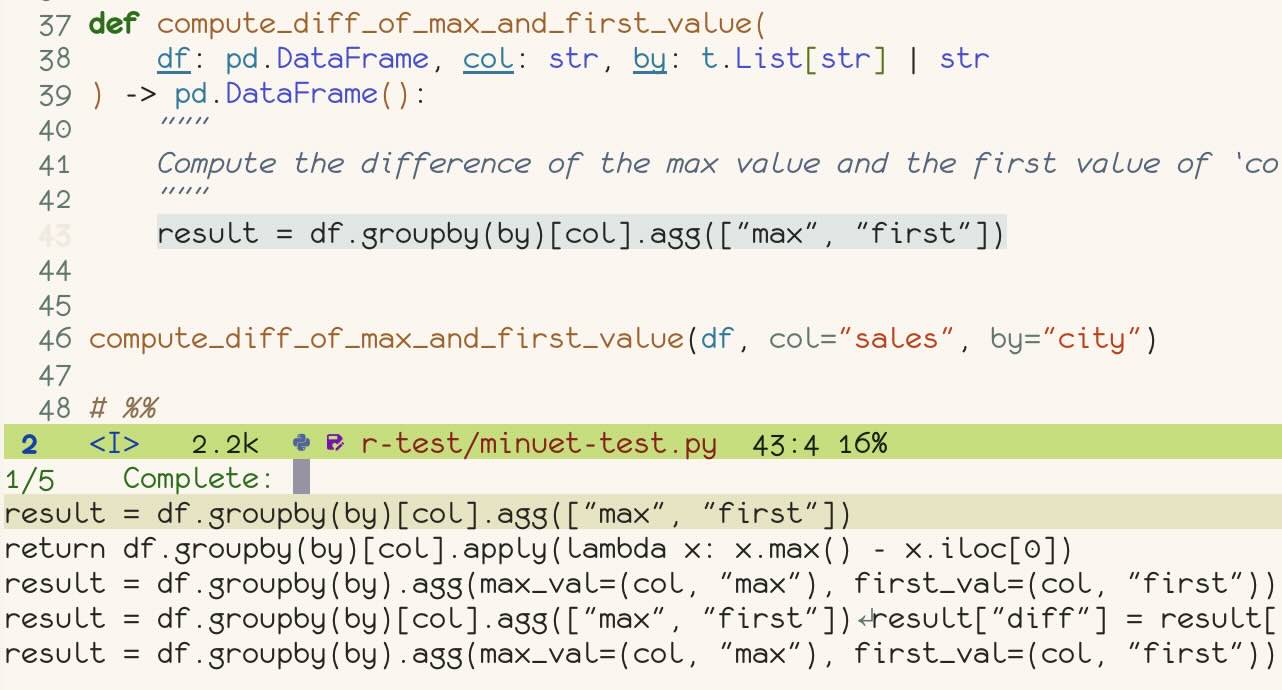
**With minibuffer frontend**:
Note: Previewing insertion results within the buffer requires the `consult`
package.
**With overlay ghost text frontend**:
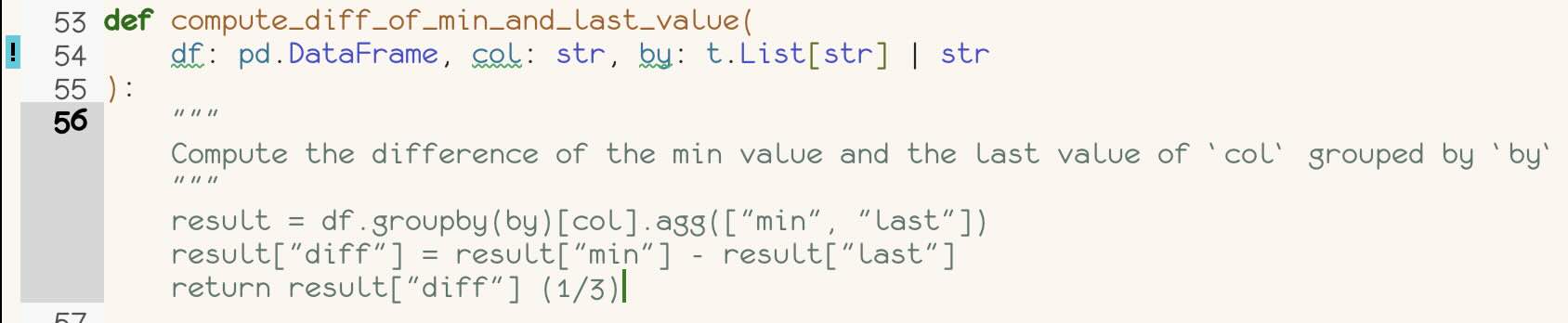
https://github.com/user-attachments/assets/04716eab-9acc-46f4-a47d-d6c763eca4c2
**With duet (next edit prediction)**:
https://github.com/user-attachments/assets/45a0dab0-6fc0-4d21-9060-a98597e1ea84
# Requirements
- emacs 29+ compiled with native JSON support (verify with `json-available-p`).
- plz 0.9+
- dash
- An API key for at least one of the supported LLM providers
# Installation
`minuet` is available on ELPA and MELPA and can be installed using your
preferred package managers.
```elisp
;; install with package.el
(package-install 'minuet)
;; install with straight
(straight-use-package 'minuet)
(use-package minuet
:bind
(("M-y" . #'minuet-complete-with-minibuffer) ;; use minibuffer for completion
("M-i" . #'minuet-show-suggestion) ;; use overlay for completion
("C-c m" . #'minuet-configure-provider)
:map minuet-active-mode-map
;; These keymaps activate only when a minuet suggestion is displayed in the current buffer
("M-p" . #'minuet-previous-suggestion) ;; invoke completion or cycle to next completion
("M-n" . #'minuet-next-suggestion) ;; invoke completion or cycle to previous completion
("M-A" . #'minuet-accept-suggestion) ;; accept whole completion
;; Accept the first line of completion, or N lines with a numeric-prefix:
;; e.g. C-u 2 M-a will accepts 2 lines of completion.
("M-a" . #'minuet-accept-suggestion-line)
;; Accept the first word of completion, or N words with a numeric-prefix:
;; e.g. C-u 2 M-w will accepts 2 words of completion.
("M-w" . #'minuet-accept-suggestion-word)
("M-e" . #'minuet-dismiss-suggestion))
:init
;; if you want to enable auto suggestion.
;; Note that you can manually invoke completions without enable minuet-auto-suggestion-mode
(add-hook 'prog-mode-hook #'minuet-auto-suggestion-mode)
:config
;; You can use M-x minuet-configure-provider to interactively configure provider and model
(setq minuet-provider 'openai-fim-compatible)
(minuet-set-optional-options minuet-openai-fim-compatible-options :max_tokens 64))
;; For Evil users: When defining `minuet-ative-mode-map` in insert
;; or normal states, the following one-liner is required.
;; (add-hook 'minuet-active-mode-hook #'evil-normalize-keymaps)
;; This is *not* necessary when defining `minuet-active-mode-map`.
;; To minimize frequent overhead, it is recommended to avoid adding
;; `evil-normalize-keymaps` to `minuet-active-mode-hook`. Instead,
;; bind keybindings directly within `minuet-active-mode-map` using
;; standard Emacs key sequences, such as `M-xxx`. This approach should
;; not conflict with Evil's keybindings, as Evil primarily avoids
;; using `M-xxx` bindings.
```
# Quick Start: LLM Provider Examples
## Ollama Qwen-2.5-coder:3b
```elisp
(use-package minuet
:config
(setq minuet-provider 'openai-fim-compatible)
(setq minuet-n-completions 1) ; recommended for Local LLM for resource saving
;; I recommend beginning with a small context window size and incrementally
;; expanding it, depending on your local computing power. A context window
;; of 512, serves as an good starting point to estimate your computing
;; power. Once you have a reliable estimate of your local computing power,
;; you should adjust the context window to a larger value.
(setq minuet-context-window 512)
(plist-put minuet-openai-fim-compatible-options :end-point "http://localhost:11434/v1/completions")
;; an arbitrary non-null environment variable as placeholder.
;; For Windows users, TERM may not be present in environment variables.
;; Consider using APPDATA instead.
(plist-put minuet-openai-fim-compatible-options :name "Ollama")
(plist-put minuet-openai-fim-compatible-options :api-key "TERM")
(plist-put minuet-openai-fim-compatible-options :model "qwen2.5-coder:3b")
(minuet-set-optional-options minuet-openai-fim-compatible-options :max_tokens 56))
```
## OpenRouter Deepseek-V4-Flash
```elisp
(use-package minuet
:config
(setq minuet-provider 'openai-compatible)
(setq minuet-request-timeout 2.5)
(setq minuet-auto-suggestion-throttle-delay 1.5) ;; Increase to reduce costs and avoid rate limits
(setq minuet-auto-suggestion-debounce-delay 0.6) ;; Increase to reduce costs and avoid rate limits
(plist-put minuet-openai-compatible-options :end-point "https://openrouter.ai/api/v1/chat/completions")
(plist-put minuet-openai-compatible-options :api-key "OPENROUTER_API_KEY")
(plist-put minuet-openai-compatible-options :model "deepseek/deepseek-v4-flash")
;; Prioritize throughput for faster completion
(minuet-set-optional-options minuet-openai-compatible-options :provider '(:sort "throughput"))
;; Disable thinking to avoid first token latency
(minuet-set-optional-options minuet-openai-compatible-options :reasoning_effort "none")
(minuet-set-optional-options minuet-openai-compatible-options :max_tokens 56)
(minuet-set-optional-options minuet-openai-compatible-options :top_p 0.9))
```
## Opencode Go Deepseek-V4-Flash
```elisp
(use-package minuet
:config
(setq minuet-provider 'openai-compatible)
(setq minuet-request-timeout 2.5)
(setq minuet-auto-suggestion-throttle-delay 1.5) ;; Increase to reduce costs and avoid rate limits
(setq minuet-auto-suggestion-debounce-delay 0.6) ;; Increase to reduce costs and avoid rate limits
(plist-put minuet-openai-compatible-options :end-point "https://opencode.ai/zen/go/v1/chat/completions")
(plist-put minuet-openai-compatible-options :api-key "OPENCODE_GO_API_KEY")
(plist-put minuet-openai-compatible-options :model "deepseek-v4-flash")
;; Disable thinking to avoid first token latency
(minuet-set-optional-options minuet-openai-compatible-options :thinking '(:type "disabled")
(minuet-set-optional-options minuet-openai-compatible-options :max_tokens 56)
(minuet-set-optional-options minuet-openai-compatible-options :top_p 0.9))
```
## Deepseek Deepseek-V4-Flash
```elisp
(use-package minuet
:config
(setq minuet-provider 'openai-fim-compatible)
(setq minuet-auto-suggestion-throttle-delay 1.5) ;; Increase to reduce costs and avoid rate limits
(setq minuet-auto-suggestion-debounce-delay 0.6) ;; Increase to reduce costs and avoid rate limits
(plist-put minuet-openai-fim-compatible-options :end-point "https://api.deepseek.com/beta/completions")
(plist-put minuet-openai-fim-compatible-options :api-key "DEEPSEEK_API_KEY")
(plist-put minuet-openai-fim-compatible-options :model "deepseek-v4-flash")
(minuet-set-optional-options minuet-openai-fim-compatible-options :max_tokens 56)
(minuet-set-optional-options minuet-openai-fim-compatible-options :top_p 0.9))
```
## Llama.cpp Qwen-2.5-coder:1.5b
First, launch the `llama-server` with your chosen model.
Here's an example of a bash script to start the server if your system has less
than 8GB of VRAM:
```bash
llama-server \
-hf ggml-org/Qwen2.5-Coder-1.5B-Q8_0-GGUF \
--port 8012 -ngl 99 -fa -ub 1024 -b 1024 \
--ctx-size 0 --cache-reuse 256
```
```elisp
(use-package minuet
:config
(setq minuet-provider 'openai-fim-compatible)
(setq minuet-n-completions 1) ; recommended for Local LLM for resource saving
;; I recommend beginning with a small context window size and incrementally
;; expanding it, depending on your local computing power. A context window
;; of 512, serves as an good starting point to estimate your computing
;; power. Once you have a reliable estimate of your local computing power,
;; you should adjust the context window to a larger value.
(setq minuet-context-window 512)
(plist-put minuet-openai-fim-compatible-options :end-point "http://localhost:8012/v1/completions")
;; an arbitrary non-null environment variable as placeholder
;; For Windows users, TERM may not be present in environment variables.
;; Consider using APPDATA instead.
(plist-put minuet-openai-fim-compatible-options :name "Llama.cpp")
(plist-put minuet-openai-fim-compatible-options :api-key "TERM")
;; The model is set by the llama-cpp server and cannot be altered
;; post-launch.
(plist-put minuet-openai-fim-compatible-options :model "PLACEHOLDER")
;; Llama.cpp does not support the `suffix` option in FIM completion.
;; Therefore, we must disable it and manually populate the special
;; tokens required for FIM completion.
(minuet-set-nested-plist minuet-openai-fim-compatible-options nil :template :suffix)
(minuet-set-optional-options
minuet-openai-fim-compatible-options
:prompt
(defun minuet-llama-cpp-fim-qwen-prompt-function (ctx)
(format "<|fim_prefix|>%s\n%s<|fim_suffix|>%s<|fim_middle|>"
(plist-get ctx :language-and-tab)
(plist-get ctx :before-cursor)
(plist-get ctx :after-cursor)))
:template)
(minuet-set-optional-options minuet-openai-fim-compatible-options :max_tokens 56))
```
For additional example bash scripts to run llama.cpp based on your local
computing power, please refer to [recipes.md](./recipes.md).
# API Keys
Minuet requires API keys to function. Set the following environment variables:
- `OPENAI_API_KEY` for OpenAI
- `GEMINI_API_KEY` for Gemini
- `ANTHROPIC_API_KEY` for Claude
- `CODESTRAL_API_KEY` for Codestral
- Custom environment variable for OpenAI-compatible services (as specified in
your configuration)
**Note:** Provide the name of the environment variable to Minuet inside the
provider options, not the actual value. For instance, pass `OPENAI_API_KEY` to
Minuet, not the value itself (e.g., `sk-xxxx`).
If using Ollama, you need to assign an arbitrary, non-null environment variable
as a placeholder for it to function.
Alternatively, you can provide a function that returns the API key. This
function should return the result instantly as it will be called with each
completion request.
```lisp
;; Good
(plist-put minuet-openai-compatible-options :api-key "FIREWORKS_API_KEY")
(plist-put minuet-openai-compatible-options :api-key (defun my-fireworks-api-key () "sk-xxxx"))
;; Bad
(plist-put minuet-openai-compatible-options :api-key "sk-xxxxx")
```
# Selecting a Provider or Model
The `gemini-2.0-flash` and `codestral` models offer high-quality output with
free and fast processing. The `deepseek-v4-flash` model, used with the
`openai_fim_compatible` provider, is an alternative for low-cost APIs and fast
inference. For local LLM inference, you can deploy either `qwen-2.5-coder` or
`deepseek-coder-v2` through Ollama using the `openai-fim-compatible` provider.
Note: as of January 27, 2025, the high server demand from deepseek may
significantly slow down the default provider used by Minuet
(`openai-fim-compatible` with deepseek). We recommend trying alternative
providers instead.
We **do not** recommend using thinking models, as this mode significantly
increases latency—even with the fastest models. However, if you choose to use
thinking models, please ensure that their thinking capabilities are disabled.
Refer to the following examples for guidance on how to disable the thinking
feature.
Note: You can review the buffer contents in `*minuet*` to identify any errors
returned by the provider in case of misconfiguration in your options.
## Understanding Model Speed
For cloud-based providers,
[Openrouter](https://openrouter.ai/google/gemini-2.0-flash-001/providers) offers
a valuable resource for comparing the speed of both closed-source and
open-source models hosted by various cloud inference providers.
When assessing model speed, two key metrics are latency (time to first token)
and throughput (tokens per second). Latency is often a more critical factor than
throughput.
Ideally, one would aim for a latency of less than 1 second and a throughput
exceeding 100 tokens per second.
For local LLM,
[llama.cpp#4167](https://github.com/ggml-org/llama.cpp/discussions/4167)
provides valuable data on model speed for 7B models running on Apple M-series
chips. The two crucial metrics are `Q4_0 PP [t/s]`, which measures latency
(tokens per second to process the KV cache, equivalent to the time to generate
the first token), and `Q4_0 TG [t/s]`, which indicates the tokens per second
generation speed.
# Prompt
See [prompt](./prompt.md) for the default prompt used by `minuet` and
instructions on customization.
Note that `minuet` employs two distinct prompt systems:
1. A system designed for chat-based LLMs (OpenAI, OpenAI-Compatible, Claude, and
Gemini)
2. A separate system designed for Codestral and OpenAI-FIM-compatible models
## Prefix-First vs. Suffix-First
When use chat-based LLMs, there are two ways for constructing the prompt:
placing the prefix (context before the cursor) before the suffix (context after
the cursor), or placing the suffix before the prefix.
By default, `minuet` uses the **prefix-first** style for the OpenAI, Gemini, and
OpenAI-Compatible provider (with `deepseek-v4-flash` as the default model), and
the **suffix-first** style for Claude providers. It is recommended that you
experiment with both strategies to determine which yields the best results,
particularly if you are using an OpenAI-compatible provider with various models.
Below is an example code snippet demonstrating how to switch between these two
prompt construction methods:
```lisp
;; Prefix-first style
(plist-put minuet-openai-compatible-options :fewshots 'minuet-default-fewshots-prefix-first)
(minuet-set-nested-plist minuet-openai-compatible-options
'minuet-default-prompt-prefix-first
:system :prompt)
(minuet-set-nested-plist minuet-openai-compatible-options
'minuet-default-chat-input-template-prefix-first
:chat-input :template)
;; Suffix-first style
(plist-put minuet-openai-compatible-options :fewshots 'minuet-default-fewshots)
(minuet-set-nested-plist minuet-openai-compatible-options
'minuet-default-prompt
:system :prompt)
(minuet-set-nested-plist minuet-openai-compatible-options
'minuet-default-chat-input-template
:chat-input :template)
```
# Configuration
Below are commonly used configuration options. To view the complete list of
available settings, search for `minuet` through the `customize` interface.
- `minuet-provider`: Set the provider you want to use for completion with minuet,
available options: `openai`, `openai-compatible`, `claude`, `gemini`,
`openai-fim-compatible`, and `codestral`.
The default is `openai-fim-compatible` using the deepseek endpoint.
You can use `ollama` with either `openai-compatible` or
`openai-fim-compatible` provider, depending on your model is a chat model or
code completion (FIM) model.
- `minuet-context-window`: The maximum total characters of the context before
and after cursor. This limits how much surrounding code is sent to the LLM
for context.
The default is 16000, which roughly equates to 4000 tokens after tokenization.
- `minuet-context-ratio`: Ratio of context before cursor vs after cursor. When
the total characters exceed the context window, this ratio determines how much
context to keep before vs after the cursor. A larger ratio means more context
before the cursor will be used. The ratio should between 0 and `1`, and
default is `0.75`.
- `minuet-request-timeout`: Maximum timeout in seconds for sending completion
requests. In case of the timeout, the incomplete completion items will be
delivered. The default is `3`.
- `minuet-show-error-message-on-minibuffer`: Whether to show the error messages
in minibuffer. The default value is `nil`. When non-nil, if a request fails or
times out without generating even a single token, the error message will be
shown in the minibuffer. Note that you can always inspect
`minuet-buffer-name` to view the complete error log.
- `minuet-add-single-line-entry`: For `minuet-complete-with-minibuffer`
function, Whether to create additional single-line completion items. When
non-nil and a completion item has multiple lines, create another completion
item containing only its first line. This option has no impact for
overlay-based suggesion.
- `minuet-n-completions`: For FIM model, this is the number of requests to send.
For chat LLM , this is the number of completions encoded as part of the
prompt. Note that when `minuet-add-single-line-entry` is true, the actual
number of returned items may exceed this value. Additionally, the LLM cannot
guarantee the exact number of completion items specified, as this parameter
serves only as a prompt guideline. The default is `3`.
If resource efficiency is imporant, it is recommended to set this value to
`1`.
- `minuet-auto-suggestion-block-predicates`: List of predicate functions that
decide whether auto-suggestions should be suppressed. Each function is called
before requesting a suggestion; if any returns non-nil no suggestion is
requested for that moment.
- `minuet-auto-suggestion-debounce-delay`: The delay in seconds before sending a
completion request after typing stops. The default is `0.4` seconds.
- `minuet-auto-suggestion-throttle-delay`: The minimum time in seconds between 2
completion requests. The default is `1.0` seconds.
# Duet (Next Edit Prediction)
`minuet-duet` is Minuet's highly experimental next-edit prediction (NES)
feature.
Basic usage is manual. Bind the duet commands to your preferred keymaps, then:
1. Trigger `minuet-duet-predict` to request a prediction for the current edit.
2. Review the preview rendered in the buffer.
3. Apply it with `minuet-duet-apply` or discard it with `minuet-duet-dismiss`.
Example config:
```elisp
;; minuet and minuet-duet are two separate modules
;; It is recommended to load them separately.
(use-package minuet-duet
:bind
;; Global keymap to trigger duet prediction
(("C-c d" . #'minuet-duet-predict)
:map minuet-duet-active-mode-map
;; These keymaps activate when a duet preview is displayed
("M-a" . #'minuet-duet-apply) ;; accept the prediction
("M-e" . #'minuet-duet-dismiss)) ;; dismiss the preview
:config
;; Set the duet provider (openai, claude, gemini, openai-compatible)
(setq minuet-duet-provider 'gemini)
;; Disable thinking for gemini provider
(minuet-set-optional-options minuet-duet-gemini-options
:generationConfig
'(:thinkingConfig (:thinkingLevel "minimal")))
;; Disable thinking for openai-compatible provider
(minuet-set-optional-options minuet-duet-openai-compatible-options :reasoning_effort "none"))
```
This feature is highly experimental:
- It only targets general-purpose LLMs rather than NES-specialized models, as I
lack local GPU resources for testing. Currently, `gemini-3-flash-preview`
performs well with the prompt structure.
- Comparable small models from competitors of Google—`claude-haiku-4.5` and
`gpt-5.4-mini`—perform poorly.
- Automatic prediction is available through `minuet-duet-auto-mode` (see
[Automatic Prediction](#automatic-prediction)), but the feature is
latency-sensitive: pick a fast model, and consider raising
`minuet-duet-auto-debounce-delay` for slower providers.
It is recommended to configure the thinking levels of the models; refer to the
[provider options](#provider-options) for guidance on managing thinking settings
for each provider. Note that inline completion and duet read from separate
option variables: inline completion uses `minuet-*-options`, while duet uses
`minuet-duet-*-options`. Configuring one has no effect on the other, but they
are configured the same way.
Avoid setting a small `max_tokens` or `max_completion_tokens` limit for duet
requests. Duet expects the model to return the complete rewritten editable
region, including the cursor marker; if the response is truncated, the parser
will reject it. Leave the limit unset when the provider allows that, or set it
large enough to cover the full rewritten region.
## Automatic Prediction
Enable `minuet-duet-auto-mode` in a buffer to request predictions
automatically:
```elisp
(add-hook 'prog-mode-hook #'minuet-duet-auto-mode)
```
Running `minuet-duet-auto-mode` together with `minuet-auto-suggestion-mode` is
allowed, but both will issue requests as you type; you likely want one or the
other in a given buffer.
Relevant options:
- `minuet-duet-auto-debounce-delay`: seconds to wait after you stop editing
before requesting a prediction; each new edit restarts the wait (default
0.6).
- `minuet-duet-auto-block-predicates`: list of functions called before an
automatic prediction; if any returns non-nil, no prediction is requested at
that moment. The default is empty. Unlike inline completion, duet rewrites a
text region based on your recent edits, so edits made outside evil insert
state (for example deleting lines in normal state) still trigger
predictions.
- `minuet-duet-auto-enable-history`: whether enabling the mode also enables
`minuet-duet-history-mode` (default t).
### Combining Inline Completion and Duet Prediction
You can run both modes in one buffer and use the block predicates to split
responsibilities between them. Below are two example setups.
**Vanilla users: inline completion only at end of line, duet only elsewhere.**
```elisp
(defun my-minuet-inline-only-at-eol-p ()
"Return non-nil to block inline completion when point is not at EOL."
(not (eolp)))
(defun my-minuet-duet-only-not-at-eol-p ()
"Return non-nil to block duet prediction when point is at EOL."
(eolp))
(add-hook 'minuet-auto-suggestion-block-predicates
#'my-minuet-inline-only-at-eol-p)
(add-hook 'minuet-duet-auto-block-predicates
#'my-minuet-duet-only-not-at-eol-p)
(add-hook 'prog-mode-hook #'minuet-auto-suggestion-mode)
(add-hook 'prog-mode-hook #'minuet-duet-auto-mode)
```
**Evil users: inline completion in insert state, duet in normal state.**
```lisp
;; Block inline completion outside insert/emacs state. Note that this is
;; already the default.
(add-hook 'minuet-auto-suggestion-block-predicates
#'minuet-evil-not-insert-state-p)
(defun my-minuet-duet-only-in-evil-normal-p ()
"Return non-nil to block duet prediction outside evil normal state."
(not (and (bound-and-true-p evil-local-mode)
(evil-normal-state-p))))
(add-hook 'minuet-duet-auto-block-predicates
#'my-minuet-duet-only-in-evil-normal-p)
(add-hook 'prog-mode-hook #'minuet-auto-suggestion-mode)
(add-hook 'prog-mode-hook #'minuet-duet-auto-mode)
```
## Context Options
`minuet-duet-non-editable-region-context-window` controls the maximum total
characters kept from the non-editable regions before and after the editable
region. The default is 40000. The editable region itself is not truncated by
this option.
`minuet-duet-non-editable-region-context-ratio` controls how much of that
non-editable context window is kept before the editable region when truncation
is needed. The default is 0.75, keeping more surrounding context before the
edit.
## Edit History
To track your recent edits and incorporate them into duet prompts as unified
diffs, enable `minuet-duet-history-mode` in a buffer. This feature is opt-in and
must be activated per buffer.
Since history tracking saves temporary snapshots to disk, use a named hook
function to exclude buffers with sensitive names. The following example skips
`.env` files (including variants like `.env.local
```elisp
(defun my-minuet-duet-history-maybe-enable ()
"Enable Minuet duet history unless the buffer has a sensitive name like .env."
(unless (string-match-p
(rx ".env" (? "." (* nonl)) string-end)
(buffer-name))
(minuet-duet-history-mode 1)))
(add-hook 'prog-mode-hook #'my-minuet-duet-history-maybe-enable)
```
Relevant options:
- `minuet-duet-history-idle-delay`: idle seconds before pending edits are
recorded (default 1.5).
- `minuet-duet-history-max-entries`: history entries kept per buffer (default
8).
- `minuet-duet-history-max-entry-chars`: characters recorded per edit (default
2000). A longer diff keeps only its leading whole hunks that fit; when not
even the first hunk fits (e.g. a large single-hunk paste), the edit is not
recorded.
- `minuet-duet-history-diff-context-lines`: unchanged context lines shown around
each hunk (default 2).
- `minuet-duet-history-max-prompt-chars`: total characters of history included
in prompts; the newest entry is always included (default 6000).
- `minuet-duet-history-max-buffer-size`: buffers larger than this are not
tracked (default 1000000).
- `minuet-duet-history-diff-program`: the diff program to run, either a program
name or a list of a program and its leading arguments. The default is `diff`;
on native Windows without `diff` on `PATH` it falls back to
`git diff --no-index`. The mode is disabled if the program is not found.
- `minuet-duet-history-flush-timeout`: seconds a prediction waits for the
in-flight diff before proceeding with slightly stale history (default 0.2).
## TODO
- [x] Implement a proper diff mechanism to include recent edit changes in
prompts.
- [ ] Add support for specialized NES models (Zeta, Sweep).
- [x] Implement automatically triggered duet prediction.
# Provider Options
Each provider has two separate option variables: `minuet-*-options` for inline
completion and `minuet-duet-*-options` for duet. They do not share settings:
changing one has no effect on the other, so you need to configure each of them
separately. The way to configure them is the same, as shown below.
You can customize the provider options using `plist-put`, for example:
```lisp
(with-eval-after-load 'minuet
;; change openai model to gpt-4.1
(plist-put minuet-openai-options :model "gpt-4.1")
;; change openai-compatible provider to use fireworks
(setq minuet-provider 'openai-compatible)
(plist-put minuet-openai-compatible-options :end-point "https://api.fireworks.ai/inference/v1/chat/completions")
(plist-put minuet-openai-compatible-options :api-key "FIREWORKS_API_KEY")
(plist-put minuet-openai-compatible-options :model "accounts/fireworks/models/llama-v3p3-70b-instruct")
)
```
To pass optional parameters (like `max_tokens` and `top_p`) to send to the curl
request, you can use function `minuet-set-optional-options`:
```lisp
(minuet-set-optional-options minuet-openai-options :max_tokens 256)
(minuet-set-optional-options minuet-openai-options :top_p 0.9)
```
`:transform` is a list of functions that receive a plist with `:end-point`,
`:headers`, and `:body` and return a modified plist (or nil to keep it
unchanged). The transformed values are used for the actual request, so this is
the right place to tweak custom headers, payloads, or endpoints.
## OpenAI
Below is the default value:
```lisp
(defvar minuet-openai-options
`(:model "gpt-5.6-luna"
:api-key "OPENAI_API_KEY"
:system
(:template minuet-default-system-template
:prompt minuet-default-prompt-prefix-first
:guidelines minuet-default-guidelines
:n-completions-template minuet-default-n-completion-template)
:fewshots minuet-default-fewshots-prefix-first
:chat-input
(:template minuet-default-chat-input-template-prefix-first
:language-and-tab minuet--default-chat-input-language-and-tab-function
:context-before-cursor minuet--default-chat-input-before-cursor-function
:context-after-cursor minuet--default-chat-input-after-cursor-function)
:transform ()
:optional nil)
"config options for Minuet OpenAI provider")
```
The following configuration is not the default, but recommended to prevent
request timeout from outputing too many tokens.
```lisp
(minuet-set-optional-options minuet-openai-options :max_completion_tokens 128)
;; Recommended for thinking models (e.g., gpt-5.6-luna).
(minuet-set-optional-options minuet-openai-options :reasoning_effort "none")
```
Note: If you intend to use GPT-5 series models (e.g., `gpt-5-mini` or
`gpt-5.6-luna`), keep the following points in mind:
1. Use `max_completion_tokens` instead of `max_tokens`.
2. These models do not support `top_p` or `temperature` adjustments.
3. Disable thinking by setting `reasoning_effort` to `none`.
## Claude
Below is the default value:
```lisp
(defvar minuet-claude-options
`(:model "claude-haiku-5-5"
:max_tokens 256
:api-key "ANTHROPIC_API_KEY"
:system
(:template minuet-default-system-template
:prompt minuet-default-prompt
:guidelines minuet-default-guidelines
:n-completions-template minuet-default-n-completion-template)
:fewshots minuet-default-fewshots
:chat-input
(:template minuet-default-chat-input-template
:language-and-tab minuet--default-chat-input-language-and-tab-function
:context-before-cursor minuet--default-chat-input-before-cursor-function
:context-after-cursor minuet--default-chat-input-after-cursor-function)
:transform ()
:optional nil)
"config options for Minuet Claude provider")
```
The following configuration is not the default, but recommended to prevent
request timeout from outputing too many tokens. Claude Haiku 5.5 enables
thinking by default, so disable it to avoid first token latency.
```lisp
;; Disable thinking to avoid first token latency.
(minuet-set-optional-options minuet-claude-options :thinking '(:type "disabled"))
```
## Codestral
Codestral is a text completion model, not a chat model, so the system prompt and
few shot examples does not apply. Note that you should use the
`CODESTRAL_API_KEY`, not the `MISTRAL_API_KEY`, as they are using different
endpoint. To use the Mistral endpoint, simply modify the `end_point` and
`api_key` parameters in the configuration.
Below is the default value:
```lisp
(defvar minuet-codestral-options
'(:model "codestral-latest"
:end-point "https://codestral.mistral.ai/v1/fim/completions"
:api-key "CODESTRAL_API_KEY"
:template (:prompt minuet--default-fim-prompt-function
:suffix minuet--default-fim-suffix-function)
:transform ()
:optional nil)
"config options for Minuet Codestral provider")
```
The following configuration is not the default, but recommended to prevent
request timeout from outputing too many tokens.
```lisp
(minuet-set-optional-options minuet-codestral-options :stop ["\n\n"])
(minuet-set-optional-options minuet-codestral-options :max_tokens 256)
```
## Gemini
You should register the account and use the service from Google AI Studio
instead of Google Cloud. You can get an API key via their
[Google API page](https://makersuite.google.com/app/apikey).
For instructions on using Vertex AI with Gemini models, see
[recipes.md](./recipes.md).
The following config is the default.
```lisp
(defvar minuet-gemini-options
`(:model "gemini-2.0-flash"
:api-key "GEMINI_API_KEY"
:system
(:template minuet-default-system-template
:prompt minuet-default-prompt-prefix-first
:guidelines minuet-default-guidelines
:n-completions-template minuet-default-n-completion-template)
:fewshots minuet-default-fewshots-prefix-first
:chat-input
(:template minuet-default-chat-input-template-prefix-first
:language-and-tab minuet--default-chat-input-language-and-tab-function
:context-before-cursor minuet--default-chat-input-before-cursor-function
:context-after-cursor minuet--default-chat-input-after-cursor-function)
:transform ()
:optional nil)
"config options for Minuet Gemini provider")
```
The following configuration is not the default, but recommended to prevent
request timeout from outputing too many tokens. You can also adjust the safety
settings following the example:
```lisp
(minuet-set-optional-options
minuet-gemini-options :generationConfig
'(:maxOutputTokens 256
:topP 0.9
;; When using `gemini-2.5-flash`, it is recommended to entirely
;; disable thinking for faster completion retrieval.
:thinkingConfig (:thinkingBudget 0)))
(minuet-set-optional-options
minuet-gemini-options :safetySettings
[(:category "HARM_CATEGORY_DANGEROUS_CONTENT"
:threshold "BLOCK_NONE")
(:category "HARM_CATEGORY_HATE_SPEECH"
:threshold "BLOCK_NONE")
(:category "HARM_CATEGORY_HARASSMENT"
:threshold "BLOCK_NONE")
(:category "HARM_CATEGORY_SEXUALLY_EXPLICIT"
:threshold "BLOCK_NONE")])
```
We recommend using `gemini-2.0-flash` over `gemini-2.5-flash`, as the 2.0
version offers significantly lower costs with comparable performance. The
primary improvement in version 2.5 lies in its extended thinking mode, which
provides minimal value for code completion scenarios. Furthermore, the thinking
mode substantially increases latency, so we recommend disabling it entirely.
## OpenAI-compatible
Use any providers compatible with OpenAI's chat completion API.
For example, you can set the `end_point` to
`http://localhost:11434/v1/chat/completions` to use `ollama`.
The following config is the default.
```lisp
(defvar minuet-openai-compatible-options
`(:end-point "https://openrouter.ai/api/v1/chat/completions"
:api-key "OPENROUTER_API_KEY"
:model "deepseek/deepseek-v4-flash"
:system
(:template minuet-default-system-template
:prompt minuet-default-prompt-prefix-first
:guidelines minuet-default-guidelines
:n-completions-template minuet-default-n-completion-template)
:fewshots minuet-default-fewshots-prefix-first
:chat-input
(:template minuet-default-chat-input-template-prefix-first
:language-and-tab minuet--default-chat-input-language-and-tab-function
:context-before-cursor minuet--default-chat-input-before-cursor-function
:context-after-cursor minuet--default-chat-input-after-cursor-function)
:transform ()
:optional nil)
"Config options for Minuet OpenAI compatible provider.")
```
The following configuration is not the default, but recommended to prevent
request timeout from outputing too many tokens.
```lisp
(minuet-set-optional-options minuet-openai-compatible-options :max_tokens 256)
(minuet-set-optional-options minuet-openai-compatible-options :top_p 0.9)
```
**Disabling thinking for reasoning models:**
| Provider | Configuration |
| -------------------- | -------------------------------------------------------------------------- |
| **OpenRouter** | `reasoning = { effort = 'none' }` (or `'minimal'`, depending on the model) |
| **DeepSeek API** | `thinking = { type = 'disabled' }` |
| **Various Provider** | `reasoning_effort = 'none'` |
```lisp
;; or "minimal", depending on the model (OpenRouter)
(minuet-set-optional-options minuet-openai-compatible-options :reasoning '(:effort none))
;; or "minimal", depending on the model (various providers)
(minuet-set-optional-options minuet-openai-compatible-options :reasoning_effort "none")
;; DeepSeek API
(minuet-set-optional-options minuet-openai-compatible-options :thinking '(:type "disabled"))
```
## OpenAI-FIM-Compatible
Use any provider compatible with OpenAI's completion API. This request uses the
text `/completions` endpoint, **not** `/chat/completions` endpoint, so system
prompts and few-shot examples are not applicable.
For example, you can set the `end_point` to
`http://localhost:11434/v1/completions` to use `ollama`, or set it to
`http://localhost:8012/v1/completions` to use `llama.cpp`.
Refer to the
[Completions Legacy](https://platform.openai.com/docs/api-reference/completions)
section of the OpenAI documentation for details.
Additionally, for Ollama users, it is essential to verify whether the model's
template supports FIM completion. For example, qwen2.5-coder offers FIM support,
as suggested in its
[template](https://ollama.com/library/qwen2.5-coder/blobs/e94a8ecb9327). However
it may come as a surprise to some users that, `deepseek-coder` does not support
the FIM template, and you should use `deepseek-coder-v2` instead.
The following config is the default.
```lisp
(defvar minuet-openai-fim-compatible-options
'(:model "deepseek-v4-flash"
:end-point "https://api.deepseek.com/beta/completions"
:api-key "DEEPSEEK_API_KEY"
:name "Deepseek"
:template (:prompt minuet--default-fim-prompt-function
:suffix minuet--default-fim-suffix-function)
:transform ()
:optional nil)
"config options for Minuet OpenAI FIM compatible provider")
```
The following configuration is not the default, but recommended to prevent
request timeout from outputing too many tokens.
```lisp
(minuet-set-optional-options minuet-openai-fim-compatible-options :max_tokens 256)
(minuet-set-optional-options minuet-openai-fim-compatible-options :top_p 0.9)
```
For example bash scripts to run llama.cpp based on your local computing power,
please refer to [recipes.md](./recipes.md). Note that the model for `llama.cpp`
must be determined when you launch the `llama.cpp` server and cannot be changed
thereafter.
### Non-OpenAI-FIM-Compatible APIs
For providers like **DeepInfra FIM**
(`https://api.deepinfra.com/v1/inference/`), refer to [recipes.md](./recipes.md)
for advanced configuration instructions.
# Troubleshooting
If your setup failed, there are two most likely reasons:
1. You may set the API key incorrectly. Checkout the [API Key](#api-keys)
section to see how to correctly specify the API key.
2. You are using a model or a context window that is too large, causing
completion items to timeout before returning any tokens. This is particularly
common with local LLM. It is recommended to start with the following settings
to have a better understanding of your provider's inference speed.
- Begin by testing with manual completions.
- Use a smaller context window (e.g., `context-window = 768`)
- Use a smaller model
- Set a longer request timeout (e.g., `request-timeout = 5`)
To diagnose issues, examine the buffer content from `*minuet*`.
# Contributions
Since this package is part of GNU ELPA, substantial contributions require a
copyright assignment to the Free Software Foundation (FSF).
However, minor contributions—such as small bug fixes or documentation
improvements—are welcome even without copyright assignment. If you're unsure
where to begin, feel free to open an issue for guidance.
# Acknowledgement
- [continue.dev](https://www.continue.dev): not a emacs plugin, but I find a lot
LLM models from here.
- [llama.vim](https://github.com/ggml-org/llama.vim): Reference for CLI
parameters used to launch the llama-cpp server.