---
id: install-overview.md
summary: Choose Milvus Lite, Standalone, or Distributed based on your workload, availability requirements, and operating environment.
title: Overview of Milvus Deployment Options
---
# Overview of Milvus Deployment Options
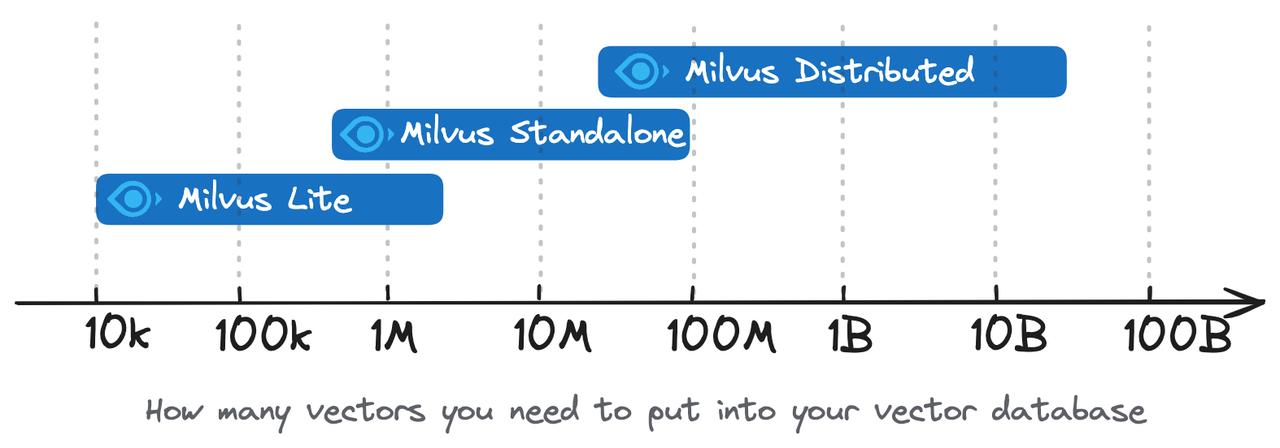
Milvus supports local prototypes and large-scale vector search services. Choose among Milvus Lite, Milvus Standalone, and Milvus Distributed based on your data, read and write load, availability requirements, and operating environment.
## Milvus Lite
[Milvus Lite](https://milvus.io/docs/milvus_lite.md) is a Python library that can be imported into your applications. As a lightweight version of Milvus, it is ideal for quick prototyping in Jupyter Notebooks or running on smart devices with limited resources. Milvus Lite supports the same APIs as other Milvus deployments. The client-side code interacting with Milvus Lite can also work with Milvus instances in other deployment modes.
For the local examples, use Python 3.10 or later and install the optional Lite dependency explicitly. On Windows, pip skips the `milvus-lite` extra, so the explicit package name is required:
```bash
python3 -m pip install "pymilvus[milvus-lite]=={{var.milvus_python_sdk_real_version}}" "milvus-lite=={{var.milvus_lite_version}}"
```
Use `MilvusClient("./demo.db")` to open local storage. Milvus Lite 3.x creates a directory at this path; an existing Milvus Lite 2.x database file requires export and migration. See [Run Milvus Lite](milvus_lite.md) for platform requirements and [Quickstart](quickstart.md) for a complete insert-and-search example.
## Milvus Standalone
Milvus Standalone is a single-machine server deployment. All components of Milvus Standalone are packed into a single [Docker image](https://milvus.io/docs/install_standalone-docker.md), making deployment convenient. If you have a production workload but prefer not to use Kubernetes, running Milvus Standalone on a single machine with sufficient memory is a good option. By default, Milvus Standalone runs **Woodpecker** (embedded) as its message queue, so there's no separate messaging service to operate.
## Milvus Distributed
Milvus Distributed can be deployed on [Kubernetes](https://milvus.io/docs/install_cluster-milvusoperator.md) clusters. This deployment features a cloud-native architecture, where ingestion load and search queries are separately handled by isolated nodes, allowing redundancy for critical components. It offers the highest scalability and availability, as well as the flexibility in customizing the allocated resources in each component. Milvus Distributed is the top choice for enterprise users running large-scale vector search systems in production. By default, Milvus Distributed runs **Woodpecker** as its message queue, deployed as a dedicated service alongside Milvus.
## Choose the Right Deployment for Your Use Case
The selection of a deployment mode typically depends on the development stage of your application:
- **For Quick Prototyping**
Use Milvus Lite in a notebook to test embeddings, RAG chunking strategies, and retrieval behavior. Move to Milvus Standalone when you need a shared server or when the measured memory and query load exceed the local environment. The client API is similar, but check feature differences and migrate the stored data separately.
- **Small-Scale Production Deployment**
Use Milvus Standalone when a single server can meet your workload and availability requirements, and you prefer to operate without Kubernetes. Estimate memory from vector dimensions, scalar fields, index settings, and replicas, then benchmark the expected query concurrency and write rate. A vector count alone does not establish capacity.
- **Large-Scale Production Deployment**
As your business is rapidly growing and the data scale exceeds the capacity of a single server, it's time to consider Milvus Distributed. You can keep using Milvus Standalone for dev or staging environment for its convenience, and operate the K8s cluster that runs Milvus Distributed. This can sustain you towards tens of billions of vectors, as well as providing flexibility on tailoring the node size for your particular workload, such as high-read, infrequent write or high-write, low read cases.
- **Local Search on Edge Devices**
For searching through private or sensitive on edge devices, you can deploy Milvus Lite on the device without relying on a cloud-based service to do text or image search. This is suitable for cases such as proprietary document search, or on-device object detection.
The choice of Milvus deployment mode depends on your project's stage and scale. Milvus provides a flexible and powerful solution for various needs, from rapid prototyping to large-scale enterprise deployment.
- **Milvus Lite** fits local evaluation and workloads within a single application's resources.
- **Milvus Standalone** provides a shared service when one server meets your measured capacity and availability requirements.
- **Milvus Distributed** provides component-level scaling and redundancy when you need to grow beyond one server or isolate read and write resources.
Milvus Standalone and Distributed use a message queue, object storage, and a metadata store. Milvus Lite runs locally without those separate services. For the server deployments' default dependencies and external service options, see [Data Infrastructure](data-infra-integration-overview.md).
If you want a managed service instead of operating the server infrastructure, consider [Zilliz Cloud](https://zilliz.com/cloud). For a hands-on deployment, continue with [Docker](install_standalone-docker.md) or [Kubernetes](install_cluster-milvusoperator.md).
## Comparison on functionalities
The Lite column describes Milvus Lite {{var.milvus_lite_version}}. Check [Milvus Lite limits](milvus_lite.md#Supported-features-and-limits) before relying on a server feature in a local application.
| Feature | Milvus Lite | Milvus Standalone | Milvus Distributed |
|--------------------------|---------------------------------------------------------------------------------------------------------------------------------------|---------------------------------------------------------------------------------------------------------------------------------------|---------------------------------------------------------------------------------------------------------------------------------------|
| SDK / client library | Python (local PyMilvus adapter) | Python
Go
Java
Node.js
C#
RESTful | Python
Java
Go
Node.js
C#
RESTful |
| Data types | Dense Vector
Sparse Vector
Boolean
Integer
Floating Point
VarChar
Array
JSON | Dense Vector
Sparse Vector
Binary Vector
Boolean
Integer
Floating Point
VarChar
Array
JSON | Dense Vector
Sparse Vector
Binary Vector
Boolean
Integer
Floating Point
VarChar
Array
JSON |
| Search capabilities | Vector Search (ANN Search)
Metadata Filtering
Range Search
Scalar Query
Get Entities by Primary Key
Hybrid Search | Vector Search (ANN Search)
Metadata Filtering
Range Search
Scalar Query
Get Entities by Primary Key
Hybrid Search | Vector Search (ANN Search)
Metadata Filtering
Range Search
Scalar Query
Get Entities by Primary Key
Hybrid Search |
| CRUD operations | ✔️ | ✔️ | ✔️ |
| Advanced data management | Databases
Partitions
Aliases
No access control | Access Control
Partition
Partition Key | Access Control
Partition
Partition Key
Physical Resource Grouping |
| Consistency Levels | Not applicable: a single local process serves all requests; `consistency_level` is accepted but has no effect | Strong
Bounded Staleness
Session
Eventual | Strong
Bounded Staleness
Session
Eventual |
| Message queue | N/A | Woodpecker (embedded) | Woodpecker (service) |