---
id: grouping-search.md
title: "Grouping Search"
summary: "Use grouping search to aggregate ANN search results by a field value and reduce duplicate entities."
---
# Grouping Search
A grouping search allows {{var.product_name}} to group the search results by the values in a specified field to aggregate data at a higher level. For example, you can use a basic ANN search to find books similar to the one at hand, but you can use a grouping search to find the book categories that may involve the topics discussed in that book. This topic describes how to use Grouping Search along with key considerations.
## Overview
When entities in the search results share the same value in a scalar field, this indicates that they are similar in a particular attribute, which may negatively impact the search results.
Assume a collection stores multiple documents (denoted by **docId**). To retain as much semantic information as possible when converting documents into vectors, each document is split into smaller, manageable paragraphs (or **chunks**) and stored as separate entities. Even though the document is divided into smaller sections, users are often still interested in identifying which documents are most relevant to their needs.
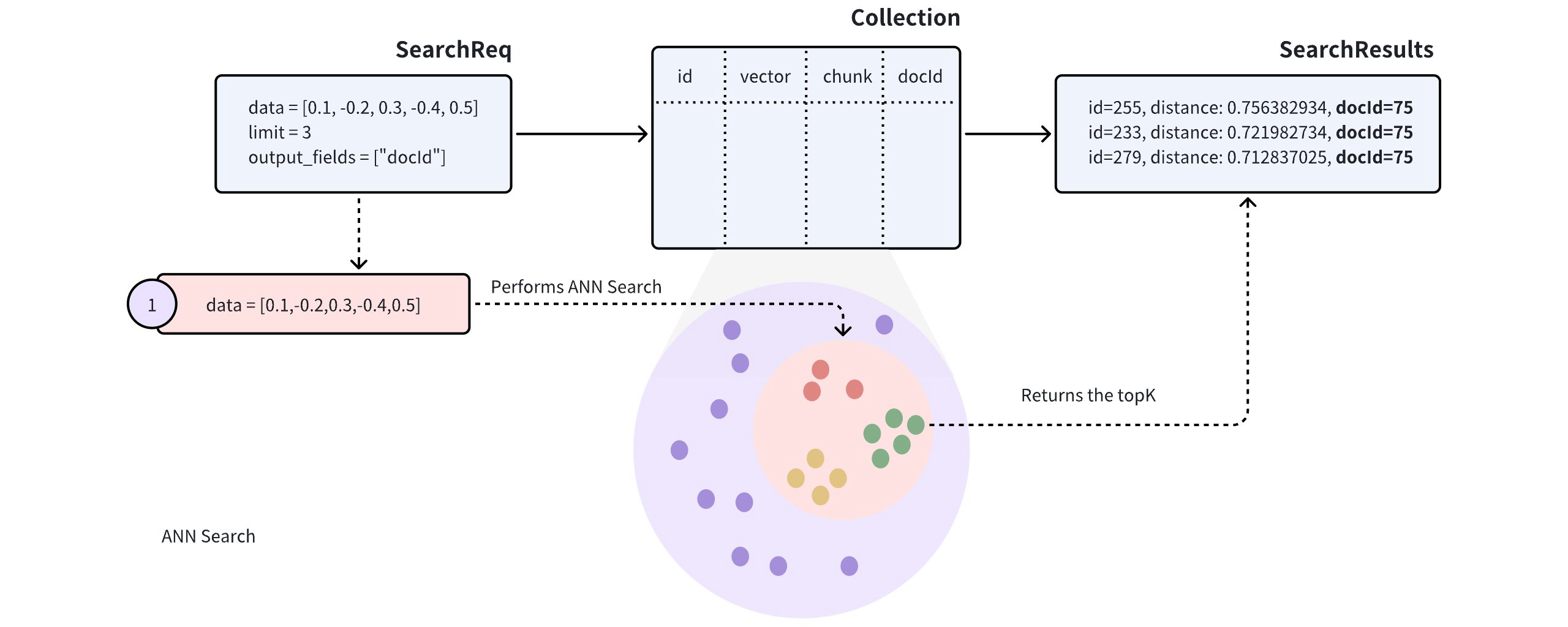
When performing an Approximate Nearest Neighbor (ANN) search on such a collection, the search results may include several paragraphs from the same document, potentially causing other documents to be overlooked, which may not align with the intended use case.
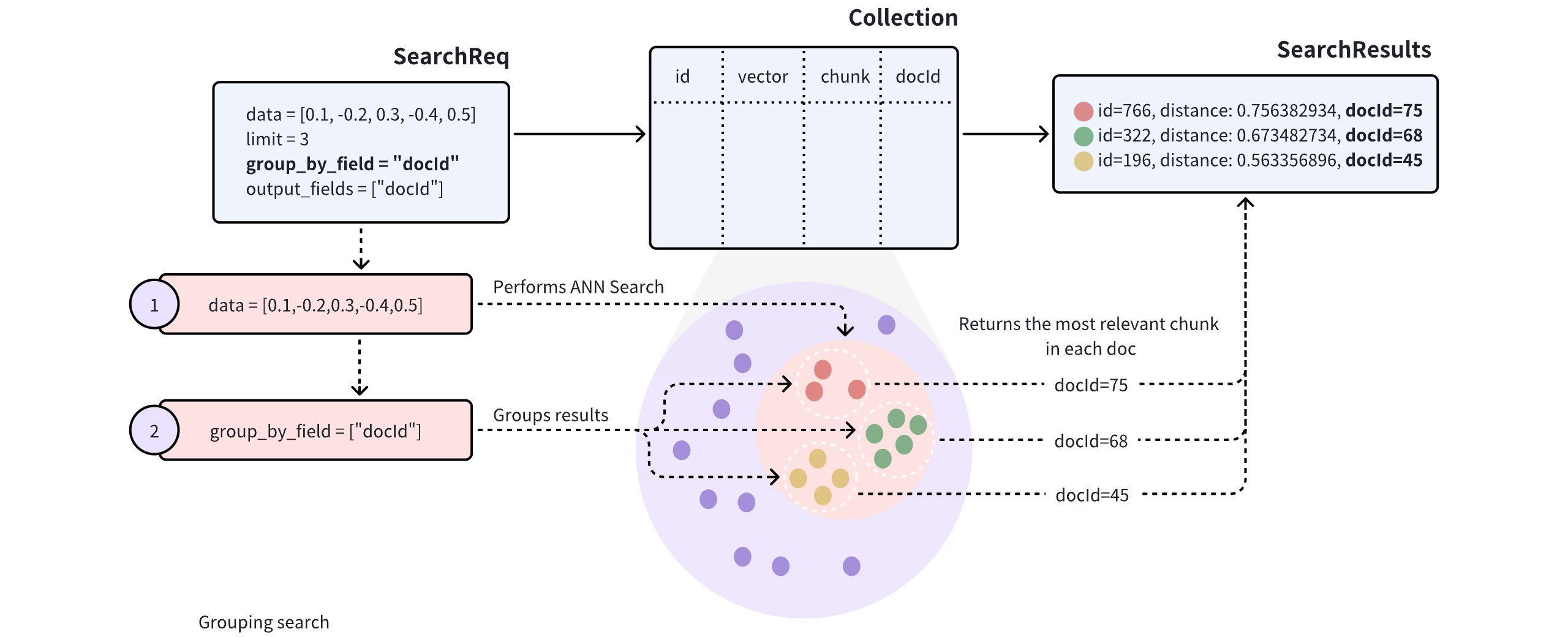
To improve the diversity of search results, you can add the `group_by_field` parameter in the search request to enable Grouping Search. As shown in the diagram, you can set `group_by_field` to `docId`. Upon receiving this request, {{var.product_name}} will:
- Perform an ANN search based on the provided query vector to find all entities most similar to the query.
- Group the search results by the specified `group_by_field`, such as `docId`.
- Return the top results for each group, as defined by the `limit` parameter, with the most similar entity from each group.
By default, Grouping Search returns only one entity per group. If you want to increase the number of results to return per group, you can control this with the `group_size` and `strict_group_size` parameters.
## Perform Grouping Search
This section provides example code to demonstrate the use of Grouping Search. The following example assumes the collection includes fields for `id`, `vector`, `chunk`, and `docId`.
```plaintext
[
{"id": 0, "vector": [0.3580376395471989, -0.6023495712049978, 0.18414012509913835, -0.26286205330961354, 0.9029438446296592], "chunk": "pink_8682", "docId": 1},
{"id": 1, "vector": [0.19886812562848388, 0.06023560599112088, 0.6976963061752597, 0.2614474506242501, 0.838729485096104], "chunk": "red_7025", "docId": 5},
{"id": 2, "vector": [0.43742130801983836, -0.5597502546264526, 0.6457887650909682, 0.7894058910881185, 0.20785793220625592], "chunk": "orange_6781", "docId": 2},
{"id": 3, "vector": [0.3172005263489739, 0.9719044792798428, -0.36981146090600725, -0.4860894583077995, 0.95791889146345], "chunk": "pink_9298", "docId": 3},
{"id": 4, "vector": [0.4452349528804562, -0.8757026943054742, 0.8220779437047674, 0.46406290649483184, 0.30337481143159106], "chunk": "red_4794", "docId": 3},
{"id": 5, "vector": [0.985825131989184, -0.8144651566660419, 0.6299267002202009, 0.1206906911183383, -0.1446277761879955], "chunk": "yellow_4222", "docId": 4},
{"id": 6, "vector": [0.8371977790571115, -0.015764369584852833, -0.31062937026679327, -0.562666951622192, -0.8984947637863987], "chunk": "red_9392", "docId": 1},
{"id": 7, "vector": [-0.33445148015177995, -0.2567135004164067, 0.8987539745369246, 0.9402995886420709, 0.5378064918413052], "chunk": "grey_8510", "docId": 2},
{"id": 8, "vector": [0.39524717779832685, 0.4000257286739164, -0.5890507376891594, -0.8650502298996872, -0.6140360785406336], "chunk": "white_9381", "docId": 5},
{"id": 9, "vector": [0.5718280481994695, 0.24070317428066512, -0.3737913482606834, -0.06726932177492717, -0.6980531615588608], "chunk": "purple_4976", "docId": 3},
]
```
In the search request, set both `group_by_field` and `output_fields` to `docId`. {{var.product_name}} will group the results by the specified field and return the most similar entity from each group, including the value of `docId` for each returned entity.
```python
from pymilvus import MilvusClient
client = MilvusClient(
uri="{{var.example_endpoint}}",
token="{{var.example_token}}"
)
query_vectors = [
[0.14529211512077012, 0.9147257273453546, 0.7965055218724449, 0.7009258593102812, 0.5605206522382088]]
# Group search results
res = client.search(
collection_name="my_collection",
data=query_vectors,
limit=3,
group_by_field="docId",
output_fields=["docId"]
)
# Retrieve the values in the `docId` column
doc_ids = [result['entity']['docId'] for result in res[0]]
```
```java
import io.milvus.v2.client.ConnectConfig;
import io.milvus.v2.client.MilvusClientV2;
import io.milvus.v2.service.vector.request.SearchReq;
import io.milvus.v2.service.vector.request.data.FloatVec;
import io.milvus.v2.service.vector.response.SearchResp;
import java.util.Collections;
import java.util.List;
MilvusClientV2 client = new MilvusClientV2(ConnectConfig.builder()
.uri("{{var.example_endpoint}}")
.token("{{var.example_token}}")
.build());
FloatVec queryVector = new FloatVec(new float[]{0.14529211512077012f, 0.9147257273453546f, 0.7965055218724449f, 0.7009258593102812f, 0.5605206522382088f});
SearchReq searchReq = SearchReq.builder()
.collectionName("my_collection")
.data(Collections.singletonList(queryVector))
.topK(3)
.groupByFieldName("docId")
.outputFields(Collections.singletonList("docId"))
.build();
SearchResp searchResp = client.search(searchReq);
List> searchResults = searchResp.getSearchResults();
for (List results : searchResults) {
System.out.println("TopK results:");
for (SearchResp.SearchResult result : results) {
System.out.println(result);
}
}
// Output
// TopK results:
// SearchResp.SearchResult(entity={docId=5}, score=0.74767184, id=1)
// SearchResp.SearchResult(entity={docId=2}, score=0.6254269, id=7)
// SearchResp.SearchResult(entity={docId=3}, score=0.3611898, id=3)
```
```go
import (
"context"
"fmt"
"github.com/milvus-io/milvus/client/v2/entity"
"github.com/milvus-io/milvus/client/v2/milvusclient"
)
ctx, cancel := context.WithCancel(context.Background())
defer cancel()
milvusAddr := "{{var.example_endpoint}}"
client, err := milvusclient.New(ctx, &milvusclient.ClientConfig{
Address: milvusAddr,
})
if err != nil {
fmt.Println(err.Error())
// handle error
}
defer client.Close(ctx)
queryVector := []float32{0.3580376395471989, -0.6023495712049978, 0.18414012509913835, -0.26286205330961354, 0.9029438446296592}
resultSets, err := client.Search(ctx, milvusclient.NewSearchOption(
"my_collection", // collectionName
3, // limit
[]entity.Vector{entity.FloatVector(queryVector)},
).WithANNSField("vector").
WithGroupByField("docId").
WithOutputFields("docId"))
if err != nil {
fmt.Println(err.Error())
// handle error
}
for _, resultSet := range resultSets {
fmt.Println("IDs: ", resultSet.IDs.FieldData().GetScalars())
fmt.Println("Scores: ", resultSet.Scores)
fmt.Println("docId: ", resultSet.GetColumn("docId").FieldData().GetScalars())
}
```
```rust
use milvus::v2::prelude::*;
let config = ConnectConfig::new().uri("{{var.example_endpoint}}").token("{{var.example_token}}");
let client = ClientV2::new(&config).await?;
let query_vectors = vec![
vec![0.14529211512077012, 0.9147257273453546, 0.7965055218724449, 0.7009258593102812, 0.5605206522382088],
];
// Group search results
let res = client.search(SearchRequest::builder()
.collection_name("my_collection")
.vector_field("vector")
.vectors(SearchVectors::Float(query_vectors))
.limit(3)
.group_by_field("docId")
.output_fields(["docId"])
.build()?)
.await?;
// Retrieve the values in the `docId` column
let mut doc_ids = Vec::new();
for result in res.results() {
for row in result.rows()? {
doc_ids.push(row.get_i32("docId")?);
}
}
```
```javascript
import { MilvusClient, DataType } from "@zilliz/milvus2-sdk-node";
const address = "{{var.example_endpoint}}";
const token = "{{var.example_token}}";
const client = new MilvusClient({address, token});
var query_vector = [0.3580376395471989, -0.6023495712049978, 0.18414012509913835, -0.26286205330961354, 0.9029438446296592]
res = await client.search({
collection_name: "my_collection",
data: [query_vector],
limit: 3,
// highlight-start
group_by_field: "docId"
// highlight-end
})
// Retrieve the values in the `docId` column
var docIds = res.results.map(result => result.entity.docId)
```
```csharp
using Milvus.Client.V2;
using Milvus.Client.V2.Requests.Collection;
using Milvus.Client.V2.Requests.Dml;
using Milvus.Client.V2.Requests.Dql;
using Milvus.Client.V2.Requests.Index;
using Milvus.Client.V2.Types;
var client = new MilvusClientV2(new ConnectConfig
{
Uri = "{{var.example_endpoint}}",
Username = "root",
Password = "Milvus"
});
float[] queryVectors = new[] { 0.14529211512077012f, 0.9147257273453546f, 0.7965055218724449f, 0.7009258593102812f, 0.5605206522382088f };
// Group search results
var res = await client.SearchAsync(new SearchReq
{
CollectionName = "my_collection",
Vectors = new[] { new ReadOnlyMemory(queryVectors) },
Limit = 3,
Parameters = new SearchParameters
{
GroupByField = "docId",
OutputFields = { "docId" }
}
});
```
```bash
export CLUSTER_ENDPOINT="{{var.example_endpoint}}"
export TOKEN="{{var.example_token}}"
curl --request POST \
--url "${CLUSTER_ENDPOINT}/v2/vectordb/entities/search" \
--header "Authorization: Bearer ${TOKEN}" \
--header "Content-Type: application/json" \
--header "Request-Timeout: 10" \
-d '{
"collectionName": "my_collection",
"data": [
[0.3580376395471989, -0.6023495712049978, 0.18414012509913835, -0.26286205330961354, 0.9029438446296592]
],
"annsField": "vector",
"limit": 3,
"groupingField": "docId",
"outputFields": ["docId"]
}'
```
```cpp
#include "milvus/MilvusClientV2.h"
#include
#include
#include
auto client = milvus::MilvusClientV2::Create();
milvus::ConnectParam connect_param{"{{var.example_endpoint}}", "{{var.example_token}}"};
auto status = client->Connect(connect_param);
if (!status.IsOk()) {
throw std::runtime_error(status.Message());
}
std::vector query_vector = {0.3580376395471989f, -0.6023495712049978f, 0.18414012509913835f, -0.26286205330961354f, 0.9029438446296592f};
auto request = milvus::SearchRequest()
.WithCollectionName("my_collection")
.AddFloatVector(query_vector)
.WithLimit(3)
.WithAnnsField("vector")
.WithGroupByField("docId")
.AddOutputField("docId");
milvus::SearchResponse response;
status = client->Search(request, response);
if (!status.IsOk()) {
throw std::runtime_error(status.Message());
}
for (auto& result : response.Results().Results()) {
std::cout << "TopK results:" << std::endl;
milvus::EntityRows output_rows;
status = result.OutputRows(output_rows);
if (!status.IsOk()) {
throw std::runtime_error(status.Message());
}
for (const auto& row : output_rows) {
std::cout << "\t" << row << std::endl;
}
}
```
In the request above, `limit=3` indicates that the system will return search results from three groups, with each group containing the single most similar entity to the query vector.
## Configure group size
By default, Grouping Search returns only one entity per group. If you want multiple results per group, adjust the `group_size` and `strict_group_size` parameters.
```python
# Group search results
res = client.search(
collection_name="my_collection",
data=query_vectors, # query vector
limit=5, # number of groups to return
group_by_field="docId", # grouping field
group_size=2, # p to 2 entities to return from each group
strict_group_size=True, # return exact 2 entities from each group
output_fields=["docId"]
)
```
```java
FloatVec queryVector = new FloatVec(new float[]{0.14529211512077012f, 0.9147257273453546f, 0.7965055218724449f, 0.7009258593102812f, 0.5605206522382088f});
SearchReq searchReq = SearchReq.builder()
.collectionName("my_collection")
.data(Collections.singletonList(queryVector))
.topK(5)
.groupByFieldName("docId")
.groupSize(2)
.strictGroupSize(true)
.outputFields(Collections.singletonList("docId"))
.build();
SearchResp searchResp = client.search(searchReq);
List> searchResults = searchResp.getSearchResults();
for (List results : searchResults) {
System.out.println("TopK results:");
for (SearchResp.SearchResult result : results) {
System.out.println(result);
}
}
// Output
// TopK results:
// SearchResp.SearchResult(entity={docId=5}, score=0.74767184, id=1)
// SearchResp.SearchResult(entity={docId=5}, score=-0.49148706, id=8)
// SearchResp.SearchResult(entity={docId=2}, score=0.6254269, id=7)
// SearchResp.SearchResult(entity={docId=2}, score=0.38515577, id=2)
// SearchResp.SearchResult(entity={docId=3}, score=0.3611898, id=3)
// SearchResp.SearchResult(entity={docId=3}, score=0.19556211, id=4)
```
```go
import (
"context"
"fmt"
"github.com/milvus-io/milvus/client/v2/entity"
"github.com/milvus-io/milvus/client/v2/milvusclient"
)
ctx, cancel := context.WithCancel(context.Background())
defer cancel()
milvusAddr := "{{var.example_endpoint}}"
client, err := milvusclient.New(ctx, &milvusclient.ClientConfig{
Address: milvusAddr,
})
if err != nil {
fmt.Println(err.Error())
// handle error
}
defer client.Close(ctx)
queryVector := []float32{0.3580376395471989, -0.6023495712049978, 0.18414012509913835, -0.26286205330961354, 0.9029438446296592}
resultSets, err := client.Search(ctx, milvusclient.NewSearchOption(
"my_collection", // collectionName
5, // limit
[]entity.Vector{entity.FloatVector(queryVector)},
).WithANNSField("vector").
WithGroupByField("docId").
WithStrictGroupSize(true).
WithGroupSize(2).
WithOutputFields("docId"))
if err != nil {
fmt.Println(err.Error())
// handle error
}
for _, resultSet := range resultSets {
fmt.Println("IDs: ", resultSet.IDs.FieldData().GetScalars())
fmt.Println("Scores: ", resultSet.Scores)
fmt.Println("docId: ", resultSet.GetColumn("docId").FieldData().GetScalars())
}
```
```rust
use milvus::v2::prelude::*;
let config = ConnectConfig::new().uri("{{var.example_endpoint}}").token("{{var.example_token}}");
let client = ClientV2::new(&config).await?;
let query_vectors = vec![
vec![0.14529211512077012, 0.9147257273453546, 0.7965055218724449, 0.7009258593102812, 0.5605206522382088],
];
// Group search results
let res = client.search(SearchRequest::builder()
.collection_name("my_collection")
.vector_field("vector")
.vectors(SearchVectors::Float(query_vectors)) // Query vector
.limit(5) // Number of groups to return
.group_by_field("docId") // Grouping field
.group_size(2) // Up to 2 entities to return from each group
.strict_group_size(true) // Return exactly 2 entities from each group
.output_fields(["docId"])
.build()?)
.await?;
// Retrieve the values in the `docId` column
let mut doc_ids = Vec::new();
for result in res.results() {
for row in result.rows()? {
doc_ids.push(row.get_i32("docId")?);
}
}
```
```javascript
import { MilvusClient, DataType } from "@zilliz/milvus2-sdk-node";
const address = "{{var.example_endpoint}}";
const token = "{{var.example_token}}";
const client = new MilvusClient({address, token});
var query_vector = [0.3580376395471989, -0.6023495712049978, 0.18414012509913835, -0.26286205330961354, 0.9029438446296592]
res = await client.search({
collection_name: "my_collection",
data: [query_vector],
limit: 5,
group_by_field: "docId",
// highlight-start
group_size: 2,
strict_group_size: true
// highlight-end
})
// Retrieve the values in the `docId` column
var docIds = res.results.map(result => result.entity.docId)
```
```csharp
using Milvus.Client.V2;
using Milvus.Client.V2.Requests.Collection;
using Milvus.Client.V2.Requests.Dml;
using Milvus.Client.V2.Requests.Dql;
using Milvus.Client.V2.Requests.Index;
using Milvus.Client.V2.Types;
// Group search results
var res = await client.SearchAsync(new SearchReq
{
CollectionName = "my_collection",
Vectors = new[] { new ReadOnlyMemory(queryVectors) }, // Query vector
Limit = 5, // Number of groups to return
Parameters = new SearchParameters
{
GroupByField = "docId", // Grouping field
GroupSize = 2, // Up to 2 entities to return from each group
StrictGroupSize = true, // Return exactly 2 entities from each group
OutputFields = { "docId" }
}
});
```
```bash
curl --request POST \
--url "${CLUSTER_ENDPOINT}/v2/vectordb/entities/search" \
--header "Authorization: Bearer ${TOKEN}" \
--header "Content-Type: application/json" \
--header "Request-Timeout: 10" \
-d '{
"collectionName": "my_collection",
"data": [
[0.3580376395471989, -0.6023495712049978, 0.18414012509913835, -0.26286205330961354, 0.9029438446296592]
],
"annsField": "vector",
"limit": 5,
"groupingField": "docId",
"groupSize":2,
"strictGroupSize":true,
"outputFields": ["docId"]
}'
```
```cpp
#include "milvus/MilvusClientV2.h"
#include
#include
#include
auto client = milvus::MilvusClientV2::Create();
milvus::ConnectParam connect_param{"{{var.example_endpoint}}", "{{var.example_token}}"};
auto status = client->Connect(connect_param);
if (!status.IsOk()) {
throw std::runtime_error(status.Message());
}
std::vector query_vector = {0.3580376395471989f, -0.6023495712049978f, 0.18414012509913835f, -0.26286205330961354f, 0.9029438446296592f};
auto request = milvus::SearchRequest()
.WithCollectionName("my_collection")
.AddFloatVector(query_vector)
.WithLimit(5)
.WithAnnsField("vector")
.WithGroupByField("docId")
.WithGroupSize(2)
.WithStrictGroupSize(true)
.AddOutputField("docId");
milvus::SearchResponse response;
status = client->Search(request, response);
if (!status.IsOk()) {
throw std::runtime_error(status.Message());
}
for (auto& result : response.Results().Results()) {
std::cout << "TopK results:" << std::endl;
milvus::EntityRows output_rows;
status = result.OutputRows(output_rows);
if (!status.IsOk()) {
throw std::runtime_error(status.Message());
}
for (const auto& row : output_rows) {
std::cout << "\t" << row << std::endl;
}
}
```
In the example above:
- `group_size`: Specifies the desired number of entities to return per group. For instance, setting `group_size=2` means each group (or each `docId`) should ideally return two of the most similar paragraphs (or **chunks**). If `group_size` is not set, the system defaults to returning one result per group.
- `strict_group_size`: This boolean parameter controls whether the system should strictly enforce the count set by `group_size`. When `strict_group_size=True`, the system will attempt to include the exact number of entities specified by `group_size` in each group (e.g., two paragraphs), unless there isn’t enough data in that group. By default (`strict_group_size=False`), the system prioritizes meeting the number of groups specified by the `limit` parameter, rather than ensuring each group contains `group_size` entities. This approach is generally more efficient in cases where data distribution is uneven.
For additional parameter details, refer to [search](https://docs.zilliz.com/reference/python/python/Vector-search).
## Order groups by a scalar field
You can combine Grouping Search with `order_by_fields` to order groups by a scalar field. This is useful when you want diverse results across groups, but still want the groups to follow a business-relevant order such as price or rating.
The following example groups search results by `category`, returns up to three entities per group, and orders the returned groups by `price` from low to high.
```python
res = client.search(
collection_name="product_catalog",
data=query_vectors,
anns_field="embedding",
limit=20,
group_by_field="category",
group_size=3,
strict_group_size=True,
output_fields=["category", "price", "rating"],
# highlight-start
order_by_fields=[
{"field": "price", "order": "asc"}
],
# highlight-end
)
```
```java
import io.milvus.v2.service.vector.request.SearchReq;
import io.milvus.v2.service.vector.request.data.FloatVec;
import io.milvus.v2.service.vector.request.aggregation.AggDirection;
import io.milvus.v2.service.vector.request.aggregation.OrderByField;
import io.milvus.v2.service.vector.response.SearchResp;
import java.util.List;
// Prerequisite: client is connected to {{var.product_name}} and product_catalog is loaded.
FloatVec queryVector = new FloatVec(new float[]{0.14529211512077012f, 0.9147257273453546f, 0.7965055218724449f, 0.7009258593102812f, 0.5605206522382088f});
SearchReq request = SearchReq.builder()
.collectionName("product_catalog")
.data(List.of(queryVector))
.annsField("embedding")
.topK(20)
.groupByFieldName("category")
.groupSize(3)
.strictGroupSize(true)
.outputFields(List.of("category", "price", "rating"))
.orderByFields(List.of(OrderByField.builder()
.fieldName("price").direction(AggDirection.ASC).build()))
.build();
SearchResp response = client.search(request);
System.out.println(response.getSearchResults());
```
```javascript
// Prerequisite: client is connected to {{var.product_name}} and product_catalog is loaded.
const queryVector = [0.14529211512077012, 0.9147257273453546, 0.7965055218724449, 0.7009258593102812, 0.5605206522382088];
const response = await client.search({
collection_name: "product_catalog",
data: [queryVector],
anns_field: "embedding",
limit: 20,
group_by_field: "category",
group_size: 3,
strict_group_size: true,
output_fields: ["category", "price", "rating"],
order_by_fields: [{ field: "price", order: "asc" }],
});
console.log(response.results);
```
```csharp
using Milvus.Client.V2;
// Note: Ordering groups by a scalar field is not supported in milvus-sdk-csharp as of v3.0.0.
```
```go
import (
"fmt"
"github.com/milvus-io/milvus/client/v3/entity"
"github.com/milvus-io/milvus/client/v3/milvusclient"
)
// Prerequisite: client is connected to {{var.product_name}} and product_catalog is loaded.
queryVector := []float32{0.14529211512077012, 0.9147257273453546, 0.7965055218724449, 0.7009258593102812, 0.5605206522382088}
results, err := client.Search(ctx, milvusclient.NewSearchOption(
"product_catalog", 20, []entity.Vector{entity.FloatVector(queryVector)},
).
WithANNSField("embedding").
WithGroupByField("category").
WithGroupSize(3).
WithStrictGroupSize(true).
WithOutputFields("category", "price", "rating").
WithSearchParam("order_by_fields", "price:asc"))
if err != nil {
panic(err)
}
for _, result := range results {
fmt.Println(result.IDs, result.Scores)
fmt.Println(result.GetColumn("category"), result.GetColumn("price"), result.GetColumn("rating"))
}
```
```rust
use milvus::v2::prelude::*;
let config = ConnectConfig::new().uri("{{var.example_endpoint}}").token("{{var.example_token}}");
let client = ClientV2::new(&config).await?;
// Prerequisite: the collection product_catalog is loaded.
let query_vectors = vec![
vec![0.14529211512077012, 0.9147257273453546, 0.7965055218724449, 0.7009258593102812, 0.5605206522382088],
];
let res = client.search(SearchRequest::builder()
.collection_name("product_catalog")
.vector_field("embedding")
.vectors(SearchVectors::Float(query_vectors))
.limit(20)
.group_by_field("category")
.group_size(3)
.strict_group_size(true)
.output_fields(["category", "price", "rating"])
.order_by_fields([OrderByField::new()
.field_name("price")
.direction(AggDirection::Asc)])
.build()?)
.await?;
for result in res.results() {
for row in result.rows()? {
println!("{:?}", row.to_entity_row()?);
}
}
```
```bash
# Prerequisite: set CLUSTER_ENDPOINT and TOKEN for your {{var.product_name}} instance.
curl --request POST \
--url "${CLUSTER_ENDPOINT}/v2/vectordb/entities/search" \
--header "Authorization: Bearer ${TOKEN}" \
--header "Content-Type: application/json" \
--data '{
"collectionName": "product_catalog",
"data": [[0.14529211512077012, 0.9147257273453546, 0.7965055218724449, 0.7009258593102812, 0.5605206522382088]],
"annsField": "embedding",
"limit": 20,
"groupingField": "category",
"groupSize": 3,
"strictGroupSize": true,
"outputFields": ["category", "price", "rating"],
"orderByFields": ["price:asc"]
}'
```
```cpp
#include "milvus/MilvusClientV2.h"
#include
#include
// Prerequisite: client is connected to {{var.product_name}} and product_catalog is loaded.
std::vector query_vector = {0.14529211512077012f, 0.9147257273453546f, 0.7965055218724449f, 0.7009258593102812f, 0.5605206522382088f};
auto request = milvus::SearchRequest()
.WithCollectionName("product_catalog")
.AddFloatVector(query_vector)
.WithAnnsField("embedding")
.WithLimit(20)
.WithGroupByField("category")
.WithGroupSize(3)
.WithStrictGroupSize(true)
.AddOutputField("category")
.AddOutputField("price")
.AddOutputField("rating")
.AddOrderByField(milvus::OrderByField("price", milvus::AggregationDirection::ASC));
milvus::SearchResponse response;
auto status = client->Search(request, response);
if (!status.IsOk()) { throw std::runtime_error(status.Message()); }
for (const auto& result : response.Results().Results()) {
milvus::EntityRows rows;
status = result.OutputRows(rows);
if (!status.IsOk()) { throw std::runtime_error(status.Message()); }
std::cout << rows << std::endl;
}
```
In the request above, `limit=20` means {{var.product_name}} selects up to 20 groups, not 20 entities. Because `group_size=3`, the flat result list can contain up to 60 entities in total.
When you use `order_by_fields` with `group_by_field`, {{var.product_name}} orders groups by the specified scalar field value of each group's top entity. Within each group, entities remain ordered by their similarity score to the query vector.
## Considerations
- **Indexing**: This grouping feature works only for collections that are indexed with these index types: **FLAT**, **IVF_FLAT**, **IVF_SQ8**, **HNSW**, **HNSW_PQ**, **HNSW_PRQ**, **HNSW_SQ**, **DISKANN**, **SPARSE_INVERTED_INDEX**.
- **Number of groups**: The `limit` parameter controls the number of groups from which search results are returned, rather than the specific number of entities within each group. Setting an appropriate `limit` helps control search diversity and query performance. Reducing `limit` can reduce computation costs if data is densely distributed or performance is a concern.
- **Entities per group**: The `group_size` parameter controls the number of entities returned per group. Adjusting `group_size` based on your use case can increase the richness of search results. However, if data is unevenly distributed, some groups may return fewer entities than specified by `group_size`, particularly in limited data scenarios.
- **Strict group size**: When `strict_group_size=True`, the system will attempt to return the specified number of entities (`group_size`) for each group, unless there isn’t enough data in that group. This setting ensures consistent entity counts per group but may lead to performance degradation with uneven data distribution or limited resources. If strict entity counts aren’t required, setting `strict_group_size=False` can improve query speed.
- If the query vectors already exist in the target collection, consider using `ids` instead of retrieving them before searches. For details, refer to [Primary-Key Search](primary-key-search.md).