MZTimerLabel
============
)

[](https://cocoapods.org/?q=MZTimerLabel)
[](https://github.com/Carthage/Carthage)
[](https://cocoapods.org/pods/MZTimerLabel)
 ### Purpose
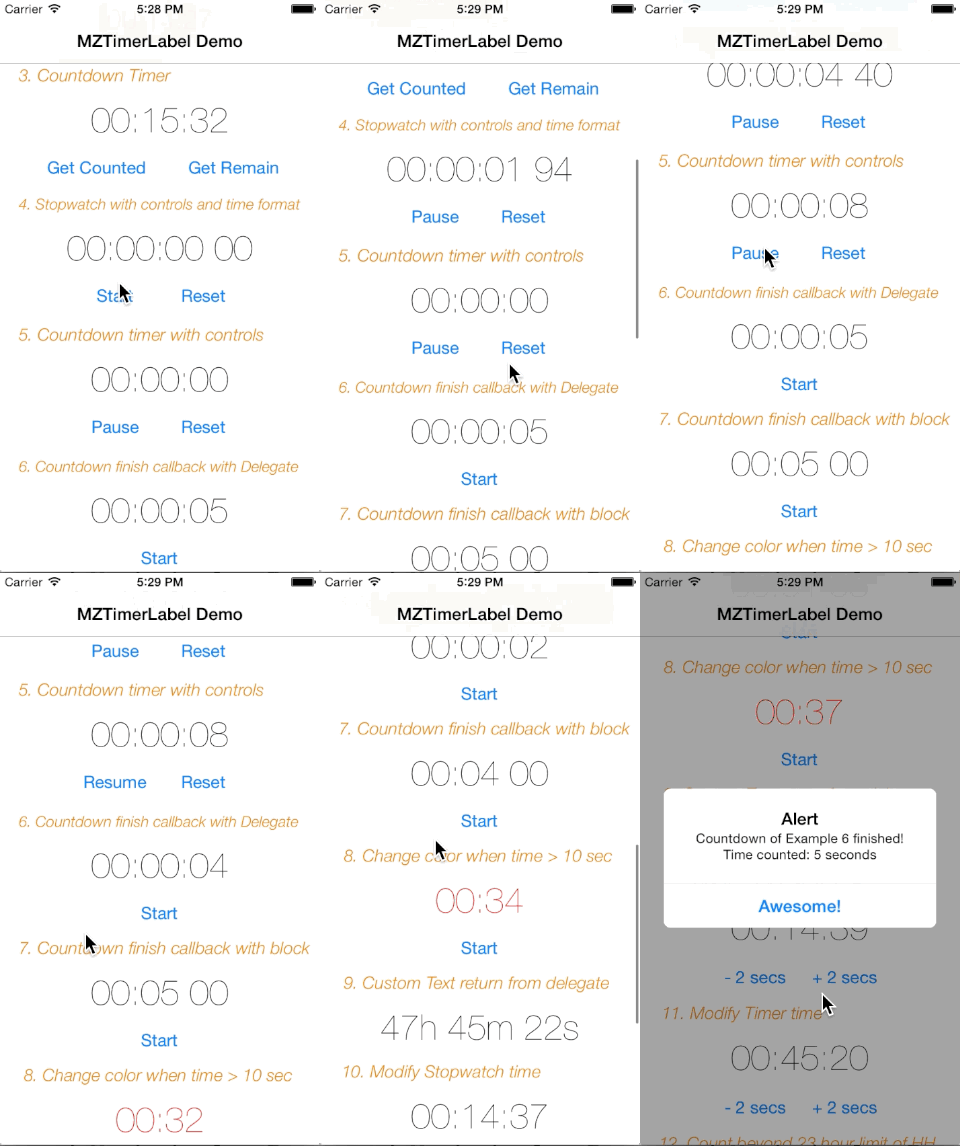
MZTimerLabel is a UILabel subclass, which is a handy way to use UILabel as a countdown timer or stopwatch just like that in Apple Clock App with just __2 lines of code__. MZTimerLabel also provides delegate method for you to define the action when the timer finished.
Author: [MineS Chan](https://github.com/mineschan/) and awesome [contributors](https://github.com/mineschan/MZTimerLabel/graphs/contributors).
_Remark: This is my first iOS plugin project on github, please accept my apologize if any bad coding._
### Requirements
* ARC
* iOS 5.0+
### Installations
#### Manual
1. Download or clone MZTimerLabel, add `MZTimerLabel.h` and `MZTimerLabel.m` source files into your project.
2. `#import "MZTimerLabel.h"` whereever you need it.
#### CocoaPods
(Unfamiliar with [CocoaPods](http://cocoapods.org/) yet? It's a dependency management tool for iOS and Mac, check it out!)
```
pod 'MZTimerLabel'
```
#### Carthage
Another dependency manager is [Carthage](http://github.com/Carthage/Carthage), which does not have a centralized repository.
```
github "mineschan/MZTimerLabel"
```
### Easy Example
To use MZTimerLabel as a stopwatch and counter, you need only __2 lines__.
```objective-c
MZTimerLabel *stopwatch = [[MZTimerLabel alloc] initWithLabel:aUILabel];
[stopwatch start];
```
Easy? If you are looking for a timer, things is just similar.
```objective-c
MZTimerLabel *timer = [[MZTimerLabel alloc] initWithLabel:aUILabel andTimerType:MZTimerLabelTypeTimer];
[timer setCountDownTime:60];
[timer start];
```
Now the timer will start counting from 60 to 0 ;)
### Custom Appearance
As MZTimerLabel is a UILabel subclass, you can directly allocate it as a normal UILabel and customize `timeLabel` property just like usual.
```objective-c
MZTimerLabel *redStopwatch = [[MZTimerLabel alloc] init];
redStopwatch.frame = CGRectMake(100,50,100,20);
redStopwatch.timeLabel.font = [UIFont systemFontOfSize:20.0f];
redStopwatch.timeLabel.textColor = [UIColor redColor];
[self.view addSubview:redStopwatch];
[redStopwatch start];
```
MZTimerLabel uses `00:00:00 (HH:mm:ss)` as time format, if you prefer using another format such as including milliseconds.Your can set your time format like below.
`timerExample4.timeFormat = @"HH:mm:ss SS";`
### Control the timer
You can start,pause,reset your timer with your custom control, set your control up and call these methods:
```
-(void)start;
-(void)pause;
-(void)reset;
```
#### Getter and Setters
You may control the time value and behaviours at the begining or during runtime with these properties and methods
```
@property (assign) BOOL shouldCountBeyondHHLimit; //see example #12
@property (assign) BOOL resetTimerAfterFinish; //see example #7
-(void)setCountDownTime:(NSTimeInterval)time;
-(void)setStopWatchTime:(NSTimeInterval)time;
-(void)setCountDownToDate:(NSDate*)date;
-(void)addTimeCountedByTime:(NSTimeInterval)timeToAdd; //see example #10, #11
```
And if you want to have information of the timer, here is how.
```
@property (assign,readonly) BOOL counting; //see example #4-7
- (NSTimeInterval)getTimeCounted; //see example #3
- (NSTimeInterval)getTimeRemaining; //see example #3
- (NSTimeInterval)getCountDownTime;
```
### Timer Finish Handling
Usually when you need a timer, you need to deal with it after it finished. Following are 2 examples showing how to do it using `delegate` and `block` methods.
#### Delegate
First, set the delegate of the timer label.
`timer.delegate = self;`
And then implement `MZTimerLabelDelegate` protocol in your dedicated class
`@interface ViewController : UIViewController`
Finally, implement the delegate method `timerLabel:finshedCountDownTimerWithTimeWithTime:`
```objective-c
-(void)timerLabel:(MZTimerLabel*)timerLabel finshedCountDownTimerWithTime:(NSTimeInterval)countTime{
//time is up, what should I do master?
}
```
#### Blocks
Block is a very convenient way to handle the callbacks, MZTimerLabel makes your life even easier.
```objective-c
MZTimerLabel *timer = [[MZTimerLabel alloc] initWithLabel:aUILabel andTimerType:MZTimerLabelTypeTimer];
[timer3 setCountDownTime:60];
[timer startWithEndingBlock:^(NSTimeInterval countTime) {
//oh my gosh, it's awesome!!
}];
```
Or set it seperately
```
[timer3 setCountDownTime:60];
timer.endedBlock = ^(NSTimeInterval countTime) {
//oh my gosh, it's awesome!!
};
[timer start];
```
### More Examples
Please check the demo project I provided, with well explained example code inside.
### License
This code is distributed under the terms and conditions of the [MIT license](LICENSE).
### What's coming up next?
1. ~~Submit to CocaPods~~
2. ~~Better performance.~~
3. __Your suggestions!:D__
### Purpose
MZTimerLabel is a UILabel subclass, which is a handy way to use UILabel as a countdown timer or stopwatch just like that in Apple Clock App with just __2 lines of code__. MZTimerLabel also provides delegate method for you to define the action when the timer finished.
Author: [MineS Chan](https://github.com/mineschan/) and awesome [contributors](https://github.com/mineschan/MZTimerLabel/graphs/contributors).
_Remark: This is my first iOS plugin project on github, please accept my apologize if any bad coding._
### Requirements
* ARC
* iOS 5.0+
### Installations
#### Manual
1. Download or clone MZTimerLabel, add `MZTimerLabel.h` and `MZTimerLabel.m` source files into your project.
2. `#import "MZTimerLabel.h"` whereever you need it.
#### CocoaPods
(Unfamiliar with [CocoaPods](http://cocoapods.org/) yet? It's a dependency management tool for iOS and Mac, check it out!)
```
pod 'MZTimerLabel'
```
#### Carthage
Another dependency manager is [Carthage](http://github.com/Carthage/Carthage), which does not have a centralized repository.
```
github "mineschan/MZTimerLabel"
```
### Easy Example
To use MZTimerLabel as a stopwatch and counter, you need only __2 lines__.
```objective-c
MZTimerLabel *stopwatch = [[MZTimerLabel alloc] initWithLabel:aUILabel];
[stopwatch start];
```
Easy? If you are looking for a timer, things is just similar.
```objective-c
MZTimerLabel *timer = [[MZTimerLabel alloc] initWithLabel:aUILabel andTimerType:MZTimerLabelTypeTimer];
[timer setCountDownTime:60];
[timer start];
```
Now the timer will start counting from 60 to 0 ;)
### Custom Appearance
As MZTimerLabel is a UILabel subclass, you can directly allocate it as a normal UILabel and customize `timeLabel` property just like usual.
```objective-c
MZTimerLabel *redStopwatch = [[MZTimerLabel alloc] init];
redStopwatch.frame = CGRectMake(100,50,100,20);
redStopwatch.timeLabel.font = [UIFont systemFontOfSize:20.0f];
redStopwatch.timeLabel.textColor = [UIColor redColor];
[self.view addSubview:redStopwatch];
[redStopwatch start];
```
MZTimerLabel uses `00:00:00 (HH:mm:ss)` as time format, if you prefer using another format such as including milliseconds.Your can set your time format like below.
`timerExample4.timeFormat = @"HH:mm:ss SS";`
### Control the timer
You can start,pause,reset your timer with your custom control, set your control up and call these methods:
```
-(void)start;
-(void)pause;
-(void)reset;
```
#### Getter and Setters
You may control the time value and behaviours at the begining or during runtime with these properties and methods
```
@property (assign) BOOL shouldCountBeyondHHLimit; //see example #12
@property (assign) BOOL resetTimerAfterFinish; //see example #7
-(void)setCountDownTime:(NSTimeInterval)time;
-(void)setStopWatchTime:(NSTimeInterval)time;
-(void)setCountDownToDate:(NSDate*)date;
-(void)addTimeCountedByTime:(NSTimeInterval)timeToAdd; //see example #10, #11
```
And if you want to have information of the timer, here is how.
```
@property (assign,readonly) BOOL counting; //see example #4-7
- (NSTimeInterval)getTimeCounted; //see example #3
- (NSTimeInterval)getTimeRemaining; //see example #3
- (NSTimeInterval)getCountDownTime;
```
### Timer Finish Handling
Usually when you need a timer, you need to deal with it after it finished. Following are 2 examples showing how to do it using `delegate` and `block` methods.
#### Delegate
First, set the delegate of the timer label.
`timer.delegate = self;`
And then implement `MZTimerLabelDelegate` protocol in your dedicated class
`@interface ViewController : UIViewController`
Finally, implement the delegate method `timerLabel:finshedCountDownTimerWithTimeWithTime:`
```objective-c
-(void)timerLabel:(MZTimerLabel*)timerLabel finshedCountDownTimerWithTime:(NSTimeInterval)countTime{
//time is up, what should I do master?
}
```
#### Blocks
Block is a very convenient way to handle the callbacks, MZTimerLabel makes your life even easier.
```objective-c
MZTimerLabel *timer = [[MZTimerLabel alloc] initWithLabel:aUILabel andTimerType:MZTimerLabelTypeTimer];
[timer3 setCountDownTime:60];
[timer startWithEndingBlock:^(NSTimeInterval countTime) {
//oh my gosh, it's awesome!!
}];
```
Or set it seperately
```
[timer3 setCountDownTime:60];
timer.endedBlock = ^(NSTimeInterval countTime) {
//oh my gosh, it's awesome!!
};
[timer start];
```
### More Examples
Please check the demo project I provided, with well explained example code inside.
### License
This code is distributed under the terms and conditions of the [MIT license](LICENSE).
### What's coming up next?
1. ~~Submit to CocaPods~~
2. ~~Better performance.~~
3. __Your suggestions!:D__