
The creative suite built for your AI agent.
Editing, motion, and sound. Connected in one local project.
Get started · What you can make · Examples · Downloads · Mirage
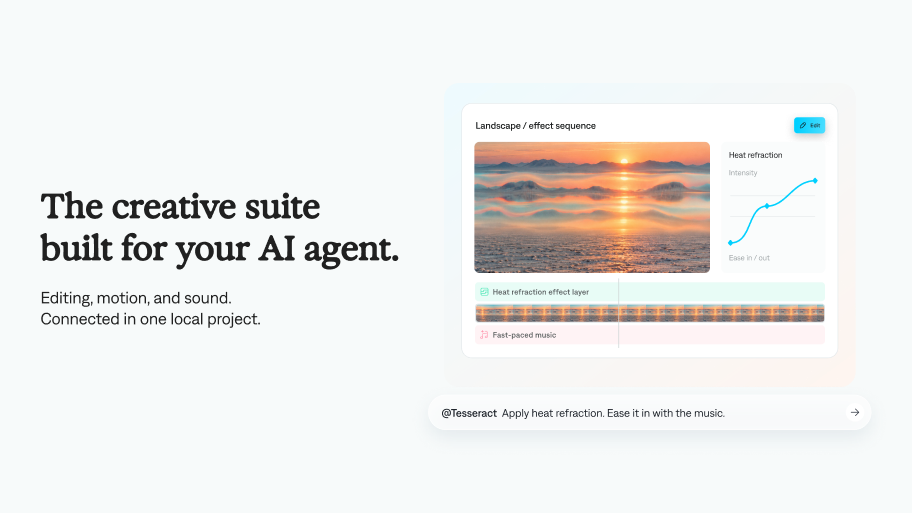 Tesseract brings professional creative tools into your agent workflow. Work with video layers, compositions, keyframes, and audio in one connected project. Preview the result, direct a revision, and render the finished video locally.
# Get started
**macOS, Windows, or Linux x86_64**, including compatible cloud-agent environments.
Your agent needs file and command access.
See the [installation guide](skills/tesseract-video/references/installation.md) for platform requirements.
### Install with one command
```sh
npx skills add mirage-hq/Tesseract
```
Choose the Tesseract skills you need. Requires Node.js/npm for this installer; the Tesseract CLI itself does not require Node.
Then [ask it to make a video](#what-you-can-make). The skills guide your agent through CLI setup when needed.
### Or let your agent install it
```text
Install the Tesseract skills from https://github.com/mirage-hq/Tesseract.
Follow their installation guide to set up the matching CLI for my
computer, verify its checksum, and confirm it runs.
Then ask me for my footage or the video I want to make.
```
### Plugins
[ChatGPT/Codex plugin →](https://chatgpt.com/plugins/plugins_6ab148f4986c819198f6a08c7fb30f3e?open_in_app)
Claude Code plugin coming soon
### Manual downloads
**[Download a release →](https://github.com/mirage-hq/Tesseract/releases)** · **[Installation guide →](skills/tesseract-video/references/installation.md)**
| Download | Choose this for |
| --- | --- |
| CLI ZIP — `linux-x86_64` | Linux PCs and compatible cloud-agent environments |
| CLI ZIP — `darwin-arm64` | Apple Silicon Mac |
| CLI ZIP — `darwin-x86_64` | Intel Mac |
| CLI ZIP — `windows-x86_64` | 64-bit Windows PC |
| Web runtime ZIP — `web` | Build browser-based Tesseract editors and previews |
| Matching `.sha256` | Verify your ZIP before installing |
Use the CLI version required by your skills. Install either the plugin or the skills; you don't need both.
# What you can make
| Skill | Use it for |
| --- | --- |
| **Tesseract: Edit Video** | Cut footage, adjust framing, and combine dialogue and music. |
| **Tesseract: Motion Graphics** | Animate titles, typography, diagrams, and overlays. |
| **Tesseract: Editor** | Build a custom browser editor for previewing, editing, and saving Tesseract projects. |
| **Tesseract: Design** | Create static visuals, including posters, social graphics, and UI mockups. |
Attach your material, then copy a prompt:
```text
Use Tesseract to turn these clips into a 30-second product video.
Keep the opening quick, add a clean title, and finish on the logo.
```
```text
Use Tesseract to animate a diagram of these three steps.
Use our brand colors and keep the text editable.
```
```text
Use Tesseract to design a promotional graphic to accompany this video.
Match its typography and colors. Deliver the PNG and editable project.
```
Preview, then direct a revision:
```text
Make the title arrive earlier and soften the motion.
Render a preview before exporting the finished video.
```
Keep the editable `.tsrct` project for your next revision.
### Example projects
Finished projects to open, take apart, and remix — each one an editable `.tsrct` document with the video it renders to.
**[Browse the examples →](https://github.com/mirage-hq/Tesseract-Projects)**
Grouped by scope: a single feature shown on its own, a small finished piece, or a full production. Point your agent at any `.tsrct` and describe the change you want.
# Community
Join the Tesseract community on Reddit: [r/TesseractByMirage](https://www.reddit.com/r/TesseractByMirage/)
Share your projects, ask questions, and swap tips. For bugs, please use GitHub Issues.
# Terms
[Product terms](TERMS.md) · [Tesseract terms](https://mirage.app/legal/tesseract-terms) · [Privacy policy](https://mirage.app/legal/privacy-policy) · [Third-party notices](THIRD_PARTY_NOTICES.md)
Each CLI ZIP includes third-party notices, licenses, and matching dependency sources.