
A lightweight and colourful test framework.
Alcotest exposes a simple interface to perform unit tests. It exposes
a simple `TESTABLE` module type, a `check` function to assert test
predicates and a `run` function to perform a list of `unit -> unit`
test callbacks.
Alcotest provides a quiet and colorful output where only faulty runs
are fully displayed at the end of the run (with the full logs ready to
inspect), with a simple (yet expressive) query language to select the
tests to run. See [the manpage](./alcotest-help.txt) for details.
The API documentation can be found [here][docs]. For information on
contributing to Alcotest, see [CONTRIBUTING.md](./CONTRIBUTING.md).
[](https://ci.ocamllabs.io/github/mirage/alcotest)
[][docs]
[docs]: https://mirage.github.io/alcotest/alcotest/Alcotest/index.html
### Examples
A simple example (taken from `examples/simple.ml`):
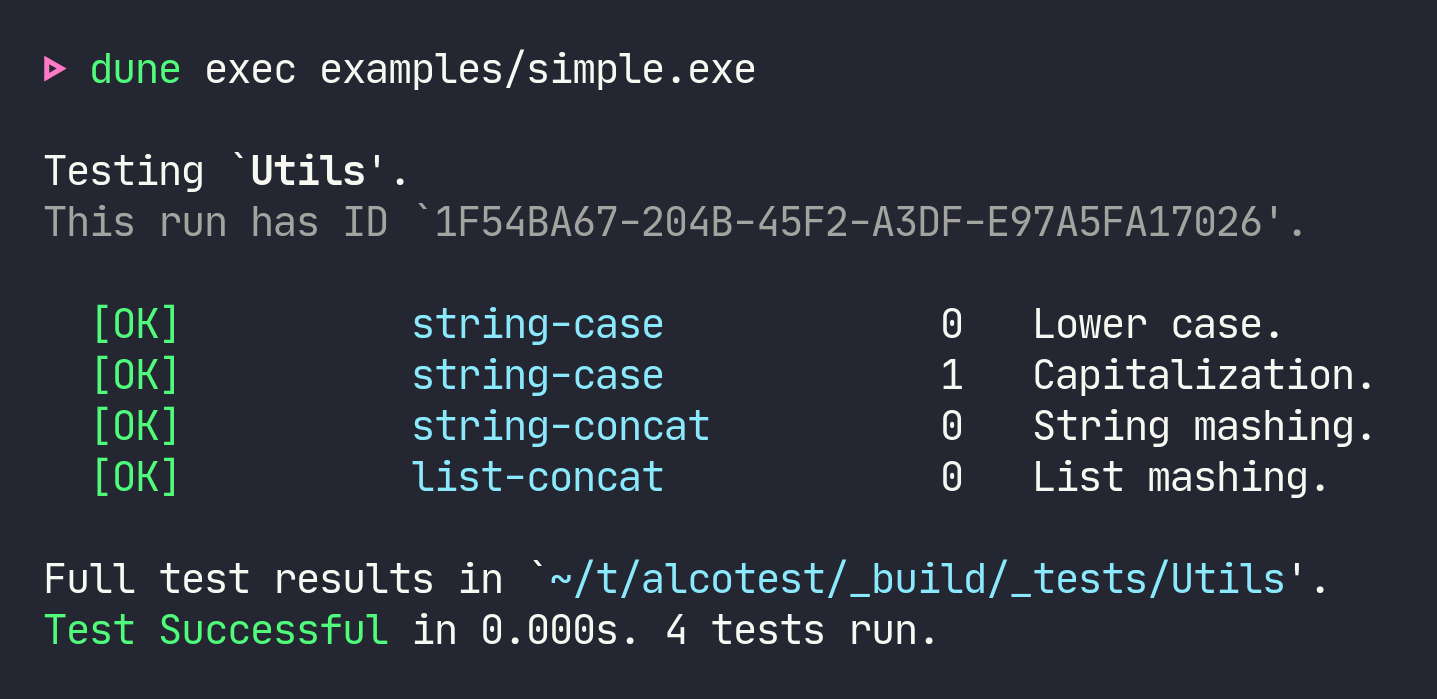
Generated by the following test suite specification:
```ocaml
(* Build with `ocamlbuild -pkg alcotest simple.byte` *)
(* A module with functions to test *)
module To_test = struct
let lowercase = String.lowercase_ascii
let capitalize = String.capitalize_ascii
let str_concat = String.concat ""
let list_concat = List.append
end
(* The tests *)
let test_lowercase () =
Alcotest.(check string) "same string" "hello!" (To_test.lowercase "hELLO!")
let test_capitalize () =
Alcotest.(check string) "same string" "World." (To_test.capitalize "world.")
let test_str_concat () =
Alcotest.(check string) "same string" "foobar" (To_test.str_concat ["foo"; "bar"])
let test_list_concat () =
Alcotest.(check (list int)) "same lists" [1; 2; 3] (To_test.list_concat [1] [2; 3])
(* Run it *)
let () =
let open Alcotest in
run "Utils" [
"string-case", [
test_case "Lower case" `Quick test_lowercase;
test_case "Capitalization" `Quick test_capitalize;
];
"string-concat", [ test_case "String mashing" `Quick test_str_concat ];
"list-concat", [ test_case "List mashing" `Slow test_list_concat ];
]
```
The result is a self-contained binary which displays the test
results. Use `dune exec examples/simple.exe -- --help` to see the
runtime options.
Here's an example of a of failing test suite:
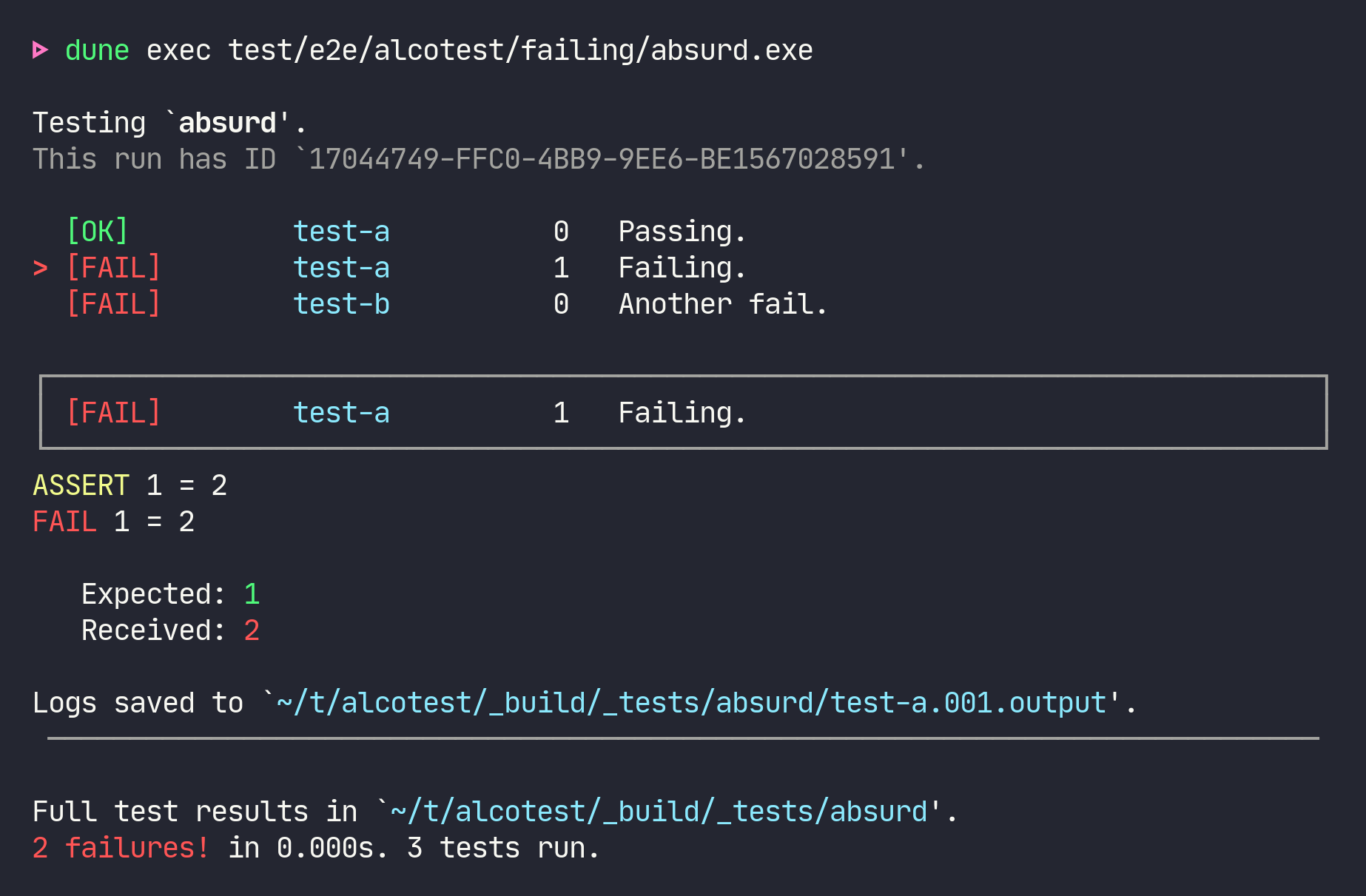
By default, only the first failing test log is printed to the console
(and all test logs are captured on disk). Pass `--show-errors` to
print all error messages.
### Using Alcotest with opam and Dune
Add `(alcotest :with-test)` to the `depends` stanza of your
`dune-project` file, or `"alcotest" {with-test}` to your opam file.
Use the `with-test` [package variable][with-test] to declare your
tests opam dependencies. Call opam to install them:
```sh-session
$ opam install --deps-only --with-test .
```
You can then [declare your test][tests] and link with Alcotest: `(test
(libraries alcotest …) …)`, and run your tests:
```sh-session
$ dune runtest
```
[with-test]: https://opam.ocaml.org/doc/Manual.html#pkgvar-with-test
[tests]: https://dune.readthedocs.io/en/stable/tests.html#custom-tests
### Selecting tests to execute
You can filter which tests to run by supplying a regular expression
matching the names of the tests to execute, or by passing a regular
expression _and_ a comma-separated list of test numbers (or ranges of
test numbers, e.g. `2,4..9`):
```sh-session
$ ./simple.native test '.*concat*'
Testing Utils.
[SKIP] string-case 0 Lower case.
[SKIP] string-case 1 Capitalization.
[OK] string-concat 0 String mashing.
[OK] list-concat 0 List mashing.
The full test results are available in `_build/_tests`.
Test Successful in 0.000s. 2 tests run.
$ ./simple.native test 'string-case' '1..3'
Testing Utils.
[SKIP] string-case 0 Lower case.
[OK] string-case 1 Capitalization.
[SKIP] string-concat 0 String mashing.
[SKIP] list-concat 0 List mashing.
The full test results are available in `_build/_tests`.
Test Successful in 0.000s. 1 test run.
```
Note that you cannot filter by test case name (i.e. `Lower case` or
`Capitalization`), you must filter by test name & number instead.
See the [examples][] directory for more examples.
[examples]: https://github.com/mirage/alcotest/tree/main/examples
### Quick and Slow tests
In general you should use `` `Quick`` tests: tests that are ran on any
invocations of the test suite. You should only use `` `Slow`` tests
for stress tests that are ran only on occasion (typically before a
release or after a major change). These slow tests can be suppressed
by passing the `-q` flag on the command line, e.g.:
```sh-session
$ ./test.exe -q # run only the quick tests
$ ./test.exe # run quick and slow tests
```
### Passing custom options to the tests
In most cases, the base tests are `unit -> unit` functions. However,
it is also possible to pass an extra option to all the test functions
by using `'a -> unit`, where `'a` is the type of the extra parameter.
In order to do this, you need to specify how this extra parameter is
read on the command-line, by providing a [Cmdliner term][] for
command-line arguments which explains how to parse and serialize
values of type `'a` (*note:* do not use positional arguments, only
optional arguments are supported).
[Cmdliner term]: https://erratique.ch/software/cmdliner/doc/Cmdliner/Term/index.html
For instance:
```ocaml
let test_nice i = Alcotest.(check int) "Is it a nice integer?" i 42
let int =
let doc = "What is your preferred number?" in
Cmdliner.Arg.(required & opt (some int) None & info ["n"] ~doc ~docv:"NUM")
let () =
Alcotest.run_with_args "foo" int [
"all", ["nice", `Quick, test_nice]
]
```
Will generate `test.exe` such that:
```sh-session
$ test.exe test
test.exe: required option -n is missing
$ test.exe test -n 42
Testing foo.
[OK] all 0 int.
```
### Lwt
Alcotest provides an `Alcotest_lwt` module that you could use to wrap
Lwt test cases. The basic idea is that instead of providing a test
function in the form `unit -> unit`, you provide one with the type
`unit -> unit Lwt.t` and alcotest-lwt calls `Lwt_main.run` for you.
However, there are a couple of extra features:
- If an async exception occurs, it will cancel your test case for you
and fail it (rather than exiting the process).
- You get given a switch, which will be turned off when the test case
finishes (or fails). You can use that to free up any resources.
For instance:
```ocaml
let free () = print_endline "freeing all resources"; Lwt.return ()
let test_lwt switch () =
Lwt_switch.add_hook (Some switch) free;
Lwt.async (fun () -> failwith "All is broken");
Lwt_unix.sleep 10.
let () =
Lwt_main.run @@ Alcotest_lwt.run "foo" [
"all", [
Alcotest_lwt.test_case "one" `Quick test_lwt
]
]
```
Will generate:
```sh-session
$ test.exe
Testing foo.
[ERROR] all 0 one.
-- all.000 [one.] Failed --
in _build/_tests/all.000.output:
freeing all resources
[failure] All is broken
```
### Comparison with other testing frameworks
The README is pretty clear about that:
> Alcotest is a lightweight and colourful test framework.
Alcotest is the only testing framework using colors!
More seriously, Alcotest is similar to [ounit][] but it fixes a few of
the problems found in that library:
- Alcotest has a nicer output, it is easier to see what failed and
what succeeded and to read the log outputs of the failed tests;
- Alcotest uses combinators to define pretty-printers and comparators
between the things to test.
Other nice tools doing different kind of testing also exist:
- [qcheck][] does random generation and property testing (e.g. Quick
Check);
- [crowbar][] and [bun][] are similar to qcheck, but use
compiler-directed randomness, i.e. they take advantage of the AFL
support the OCaml compiler;
- [ppx_inline_tests][] allows to write tests in the same file as
your source-code; they will be run only in a special mode of
compilation.
[ounit]: https://github.com/gildor478/ounit
[qcheck]: https://github.com/c-cube/qcheck
[crowbar]: https://github.com/stedolan/crowbar
[bun]: https://github.com/yomimono/ocaml-bun
[ppx_inline_tests]: https://github.com/janestreet/ppx_inline_test