# PoseFix: Model-agnostic General Human Pose Refinement Network
[](https://paperswithcode.com/sota/multi-person-pose-estimation-on-coco?p=posefix-model-agnostic-general-human-pose)
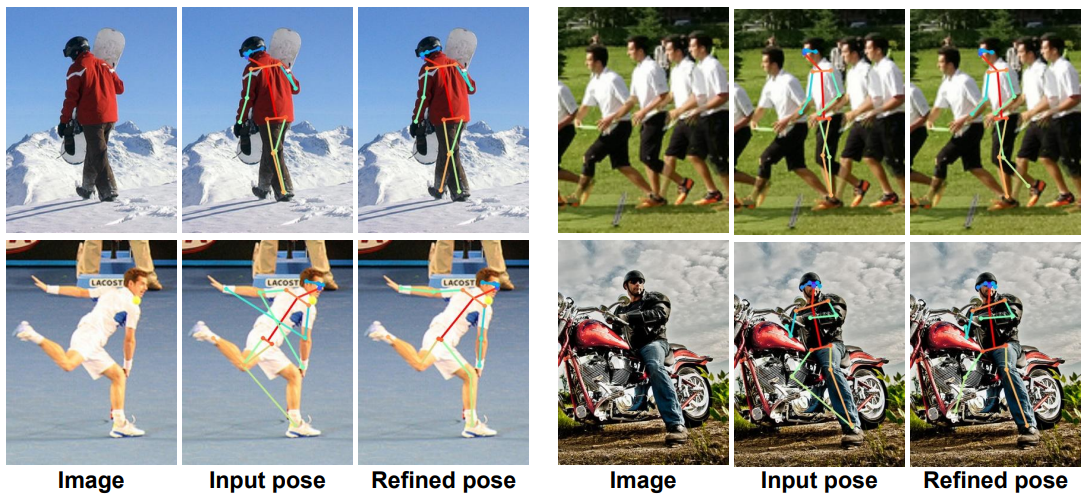
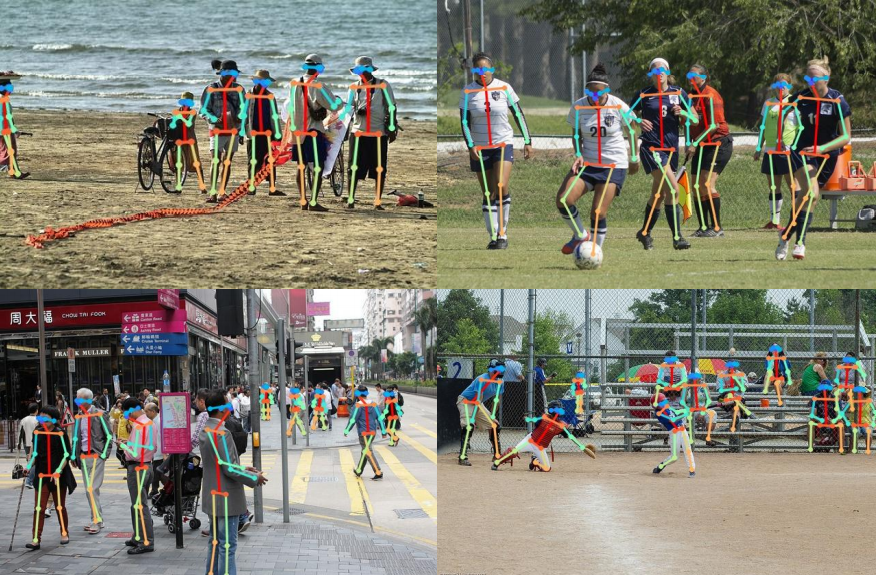
PoseFix makes pose result of any methods better from a single '.json' file!
## News
We achieved top performance by refining the state-of-the-art ([HRNet](https://arxiv.org/abs/1902.09212), CVPR 2019). You can always make your results better!
## Introduction
This repo is official **[TensorFlow](https://www.tensorflow.org)** implementation of **[PoseFix: Model-agnostic General Human Pose Refinement Network (CVPR 2019)](https://arxiv.org/abs/1812.03595)** for **model-agnostic human pose refinement** from a single RGB image.
**What this repo provides:**
* [TensorFlow](https://www.tensorflow.org) implementation of [PoseFix: Model-agnostic General Human Pose Refinement Network](https://arxiv.org/abs/1812.03595).
* Flexible and simple code.
* Compatibility for most of the publicly available 2D multi-person pose estimation datasets including **[MPII](http://human-pose.mpi-inf.mpg.de/), [PoseTrack 2018](https://posetrack.net/), and [MS COCO 2017](http://cocodataset.org/#home)**.
* Human pose estimation visualization code (modified from [Detectron](https://github.com/facebookresearch/Detectron)).
## Dependencies
* [TensorFlow](https://www.tensorflow.org/)
* [CUDA](https://developer.nvidia.com/cuda-downloads)
* [cuDNN](https://developer.nvidia.com/cudnn)
* [Anaconda](https://www.anaconda.com/download/)
* [COCO API](https://github.com/cocodataset/cocoapi)
This code is tested under Ubuntu 16.04, CUDA 9.0, cuDNN 7.1 environment with two NVIDIA 1080Ti GPUs.
Python 3.6.5 version with Anaconda 3 is used for development.
## Directory
### Root
The `${POSE_ROOT}` is described as below.
```
${POSE_ROOT}
|-- data
|-- lib
|-- main
|-- tool
`-- output
```
* `data` contains data loading codes and soft links to images and annotations directories.
* `lib` contains kernel codes for 2d multi-person pose estimation system.
* `main` contains high-level codes for training or testing the network.
* `tool` contains dataset converter. `posetrack2coco_output.py` converts `posetrack` output files to `coco` format.
* `output` contains log, trained models, visualized outputs, and test result.
### Data
You need to follow directory structure of the `data` as below.
```
${POSE_ROOT}
|-- data
|-- |-- MPII
| `-- |-- input_pose
| | |-- name_of_input_pose.json
| | |-- test_on_trainset
| | | | -- result.json
| |-- annotations
| | |-- train.json
| | `-- test.json
| `-- images
| |-- 000001163.jpg
| |-- 000003072.jpg
|-- |-- PoseTrack
| `-- |-- input_pose
| | |-- name_of_input_pose.json
| | |-- test_on_trainset
| | | | -- result.json
| |-- annotations
| | |-- train2018.json
| | |-- val2018.json
| | `-- test2018.json
| |-- original_annotations
| | |-- train/
| | |-- val/
| | `-- test/
| `-- images
| |-- train/
| |-- val/
| `-- test/
|-- |-- COCO
| `-- |-- input_pose
| | |-- name_of_input_pose.json
| | |-- test_on_trainset
| | | | -- result.json
| |-- annotations
| | |-- person_keypoints_train2017.json
| | |-- person_keypoints_val2017.json
| | `-- image_info_test-dev2017.json
| `-- images
| |-- train2017/
| |-- val2017/
| `-- test2017/
`-- |-- imagenet_weights
| |-- resnet_v1_50.ckpt
| |-- resnet_v1_101.ckpt
| `-- resnet_v1_152.ckpt
```
* In the `tool` of [TF-SimpleHumanPose](https://github.com/mks0601/TF-SimpleHumanPose), run `python mpii2coco.py` to convert MPII annotation files to MS COCO format (`MPII/annotations`).
* In the `tool` of [TF-SimpleHumanPose](https://github.com/mks0601/TF-SimpleHumanPose), run `python posetrack2coco.py` to convert PoseTrack annotation files to MS COCO format (`PoseTrack/annotations`).
* Download imagenet pre-trained resnet models from [tf-slim](https://github.com/tensorflow/models/tree/master/research/slim) and place it in the `data/imagenet_weights`.
* Except for `annotations` of the MPII and PoseTrack, all other directories are original version of downloaded ones.
* If you want to add your own dataset, you have to convert it to [MS COCO format](http://cocodataset.org/#format-data).
* You can change default directory structure of `data` by modifying `dataset.py` of each dataset folder.
### Output
You need to follow the directory structure of the `output` folder as below.
```
${POSE_ROOT}
|-- output
|-- |-- log
|-- |-- model_dump
|-- |-- result
`-- |-- vis
```
* Creating `output` folder as soft link form is recommended instead of folder form because it would take large storage capacity.
* `log` folder contains training log file.
* `model_dump` folder contains saved checkpoints for each epoch.
* `result` folder contains final estimation files generated in the testing stage.
* `vis` folder contains visualized results.
* You can change default directory structure of `output` by modifying `main/config.py`.
## Running PoseFix
### Start
* Run `pip install -r requirement.txt` to install required modules.
* Run `cd ${POSE_ROOT}/lib` and `make` to build NMS modules.
* In the `main/config.py`, you can change settings of the model including dataset to use, network backbone, and input size and so on.
### Train
`input_pose/test_on_trainset/result.json` should be prepared before training. This is test result on the training set with the groundtruth bbox and used when synthesizing input pose of not annotated keypoints in the training stage. Testing result of [TF-SimpleHumanPose](https://github.com/mks0601/TF-SimpleHumanPose) is used.
In the `main` folder, run
```bash
python train.py --gpu 0-1
```
to train the network on the GPU 0,1.
If you want to continue experiment, run
```bash
python train.py --gpu 0-1 --continue
```
`--gpu 0,1` can be used instead of `--gpu 0-1`.
### Test
`input_pose/name_of_input_pose.json` is pose estimation result of any other method. You have to rename the it and also `input_pose_path` of the `data/$DATASET/dataset.py`. The `input_pose/name_of_input_pose.json` should be follow [MS COCO format](http://cocodataset.org/#format-results). To test on the `PoseTrack` dataset, run `tool/posetrack2coco_output.py` before testing to convert `PoseTrack` output files to `COCO` format.
Place trained model at the `output/model_dump/$DATASET/` and pose estimation result of any other method (`name_of_input_pose.json`) to `data/$DATASET/input_pose/`.
In the `main` folder, run
```bash
python test.py --gpu 0-1 --test_epoch 140
```
to test the network on the GPU 0,1 with 140th epoch trained model. `--gpu 0,1` can be used instead of `--gpu 0-1`.
## Results
Here I report the performance of the PoseFix. Also, you can download pre-trained models of the PoseFix in [here](https://drive.google.com/drive/folders/1v8J6h2x9iLeCs0Q6wkMOI1JzV31qKX-l?usp=sharing) and `test_on_trainset/result.json` in [here](https://drive.google.com/drive/folders/1CcRoyWWeVGOsOPTmcuVvL-OnaPEm93J7?usp=sharing).
As this repo outputs compatible output files for MS COCO and PoseTrack, you can directly use [cocoapi](https://github.com/cocodataset/cocoapi) or [poseval]( https://github.com/leonid-pishchulin/poseval) to evaluate result on the MS COCO or PoseTrack dataset. You have to convert the produced `mat` file to MPII `mat` format to evaluate on MPII dataset following [this](http://human-pose.mpi-inf.mpg.de/#evaluation).
### Results on MSCOCO 2017 dataset
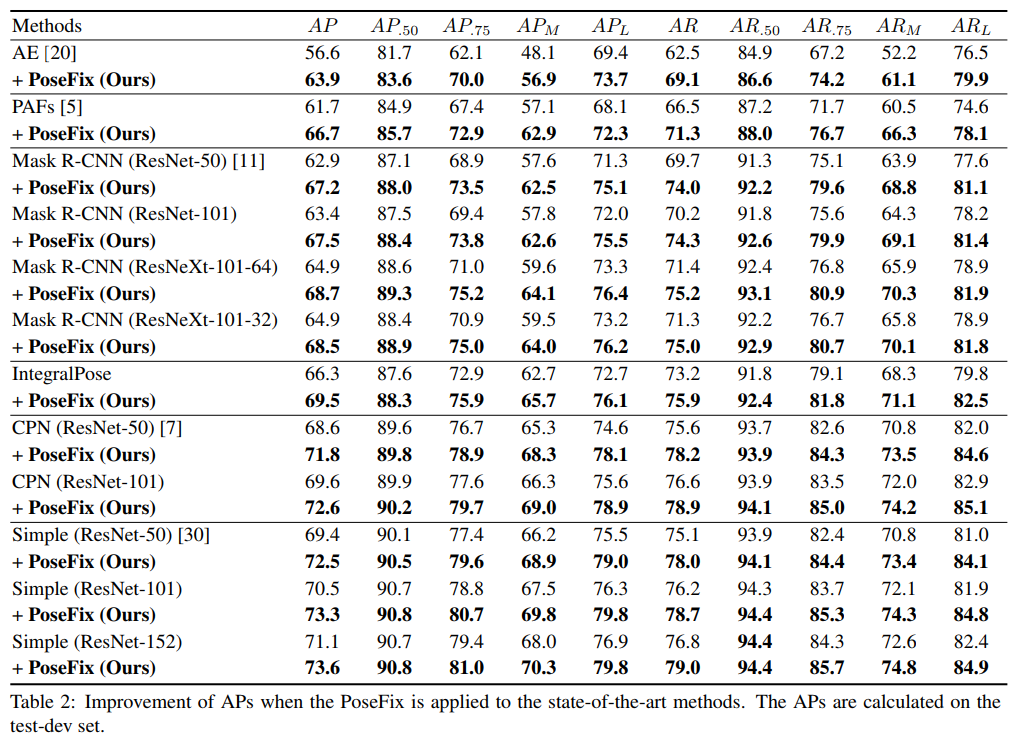
We additionally applied our PoseFix on [HRNet](https://arxiv.org/abs/1902.09212) (Ke etal. CVPR2019), and achieved the top performance.
#### MSCOCO 2017 validation set
| Method | AP | Ap .5 | AP .75 | AP (M) | AP (L) | AR | AR .5 | AR .75 | AR (M) | AR (L) |
|--------------------|-------|-------|--------|--------|--------|-------|-------|--------|--------|--------|
| pose_hrnet_w48 | 76.3 | 90.8 | 82.9 | 72.3 | 83.4 | 81.2 | 94.2 | 87.1 | 76.7 | 87.6 |
| **PoseFix + HRNet** | 77.3 | 90.9 | 83.5 | 73.5 | 84.4 | 82.0 | 94.3 | 87.5 | 77.7 | 88.3 |
#### MSCOCO 2017 test-dev set
| Method | AP | Ap .5 | AP .75 | AP (M) | AP (L) | AR | AR .5 | AR .75 | AR (M) | AR (L) |
|--------------------|-------|-------|--------|--------|--------|-------|-------|--------|--------|--------|
| pose_hrnet_w48 | 75.5 | 92.5 | 83.3 | 71.9 | 81.5 | 80.5 | 95.7 | 87.4 | 76.3 | 86.3 |
| **PoseFix + HRNet** | 76.7 | 92.6 | 84.1 | 73.1 | 82.6 | 81.5 | 95.8 | 88.1 | 77.5 | 87.2 |
* You have to set `dataset`, `backbone` and `input_shape` to those of the model in `config.py`.
### Results on PoseTrack 2018 dataset
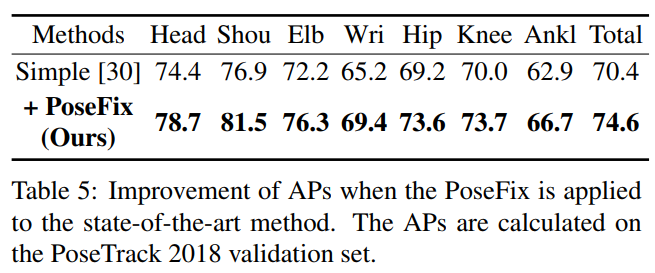
* You have to set `dataset`, `backbone` and `input_shape` to those of the model in `config.py`.
## Troubleshoot
1. Those who are suffer from out of bound index issue, please refer this [issue](https://github.com/mks0601/PoseFix_RELEASE/issues/8). According to [TF docs](https://www.tensorflow.org/api_docs/python/tf/scatter_nd), `tf.scatter_nd` will ignore out of bound indices in GPU mode. However, `BruceLeeeee` had a issue with that and fixed by clipping coordinates.
2. For those who suffer from `FileNotFoundError: [Errno 2] No such file or directory: 'tmp_result_0.pkl'` in testing stage, **please prepare input pose properly**. The pkl files are generated and deleted automatically in testing stage, so you don't have to prepare them. Most of this error comes from inproper human detection file.
## Acknowledgements
This repo is largely modified from [TensorFlow repo of CPN](https://github.com/chenyilun95/tf-cpn) and [PyTorch repo of Simple](https://github.com/Microsoft/human-pose-estimation.pytorch).
## Reference
```
@InProceedings{Moon_2019_CVPR_PoseFix,
author = {Moon, Gyeongsik and Chang, Juyong and Lee, Kyoung Mu},
title = {PoseFix: Model-agnostic General Human Pose Refinement Network},
booktitle = {The IEEE Conference on Computer Vision and Pattern Recognition (CVPR)},
year = {2019}
}
```