TinyFormer: Preserving Tiny Objects in YOLO-DETR Hybrid Real-time Detectors
TinyFormer is a high-performance real-time object detector that bridges the gap between YOLO-style efficiency and DETR-based precision. By introducing the Parallel Bi-fusion Module (PBM) and Spatial Semantic Adapter (SSA), it effectively preserves fine-grained spatial information, achieving State-of-the-Art performance in tiny object detection without compromising inference speed.
---
## Updates
📢 **A Google Drive mirror is now available for faster and more reliable checkpoint downloads.**
[](https://drive.google.com/drive/folders/1yIsUO14g5EyTFRbDeISoNJSDqNeSgT5o)
## 1. Model Zoo
### COCO
| Model | Dataset | AP | #Params | GFLOPs | Latency(ms) | config | checkpoint |
| :---: | :---: | :---: | :---: | :---: |:------------:| :---: | :---: |
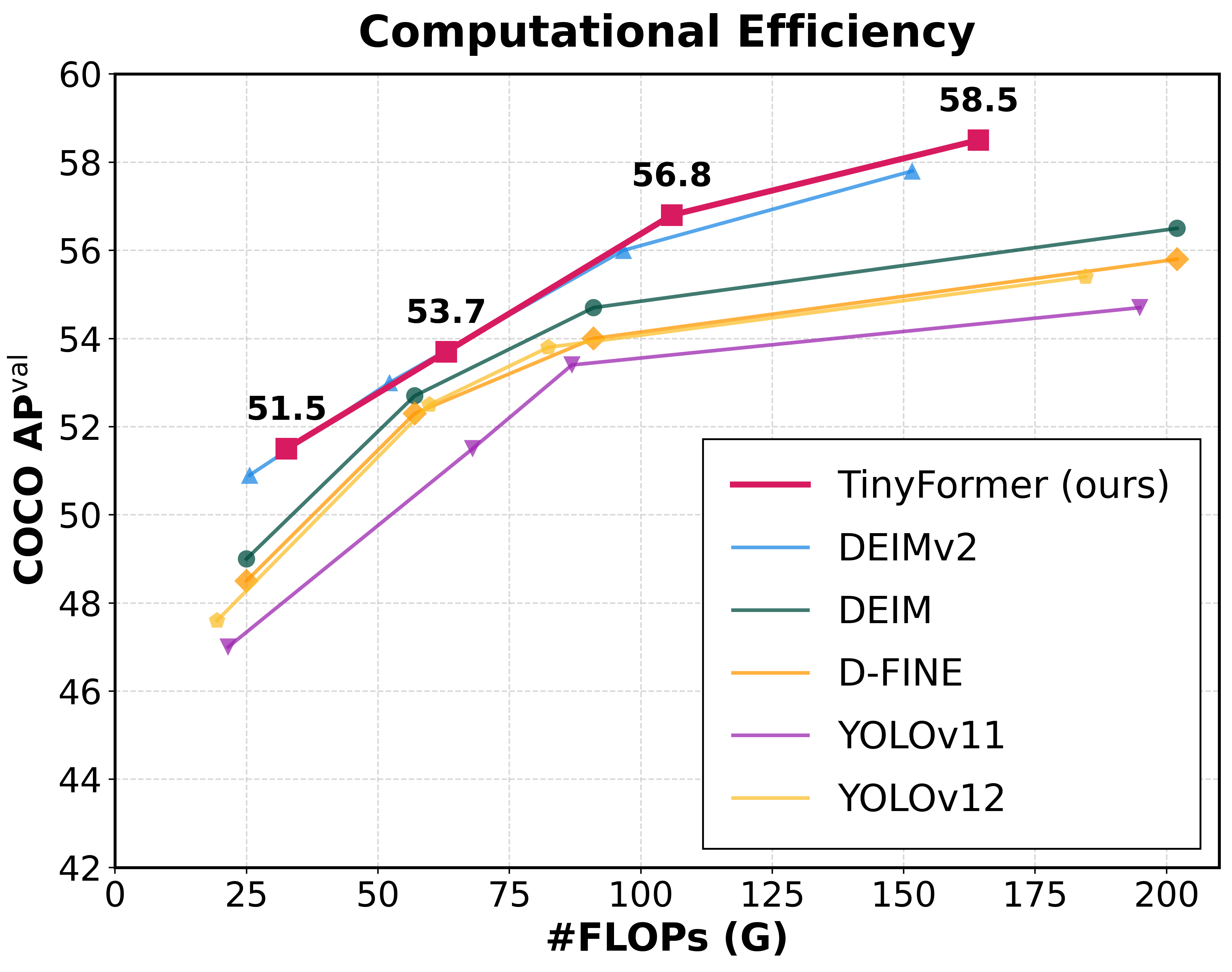
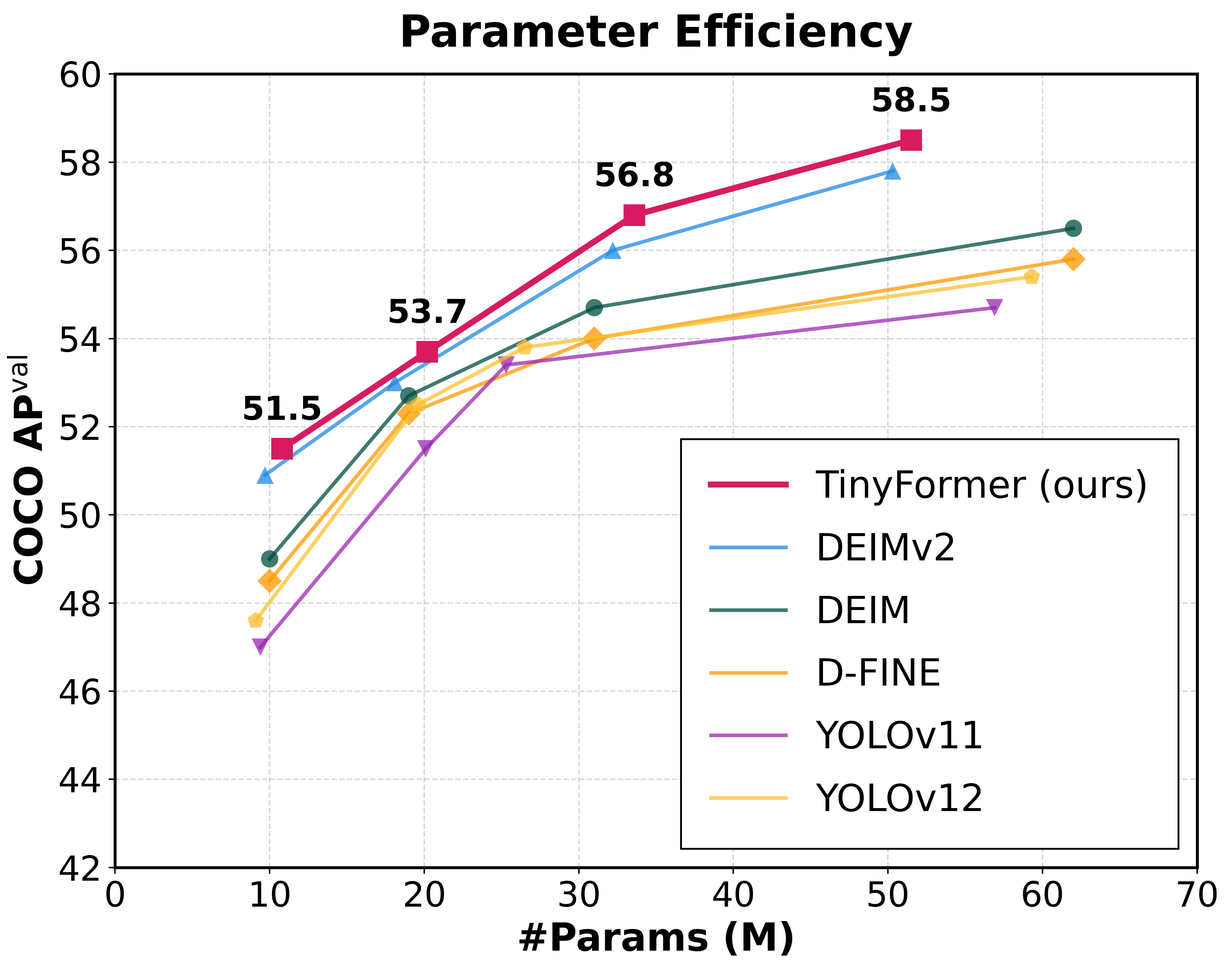
| **TinyFomer-S-PBM** | COCO | **51.5** | 10.8M | 32.6 | 2.36 | [yml](./configs/tinyformer/tinyformer_dinov3_s_coco_pbm.yml) | [Link](http://140.113.110.150:5000/sharing/AhP1PzOpi) |
| **TinyFomer-M-PBM** | COCO | **53.7** | 20.2M | 63.0 | 3.22 | [yml](./configs/tinyformer/tinyformer_dinov3_m_coco_pbm.yml) | [Link](http://140.113.110.150:5000/sharing/rkowjjp56) |
| **TinyFomer-L-PBM** | COCO | **56.8** | 33.6M | 105.9 | 3.72 | [yml](./configs/tinyformer/tinyformer_dinov3_l_coco_pbm.yml) | [Link](http://140.113.110.150:5000/sharing/wjVPvDtCK) |
| **TinyFomer-X-PBM** | COCO | **58.5** | 51.5M | 164.2 | 4.81 | [yml](./configs/tinyformer/tinyformer_dinov3_x_coco_pbm.yml) | [Link](http://140.113.110.150:5000/sharing/5F4yhersA) |
| **TinyFomer-XL-PBM** | COCO | **60.6** | 125.5M | 437.9 | 7.91 | [yml](./configs/tinyformer/tinyformer_dinov3_xl_coco_pbm.yml) | [Link](http://140.113.110.150:5000/sharing/Qzyz1aAkG) |
Models without PBM
| Model | Dataset | AP | #Params | GFLOPs | Latency(ms) | config | checkpoint |
| :---: | :---: | :---: | :---: | :---: |:------------:| :---: | :---: |
| **TinyFomer-S** | COCO | **51.3** | 9.8M | 25.1 | 2.33 | [yml](./configs/tinyformer/tinyformer_dinov3_s_coco.yml) | [Link](http://140.113.110.150:5000/sharing/8cAsmrEye) |
| **TinyFomer-M** | COCO | **53.5** | 18.2M | 51.2 | 3.05 | [yml](./configs/tinyformer/tinyformer_dinov3_m_coco.yml) | [Link](http://140.113.110.150:5000/sharing/WEI4Aoxsu) |
| **TinyFomer-L** | COCO | **56.5** | 32.3M | 96.3 | 3.54 | [yml](./configs/tinyformer/tinyformer_dinov3_l_coco.yml) | [Link](http://140.113.110.150:5000/sharing/NZiKRBghP) |
| **TinyFomer-X** | COCO | **58.4** | 49.8M | 151.1 | 4.63 | [yml](./configs/tinyformer/tinyformer_dinov3_x_coco.yml) | [Link](http://140.113.110.150:5000/sharing/gHCL5pOSk) |
### VisDrone 2019
| Model | Dataset | AP | #Params | GFLOPs | config | checkpoint |
| :---: | :---: | :---: | :---: | :---: | :---: | :---: |
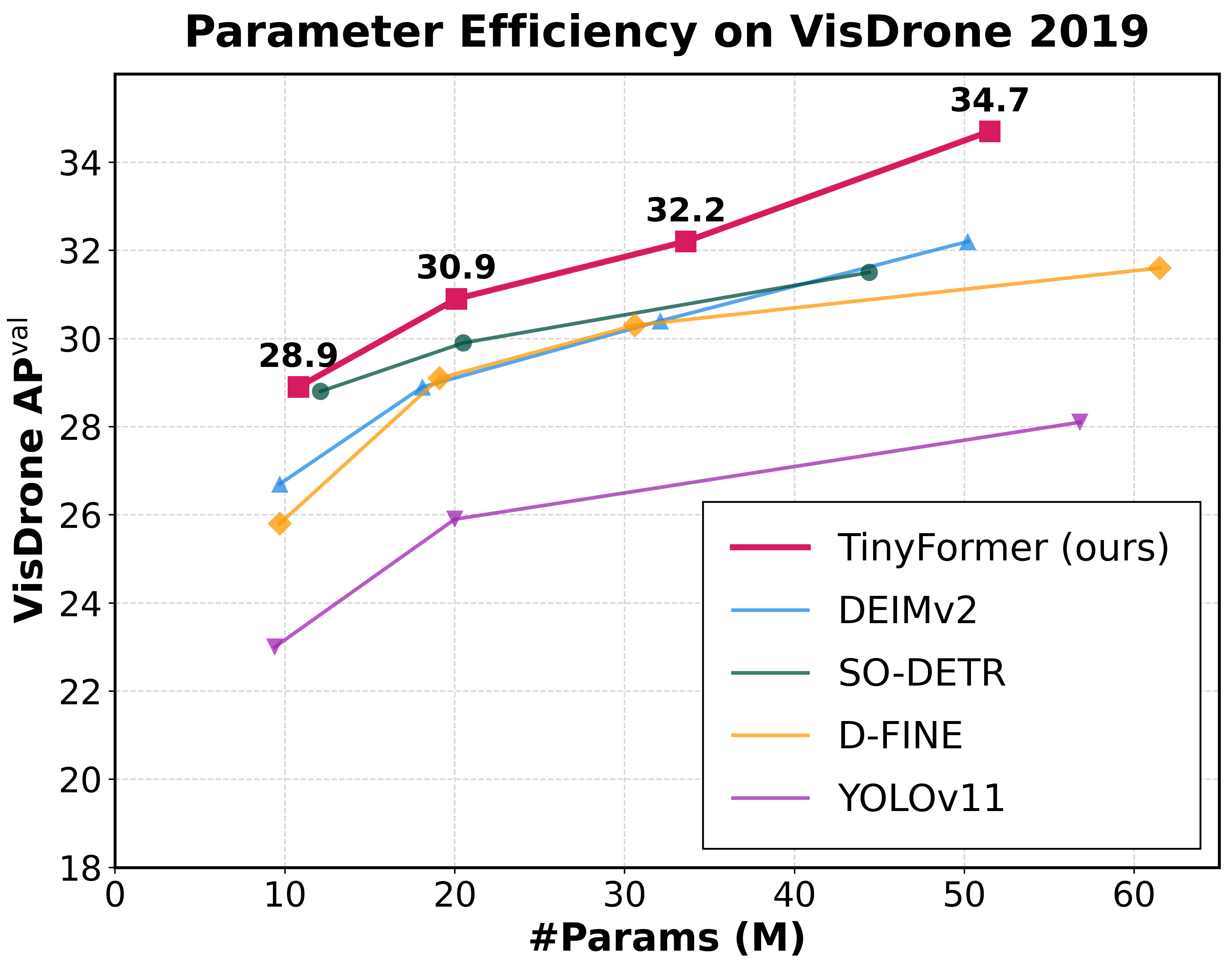
| **TinyFomer-S-PBM-visdrone** | VisDrone | **28.9** | 10.8M | 32.6 | [yml](./configs/tinyformer/visdrone/tinyformer_dinov3_s_coco_pbm_visdrone.yml) | [Link](http://140.113.110.150:5000/sharing/tNijI5DdW) |
| **TinyFomer-M-PBM-visdrone** | VisDrone | **30.9** | 20.1M | 63.0 | [yml](./configs/tinyformer/visdrone/tinyformer_dinov3_m_coco_pbm_visdrone.yml) | [Link](http://140.113.110.150:5000/sharing/umWSr3NgG) |
| **TinyFomer-L-PBM-visdrone** | VisDrone | **32.2** | 33.6M | 105.6 | [yml](./configs/tinyformer/visdrone/tinyformer_dinov3_l_coco_pbm_visdrone.yml) | [Link](http://140.113.110.150:5000/sharing/ejcGqF2IH) |
| **TinyFomer-X-PBM-visdrone** | VisDrone | **34.7** | 51.5M | 163.9 | [yml](./configs/tinyformer/visdrone/tinyformer_dinov3_x_coco_pbm_visdrone.yml) | [Link](http://140.113.110.150:5000/sharing/XdcqUT7Xz) |
### Object365+COCO
| Model | Dataset | AP | #Params | GFLOPs | Latency(ms) | config | checkpoint |
| :---: | :---: | :---: | :---: | :---: |:------------:| :---: | :---: |
| **TinyFomer-X-PBM** | Object365+COCO | **60.2** | 51.5M | 164.2 | 4.81 | [yml](./configs/tinyformer/object365/tinyformer_dinov3_x_obj2coco_pbm_24e.yml) | [Link](http://140.113.110.150:5000/sharing/e9fen8f9g) |
| **TinyFomer-XL-PBM** | Object365+COCO | **62.5** | 125.5M | 437.9 | 7.91 | [yml](./configs/tinyformer/object365/tinyformer_dinov3_xl_obj2coco_pbm_24e.yml) | [Link](http://140.113.110.150:5000/sharing/mvSVFwJZe) |
**Notes:**
- **AP(APval)** is evaluated on *MSCOCO val2017* dataset.
- **Latency** is evaluated on a single 3090 GPU with $batch\\_size = 1$, $fp16$, and $TensorRT==10.14.18$.
- **Objects365+COCO** means finetuned model on *COCO* using pretrained weights trained on *Objects365*.
Pretrained Models on Objects365 (Best generalization)
| Model | Dataset | AP5000 | #Params | GFLOPs | Latency(ms) | config | checkpoint |
| :---: | :---: | :---: | :---: | :---: |:------------:| :---: | :---: |
| **TinyFomer-X-PBM** | Object365 | **47.0** | 51.5M | 164.2 | 4.81 | [yml](./configs/tinyformer/object365/tinyformer_dinov3_x_obj365_pbm.yml) | [Link](http://140.113.110.150:5000/sharing/ECP1QyyWz) |
| **TinyFomer-XL-PBM** | Object365 | **52.4** | 125.5M | 437.9 | 7.91 | [yml](./configs/tinyformer/object365/tinyformer_dinov3_xl_obj365_pbm.yml) | [Link](http://140.113.110.150:5000/sharing/itlmEtOof)|
- **AP5000** is evaluated on the first 5000 samples of the *Objects365* validation set.
## 2. Quick start
### Setup
```shell
conda create -n tinyformer python=3.11 -y
conda activate tinyformer
pip install -r requirements.txt
```
### Data Preparation
COCO2017 Dataset
1. Download COCO2017 from [OpenDataLab](https://opendatalab.com/OpenDataLab/COCO_2017) or [COCO](https://cocodataset.org/#download).
2. Modify paths in [coco_detection.yml](./configs/dataset/coco_detection.yml)
```yaml
train_dataloader:
img_folder: /data/COCO2017/train2017/
ann_file: /data/COCO2017/annotations/instances_train2017.json
val_dataloader:
img_folder: /data/COCO2017/val2017/
ann_file: /data/COCO2017/annotations/instances_val2017.json
```
VisDrone 2019 Dataset
1. Download dataset from [VisDrone-Dataset](https://github.com/VisDrone/VisDrone-Dataset).
2. Modify `TXT_FOLDER`, `IMG_FOLDER`, and `OUTPUT_JSON` in [tools/dataset/visdrone2coco.py](./tools/dataset/visdrone2coco.py) to match your local paths, then run the script:
```shell
# Run the conversion script
python tools/dataset/visdrone2coco.py
```
4. Modify paths in [vis_drone.yml](./configs/dataset/vis_drone.yml)
```yaml
train_dataloader:
img_folder: ./datasets/VisDrone/train/
ann_file: ./datasets/VisDrone/annotations/train.json
val_dataloader:
img_folder: ./datasets/VisDrone/val/
ann_file: ./datasets/VisDrone/annotations/val.json
```
Objects365 Dataset
1. Download Objects365 from [OpenDataLab](https://opendatalab.com/OpenDataLab/Objects365).
2. Set the Base Directory:
```shell
export BASE_DIR=/data/Objects365/data
```
3. Extract and organize the downloaded files, resulting directory structure:
```shell
${BASE_DIR}/train
├── images
│ ├── v1
│ │ ├── patch0
│ │ │ ├── 000000000.jpg
│ │ │ ├── 000000001.jpg
│ │ │ └── ... (more images)
│ ├── v2
│ │ ├── patchx
│ │ │ ├── 000000000.jpg
│ │ │ ├── 000000001.jpg
│ │ │ └── ... (more images)
├── zhiyuan_objv2_train.json
```
```shell
${BASE_DIR}/val
├── images
│ ├── v1
│ │ ├── patch0
│ │ │ ├── 000000000.jpg
│ │ │ └── ... (more images)
│ ├── v2
│ │ ├── patchx
│ │ │ ├── 000000000.jpg
│ │ │ └── ... (more images)
├── zhiyuan_objv2_val.json
```
4. Create a New Directory to Store Images from the Validation Set:
```shell
mkdir -p ${BASE_DIR}/train/images_from_val
```
5. Copy the v1 and v2 folders from the val directory into the train/images_from_val directory
```shell
cp -r ${BASE_DIR}/val/images/v1 ${BASE_DIR}/train/images_from_val/
cp -r ${BASE_DIR}/val/images/v2 ${BASE_DIR}/train/images_from_val/
```
6. Run remap_obj365.py to merge a subset of the validation set into the training set. Specifically, this script moves samples with indices between 5000 and 800000 from the validation set to the training set.
```shell
python tools/remap_obj365.py --base_dir ${BASE_DIR}
```
7. Run the resize_obj365.py script to resize any images in the dataset where the maximum edge length exceeds 640 pixels. Use the updated JSON file generated in Step 5 to process the sample data. Ensure that you resize images in both the train and val datasets to maintain consistency.
```shell
python tools/resize_obj365.py --base_dir ${BASE_DIR}
```
8. Modify paths in [obj365_detection.yml](./configs/dataset/obj365_detection.yml)
```yaml
train_dataloader:
img_folder: /data/Objects365/data/train
ann_file: /data/Objects365/data/train/new_zhiyuan_objv2_train_resized.json
val_dataloader:
img_folder: /data/Objects365/data/val/
ann_file: /data/Objects365/data/val/new_zhiyuan_objv2_val_resized.json
```
Custom Dataset
To train on your custom dataset, you need to organize it in the COCO format. Follow the steps below to prepare your dataset:
1. **Set `remap_mscoco_category` to `False`:**
This prevents the automatic remapping of category IDs to match the MSCOCO categories.
```yaml
remap_mscoco_category: False
```
2. **Organize Images:**
Structure your dataset directories as follows:
```shell
dataset/
├── images/
│ ├── train/
│ │ ├── image1.jpg
│ │ ├── image2.jpg
│ │ └── ...
│ ├── val/
│ │ ├── image1.jpg
│ │ ├── image2.jpg
│ │ └── ...
└── annotations/
├── instances_train.json
├── instances_val.json
└── ...
```
- **`images/train/`**: Contains all training images.
- **`images/val/`**: Contains all validation images.
- **`annotations/`**: Contains COCO-formatted annotation files.
3. **Convert Annotations to COCO Format:**
If your annotations are not already in COCO format, you'll need to convert them. You can use the following Python script as a reference or utilize existing tools:
```python
import json
def convert_to_coco(input_annotations, output_annotations):
# Implement conversion logic here
pass
if __name__ == "__main__":
convert_to_coco('path/to/your_annotations.json', 'dataset/annotations/instances_train.json')
```
4. **Update Configuration Files:**
Modify your [custom_detection.yml](./configs/dataset/custom_detection.yml).
```yaml
task: detection
evaluator:
type: CocoEvaluator
iou_types: ['bbox', ]
num_classes: 777 # your dataset classes
remap_mscoco_category: False
train_dataloader:
type: DataLoader
dataset:
type: CocoDetection
img_folder: /data/yourdataset/train
ann_file: /data/yourdataset/train/train.json
return_masks: False
transforms:
type: Compose
ops: ~
shuffle: True
num_workers: 4
drop_last: True
collate_fn:
type: BatchImageCollateFunction
val_dataloader:
type: DataLoader
dataset:
type: CocoDetection
img_folder: /data/yourdataset/val
ann_file: /data/yourdataset/val/ann.json
return_masks: False
transforms:
type: Compose
ops: ~
shuffle: False
num_workers: 4
drop_last: False
collate_fn:
type: BatchImageCollateFunction
```
### Backbone Checkpoints
For DINOv3 S and S+, download them following the guide in https://github.com/facebookresearch/dinov3
For ViT-Tiny and ViT-Tiny+, you can download them from [ViT-Tiny](https://drive.google.com/file/d/1YMTq_woOLjAcZnHSYNTsNg7f0ahj5LPs/view?usp=sharing) and [ViT-Tiny+](https://drive.google.com/file/d/1COHfjzq5KfnEaXTluVGEOMdhpuVcG6Jt/view?usp=sharing) distilled by [DEIMv2](https://github.com/Intellindust-AI-Lab/DEIMv2) team.
Then place them into ./ckpts as:
```shell
ckpts/
├── dinov3_vits16.pth
├── vitt_distill.pt
├── vittplus_distill.pt
└── ...
```
## 3. Usage
COCO2017
1. Training
```shell
CUDA_VISIBLE_DEVICES=0,1,2,3 torchrun --master_port=7777 --nproc_per_node=4 train.py -c configs/tinyformer/tinyformer_dinov3_${model}_coco.yml --use-amp --seed=0
CUDA_VISIBLE_DEVICES=0,1,2,3 torchrun --master_port=7777 --nproc_per_node=4 train.py -c configs/tinyformer/tinyformer_dinov3_${model}_coco_pbm.yml --use-amp --seed=0
```
2. Testing
```shell
CUDA_VISIBLE_DEVICES=0,1,2,3 torchrun --master_port=7777 --nproc_per_node=4 train.py -c configs/tinyformer/tinyformer_dinov3_${model}_coco.yml --test-only -r model.pth
CUDA_VISIBLE_DEVICES=0,1,2,3 torchrun --master_port=7777 --nproc_per_node=4 train.py -c configs/tinyformer/tinyformer_dinov3_${model}_coco_pbm.yml --test-only -r model.pth
```
3. Tuning
```shell
CUDA_VISIBLE_DEVICES=0,1,2,3 torchrun --master_port=7777 --nproc_per_node=4 train.py -c configs/tinyformer/tinyformer_dinov3_${model}_coco.yml --use-amp --seed=0 -t model.pth
CUDA_VISIBLE_DEVICES=0,1,2,3 torchrun --master_port=7777 --nproc_per_node=4 train.py -c configs/tinyformer/tinyformer_dinov3_${model}_coco_pbm.yml --use-amp --seed=0 -t model.pth
```
VisDrone 2019
1. Training: For VisDrone dataset, please download our COCO chekcpooint as initial weight.
```shell
CUDA_VISIBLE_DEVICES=0,1,2,3 torchrun --master_port=7777 --nproc_per_node=4 train.py -c configs/tinyformer/visdrone/tinyformer_dinov3_${model}_coco_pbm_visdrone.yml --use-amp --seed=0 -t TinyFormer-${model}-pbm.pth
```
2. Testing
```shell
CUDA_VISIBLE_DEVICES=0,1,2,3 torchrun --master_port=7777 --nproc_per_node=4 train.py -c configs/tinyformer/visdrone/tinyformer_dinov3_${model}_coco_pbm_visdrone.yml --test-only -r TinyFormer-${model}-pbm-visdrone.pth
```
## 4. Tools
Deployment
1. Setup
```shell
pip install onnx onnxsim
```
2. Export onnx
```shell
python tools/deployment/export_onnx.py --check -c configs/tinyformer/tinyformer_dinov3_${model}_coco.yml -r model.pth
```
3. Export [tensorrt](https://docs.nvidia.com/deeplearning/tensorrt/install-guide/index.html)
```shell
trtexec --onnx="model.onnx" --saveEngine="model.engine" --fp16
```
Inference (Visualization)
1. Setup
```shell
pip install -r tools/inference/requirements.txt
```
2. Inference (onnxruntime / tensorrt / torch)
Inference on images and videos is now supported.
```shell
python tools/inference/onnx_inf.py --onnx model.onnx --input image.jpg # video.mp4
python tools/inference/trt_inf.py --trt model.engine --input image.jpg
python tools/inference/torch_inf.py -c configs/tinyformer/tinyformer_dinov3_${model}_coco.yml -r model.pth --input image.jpg --device cuda:0
```
Benchmark
1. Setup
```shell
pip install -r tools/benchmark/requirements.txt
```
2. Model FLOPs, MACs, and Params
```shell
python tools/benchmark/get_info.py -c configs/tinyformer/tinyformer_dinov3_${model}_coco.yml
```
2. TensorRT Latency
```shell
python tools/benchmark/trt_benchmark.py --COCO_dir path/to/COCO2017 --engine_dir model.engine
```
Fiftyone Visualization
1. Setup
```shell
pip install fiftyone
```
4. Voxel51 Fiftyone Visualization ([fiftyone](https://github.com/voxel51/fiftyone))
```shell
python tools/visualization/fiftyone_vis.py -c configs/tinyformer/tinyformer_dinov3_${model}_coco.yml -r model.pth
```
Others
1. Auto Resume Training
```shell
bash reference/safe_training.sh
```
2. Converting Model Weights
```shell
python reference/convert_weight.py model.pth
```
## 5. Citation
If you use `TinFormer` or its methods in your work, please cite the following BibTeX entries:
bibtex
```latex
@article{hsieh2026tinyformer,
title={TinyFormer: Preserving Tiny Objects in YOLO-DETR Hybrid Real-time Detectors},
author={Hsieh, Jun-Wei and Kao, Meng-Yu and Kurniawan, Ghufron Wahyu and Peng, Kuan-Chuan},
journal={arXiv preprint arXiv:2605.25046},
year={2026}
}
```
## 6. Acknowledgement
Our work is built upon [DEIMv2](https://github.com/Intellindust-AI-Lab/DEIMv2),[D-FINE](https://github.com/Peterande/D-FINE), [RT-DETR](https://github.com/lyuwenyu/RT-DETR), [DEIM](https://github.com/ShihuaHuang95/DEIM), and [DINOv3](https://github.com/facebookresearch/dinov3). Thanks for their great work!