# Bugsy
Bugsy is a command-line interface (CLI) tool that provides automatic security vulnerability remediation for your code. It is the community edition version of [Mobb](https://mobb.ai), the first vendor-agnostic automated security vulnerability remediation tool. Bugsy is designed to help developers quickly identify and fix security vulnerabilities in their code.
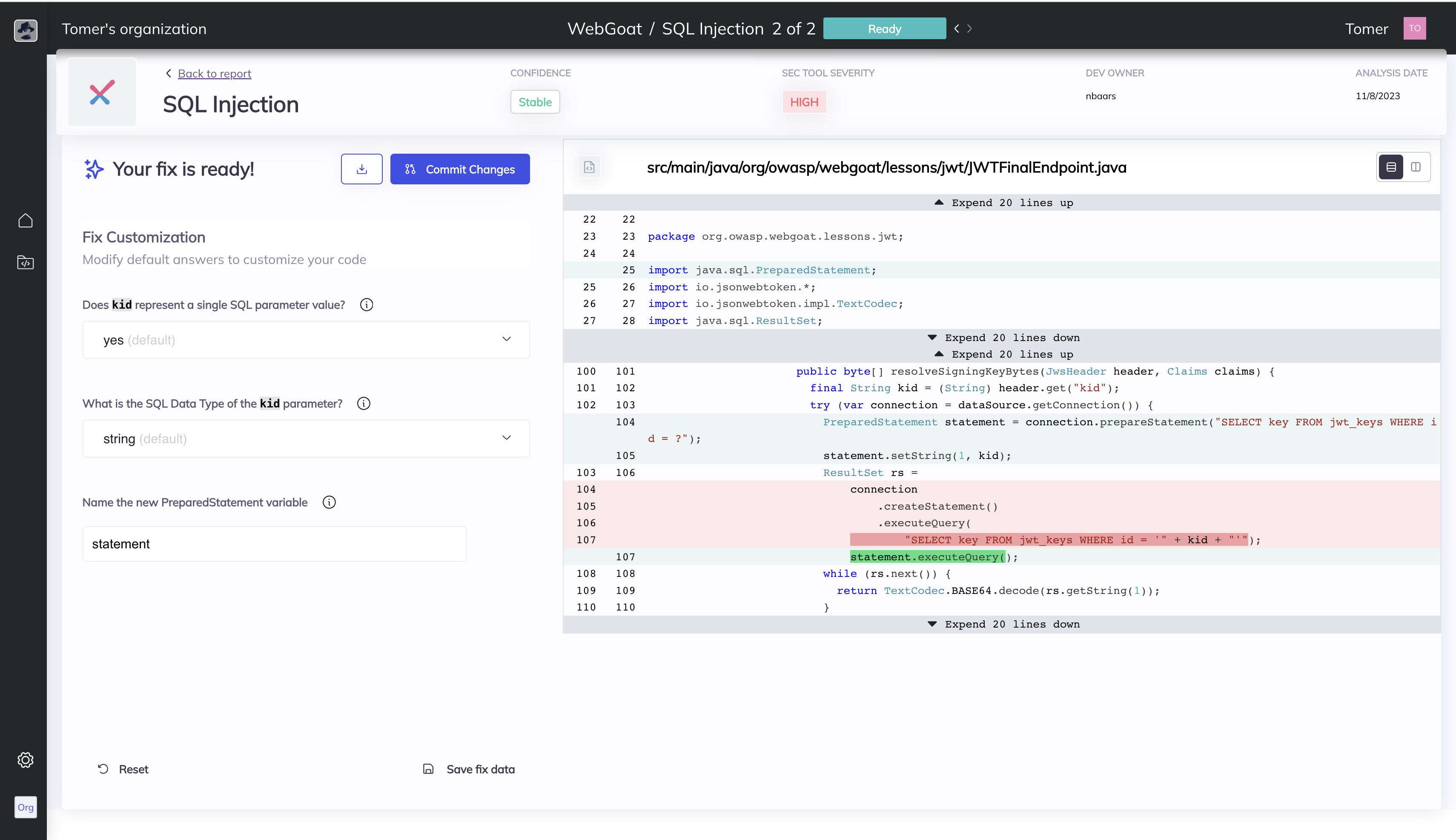 ## What is [Mobb](https://mobb.ai)?
[Mobb](https://mobb.ai) is the first vendor-agnostic automatic security vulnerability remediation tool. It ingests SAST results from Checkmarx, CodeQL (GitHub Advanced Security), OpenText Fortify, and Snyk and produces code fixes for developers to review and commit to their code.
## What does Bugsy do?
Bugsy has two modes - Scan (no SAST report needed) & Analyze (the user needs to provide a pre-generated SAST report from one of the supported SAST tools).
Scan
- Uses Checkmarx or Snyk CLI tools to run a SAST scan on a given open-source GitHub/GitLab/ADO repo
- Analyzes the vulnerability report to identify issues that can be remediated automatically
- Produces the code fixes and redirects the user to the fix report page on the Mobb platform
Analyze
- Analyzes the a Checkmarx/CodeQL/Fortify/Snyk vulnerability report to identify issues that can be remediated automatically
- Produces the code fixes and redirects the user to the fix report page on the Mobb platform
## Disclaimer
This is a community edition version that only analyzes public GitHub repositories. Analyzing private repositories is allowed for a limited amount of time.
Bugsy does not detect any vulnerabilities in your code, it uses findings detected by the SAST tools mentioned above.
## Usage
### Command Line Interface
You can simply run Bugsy from the command line, using npx:
```shell
npx mobbdev
```
This will show you Bugsy's usage help:
```shell
Bugsy - Trusted, Automatic Vulnerability Fixer 🕵️♂️
Usage:
mobbdev [options]
Commands:
mobbdev scan Scan your code for vulnerabilities, get automated fixes right away.
mobbdev analyze Provide a vulnerability report and relevant code repository, get automated fixes right away.
Options:
-h, --help Show help [boolean]
Examples:
mobbdev scan -r https://github.com/WebGoat/WebGoat Scan an existing repository
Made with ❤️ by Mobb
```
To run a new SAST scan on a repo and get fixes, run the **Bugsy Scan** command. Example:
```shell
npx mobbdev scan --repo https://github.com/mobb-dev/simple-vulnerable-java-project
```
To get fixes for a pre-generated SAST report, run the **Bugsy Analyze** command. Example:
npx mobbdev analyze --scan-file sast_results.json --repo https://github.com/mobb-dev/simple-vulnerable-java-project
Bugsy will automatically generate a fix for each supported vulnerability identified in the results, and refer the developer to review and commit the fixes to their code.
To see all the options Bugsy allows, use the Scan or Analyze commands with the -h option:
```shell
npx mobbdev scan -h
npx mobbdev analyze -h
```
### Model Context Protocol (MCP) Server
Bugsy can also be used as an MCP server, allowing AI assistants like Claude to automatically scan and fix vulnerabilities in your code repositories.
#### Prerequisites
1. **API Key**: You need a Mobb API key to use the MCP server functionality
- Sign up at [mobb.ai](https://app.mobb.ai) to get your API key
- Set the `API_KEY` environment variable: `export API_KEY=your_api_key_here`
2. **Local Git Repository**: The MCP server analyzes git repositories with uncommitted changes
- Make sure your code is in a local git repository
- Have some modified, added, or staged files to analyze
#### Installation
Run mobb-mcp from command line:
```shell
npx mobbdev mcp
```
#### Configuration
Add Mobb MCP to your Cursor MCP client configuration:
`API_URL` is only required if you are not using https://app.mobb.ai
```json
{
"mcpServers": {
"mobb-mcp": {
"command": "npx",
"args": ["mobbdev", "mcp"],
"env": {
"API_KEY": "your_mobb_api_key_here",
"API_URL": "optional__your_mobb_api_url_here",
"MVS_AUTO_FIX": "true"
}
}
}
}
```
**Environment Variables:**
- `API_KEY`: Your Mobb API key (required)
- `API_URL`: Custom Mobb API URL (optional, defaults to https://app.mobb.ai)
- `MVS_AUTO_FIX`: Override auto-fix setting - set to `"true"` or `"false"` to force enable/disable automatic fix application regardless of user's database setting (optional)
#### Usage
Once configured, you can use the MCP server through your AI assistant:
1. **Ask Claude to scan for vulnerabilities**:
```
run a scan with mobb-mcp
```
or
```
run fix-vulnerabilities mcp tool
```
2. **The MCP server will**:
- Validate the repository path
- Check for git changes (modified, added, or staged files)
- Upload the changed files for analysis
- Generate automated fixes for detected vulnerabilities
- Return detailed fix recommendations
#### Available MCP Tools
- **`fix_vulnerabilities`**: Scans the current code changes and returns fixes for potential vulnerabilities
- **Parameter**: `path` (string) - The path to the local git repository
- **Returns**: Detailed vulnerability fixes with code patches and explanations
#### Example MCP Workflow
1. Make changes to your code
2. Stage or modify files in git
3. Ask your AI assistant: "Can you check my code for security vulnerabilities?"
4. The assistant will use the MCP server to analyze your changes
5. Receive detailed fix recommendations with code patches
#### Troubleshooting
- **"API_KEY environment variable is not set"**: Make sure you've set your Mobb API key
- **"Path is not a valid git repository"**: Ensure you're pointing to a valid git repository
- **"No changed files found"**: Make sure you have modified, added, or staged files in your repository
## Using Bugsy as part of a CI/CD pipeline
If you utilize SAST scans as part of the CI/CD pipeline, Bugsy can be easiy added and provide immediate fix for every issue detected.
Here is a simple example of a command line that will run Bugsy in your pipeline:
```shell
npx mobbdev analyze --ci --scan-file $SAST_RESULTS_FILENAME --repo $CI_PROJECT_URL --ref $CI_COMMIT_REF_NAME --api-key $MOBB_API_KEY
```
### Polling Mode
By default, Bugsy uses WebSocket connections for real-time status updates during analysis. However, some proxy environments or firewalls may block WebSocket connections. In these cases, you can use the `--polling` flag to use HTTP polling instead:
```shell
npx mobbdev analyze --scan-file report.json --repo https://github.com/org/repo --polling
```
**When to use `--polling`:**
- Your network blocks WebSocket connections (ws:// or wss://)
- You're behind a corporate proxy that doesn't support WebSocket
- You experience connection timeouts with the default WebSocket mode
**Polling characteristics:**
- Polling interval: 5 seconds
- Timeout: 30 minutes
- Slightly higher latency compared to WebSocket mode, but works in restricted environments
## Contribution
Install the dependencies and run the tests:
```shell
pnpm install
# or use npm run build:dev to watch for changes
pnpm run build
# or use npm test:watch to watch for changes
pnpm run test
```
### Debugging
If you're using VSCode, you can use the `launch.json` file to debug the code. Run the `CLI tests` configuration to continuously run and debug the tests.
## Getting support
If you need support using Bugsy or just want to share your thoughts and learn more, you are more than welcome to join our [discord server](https://bit.ly/Mobb-discord)
## What is [Mobb](https://mobb.ai)?
[Mobb](https://mobb.ai) is the first vendor-agnostic automatic security vulnerability remediation tool. It ingests SAST results from Checkmarx, CodeQL (GitHub Advanced Security), OpenText Fortify, and Snyk and produces code fixes for developers to review and commit to their code.
## What does Bugsy do?
Bugsy has two modes - Scan (no SAST report needed) & Analyze (the user needs to provide a pre-generated SAST report from one of the supported SAST tools).
Scan
- Uses Checkmarx or Snyk CLI tools to run a SAST scan on a given open-source GitHub/GitLab/ADO repo
- Analyzes the vulnerability report to identify issues that can be remediated automatically
- Produces the code fixes and redirects the user to the fix report page on the Mobb platform
Analyze
- Analyzes the a Checkmarx/CodeQL/Fortify/Snyk vulnerability report to identify issues that can be remediated automatically
- Produces the code fixes and redirects the user to the fix report page on the Mobb platform
## Disclaimer
This is a community edition version that only analyzes public GitHub repositories. Analyzing private repositories is allowed for a limited amount of time.
Bugsy does not detect any vulnerabilities in your code, it uses findings detected by the SAST tools mentioned above.
## Usage
### Command Line Interface
You can simply run Bugsy from the command line, using npx:
```shell
npx mobbdev
```
This will show you Bugsy's usage help:
```shell
Bugsy - Trusted, Automatic Vulnerability Fixer 🕵️♂️
Usage:
mobbdev [options]
Commands:
mobbdev scan Scan your code for vulnerabilities, get automated fixes right away.
mobbdev analyze Provide a vulnerability report and relevant code repository, get automated fixes right away.
Options:
-h, --help Show help [boolean]
Examples:
mobbdev scan -r https://github.com/WebGoat/WebGoat Scan an existing repository
Made with ❤️ by Mobb
```
To run a new SAST scan on a repo and get fixes, run the **Bugsy Scan** command. Example:
```shell
npx mobbdev scan --repo https://github.com/mobb-dev/simple-vulnerable-java-project
```
To get fixes for a pre-generated SAST report, run the **Bugsy Analyze** command. Example:
npx mobbdev analyze --scan-file sast_results.json --repo https://github.com/mobb-dev/simple-vulnerable-java-project
Bugsy will automatically generate a fix for each supported vulnerability identified in the results, and refer the developer to review and commit the fixes to their code.
To see all the options Bugsy allows, use the Scan or Analyze commands with the -h option:
```shell
npx mobbdev scan -h
npx mobbdev analyze -h
```
### Model Context Protocol (MCP) Server
Bugsy can also be used as an MCP server, allowing AI assistants like Claude to automatically scan and fix vulnerabilities in your code repositories.
#### Prerequisites
1. **API Key**: You need a Mobb API key to use the MCP server functionality
- Sign up at [mobb.ai](https://app.mobb.ai) to get your API key
- Set the `API_KEY` environment variable: `export API_KEY=your_api_key_here`
2. **Local Git Repository**: The MCP server analyzes git repositories with uncommitted changes
- Make sure your code is in a local git repository
- Have some modified, added, or staged files to analyze
#### Installation
Run mobb-mcp from command line:
```shell
npx mobbdev mcp
```
#### Configuration
Add Mobb MCP to your Cursor MCP client configuration:
`API_URL` is only required if you are not using https://app.mobb.ai
```json
{
"mcpServers": {
"mobb-mcp": {
"command": "npx",
"args": ["mobbdev", "mcp"],
"env": {
"API_KEY": "your_mobb_api_key_here",
"API_URL": "optional__your_mobb_api_url_here",
"MVS_AUTO_FIX": "true"
}
}
}
}
```
**Environment Variables:**
- `API_KEY`: Your Mobb API key (required)
- `API_URL`: Custom Mobb API URL (optional, defaults to https://app.mobb.ai)
- `MVS_AUTO_FIX`: Override auto-fix setting - set to `"true"` or `"false"` to force enable/disable automatic fix application regardless of user's database setting (optional)
#### Usage
Once configured, you can use the MCP server through your AI assistant:
1. **Ask Claude to scan for vulnerabilities**:
```
run a scan with mobb-mcp
```
or
```
run fix-vulnerabilities mcp tool
```
2. **The MCP server will**:
- Validate the repository path
- Check for git changes (modified, added, or staged files)
- Upload the changed files for analysis
- Generate automated fixes for detected vulnerabilities
- Return detailed fix recommendations
#### Available MCP Tools
- **`fix_vulnerabilities`**: Scans the current code changes and returns fixes for potential vulnerabilities
- **Parameter**: `path` (string) - The path to the local git repository
- **Returns**: Detailed vulnerability fixes with code patches and explanations
#### Example MCP Workflow
1. Make changes to your code
2. Stage or modify files in git
3. Ask your AI assistant: "Can you check my code for security vulnerabilities?"
4. The assistant will use the MCP server to analyze your changes
5. Receive detailed fix recommendations with code patches
#### Troubleshooting
- **"API_KEY environment variable is not set"**: Make sure you've set your Mobb API key
- **"Path is not a valid git repository"**: Ensure you're pointing to a valid git repository
- **"No changed files found"**: Make sure you have modified, added, or staged files in your repository
## Using Bugsy as part of a CI/CD pipeline
If you utilize SAST scans as part of the CI/CD pipeline, Bugsy can be easiy added and provide immediate fix for every issue detected.
Here is a simple example of a command line that will run Bugsy in your pipeline:
```shell
npx mobbdev analyze --ci --scan-file $SAST_RESULTS_FILENAME --repo $CI_PROJECT_URL --ref $CI_COMMIT_REF_NAME --api-key $MOBB_API_KEY
```
### Polling Mode
By default, Bugsy uses WebSocket connections for real-time status updates during analysis. However, some proxy environments or firewalls may block WebSocket connections. In these cases, you can use the `--polling` flag to use HTTP polling instead:
```shell
npx mobbdev analyze --scan-file report.json --repo https://github.com/org/repo --polling
```
**When to use `--polling`:**
- Your network blocks WebSocket connections (ws:// or wss://)
- You're behind a corporate proxy that doesn't support WebSocket
- You experience connection timeouts with the default WebSocket mode
**Polling characteristics:**
- Polling interval: 5 seconds
- Timeout: 30 minutes
- Slightly higher latency compared to WebSocket mode, but works in restricted environments
## Contribution
Install the dependencies and run the tests:
```shell
pnpm install
# or use npm run build:dev to watch for changes
pnpm run build
# or use npm test:watch to watch for changes
pnpm run test
```
### Debugging
If you're using VSCode, you can use the `launch.json` file to debug the code. Run the `CLI tests` configuration to continuously run and debug the tests.
## Getting support
If you need support using Bugsy or just want to share your thoughts and learn more, you are more than welcome to join our [discord server](https://bit.ly/Mobb-discord)