# 🤖 AnyModelBot
AnyModelBot is a team of AI bots for Windows, macOS, and Linux, running on your computer. Each bot has its own persona, default model, workspace, and memory. You can chat in the app, or connect WeChat, Feishu, Telegram, Slack, or Discord. It can read and write files, run commands, and operate the desktop after you grant permission; it asks before writing outside its workspace.
Conversations, memory, files, and API keys stay on your device. Models can come from [Modelflare](https://modelflare.dev/?utm_source=anymodelbot&utm_campaign=amb_readme) (sign in, pay as you go) or from your own official API keys, sent directly to the provider. AnyModelBot itself has no subscription fee.
Ready to use after install: background tasks, scheduled rules, and items waiting for your OK are built in.
**0.1.49:** Added Traditional Chinese (Taiwan). Select 繁體中文(台灣) in Settings → General → Language, or follow the system language. [Changelog](./CHANGELOG_en.md#0149---2026-11-26)
📥 [Download](#-download-and-run) · 🌠 [Screenshots](#-screenshots) · 🌟 [Features](#-key-features) · 🆚 [Compare](#-anymodelbot-vs-grok-bot-openai-dots-and-claude-duet) · 🔐 [Privacy](#-how-it-works--privacy)
⭐ Like AnyModelBot? Star the repo to follow new releases.
---
The easiest way to get models is **[Modelflare](https://modelflare.dev/?utm_source=anymodelbot&utm_campaign=amb_readme)**: sign in and use models, with no separate key to request from each provider (to go straight to a provider, see [Any model](#-any-model-through-modelflare-or-official-apis)). Available models, prices, and current offers are on [Modelflare](https://modelflare.dev/?utm_source=anymodelbot&utm_campaign=amb_readme) and the [price list](https://modelflare.dev/pricing?utm_source=anymodelbot&utm_campaign=amb_readme).
**Bot credits**: new accounts get Bot credits when they sign up, and Modelflare subscriptions add Bot credits worth 10% of the plan; see Modelflare's site for the current terms. Bot credits are usable only in AnyModelBot. Requests from the app use them first, and Settings → Models shows how much is left.
**[Sign up for Modelflare →](https://modelflare.dev/sign-up?utm_source=anymodelbot&utm_campaign=amb_readme)** ·
[Price list](https://modelflare.dev/pricing?utm_source=anymodelbot&utm_campaign=amb_readme) ·
[API docs](https://docs.modelflare.dev/?utm_source=anymodelbot&utm_campaign=amb_readme) ·
[Trust Center](https://modelflare.dev/trust?utm_source=anymodelbot&utm_campaign=amb_readme) ·
[X](https://x.com/modelflare_dev)
**How AnyModelBot uses Modelflare**
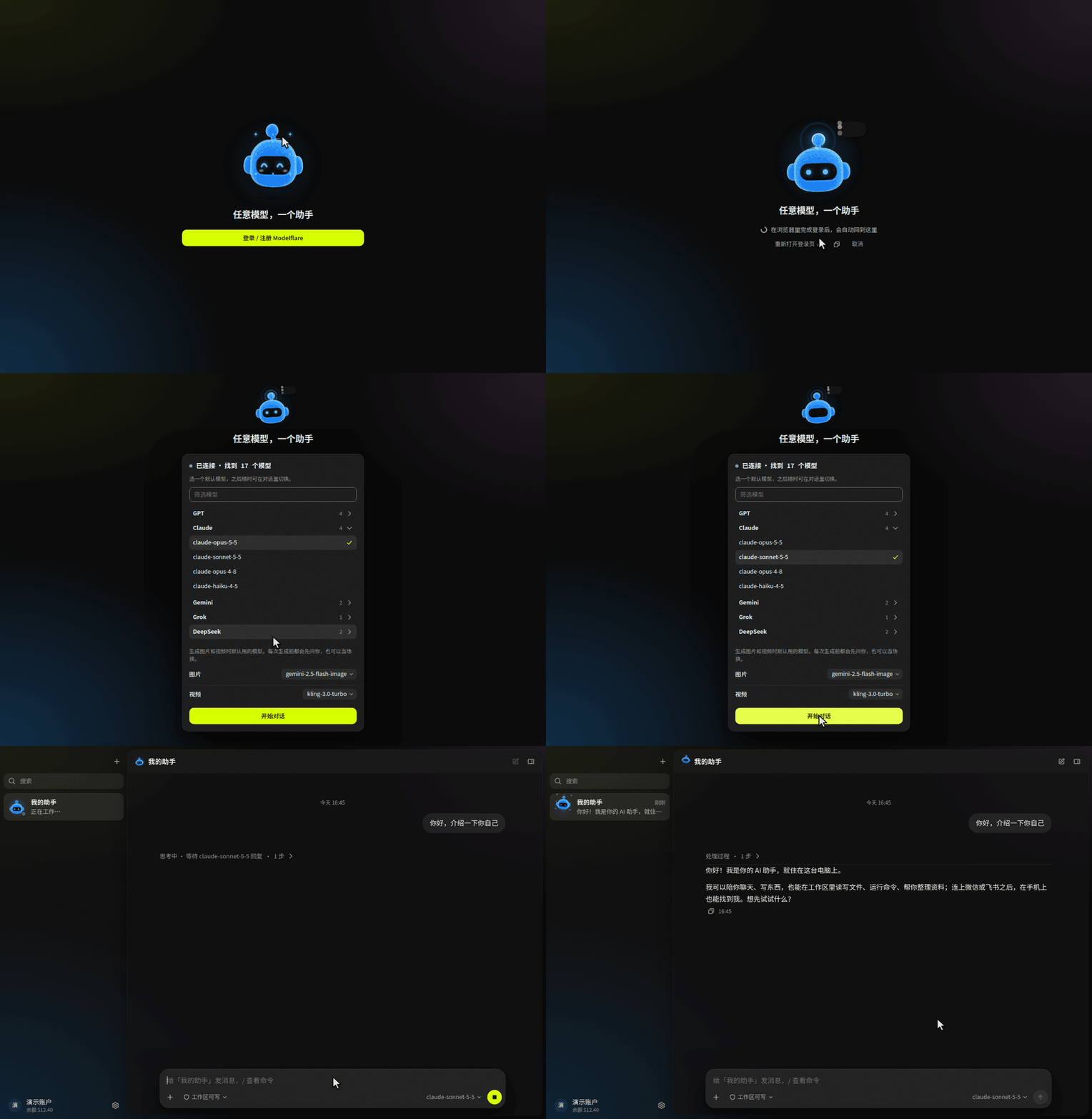
- **Sign in once.** The first launch opens your browser to sign in to (or sign up for) Modelflare. The app then connects this device itself, so there is no key to copy, and brings you back once you approve. If you have no default model yet, it picks a low-cost model that supports tools. Running in Docker or on a server? Sign in from a browser on any device, then paste the link you land on back into the app.
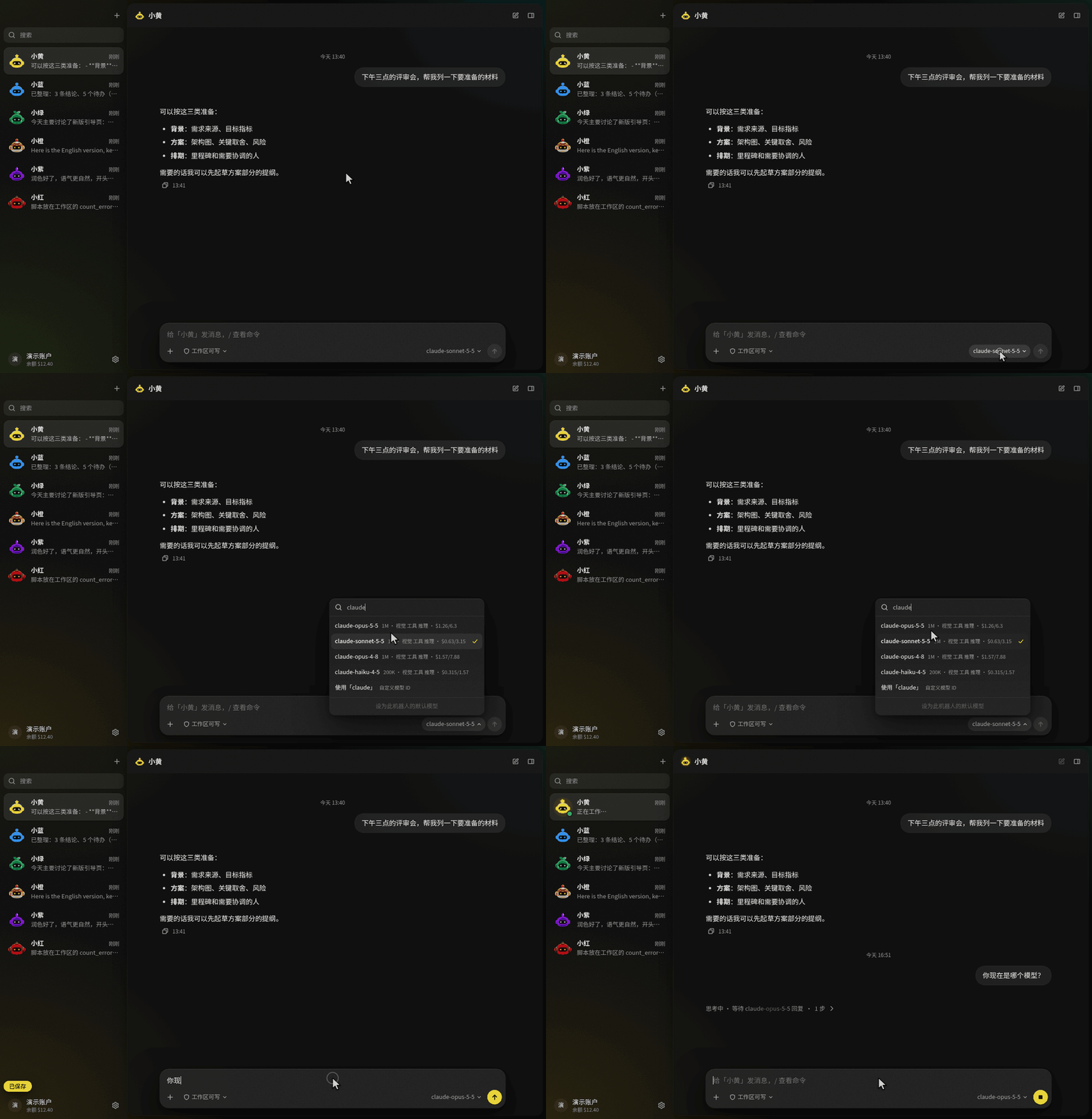
- **Every model, one picker.** Your Modelflare models are listed automatically, with context length, capabilities and reference prices next to each one.
- **Pay for what you use.** Your balance and Top up link are in Settings → Models (along with the remaining Bot credits and percentage, if available), and low-balance reminders and per-day usage show up inside the app. Check the public price list and compare it with the official rates before you choose a model.
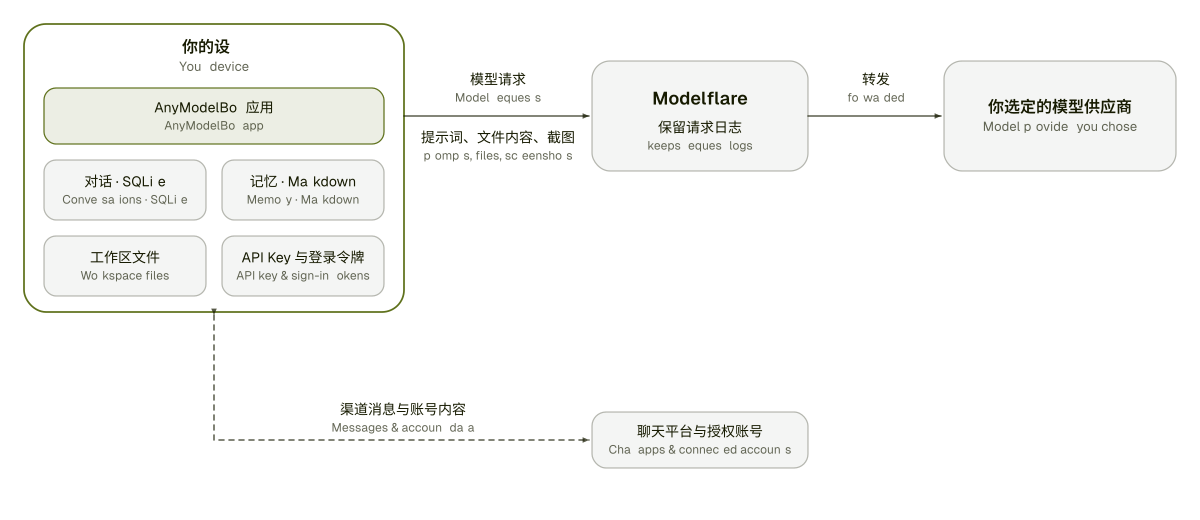
- **An honest boundary.** Model requests travel through Modelflare to the provider you pick, and Modelflare keeps request logs. See the [Trust Center](https://modelflare.dev/trust?utm_source=anymodelbot&utm_campaign=amb_readme) for what is kept and for how long. Everything else stays on your device ([details](#-how-it-works--privacy)).
---
# 📥 Download and run
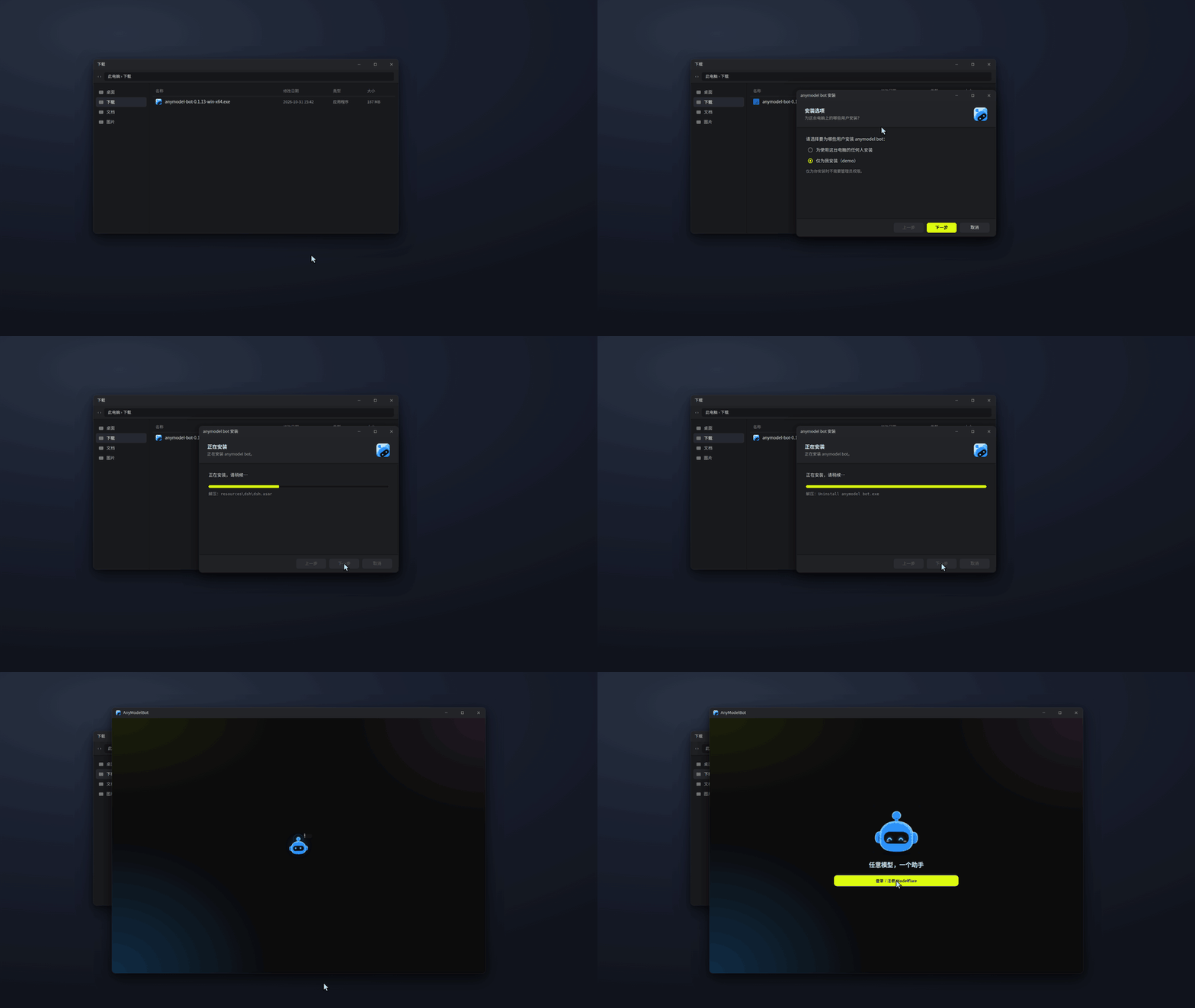
Pick your platform. Every release page lists all installers and a `SHA256SUMS` file.
| Platform | Architecture | Installer | |
| :--- | :--- | :--- | :--- |
| ![Windows][win-badge] | x64 | `anymodel-bot--win-x64.exe` | [Download][releases-link] |
| ![Windows][win-badge] | arm64 | `anymodel-bot--win-arm64.exe` | [Download][releases-link] |
| ![macOS][mac-badge] | Apple silicon | `anymodel-bot--mac-arm64.dmg` | [Download][releases-link] |
| ![macOS][mac-badge] | Intel | `anymodel-bot--mac-x64.dmg` | [Download][releases-link] |
| ![Linux][linux-badge] | x64 | `anymodel-bot--linux-x86_64.AppImage` | [Download][releases-link] |
| ![Linux][linux-badge] | arm64 | `anymodel-bot--linux-arm64.AppImage` | [Download][releases-link] |
**First launch.** If Windows shows a security warning, choose *More info → Run anyway*. The macOS app is Developer ID signed and notarized by Apple: drag it to Applications, launch it, and choose Open if prompted to confirm an internet download. On Linux, mark the AppImage as executable (`chmod +x`) and run it. Closing the window hides AnyModelBot to the tray; quit from the tray menu or from Settings.
**Verify a download.**
```bash
sha256sum -c SHA256SUMS --ignore-missing
```
On macOS use `shasum -a 256 `; in Windows PowerShell use `Get-FileHash `. Compare the result with the line in `SHA256SUMS`.
**Run it in Docker on a NAS or server** (the image covers both x64 and arm64)
```bash
docker run -d --name amb -p 3600:3600 -v amb-data:/data ghcr.io/modelflare-ai/anymodel-bot
docker exec amb cat /data/ui-token # then open http://:3600/?token=
```
Don't expose port 3600 directly to the internet.
**Run from source**
```bash
git clone https://github.com/modelflare-ai/AnyModelBot.git
cd AnyModelBot
npm install
npm run setup # fetches and builds the bundled gateway
npm start # opens the local console at http://127.0.0.1:3600/ (first time: use the link with the token it prints)
```
Requirements for building from source: Node.js 22.13+ and Go 1.26.8+. To build the Docker image yourself, see the [development guide](./docs/development_en.md).
# 🌠 Screenshots
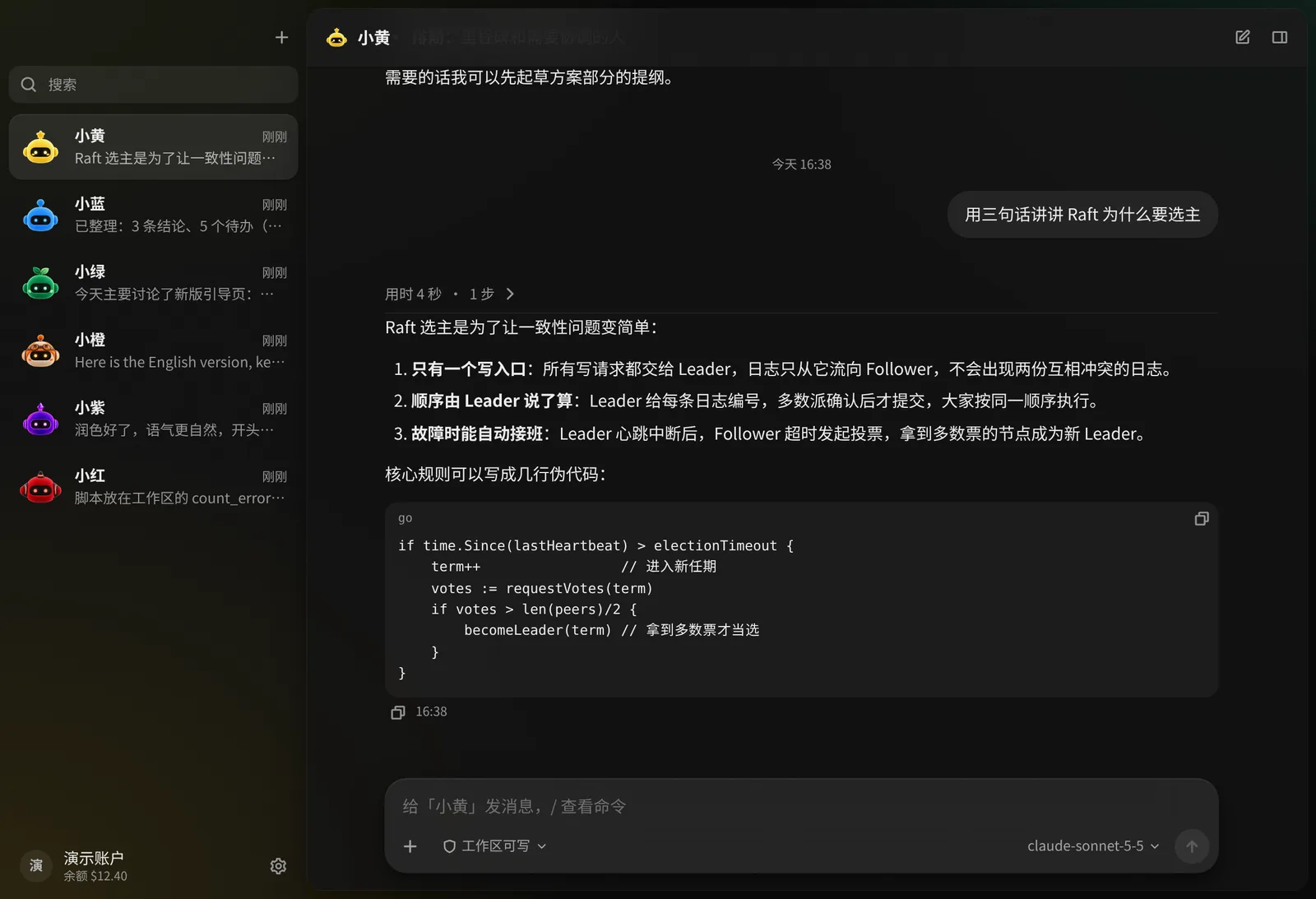
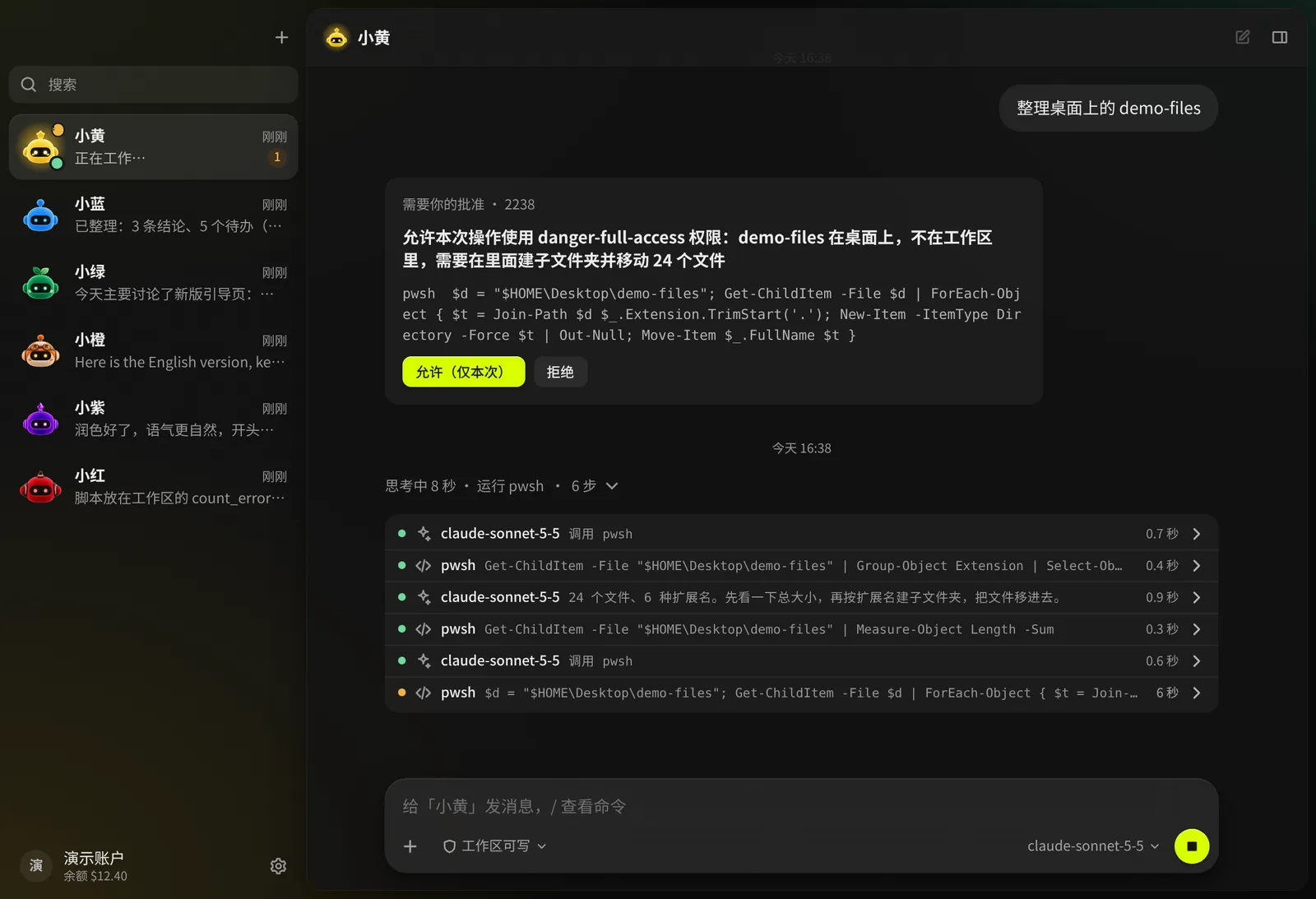
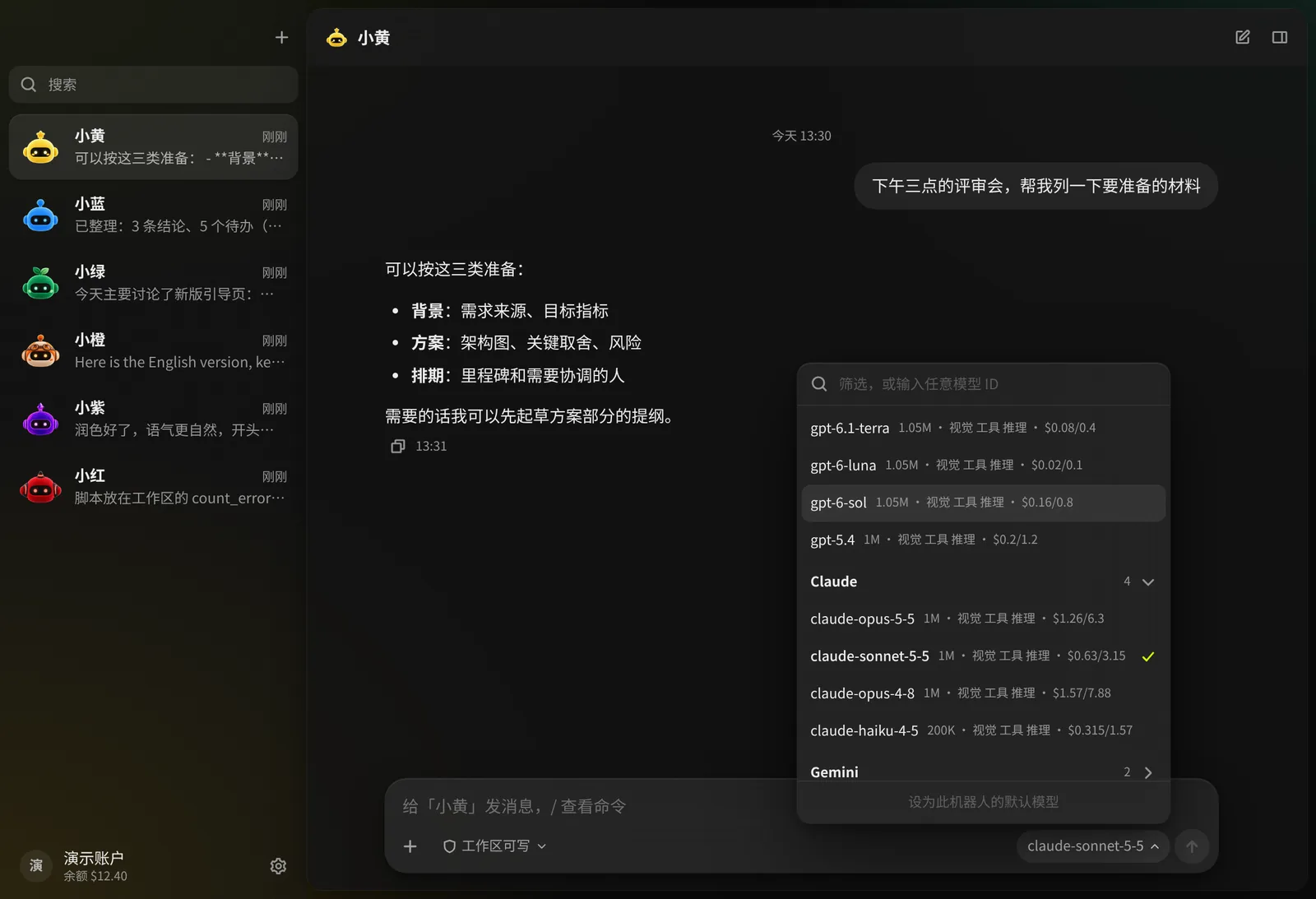
These screenshots show the Simplified Chinese interface. The app also supports Traditional Chinese (Taiwan), English, Japanese, Korean, Russian, Spanish, Portuguese (Brazil) and Turkish; switch in Settings.
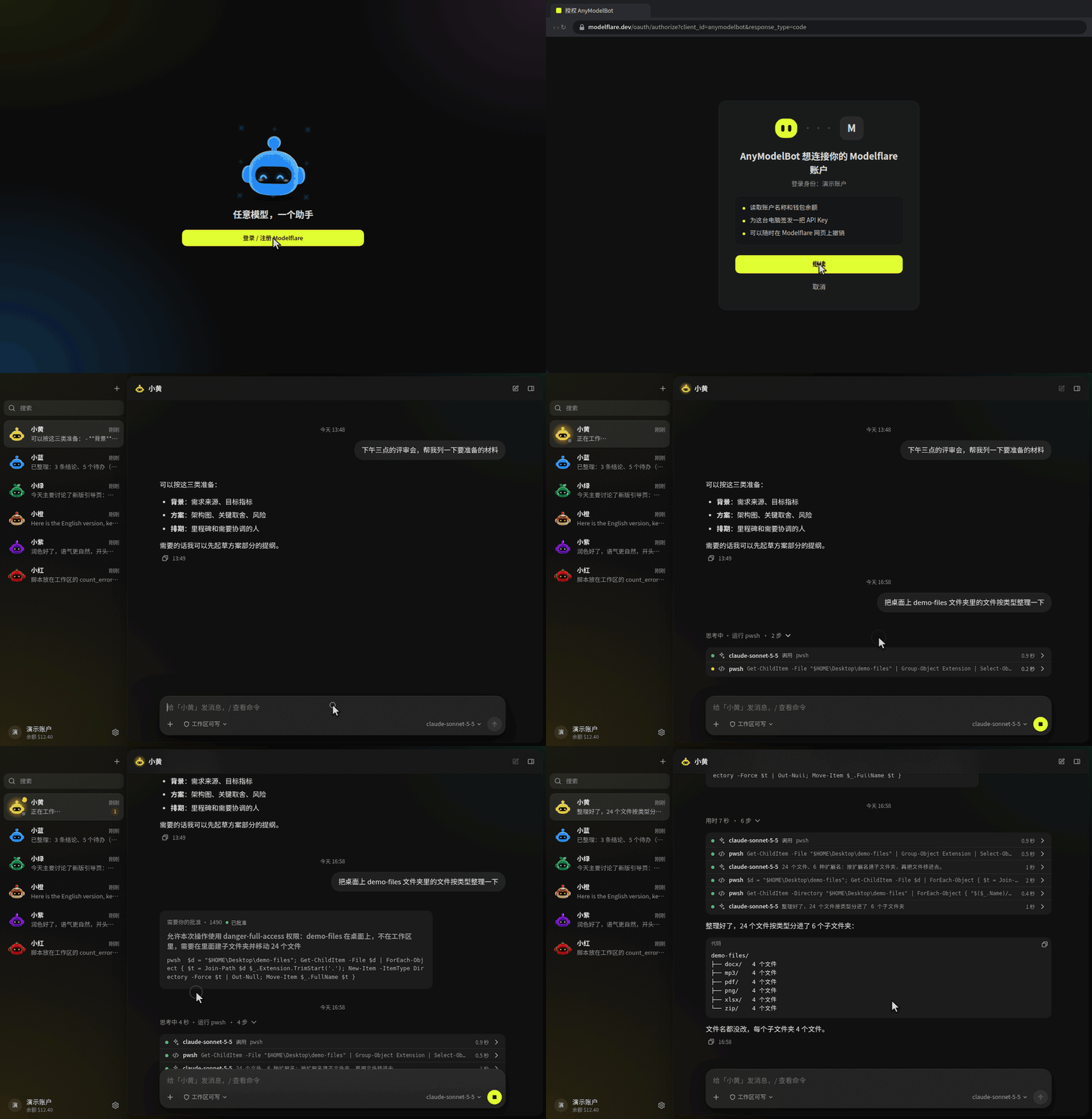
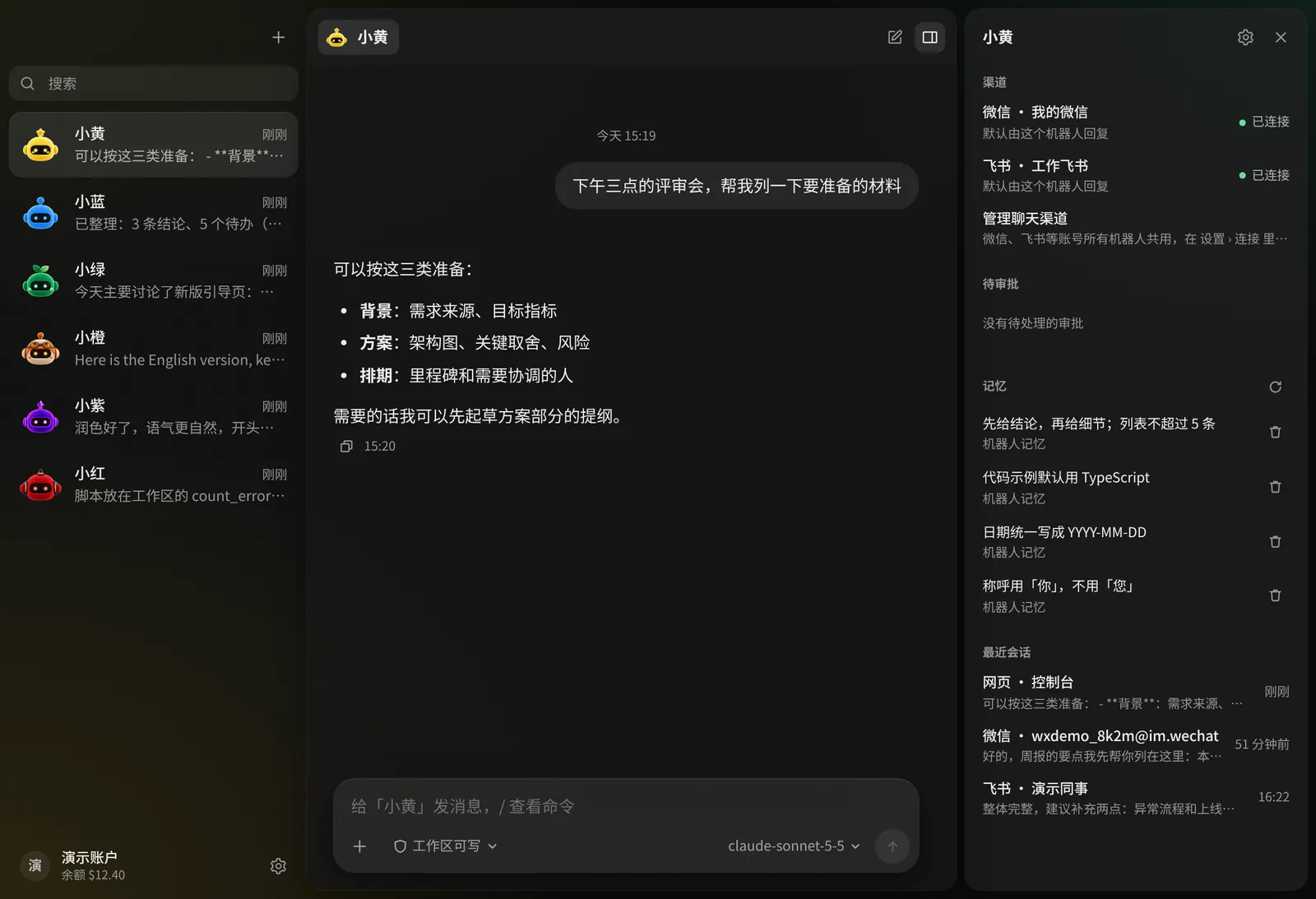
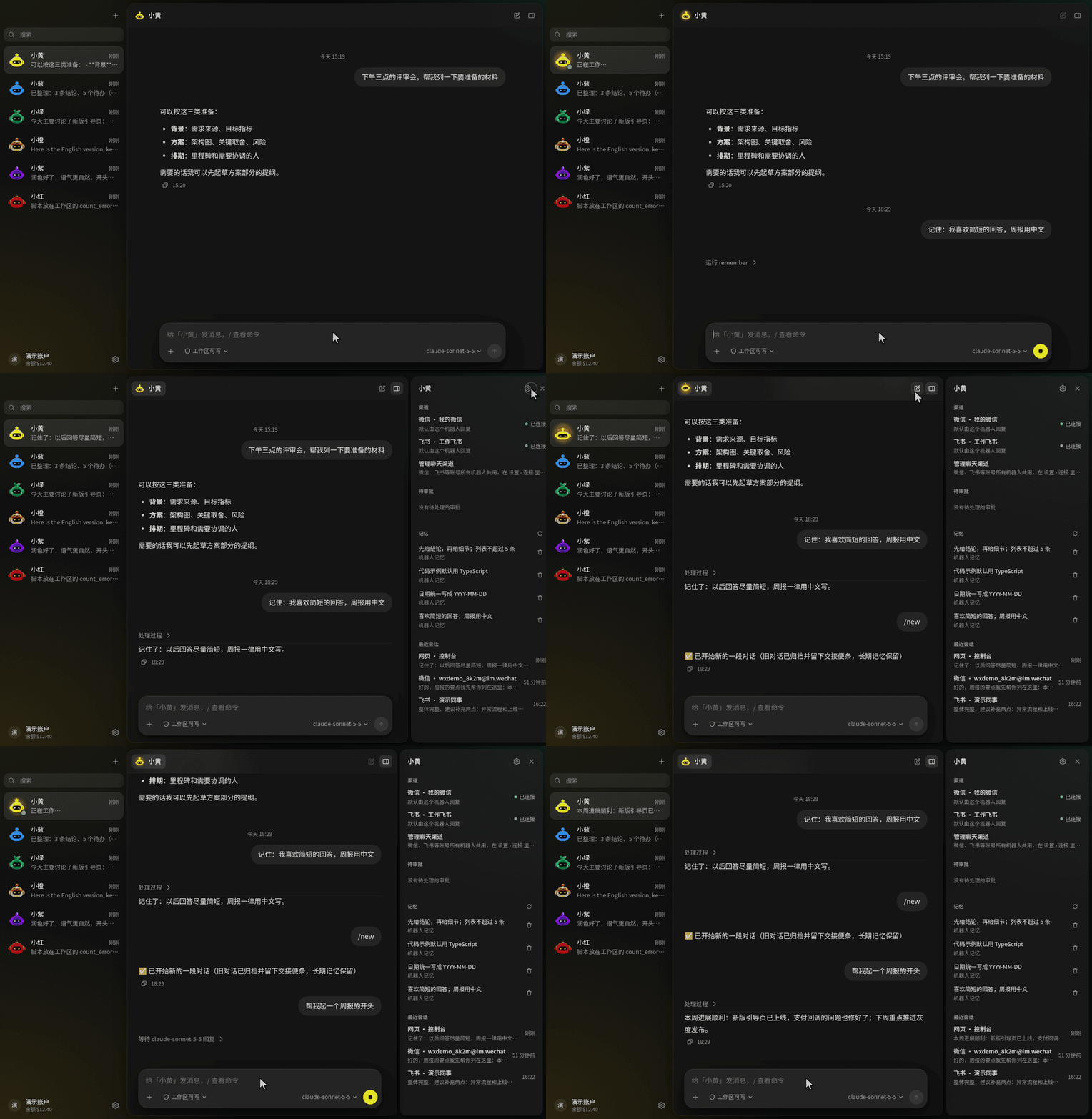
Chat with a bot. Replies render Markdown and code, and the composer shows which model it is using.
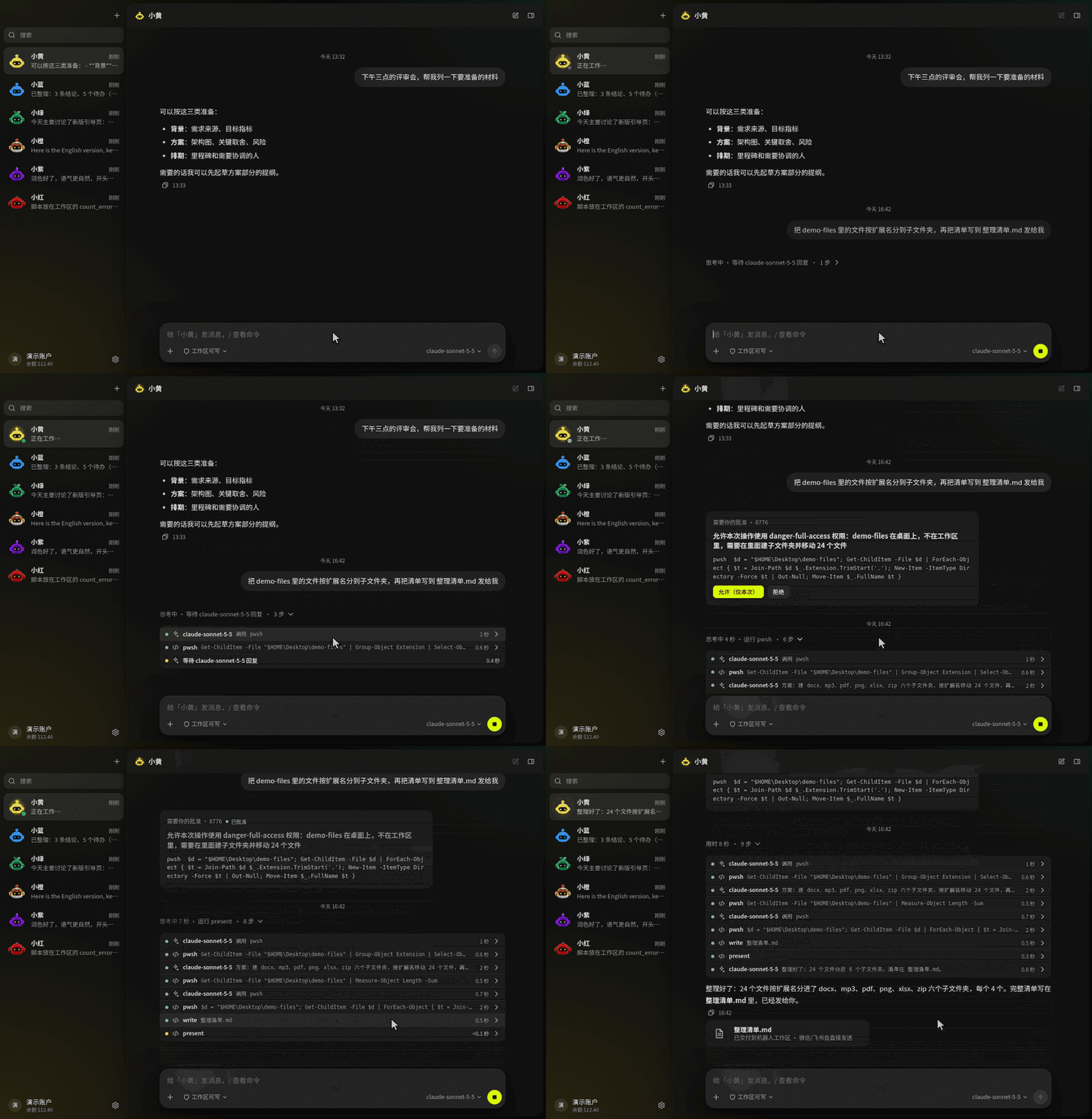
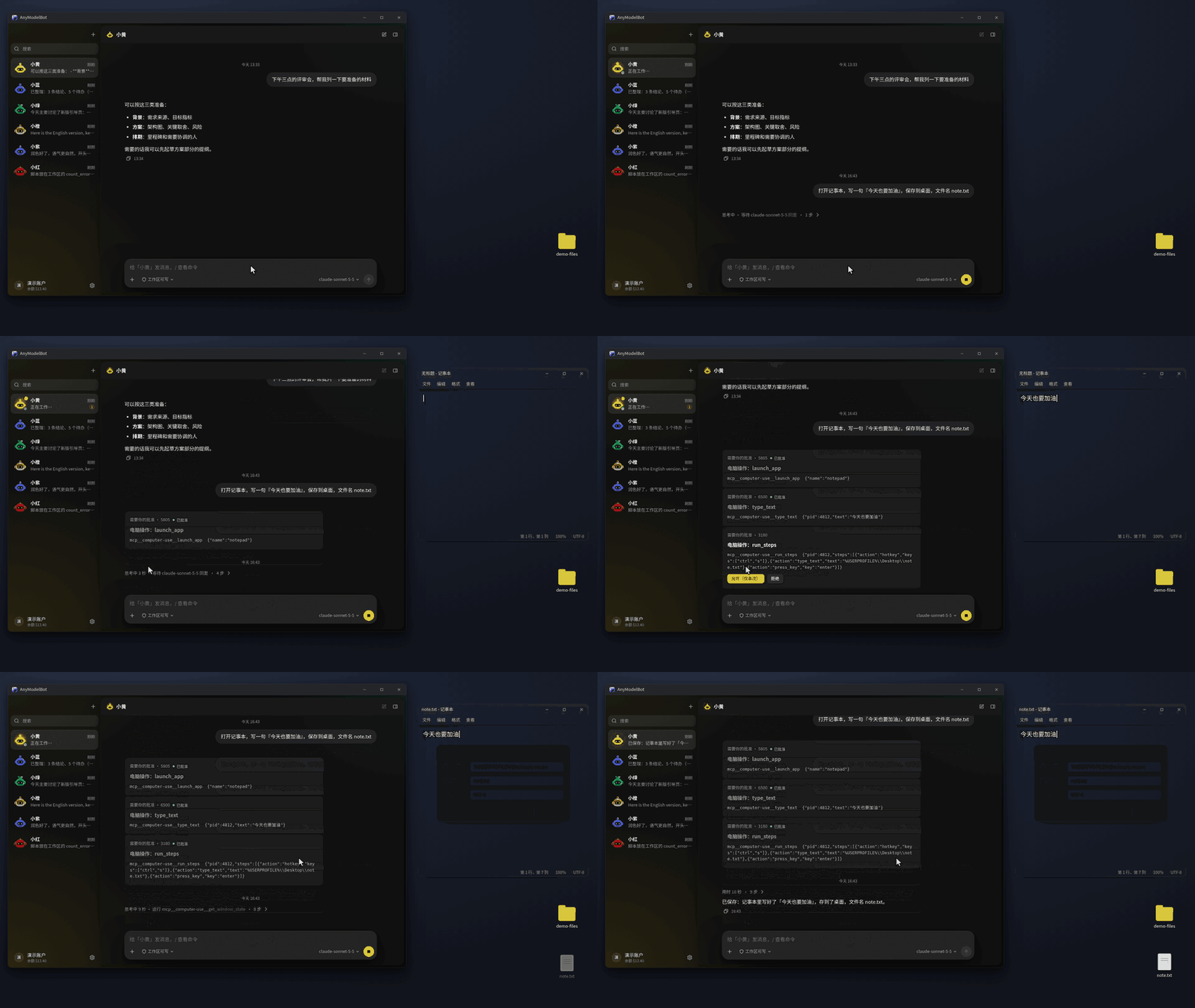
What the bot does is visible step by step. Anything outside the workspace waits for your approval.
Pick any Modelflare model per conversation. Context length, capabilities and reference prices sit next to each one.
Memory, channels and sessions for each bot, in one panel.
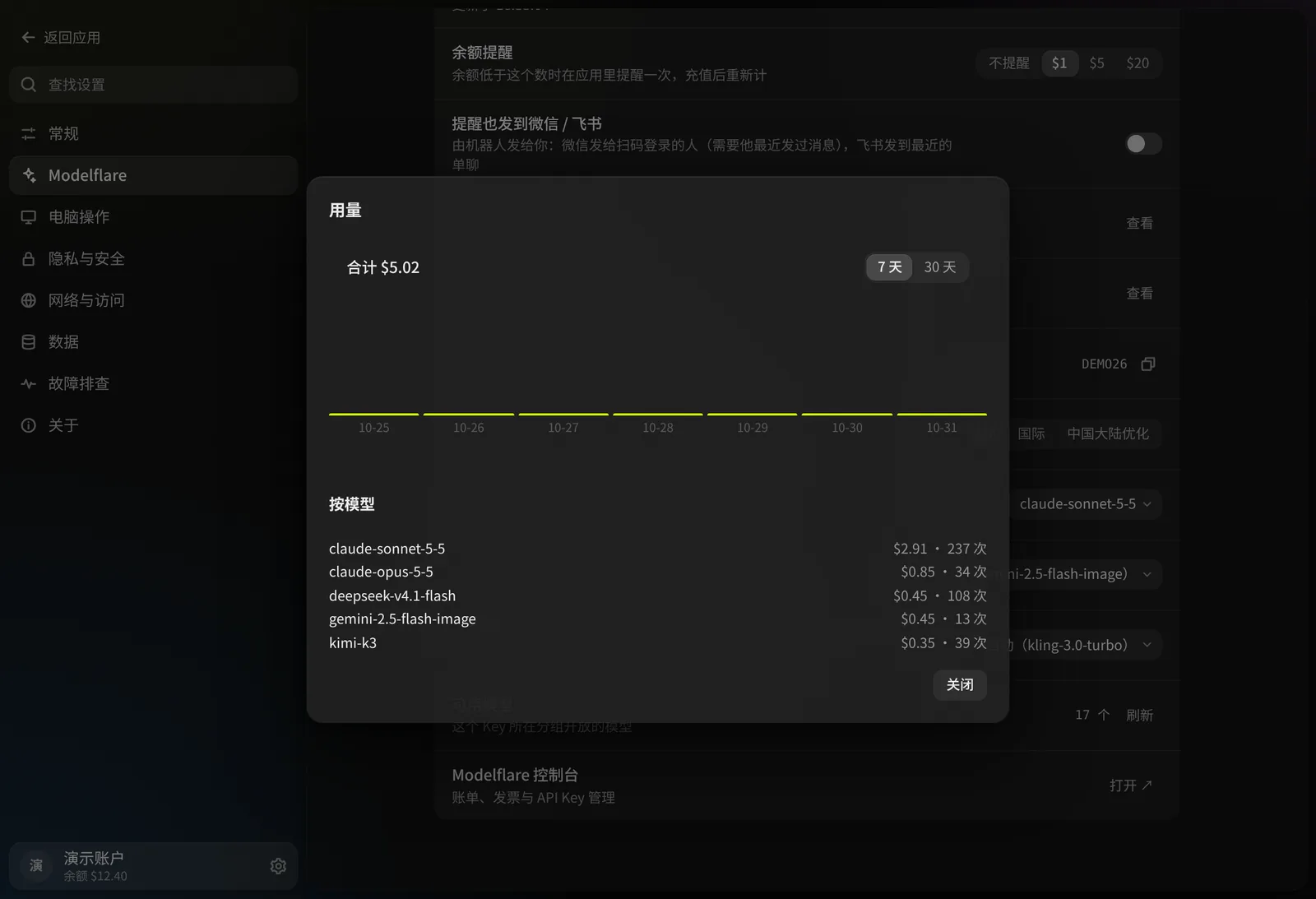
Your Modelflare account inside the app: balance, usage and defaults.
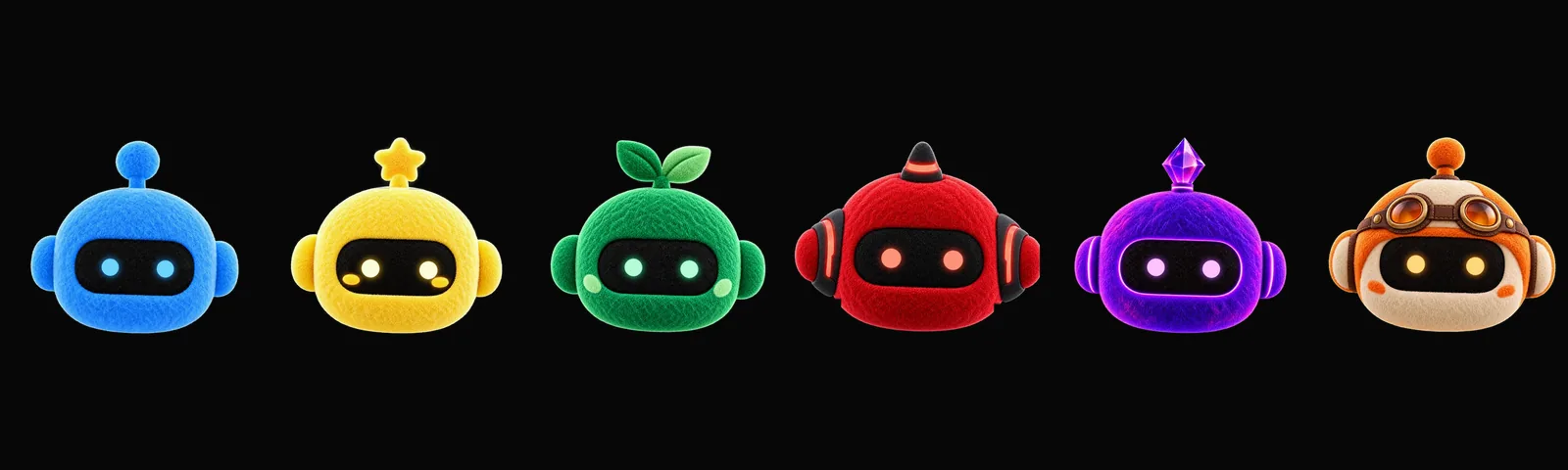
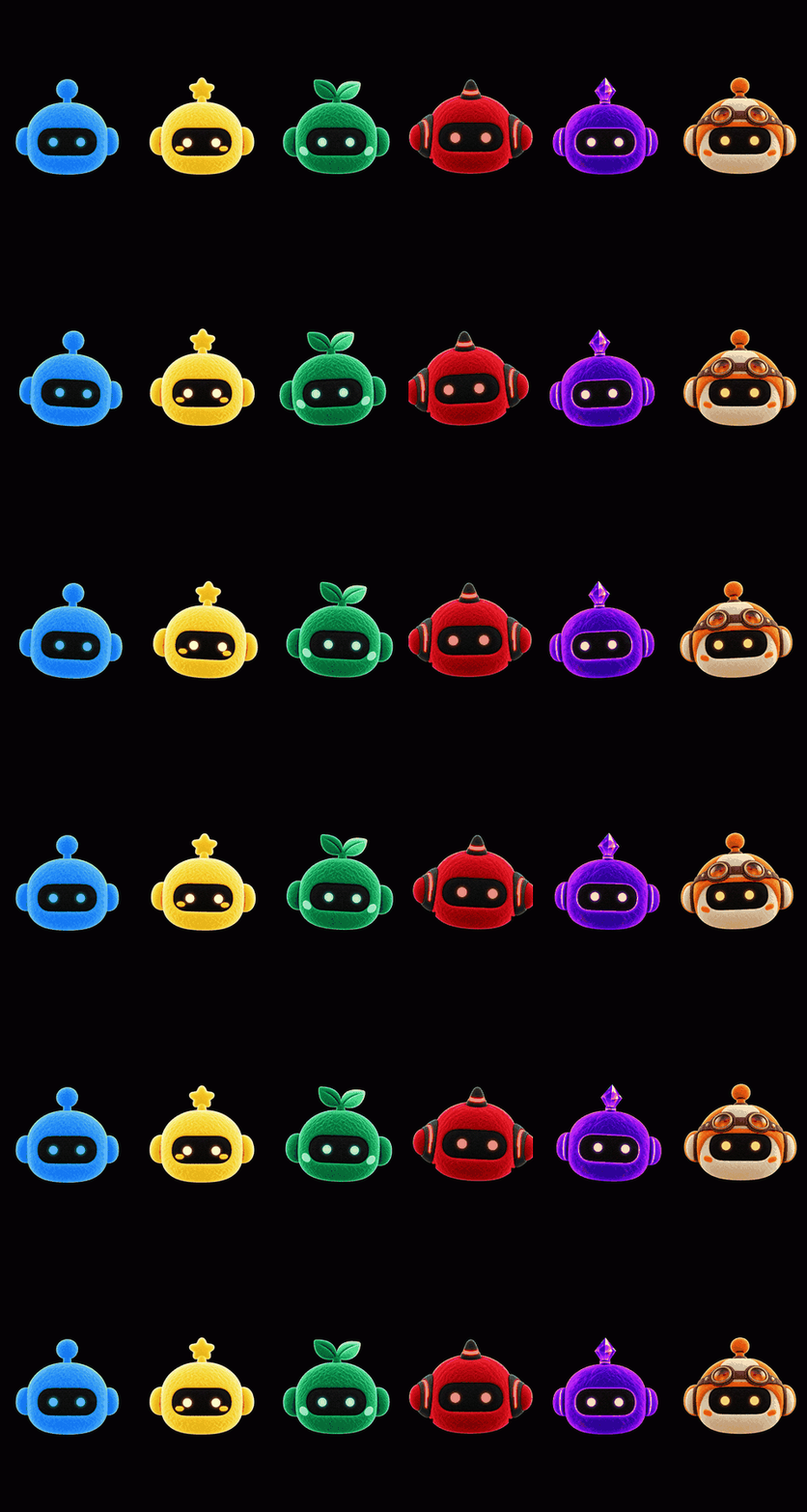
Six characters to tell your bots apart. Their eyes follow your pointer.
# 🌟 Key Features
## 🤖 Bots that do the work
A bot is more than a chat window: it has a persona, a default model, its own workspace and its own memory.
- **As many as you need**, each with its own persona, model, workspace and avatar.
- **You define each bot.** A persona is just text, and templates are only a starting point. The six avatars change how a bot looks, not what it can do.
- **Real file work.** Bots read and write files, run commands in a sandbox, and send the results back to the chat as files.
- **Three permission presets per bot.** *Read-only*, *Workspace* (the default: write inside the bot's own folder; it asks before writing outside its workspace) and *Full access* (no sandbox; even with full access, it asks before deleting a whole folder).
- **Skills: install, import or save your own.** Pick a skill from the library in **Apps & skills**, then send its install prompt or GitHub link to a bot and confirm the card; or import a ZIP containing `SKILL.md` in **Bot settings → Skills** (one skill per ZIP, up to 20 MB). Once a bot gets something right, say "save as skill" or send `/skill` and confirm the draft card to keep it in My skills, use it on several bots, export it as a ZIP or schedule it. Changes take effect after current work finishes. [Skill guide](./docs/skills_en.md).
- **Approval cards, not surprises.** Actions that write outside the workspace stop and wait for your answer.
- **Told after a restart.** A message still in progress when the app quit or crashed is flagged in its conversation at the next start, so you can send it again; nothing is redone on its own.
- **Group chats.** Create a group and add a few bots. Whoever you @ answers; with no @, the bot that answered last carries on. Bots can also @ another member to hand off. Each bot keeps its own model, workspace and memory, and costs are tracked per bot.
- **Bots that message each other.** In the app, tell a bot "hand this to B": B works in the background with its own model, permissions and budget and replies when done, and the first bot checks the result before telling you. B asks for approvals in the same chat under its own name, and you can read their conversation any time. Requires signing in to Modelflare, with both bots on Modelflare models.
- **Search chat history.** Search all messages saved on your device from the sidebar, filter by bot, conversation, channel or date, and jump to the original message. `Ctrl/Cmd+Shift+F` opens global search; `Ctrl/Cmd+F` searches the current chat. Searches do not call a model. Before you type, the search dialog lists recent chats by date.
- **Work folders and ZIP files.** In the desktop app, choose a folder above the message box and the bot reads and edits the files in place (with Workspace access, changes inside that folder need no approval each time); drag a ZIP into a chat and the bot extracts it safely once you say what to do.
- **Images as generation references.** Signed in to Modelflare, add images to a chat and turn on “Use as image-generation references”: the model selected at the bottom right generates a new image from them. You can also pick an image-generation model and generate from a sentence. When something blocks it, a note above the message box says why.
- **Import skills from this machine.** The desktop app finds skills that Claude Code, Codex, Cursor and similar tools installed on this computer and, after a review, imports them into My skill library in one go; the library keeps one copy of each skill and every bot decides whether to turn it on.
- **Slash commands** such as `/model` and `/reset` work in the app and in every chat channel. In a chat channel, `/bot` switches to another bot.
## 🧩 Ready-made bots
If you don't want to write a persona, use a ready-made bot from Discover. Each has its own view. Opening one shows a sample, and it's only installed when you send your first message.
Official bots include their UIs, samples, personas and skills in the installer. First preview and installation need no bot package downloads. Updates ship with app releases and preserve existing project data. Model calls and online research still need a network connection. Each bot is a desktop workspace: your work is listed on the left and the content is on the right, New starts a short guided form, the top bar switches to the full chat, and the input box has the model picker.
- **Company Research:** Company research on your computer, with sourced briefings and PDF reports.
- **PPT Master:** Turn documents or topics into editable slides, or edit decks you already have.
- **Film Studio:** Short videos and serials: script, storyboard, voice, editing, and final cut.
- **US Stock Research:** Research US-listed companies from SEC filings, with every number traceable.
Film Studio requires AnyModelBot 0.1.23 or later, Python 3.10+ and FFmpeg (including ffprobe) on your device. AI images and videos use Modelflare and are billed by usage; projects and media stay on your device.
See the [bots page on our website](https://anymodel.bot/en/bots) for details.
## ⏳ Works in the background, and comes to you only when needed
- **Background tasks.** For work that takes a while (research, a report, sorting files), or when you say "do it in the background", the bot starts a background task and you keep chatting. The result comes back to the conversation that asked for it.
- **Follow-ups.** Quote the result in WeChat, or reply to it in Feishu, to keep talking to that task.
- **Rules.** "Every morning at 8, check X's price and tell me if it drops below 200" becomes a rule that checks on schedule and tells you only when something matters. To see how it behaves first, say "observe first": it records what it would have said, and sends nothing and changes no files. Once it looks right, switch it to act.
- **Needs you.** Everything any bot is waiting on you for, an answer, an approval or a retry, sits in one sidebar row that is only there when something needs you. The info panel's Tasks group lists the bot's tasks and rules, with every step visible.
- **Quiet by default.** Only results, decisions and failures are pushed, never progress. Quiet hours are 22:00 to 08:00, and unprompted messages are capped per day (3 on WeChat, 5 on other channels), with the rest merged into one.
- **Budgets.** Every task and rule has a budget (1 US dollar per task; 0.10 per rule run and 3 a month), and work stops and asks when it runs out. Change them in the task details and the rule editor.
- **Pause anytime.** One switch in bot settings › Proactive messages pauses background work; chat carries on.
- **Cleans up after itself.** Tasks and run logs are kept for 30 days. A task folder unused for 30 days is deleted without asking; the task details show the date, and Keep holds on to it. Run logs export as Markdown.
The runtime is built on [DeepSeek Harness](https://github.com/deepseek-ai/deepseek-harness), and the design draws on DeepSeek's [super-agent prototype](https://github.com/deepseek-ai/dsh-superagent-prototype). The full story, in Chinese: [AnyModelBot 超级智能体](./docs/blog/superagent.md).
## 🖥️ Operates your computer, and makes images and video
- **Computer use** is powered by the bundled [Cua Driver](https://github.com/trycua/cua). By default, actions run automatically. Switch a bot to *ask before changing the screen* and every click and keystroke waits for you. Reading the screen never needs approval. On macOS, computer use is a Beta feature: Accessibility and Screen Recording permissions are requested only when a bot first needs them, and the chat explains which one is missing.
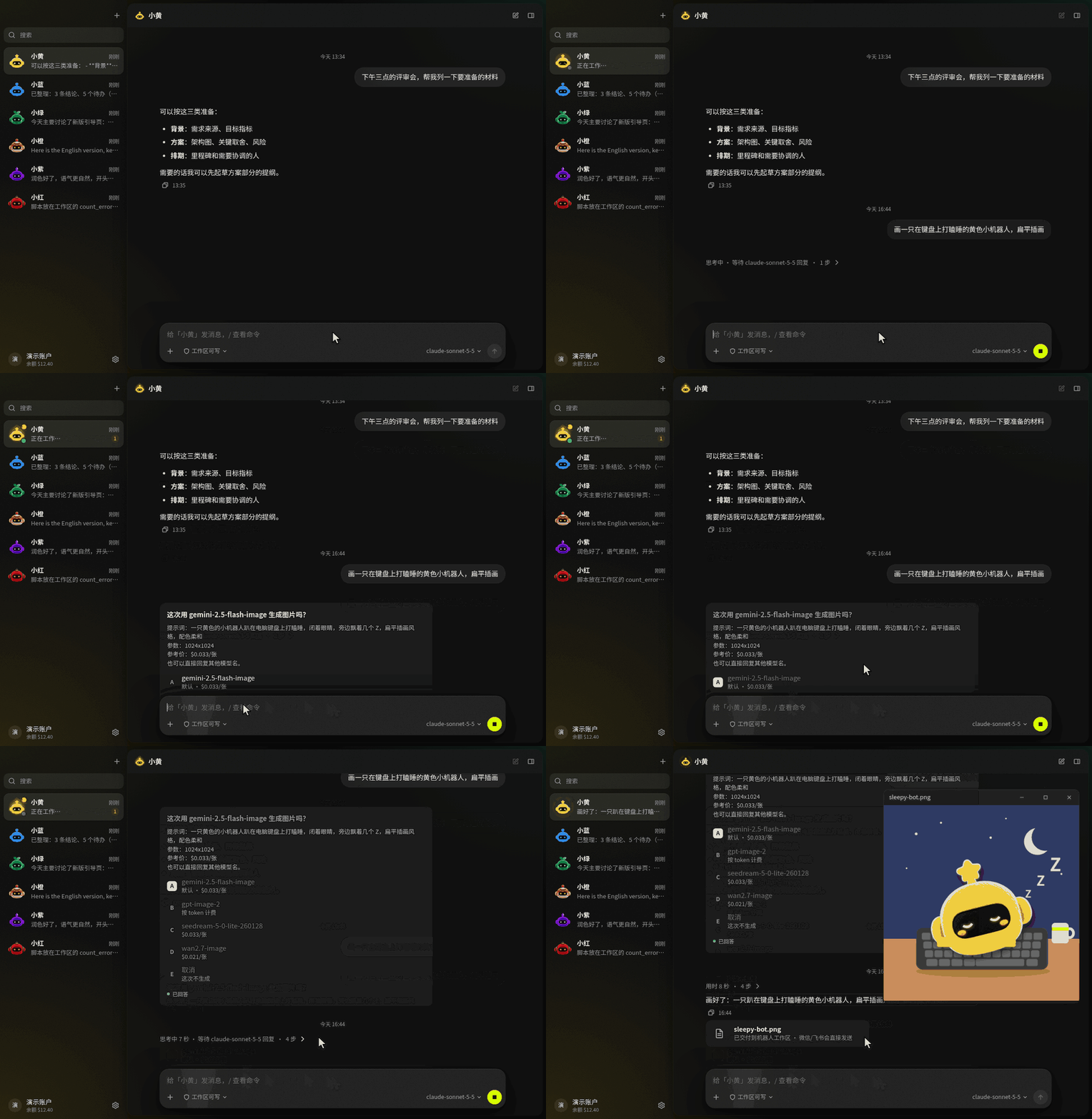
- **Image and video generation** runs right away, taking the most reasonable reading of a loose request. It asks first only when the estimated cost is above 0.50 US dollars, so you see the model and prompt and can swap the model on the spot. To be asked every time, turn it on in the bot's settings.
## 🌐 Any model, through Modelflare or official APIs
- **Sign in once** and your Modelflare models appear automatically.
- **Or bring your own official API keys.** OpenAI, Anthropic, Google Gemini, xAI, DeepSeek, Kimi, GLM, Qwen, MiniMax and Mistral are supported. Keys stay on your device, model requests go straight to the provider without passing through Modelflare, and the provider bills you. Image and video generation is only available through Modelflare for now.
- **One picker for everything.** GPT, Claude, Gemini, Grok, DeepSeek, Kimi, GLM and more, each with context length, capability tags and a reference price.
- **Switch per conversation** or set a default per bot. Background chores such as tidying memory and context hand-offs can use a separate model of their own.
- **Three API domains.** Choose `modelflare.dev`, `origin.modelflare.dev` or `cf.modelflare.dev` and compare their response times in Settings; AnyModelBot never switches automatically.
- **Pay per use.** Wallet balance, low-balance reminders, daily usage and per-bot budget keys are built in. AnyModelBot itself has no subscription fee.
## 🧠 Memory, and reachable from anywhere
- **Memory that carries over.** Things about you live in About me, shared by all your bots: say it once and every bot knows, and you can view, edit or undo it in Settings. Bots ask before saving an address, phone number or email. Each bot and group also has its own memory, kept as Markdown and kept separate. Content that looks like passwords or keys isn't saved.
- **Long chats stay usable.** A context steward compacts or starts a fresh segment with a hand-off summary before the window fills up.
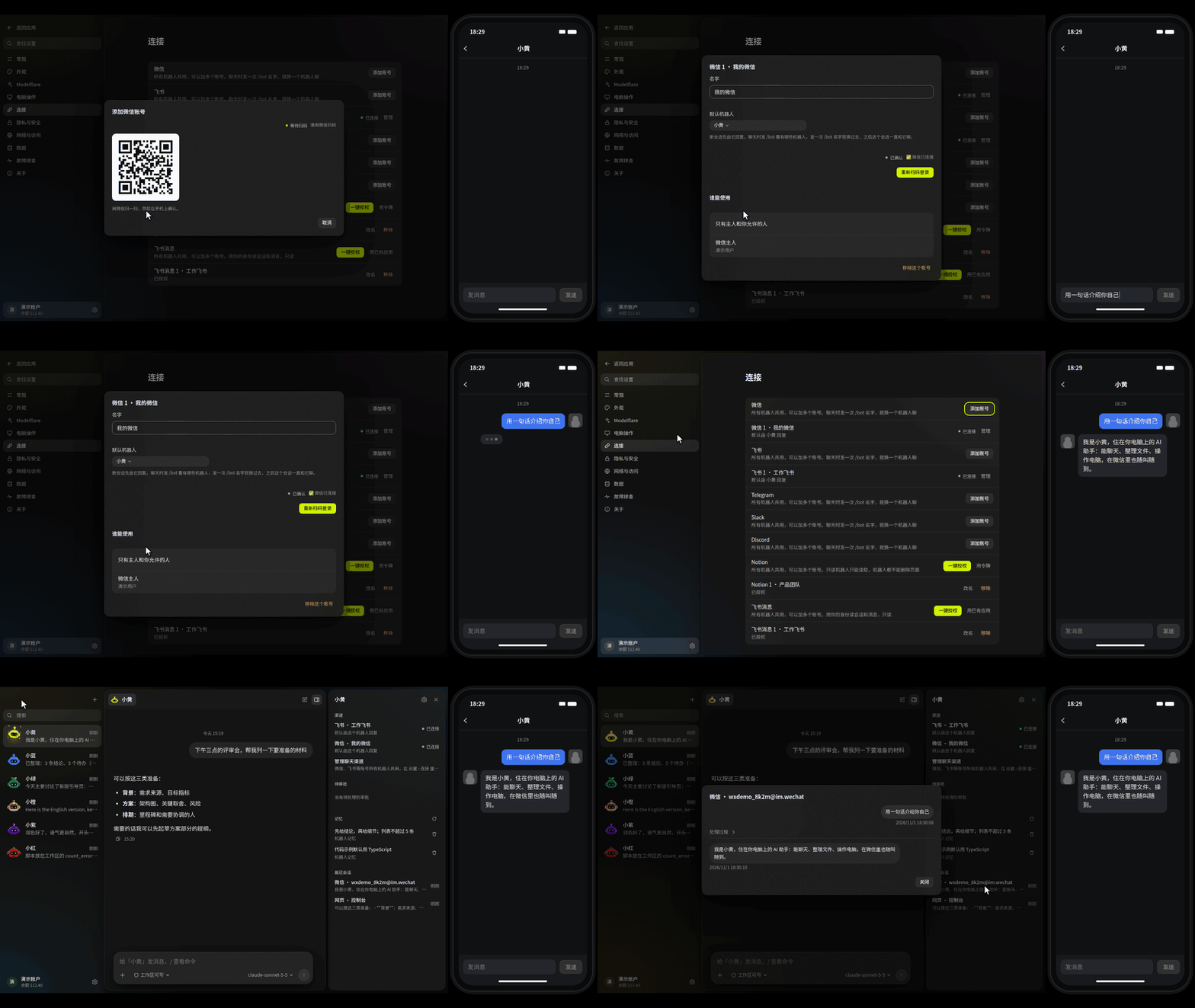
- **Accounts shared by all bots.** Add WeChat, Feishu, Telegram, Slack and Discord chat accounts once under Settings › Chat channels. Every bot shares them, and each channel can have several accounts with aliases. Send `/bot name` once in a chat app to talk to a different bot.
- **Connect apps.** Apps & skills in the avatar menu comes with connectors for Feishu, Tencent Docs, DingTalk, Amap, Yuque, Notion, GitHub, Linear, Atlassian and Canva, and you can add custom MCP connectors (remote servers or local commands). Connect once and every bot can use it by default; narrow it per bot and per tool. Read-only tools run right away, writes ask you first, and deletes or anything sent to other people always ask.
- **WeChat and Feishu.** Scan a QR code to connect WeChat, or connect a Feishu bot with streaming reply cards. WeChat also carries images and files.
- **Telegram, Slack and Discord.** Paste a token in Settings › Chat channels. No public address needed. Replies appear as they're written, and images and files work both ways. Direct messages only for now, and approvals and questions are answered by text.
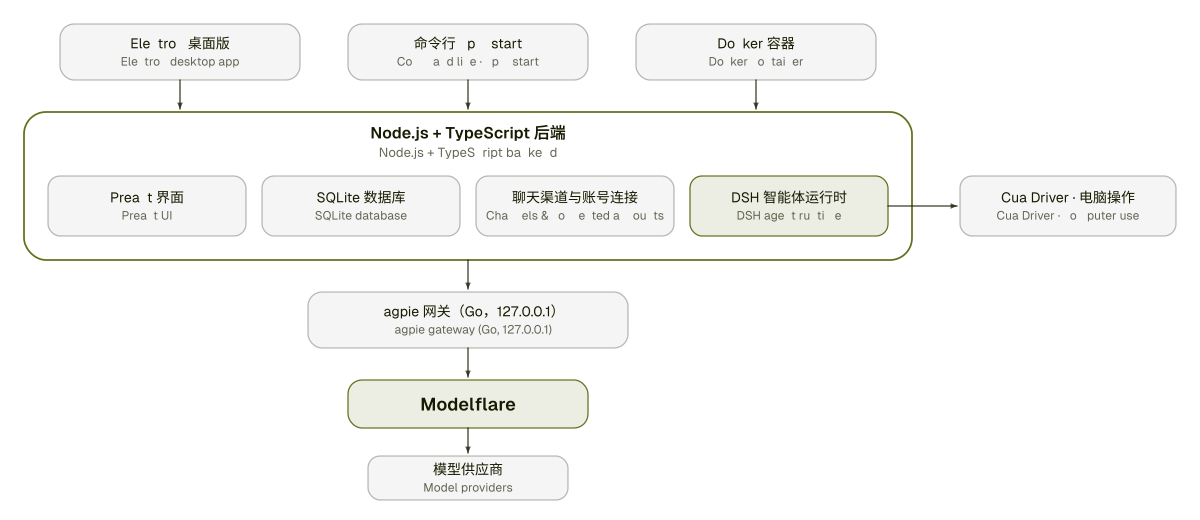
- **Four ways to run it.** Desktop app, command line, Docker, or the local web console at `127.0.0.1:3600`.
## 🔒 Local-first, and easy on the eyes
- **Your data stays with you.** Conversations, memory, files and API keys are stored on your device. The local console listens on `127.0.0.1` only and opens only with an access token (the desktop app generates a fresh one on every launch).
- **It answers to you.** By default a bot replies only to its owner (the WeChat account that scanned the QR code; on Feishu, Telegram, Slack and Discord, the first person to message it after you connect it, which is you) and the people you allow. Anyone else gets a one-line notice and no model is called; you let them in from the info panel, or by replying `yes ` in chat.
- **Replies are not lost.** A reply is saved locally before it is sent; network errors are retried, sending resumes after a restart, and when WeChat's 24-hour window has closed the reply waits and arrives with your next message.
- **Telemetry kept off.** Telemetry in the bundled computer-use driver is switched off, and the built-in gateway runs with auto-update disabled.
- **In-app updates.** From 0.1.29, installed desktop apps enable Settings → General → Automatically download updates by default. New versions download in the background and offer Restart and update when ready. Installation requires your click and no running tasks; turn the setting off for manual downloads. Users on 0.1.28 or earlier must manually install 0.1.29 or later once. Docker and source deployments still update manually. From 0.1.30, the first launch after an update shows what changed, the update button beside your sidebar account downloads the update and restarts to install it when ready, and the changelog is always in Settings → About.
- **Light, dark or follow the system.** Six bot characters, and their eyes follow your pointer.
- **Tray and autostart.** Close the window to hide to the tray; autostart is available on macOS and Windows.
> [!NOTE]
> Features depend on the model you choose, your operating system and the permissions you grant. Computer use requires a desktop session, and macOS computer use is in Beta. Model requests go to the provider you pick (directly with your own official API key, otherwise through Modelflare); see [How it works & privacy](#-how-it-works--privacy).
# 🆚 AnyModelBot vs Grok Bot, OpenAI dots and Claude Duet
In the second half of 2026, xAI's [Grok Bot](https://x.ai/bot), OpenAI's [dots](https://openai.com/index/introducing-dots/) and Anthropic's Claude Duet launched one after another. They also work for you in the background, and check in when a decision is yours. AnyModelBot does the same kind of work, in a different way: it is open source, runs on your own device, and works with a wide range of models.
| | AnyModelBot | Grok Bot | OpenAI dots | Claude Duet |
| :--- | :--- | :--- | :--- | :--- |
| Open source | ✅ MIT | — | — | — |
| Where it runs | Your own computer or server | xAI's cloud computer | OpenAI's cloud computer | Anthropic's cloud |
| Models | GPT, Claude, Gemini, Grok and more (through Modelflare or official APIs) | Mainly xAI's Grok models | OpenAI's models | Claude (Opus 5.5) |
| Cost | Free app, models billed per token | Subscription | ChatGPT Pro / Business Premium subscription | Claude Pro / Max subscription |
| Where you reach it | Desktop app (Windows, macOS, Linux), Docker, WeChat, Feishu, Telegram, Slack, Discord | Desktop app, iPhone | ChatGPT, Slack, Teams | iOS, Android, claude.ai |
| Availability | Download it now | Beta | Select markets | Research preview, US waitlist |
AnyModelBot works in the background too: a task you hand over can finish in the background and send its result to your chat app, and anything that needs your approval or answer shows up under "Needs you" in the sidebar. Every step a bot takes is visible, and anything outside its workspace asks you first.
> [!NOTE]
> Details about the other products come from public reports as of October 2026 and may have changed; check each vendor's official information. Grok Bot, dots and Claude Duet are products and trademarks of xAI, OpenAI and Anthropic respectively. AnyModelBot is not affiliated with them.
# 🔐 How it works & privacy
| Stays on your device | Leaves your device |
| :--- | :--- |
| Conversations and sessions (local SQLite database) | The prompts, files and tool results a model needs to answer, sent to the provider you chose (directly with your own official API key, otherwise through Modelflare) |
| Memory (Markdown files) | Screenshots, when you ask a bot to look at your screen with computer use |
| Files in each bot's workspace | Messages you exchange over chat channels, which pass through those platforms |
| Your API key and sign-in tokens | Your sign-in with Modelflare, which happens at modelflare.dev |
| Connect apps | After you connect apps (Feishu, Notion, GitHub and so on) or add a custom MCP connector, bots read and write their content, and what they read also goes into model requests |
Modelflare keeps request logs; its [Trust Center](https://modelflare.dev/trust?utm_source=anymodelbot&utm_campaign=amb_readme) explains what is kept and for how long. We do not claim your data is beyond all risk: anything you send to a model leaves your device. The full inventory is in [docs/privacy_en.md](./docs/privacy_en.md).
| Layer | Technology |
| :--- | :--- |
| Interface | Preact + htm, no build step |
| Backend | Node.js 22.13+, TypeScript, `node:sqlite` |
| Desktop shell | Electron, with a tray |
| Model gateway | [magpie](https://github.com/yetone/magpie) (Go, MIT), bundled and started by the app |
| Agent runtime | [DeepSeek Harness](https://github.com/deepseek-ai/deepseek-harness) (MIT), run as a separate process |
| Computer use | [Cua Driver](https://github.com/trycua/cua), bundled |
| Channels | Feishu (long connection + streaming cards), WeChat (iLink), Telegram (long polling), Slack (Socket Mode), Discord (Gateway) |
| Connect apps | Built-in connectors: Feishu, Tencent Docs, DingTalk, Amap, Yuque, Notion, GitHub, Linear, Atlassian, Canva; custom MCP: Streamable HTTP (SSE compatible), local commands |
| Tests and CI | Vitest, GitHub Actions |
# 📝 Roadmap
Directions we are exploring. They are not promises, and the order is not a schedule. For what changed in each version, see the [changelog](./CHANGELOG_en.md).
- [x] **Scheduled tasks**: let a bot run work on a timer (shipped as rules, above).
- [x] **In-app group chats**: create a group in the app and chat with several bots at once.
- [ ] **Group chats on chat channels**: chat channels handle one-to-one chats today.
- [x] **Multilingual interface**: the app supports Simplified Chinese, Traditional Chinese (Taiwan), English, Japanese, Korean, Russian, Spanish, Portuguese (Brazil) and Turkish; switch in Settings.
- [ ] **macOS computer use**: verify direct mode on more real machines and move it out of Beta.
- [ ] **Email, calendar and event triggers**: connect email and calendar accounts, and let rules run the moment something happens (a message from a certain person, a meeting about to start), not only on a timer. Runs triggered by outside content get lower permissions, so text written by someone else can't give your bot orders.
- [ ] **Always-on hosting, backup and migration**: rules don't run while your computer is off. Make it possible for anyone to deploy to their own server in one click, move their chats, memory and accounts over, and back up and restore.
- [ ] **Add your own MCP servers**: today you can only use the built-in tools and accounts. Opening this up lets you connect services like GitHub and Linear yourself.
- [ ] **Bots working together**: let one bot hand work to another, for example drafting and reviewing with different models, with costs tracked separately.
- [ ] **Voice message transcription**: bots can't hear Telegram voice messages today, and WeChat relies on the platform's own transcript.
- [ ] **A standalone mobile app**: today you reach your bots from WeChat, Feishu, Telegram, Slack or Discord.
Have a different idea? Open an [issue](https://github.com/modelflare-ai/AnyModelBot/issues) or start a [discussion](https://github.com/modelflare-ai/AnyModelBot/discussions). Items we pick up are tracked with the [`roadmap`](https://github.com/modelflare-ai/AnyModelBot/labels/roadmap) label.
# 🤝 Contributing
Bug reports, fixes, docs and ideas are all welcome.
1. Check existing [issues](https://github.com/modelflare-ai/AnyModelBot/issues) and [discussions](https://github.com/modelflare-ai/AnyModelBot/discussions) first. Issues labeled [`good first issue`](https://github.com/modelflare-ai/AnyModelBot/labels/good%20first%20issue) are a good place to start.
2. Fork the repo and create a branch from `master`.
3. Run it locally and make your change:
```bash
npm install
npm run setup # fetches and builds the bundled gateway
npm run electron:dev # desktop app in development mode
npm run typecheck && npm test
```
4. Open a pull request against `master` and describe what changed and why. For anything larger than a small fix, open an issue first so we can agree on the approach.
Read the full [contributing guide](./CONTRIBUTING_en.md). To report a security problem, follow [SECURITY.md](./SECURITY.md) instead of opening a public issue.
# 🔗 Related Projects
- [Modelflare](https://modelflare.dev/?utm_source=anymodelbot&utm_campaign=amb_readme): the AI API gateway behind AnyModelBot's models.
- [magpie](https://github.com/yetone/magpie): the Go gateway bundled with the app (MIT).
- [DeepSeek Harness](https://github.com/deepseek-ai/deepseek-harness): the agent runtime (MIT).
- [Cua](https://github.com/trycua/cua): the computer-use driver.
- [kimi-computer-use](https://github.com/songkeys/kimi-computer-use): the macOS computer-use bridge.
- [openclaw-weixin](https://github.com/Tencent/openclaw-weixin): the WeChat channel we ported from (MIT).
- [DS Bot](https://github.com/Fei2411/DS-Bot): the design source for our memory and context steward (Apache-2.0).
Full licenses and notices: [THIRD_PARTY_NOTICES_en.md](./THIRD_PARTY_NOTICES_en.md).
# 💬 Community
- **Questions and ideas:** [GitHub Discussions](https://github.com/modelflare-ai/AnyModelBot/discussions)
- **Bugs and feature requests:** [GitHub Issues](https://github.com/modelflare-ai/AnyModelBot/issues)
- **Requests & Feedback:** account menu → Requests & Feedback (use cases & ideas, problems, business & partnerships; signed in to Modelflare, it becomes a private ticket on your account, with contact details only if you agree)
- **Chat with the community:** [Discord](https://discord.gg/umBN6wX3zJ) · [Telegram](https://t.me/+Tx6Payfzxqk2ZGVl)
- **Email:** [support@anymodel.bot](mailto:support@anymodel.bot)
- **News from Modelflare:** [@modelflare_dev on X](https://x.com/modelflare_dev)
# 🚀 Contributors
# ⭐️ Star History
# 📜 License
AnyModelBot is released under the [MIT License](./LICENSE). Bundled third-party software keeps its own licenses; see [THIRD_PARTY_NOTICES_en.md](./THIRD_PARTY_NOTICES_en.md) and the [`LICENSES/`](./LICENSES) folder.
[release-shield]: https://img.shields.io/github/v/release/modelflare-ai/AnyModelBot?include_prereleases&label=release&logo=data:image/svg%2bxml;base64,PHN2ZyB4bWxucz0iaHR0cDovL3d3dy53My5vcmcvMjAwMC9zdmciIHZpZXdCb3g9IjAgMCAxMDAgMTAwIj48cmVjdCB4PSIzIiB5PSI5IiB3aWR0aD0iOTQiIGhlaWdodD0iODIiIHJ4PSIzNiIgZmlsbD0iI2Q3ZmYwMCIvPjxyZWN0IHg9IjI5IiB5PSIzNiIgd2lkdGg9IjEzIiBoZWlnaHQ9IjI4IiByeD0iNi41IiBmaWxsPSIjMTYxYTAwIi8+PHJlY3QgeD0iNTgiIHk9IjM2IiB3aWR0aD0iMTMiIGhlaWdodD0iMjgiIHJ4PSI2LjUiIGZpbGw9IiMxNjFhMDAiLz48L3N2Zz4=&style=flat-square&labelColor=161a00&color=d7ff00
[downloads-shield]: https://img.shields.io/github/downloads/modelflare-ai/AnyModelBot/total?logo=github&logoColor=d7ff00&style=flat-square&labelColor=161a00&color=d7ff00
[stars-shield]: https://img.shields.io/github/stars/modelflare-ai/AnyModelBot?logo=github&logoColor=d7ff00&style=flat-square&labelColor=161a00&color=d7ff00
[license-shield]: https://img.shields.io/github/license/modelflare-ai/AnyModelBot?logo=opensourceinitiative&logoColor=d7ff00&style=flat-square&labelColor=161a00&color=d7ff00
[ci-shield]: https://img.shields.io/github/actions/workflow/status/modelflare-ai/AnyModelBot/ci.yml?branch=master&label=CI&logo=githubactions&logoColor=d7ff00&style=flat-square&labelColor=161a00&color=d7ff00
[platform-shield]: https://img.shields.io/badge/platform-Windows%20%7C%20macOS%20%7C%20Linux%20%7C%20Docker-d7ff00?style=flat-square&labelColor=161a00
[pricing-shield]: https://img.shields.io/badge/pricing-pay--as--you--go-d7ff00?style=flat-square&labelColor=161a00
[modelflare-shield]: https://img.shields.io/badge/Modelflare-modelflare.dev-d7ff00?style=flat-square&labelColor=161a00
[x-shield]: https://img.shields.io/badge/X-@modelflare__dev-d7ff00?style=flat-square&labelColor=161a00&logo=x&logoColor=d7ff00
[qq-shield]: https://img.shields.io/badge/QQ-1132903119-d7ff00?style=flat-square&labelColor=161a00&logo=qq&logoColor=d7ff00
[telegram-shield]: https://img.shields.io/badge/Telegram-chat-d7ff00?style=flat-square&labelColor=161a00&logo=telegram&logoColor=d7ff00
[discord-shield]: https://img.shields.io/badge/Discord-chat-d7ff00?style=flat-square&labelColor=161a00&logo=discord&logoColor=d7ff00
[win-badge]: https://img.shields.io/badge/Windows-161a00?style=for-the-badge&logo=data:image/svg%2bxml;base64,PHN2ZyB4bWxucz0iaHR0cDovL3d3dy53My5vcmcvMjAwMC9zdmciIHZpZXdCb3g9IjAgMCAyNCAyNCIgZmlsbD0iI2Q3ZmYwMCI+PHJlY3QgeD0iMiIgeT0iMyIgd2lkdGg9IjkuNSIgaGVpZ2h0PSI4LjUiLz48cmVjdCB4PSIxMi41IiB5PSIzIiB3aWR0aD0iOS41IiBoZWlnaHQ9IjguNSIvPjxyZWN0IHg9IjIiIHk9IjEyLjUiIHdpZHRoPSI5LjUiIGhlaWdodD0iOC41Ii8+PHJlY3QgeD0iMTIuNSIgeT0iMTIuNSIgd2lkdGg9IjkuNSIgaGVpZ2h0PSI4LjUiLz48L3N2Zz4=
[mac-badge]: https://img.shields.io/badge/macOS-161a00?style=for-the-badge&logo=apple&logoColor=d7ff00
[linux-badge]: https://img.shields.io/badge/Linux-161a00?style=for-the-badge&logo=linux&logoColor=d7ff00
[releases-link]: https://github.com/modelflare-ai/AnyModelBot/releases
[stars-link]: https://github.com/modelflare-ai/AnyModelBot/stargazers
[license-link]: https://github.com/modelflare-ai/AnyModelBot/blob/master/LICENSE
[ci-link]: https://github.com/modelflare-ai/AnyModelBot/actions/workflows/ci.yml
[pricing-link]: https://modelflare.dev/pricing?utm_source=anymodelbot&utm_campaign=amb_readme
[modelflare-link]: https://modelflare.dev/?utm_source=anymodelbot&utm_campaign=amb_readme
[x-link]: https://x.com/modelflare_dev
[qq-link]: https://qm.qq.com/q/yHN9KrvlGa
[telegram-link]: https://t.me/+Tx6Payfzxqk2ZGVl
[discord-link]: https://discord.gg/umBN6wX3zJ


 The easiest way to get models is **[Modelflare](https://modelflare.dev/?utm_source=anymodelbot&utm_campaign=amb_readme)**: sign in and use models, with no separate key to request from each provider (to go straight to a provider, see [Any model](#-any-model-through-modelflare-or-official-apis)). Available models, prices, and current offers are on [Modelflare](https://modelflare.dev/?utm_source=anymodelbot&utm_campaign=amb_readme) and the [price list](https://modelflare.dev/pricing?utm_source=anymodelbot&utm_campaign=amb_readme).
**Bot credits**: new accounts get Bot credits when they sign up, and Modelflare subscriptions add Bot credits worth 10% of the plan; see Modelflare's site for the current terms. Bot credits are usable only in AnyModelBot. Requests from the app use them first, and Settings → Models shows how much is left.
**[Sign up for Modelflare →](https://modelflare.dev/sign-up?utm_source=anymodelbot&utm_campaign=amb_readme)** ·
[Price list](https://modelflare.dev/pricing?utm_source=anymodelbot&utm_campaign=amb_readme) ·
[API docs](https://docs.modelflare.dev/?utm_source=anymodelbot&utm_campaign=amb_readme) ·
[Trust Center](https://modelflare.dev/trust?utm_source=anymodelbot&utm_campaign=amb_readme) ·
[X](https://x.com/modelflare_dev)
**How AnyModelBot uses Modelflare**
- **Sign in once.** The first launch opens your browser to sign in to (or sign up for) Modelflare. The app then connects this device itself, so there is no key to copy, and brings you back once you approve. If you have no default model yet, it picks a low-cost model that supports tools. Running in Docker or on a server? Sign in from a browser on any device, then paste the link you land on back into the app.
- **Every model, one picker.** Your Modelflare models are listed automatically, with context length, capabilities and reference prices next to each one.
- **Pay for what you use.** Your balance and Top up link are in Settings → Models (along with the remaining Bot credits and percentage, if available), and low-balance reminders and per-day usage show up inside the app. Check the public price list and compare it with the official rates before you choose a model.
- **An honest boundary.** Model requests travel through Modelflare to the provider you pick, and Modelflare keeps request logs. See the [Trust Center](https://modelflare.dev/trust?utm_source=anymodelbot&utm_campaign=amb_readme) for what is kept and for how long. Everything else stays on your device ([details](#-how-it-works--privacy)).
---
# 📥 Download and run
Pick your platform. Every release page lists all installers and a `SHA256SUMS` file.
| Platform | Architecture | Installer | |
| :--- | :--- | :--- | :--- |
| ![Windows][win-badge] | x64 | `anymodel-bot-
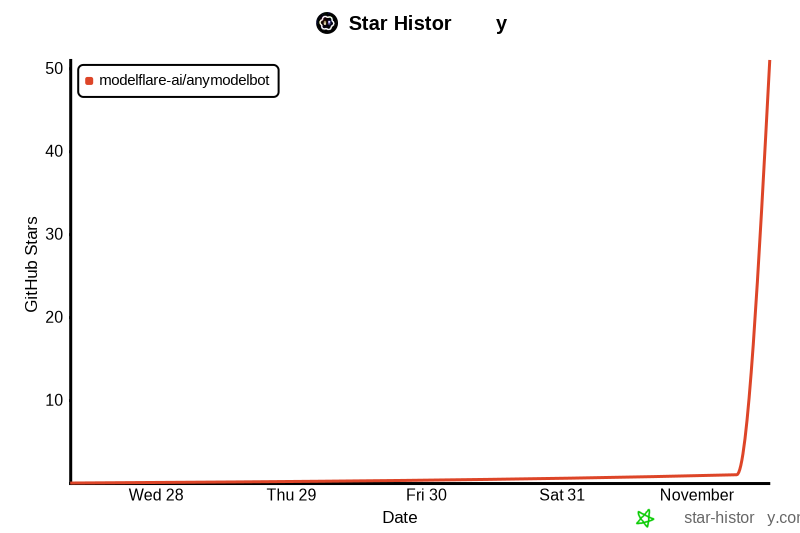
 # ⭐️ Star History