# 🤖 AnyModelBot
AnyModelBot is a local-first AI agent app for Windows, macOS and Linux. A bot is a persona with its own default model, workspace and memory. Chat with it in the app, or reach it from WeChat, Feishu, Telegram, Slack or Discord. Let it read and write files, run commands and operate your desktop, with an approval prompt whenever it steps outside its workspace.
Your conversations, memory, files and API keys live on your device. Models come from [Modelflare](https://modelflare.dev/?utm_source=anymodelbot&utm_campaign=amb_readme): one account, any model, priced per token. AnyModelBot itself has no subscription.
Like xAI's Grok Bot, OpenAI's dots and Anthropic's Claude Duet, it is an always-on personal AI agent: it works in the background and checks in when a decision is yours. The difference: AnyModelBot is open source (MIT), runs on your own computer or server, works with any model (GPT, Claude, Gemini, Grok and more) and is pay-per-use, with no single vendor's subscription ([full comparison](#-anymodelbot-vs-grok-bot-openai-dots-and-claude-duet)).
It is a Super Agent out of the box: background tasks, scheduled rules and Needs you need no extra setup. The design draws on DeepSeek's [super-agent prototype](https://github.com/deepseek-ai/dsh-superagent-prototype), and the agent runs on [DeepSeek Harness](https://github.com/deepseek-ai/deepseek-harness) ([the full story, in Chinese](./docs/blog/superagent.md)).
📥 [Download](#-download) · 🌠 [Screenshots](#-screenshots) · 🌟 [Features](#-key-features) · 🆚 [Compare](#-anymodelbot-vs-grok-bot-openai-dots-and-claude-duet) · 🔐 [Privacy](#-how-it-works--privacy)
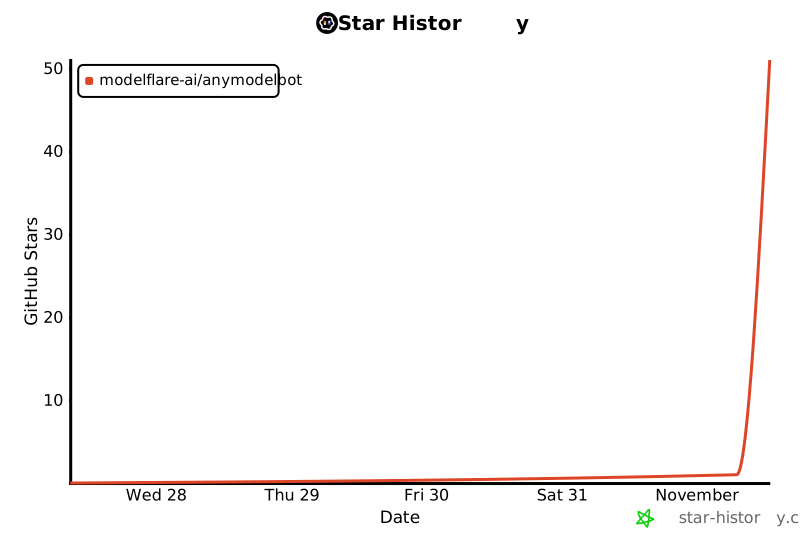
⭐ Like AnyModelBot? Star the repo to follow new releases.
---
Every model in AnyModelBot comes from **[Modelflare](https://modelflare.dev/?utm_source=anymodelbot&utm_campaign=amb_readme)**: full-strength, stable models with nothing watered down, and global SOTA models at a lower cost. Modelflare is run by Havenbyte LLC, a US company, and has 200,000+ registered developers. One API key opens 70+ text, image and video models from 13 providers, including GPT, Claude, Gemini, Grok, DeepSeek, Kimi and GLM, over OpenAI, Anthropic, Gemini and other common API formats. Requests are routed across providers with automatic fallback, every request is recorded with its usage and cost, and the price list is public and billed per token.
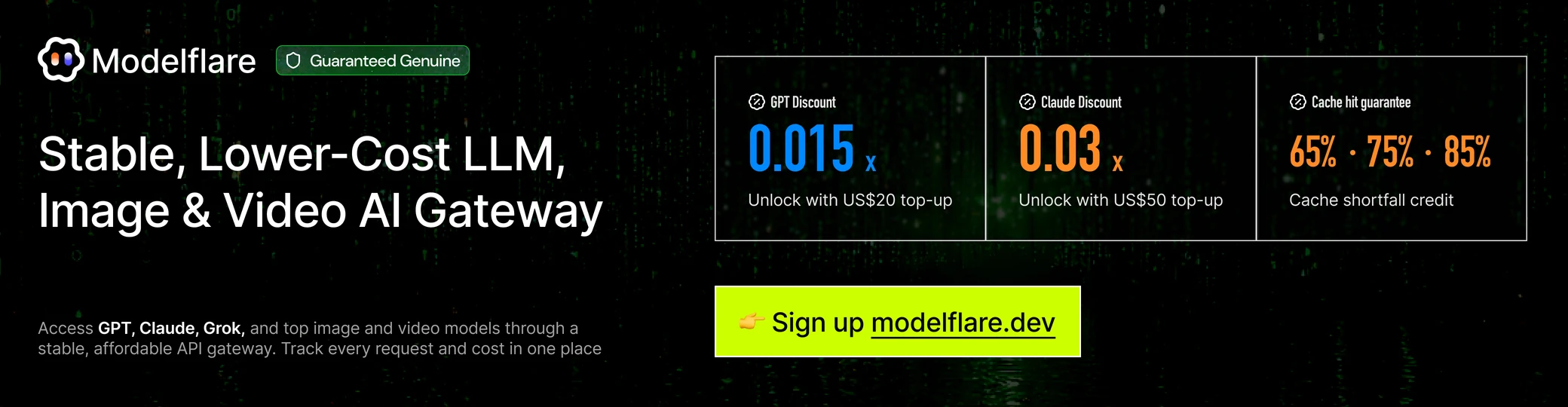
**Cache compensation** is a highlight: the price-first, stable and premium OpenAI groups guarantee daily cache hit rates of 65%, 75% and 85%. When eligible requests fall short, Modelflare credits the difference.
**Special offers**: a single top-up of a set amount unlocks the GPT discount group at a 0.015x price multiplier and the Claude discount group at 0.03x, made for personal projects, feature testing and light use. These are limited-time offers, with thresholds and rules on Modelflare's site. Sign up through [this link](https://modelflare.dev/sign-up?utm_source=anymodelbot&utm_campaign=amb_readme) to join.
**[Sign up for Modelflare →](https://modelflare.dev/sign-up?utm_source=anymodelbot&utm_campaign=amb_readme)** ·
[Price list](https://modelflare.dev/pricing?utm_source=anymodelbot&utm_campaign=amb_readme) ·
[API docs](https://docs.modelflare.dev/?utm_source=anymodelbot&utm_campaign=amb_readme) ·
[Trust Center](https://modelflare.dev/trust?utm_source=anymodelbot&utm_campaign=amb_readme) ·
[X](https://x.com/modelflare_dev)
**How AnyModelBot uses Modelflare**
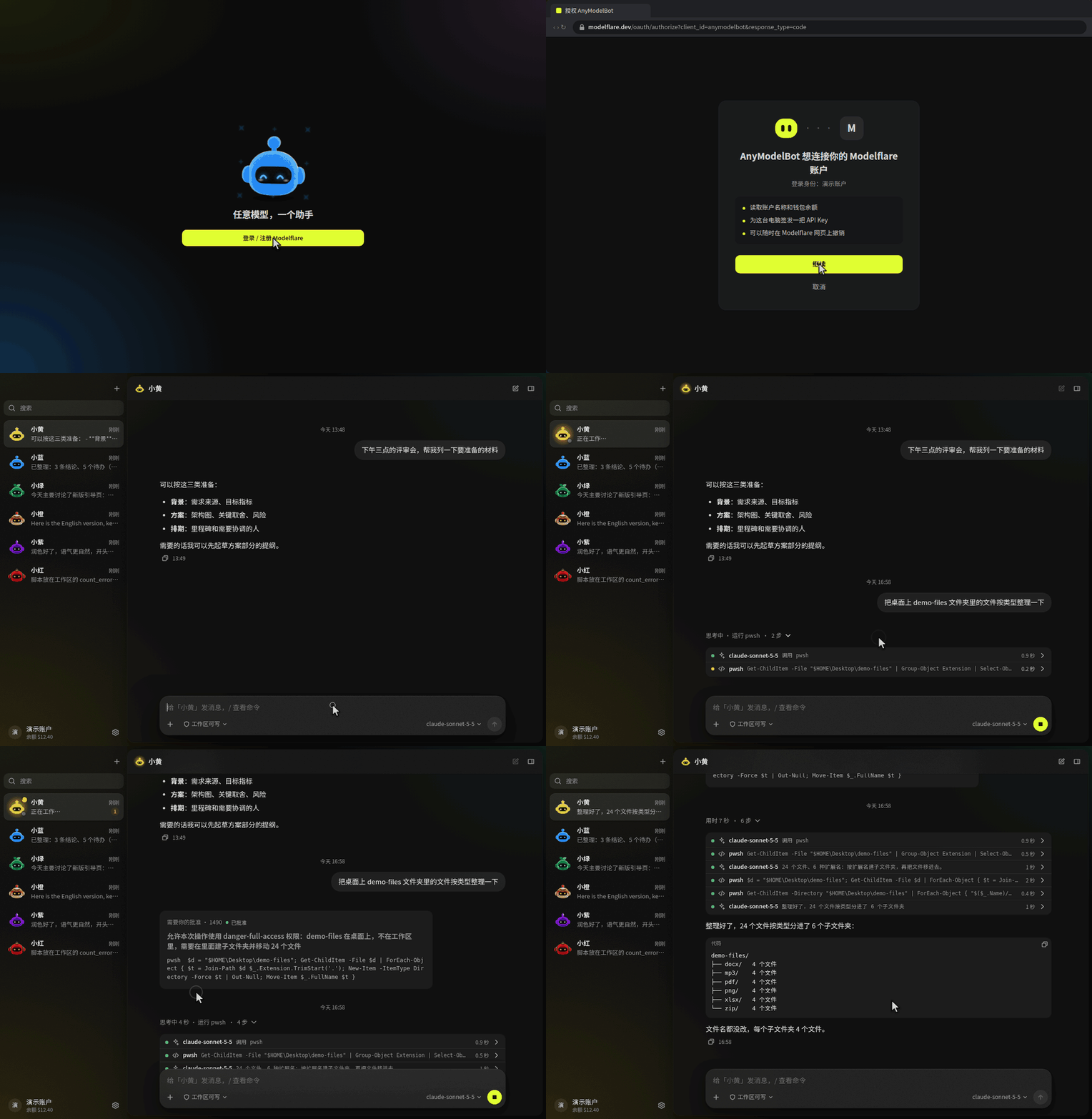
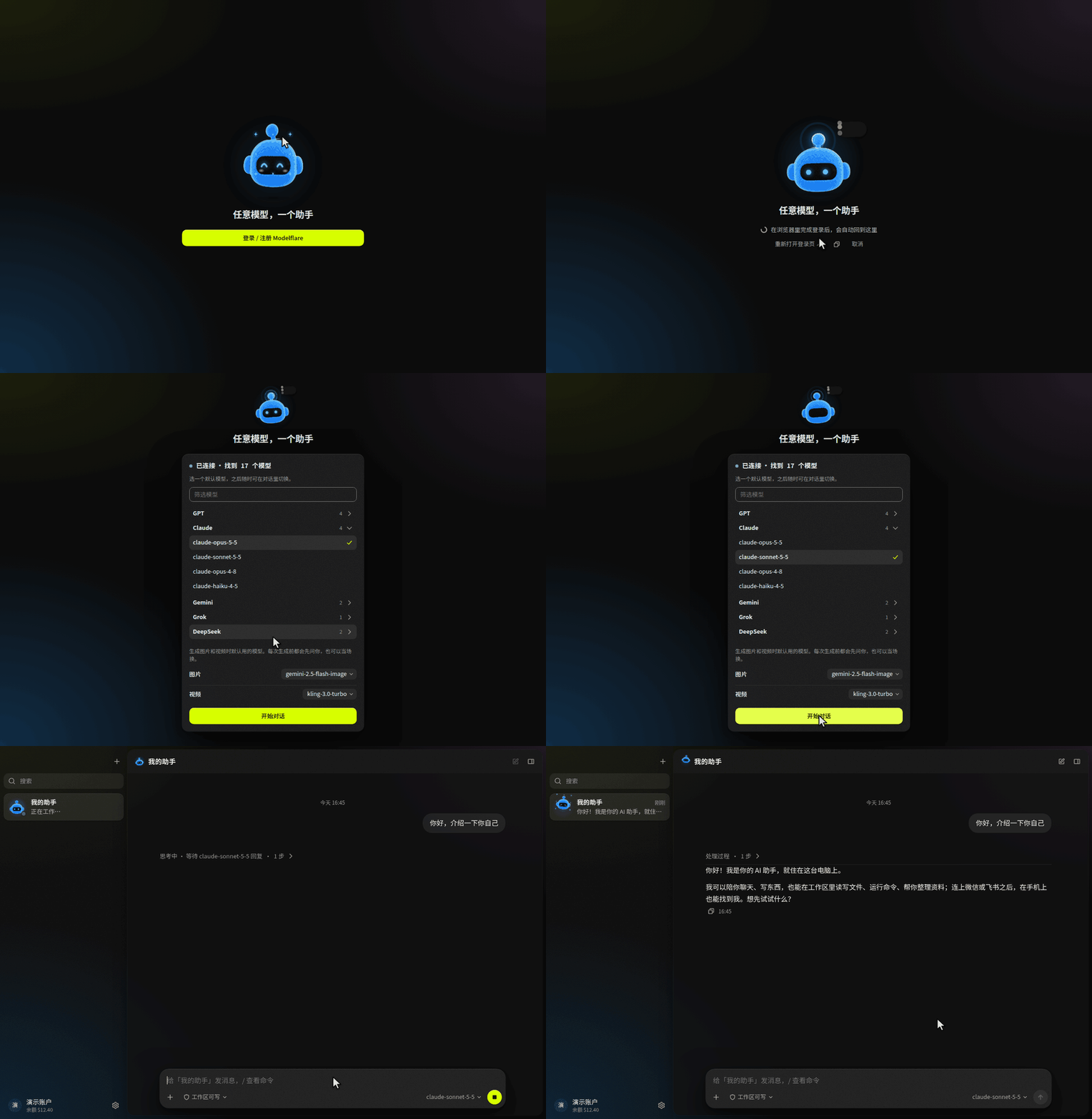
- **Sign in once.** The first launch opens your browser to sign in to (or sign up for) Modelflare. The app then connects this device itself, so there is no key to copy. Running in Docker or on a server? Paste an API key instead.
- **Every model, one picker.** Your Modelflare models are listed automatically, with context length, capabilities and reference prices next to each one.
- **Pay for what you use.** Balance, low-balance reminders and per-day usage show up inside the app. Check the public price list and compare it with the official rates before you choose a model.
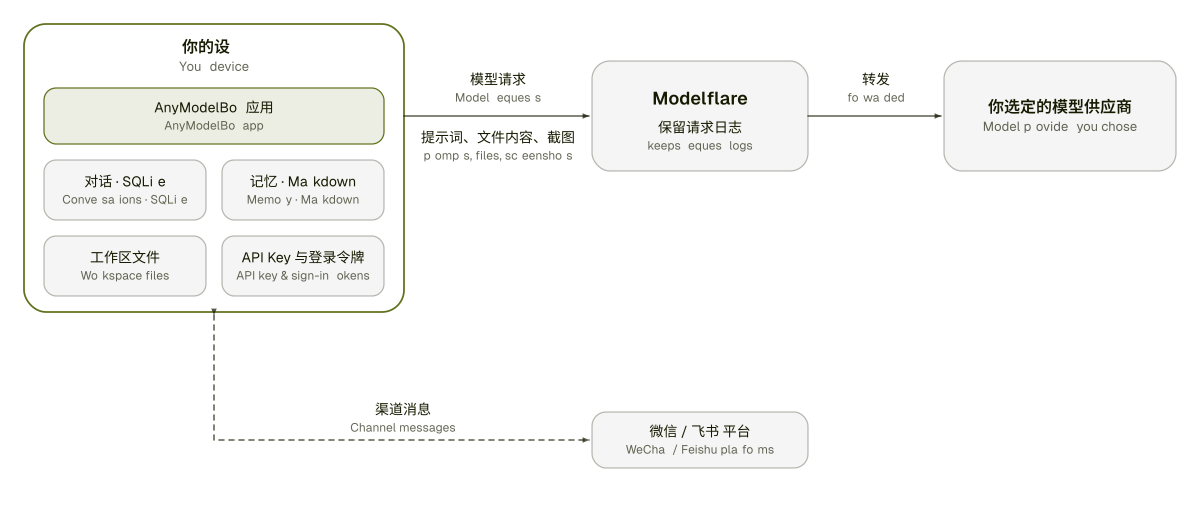
- **An honest boundary.** Model requests travel through Modelflare to the provider you pick, and Modelflare keeps request logs. See the [Trust Center](https://modelflare.dev/trust?utm_source=anymodelbot&utm_campaign=amb_readme) for what is kept and for how long. Everything else stays on your device ([details](#-how-it-works--privacy)).
---
# 📥 Download
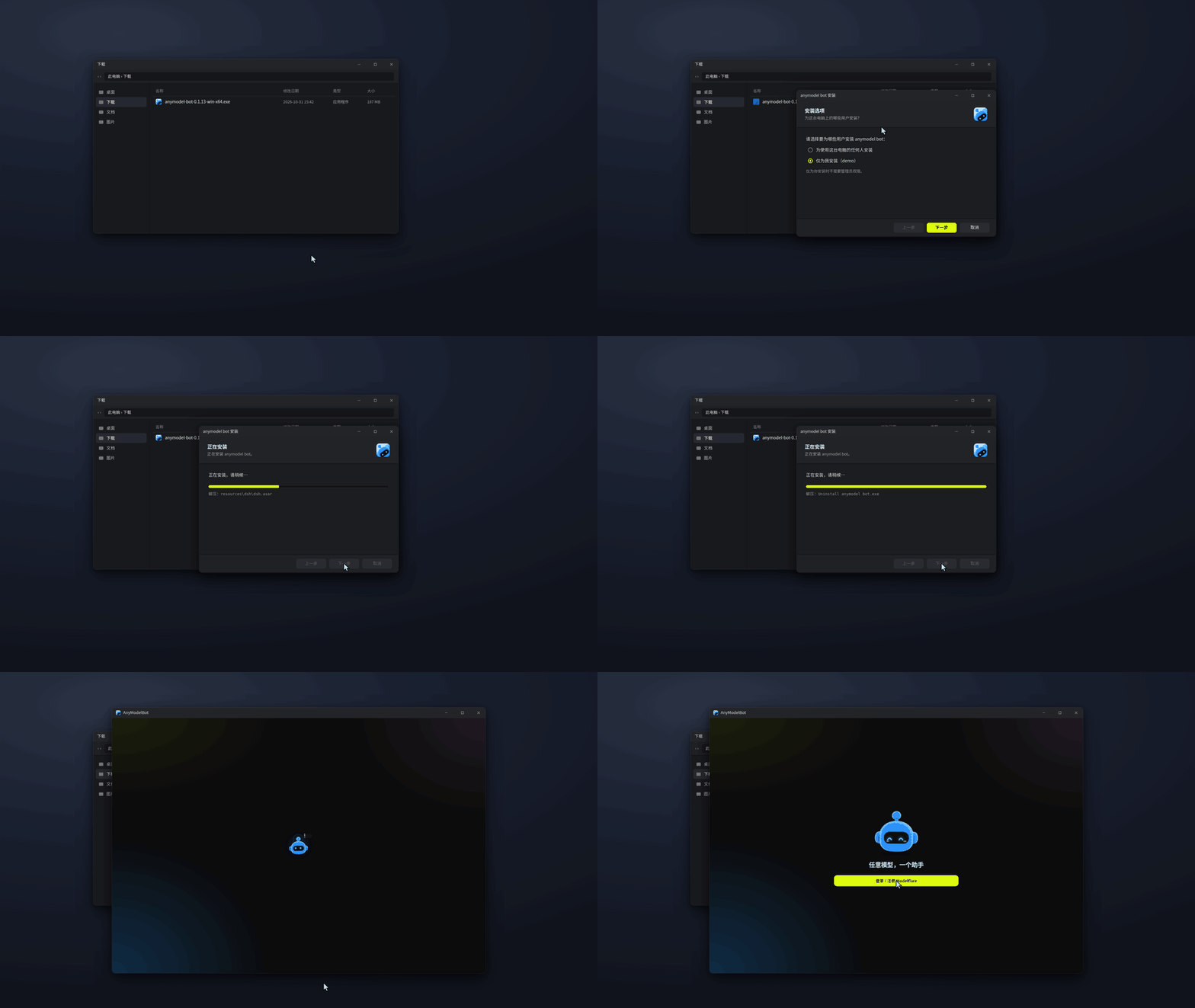
Pick your platform. Every release page lists all installers and a `SHA256SUMS` file.
| Platform | Architecture | Installer | |
| :--- | :--- | :--- | :--- |
| ![Windows][win-badge] | x64 | `anymodel-bot--win-x64.exe` | [Download][releases-link] |
| ![Windows][win-badge] | arm64 | `anymodel-bot--win-arm64.exe` | [Download][releases-link] |
| ![macOS][mac-badge] | Apple silicon | `anymodel-bot--mac-arm64.dmg` | [Download][releases-link] |
| ![macOS][mac-badge] | Intel | `anymodel-bot--mac-x64.dmg` | [Download][releases-link] |
| ![Linux][linux-badge] | x64 | `anymodel-bot--linux-x86_64.AppImage` | [Download][releases-link] |
| ![Linux][linux-badge] | arm64 | `anymodel-bot--linux-arm64.AppImage` | [Download][releases-link] |
**First launch.** If your system warns about an app downloaded from the internet, choose *More info → Run anyway* on Windows, or *System Settings → Privacy & Security → Open Anyway* on macOS. On Linux, mark the AppImage as executable (`chmod +x`) and run it. Closing the window hides AnyModelBot to the tray; quit from the tray menu or from Settings.
**Verify a download.**
```bash
sha256sum -c SHA256SUMS --ignore-missing
```
On macOS use `shasum -a 256 `; in Windows PowerShell use `Get-FileHash `. Compare the result with the line in `SHA256SUMS`.
**Run it in Docker on a NAS or server** (the image covers both x64 and arm64)
```bash
docker run -d --name amb -p 3600:3600 -v amb-data:/data ghcr.io/modelflare-ai/anymodel-bot
docker exec amb cat /data/ui-token # then open http://:3600/?token=
```
Don't expose port 3600 directly to the internet.
**Run from source**
```bash
git clone https://github.com/modelflare-ai/AnyModelBot.git
cd AnyModelBot
npm install
npm run setup # fetches and builds the bundled gateway
npm start # opens the local console at http://127.0.0.1:3600/
```
Requirements for building from source: Node.js 22.13+ and Go 1.26.8+. To build the Docker image yourself, see the [development guide](./docs/development_en.md).
# 🌠 Screenshots
These screenshots show the Simplified Chinese interface. The app also runs in English; switch in Settings.
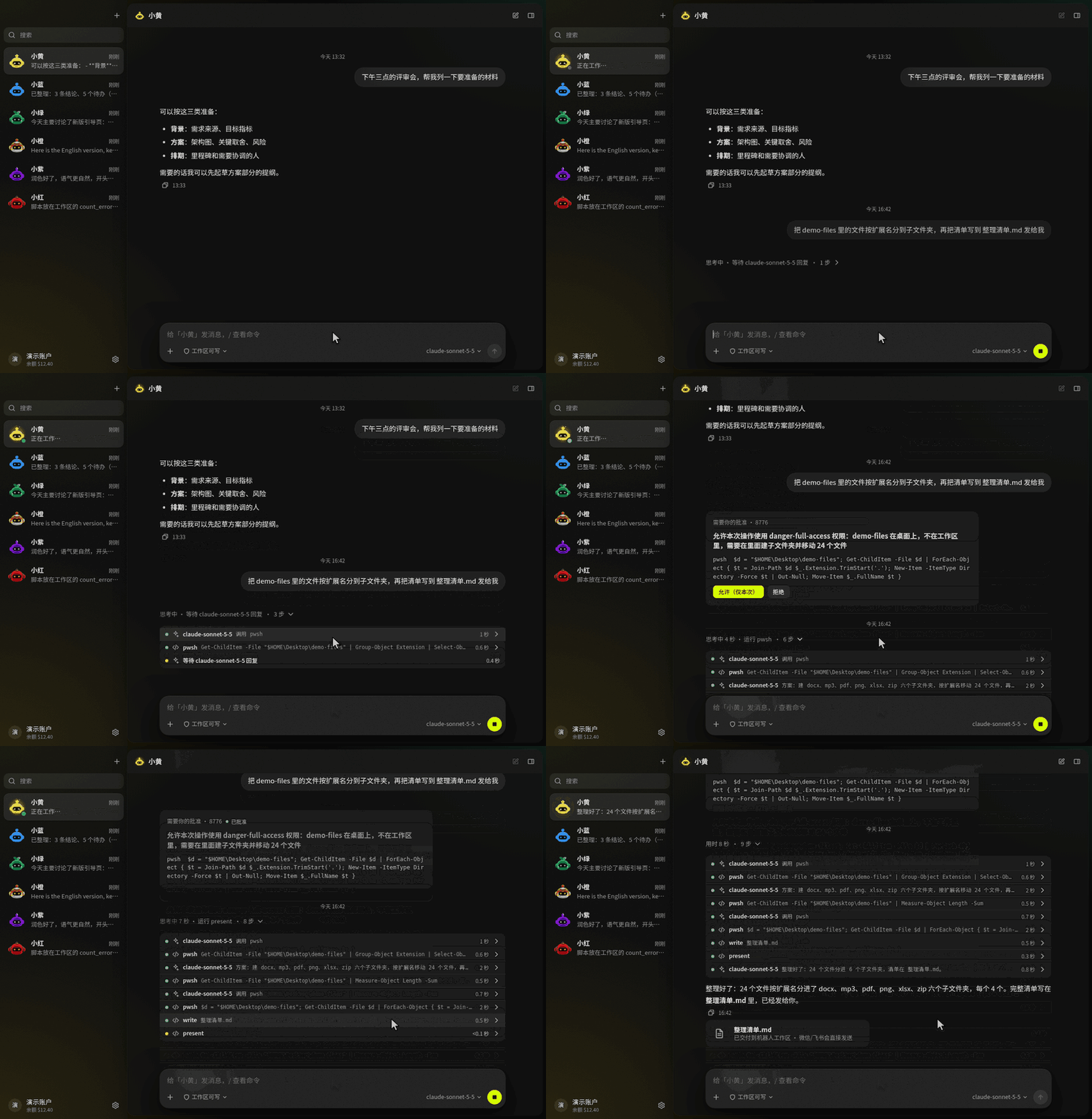
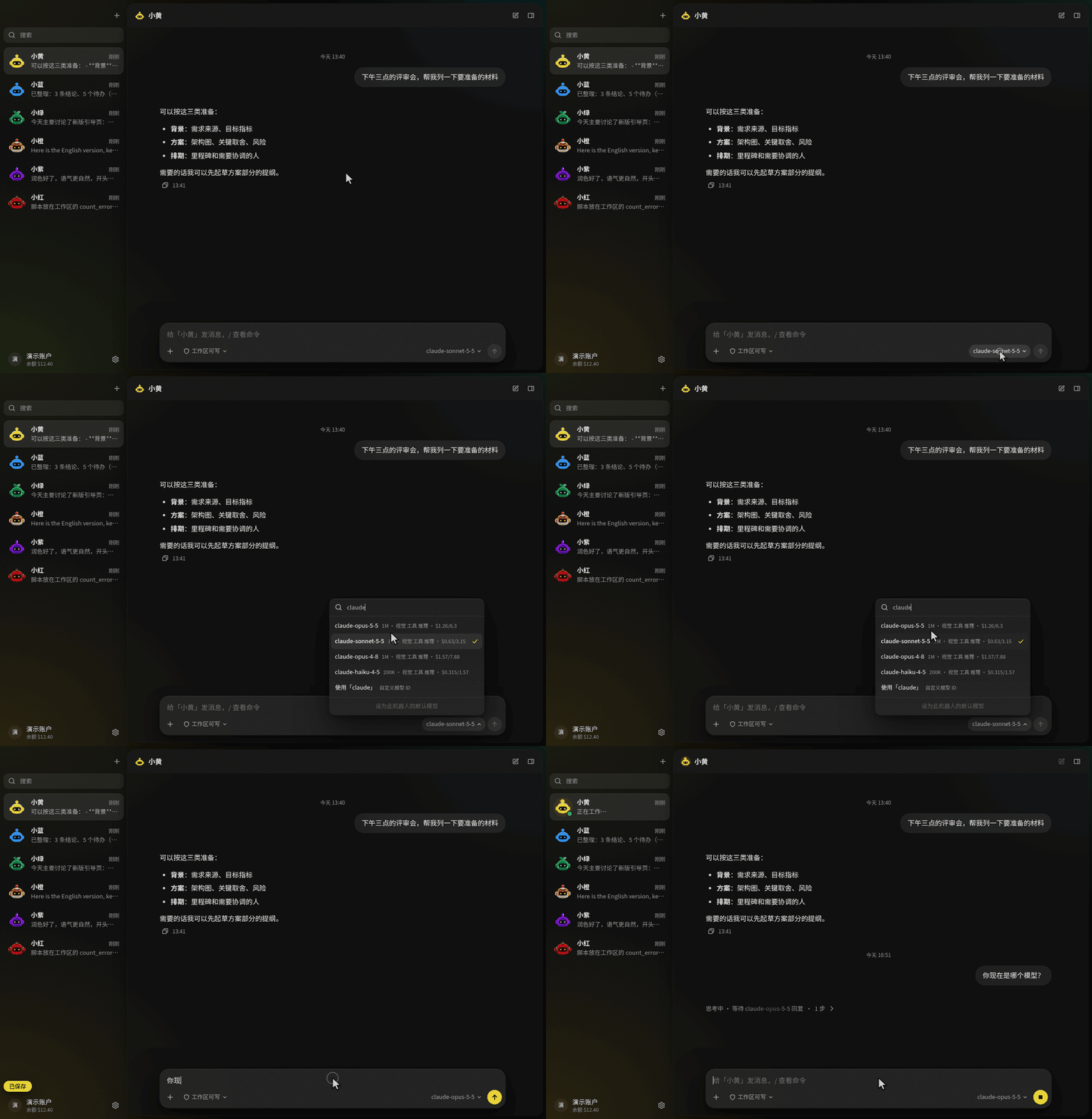
Chat with a bot. Replies render Markdown and code, and the composer shows which model it is using.
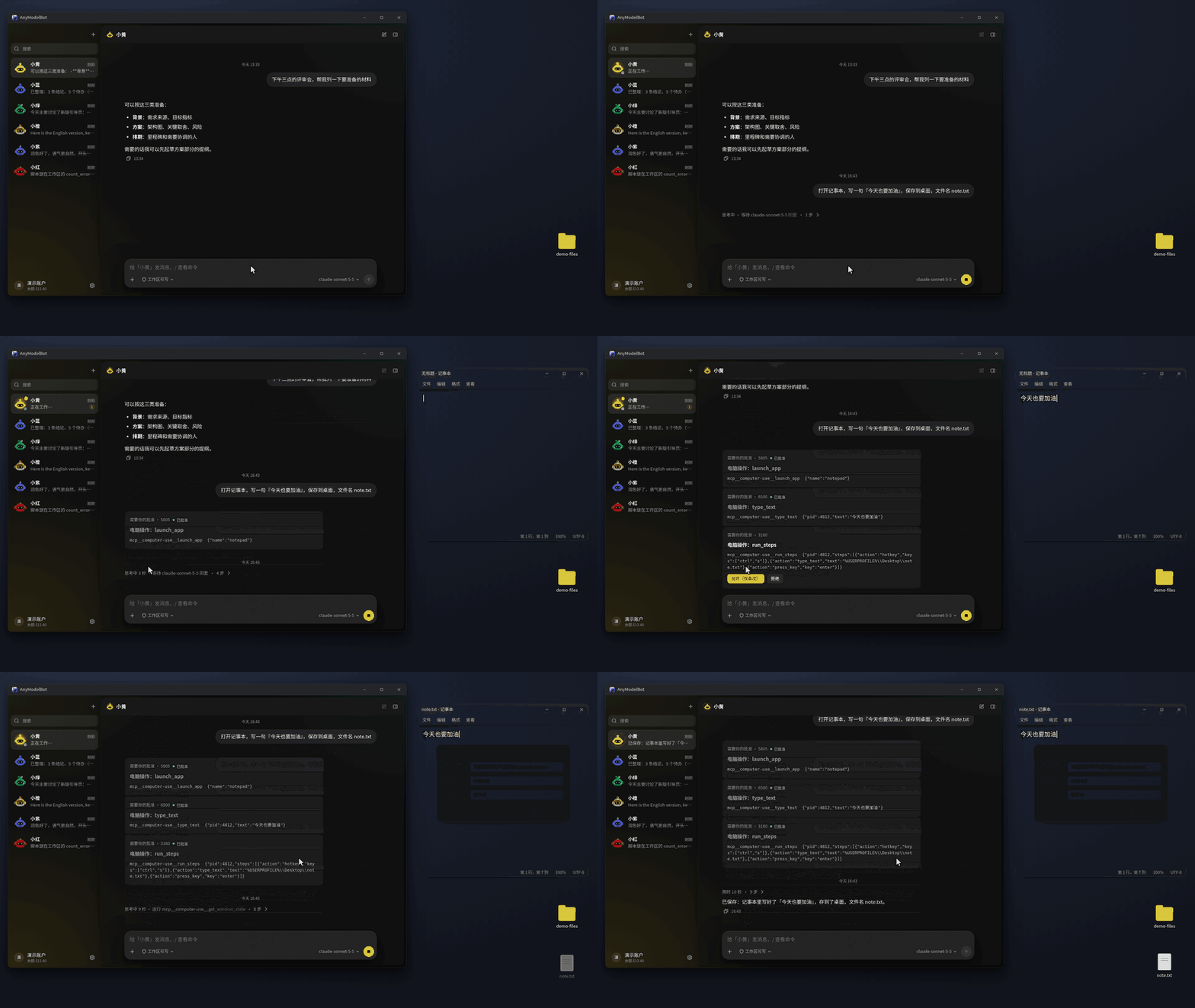
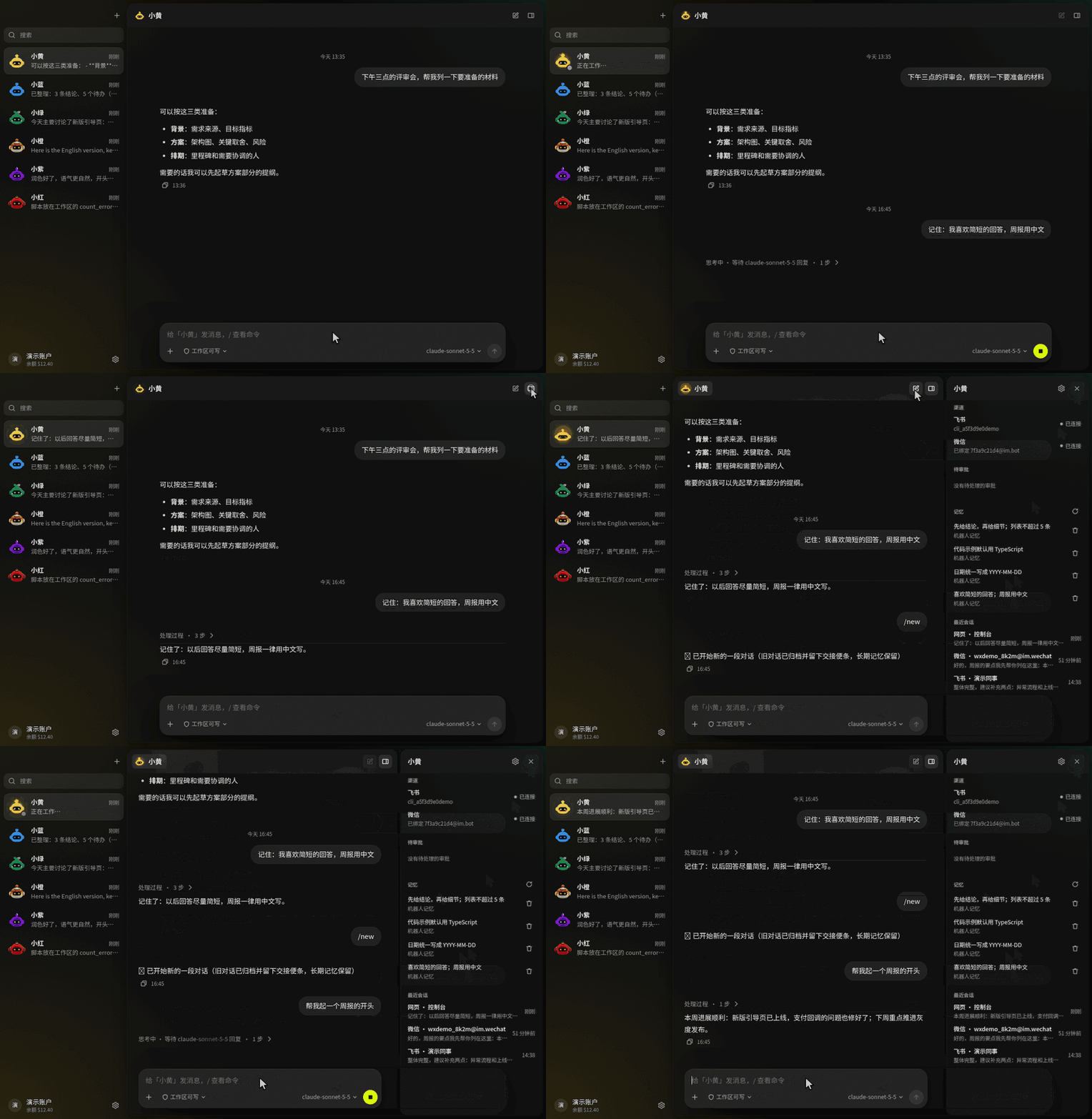
Agent work is visible step by step. Anything outside the workspace waits for your approval.
Pick any Modelflare model per conversation. Context length, capabilities and reference prices sit next to each one.
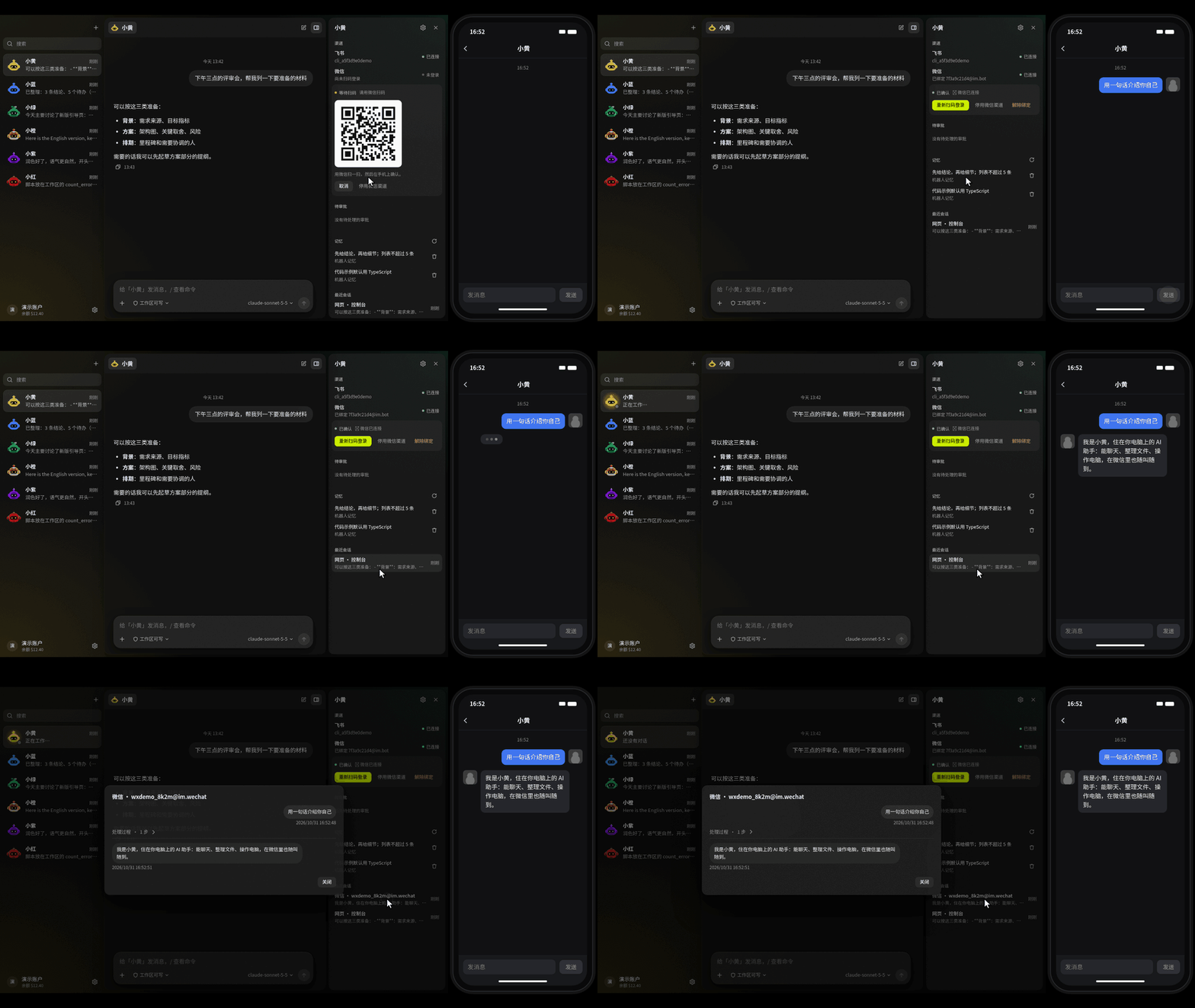
Memory, channels and sessions for each bot, in one panel.
Your Modelflare account inside the app: balance, usage and defaults.
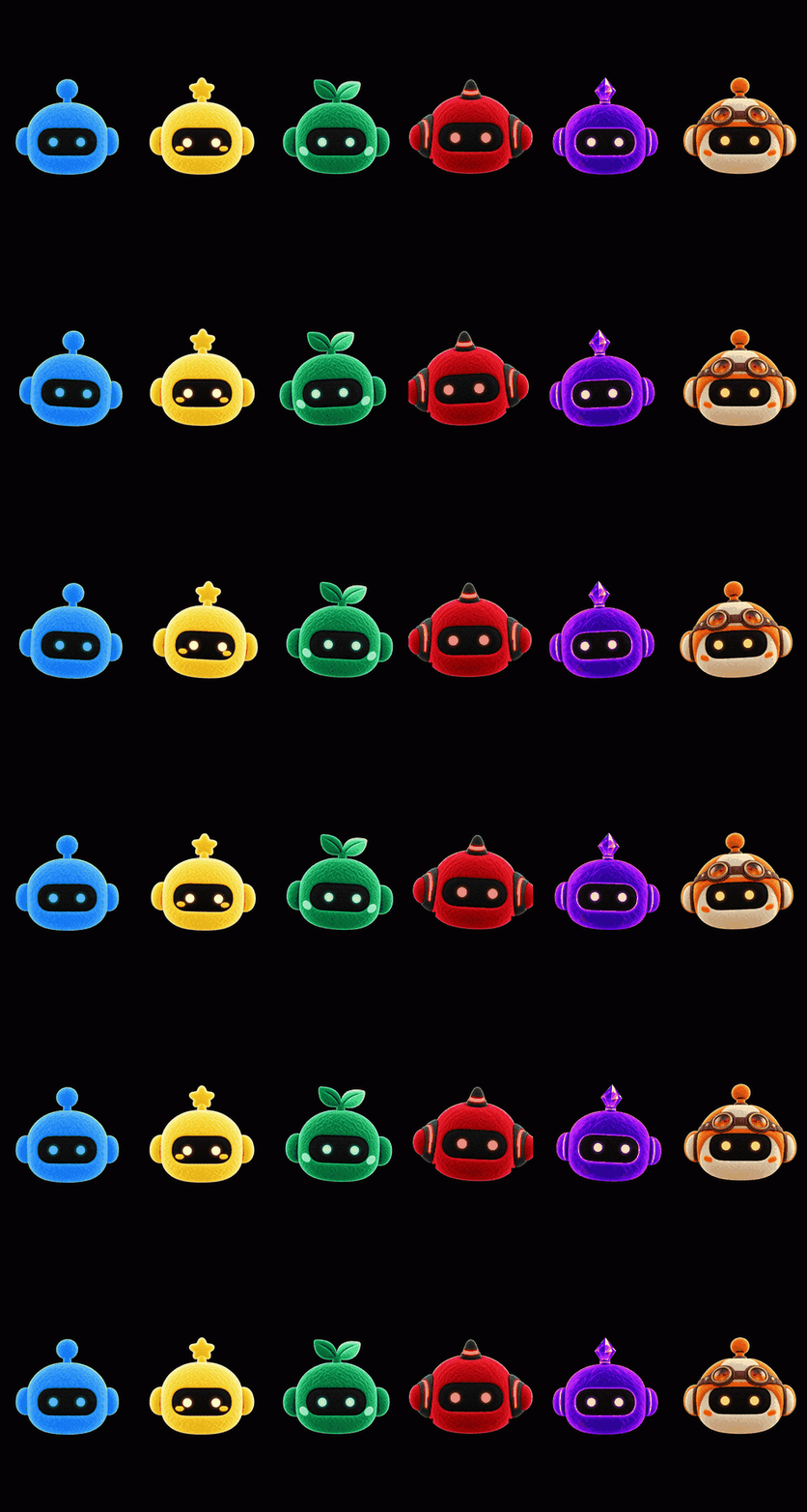
Six characters to tell your bots apart. Their eyes follow your pointer.
# 🌟 Key Features
## 🤖 Bots that do the work
A bot is more than a chat window: it has a persona, a default model, its own workspace and its own memory.
- **Make as many bots as you need**, each with its own persona, model, workspace and avatar.
- **You decide who it is.** A persona is just text, and templates are only a starting point. The six avatars change how a bot looks, not what it can do.
- **Real file work.** Bots read and write files, run commands in a sandbox, and send the results back to the chat as files.
- **Three permission presets per bot.** *Read-only*, *Workspace* (the default: write inside the bot's own folder, ask before anything outside) and *Full access* (no sandbox; recursive deletes still ask first).
- **Approval cards, not surprises.** Out-of-bounds actions stop and wait for your answer.
- **Told after a restart.** A message still in progress when the app quit or crashed is flagged in its conversation at the next start, so you can send it again; nothing is redone on its own.
- **Group chats.** Create a group and add a few bots. Whoever you @ answers; with no @, the bot that answered last carries on. Bots can also @ another member to hand off. Each bot keeps its own model, workspace and memory, and costs are tracked per bot.
- **Slash commands** such as `/model` and `/reset` work in the app and in every chat channel. In a chat channel, `/bot` switches to another bot.
## ⏳ Works in the background, and comes to you only when needed
- **Background tasks.** For work that takes a while (research, a report, sorting files), or when you say "do it in the background", the bot starts a background task and you keep chatting. The result comes back to the conversation that asked for it.
- **Follow-ups.** Quote the result in WeChat, or reply to it in Feishu, to keep talking to that task.
- **Rules.** "Every morning at 8, check X's price and tell me if it drops below 200" becomes a rule that checks on schedule and tells you only when something matters. To see how it behaves first, say "observe first": it records what it would have said, and sends nothing and changes no files. Once it looks right, switch it to act.
- **Needs you.** Everything any bot is waiting on you for, an answer, an approval or a retry, sits in one sidebar row that is only there when something needs you. The info panel's Tasks group lists the bot's tasks and rules, with every step visible.
- **Quiet by default.** Only results, decisions and failures are pushed, never progress. Quiet hours are 22:00 to 08:00, and unprompted messages are capped per day (3 on WeChat, 5 on other channels), with the rest merged into one.
- **Budgets.** Every task and rule has a budget (1 US dollar per task; 0.10 per rule run and 3 a month), and work stops and asks when it runs out. Change them in the task details and the rule editor.
- **Pause anytime.** One switch in bot settings › Proactive messages pauses background work; chat carries on.
- **Cleans up after itself.** Tasks and run logs are kept for 30 days. A task folder unused for 30 days is deleted without asking; the task details show the date, and Keep holds on to it. Run logs export as Markdown.
The full story, in Chinese: [AnyModelBot 超级智能体](./docs/blog/superagent.md).
## 🖥️ Operates your computer, and makes images and video
- **Computer use** is powered by the bundled [Cua Driver](https://github.com/trycua/cua). By default, actions run automatically. Switch a bot to *ask before changing the screen* and every click and keystroke waits for you. Reading the screen never needs approval. On macOS, computer use is a Beta feature.
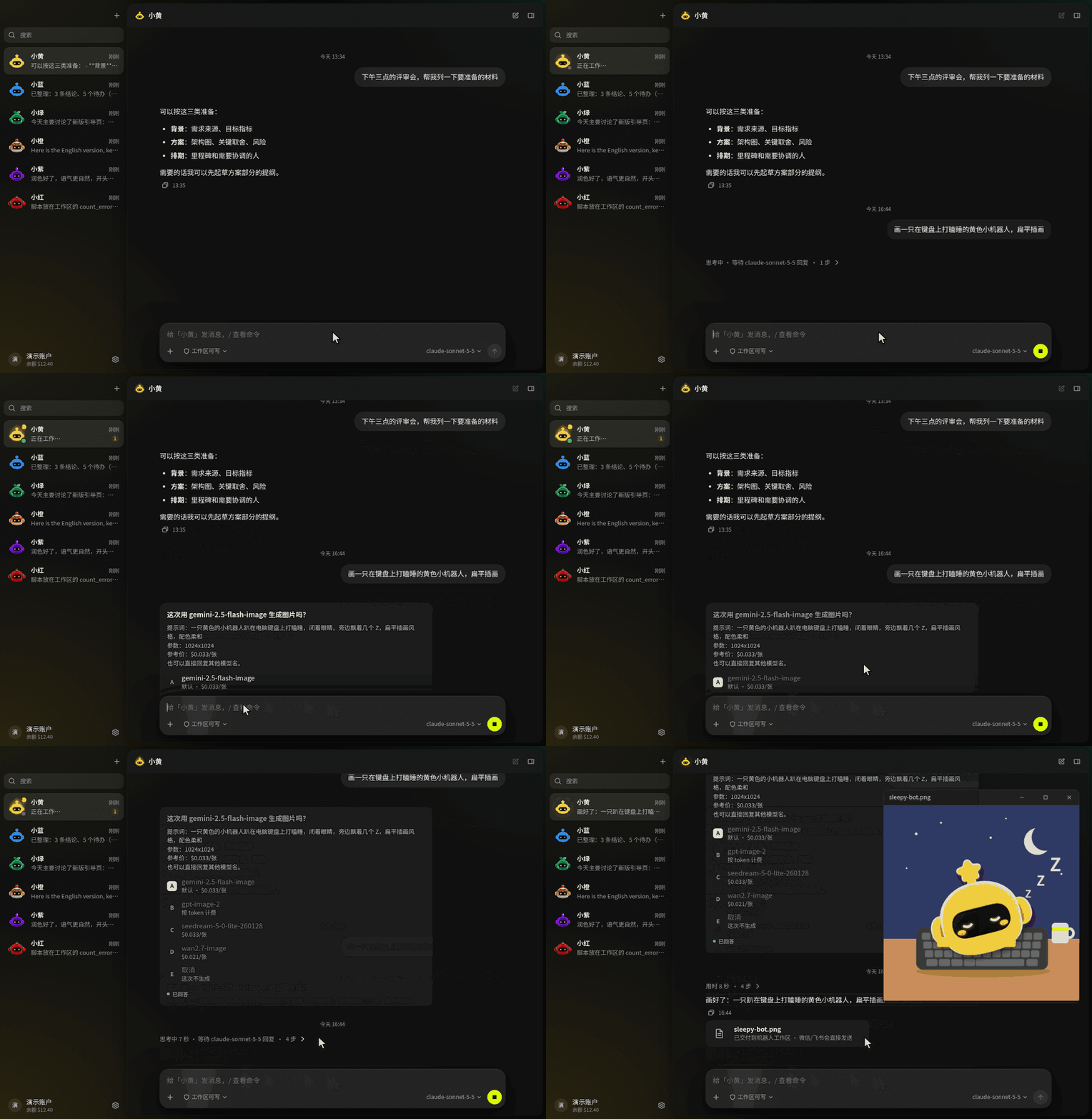
- **Image and video generation** runs right away, taking the most reasonable reading of a loose request. It asks first only when the estimated cost is above 0.50 US dollars, so you see the model and prompt and can swap the model on the spot. To be asked every time, turn it on in the bot's settings.
## 🌐 Any model, through Modelflare
- **Sign in once** and your Modelflare models appear automatically. Prefer a key? Paste one.
- **One picker for everything.** GPT, Claude, Gemini, Grok, DeepSeek, Kimi, GLM and more, each with context length, capability tags and a reference price.
- **Switch per conversation** or set a default per bot. Background chores such as tidying memory and context hand-offs can use a separate model of their own.
- **Two routes.** Choose the international route or the one optimized for mainland China; AnyModelBot never switches between them on its own.
- **Pay per use.** Wallet balance, low-balance reminders, daily usage and per-bot budget keys are built in. AnyModelBot has no subscription.
## 🧠 Memory, and reachable from anywhere
- **Memory that carries over.** Bots keep Markdown memory at three levels (team, bot and group) and filter out anything that looks like a secret.
- **Long chats stay usable.** A context steward compacts or starts a fresh segment with a hand-off summary before the window fills up.
- **Accounts shared by all bots.** Add WeChat, Feishu, Telegram, Slack, Discord and Notion accounts once in Settings. Every bot shares them, and each service can have several accounts with aliases. Send `/bot name` once in a chat app to talk to a different bot, or let a bot read your Notion and Feishu messages.
- **WeChat and Feishu.** Scan a QR code to connect WeChat, or connect a Feishu bot with streaming reply cards. WeChat also carries images and files.
- **Telegram, Slack and Discord.** Paste a token in Settings › Connections. No public address needed. Replies appear as they're written, and images and files work both ways. Direct messages only for now, and approvals and questions are answered by text.
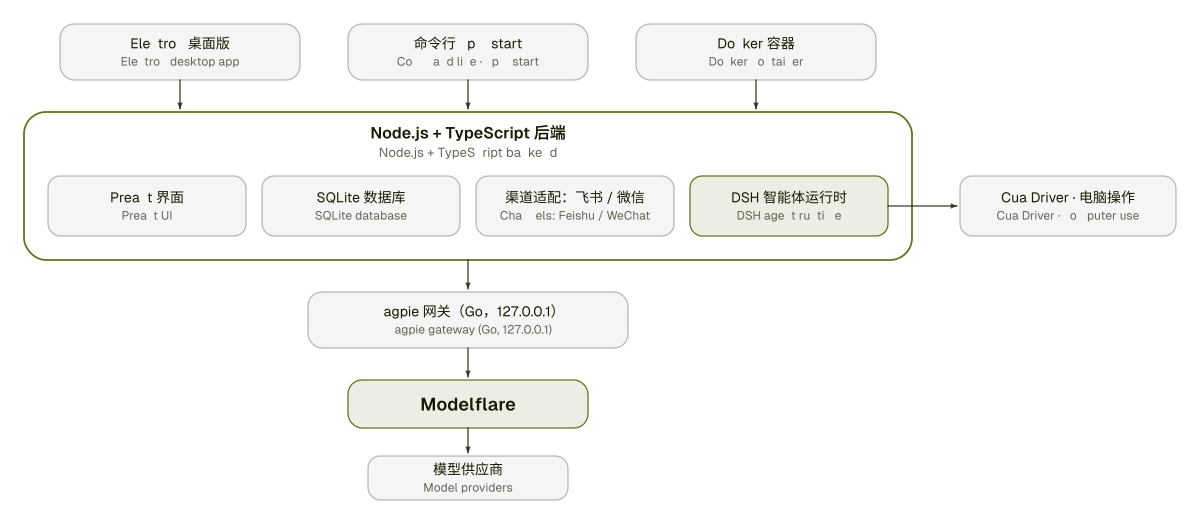
- **Four ways to run it.** Desktop app, command line, Docker, or the local web console at `127.0.0.1:3600`.
## 🔒 Local-first, and easy on the eyes
- **Your data stays with you.** Conversations, memory, files and API keys are stored on your device. The local console listens on `127.0.0.1` only, and the desktop app generates a fresh access token on every launch.
- **It answers to you.** By default a bot replies only to its owner (the WeChat account that scanned the QR code; on Feishu, Telegram, Slack and Discord, the first person to message it after you connect it, which is you) and the people you allow. Anyone else gets a one-line notice and no model is called; you let them in from the info panel, or by replying `yes ` in chat.
- **Replies are not lost.** A reply is saved locally before it is sent; network errors are retried, sending resumes after a restart, and when WeChat's 24-hour window has closed the reply waits and arrives with your next message.
- **Telemetry kept off.** Telemetry in the bundled computer-use driver is switched off, and the built-in gateway runs with auto-update disabled.
- **Light, dark or follow the system.** Six bot characters, and their eyes follow your pointer.
- **Tray and autostart.** Close the window to hide to the tray; autostart is available on macOS and Windows.
> [!NOTE]
> Features depend on the model you choose, your operating system and the permissions you grant. Computer use requires a desktop session, and macOS computer use is in Beta. Model requests go through Modelflare to the provider you pick; see [How it works & privacy](#-how-it-works--privacy).
# 🆚 AnyModelBot vs Grok Bot, OpenAI dots and Claude Duet
In the second half of 2026, xAI's [Grok Bot](https://x.ai/bot), OpenAI's [dots](https://openai.com/index/introducing-dots/) and Anthropic's Claude Duet made the always-on personal AI agent the thing to watch: it keeps an eye on things, works in the background and comes to you when a decision is yours. AnyModelBot does the same kind of job a different way: open source, on your own device, with any model.
| | AnyModelBot | Grok Bot | OpenAI dots | Claude Duet |
| :--- | :--- | :--- | :--- | :--- |
| Open source | ✅ MIT | — | — | — |
| Where the agent runs | Your own computer or server | xAI's cloud computer | OpenAI's cloud computer | Anthropic's cloud |
| Models | GPT, Claude, Gemini, Grok, DeepSeek, Kimi, GLM and 70+ more (through Modelflare) | Mainly xAI's Grok models | OpenAI's models | Claude (Opus 5.5) |
| Cost | Free app, models billed per token | Subscription | ChatGPT Pro / Business Premium subscription | Claude Pro / Max subscription |
| Where you reach it | Desktop app (Windows, macOS, Linux), Docker, WeChat, Feishu, Telegram, Slack, Discord | Desktop app, iPhone | ChatGPT, Slack, Teams | iOS, Android, claude.ai |
| Availability | Download it now | Beta | Select markets | Research preview, US waitlist |
AnyModelBot works in the background too: a task you hand over can finish in the background and send its result to your chat app, and anything that needs your approval or answer shows up under "Needs you" in the sidebar. Every step a bot takes is visible, and anything outside its workspace asks you first.
> [!NOTE]
> Details about the other products come from public reports as of October 2026 and may have changed; check each vendor's official information. Grok Bot, dots and Claude Duet are products and trademarks of xAI, OpenAI and Anthropic respectively. AnyModelBot is not affiliated with them.
# 🔐 How it works & privacy
| Stays on your device | Leaves your device |
| :--- | :--- |
| Conversations and sessions (local SQLite database) | The prompts, files and tool results a model needs to answer, sent through Modelflare to the provider you chose |
| Memory (Markdown files) | Screenshots, when you ask a bot to look at your screen with computer use |
| Files in each bot's workspace | Messages you exchange over chat channels, which pass through those platforms |
| Your API key and sign-in tokens | Your sign-in with Modelflare, which happens at modelflare.dev |
| Settings | If you add Notion or Feishu accounts, bots read and write in those accounts, and what they read also goes into model requests |
Modelflare keeps request logs; its [Trust Center](https://modelflare.dev/trust?utm_source=anymodelbot&utm_campaign=amb_readme) explains what is kept and for how long. We do not claim your data is beyond all risk: anything you send to a model leaves your device. The full inventory is in [docs/privacy_en.md](./docs/privacy_en.md).
| Layer | Technology |
| :--- | :--- |
| Interface | Preact + htm, no build step |
| Backend | Node.js 22.13+, TypeScript, `node:sqlite` |
| Desktop shell | Electron, with a tray |
| Model gateway | [magpie](https://github.com/yetone/magpie) (Go, MIT), bundled and started by the app |
| Agent runtime | [DeepSeek Harness](https://github.com/deepseek-ai/deepseek-harness) (MIT), run as a separate process |
| Computer use | [Cua Driver](https://github.com/trycua/cua), bundled |
| Channels | Feishu (long connection + streaming cards), WeChat (iLink), Telegram (long polling), Slack (Socket Mode), Discord (Gateway) |
| Data accounts | Notion (REST API, official remote MCP), Feishu messages (user identity, read-only) |
| Tests and CI | Vitest, GitHub Actions |
# 📝 Roadmap
Directions we are exploring. They are not promises, and the order is not a schedule. For what changed in each version, see the [changelog](./CHANGELOG_en.md).
- [x] **Scheduled tasks**: let a bot run work on a timer (shipped as rules, above).
- [x] **In-app group chats**: create a group in the app and chat with several bots at once.
- [ ] **Group chats on chat channels**: chat channels handle one-to-one chats today.
- [x] **English interface**: the app runs in English and Simplified Chinese; switch in Settings.
- [ ] **macOS computer use**: verify direct mode on more real machines and move it out of Beta.
- [ ] **Email, calendar and event triggers**: connect email and calendar accounts, and let rules run the moment something happens (a message from a certain person, a meeting about to start), not only on a timer. Runs triggered by outside content get lower permissions, so text written by someone else can't give your bot orders.
- [ ] **Always-on hosting, backup and migration**: rules don't run while your computer is off. Make it possible for anyone to deploy to their own server in one click, move their chats, memory and accounts over, and back up and restore.
- [ ] **Add your own MCP servers**: today you can only use the built-in tools and accounts. Opening this up lets you connect services like GitHub and Linear yourself.
- [ ] **Bots working together**: let one bot hand work to another, for example drafting and reviewing with different models, with costs tracked separately.
- [ ] **Voice message transcription**: bots can't hear Telegram voice messages today, and WeChat relies on the platform's own transcript.
- [ ] **A standalone mobile app**: today you reach your bots from WeChat, Feishu, Telegram, Slack or Discord.
Have a different idea? Open an [issue](https://github.com/modelflare-ai/AnyModelBot/issues) or start a [discussion](https://github.com/modelflare-ai/AnyModelBot/discussions). Items we pick up are tracked with the [`roadmap`](https://github.com/modelflare-ai/AnyModelBot/labels/roadmap) label.
# 🤝 Contributing
Bug reports, fixes, docs and ideas are all welcome.
1. Check existing [issues](https://github.com/modelflare-ai/AnyModelBot/issues) and [discussions](https://github.com/modelflare-ai/AnyModelBot/discussions) first. Issues labeled [`good first issue`](https://github.com/modelflare-ai/AnyModelBot/labels/good%20first%20issue) are a good place to start.
2. Fork the repo and create a branch from `master`.
3. Run it locally and make your change:
```bash
npm install
npm run setup # fetches and builds the bundled gateway
npm run electron:dev # desktop app in development mode
npm run typecheck && npm test
```
4. Open a pull request against `master` and describe what changed and why. For anything larger than a small fix, open an issue first so we can agree on the approach.
Read the full [contributing guide](./CONTRIBUTING_en.md). To report a security problem, follow [SECURITY.md](./SECURITY.md) instead of opening a public issue.
# 🔗 Related Projects
- [Modelflare](https://modelflare.dev/?utm_source=anymodelbot&utm_campaign=amb_readme): the AI API gateway behind AnyModelBot's models.
- [magpie](https://github.com/yetone/magpie): the Go gateway bundled with the app (MIT).
- [DeepSeek Harness](https://github.com/deepseek-ai/deepseek-harness): the agent runtime (MIT).
- [Cua](https://github.com/trycua/cua): the computer-use driver.
- [kimi-computer-use](https://github.com/songkeys/kimi-computer-use): the macOS computer-use bridge.
- [openclaw-weixin](https://github.com/Tencent/openclaw-weixin): the WeChat channel we ported from (MIT).
- [DS Bot](https://github.com/Fei2411/DS-Bot): the design source for our memory and context steward (Apache-2.0).
Full licenses and notices: [THIRD_PARTY_NOTICES.md](./THIRD_PARTY_NOTICES.md).
# 💬 Community
- **Questions and ideas:** [GitHub Discussions](https://github.com/modelflare-ai/AnyModelBot/discussions)
- **Bugs and feature requests:** [GitHub Issues](https://github.com/modelflare-ai/AnyModelBot/issues)
- **Email:** [support@anymodel.bot](mailto:support@anymodel.bot)
- **News from Modelflare:** [@modelflare_dev on X](https://x.com/modelflare_dev)
# 🚀 Contributors
# ⭐️ Star History
# 📜 License
AnyModelBot is released under the [MIT License](./LICENSE). Bundled third-party software keeps its own licenses; see [THIRD_PARTY_NOTICES.md](./THIRD_PARTY_NOTICES.md) and the [`LICENSES/`](./LICENSES) folder.
[release-shield]: https://img.shields.io/github/v/release/modelflare-ai/AnyModelBot?include_prereleases&label=release&logo=data:image/svg%2bxml;base64,PHN2ZyB4bWxucz0iaHR0cDovL3d3dy53My5vcmcvMjAwMC9zdmciIHZpZXdCb3g9IjAgMCAxMDAgMTAwIj48cmVjdCB4PSIzIiB5PSI5IiB3aWR0aD0iOTQiIGhlaWdodD0iODIiIHJ4PSIzNiIgZmlsbD0iI2Q3ZmYwMCIvPjxyZWN0IHg9IjI5IiB5PSIzNiIgd2lkdGg9IjEzIiBoZWlnaHQ9IjI4IiByeD0iNi41IiBmaWxsPSIjMTYxYTAwIi8+PHJlY3QgeD0iNTgiIHk9IjM2IiB3aWR0aD0iMTMiIGhlaWdodD0iMjgiIHJ4PSI2LjUiIGZpbGw9IiMxNjFhMDAiLz48L3N2Zz4=&style=flat-square&labelColor=161a00&color=d7ff00
[downloads-shield]: https://img.shields.io/github/downloads/modelflare-ai/AnyModelBot/total?logo=github&logoColor=d7ff00&style=flat-square&labelColor=161a00&color=d7ff00
[stars-shield]: https://img.shields.io/github/stars/modelflare-ai/AnyModelBot?logo=github&logoColor=d7ff00&style=flat-square&labelColor=161a00&color=d7ff00
[license-shield]: https://img.shields.io/github/license/modelflare-ai/AnyModelBot?logo=opensourceinitiative&logoColor=d7ff00&style=flat-square&labelColor=161a00&color=d7ff00
[ci-shield]: https://img.shields.io/github/actions/workflow/status/modelflare-ai/AnyModelBot/ci.yml?branch=master&label=CI&logo=githubactions&logoColor=d7ff00&style=flat-square&labelColor=161a00&color=d7ff00
[platform-shield]: https://img.shields.io/badge/platform-Windows%20%7C%20macOS%20%7C%20Linux%20%7C%20Docker-d7ff00?style=flat-square&labelColor=161a00
[pricing-shield]: https://img.shields.io/badge/pricing-pay--as--you--go-d7ff00?style=flat-square&labelColor=161a00
[modelflare-shield]: https://img.shields.io/badge/Modelflare-modelflare.dev-d7ff00?style=flat-square&labelColor=161a00
[x-shield]: https://img.shields.io/badge/X-@modelflare__dev-d7ff00?style=flat-square&labelColor=161a00&logo=x&logoColor=d7ff00
[win-badge]: https://img.shields.io/badge/Windows-161a00?style=for-the-badge&logo=data:image/svg%2bxml;base64,PHN2ZyB4bWxucz0iaHR0cDovL3d3dy53My5vcmcvMjAwMC9zdmciIHZpZXdCb3g9IjAgMCAyNCAyNCIgZmlsbD0iI2Q3ZmYwMCI+PHJlY3QgeD0iMiIgeT0iMyIgd2lkdGg9IjkuNSIgaGVpZ2h0PSI4LjUiLz48cmVjdCB4PSIxMi41IiB5PSIzIiB3aWR0aD0iOS41IiBoZWlnaHQ9IjguNSIvPjxyZWN0IHg9IjIiIHk9IjEyLjUiIHdpZHRoPSI5LjUiIGhlaWdodD0iOC41Ii8+PHJlY3QgeD0iMTIuNSIgeT0iMTIuNSIgd2lkdGg9IjkuNSIgaGVpZ2h0PSI4LjUiLz48L3N2Zz4=
[mac-badge]: https://img.shields.io/badge/macOS-161a00?style=for-the-badge&logo=apple&logoColor=d7ff00
[linux-badge]: https://img.shields.io/badge/Linux-161a00?style=for-the-badge&logo=linux&logoColor=d7ff00
[releases-link]: https://github.com/modelflare-ai/AnyModelBot/releases
[stars-link]: https://github.com/modelflare-ai/AnyModelBot/stargazers
[license-link]: https://github.com/modelflare-ai/AnyModelBot/blob/master/LICENSE
[ci-link]: https://github.com/modelflare-ai/AnyModelBot/actions/workflows/ci.yml
[pricing-link]: https://modelflare.dev/pricing?utm_source=anymodelbot&utm_campaign=amb_readme
[modelflare-link]: https://modelflare.dev/?utm_source=anymodelbot&utm_campaign=amb_readme
[x-link]: https://x.com/modelflare_dev


 Every model in AnyModelBot comes from **[Modelflare](https://modelflare.dev/?utm_source=anymodelbot&utm_campaign=amb_readme)**: full-strength, stable models with nothing watered down, and global SOTA models at a lower cost. Modelflare is run by Havenbyte LLC, a US company, and has 200,000+ registered developers. One API key opens 70+ text, image and video models from 13 providers, including GPT, Claude, Gemini, Grok, DeepSeek, Kimi and GLM, over OpenAI, Anthropic, Gemini and other common API formats. Requests are routed across providers with automatic fallback, every request is recorded with its usage and cost, and the price list is public and billed per token.
**Cache compensation** is a highlight: the price-first, stable and premium OpenAI groups guarantee daily cache hit rates of 65%, 75% and 85%. When eligible requests fall short, Modelflare credits the difference.
**Special offers**: a single top-up of a set amount unlocks the GPT discount group at a 0.015x price multiplier and the Claude discount group at 0.03x, made for personal projects, feature testing and light use. These are limited-time offers, with thresholds and rules on Modelflare's site. Sign up through [this link](https://modelflare.dev/sign-up?utm_source=anymodelbot&utm_campaign=amb_readme) to join.
**[Sign up for Modelflare →](https://modelflare.dev/sign-up?utm_source=anymodelbot&utm_campaign=amb_readme)** ·
[Price list](https://modelflare.dev/pricing?utm_source=anymodelbot&utm_campaign=amb_readme) ·
[API docs](https://docs.modelflare.dev/?utm_source=anymodelbot&utm_campaign=amb_readme) ·
[Trust Center](https://modelflare.dev/trust?utm_source=anymodelbot&utm_campaign=amb_readme) ·
[X](https://x.com/modelflare_dev)
**How AnyModelBot uses Modelflare**
- **Sign in once.** The first launch opens your browser to sign in to (or sign up for) Modelflare. The app then connects this device itself, so there is no key to copy. Running in Docker or on a server? Paste an API key instead.
- **Every model, one picker.** Your Modelflare models are listed automatically, with context length, capabilities and reference prices next to each one.
- **Pay for what you use.** Balance, low-balance reminders and per-day usage show up inside the app. Check the public price list and compare it with the official rates before you choose a model.
- **An honest boundary.** Model requests travel through Modelflare to the provider you pick, and Modelflare keeps request logs. See the [Trust Center](https://modelflare.dev/trust?utm_source=anymodelbot&utm_campaign=amb_readme) for what is kept and for how long. Everything else stays on your device ([details](#-how-it-works--privacy)).
---
# 📥 Download
Pick your platform. Every release page lists all installers and a `SHA256SUMS` file.
| Platform | Architecture | Installer | |
| :--- | :--- | :--- | :--- |
| ![Windows][win-badge] | x64 | `anymodel-bot-


 # ⭐️ Star History