[](https://github.com/Akshay090/svg-banners)
### 「[简体中文](./README_zh.md) | English」
** ⚡ Open-source, accurate and easy-to-use video clipping tool
**
** 🧠 Explore LLM based video clipping with FunClip
**
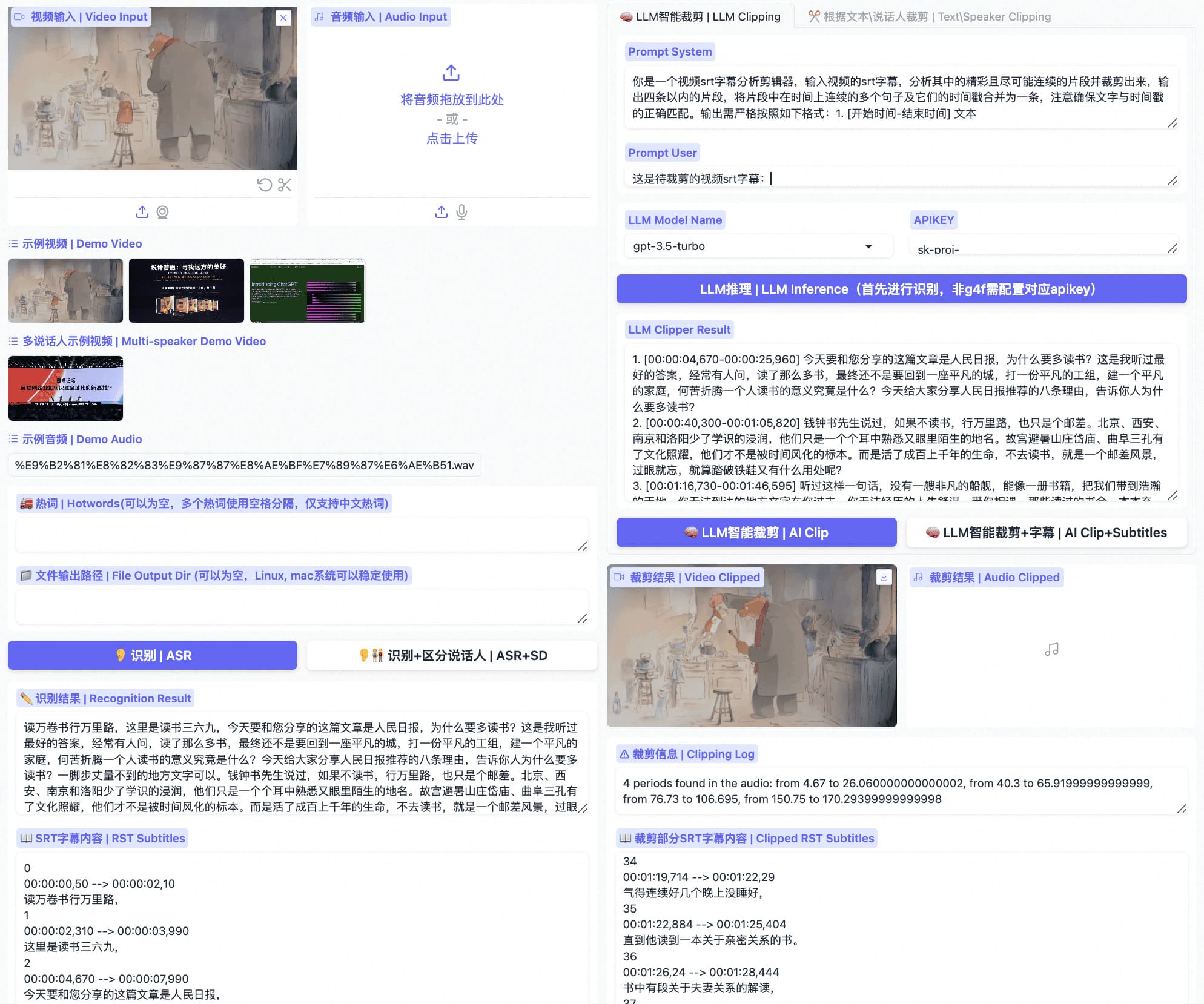

**FunClip** is a fully open-source, locally deployed automated video clipping tool. It leverages Alibaba TONGYI speech lab's open-source [FunASR](https://github.com/modelscope/FunASR) Paraformer series models to perform speech recognition on videos. Then, users can freely choose text segments or speakers from the recognition results and click the clip button to obtain the video clip corresponding to the selected segments (Quick Experience [Modelscope⭐](https://modelscope.cn/studios/iic/funasr_app_clipvideo/summary) [HuggingFace🤗](https://huggingface.co/spaces/FunAudioLLM/FunClip)).
## Highlights🎨
- 🔥Try AI clipping using LLM in FunClip now.
- FunClip integrates Alibaba's open-source industrial-grade model [Paraformer-Large](https://modelscope.cn/models/iic/speech_paraformer-large_asr_nat-zh-cn-16k-common-vocab8404-pytorch/summary), which is one of the best-performing open-source Chinese ASR models available, with over 13 million downloads on Modelscope. It can also accurately predict timestamps in an integrated manner.
- FunClip incorporates the hotword customization feature of [SeACo-Paraformer](https://modelscope.cn/models/iic/speech_seaco_paraformer_large_asr_nat-zh-cn-16k-common-vocab8404-pytorch/summary), allowing users to specify certain entity words, names, etc., as hotwords during the ASR process to enhance recognition results.
- FunClip integrates the [CAM++](https://modelscope.cn/models/iic/speech_campplus_sv_zh-cn_16k-common/summary) speaker recognition model, enabling users to use the auto-recognized speaker ID as the target for trimming, to clip segments from a specific speaker.
- The functionalities are realized through Gradio interaction, offering simple installation and ease of use. It can also be deployed on a server and accessed via a browser.
- FunClip supports multi-segment free clipping and automatically returns full video SRT subtitles and target segment SRT subtitles, offering a simple and convenient user experience.
## What's New🚀
- 2026/09/01 [FunClip v2.2.1](https://github.com/modelscope/FunClip/releases/tag/v2.2.1) preserves selected subtitle colors with a Pillow renderer and publishes the latest MOSS speaker-label boundaries in checksum-protected source archives.
- 2026/08/30 [FunClip v2.2.0](https://github.com/modelscope/FunClip/releases/tag/v2.2.0) adds the third-party [MOSS-Transcribe-Diarize](https://github.com/OpenMOSS/MOSS-Transcribe-Diarize) path for long-form ASR, timestamps, and anonymous speaker labels without external VAD or speaker models.
- 2026/08/03 [FunClip v2.1.1](https://github.com/modelscope/FunClip/releases/tag/v2.1.1) improves fresh Gradio installs, private-by-default container startup, case-insensitive matching, and MiniMax routing.
> See [GitHub Releases](https://github.com/modelscope/FunClip/releases) for the complete history and downloadable assets.
## On Going🌵
- [x] FunClip will support Whisper model for English users, coming soon (ASR using Whisper with timestamp requires massive GPU memory, we support timestamp prediction for vanilla Paraformer in FunASR to achieving this).
- [x] FunClip will further explore large language model based AI clipping. Feedback and prompt-setting tips are welcome.
- [ ] Reverse periods choosing while clipping.
- [ ] Removing silence periods.
## Install🔨
### Python env install
Use a separate Python environment for FunClip. The commands below use Python 3.12; install a matching PyTorch/torchaudio pair for your platform before the remaining requirements. See the [installation and troubleshooting guide](docs/installation.md#english) for the Linux CPU recipe, Windows activation and certificate errors.
```shell
git clone https://github.com/modelscope/FunClip.git
cd FunClip
python3.12 -m venv .venv
. .venv/bin/activate
python -m pip install -r requirements.txt
python -m pip check
python funclip/launch.py --help
```
Keep this environment on the repository's **Transformers 4.x** requirements. Nano's separate native **Transformers 5.x** quickstart is not an upgrade command for an existing FunClip installation.
For a versioned snapshot, download [FunClip-2.2.1.tar.gz](https://github.com/modelscope/FunClip/releases/download/v2.2.1/FunClip-2.2.1.tar.gz) or [FunClip-2.2.1.zip](https://github.com/modelscope/FunClip/releases/download/v2.2.1/FunClip-2.2.1.zip), then verify it with the published [SHA256SUMS](https://github.com/modelscope/FunClip/releases/download/v2.2.1/SHA256SUMS). Model weights are downloaded separately when FunClip starts and are not included in these source archives.
FunClip v2.2.1 keeps the supported Gradio 4 runtime and renders built-in subtitles with Pillow so the selected foreground color survives video encoding. Existing installations should run `python -m pip install -U -r requirements.txt` inside their FunClip environment before restarting.
FunClip's current model and subtitle compatibility paths require `funasr>=1.4.9`. This includes the MOSS vLLM adapter, long-audio generation controls, normalized `sentence_info` speaker segments, and the earlier SenseVoice and realtime fixes. If you installed FunClip before this requirement was updated, run `python -m pip install -U "funasr>=1.4.9"` before starting the Gradio service. [Release notes](https://github.com/modelscope/FunASR/releases/tag/v1.4.9) · [PyPI](https://pypi.org/project/funasr/1.4.9/)
### imagemagick install (Optional)
The built-in subtitle renderer in v2.2.1 uses Pillow and the bundled font, so standard subtitle clipping no longer requires ImageMagick. Install ImageMagick only for the legacy `funclip/test/imagemagick_test.py` example or your own MoviePy `TextClip` workflow.
## Use FunClip
### A. Use FunClip as local Gradio Service
You can establish your own FunClip service which is same as [Modelscope Space](https://modelscope.cn/studios/iic/funasr_app_clipvideo/summary) as follow:
```shell
python funclip/launch.py
# '-m fun-asr-nano' for the flagship Fun-ASR-Nano model (Mandarin, English,
# Japanese, 7 Chinese dialect groups, and 26 regional accents)
# '-m sensevoice' for SenseVoice model (multilingual ASR + emotion + audio event detection)
# '--model moss' for OpenMOSS long-form ASR + anonymous speaker labels + timestamps
# '-l en' for English audio recognize
# '-p xxx' for setting port number
# '-s True' for establishing service for public accessing
```
#### Model selection quick start
| Scenario | Command |
| --- | --- |
| Default Chinese video clipping with Paraformer | `python funclip/launch.py` |
| High-accuracy transcription with the flagship Fun-ASR-Nano checkpoint (use Paraformer for precise text-based clipping) | `python funclip/launch.py -m fun-asr-nano` |
| Multilingual ASR with emotion and audio event tags | `python funclip/launch.py -m sensevoice` |
| MOSS through a local vLLM transcription service | `python funclip/launch.py --model moss --moss-backend vllm` |
| English video clipping with the Paraformer English model | `python funclip/launch.py -l en` |
#### MOSS-Transcribe-Diarize backend
[MOSS-Transcribe-Diarize](https://github.com/OpenMOSS/MOSS-Transcribe-Diarize) is a third-party OpenMOSS model, not a FunASR or FunClip model. FunClip pins the published Hugging Face object `OpenMOSS-Team/MOSS-Transcribe-Diarize` at revision `e8681d68e7042738ffca8ac8212bc8fcb1131ab8`. Start and verify the vLLM service using the [bilingual production guide](https://www.funasr.com/en/deploy/moss-transcribe-diarize.html), then run:
```shell
# vLLM is the default MOSS backend and defaults to http://127.0.0.1:8898/v1
python funclip/launch.py --model moss --moss-backend vllm
# Optional bearer credentials are read from the environment, not the command line
MOSS_API_KEY=replace-me python funclip/launch.py --model moss
```
MOSS performs segmentation and speaker diarization end to end. Its `spkS01`, `spkS02`, ... values are anonymous speaker labels within the current recording; the model does not identify a known person, verify an enrolled voiceprint, or guarantee label continuity across separate recordings. Do not attach an external `vad_model` or `spk_model`, because chunking would break consistent speaker assignment within the recording. Its timestamps are segment-level: SRT, speaker clipping, and LLM timestamp clipping are supported, while precise arbitrary text clipping still requires Paraformer's token timestamps. FunClip currently exposes the vLLM path because it is compatible with the standard Transformers 4.x environment and has an end-to-end tested OpenAI transcription contract.
If you only need offline speech transcription on CPU or edge devices and do not need FunClip's video clipping UI, use the FunASR llama.cpp / GGUF runtime instead: [funasr.com/llama-cpp](https://www.funasr.com/llama-cpp.html) · [Fun-ASR-Nano-GGUF](https://huggingface.co/FunAudioLLM/Fun-ASR-Nano-GGUF) · [SenseVoiceSmall-GGUF](https://huggingface.co/FunAudioLLM/SenseVoiceSmall-GGUF).
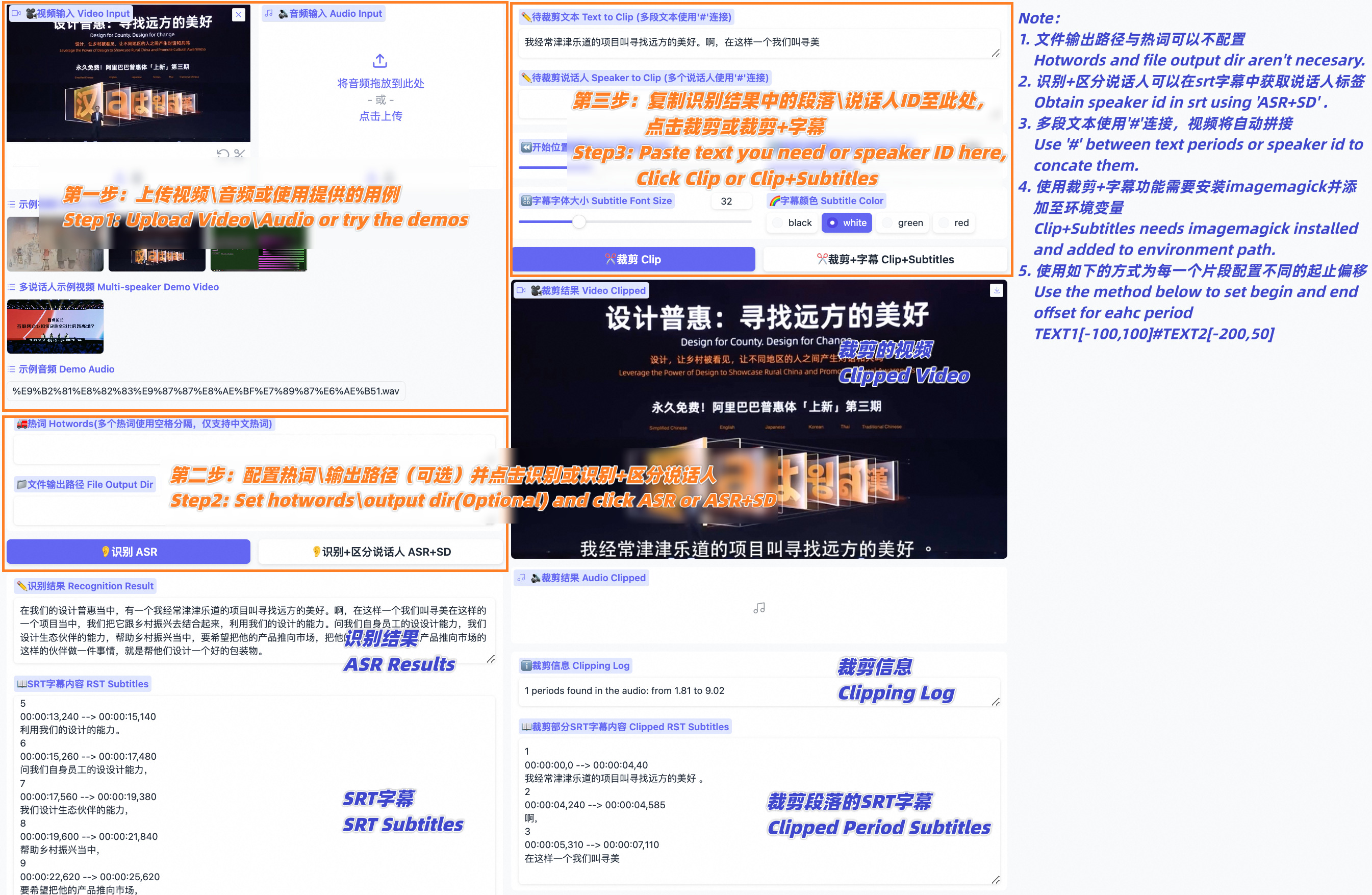
then visit ```localhost:7860``` you will get a Gradio service like below and you can use FunClip following the steps:
- Step1: Upload your video file (or try the example videos below)
- Step2: Copy the text segments you need to 'Text to Clip'
- Step3: Adjust subtitle settings (if needed)
- Step4: Click 'Clip' or 'Clip and Generate Subtitles'
 Follow the guide below to explore LLM based clipping:
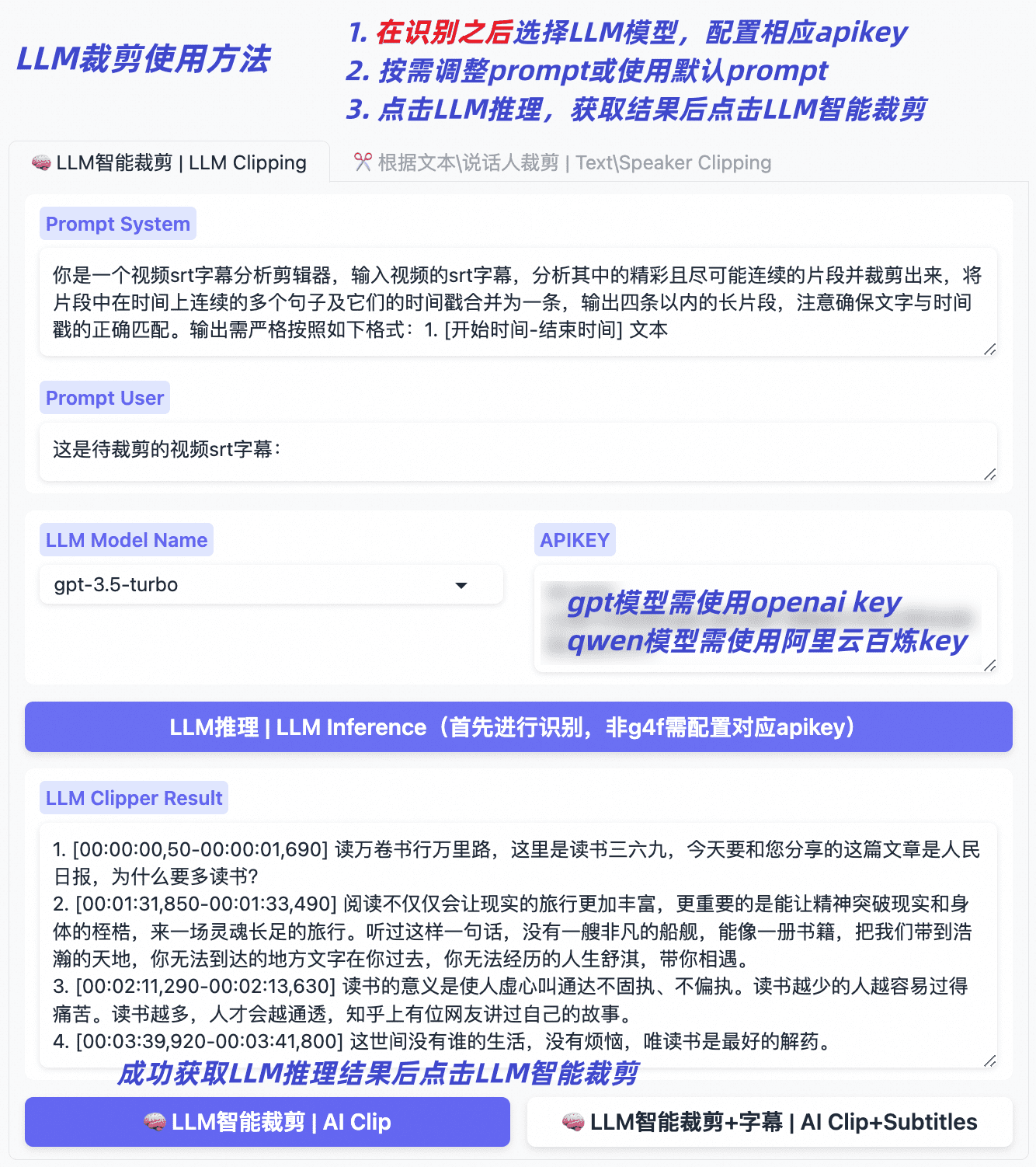 #### Using OrcaRouter as your LLM gateway (optional)
Besides the transcript-based LLMs above, FunClip can route LLM-assisted clipping through [OrcaRouter](https://www.orcarouter.ai), an OpenAI-compatible smart-routing gateway. Select any `orcarouter/` model in the **LLM Model Name** dropdown (`orcarouter/auto` routes each request to the best model for the task), paste an OrcaRouter API key in the **APIKEY** box, and click 'LLM Inference' — FunClip sends the transcript and prompts to `https://api.orcarouter.ai/v1/chat/completions`, and the returned segments work with the existing 'AI Clip' button unchanged.
OrcaRouter exposes one endpoint for all frontier and open-weight models, so you can switch routing targets without changing FunClip. It also offers gateway-level, zero-trust controls for AI agents on the same endpoint. Enforcement follows the Guardrail or Firewall policy attached to the relevant scope for prompts, responses, and tool calls that traverse the gateway; select the documented `tight` posture to enable default-deny behavior. Enforcement is opt-in — this integration supplies only the base URL, API key, and model, and does not attach a policy by itself. Apply a policy via the [security quickstart](https://docs.orcarouter.ai/security/concepts/quickstart); see [Guardrails](https://docs.orcarouter.ai/features/guardrails#scoping-and-the-workspace-default) and [Firewall](https://docs.orcarouter.ai/features/firewall#scoping-and-resolution) for how coverage is scoped.
Set `ORCAROUTER_API_KEY` (and optionally `ORCAROUTER_API_BASE`, which defaults to `https://api.orcarouter.ai/v1`) instead of pasting the key into the UI if you prefer environment-based configuration. A key is available at https://www.orcarouter.ai.
#### Content-aware clipping with TwelveLabs Pegasus (optional)
Besides the transcript-based LLMs above, FunClip can optionally use [TwelveLabs](https://twelvelabs.io) Pegasus, a video understanding model that reasons over the actual video (visuals + audio) rather than only the ASR transcript. This helps pick highlight segments even when the transcript alone is ambiguous (e.g. action, scene changes, on-screen events). To use it, select the `pegasus1.5` model name, paste your TwelveLabs API key, upload a video, and click 'LLM Inference' — Pegasus returns segments in the same `N. [start-end] text` format, so the existing 'AI Clip' button works unchanged. It needs `pip install twelvelabs`, and a free API key is available at https://twelvelabs.io.
### B. Experience FunClip in Modelscope
[FunClip@Modelscope Space⭐](https://modelscope.cn/studios/iic/funasr_app_clipvideo/summary)
[FunClip@HuggingFace Space🤗](https://huggingface.co/spaces/FunAudioLLM/FunClip)
### C. Use FunClip in command line
FunClip supports you to recognize and clip with commands:
```shell
# download the example video used in the commands below
mkdir -p examples
wget "https://huggingface.co/spaces/R1ckShi/FunClip/resolve/main/examples/2022%E4%BA%91%E6%A0%96%E5%A4%A7%E4%BC%9A_%E7%89%87%E6%AE%B5.mp4" -O "examples/2022云栖大会_片段.mp4"
# step1: Recognize
python funclip/videoclipper.py --stage 1 \
--file examples/2022云栖大会_片段.mp4 \
--output_dir ./output
# now you can find recognition results and entire SRT file in ./output/
# step2: Clip
python funclip/videoclipper.py --stage 2 \
--file examples/2022云栖大会_片段.mp4 \
--output_dir ./output \
--dest_text '我们把它跟乡村振兴去结合起来,利用我们的设计的能力' \
--start_ost 0 \
--end_ost 100 \
--output_file './output/res.mp4'
```
## Community Communication🍟
FunClip was first open-sourced by the FunASR team, and useful PRs are welcome.
You can also scan the following DingTalk group or WeChat group QR code to join the community group for communication.
QR codes can expire. If scanning is unavailable, use [GitHub Discussions](https://github.com/modelscope/FunClip/discussions) for questions, ideas, and community projects.
| DingTalk group | WeChat group |
|:-------------------------------------------------------------------:|:-----------------------------------------------------:|
|
#### Using OrcaRouter as your LLM gateway (optional)
Besides the transcript-based LLMs above, FunClip can route LLM-assisted clipping through [OrcaRouter](https://www.orcarouter.ai), an OpenAI-compatible smart-routing gateway. Select any `orcarouter/` model in the **LLM Model Name** dropdown (`orcarouter/auto` routes each request to the best model for the task), paste an OrcaRouter API key in the **APIKEY** box, and click 'LLM Inference' — FunClip sends the transcript and prompts to `https://api.orcarouter.ai/v1/chat/completions`, and the returned segments work with the existing 'AI Clip' button unchanged.
OrcaRouter exposes one endpoint for all frontier and open-weight models, so you can switch routing targets without changing FunClip. It also offers gateway-level, zero-trust controls for AI agents on the same endpoint. Enforcement follows the Guardrail or Firewall policy attached to the relevant scope for prompts, responses, and tool calls that traverse the gateway; select the documented `tight` posture to enable default-deny behavior. Enforcement is opt-in — this integration supplies only the base URL, API key, and model, and does not attach a policy by itself. Apply a policy via the [security quickstart](https://docs.orcarouter.ai/security/concepts/quickstart); see [Guardrails](https://docs.orcarouter.ai/features/guardrails#scoping-and-the-workspace-default) and [Firewall](https://docs.orcarouter.ai/features/firewall#scoping-and-resolution) for how coverage is scoped.
Set `ORCAROUTER_API_KEY` (and optionally `ORCAROUTER_API_BASE`, which defaults to `https://api.orcarouter.ai/v1`) instead of pasting the key into the UI if you prefer environment-based configuration. A key is available at https://www.orcarouter.ai.
#### Content-aware clipping with TwelveLabs Pegasus (optional)
Besides the transcript-based LLMs above, FunClip can optionally use [TwelveLabs](https://twelvelabs.io) Pegasus, a video understanding model that reasons over the actual video (visuals + audio) rather than only the ASR transcript. This helps pick highlight segments even when the transcript alone is ambiguous (e.g. action, scene changes, on-screen events). To use it, select the `pegasus1.5` model name, paste your TwelveLabs API key, upload a video, and click 'LLM Inference' — Pegasus returns segments in the same `N. [start-end] text` format, so the existing 'AI Clip' button works unchanged. It needs `pip install twelvelabs`, and a free API key is available at https://twelvelabs.io.
### B. Experience FunClip in Modelscope
[FunClip@Modelscope Space⭐](https://modelscope.cn/studios/iic/funasr_app_clipvideo/summary)
[FunClip@HuggingFace Space🤗](https://huggingface.co/spaces/FunAudioLLM/FunClip)
### C. Use FunClip in command line
FunClip supports you to recognize and clip with commands:
```shell
# download the example video used in the commands below
mkdir -p examples
wget "https://huggingface.co/spaces/R1ckShi/FunClip/resolve/main/examples/2022%E4%BA%91%E6%A0%96%E5%A4%A7%E4%BC%9A_%E7%89%87%E6%AE%B5.mp4" -O "examples/2022云栖大会_片段.mp4"
# step1: Recognize
python funclip/videoclipper.py --stage 1 \
--file examples/2022云栖大会_片段.mp4 \
--output_dir ./output
# now you can find recognition results and entire SRT file in ./output/
# step2: Clip
python funclip/videoclipper.py --stage 2 \
--file examples/2022云栖大会_片段.mp4 \
--output_dir ./output \
--dest_text '我们把它跟乡村振兴去结合起来,利用我们的设计的能力' \
--start_ost 0 \
--end_ost 100 \
--output_file './output/res.mp4'
```
## Community Communication🍟
FunClip was first open-sourced by the FunASR team, and useful PRs are welcome.
You can also scan the following DingTalk group or WeChat group QR code to join the community group for communication.
QR codes can expire. If scanning is unavailable, use [GitHub Discussions](https://github.com/modelscope/FunClip/discussions) for questions, ideas, and community projects.
| DingTalk group | WeChat group |
|:-------------------------------------------------------------------:|:-----------------------------------------------------:|
| 
|

 📚SeACo-Paraformer Paper:
  ## License
- FunClip source code is licensed under the [MIT License](./LICENSE).
- Model weights are downloaded separately and are governed by the terms on their model pages. The default [Paraformer-Large](https://modelscope.cn/models/iic/speech_paraformer-large_asr_nat-zh-cn-16k-common-vocab8404-pytorch/summary), [SeACo-Paraformer](https://modelscope.cn/models/iic/speech_seaco_paraformer_large_asr_nat-zh-cn-16k-common-vocab8404-pytorch/summary), and [CAM++](https://modelscope.cn/models/iic/speech_campplus_sv_zh-cn_16k-common/summary) pages currently list Apache License 2.0; check the applicable model page before redistribution.
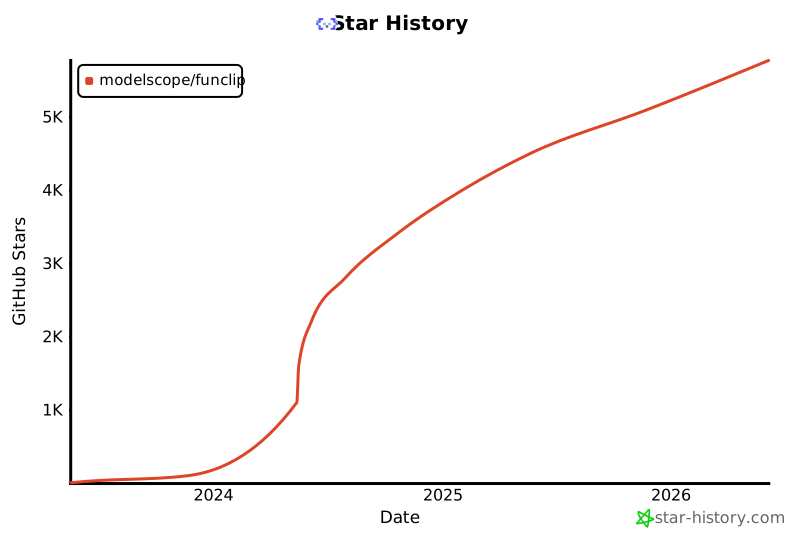
## Star History
[](https://star-history.com/#modelscope/FunClip&Date)
## License
- FunClip source code is licensed under the [MIT License](./LICENSE).
- Model weights are downloaded separately and are governed by the terms on their model pages. The default [Paraformer-Large](https://modelscope.cn/models/iic/speech_paraformer-large_asr_nat-zh-cn-16k-common-vocab8404-pytorch/summary), [SeACo-Paraformer](https://modelscope.cn/models/iic/speech_seaco_paraformer_large_asr_nat-zh-cn-16k-common-vocab8404-pytorch/summary), and [CAM++](https://modelscope.cn/models/iic/speech_campplus_sv_zh-cn_16k-common/summary) pages currently list Apache License 2.0; check the applicable model page before redistribution.
## Star History
[](https://star-history.com/#modelscope/FunClip&Date)