简体中文 | English

Iris Media for DSH
A multimodal media production runtime · currently shipped as a DeepSeek Harness plugin





dsh-iris gives agents and the Iris workbench image, video, speech, and visual understanding capabilities, and it can optimize any draft directly in the DSH composer. It connects to Alibaba Cloud DashScope (Bailian) and to OpenAI Images–compatible services. Configuration and task management live in the Iris workbench, and a floating Iris bubble in the bottom-right corner is the quick entry point.
## A real generation example

> Starting from the two-character draft “鸢尾花”: Iris composer optimization (`deepseek-v4-flash`, thinking `off`) → Alibaba Cloud Bailian `qwen-image-3.0-pro` generation · 2048×2048
## Android 16 live UI
These captures come from an Android browser connected to DSH under Termux/PRoot Debian ARM64, using the default DSH skin. Public copies have no EXIF, XMP, or IPTC metadata.
| 🫧 in the conversation composer | Optimized draft written back |
|---|---|
| 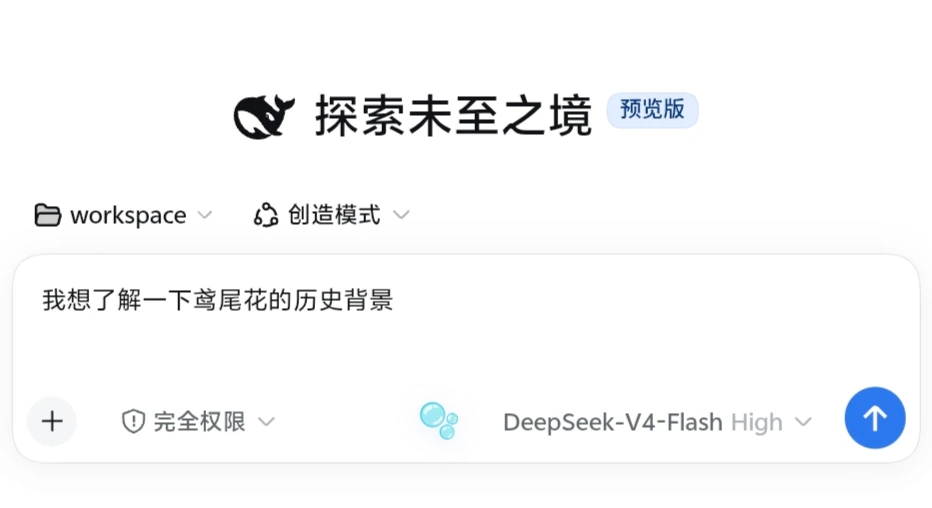 | 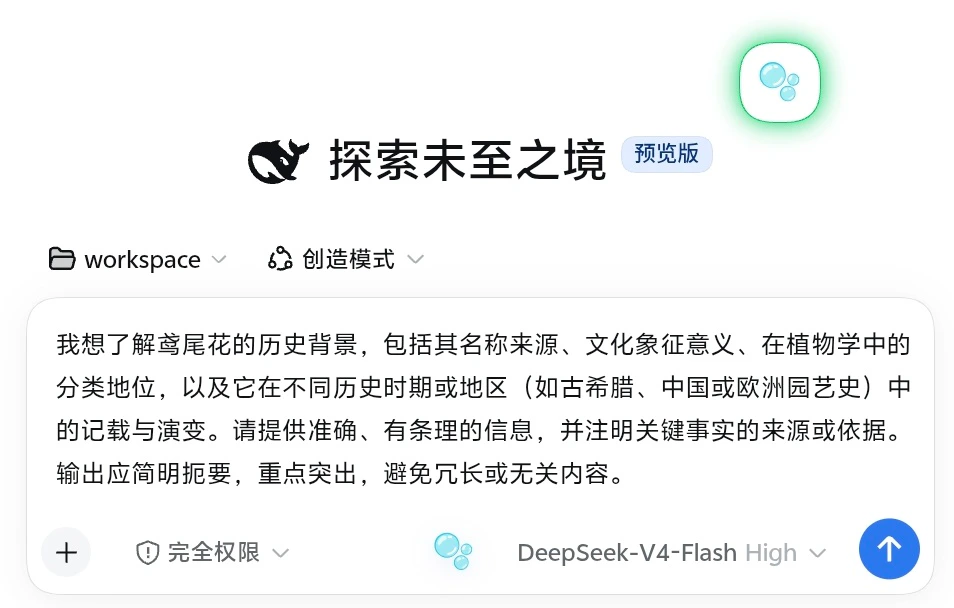 |
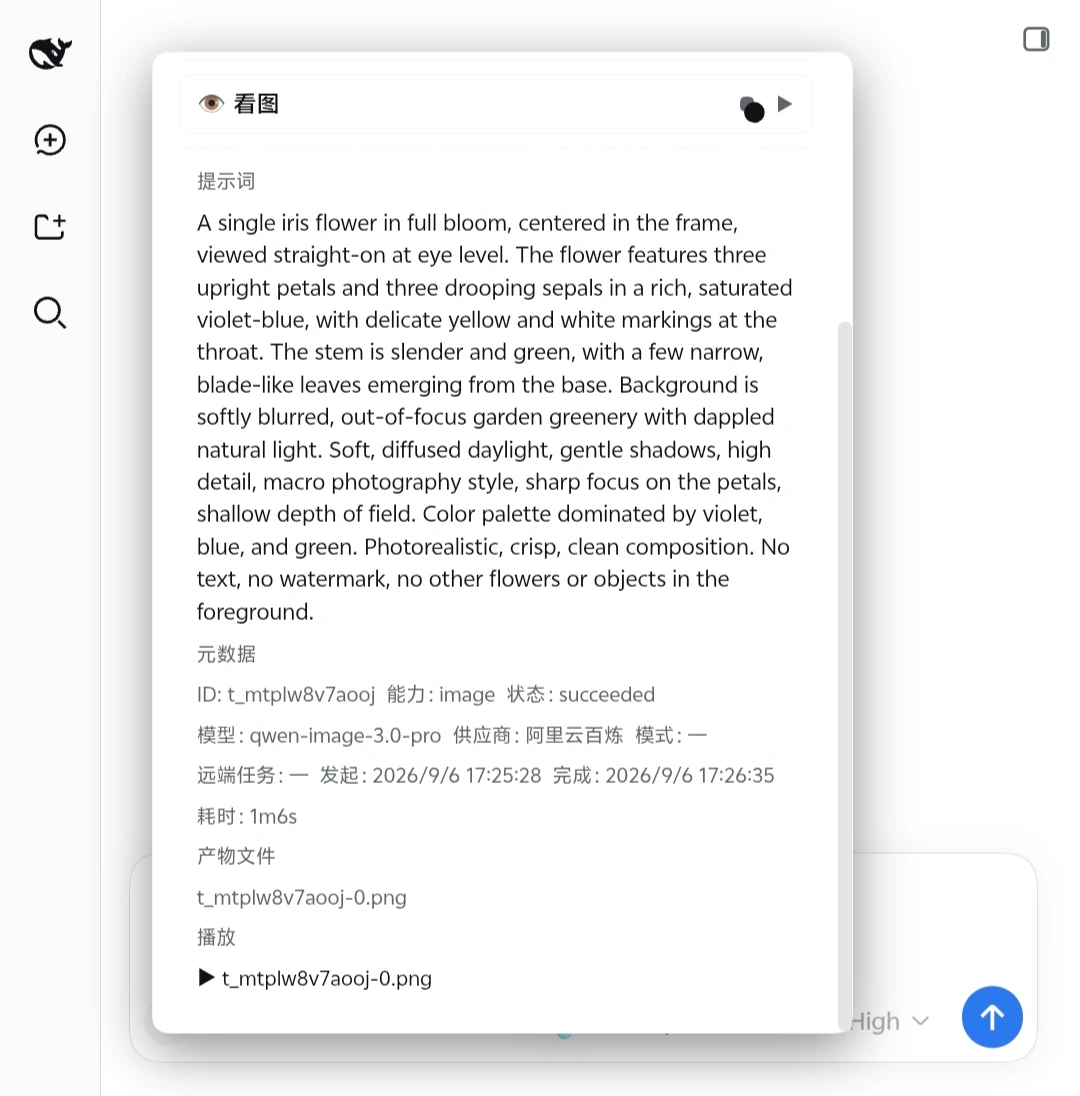
> [See the complete six-image workflow: before, glass preview panel, write-back, succeeded task, and artifact](docs/screenshots.md)
The project is at an early stage; interfaces and configuration formats may still change between releases.
Iris's long-term direction is a media production core that can run on its own and plug into different agent hosts. DeepSeek Harness is the first supported host, and the current version still requires DSH — a standalone Core, CLI, and workbench are on the roadmap but not yet available.
## Relationship with ai-paint
`ai-paint` is the maintainer's local, unpublished predecessor of Iris. It is not a public dependency, and users never need to download, install, or create it. Without that project, simply configure providers in the Iris workbench as described below.
Early versions read models and credentials from the maintainer's local ai-paint configuration — partly to migrate the predecessor project, and partly so the host process could reuse an existing API key locally instead of pasting keys into agent sessions, command-line arguments, or documents. Version 0.1.1 separates the two configurations completely: Iris uses only its own configuration. The old one can be imported exactly once, and only by explicitly setting `IRIS_IMPORT_WORKBENCH_CONFIG` to the absolute path of the local config file. Iris never scans for ai-paint by default and never syncs the two sides. The variable carries a file path, not an API key, and the source file is left untouched. See the [user guide](user_guide.md) for details.
## Quickest start
With DeepSeek Harness `0.1.2-rc.1` installed and `pnpm` on your PATH, add Iris to the Web profile:
```bash
dsh plugin --profile web add @mokuyoaxis/dsh-iris
dsh web
```
> The unscoped `dsh-iris` on npm belongs to a different plugin. Always keep the fully scoped name `@mokuyoaxis/dsh-iris` when installing or updating Iris Media.
To try it from a source checkout, replace `@mokuyoaxis/dsh-iris` in the first command with `.`. The plugin loads the next time DSH starts; the web UI defaults to `http://127.0.0.1:3080`.
After the first start, open "Settings → Iris workbench → + Add provider", enter your DashScope base URL and API key, then click "Discover models". A single provider can start with automatic capability assignment. Full steps, OpenAI Images–compatible configuration, and failover notes are in the [user guide](user_guide.md) (Chinese).
Once configured, minimal instructions can be as simple as:
```text
Use iris_draw_image: draw a white cat sitting by a blue window.
Summarize the image I just uploaded.
Summarize /absolute/path/demo.mp4 with Iris, then turn the summary into speech.
```
DSH profiles and plugin commands follow the [official installation docs](https://github.com/deepseek-ai/deepseek-harness/blob/master/docs/user/develop/basic/publish.md). Generating images, videos, or speech may incur provider charges.
## Feature overview
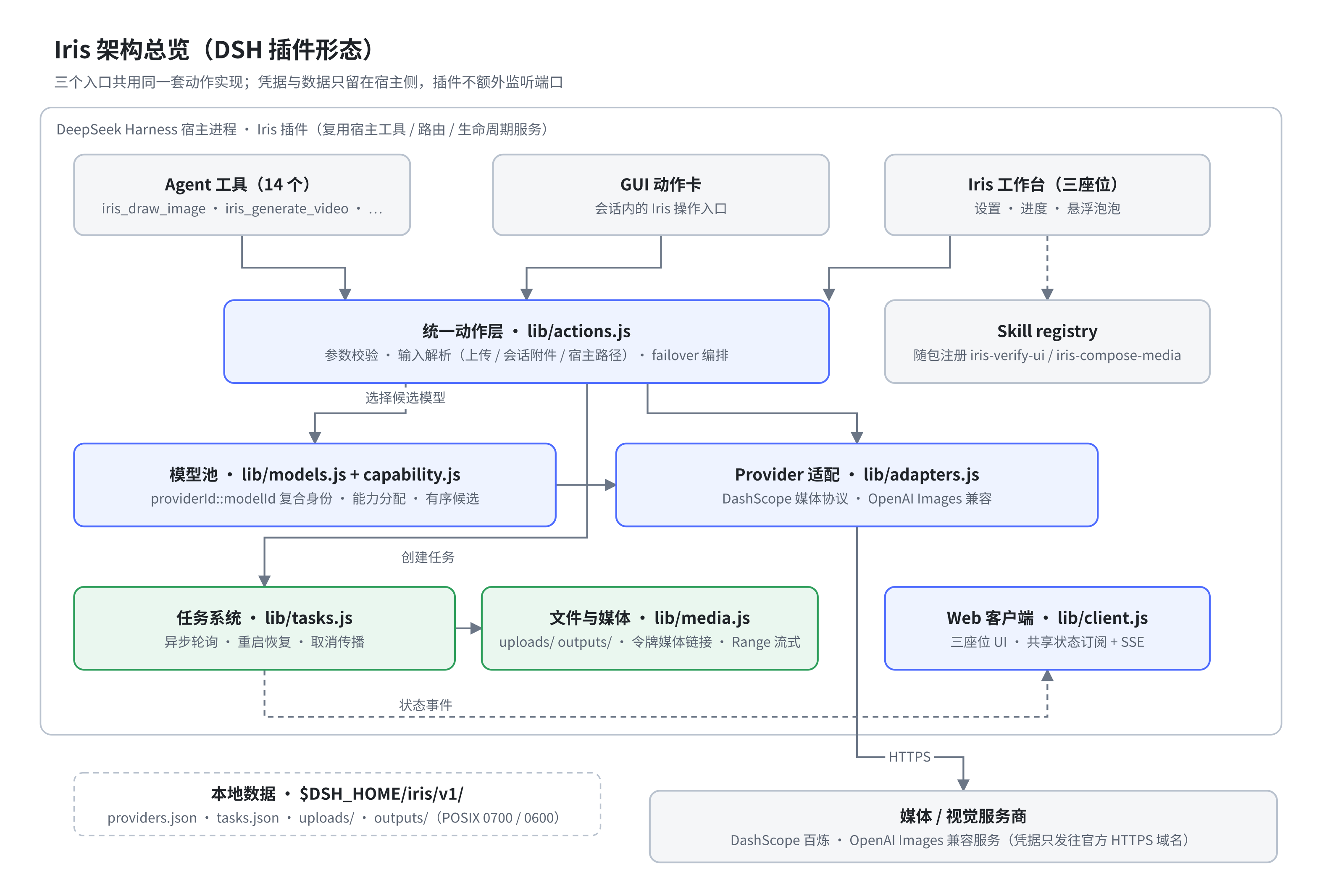
- Image generation, text-to-video, image-to-video, and S2V digital-human video
- Text-to-speech and audio transcription
- Visual question answering, long-image OCR, target grounding, cropping, and pixel-diff analysis
- Video frame extraction and multimodal video summarization
- Asynchronous task tracking, restart recovery, and token-authorized media playback
- A multi-provider model pool with per `provider + model` capability assignment
- Three file sources: browser upload, session attachments, and host paths
- Workbench-independent composer prompt optimization with current-session and JSON-configured fixed model routing
## Prerequisites
- A Node.js version that satisfies your DeepSeek Harness release's requirement; dsh-iris itself requires at least 20.10
- A working DeepSeek Harness environment with `pnpm` on the PATH
- At least one supported media or vision provider
- `ffmpeg` and `ffprobe` on the system, for video frame extraction and video summaries
After installing the plugin, add a provider in the Iris workbench and assign models to the capabilities you need. Provider keys are kept in Iris's host-side configuration; on POSIX systems, Iris's own directories and files are tightened to `0700` and `0600` respectively, and neither the UI nor the API ever returns full keys. On Windows, file modes are not equivalent to ACLs — keep relying on your user directory and system account permissions.
## DeepSeek Harness adaptation
dsh-iris ships as a native DSH plugin with a server side and a web client. The server registers 14 agent tools and reuses the host's tool, routing, and lifecycle services; the client hooks into the settings page, the conversation input area, and the global floating layer through DSH's module loader. The plugin never starts a separate service or listens on an extra port.
Automated tests currently cover plugin loading, tool registration, client seats, and routing behavior. Version 0.1.1 completed host smoke tests on Linux ARM64 — in both a clean and a real web profile — against DSH `0.1.2-rc.1` on Node.js `22.23.2`: the browser startup graph, the full combined bundle, the Iris client factory, and the three UI seats present at that time were verified. The fourth prompt-optimizer seat added in 0.1.2 has now been rendered in a live Android browser; configuration loading, a real session-model optimization with thinking actually `off`, preview write-back, independent disabling and re-enabling, and the loop from a short draft to a succeeded image-generation task are verified. Browser-side cancellation and JSON operations have automated HTTP/configuration coverage; a step-by-step live-device record is still pending. Iris itself keeps Node.js `>=20.10` as its own floor.
Iris 0.1.1–0.1.2 explicitly supports DSH `>=0.1.2-rc.1 <0.1.3-0` and no longer works with the legacy client runtime of DSH 0.1.0/0.1.1. DSH is still evolving quickly; later preview versions must pass verification before the supported range widens, and the compatibility badge is not an official certification. If DSH requires a newer Node.js, DSH wins.
## Tools
### Generation, speech, and tasks
| Tool | Purpose |
|---|---|
| `iris_draw_image` | Generate images from a prompt |
| `iris_generate_video` | Text-to-video, image-to-video, or S2V digital-human video |
| `iris_speak_text` | Synthesize speech from text |
| `iris_transcribe_audio` | Transcribe audio to text |
| `iris_task_status` | Check the status and outputs of one task or the recent tasks |
### Vision and image processing
| Tool | Purpose |
|---|---|
| `iris_look_at_image` | Ask a question about an image and get a vision model's answer |
| `iris_relook_attachment` | Re-inspect an image attachment from the session with a new question |
| `iris_long_ocr` | Recognize text in tall screenshots or long images, chunk by chunk |
| `iris_locate` | Ground a target in an image and return pixel coordinates |
| `iris_crop` | Crop an image by pixel region |
| `iris_pixel_diff` | Compare two images and produce diff statistics and a heatmap |
| `iris_html_screenshot` | Render an HTML string to a screenshot in a restricted environment |
### Video processing
| Tool | Purpose |
|---|---|
| `iris_video_frames` | Extract frames evenly from a video |
| `iris_media_summarize` | Summarize a video from sampled frames plus optional audio transcription |
## File inputs
Iris accepts three file sources, in the recommended order:
1. **Browser upload** — best for local files and cross-environment access; 64 MB per file.
2. **Session attachments** — best for reusing media already uploaded or generated in the current session.
3. **Host paths** — best for large files the host can read directly. Enter the path as seen by the host process; it is not always the path on the machine your browser runs on.
Uploads are stored under `$DSH_HOME/iris/v1/uploads/` and kept for 7 days by default. For path-picking advice on different platforms, see [File access across environments](docs/file-access-across-environments.md) (Chinese).
## Conversation prompt optimization
Iris adds a borderless, text-free “🫧” control directly to the DSH composer, so the workbench does not need to be open. It opens a translucent glass panel with background blur and soft depth; on narrow screens and Android browsers it becomes a safe-area-aware, internally scrollable bottom sheet to prevent overlap and overflow. It reads only the current unsent plain-text draft and offers general, image, video, and start-to-end-frame video targets. The result is previewed first and is written back only after confirmation; Iris never sends it automatically. Drafts containing structured `@` or `/` references are left untouched for now so their identities are not lost.
By default, the optimizer uses the model selected for the current session and falls back to DSH's default model when the session has none. The request carries no chat history, tools, attachments, or workspace content—only the current draft and target template. To prevent reasoning tokens from exhausting the generation budget before visible text is complete, `generation.reasoningEffort` defaults to `off-if-supported`: reasoning is disabled only when DSH model metadata explicitly advertises such an effort; otherwise the provider default is used, and the session High/Low setting is not inherited. JSON may select `provider-default`, `inherit`, or an exact effort ID advertised by the model. For predictable cost and latency, use a `fixed` route with a lightweight non-reasoning model. You can also export `prompt-optimizer.json`, change `route.mode` to `fixed`, name another `provider` and `model` already registered in DSH, and import it again. “Reset to defaults” restores Iris's built-in prompt, target templates, session-model routing, and generation settings. The composer control can be disabled independently and re-enabled from the Iris workbench; disabling it does not stop the workbench, agent tools, or task runtime. An optimization call may incur charges from the selected text model.
## Model assignment and failover
Capability assignment uses `providerId::modelId` as the model identity. The same model name from a different provider or account counts as two independent options.
Generation capabilities accept multiple candidate models. Iris only tries the next candidate when the upload, the submission, or a synchronous generation fails; once a remote service has accepted a task, Iris never resubmits it automatically — that is how duplicate tasks and double billing are avoided. Accepted asynchronous tasks remain under the task system's watch.
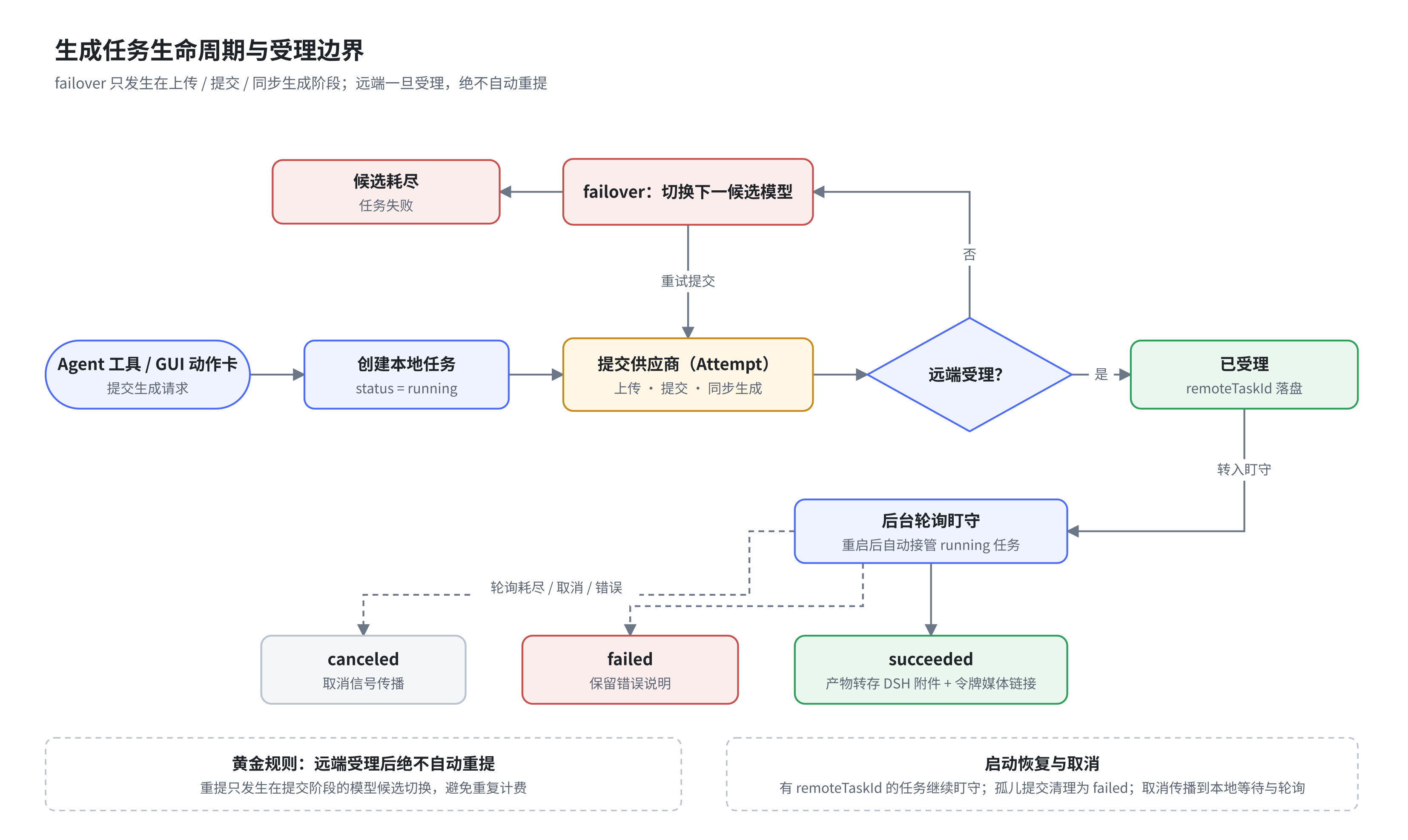
Transcription is a separate `transcribe` capability and does not consume the TTS or vision model configuration.
## Composed workflow example
Iris ships two agent skills (`iris-verify-ui` and `iris-compose-media`) that chain multiple tools into bounded, reviewable media workflows. The example below is "look → redraw → self-check": understand the source image first, then generate, review against concrete mismatches, and only deliver once the review passes.
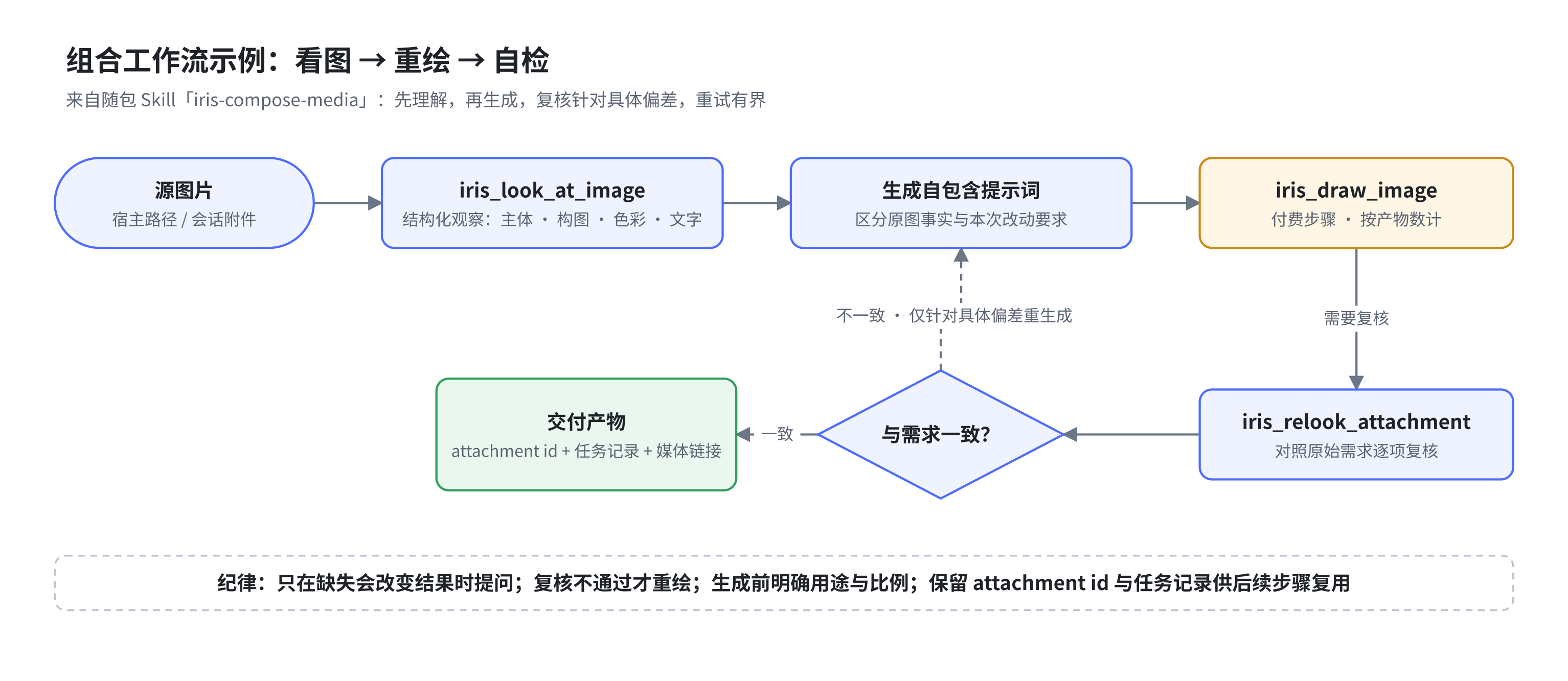
SVG versions and editable drawio sources of the figures above live in [`docs/assets/diagrams/`](docs/assets/diagrams/). Diagram labels are currently in Chinese.
## Data and tasks
Runtime data lives under `$DSH_HOME/iris/v1/` by default:
| Location | Contents |
|---|---|
| `providers.json` | Providers and capability assignments; file mode 0600 |
| `prompt-optimizer.json` | Imported optimizer prompt, target templates, model route, and generation settings; file mode 0600 |
| `tasks.json` | Task metadata and attachment indexes; up to 500 records |
| `outputs/` | Generated and processed media |
| `uploads/` | Temporary copies of browser uploads |
On first load, 0.1.1 tightens POSIX permissions across an existing `$DSH_HOME/iris/v1/` tree without modifying file contents or following symlinks. Large media downloads stream to a private temporary file and are moved into place atomically, instead of loading a whole video into memory.
Asynchronous tasks are polled in the background. After a plugin restart, Iris can re-adopt tasks that are still running remotely. Cancellation signals propagate through local waits and polling; whether the remote computation itself can be cancelled depends on the provider's API.
Audio and video are served through Iris media links that carry random capability tokens. Images are, wherever possible, also saved as DSH durable attachments so they stay usable in the conversation.
## Security notes
- Provider keys are never returned by status endpoints.
- The DashScope media protocol only sends keys to official Alibaba Cloud HTTPS domains; any other base URL defaults to the OpenAI Images–compatible protocol.
- `/iris/*` accepts loopback Host headers only by default; LAN or reverse-proxy deployments must set `IRIS_TRUSTED_HOSTS` explicitly, and state-changing requests are also checked against cross-site origins.
- `IRIS_TRUSTED_HOSTS` is not an authentication mechanism. When exposing DSH to the public internet or an untrusted network, configure authentication and HTTPS at the reverse proxy or host layer.
- Paid model probes run one capability at a time and always confirm before a real provider call; video and transcription never submit empty-sample paid probes automatically.
- HTML screenshots render inside a sandboxed page without same-origin privileges; scripts and external network access are disabled by default.
- Media links use random capability tokens, and file paths are resolved only from task records.
- Iris provides no account system of its own; multi-user isolation and access control are the responsibility of the DeepSeek Harness deployment.
## Known limitations
- `sharp` bundles native components; glibc Linux, Windows, and macOS are the primary targets. Non-standard environments such as bare Termux may need extra work.
- Video frame extraction and video summaries require system-installed `ffmpeg` and `ffprobe`.
- HTML screenshots load no remote scripts, fonts, or images; inline the resources you need first.
- Under WSL, containers, and remote deployments, browser paths usually cannot be handed to the host directly — prefer uploading files.
- Provider model lists are candidate sets only; whether a model truly supports a capability is settled by real calls.
## Agent Skills
When the plugin is enabled, it automatically registers the two bundled skills through the DSH skill registry:
| Skill | When to use |
|---|---|
| [`iris-verify-ui`](.dsh/skills/iris-verify-ui/SKILL.md) | Combine screenshots, semantic inspection, element grounding, cropping, and pixel comparison into evidence-based UI acceptance |
| [`iris-compose-media`](.dsh/skills/iris-compose-media/SKILL.md) | Chain two or more Iris tools into media workflows: inspect-then-draw, image-to-video, video summary with narration, S2V, and more |
From 0.1.2, as long as the host provides the DSH skill registry, regular npm installs can discover and load both skills from any project directory — no need to clone this repository or configure a skill search path. When the project directory contains same-name skills, DSH's native precedence keeps using the project versions; if the skill registry is unavailable, the 14 Iris tools still load on their own.
## Development and verification
Run in the project directory:
npm test
Tests cover config merging, model identity, task lifecycle, generation actions, HTTP/SSE routing, client interactions, and security boundaries. The project is pure ES Modules with no build step.
The test scheduler runs on Node.js, launching one process per file and stopping at the first failure — no Bash involved. Temporary directories use system APIs and are cleaned up on exit. GitHub Actions defines a Linux/Windows × Node.js 20.10/22 matrix, and a pre-release hook re-runs the full suite. DSH host smoke tests on native Windows/WSL are still pending real-machine verification.
Releases are triggered by `v*` tags through `.github/workflows/release.yml`: the full test suite runs first, then the tarball is packaged, a GitHub Release is created with the workflow's built-in `GITHUB_TOKEN` (tarball attached; release notes taken from the matching CHANGELOG section), and npm publish happens when an `NPM_TOKEN` secret is configured. No local GitHub credentials are needed.
## Documentation
- [User guide](user_guide.md) (Chinese)
- [Changelog](CHANGELOG.md) (Chinese)
- [Roadmap](docs/ROADMAP.md) (Chinese)
- [File access across environments](docs/file-access-across-environments.md) (Chinese)
- [Android 16 screenshot gallery](docs/screenshots.md)
## License
[MIT](LICENSE)