
Open-source tracing & testing for GenAI apps and agents.







A GitHub Star goes a long way.

How It Works ·
Quick Start ·
Testing ·
Frameworks ·
Integrations ·
Contributing
Built under the Linux Foundation AI & Data umbrella,
designed to plug into your existing OpenTelemetry stack. With a few lines of code (or none at all),
you get rich traces, CI-friendly tests, and deep visibility across LLMs, agents, tools, and vector stores.
## How it works
At its core, Monocle is a **GenAI-specific observability layer built on OpenTelemetry**.
* 🧬 **Metamodel** — defines entities such as agents, prompts, responses, tools, and vector operations, and maps them to standardized span attributes. See the [metamodel docs](src/monocle_apptrace/metamodel/spans/span_format.json) for details.
* 🔌 **Instrumentation adapters** — for GenAI frameworks automatically create spans for key operations (agent runs, tool calls, LLM invocations, retrieval queries) without you wiring them manually.
* 📤 **OTLP-compatible traces** — your existing collectors, backends, and dashboards just work.
Because the traces are structured and consistent, they are easy for humans, dashboards, and even SRE/QA agents to consume.
## Why developers love Monocle
* 🔍 **Turn black-box agents into step-by-step traces** — see every model call, tool invocation, vector lookup, and intermediate state in one connected timeline.
* 🧩 **Works with the GenAI stack you already use** — LangChain, LlamaIndex, Haystack, Google ADK, OpenAI, Anthropic and more are supported through first-class instrumentation.
* 📡 **Speaks OpenTelemetry natively** — Monocle emits standard OTLP spans so you can send them to any observability backend (file, console, cloud storage, or your favorite APM).
* 🧪 **Makes AI testing real, not aspirational** — with `monocle-test-tools`, you can assert on traces themselves — agents invoked, tools used, token costs, error states — not just input/output pairs.
* 🏛️ **Linux Foundation & CNCF community DNA** — built and governed in the open, with contributions from the broader AI and cloud-native observability communities.
If you care about **debuggability, reliability, or compliance** for AI agents, Monocle is meant for you.
## Who Monocle is for
* 👩💻 **App developers** — trace GenAI apps in any environment without decorating every function with bespoke OpenTelemetry code.
* 🏗️ **Platform / infra engineers** — prefer wrapping and operators over asking product teams to refactor their apps for observability.
* 🏢 **Enterprises & SREs** — standardized, OTel-compliant traces and CI-friendly AI tests that fit existing pipelines and dashboards.
## What's in this repo
This repository contains the **Python implementation** of Monocle's tracing SDK and metamodel (`monocle_apptrace`), including:
* Core instrumentation utilities.
* A community-curated [metamodel](src/monocle_apptrace/metamodel/spans/span_format.json) for consistent tracing of GenAI components (agents, LLM calls, tools, vector stores, etc.).
* Framework-specific adapters (e.g., LangChain, LlamaIndex, Haystack, Google ADK) so you don't have to handcraft spans.
* Export configuration for local JSON files, console, and cloud storage backends.
There is also a separate package, **[`monocle-test-tools`](test_tools/)**, which provides a testing and validation framework for AI agent tracing, built on top of pytest.
## Quick Start
### 1. Install
```bash
pip install monocle_apptrace
```
### 2. Initialize telemetry once
```python
from monocle_apptrace import setup_monocle_telemetry
setup_monocle_telemetry(workflow_name="simple_math_app")
```
This wires up OpenTelemetry, configures the Monocle metamodel, and auto-instruments supported frameworks without requiring you to manually create spans.
### 3. Run your app and inspect traces
By default, Monocle exports traces as JSON files under a local `./monocle` directory:
```text
monocle_trace_{workflow_name}_{trace_id}_{timestamp}.json
```
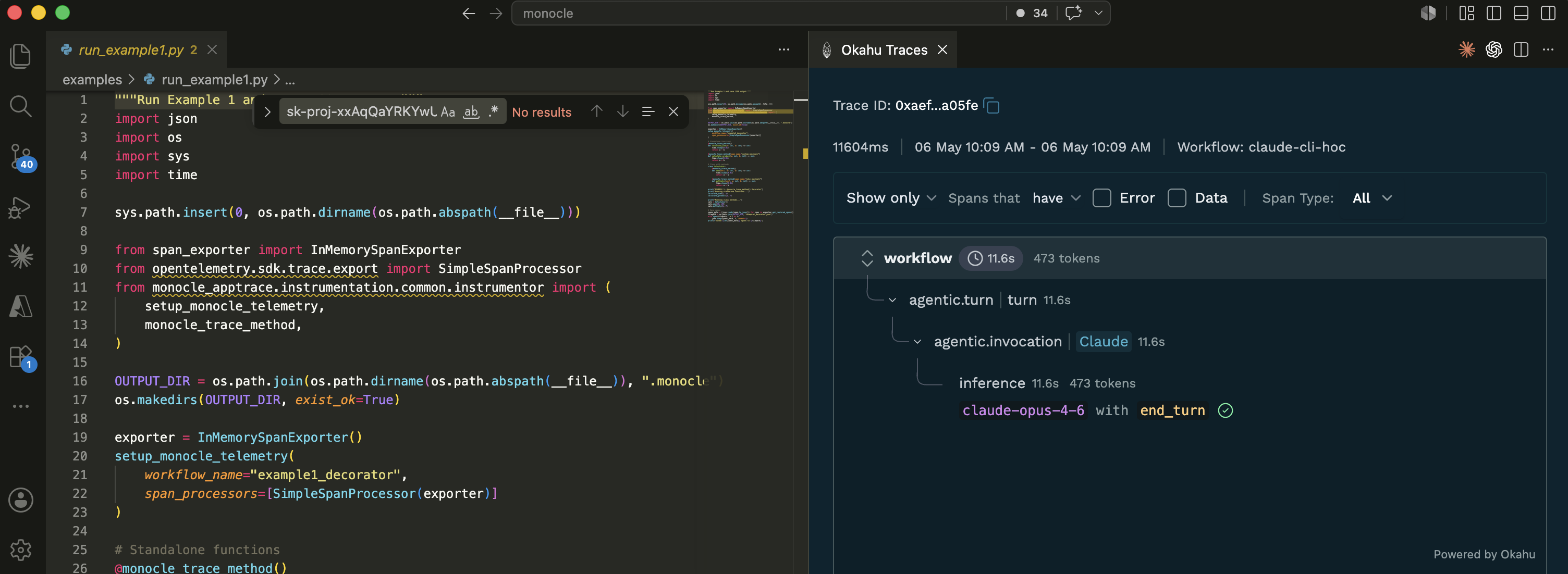
Each file contains an array of OpenTelemetry spans capturing agent runs, tool calls, and LLM interactions. Load them into any OTLP-compatible backend, or use the [Okahu VS Code extension](https://docs.okahu.ai/vscode-extension/) for a rich Gantt-style timeline visualization.
Example: tag traces with business context (scopes)
Use a scope to attach attributes like `user_id`, `session_id`, or `tenant_id` to every span created inside a block. Great for filtering traces by tenant or correlating a multi-step flow.
```python
from monocle_apptrace.instrumentation.common.instrumentor import (
monocle_trace_scope,
monocle_trace_scope_method,
)
# Context manager — scope applies to every span inside the with-block
with monocle_trace_scope("user_id", "user-123"):
result = my_agent.run("What's the weather in London?")
# Decorator — scope applies to every call of the function
@monocle_trace_scope_method("tenant_id", "acme-corp")
def handle_request(payload):
...
```
Async equivalents (`amonocle_trace_scope`) and full reference: [Scope API docs](docs/monocle_scope_api.md).
## Testing AI agents with `monocle-test-tools`
**[`monocle-test-tools`](test_tools/)** is the companion test framework that lets you write pytest-style tests that assert on traces, not just return values.
### What you can validate
| Capability | Description |
| --- | --- |
| **Agentic response** | Did the agent produce the right kind of answer for a given input? |
| **Agent invocation** | Did the correct agent or sub-agent run, and delegate the right tasks? |
| **Tool behavior** | Were the intended tools called, with the expected parameters and outputs? |
| **Inference quality & cost** | Did responses match your schemas or rubrics, and stay within token/cost budgets? |
| **E2E evaluations in CI/CD** | Run eval-style tests as part of your pipeline using the same traces that power observability. |
### Install
```bash
pip install monocle_test_tools
```
Example: validate agent behavior and tool calls
```python
from monocle_test_tools import expected
def test_weather_agent():
result = expected(
input="What is the weather in London?",
expected_output="weather report for London"
)
result.called_agent("weather_agent")
result.called_tool("get_weather", agent_name="weather_agent")
result.under_token_limit(5000)
result.under_duration(10)
```
Example: multi-turn session evaluation
Pass a `session_id` so multiple turns roll up into one session, then evaluate at the `agentic_sessions` fact (role adherence, knowledge retention, conversation completeness across turns).
```python
import pytest
from monocle_test_tools import MonocleValidator, TestCase
agent_test_cases = [
{"test_input": ["Book a flight from SFO to Mumbai on 26 Nov."]},
{"test_input": ["Now book a hotel near the airport for 4 nights."]},
]
@MonocleValidator().monocle_testcase(agent_test_cases)
async def test_multi_turn_session(test_case: TestCase):
# Same session_id ties both turns to the same agentic session
await MonocleValidator().test_agent_async(
root_agent, "strands", test_case, session_id="travel_session_1"
)
@pytest.mark.asyncio
async def test_session_quality(monocle_trace_asserter):
# After the two turns above, evaluate the session as a whole
monocle_trace_asserter.with_evaluation("okahu") \
.check_eval(fact_name="agentic_sessions", eval_name="role_adherence",
expected=["excellent_adherence", "good_adherence"]) \
.check_eval(fact_name="agentic_sessions", eval_name="knowledge_retention",
expected=["excellent_retention", "good_retention"]) \
.check_eval(fact_name="agentic_sessions", eval_name="correctness",
expected="correct")
```
See the full [test assertions reference](docs/monocle_test_assertions.md) and [test tools README](test_tools/README.md) for detailed usage.
## Zero- and low-code tracing modes
Monocle supports both **in-app initialization** and **wrapper-style execution** so you can choose how invasive you want tracing to be.
* 🟢 **In-code setup** — call `setup_monocle_telemetry()` once at startup and let Monocle auto-instrument supported frameworks.
* 🟢 **Wrapper / operator mode** — use CLI-like entrypoints (e.g., running your script with a `monocle_apptrace` module) to trace apps without modifying the code, making it suitable for Lambda layers and platform-level integration.
This flexibility is especially useful when platform teams want to inject tracing without touching product code, or when you ship multi-tenant AI platforms.
Instrumenting Claude CLI, Codex CLI, and GitHub Copilot
Monocle can trace the major AI coding assistants. Install once, then register hooks for the CLIs you use:
```bash
# Install the Monocle package
uv tool install monocle_apptrace
# Register hooks for whichever assistants you use
monocle-apptrace claude-setup # Claude Code
monocle-apptrace codex-setup # OpenAI Codex CLI
monocle-apptrace copilot-setup # GitHub Copilot (CLI + VS Code Chat)
```
Each `*-setup` is interactive and asks two things:
1. **Where to install — two options:**
- **Global** (default) — hooks installed under your home directory (`~/.claude/`, `~/.codex/`, `~/.copilot/`); applies to every session on the machine.
- **This project** — hooks installed under the current repo (`.claude/`, `.codex/`, `.github/hooks/`); only sessions started inside that project are traced. Useful for trying Monocle on one repo without affecting others.
You can also skip the prompt with `--global` or `--project`:
```bash
monocle-apptrace claude-setup --project
```
2. **How to authenticate — local storage or Okahu cloud:**
- **Sign in** — opens a browser to sign in via **GitHub** (through Auth0); mints an Okahu API key so traces export to Okahu cloud in addition to local files.
- **Paste an API key** — if you already have one from the Okahu portal.
- **Skip** — local-file export only; inspect traces with the [Okahu VS Code extension](https://docs.okahu.ai/vscode-extension/).
Start a new session — traces flow automatically to whatever exporter you've configured (file, console, or cloud), giving you full visibility into how these assistants interact with your codebase.
## Supported frameworks and providers
| Category | Supported |
| --- | --- |
| **Language** | 🟢 Python · 🟢 [Typescript](https://github.com/monocle2ai/monocle-typescript) |
| **Agentic frameworks** | 🟢 Langgraph · 🟢 LlamaIndex · 🟢 Google ADK · 🟢 OpenAI Agent SDK · 🟢 AWS Strands · 🟢 CrewAI · 🟢 Microsoft Agent Framework |
| **MCP / A2A** | 🟢 FastMCP · 🟢 MCP client · 🟢 A2A client |
| **Web / App** | 🟢 Flask · 🟢 AIO Http · 🟢 FastAPI · 🟢 Azure Function · 🟢 AWS Lambda · 🟢 Vercel (TS) · 🟢 Microsoft Teams AI SDK · 🟢 Web/REST client · 🔜 Google Function |
| **LLM frameworks** | 🟢 Langchain · 🟢 Llamaindex · 🟢 Haystack |
| **Agent Runtime** | 🟢 AWS Bedrock Agentcore · 🟢 Azure AI Foundry |
| **LLM inference** | 🟢 OpenAI · 🟢 Azure OpenAI · 🟢 Azure AI · 🟢 Azure AI Foundry · 🟢 Nvidia Triton · 🟢 AWS Bedrock · 🟢 AWS Sagemaker · 🟢 Google Vertex · 🟢 Google Gemini · 🟢 Hugging Face · 🟢 Deepseek · 🟢 Anthropic · 🟢 Mistral · 🟢 LiteLLM · 🔜 Azure ML |
| **AI coding assistants** | 🟢 Claude CLI · 🟢 OpenAI Codex CLI · 🟢 GitHub Copilot (CLI + VS Code Chat) |
| **Vector stores** | 🟢 FAISS · 🔜 OpenSearch · 🔜 Milvus |
| **Exporters** | 🟢 stdout · 🟢 file · 🟢 Memory · 🟢 Azure Blob Storage · 🟢 AWS S3 · 🟢 Okahu cloud · 🟢 OTEL collectors · 🟢 Google Cloud Storage · 🟢 PostgreSQL · 🟢 ClickHouse · 🟢 [Paygentic](https://docs.paygentic.io/integrations/monocle) |
## IDEs, ADK, and ecosystem integrations
Monocle is designed to play nicely with the tools you already use.
### VS Code extension
The **Okahu Trace Visualizer** extension reads Monocle JSON trace files and displays them in an interactive UI with timelines, JSON viewers, token counts, and error badges.
👉 Download from VS Code Marketplace
### Google Agent Development Kit (ADK)
A dedicated integration automatically instruments ADK agents, tools, and runners after you call `setup_monocle_telemetry`, emitting spans for agent runs, tool calls, and LLM interactions. See the [Google ADK docs](https://google.github.io/adk-docs/observability/monocle/) for setup instructions.
### Okahu cloud observability
Okahu uses Monocle traces as a primary signal source for debugging, evaluation, and SRE-style monitoring of agentic applications.
These integrations make it easy to go from **local debug** → **CI/CD testing** → **production observability** without switching tracing models.
## Docs, examples, and learning resources
| Resource | Description |
| --- | --- |
| **[User Guide](docs/Monocle_User_Guide.md)** | Installation, configuration, and how traces are structured |
| **[Trace API](docs/monocle_trace_api.md)** | `monocle_trace` / `amonocle_trace` and low-level `start_trace` / `stop_trace` |
| **[Scope API](docs/monocle_scope_api.md)** | `monocle_trace_scope` helpers to attach scopes across spans |
| **[Test Assertions](docs/monocle_test_assertions.md)** | Complete reference for all fluent API assertions in `monocle-test-tools` |
| **[Test Tools](test_tools/README.md)** | Getting started with `monocle-test-tools`, `conftest.py` setup and examples |
| **[Evaluation API](docs/monocle_evaluation_api.md)** | LLM-based evaluation integration for test assertions |
| **[Contributing](CONTRIBUTING.md)** | Technical details for contributing to the project |
| **[Examples](examples/)** | Sample apps demonstrating Monocle with various frameworks |
## Roadmap
Monocle's long-term goal is to support **tracing and testing for GenAI apps built in any language, with any orchestration or agent framework, on any LLM or vector backend.**
* First-class support for more languages (TypeScript and beyond).
* Deeper adapters for additional LLM hosting services and vector databases.
* Richer test assertions and evaluation hooks in `monocle-test-tools` for complex, policy-driven AI systems.
You can track progress and proposals via the [LF AI & Data Monocle project page](https://lfaidata.foundation/projects/monocle/) and [GitHub discussions](https://github.com/monocle2ai).
## Contributing & community
Monocle is a **community-based open source project** under the Apache 2.0 license.
* File bugs and feature requests via [GitHub Issues](https://github.com/monocle2ai/monocle/issues).
* Open PRs for new framework integrations, exporters, or metamodel improvements.
* Join discussions on [Discord](https://discord.gg/D8vDbSUhJX) or [Slack](https://join.slack.com/t/monocle2ai/shared_invite/zt-37pgez3jr-BNjNynF6VV8iHvRlaLM7QA).
Please see [CONTRIBUTING](CONTRIBUTING.md), [CODE_OF_CONDUCT](CODE_OF_CONDUCT.md), and [SECURITY](SECURITY.md) for detailed guidelines.