# tilesplit
CLI tilesheet splitter in Py3
#### usage: `python3 tilesplit.py tilesheet.png 16 tilesheet.txt`
* takes in a tilesheet, the tile size, and the naming file
* exports named tiles in a dir with the name of the tilesheet, in the same dir as the tilesheet
#### usage: `python3 tilesplit.py tilesheet.png 16`
* takes in a tilesheet and the tile size
* exports ***un***named tiles in the same location the above command would
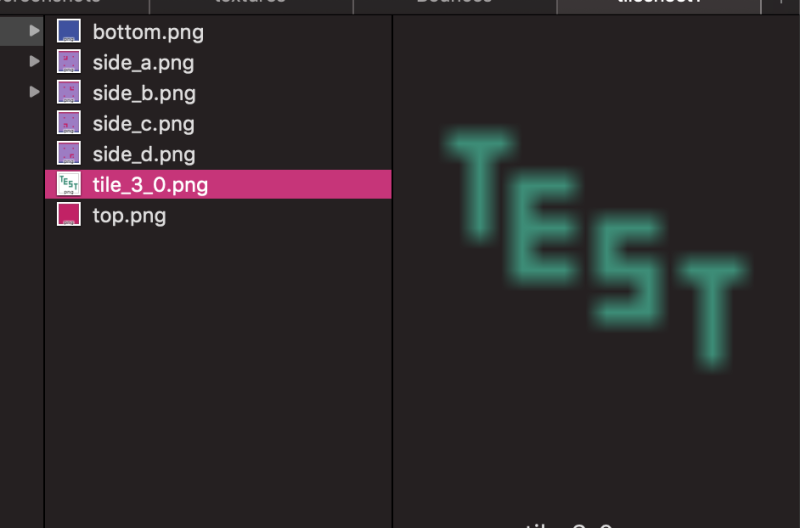
* exported files are named tile_x_y.png where x and y are the tile coordinate
#### usage `python3 tilesplit.py tilesheet.tsn`
* takes in a tsn file
* the tsn file must declare the image path (relative or absolute) and the tile size
* exports files the same way the first option does
Files exported using the first or third way that were not given a name get a default name in the same format as files exported with the second way.
*tilesplit* uses Pathlib and has been used on Windows, but all testing is done on macOS. Additional testing on Windows as well as initial testing on Linuxes and even just on more devices would be appreciated. Please make an issue if you run into any problems running or otherwise using *tilesplit*
---
## Basic naming file usage
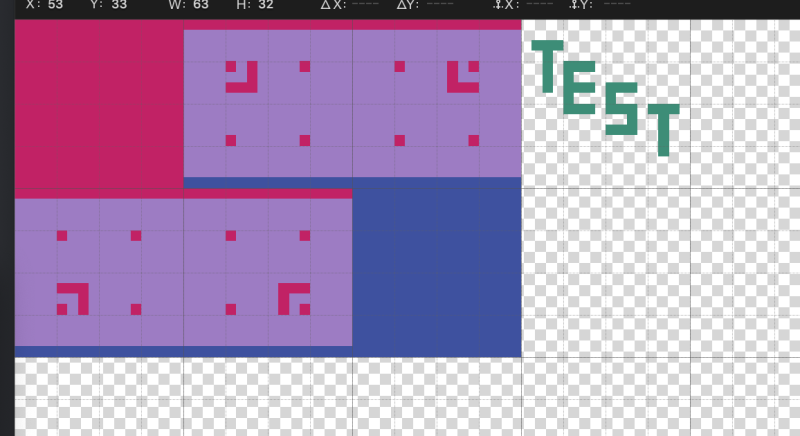
The first two lines should start with `default` and `empty` these define the default name applied to everything and what is done with tiles that do not contain any image data. For each you have two main options `_blank_`, which will be replaced with `tile_x_y` using the tile coordinates, and `_noexport_` which will not export that tile. You can set these to any text, however currently *tilesplit* does not check for existing files before exporting, so you will only end up with one file with that name. This may be changed in the future.
All coordinates in *tilesplit* are zero indexed. this means that the top-most left-most tile is 0 0, not 1 1. This will be assumed knowledge for the remainder of the README.
To define a tile, type the x coordinate, a single space, the y coordinate, a single space, and then the filename. The filename may include subfolders separated by `/`, and will create folders on the disk if they do not exist. Currently, all argument separation must be one and only one space. This may change in the future.
```
default _blank_
empty _noexport_
0 0 top
1 0 side_a
2 0 side_b
0 1 side_c
1 1 side_d
2 1 bottom
```
 ---
## Comments
Comments are handy to tell you what some naming lines are for or to separate sections of namings, with long lines across the file.
Comments are any line that start with one of the following characters:
* `!`
* `#`
* `/`
* `%`
* `-`
* `;`
* `"`
* ` ` (a space)
and are checked in that order.
---
## Templates
Templates let you write much cleaner naming files and make it easier to understand them.
There are two commands for running templates, `template` and `final template`. `template` runs the template when it is called, and `final template` runs it at the end, in the order the final templates are called.
* Using `template` allows you to then override the name on one of the tiles it names, like if you had a template for metals (ingot, nugget, dust, etc), and had a variant for chicken and wanted the chicken nugget to instead be named chicken tendie/tendy/tender.
* Using `final template` overrides any changes that were made in this way, and can sometimes fix issues you may have with things getting the wrong name, although you should figure out why it was happening.
The syntax for calling a template is otherwise the same. `template`/`final template`, the template name, the x y coordinates of the top left corner of where it should go, the name prepend, and an optional name append, all separated by one and only one space.
To define a template, you first type `new template ` then the name of your template, which cannot contain spaces. If it does, everything after the first incorrect space will not be used.
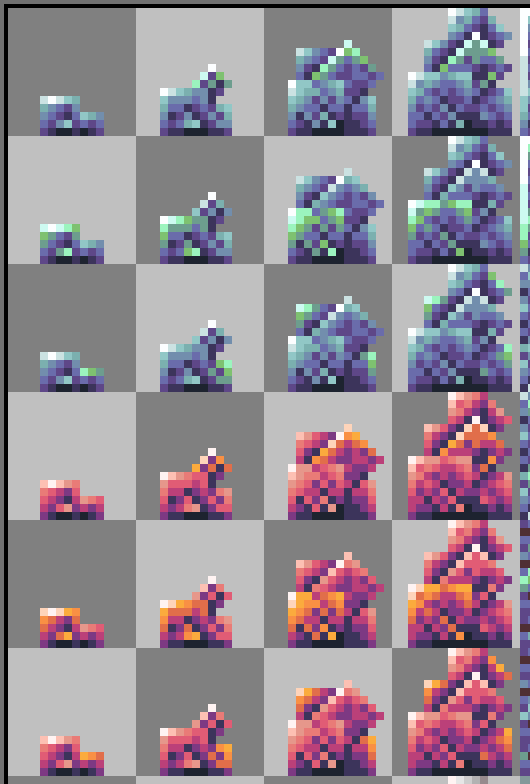
On the following lines, type manual tile definitions with the name that differentiates each from the others without any shared file path. The template does not need to define all tiles within the rectangular region it occupies, nor does it need to define a tile at 0 0, but all tiles should be named as if the tiles the template would be used on were as top-most and left-most as they could be. The coordinates defined here will be added to the coordinates provided when the template is called, and it will make more sense to you later if you have them start at a sensible coordinate.
After you have defined everything you want the template to have, follow it with `end template`
```
default _blank_
empty _noexport_
new template crystal
0 0 stage1
1 0 stage2
2 0 stage3
3 0 stage4
end template
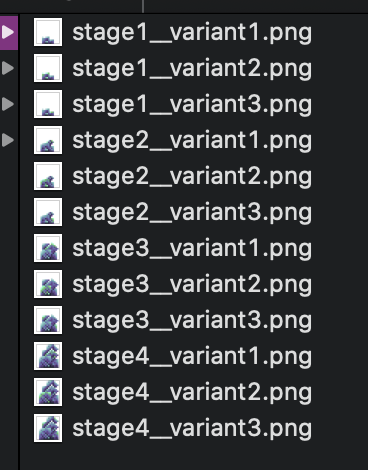
final template crystal 0 0 crystal/blue/ __variant1
final template crystal 0 1 crystal/blue/ __variant2
final template crystal 0 2 crystal/blue/ __variant3
final template crystal 0 3 crystal/pink/ __variant1
final template crystal 0 4 crystal/pink/ __variant2
final template crystal 0 5 crystal/pink/ __variant3
```
---
## Comments
Comments are handy to tell you what some naming lines are for or to separate sections of namings, with long lines across the file.
Comments are any line that start with one of the following characters:
* `!`
* `#`
* `/`
* `%`
* `-`
* `;`
* `"`
* ` ` (a space)
and are checked in that order.
---
## Templates
Templates let you write much cleaner naming files and make it easier to understand them.
There are two commands for running templates, `template` and `final template`. `template` runs the template when it is called, and `final template` runs it at the end, in the order the final templates are called.
* Using `template` allows you to then override the name on one of the tiles it names, like if you had a template for metals (ingot, nugget, dust, etc), and had a variant for chicken and wanted the chicken nugget to instead be named chicken tendie/tendy/tender.
* Using `final template` overrides any changes that were made in this way, and can sometimes fix issues you may have with things getting the wrong name, although you should figure out why it was happening.
The syntax for calling a template is otherwise the same. `template`/`final template`, the template name, the x y coordinates of the top left corner of where it should go, the name prepend, and an optional name append, all separated by one and only one space.
To define a template, you first type `new template ` then the name of your template, which cannot contain spaces. If it does, everything after the first incorrect space will not be used.
On the following lines, type manual tile definitions with the name that differentiates each from the others without any shared file path. The template does not need to define all tiles within the rectangular region it occupies, nor does it need to define a tile at 0 0, but all tiles should be named as if the tiles the template would be used on were as top-most and left-most as they could be. The coordinates defined here will be added to the coordinates provided when the template is called, and it will make more sense to you later if you have them start at a sensible coordinate.
After you have defined everything you want the template to have, follow it with `end template`
```
default _blank_
empty _noexport_
new template crystal
0 0 stage1
1 0 stage2
2 0 stage3
3 0 stage4
end template
final template crystal 0 0 crystal/blue/ __variant1
final template crystal 0 1 crystal/blue/ __variant2
final template crystal 0 2 crystal/blue/ __variant3
final template crystal 0 3 crystal/pink/ __variant1
final template crystal 0 4 crystal/pink/ __variant2
final template crystal 0 5 crystal/pink/ __variant3
```
 ---
## Regions
So tile grids are nice and all, but what if you had a 32x48 pixel texture for a more complex model, or a 12x12 pixel texture for something small, or you needed to have each part of a complex model exported to its own small image, well regions are *tilesplit*'s answer to those situations.
Regions are defined with the tiles the cover, with 0 0 meaning one tile, 3 7 meaning 4 horizontally and 8 vertically. Within a region definition, you define export regions with 4 integers, the top left coordinates and the bottom right coordinates, both x y as with everything else.
```
default _blank_
empty _noexport_
new region 2 2 one
! 48x48 pixel single export
0 0 47 47 growth
end region
new region 0 0 two
! four smaller areas
0 0 7 7 8x8
10 0 15 5 6x6
12 8 15 11 4x4
14 14 15 15 2x2
end region
```
Regions can be used for a single large region or many smaller ones. But you should avoid exporting many tiny (a few pixels on each side) images, as this is not only time consuming and extends over many lines of your naming file, but will likely also be more annoying to use.
---
## Meta Templates
Template definitions can also include template and region calls (but not definitions). This makes it significantly easier to make naming definitions for large tilesheets, without making the main template unwieldy and confusing. You can break it up into individual sections, using smaller templates.
```
new template column
template 3x2y 0 0 tile/tile
template 3x2y 0 2 flat/flat_old
template 3x2y 0 4 flat/flat
template 3x2y 0 6 layered/layered
template 3x1y 0 8 sweetstone/sweetstone
template 3x1y 0 9 sweetstone/cobbled_sweetstone
template bricks 0 10 sweetstone/bricks__
template 3x1y 0 12 sweetstone/tile
template 3x1y 0 13 crushed/crushed
template 3x2y 0 14 crystal/crystal
template 3x2y 0 16 crystal/crystal__clear
template normal_items 0 20 item/item
region growth3d 0 22 growth/
end template
```
---
## Regions
So tile grids are nice and all, but what if you had a 32x48 pixel texture for a more complex model, or a 12x12 pixel texture for something small, or you needed to have each part of a complex model exported to its own small image, well regions are *tilesplit*'s answer to those situations.
Regions are defined with the tiles the cover, with 0 0 meaning one tile, 3 7 meaning 4 horizontally and 8 vertically. Within a region definition, you define export regions with 4 integers, the top left coordinates and the bottom right coordinates, both x y as with everything else.
```
default _blank_
empty _noexport_
new region 2 2 one
! 48x48 pixel single export
0 0 47 47 growth
end region
new region 0 0 two
! four smaller areas
0 0 7 7 8x8
10 0 15 5 6x6
12 8 15 11 4x4
14 14 15 15 2x2
end region
```
Regions can be used for a single large region or many smaller ones. But you should avoid exporting many tiny (a few pixels on each side) images, as this is not only time consuming and extends over many lines of your naming file, but will likely also be more annoying to use.
---
## Meta Templates
Template definitions can also include template and region calls (but not definitions). This makes it significantly easier to make naming definitions for large tilesheets, without making the main template unwieldy and confusing. You can break it up into individual sections, using smaller templates.
```
new template column
template 3x2y 0 0 tile/tile
template 3x2y 0 2 flat/flat_old
template 3x2y 0 4 flat/flat
template 3x2y 0 6 layered/layered
template 3x1y 0 8 sweetstone/sweetstone
template 3x1y 0 9 sweetstone/cobbled_sweetstone
template bricks 0 10 sweetstone/bricks__
template 3x1y 0 12 sweetstone/tile
template 3x1y 0 13 crushed/crushed
template 3x2y 0 14 crystal/crystal
template 3x2y 0 16 crystal/crystal__clear
template normal_items 0 20 item/item
region growth3d 0 22 growth/
end template
```