# Optics Framework
**Self-healing test automation for mobile, web, TV — and AI agents.**
One keyword engine. Six ways to drive it: CSV/YAML files, a Python SDK, Robot Framework, a REST API, an interactive terminal, or an MCP server your AI agent talks to.
[](https://pypi.org/project/optics-framework/)
[](https://www.python.org/)
[](LICENSE)
[](https://pypi.org/project/optics-framework/)
[](https://sonarcloud.io/summary/new_code?id=mozarkai_optics-framework)
[](https://sonarcloud.io/summary/new_code?id=mozarkai_optics-framework)
[](https://www.bestpractices.dev/projects/10842)
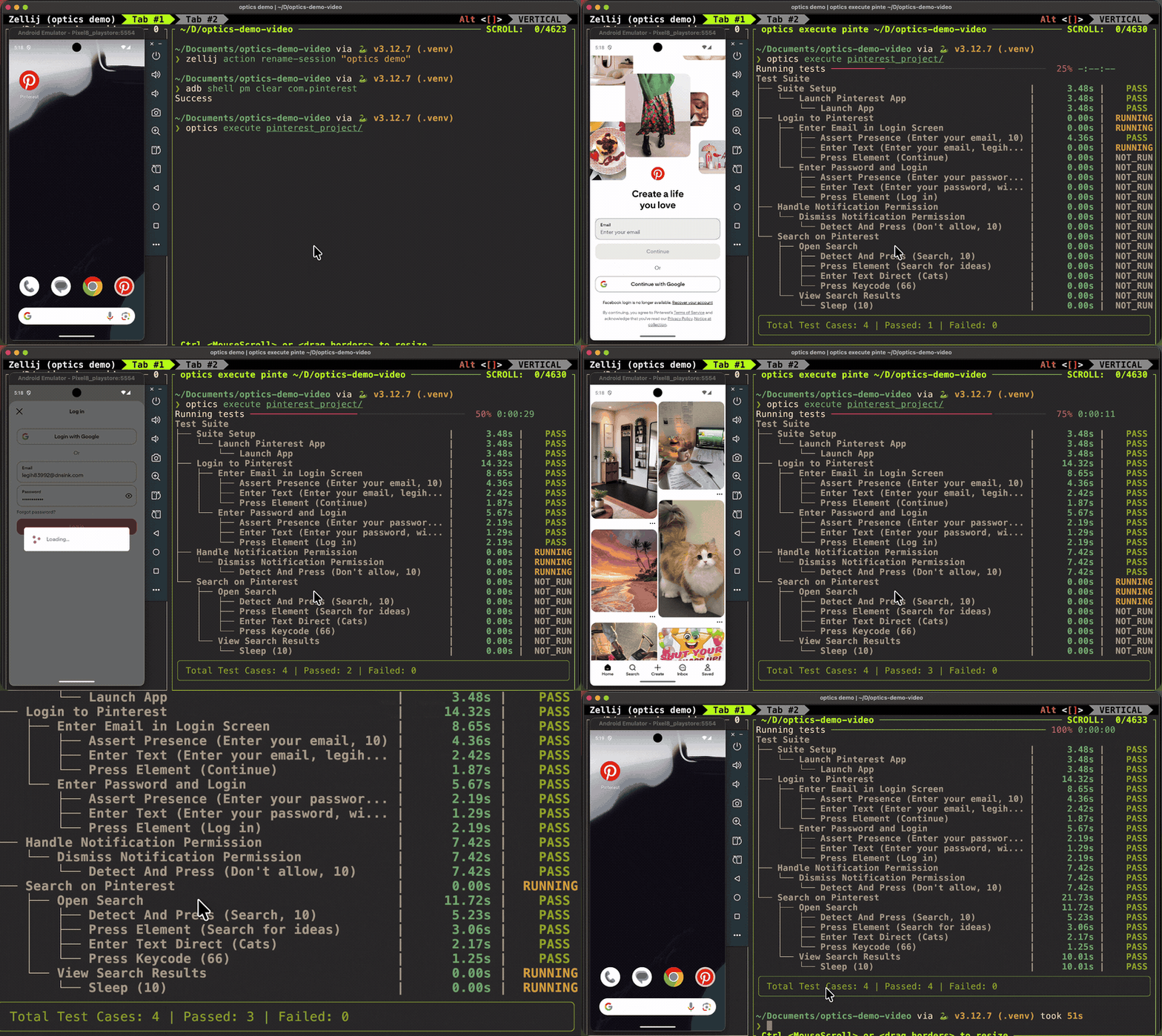
[Documentation](https://optics-framework.org/docs/) · [Install](https://optics-framework.org/docs/get-started/install) · [Getting Started](https://optics-framework.org/docs/get-started/quickstart) · [Keywords](https://optics-framework.org/docs/reference/keywords/) · [Architecture](https://mozarkai.github.io/optics-framework/architecture/)
---
Most frameworks assume a UI element has one true locator, and a test breaks the moment that locator changes. Optics assumes an element has **several plausible identities** — its XPath, its visible text, what it looks like on screen — and tries all of them before giving up.
That idea runs through the whole framework: locators fall back, drivers fall back, element values fall back. Tests are data (CSV or YAML), so non-coders can write them, and the same keywords are reachable from Python, Robot Framework, HTTP, and MCP.
## Install
One line puts the `optics` CLI on your PATH:
```bash
curl -fsSL https://optics-framework.org/install | sh # macOS, Linux
```
```powershell
irm https://optics-framework.org/install.ps1 | iex # Windows
```
It installs into its own virtual environment under `~/.optics`, so nothing lands in your system Python. Then `optics quickstart` builds a project, checks your setup, and runs your first test.
Already managing your own environment? Optics needs **Python 3.12+**, and the core install ships no drivers, OCR, or LLM backends — you add only what you need:
```bash
python3 -m venv venv && source venv/bin/activate
pip install "optics-framework[appium,easyocr]"
```
Most extra names match the `config.yaml` source keys, so the word you install is usually the word you enable (exceptions: `google-vision` enables `google_vision`, and the bundles and `mcp` aren't config keys):
| | |
|---|---|
| **Drivers** | `appium` · `selenium` · `playwright` · `ble` |
| **OCR** | `easyocr` · `pytesseract` · `google-vision` |
| **AI** | `gemini` · `openai` · `anthropic` (natural-language mode + self-heal) · `mcp` (MCP server) |
| **Bundles** | `mobile` · `web` · `vision` · `llm` · `all` |
`optics setup` installs the drivers, OCR and LLM engines above (and the bundles) by name — pinned to your installed Optics version — and bare `optics setup` opens a TUI picker. `optics quickstart` goes one step further and offers the right extras for the platform you pick:
```bash
optics setup --list
optics setup --install appium easyocr
```
> [!NOTE]
> The `mcp` server extra is **pip-only** (it isn't an engine backend `optics setup` manages): `pip install "optics-framework[mcp]"`.
> [!IMPORTANT]
> Some extras need system tooling beyond the Python package. A driver extra installs only the **Python client** — mobile testing also needs the Appium server, a device/emulator, and platform tooling (Node.js, Android SDK/`adb`, JDK). `pytesseract` needs the Tesseract binary; `playwright` needs its browsers (`playwright install`). See the [Installation guide](https://optics-framework.org/docs/get-started/install).
> [!WARNING]
> Conda is not supported for `easyocr` + `optics-framework` together (conflicting NumPy 1.x/2.x requirements). Use a standard `venv`.
## Quickstart
From a fresh install to a running test with **one guided command**:
```bash
pip install optics-framework
optics quickstart
```
`optics quickstart` asks what you want to automate, installs the matching engine, scaffolds the project, writes a platform-correct `config.yaml`, and runs an `optics doctor` check — then prints your next steps. Every prompt has a default, so pressing Enter throughout yields a runnable project.
Prefer to drive each step yourself?
```bash
optics init my_test_project --template contact
# point my_test_project/config.yaml at your device/app, start the Appium server, then:
optics dry_run my_test_project # validate keywords, elements and module refs — no device (but the config's engines must be installed)
optics execute my_test_project
```
`--template` scaffolds a working project from a bundled sample. Each needs the matching extras installed (see [Install](#install)); the headline `[appium,easyocr]` above covers the first three:
- `contact` · `calendar` · `youtube` — Appium/Android, easyocr → `[appium,easyocr]`
- `clock` — Appium/Android, image templates + Tesseract OCR → `[appium,pytesseract]` (plus the Tesseract binary)
- `gmail_web` — Selenium → `[selenium,easyocr]`
- `playwright` — Playwright → `[playwright]` (then `playwright install` for the browsers)
Omit `--template` for an empty scaffold with a commented starter `config.yaml`. Need only a config for an existing folder? `optics configure ` writes one from a few questions, and `optics doctor [folder] [--check]` verifies engines, tooling, and project config.
## Why Optics
**A locator ladder, not a locator.** Every element-based keyword walks a priority-ordered chain until one strategy succeeds:
| # | Strategy | How it finds the element |
|---|----------|--------------------------|
| 1 | `XPathStrategy` | Native XPath query through the driver's accessibility tree |
| 2 | `TextElementStrategy` | Direct text / CSS / class lookup through the element source |
| 3 | `TextDetectionStrategy` | Screenshot → OCR (EasyOCR, Pytesseract, Google Vision, remote OCR) |
| 4 | `ImageDetectionStrategy` | Screenshot → template matching against a reference PNG |
| 5 | AI self-heal *(opt-in)* | All four failed → an LLM reads the screen and recovers |
Cheap strategies run first, so vision only costs you time when the tree can't help. Steps 1–4 are `LocatorStrategy` registrations; step 5 is a separate recovery layer, bounded to five turns and a six-keyword allowlist so it re-enters the ladder rather than tapping blind coordinates. Two more fallback axes sit alongside: **multiple values per element name**, and **multiple enabled drivers or element sources**, each tried in config order.
Beyond the ladder:
- **Tests are data** — elements, modules and test cases as plain CSV or YAML. No IDE, no programming.
- **Targets** — Android, iOS, web (Selenium/Playwright), Android TV, Samsung Tizen, LG webOS.
- **Non-intrusive** — the `ble` driver drives production devices as a Bluetooth HID mouse/keyboard where debugging and screenshots are blocked. Coordinate-only, so pair it with `camera_screenshot` and the vision strategies.
- **Agent-ready** — `optics mcp` exposes every keyword as a typed MCP tool and device state as MCP resources.
## Write a test as data
```text
my_test_project/
├── config.yaml
├── test_cases/test_cases.csv
├── modules/modules.csv
└── test_data/
├── elements.csv
├── error_definitions.csv # optional
└── input_templates/*.png # optional, for image matching
```
Optics discovers these files by their **content** (CSV headers / YAML top-level keys), not their path — the folder names above are a convention, so `elements.csv` works equally under `test_data/` or `elements/` (the folder `optics live`'s `/save` writes to).
**`test_data/elements.csv`** — names mapped to locators. Doubles as a general variable store; repeating a name builds a fallback list.
```csv
Element_Name,Element_ID
Add_Contact_Button,//android.widget.Button[@content-desc="Create contact"]
First_Name_element,//android.widget.EditText[@text="First name"]
Save_Button,Save
First_Name,John
```
A locator can be an XPath, `text=…`, `css=…`, a plain string, an image filename from `input_templates/`, or `TEXT_ONLY:…` to force a vision-based search.
**`modules/modules.csv`** — a reusable sequence of keywords; `${name}` resolves against `elements.csv`.
```csv
module_name,module_step,param_1,param_2
Add Contact,Press Element,${Add_Contact_Button}
Add Contact,Enter Text,${First_Name_element},${First_Name}
Add Contact,Press Element,${Save_Button}
```
**`test_cases/test_cases.csv`** — modules sequenced into scenarios. A test case whose name contains *suite* + *setup* (or *teardown*) is hoisted to run around the whole suite.
```csv
test_case,test_step
Suite Setup,Launch Contact Application
Add Contact with Contact App,Add Contact
Add Contact with Contact App,Verify Contact is Added
```
## Six ways to run the same keywords
| Surface | Command / import | Best for |
|---------|------------------|----------|
| **CLI runner** | `optics execute ` | CI suites written as CSV/YAML |
| **Interactive TUI** | `optics live [project]` | Building a test by doing it — recording is always on, `Ctrl-N` toggles natural-language mode |
| **Python SDK** | `from optics_framework import Optics` | Custom logic, embedding in existing suites |
| **Robot Framework** | `Library optics_framework.optics.Optics` | Teams already on Robot |
| **REST API** | `optics serve` | Remote/orchestrated execution, live workspace streaming over SSE |
| **MCP server** | `optics mcp` | Letting an AI agent drive a real device |
optics live — turning a session into a reusable module
Every successful keyword is buffered as you work. To persist the buffer:
```text
/save
```
That appends the recorded keywords to `modules/modules.csv` as ``, adds a `(, )` row to `test_cases/test_cases.csv`, creates a header-only `elements/elements.csv` stub if none exists, and copies the session's screenshots to `execution_output//`. The buffer then clears, so the next actions become the next module. If either name already exists, re-run the identical `/save` to confirm the append.
Other commands: `/device [id]`, `/elements`, `/screenshot`, `/help`, `/quit`. Full reference: [Live Usage](https://optics-framework.org/docs/create/record).
Python SDK example
```python
from optics_framework import Optics
optics = Optics()
optics.setup(
driver_sources=[{"appium": {"enabled": True, "url": "http://localhost:4723"}}],
elements_sources=[{"appium_find_element": {"enabled": True}}],
)
optics.launch_app(app_identifier="com.example.app")
optics.enter_text("username_field", "testuser")
optics.press_element("submit_button")
optics.validate_element("welcome_message")
optics.quit()
```
MCP client config
```json
{ "mcpServers": { "optics": { "command": "optics", "args": ["mcp"] } } }
```
Then: `start_session` → observe (`screenshot`, `optics://session/{id}/source`) → act (`press_element`, `enter_text`, …) → `terminate_session`. For networked use: `optics mcp --transport http --port 8090`. Sessions are **not** shared with `optics serve` — each is its own process.
## Keywords
Every public method on the four API classes is automatically a keyword, on every surface above. CSV/YAML uses Title Case (`Press Element` → `press_element`).
| Category | Keywords |
|----------|----------|
| **Actions** | Press Element · Press By Percentage · Press By Coordinates · Detect And Press · Select Dropdown Option · Swipe · Swipe By Percentage · Swipe From Element · Swipe Until Element Appears · Scroll · Scroll From Element · Scroll Until Element Appears · Enter Text · Enter Text Direct · Enter Text Using Keyboard · Enter Number · Clear Element Text · Press Keycode · Get Text · Sleep · Execute Script |
| **Verification** | Assert Presence · Assert Visibility · Assert Equality · Validate Element · Validate Screen · Is Element · Get Interactive Elements · Get Screen Elements · Capture Screenshot · Capture Pagesource |
| **App lifecycle** | Launch App · Launch Other App · Start Appium Session · Get Driver Session Id · Close And Terminate App · Force Terminate App · Get App Version |
| **Flow control** | Run Loop · Condition · Read Data · Evaluate · Date Evaluate · Invoke API |
Run `optics list` for the live catalogue with signatures, or read the [Keyword Usage guide](https://optics-framework.org/docs/reference/keywords/) for parameters and examples. Location keywords accept percentage-based **Area-of-Interest** bounds (`aoi_x/y/width/height`, 0–100) to scope a vision search to part of the screen.
> [!NOTE]
> `Press Checkbox` and `Press Radio Button` still resolve but are deprecated aliases of `Press Element` — use `Press Element` directly. `Add API` is available on the `Optics` Python class only, not to the CSV/YAML runner; define APIs in an `api.yaml` and call them with `Invoke API` instead.
## Configure once, in `config.yaml`
Every section is a priority-ordered list and every entry has an `enabled` flag. Enable a second driver and it becomes a fallback. Prefer not to hand-write it? `optics configure ` writes one from a few questions, or `optics quickstart` builds the whole project including the config.
```yaml
driver_sources:
- appium:
enabled: true
url: "http://localhost:4723"
capabilities:
platformName: Android
automationName: UiAutomator2
deviceName: emulator-5554
appPackage: com.google.android.contacts
appActivity: com.android.contacts.activities.PeopleActivity
elements_sources:
- appium_find_element: { enabled: true }
- appium_page_source: { enabled: true }
- appium_screenshot: { enabled: true }
text_detection:
- easyocr: { enabled: true }
image_detection:
- templatematch: { enabled: false }
log_level: INFO
```
| Layer | Available engines |
|-------|-------------------|
| **Drivers** | `appium` (Android, iOS, Android TV, Tizen, webOS) · `selenium` · `playwright` · `ble` |
| **Element sources** | `appium_find_element` · `appium_page_source` · `appium_screenshot` · `selenium_*` · `playwright_*` · `camera_screenshot` |
| **Text detection** | `easyocr` · `pytesseract` · `google_vision` · `remote_ocr` |
| **Image detection** | `templatematch` · `remote_oir` |
| **LLM** | `gemini` · `openai` (and any OpenAI-compatible server) · `anthropic` |
### Enabling the LLM features
The `llm_models` block powers both natural-language mode in `optics live` (`Ctrl-N`) and AI self-heal. Pick the engine that matches the account you already have, install its extra, and enable it:
| You have | Install | Enable |
|---|---|---|
| A Gemini API key, or Vertex AI | `optics-framework[gemini]` | `gemini` |
| An OpenAI key | `optics-framework[openai]` | `openai` with a `model` |
| An OpenRouter key (any hosted model) | `optics-framework[openai]` | `openai` with `url: https://openrouter.ai/api/v1` |
| A local model (Ollama, vLLM, LM Studio) | `optics-framework[openai]` | `openai` with the server's `url` |
| A Claude key, or Claude on Bedrock / Vertex | `optics-framework[anthropic]` | `anthropic` with a `model` |
```yaml
llm_models:
- openai:
enabled: true
url: https://openrouter.ai/api/v1 # omit for OpenAI itself
capabilities:
model: anthropic/claude-sonnet-5-5
api_key_env: OPENROUTER_API_KEY # default OPENAI_API_KEY
ai_self_heal: true # opt into the LLM backstop; default false
```
Keys always come from environment variables (`GEMINI_API_KEY`, `OPENAI_API_KEY`, `ANTHROPIC_API_KEY`, or the variable `api_key_env` names). **Never commit keys to `config.yaml`.** Enable more than one entry and Optics falls back to the next when a call fails. A misconfigured LLM degrades to "no self-heal" rather than a hard failure.
Full reference: [Configuration](https://optics-framework.org/docs/reference/config). Adding your own engine is a file drop plus an interface — see [Extending the Framework](https://mozarkai.github.io/optics-framework/architecture/extending/).
## Results
An `optics execute` run writes to `/execution_output/`:
- **`junit_output.xml`** — written incrementally, so CI sees progress as it happens
- **`logs.json`** — structured logs when `json_log: true`
- **screenshots** — pre/post action frames, plus strategy-annotated and AOI overlays
- **`detected_errors_.json`** — on-screen error detection
Drop an `error_definitions.csv` into `test_data/` and Optics scans visible text for crash dialogs, `Session expired`, network errors, and the like — no assertions required. Matches also land in the JUnit XML as a synthetic failing testcase, so CI fails a build on "the app crashed mid-test" the same way it fails a normal assertion. See [Error Detection](https://optics-framework.org/docs/run/error-detection).
## CLI reference
```text
optics init Scaffold a new project (positional NAME; --template, --path, --force, --git-init)
optics quickstart Guided walkthrough: engines + project + config + doctor check
optics configure Write/edit a project's config.yaml (guided prompts; --edit opens a TUI)
optics doctor Diagnose engines, tooling and a project's config (--check for CI)
optics setup Install engine backends (--list, --install); bare command opens a TUI
optics dry_run Validate a project without touching a device
optics execute Run a project (--runner test_runner|pytest)
optics live Interactive keyword session against a live target
optics generate Emit pytest or Robot Framework code from a project
optics list Print every discoverable keyword
optics serve Start the REST API server (--host, --port, --workers)
optics mcp Start the MCP server (--transport stdio|http)
optics completion Install shell autocompletion
optics --version Print the installed version
```
Details in the [CLI guide](https://optics-framework.org/docs/reference/cli).
## Contributing
Contributions welcome — bug reports, docs, and code are all first-class.
- **Bigger items** are queued under [`help wanted`](https://github.com/mozarkai/optics-framework/issues?q=is%3Aissue+is%3Aopen+label%3A%22help+wanted%22).
- **Found a bug or missing a keyword?** [Open an issue](https://github.com/mozarkai/optics-framework/issues/new/choose).
The [contribution guide](CONTRIBUTING.md) covers development setup, step-by-step recipes (adding a keyword or engine backend), commit conventions, and the pull-request format reviewers expect. Tooling details live in the [Developer Guide](docs/contribution/developer_guide.md); behaviour expectations in our [Code of Conduct](CODE_OF_CONDUCT.md).
```bash
git clone git@github.com:mozarkai/optics-framework.git
cd optics-framework
pipx install poetry
poetry install --with dev,test,docs
poetry run pytest # tests + coverage
poetry run ruff check --fix . # lint
poetry run pre-commit run --all-files
poetry run mkdocs serve # docs preview
```
Commits follow [Conventional Commits](https://www.conventionalcommits.org/), enforced by commitizen in the commit-msg hook.
Security issues follow [SECURITY.md](SECURITY.md) rather than public issues.
## License & support
Apache 2.0 — see [LICENSE](LICENSE).
Questions and bugs: [GitHub Issues](https://github.com/mozarkai/optics-framework/issues).
Built by the community.