
Stunts HD
Stunts / 4D Sports Driving (DOS, 1990), recompiled for your browser and desktop: HD 3D, widescreen,
smooth at any refresh rate, the original game's own code and physics underneath.



Play in your browser ·
Download ·
Trailer ·
Status ·
Accuracy ·
Controls ·
Report a bug
> [!IMPORTANT]
> No game files are included or hosted. You need your own copy of Stunts 1.1 (the game's folder, or a zip of it).
> It is read on your computer and never uploaded.
## About
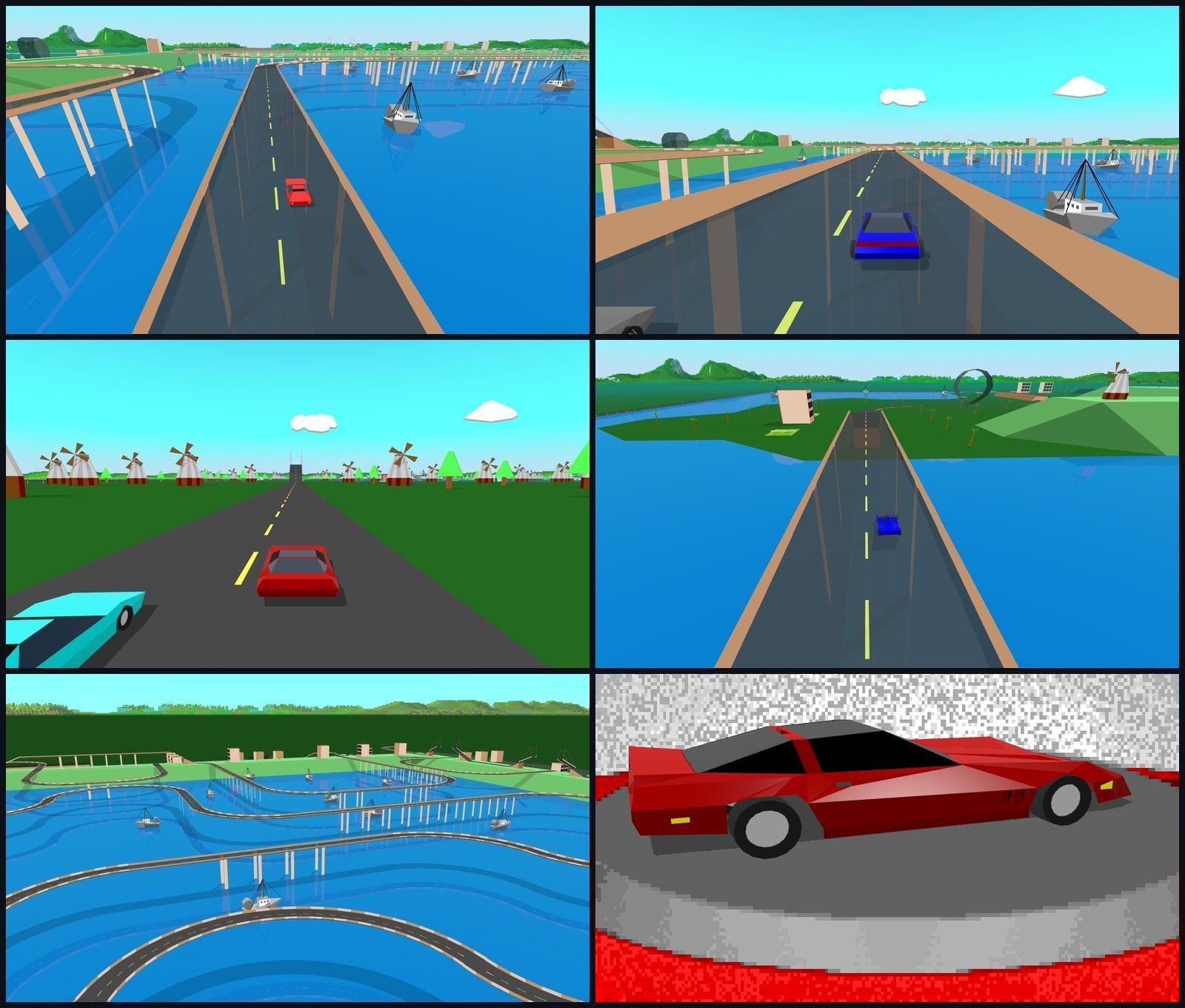
Stunts HD runs the original DOS game's own code, translated from your copy, and redraws what it draws in HD: real 3D
at your display's resolution, widescreen, interpolated between the game's frames. The handling, opponents, replays
and crashes are the original's, because it is the original's code.
## Status
| Area | State |
| --- | --- |
| Racing, opponents, replays, crashes | Working: the original's own code |
| HD 3D view, widescreen, any refresh rate | Working |
| OG mode (the 1990 look, H) | Working |
| Track editor, More Tracks, custom `.TRK` tracks | Working |
| Add-on cars (e.g. the ZakStunts pack) | Working |
| Ghost car, track sharing (Import/Export) | Working |
| Keyboard, gamepad, touch (phones and tablets) | Working |
| Desktop app: macOS, Windows, Linux | Working |
| Other versions of the game (4D Sports Driving and others) | Not yet: Stunts 1.1 only |
| Steam Deck Game Mode | Not working: desktop mode only |
## Play
**In your browser:** open [stunts-recomp.pages.dev](https://stunts-recomp.pages.dev/) in Chrome, Edge or Firefox and
pick your Stunts folder or zip.
**Desktop app:** from the [latest release](https://github.com/mr-finster/stunts-hd/releases/latest):
| System | Download |
| --- | --- |
| macOS (Apple Silicon and Intel) | `Stunts-HD-mac-universal.zip` |
| Windows | `Stunts-HD-win-x64.zip` (ARM: `win-arm64`) |
| Linux | `Stunts-HD-linux-x86_64.AppImage` (ARM: `linux-arm64`) |
1. Unzip (Linux: make the AppImage executable) and open **Stunts HD**.
2. Pick your Stunts 1.1 folder or zip on the welcome screen.
3. The first start needs an internet connection once (the game's translation map is fetched from the site and kept).
> [!NOTE]
> The app isn't signed: on macOS, the first time, open it from System Settings > Privacy & Security > Open Anyway;
> on Windows, choose More info > Run anyway. On a company PC, a Microsoft Defender rule ("Block executable files
> unless they meet a prevalence, age, or trusted list criterion") can block it outright: ask your IT team, or play in
> the browser.
## Accuracy
The game you play is the original's own code: your GAME.EXE, translated instruction by instruction, with nothing
rewritten by hand. So the handling, the opponents, the crashes and the scoring are the original's, bugs included.
| Check | Result |
| --- | --- |
| Translation | Your GAME.EXE's translation must match a checksum of the known-good translation before the game starts |
| Replays | All 6,907 replays in Chocolate Stunts' test pack play back exactly as in DOS (`stunts/tools/repcheck.js`) |
| OG mode (H) | Checked frame by frame against the original renderer's own picture |
| HD view | Checked in scripted headless races, and against the original renderer, which a debug mode draws over it |
Known differences from DOS:
- The HD view is a new renderer, so what you see differs on purpose. It never changes what the game does.
- Stunts 1.1 only, for now.
## Other Stunts projects
Stunts has a lively community, and other projects take different routes. All but Ultimate Stunts need your own copy of the game.
| Project | How it works | Runs on | Graphics |
| --- | --- | --- | --- |
| **Stunts HD** (this one) | The original GAME.EXE, translated to JavaScript | Browser; desktop app (macOS, Windows, Linux) | HD 3D at display resolution, widescreen; OG mode |
| [Chocolate Stunts](https://github.com/CommonLoon102/restunts-bb11) | A C port, built on the Restunts disassembly | Windows, macOS, Linux, BSD, DOS, Android, browser and more | Original 320x200, or HyperVision at higher resolutions; 4:3 |
| [Play Stunts](https://github.com/ACatWithEbola/playstunts) | A reconstruction in TypeScript | Browser | Enhanced renderer, or the original display modes |
| [Restunts](https://github.com/4d-stunts/restunts) | The community disassembly of the original, which builds back into the DOS game | DOS | Original |
| Ultimate Stunts | A remake, with its own engine | Windows, Linux | OpenGL |
| DOSBox | The original game, emulated | Windows, macOS, Linux | Original |
## Controls
| Key | Does |
| --- | --- |
| ↑ ↓ ← → | Accelerate, brake, steer |
| A Z | Gear up, down (manual gearbox) |
| C | Camera: in car, high, chase, TV |
| T | Watch your opponent instead, and back (when racing one) |
| H | HD mode or OG mode |
| G | Ghost car on or off |
| D | Dashboard on or off |
| R | Restart the race |
| Q (hold) | Rewind the race, a second at a time (a rewound race says so) |
| Esc | Race menu: replays, restart, quit |
| F | Fullscreen |
| F10 | Screenshot: a PNG at your display's resolution |
| ^ / ` | How it runs: frames a second, the slowest frame, the game's own frames (the key left of 1) |
Gamepad: stick or d-pad to steer, triggers to drive.
Touch (a phone or tablet): buttons over the race, shown once the screen is touched: steer, accelerate,
brake, gears (manual gearbox), camera, opponent's view (when racing one), rewind (hold), restart (hold), race menu and HD.
Menus and the replay panel are tapped. To see how it runs on a phone (there's no key for it), add `?perf` to the
address: [stunts-recomp.pages.dev/stunts/?perf](https://stunts-recomp.pages.dev/stunts/?perf).
## How it works
The original DOS executable from your own copy is translated, instruction by instruction, into JavaScript and run
unmodified on a small emulated PC: DOS file and memory services, BIOS, VGA mode 13h, the PIT timer, the keyboard
controller and an AdLib (OPL2) synth. A renderer then picks up what the game draws each frame and paints it again
with WebGL at display resolution, interpolated between the game's own frames.
## Repository layout
| Path | Contents |
| --- | --- |
| `stunts/translate.js`, `x86dec.js`, `exefile.js` | decode GAME.EXE and translate it to JavaScript, with `map.json` |
| `stunts/tools/mkmap.py` | builds `map.json` (names and places only) from the Restunts disassembly |
| `stunts/tools/asm2js.py` | the same translation, offline, for development |
| `stunts/cpu.js`, `dos.js`, `drv86.js`, `worker.js` | the emulated PC; the game runs in a worker |
| `stunts/opl-worklet.js` | OPL2 FM synthesis in an AudioWorklet |
| `stunts/hires-capture.js` | records, each game frame, what the original renderer would draw |
| `stunts/hires-view.js` | redraws it in HD (three.js): shadows, interpolation, widescreen |
| `stunts/qol.js`, `setup.js` | ghosts, track sharing, settings, the welcome screen |
| `desktop/` | the same game as a desktop app (Electron) |
| `stunts/tools/` | headless test runner (`qa.mjs`), replay check against DOS (`repcheck.js`), geometry gap checker (`gaps.*`), site build (`site.py`) |
## Run it yourself
Nothing of the game is in this repository. You need:
1. your own copy of Stunts 1.1 (the game's files, or a zip of them);
2. a checkout of [Restunts](https://github.com/4d-stunts/restunts) in `vendor/restunts`, to build `map.json`
from the disassembly and your GAME.EXE:
```sh
node stunts/tools/exedump.js vendor/restunts/stunts/game.exe exedump.json
python3 stunts/tools/mkmap.py vendor/restunts/src/restunts/asmorig exedump.json stunts/map.json vendor/restunts/stunts/game.exe
```
3. then serve with the headers the game needs (SharedArrayBuffer): `python3 stunts/tools/serve.py 8766` and
open http://localhost:8766/stunts/.
`python3 stunts/tools/site.py` builds the static site into `dist/`.
## How it's made
Made with the help of AI coding tools. The game's own code runs unchanged: the translation of your GAME.EXE must
match a checksum of the known-good translation before it starts, and the HD view is checked in scripted headless
races and against the original renderer's picture, which a debug mode draws over it.
More in [How it was made](docs/HOW-IT-WAS-MADE.md).
## Credits
The reverse engineering this stands on is the Restunts project's disassembly of Stunts. Stunts / 4D Sports
Driving was made by Distinctive Software and published by Broderbund / Mindscape; it is not affiliated with
this project. three.js (MIT).
## Licence
MIT for this project's own code: see [LICENSE](LICENSE).
## Support
If you enjoy it, you can [buy me a coffee](https://buymeacoffee.com/mrfinster).