🐶 Command-line DNS client for humans
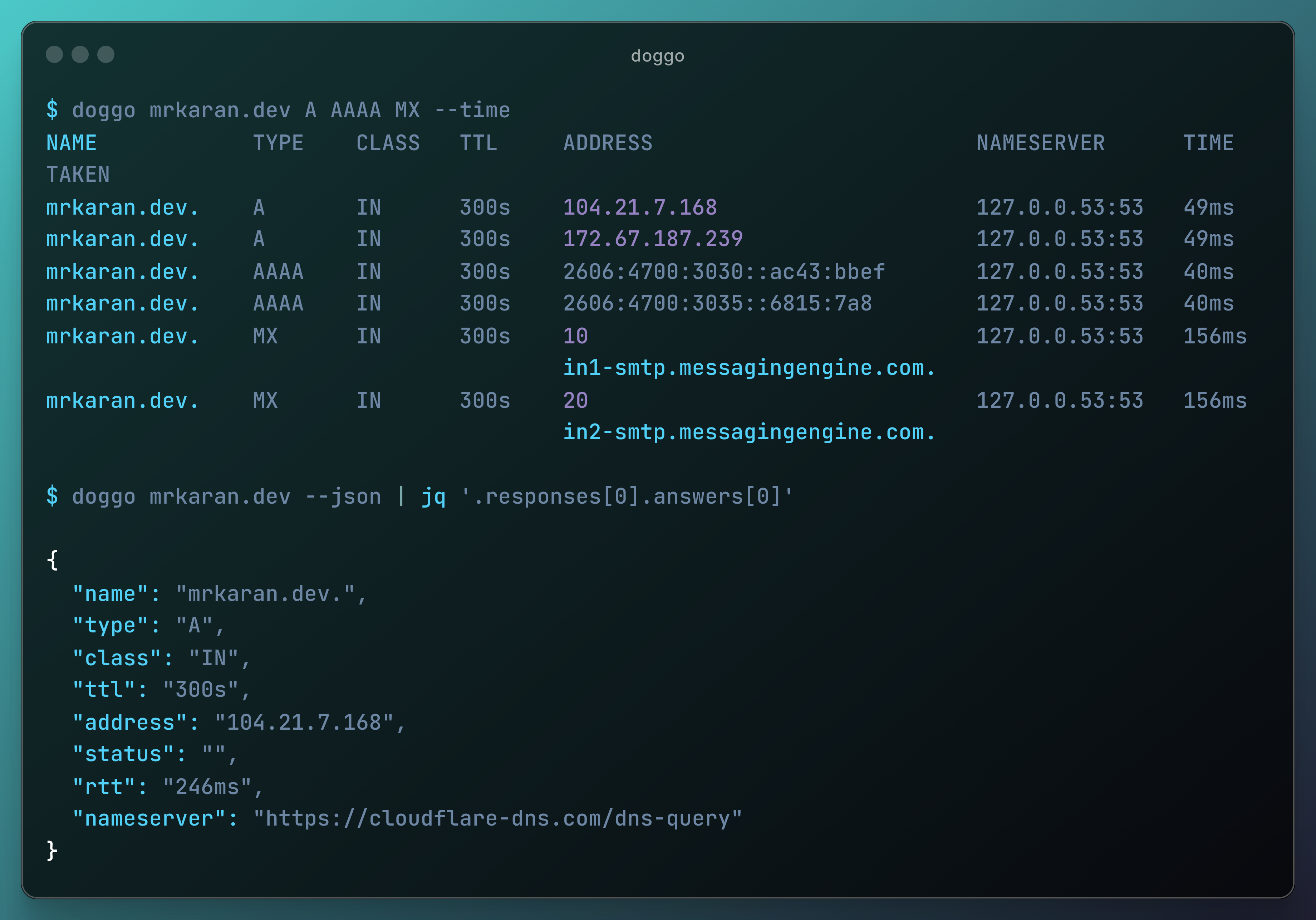 ---
**doggo** is a modern command-line DNS client (like _dig_) written in Golang. It outputs information in a neat concise manner and supports protocols like DoH, DoT, DoQ, and DNSCrypt as well.
It's totally inspired by [dog](https://github.com/ogham/dog/) which is written in Rust. I wanted to add some features to it but since I don't know Rust, I found it as a nice opportunity to experiment with writing a DNS Client from scratch in `Go` myself. Hence the name `dog` + `go` => **doggo**.
## Installation
### Easy Install (Recommended)
```shell
curl -fsSL https://raw.githubusercontent.com/mr-karan/doggo/main/install.sh | sh
```
### Package Managers
- Arch Linux: `pacman -S doggo`
- Eget: `eget mr-karan/doggo`
- Gentoo: `emerge net-dns/doggo`
- Homebrew: `brew install doggo`
- MacPorts (macOS): `port install doggo`
- [Mise](https://github.com/jdx/mise): `mise use -g doggo@latest`
- Nix: `nix profile install nixpkgs#doggo`
- Scoop (Windows): `scoop install doggo`
- Winget (Windows): `winget install doggo`
### Binary Install
You can download pre-compiled binaries for various operating systems and architectures from the [Releases](https://github.com/mr-karan/doggo/releases) page.
### Go Install
If you have Go installed on your system, you can use the `go install` command:
```shell
go install github.com/mr-karan/doggo/cmd/doggo@latest
```
The binary will be available at `$GOPATH/bin/doggo`.
### Docker
```shell
docker pull ghcr.io/mr-karan/doggo:latest
docker run --rm ghcr.io/mr-karan/doggo:latest example.com
```
For more installation options, including binary downloads and Docker images, please refer to the [full installation guide](https://doggo.mrkaran.dev/docs/intro/installation/).
## Quick Start
Here are some quick examples to get you started with doggo:
```shell
# Simple DNS lookup
doggo example.com
# Query MX records using a specific nameserver
doggo MX github.com @9.9.9.9
# Use DNS over HTTPS
doggo example.com @https://cloudflare-dns.com/dns-query
# JSON output for scripting
doggo example.com --json | jq '.responses[0].answers[].address'
# Reverse DNS lookup
doggo --reverse 8.8.8.8 --short
# Using Globalping
doggo example.com --gp-from Germany,Japan --gp-limit 2
```
## Features
- Human-readable output with color-coded and tabular format
- JSON output support for easy scripting and parsing
- Multiple transport protocols: DoH, DoT, DoQ, TCP, UDP, DNSCrypt
- EDNS support with Client Subnet (ECS), NSID, Cookies, Padding, and Extended Errors
- Additional section support for glue records and supplementary data
- Internationalized Domain Names (IDN) with automatic punycode conversion
- Support for `ndots` and `search` configurations
- Multiple resolver support with customizable query strategies
- IPv4 and IPv6 support
- Web interface available
- Shell completions for `zsh` and `fish`
- Reverse DNS lookups
- Flexible query options including various DNS flags
- Debug mode for troubleshooting
- Response time measurement
- Cross-platform support
## Documentation
For comprehensive documentation, including detailed usage instructions, configuration options, and advanced features, please visit our [official documentation site](https://doggo.mrkaran.dev/docs/).
## Sponsorship
If you find doggo useful and would like to support its development, please consider becoming a sponsor. Your support helps maintain and improve this open-source project.
[](https://github.com/sponsors/mr-karan)
Every contribution, no matter how small, is greatly appreciated and helps keep this project alive and growing. Thank you for your support! 🐶❤️
## License
[LICENSE](./LICENSE)
---
**doggo** is a modern command-line DNS client (like _dig_) written in Golang. It outputs information in a neat concise manner and supports protocols like DoH, DoT, DoQ, and DNSCrypt as well.
It's totally inspired by [dog](https://github.com/ogham/dog/) which is written in Rust. I wanted to add some features to it but since I don't know Rust, I found it as a nice opportunity to experiment with writing a DNS Client from scratch in `Go` myself. Hence the name `dog` + `go` => **doggo**.
## Installation
### Easy Install (Recommended)
```shell
curl -fsSL https://raw.githubusercontent.com/mr-karan/doggo/main/install.sh | sh
```
### Package Managers
- Arch Linux: `pacman -S doggo`
- Eget: `eget mr-karan/doggo`
- Gentoo: `emerge net-dns/doggo`
- Homebrew: `brew install doggo`
- MacPorts (macOS): `port install doggo`
- [Mise](https://github.com/jdx/mise): `mise use -g doggo@latest`
- Nix: `nix profile install nixpkgs#doggo`
- Scoop (Windows): `scoop install doggo`
- Winget (Windows): `winget install doggo`
### Binary Install
You can download pre-compiled binaries for various operating systems and architectures from the [Releases](https://github.com/mr-karan/doggo/releases) page.
### Go Install
If you have Go installed on your system, you can use the `go install` command:
```shell
go install github.com/mr-karan/doggo/cmd/doggo@latest
```
The binary will be available at `$GOPATH/bin/doggo`.
### Docker
```shell
docker pull ghcr.io/mr-karan/doggo:latest
docker run --rm ghcr.io/mr-karan/doggo:latest example.com
```
For more installation options, including binary downloads and Docker images, please refer to the [full installation guide](https://doggo.mrkaran.dev/docs/intro/installation/).
## Quick Start
Here are some quick examples to get you started with doggo:
```shell
# Simple DNS lookup
doggo example.com
# Query MX records using a specific nameserver
doggo MX github.com @9.9.9.9
# Use DNS over HTTPS
doggo example.com @https://cloudflare-dns.com/dns-query
# JSON output for scripting
doggo example.com --json | jq '.responses[0].answers[].address'
# Reverse DNS lookup
doggo --reverse 8.8.8.8 --short
# Using Globalping
doggo example.com --gp-from Germany,Japan --gp-limit 2
```
## Features
- Human-readable output with color-coded and tabular format
- JSON output support for easy scripting and parsing
- Multiple transport protocols: DoH, DoT, DoQ, TCP, UDP, DNSCrypt
- EDNS support with Client Subnet (ECS), NSID, Cookies, Padding, and Extended Errors
- Additional section support for glue records and supplementary data
- Internationalized Domain Names (IDN) with automatic punycode conversion
- Support for `ndots` and `search` configurations
- Multiple resolver support with customizable query strategies
- IPv4 and IPv6 support
- Web interface available
- Shell completions for `zsh` and `fish`
- Reverse DNS lookups
- Flexible query options including various DNS flags
- Debug mode for troubleshooting
- Response time measurement
- Cross-platform support
## Documentation
For comprehensive documentation, including detailed usage instructions, configuration options, and advanced features, please visit our [official documentation site](https://doggo.mrkaran.dev/docs/).
## Sponsorship
If you find doggo useful and would like to support its development, please consider becoming a sponsor. Your support helps maintain and improve this open-source project.
[](https://github.com/sponsors/mr-karan)
Every contribution, no matter how small, is greatly appreciated and helps keep this project alive and growing. Thank you for your support! 🐶❤️
## License
[LICENSE](./LICENSE)