Selfhosted PDF manager, viewer and editor offering a seamless user experience on multiple devices.
Website • Demo • Docs • Get Started
 ## Introduction
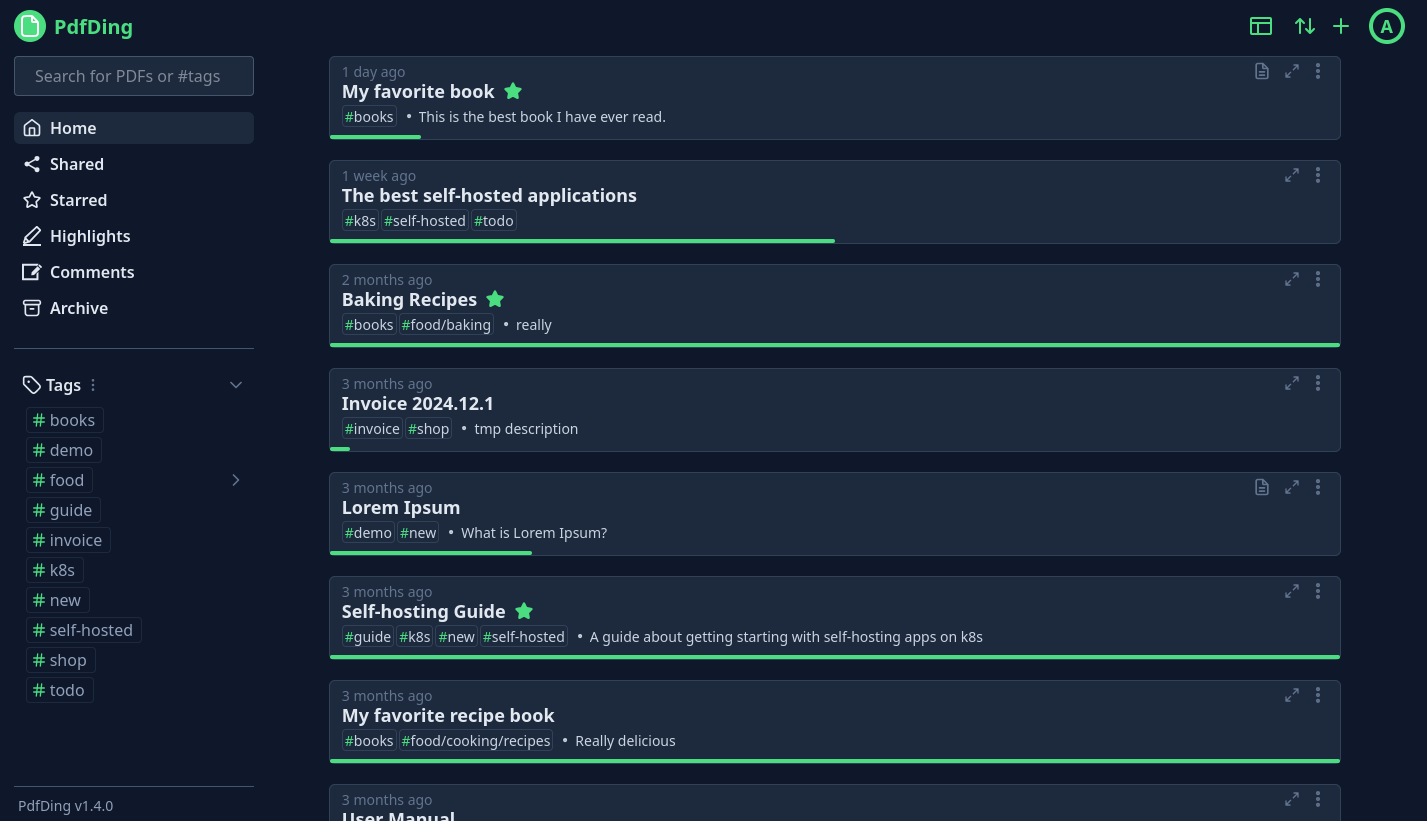
PdfDing is a PDF manager, viewer and editor that you can host yourself. It offers a seamless user experience on multiple
devices. It's designed be to be minimal, fast, and easy to set up using Docker.
The name is a combination of PDF and *ding*. Ding is the German word for thing. Thus, PdfDing is a thing for
your PDFs. Initially inspired by [linkding](https://github.com/sissbruecker/linkding).
A live demo is available at [demo.pdfding.com](https://demo.pdfding.com/).
## Features
* Seamless browser based PDF viewing on multiple devices. Remembers current position - continue where you stopped reading
* Stay on top of your PDF collection with workspaces, collections, multi-level tagging,
starring and archiving functionalities
* Edit PDFs by adding text, highlighting and drawings
* Add signatures to PDFs and access them on all devices
* Manage and export PDF highlights and comments in dedicated sections
* Clean, intuitive UI with dark mode, inverted color mode, custom theme colors and multiple layouts
* SSO support via OIDC
* Share PDFs with an external audience via a link or a QR Code with optional access control
* Protect accounts with two-factor authentication (TOTP + WebAuthn)
* Markdown Notes
* Progress bars show the reading progress of each PDF at a quick glance
## Getting started
Ready to dive into PdfDing? Then head over to the
[Getting Started](https://docs.pdfding.com/getting_started/docker/) pages of the
documentation and find instructions for setting up PdfDing via Docker, Docker Compose
and Helm. Configuration options can be found [here](https://docs.pdfding.com/configuration/).
## Contributing
Small improvements, bugfixes and documentation improvements are always welcome.
If you want to contribute a larger feature, consider opening an issue first to
discuss it. I may choose to ignore PRs for features that don't align with the
project's goals or that I don't want to maintain.
If you are interested in contributing more information can be found in the
[Contributing](https://docs.pdfding.com/contributing/about/) pages of the docs.
There are also ways to contribute if you are not a developer.
## Website & Docs
The repository, which contains the source code for the [project website](https://pdfding.com)
and the [documentation](https://docs.pdfding.com), can be found on
[Codeberg](https://codeberg.org/mrmn/PdfDing-website).
## Acknowledgements
This project was funded through the [NGI0 Commons Fund](https://nlnet.nl/commonsfund), a fund established by
[NLnet](https://nlnet.nl) with financial support from the European Commission's
[Next Generation Internet](https://ngi.eu) programme, under the aegis of DG Communications Networks,
Content and Technology under grant agreement No 101135429.
[
## Introduction
PdfDing is a PDF manager, viewer and editor that you can host yourself. It offers a seamless user experience on multiple
devices. It's designed be to be minimal, fast, and easy to set up using Docker.
The name is a combination of PDF and *ding*. Ding is the German word for thing. Thus, PdfDing is a thing for
your PDFs. Initially inspired by [linkding](https://github.com/sissbruecker/linkding).
A live demo is available at [demo.pdfding.com](https://demo.pdfding.com/).
## Features
* Seamless browser based PDF viewing on multiple devices. Remembers current position - continue where you stopped reading
* Stay on top of your PDF collection with workspaces, collections, multi-level tagging,
starring and archiving functionalities
* Edit PDFs by adding text, highlighting and drawings
* Add signatures to PDFs and access them on all devices
* Manage and export PDF highlights and comments in dedicated sections
* Clean, intuitive UI with dark mode, inverted color mode, custom theme colors and multiple layouts
* SSO support via OIDC
* Share PDFs with an external audience via a link or a QR Code with optional access control
* Protect accounts with two-factor authentication (TOTP + WebAuthn)
* Markdown Notes
* Progress bars show the reading progress of each PDF at a quick glance
## Getting started
Ready to dive into PdfDing? Then head over to the
[Getting Started](https://docs.pdfding.com/getting_started/docker/) pages of the
documentation and find instructions for setting up PdfDing via Docker, Docker Compose
and Helm. Configuration options can be found [here](https://docs.pdfding.com/configuration/).
## Contributing
Small improvements, bugfixes and documentation improvements are always welcome.
If you want to contribute a larger feature, consider opening an issue first to
discuss it. I may choose to ignore PRs for features that don't align with the
project's goals or that I don't want to maintain.
If you are interested in contributing more information can be found in the
[Contributing](https://docs.pdfding.com/contributing/about/) pages of the docs.
There are also ways to contribute if you are not a developer.
## Website & Docs
The repository, which contains the source code for the [project website](https://pdfding.com)
and the [documentation](https://docs.pdfding.com), can be found on
[Codeberg](https://codeberg.org/mrmn/PdfDing-website).
## Acknowledgements
This project was funded through the [NGI0 Commons Fund](https://nlnet.nl/commonsfund), a fund established by
[NLnet](https://nlnet.nl) with financial support from the European Commission's
[Next Generation Internet](https://ngi.eu) programme, under the aegis of DG Communications Networks,
Content and Technology under grant agreement No 101135429.
[ ](https://nlnet.nl)
[
](https://nlnet.nl)
[ ](https://nlnet.nl/core)