YunKan-TRT
martin888/yunkan-trt:latest
https://hub.docker.com/r/martin888/yunkan-trt
host
sh
false
https://github.com/mrtian2016/yunkan-unraid-templates/issues
https://yun-kan.com
YunKan (云瞰) — self-hosted, local-first **NVR / VMS** for home and small-business IP cameras, with on-device AI: motion, **person / vehicle / face recognition / license plate (ALPR / LPR) / pose & fall / package / baby-cry detection**. Your video stays on your LAN — nothing is uploaded to any vendor cloud. A privacy-first **Frigate / Shinobi / ZoneMinder / Scrypted / Agent DVR / iSpy / MotionEye** alternative — pre-bundled into a single container so there is no Mosquitto / database / reverse-proxy / model-download wiring to do by hand.
This is the **TensorRT variant** — the highest-throughput option for **NVIDIA GPUs** (≥6 GB VRAM recommended; ≥8 GB for many high-resolution cameras). On first start it builds inference engines optimized for your exact GPU — this takes a few extra minutes, one time only; the engines are cached on disk (inside the data directory) and reused across restarts and image updates, rebuilt only if you change the GPU. Pick this over "YunKan-CUDA" when you run many cameras / many AI features on one GPU and want the most headroom. Prefer a no-wait first start, or the engine build fails on an older GPU? Use "YunKan-CUDA" instead — same features, no engine build.
**Prerequisites:**
1. Install the **"NVIDIA Driver"** plugin in Unraid → reboot → `nvidia-smi` works on the host;
2. This template already sets `--runtime=nvidia` and the NVIDIA_* env vars — no extra config needed;
3. This is the largest of the four image variants, so the first pull will take a while.
No NVIDIA GPU? Install "YunKan" (CPU) or "YunKan-OpenVINO" (Intel iGPU). All four variants share the same ports — **only one can run at a time**.
**Works with any RTSP or ONVIF camera** — Reolink, Hikvision, Dahua, Amcrest, Annke, Uniview, EZVIZ, Foscam, Lorex, Anpviz, generic Chinese ONVIF, etc. **Tapo, Wyze, Xiaomi, Eufy, Mi Home, Aqara, Imou** and other proprietary-protocol cameras work via a **go2rtc** bridge. **GB/T 28181 cameras & NVRs** (Hikvision / Dahua / Uniview, etc.) register directly into YunKan — import individual channels, including many NVR channels in one batch.
**Built in:** 24/7 continuous recording + motion-event highlights, **NVR-style multi-camera synced timeline playback**, a **Birdseye** all-cameras overview, **PTZ control with presets**, **virtual tripwires (line-crossing)** for accurate entry/exit direction, customizable **video-wall layouts**, a built-in **file manager** for recordings & snapshots, a **people library** for face recognition, **AI scene understanding** that turns each event into a natural-language summary ("an elderly person fell in the living room" — no OpenAI / Gemini / Claude API keys, all inference on your own GPU), bilingual EN ↔ 中文, **WebRTC (WHEP)** sub-second live streaming with HLS fallback, **two-way talkback** (push-to-talk on supported ONVIF cameras), **Apple Home (HomeKit) incl. HomeKit Secure Video — record motion clips to iCloud (Pro)**, **Home Assistant** integration via MQTT auto-discovery, Web admin + Android + iOS apps, optional off-site backup to **115 网盘 (115 Pan / 115 Cloud)**.
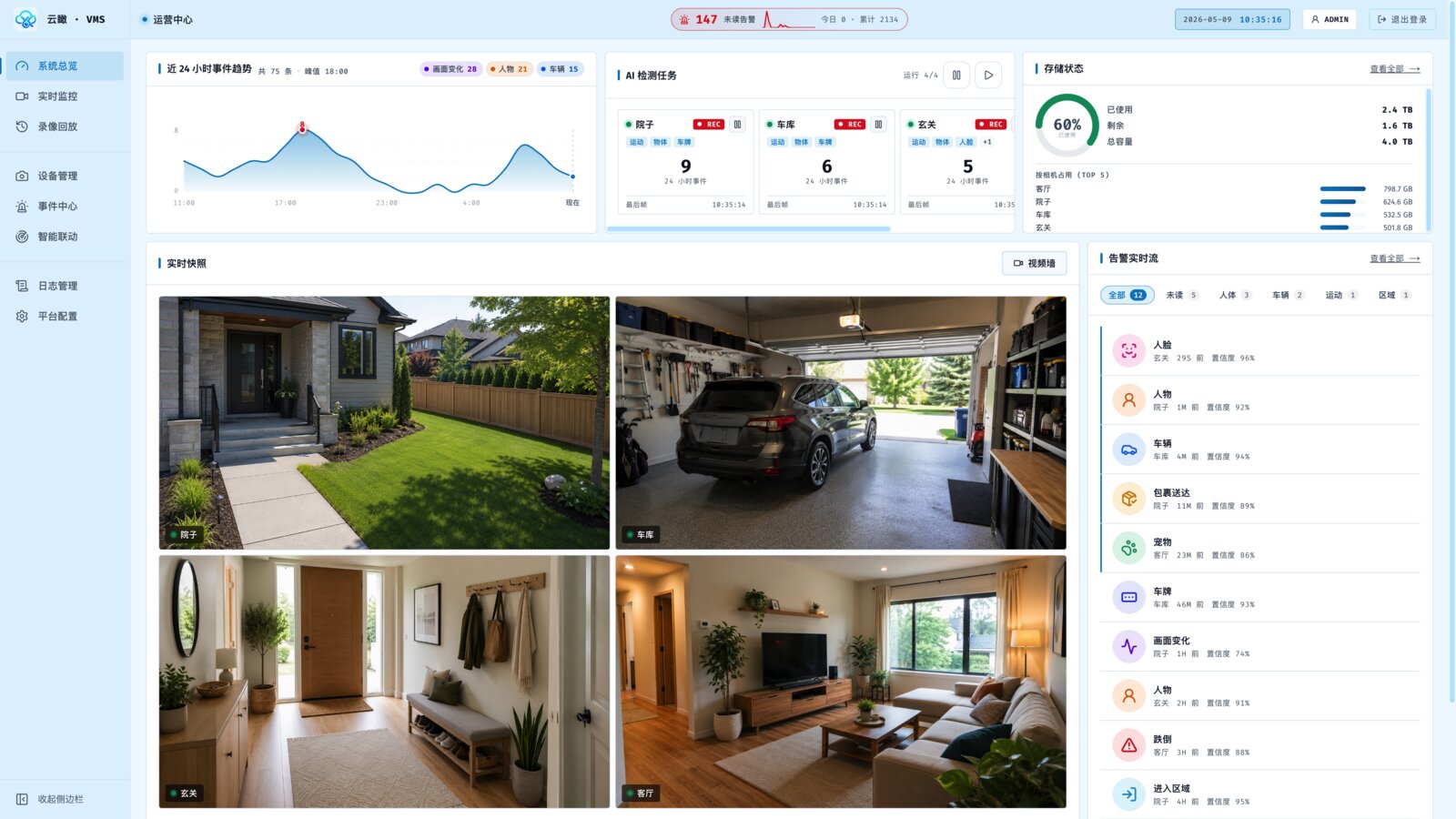
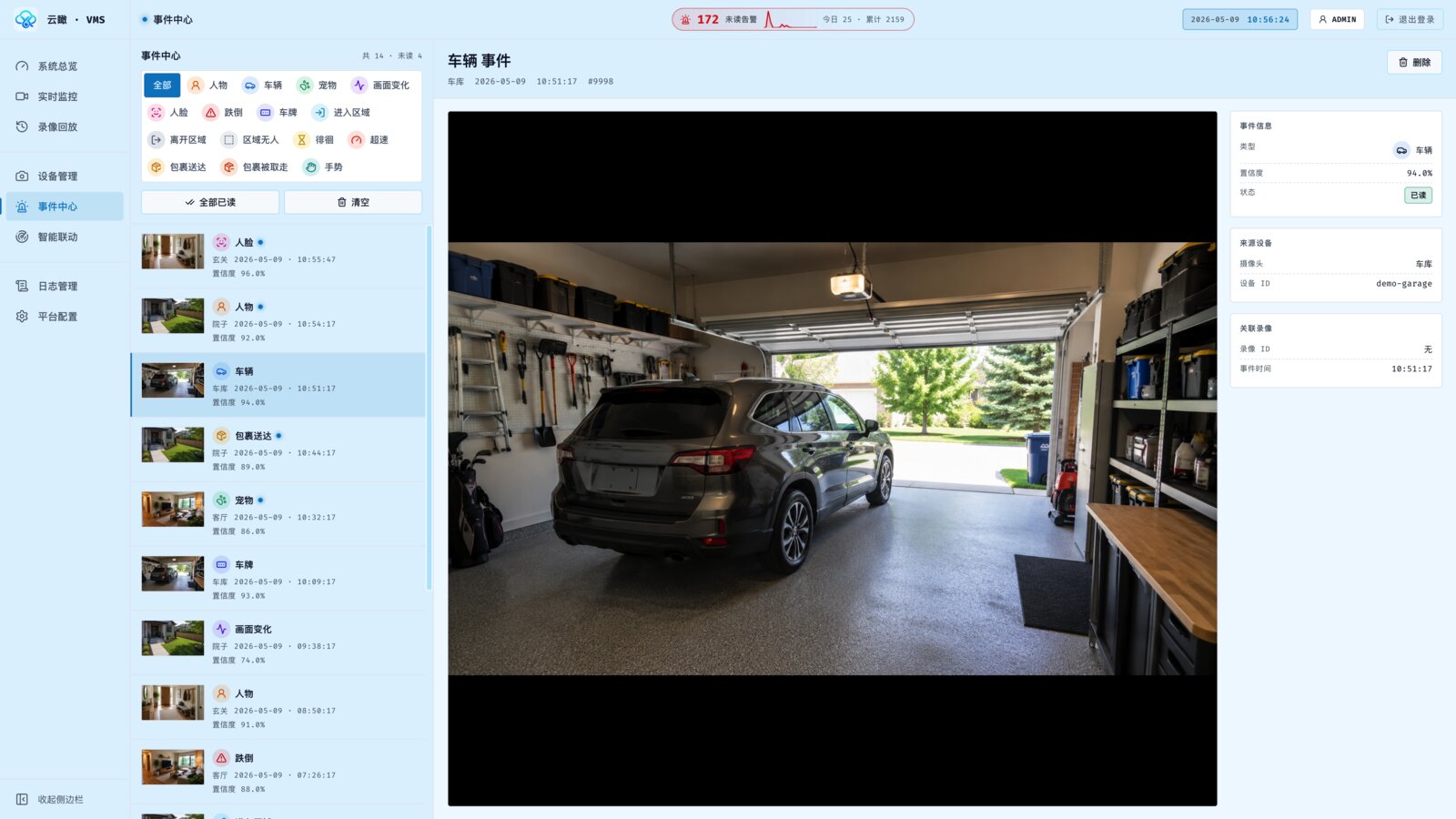
On first launch, open the WebUI to enter the Setup wizard.
Ports (hardcoded): 23406/tcp HTTP, 23880/tcp RTSP, 24214/tcp HLS + WebRTC (WHEP) signaling, 23515/udp+tcp WebRTC ICE media.
**Keywords:** NVR, VMS, CCTV, surveillance, security camera, RTSP, ONVIF, IP camera, TensorRT, TRT, CUDA, NVIDIA, GPU, NVDEC, RTX 3060, RTX 4060, RTX 4070, A2000, Tesla T4, motion detection, person detection, vehicle detection, face recognition, license plate recognition, ALPR, LPR, fall detection, pose detection, two-way audio, talkback, 24/7 recording, continuous recording, timeline playback, WebRTC, HLS, Home Assistant, MQTT, smart home, AI NVR, AI camera, AI scene understanding, natural language event summary, smart event description, on-device AI, edge AI, offline AI, no API key, no cloud, privacy, self-hosted, Frigate alternative, Shinobi alternative, ZoneMinder alternative, Scrypted alternative, Agent DVR alternative, iSpy alternative, MotionEye alternative, BlueIris alternative, Reolink, Hikvision, Dahua, Amcrest, Annke, Uniview, EZVIZ, Foscam, Lorex, Tapo, Wyze, Xiaomi, Eufy, Imou, Aqara, HomeKit, Apple Home, HomeKit Secure Video, HKSV, Siri, GB28181, GB/T 28181, birdseye, virtual tripwire, line crossing, entry exit detection, video wall, PTZ, pan tilt zoom, package detection, parcel detection, baby cry detection, people library, NVR playback, multi-channel playback, go2rtc, 云瞰, 摄像头, 监控, 显卡推理, AI 监控, 本地 AI, 自然语言.
### 0.9.23 (2026-06-30)
- **Deep integration with Hikvision / Dahua / Reolink cameras** — the smart events these brands generate on the camera itself (person / vehicle / line-crossing / lens tampering) now flow straight into Yunkan, pushing and triggering automations just like Yunkan's own AI detection; you also get the camera's built-in white-light illuminator, alarm (light plus siren), continuous PTZ and presets, and two-way audio. Adding one of these cameras now has a "Test connection / probe capabilities" button so you can see what was detected before saving.
- **One-tap white light plus alarm / light automations** — toggle the white-light illuminator from the live view and quick panel (mobile and web); automations can use "turn on the light" and "alarm" actions with an auto-off duration, lighting up and sounding a siren when someone shows up at night.
- **Smarter camera events (on-demand face / plate recognition)** — when one of these cameras reports "person / vehicle", Yunkan runs face and license-plate recognition on that frame: a recognized person becomes its own face event (which can push and drive automations), and a recognized plate is added to the matching vehicle event. It runs only at the moment of the event, adding no ongoing load.
- **Faster, clearer images from these cameras** — thumbnails and event snapshots are fetched straight from the camera: quicker, full-resolution, and no more "won't load for ages / comes back blank" on some H.265 cameras; online status is more accurate too.
- **Easier, safer disk cleanup** — cleanup is simplified to two main switches: a total recording-size cap and a whole-disk usage guard. Once the cap is hit, the oldest footage is overwritten automatically like a security NVR; this fully resolves recordings piling up endlessly and filling the disk. If the disk is filled by data outside of Yunkan, it never deletes your recordings by mistake — it only warns you.
- **No missed detections when someone enters a dark room and the light kicks in** — fixed the two-to-three seconds, when a light or IR cut switches and the whole frame changes, where the AI could briefly go "blind" and miss the moment.
- **Less local storage used** — for cameras that record only on events, the "no-event" buffer now keeps 5 minutes instead of 1 hour.
- **More reliable two-way audio** — fixed the occasional "fails the first time, works the second" when talking through some Hikvision cameras.
- **Push-language fix** — fixed some Chinese-language users being switched to English notifications after signing in; push language now follows exactly what you pick under Settings, never changed automatically.
- **Also** — more stable over long runtimes (lower memory use in background detection); a better PTZ panel layout on small-screen phones; a new icon for "lens tampering" events on mobile.
### 0.9.22 (2026-06-25)
- **PTZ controls completely redesigned (mobile)** — a clearer four-way direction pad; preset positions become collectible "view chips" picked from a one-tap pop-up; during a live preview you can "go to a preset position" in one tap.
- **Quick voice announcements from the live view / quick panel** — talk through a camera without opening the two-way audio page; choose the announcement voice and reuse frequent phrases from history.
- **Sharper, leaner AI detection** — upgraded detection-region planning so small/distant targets are less likely to be missed; choose per camera whether AI runs on the high-res main stream or the bandwidth-saving sub stream.
- **More flexible ignore zones** — pick how a zone matches a target ("feet step inside" vs. "as soon as they touch/get close", handy for a doorway); fixed an occasional miss when a target walks right along a zone's edge.
- **Fewer tripwire false alerts** — fixed duplicate fake events when a target paces back and forth near a tripwire ("in then out" repeatedly).
- **Jumping from an event into playback lands on the moment** — "view playback" now jumps to when the event happened and focuses just the camera involved.
- **Rarely-streamed cameras no longer shown offline by mistake** — cameras that neither record nor run AI detection now use an independent probe to confirm reachability, and ONVIF cameras fetch thumbnails straight from the camera.
- **Your local disk no longer fills up silently (115 cloud users)** — event snapshots auto-clean on their own retention days/size limit; only event-associated recordings upload, and failed uploads retry automatically.
- **Faster updates, less data** — upgrades download only what actually changed instead of the whole image.
### 0.9.21 (2026-06-23)
- **Mobile playback is now a unified "live + review" experience (Android / iOS)** — opening "Today" shows live, dragging the timeline back seamlessly switches to recent/historical footage; auto-selects the smoothest method, no black screen across segments; mute/volume is remembered.
- **Web playback upgraded to a "monitoring-grade" experience** — live by default plus drag-to-review history on one shared timeline across many channels; seamless transitions across recording segments with virtually no black frames; save custom video-wall layouts that sync with your account.
- **Playback timeline scrolls continuously across days** — no longer cut off at a single day; jumping from an event into playback shows a loading placeholder instead of a blank screen and, on web, lands right at the moment of the event.
- **New "Show camera info" overlay in live monitoring (all clients)** — a switch shows codec, frame rate, bitrate, resolution and protocol in the top-left corner; hidden by default.
- **AI summary on the event detail page (all clients)** — a one-sentence, natural-language summary of "what happened" below the snapshot.
- **Migrate your database to MySQL/MariaDB online (admin)** — SQLite users can migrate to their own MySQL/MariaDB from settings in one click (handy when SQLite gets corrupted on a NAS); first-time setup can also choose MySQL, default stays SQLite. Available on the free tier too.
- **Tripwires can suppress duplicate object alerts** — when enabled, crossing keeps only the "in/out direction" event, with no extra generic detection notification.
- **Fixes** — a false "recording failed" alert right after startup; cameras that can't fetch a new frame now show the last frame, with pull-to-refresh on mobile; full-screen live on Android not responding to taps; the mute button on iOS portrait recordings blocked by a gesture.
- **More fixes** — snapshots/thumbnails not loading on some H.265 cameras; more accurate disk-usage figures in the admin; cleaning recordings now also removes matching events/snapshots (no more orphan events that jump to a blank screen); smoother 115 cloud uploads via better API rate control.
### 0.9.20 (2026-06-17)
- **Smoother live detection boxes (all clients)** — detection boxes in live monitoring are now drawn in real time by the app/web, fixing the stutter and "video never shows up" issues some cameras hit before; boxes track more steadily and no longer flicker in size, with falls marked by a bold red box.
- **Playback upgraded to NVR-style multi-channel sync (web)** — play, scrub and fast-forward several cameras together on one shared timeline; one laggy stream doesn't drag down the others, and the timeline marks which segments have footage vs. gaps.
- **New "File Manager" (admin)** — manage recordings and event snapshots in one place: browse by camera × date, open a full-size image or play a segment, see per-camera disk usage, and physically delete files (clearing both local and 115 cloud, not just records).
- **More reliable recording** — hardened against some cameras silently stopping recording (zero-length clips); it now degrades gracefully to keep capturing video, and a new recording-health monitor flags any camera that should be recording but isn't, right on the dashboard.
- **Birdseye overview now on mobile** — Android/iOS get the Birdseye wall in immersive landscape full-screen with pinch-to-zoom, pan and double-tap reset, auto-selecting the smoothest streaming method.
- **More** — one-tap hide detection boxes on event snapshots (all clients); volume slider + collapsible sidebar in live monitoring (web); settings show factory-recommended values; auto-clean stray recordings (web, off by default).
- **AI master switch now truly stands by to save resources** — turning off AI detection actually releases the GPU/models instead of idling (it previously had no real effect); turning it back on restores in a few seconds.
- **Fixes** — "notify when a zone has been empty for X" firing several times in a row; cameras with detection/recording off wrongly shown offline; an occasional "database busy" error during upgrades; Birdseye freezing after a few seconds and being cropped in landscape; detection boxes not showing on iOS.
### 0.9.19 (2026-06-16)
- **Fixes for 0.9.18** — fixed an error on the Detection Settings → Inference backend page; and the NVIDIA TensorRT acceleration fix mentioned in 0.9.18 (which didn't fully ship) is now applied. Upgrade recommended.
### 0.9.18 (2026-06-16)
- **Works with Apple Home (HomeKit, Pro)** — add cameras to the iPhone/iPad Home app: watch live, use Siri, record motion clips straight to iCloud (HomeKit Secure Video), plus listen to camera audio and talk back from your phone. Pair by scanning a QR code in the admin console; each camera has its own switch.
- **Entry/exit direction is now a single tripwire line** — draw one line instead of two zones; crossing it decides in/out, more accurately and with less setup. Automations can trigger on a specific line. Existing setups migrate automatically.
- **Custom video-wall layouts for live view** — build any layout beyond the built-in grids: drag cameras into cells, resize one to span a bigger block, save multiple layouts and sync them across devices.
- **Smarter automations** — zones/tripwires narrow to the cameras you picked; disabled cameras no longer take part.
- **Choose which object types to detect** — limit detection to the categories you care about (person / bicycle / car / motorcycle / bus / truck / bird / cat / dog), set globally and narrowed per camera; keep just "person + car" and turn off "bird" so passing birds stop flooding you. (Turning off "person" also disables face/pose; turning off "vehicle" disables license plate.)
- **Optical PTZ zoom (mobile)** — zoom-in/zoom-out on the control pad: tap for one step, hold for continuous. True optical zoom, not digital crop.
- **More** — playback calendar marks days that have recordings; live preview remembers your mute choice (mobile); manually pick the hardware AI runs on (CPU / Intel iGPU / NVIDIA GPU / high-speed).
- **NVIDIA high-speed acceleration (TensorRT) usable again** — fixed a bug that made the acceleration page wrongly report "no GPU detected," so even users with a supported GPU couldn't enable it; the GPU is detected correctly now and each model shows "accelerated" the moment it finishes.
- **Performance monitoring covers Intel iGPUs** — the performance page adds Intel integrated-GPU model / utilization / shared memory / clock alongside NVIDIA GPUs, so Intel-platform users (N100 / J4125, etc.) can see iGPU usage; idle detector rows now show the camera name too.
- **New "upgrade cleanup"** — reclaim disk by removing old image versions and historical DB backups in one tap, always keeping the current and rollback versions.
- **Privacy & security** — non-admin users can no longer see camera credentials; secrets in logs/alerts are masked.
- **Localization fixes** — non-Chinese systems default to English; push notifications follow the language selected in the app.
- **Fixes** — better small-target detection (small cats/dogs); certain cameras' recordings possibly filling the disk (with automatic cleanup of leftovers); full-screen ignore zones missing detections at the edge.
### 0.9.17 (2026-06-12)
- **Far fewer false alerts** — a three-layer overhaul: the scene-change (motion) detector was reworked so gradual lighting shifts, lights turning on, IR/night-mode switches and lightning are recognized and skipped, and one-frame blips (a bird flashing by) no longer create events; parked vehicles/objects are no longer re-detected over and over (at most one alert per stay); bursts of same-type events from one camera are collapsed (default one per 60s, adjustable).
- **New Birdseye view** — all cameras stitched server-side into a single overview stream, much lighter than opening every stream.
- **New entry/exit direction detection** — draw two zones at a doorway and events tell "coming in" from "going out"; includes a ready-made "notify when someone comes home" automation template.
- **Home Assistant integration upgrades** — with MQTT connected, each camera also exposes a live-view entity and an event-snapshot image entity (with detection boxes); MQTT/webhook payloads can embed a snapshot link.
- **Enable/disable cameras** — one switch stops streaming/recording/detection and hides the camera's events everywhere; re-enable restores everything.
- **Jump-to-playback lands right before the event** — event timestamps stay accurate under load, and playback now starts 5 seconds before the event.
- **Smaller, faster updates** — semantic AI models are now downloaded on demand instead of being bundled; the image is several GB smaller.
- **TensorRT engine now persists** — the one-time GPU-specific engine build is stored under /app/data and survives image updates / container re-creates; the acceleration page in Web Admin (which could show "unavailable") is fixed.
- **Fixes** — occasional corrupted snapshots; idle cameras (no detection/recording) wrongly shown offline; missing audio / periodic stutter on GB28181 cameras; cry-detection-only status not showing; storage usage now reflects the actual recordings folder; mobile apps no longer stretch live/snapshot views for non-16:9 cameras.
### Template update (2026-06-10)
- **New TensorRT (TRT) variant template** — the highest-throughput NVIDIA option. On first start it builds inference engines optimized for your exact GPU (a few minutes, one time; cached in the data directory and reused afterwards). Prefer a no-wait first start? Use "YunKan-CUDA".
- **Separate "Recordings directory" path mapping** — recordings (TB-scale) have their own entry (container path /app/data/recordings), so you can point them at a big array share / dedicated pool independently of the small appdata state.
### 0.9.16 (2026-06-08)
- **Fixed AI detection lagging behind when running many cameras** — with several cameras detecting at once, AI detection could fall tens of seconds behind: events showed up in the Incident Center ~30s late, and "Jump to playback" landed after the event, missing the key moment. Now fixed at the root, so detection is real-time again: events appear almost instantly and "Jump to playback" lands right on the moment. The more cameras, the bigger the improvement.
- **Further fixes for some H.265 (HEVC) cameras** — black screen or missing audio in live view for certain H.265 cameras is fixed.
- **More reliable two-way talk** — fixed occasional connection failures.
- **Web PTZ controls upgraded** — Synology NVR-style pan/tilt/zoom in the web live view (scroll to zoom, hold a direction to pan), plus main/sub stream switching in the device-management live popup.
- **Mobile playback now supports landscape full-screen with pinch-to-zoom / pan; sign-in works with just a public address** (Android / iOS).
- **Update download progress** — the in-app system update now shows a live download progress bar, so you can see how far along the download is instead of staring at a blank screen.
- **Other improvements** — removed an ineffective motion-detection toggle on mobile; eased occasional stalls caused by database contention.
### 0.9.15 (2026-06-07)
- **Fixed "ignore zone" not working for birds and similar targets** — after setting a detection zone to "ignore" and choosing a target (e.g. bird) over the whole frame, birds still kept triggering alerts. Fixed: an ignore zone now suppresses the chosen target types regardless of confidence, so common false alarms like flying birds or swaying branches are cleanly filtered out.
- **Completed missing English / Japanese / Traditional Chinese translations** — detection-zone settings, common dialogs, camera audio capabilities, automation run history, the dashboard AI-detection panel and more previously showed Chinese in non-Chinese UI; now fully translated.
- **Fixed a save error when editing GB/T 28181 cameras** — cameras added via the GB28181 protocol (some NVRs / industrial cameras) could fail to save after editing; fixed.
### 0.9.14 (2026-06-07)
- **Fixed AI detection silently getting stuck on "pending"** — on some cameras AI detection would quietly stop (picture fine, no errors in logs) and only recover after manually toggling detection off/on. Fixed, plus new multi-layer self-healing: a stalled stream now auto-reconnects within ~15s, no manual action.
- **New frozen-frame (camera hang) detection & recovery** — when a camera's picture freezes on a single frame while it still looks online, SkyView now detects it, first auto-reconnects to try to wake the camera, and if it stays frozen marks the camera as faulty and alerts you — instead of silently missing recordings and detections.
- **Fixed AI detection failing to start on some licensed, online machines** — a few machines with a valid license and normal network (panel showing "licensed") couldn't start AI detection; fixed.
### 0.9.13 (2026-06-06)
- **GB/T 28181 cameras and NVRs** — Hikvision / Dahua / Uniview and other devices that support the "GB28181 upstream platform" register automatically once you enter SkyView's connection details; pick channels to import, including multiple NVR channels in one batch. Live view, recording, AI detection, snapshots, PTZ and presets, two-way audio and on-device playback all work like a normal camera.
- **One-tap Home Assistant** — after configuring MQTT, every camera shows up in Home Assistant automatically (online/offline status plus live sensors for person / vehicle / animal / package / face / fall / baby-cry detection), ready to use in your automations. Cameras added or removed sync automatically.
- **Time-lapse recordings** — turn a span of recording into a sped-up clip to review a long period in seconds.
- **Android pull-to-refresh** on the monitor, events and automations screens.
- **Faster, smoother LAN/WAN switching on mobile** — connects to your server faster and more reliably on Wi-Fi at home vs. cellular when away; after a cold start or a network change, pages load automatically without manually switching tabs; the occasional "can't connect even though it works" is fixed.
- Other fixes and polish, including the earlier beta fixes for "no audio" and "AI detection not working" on some H.265 cameras.
### 0.9.12 (2026-06-04)
- **People library** — face recognition is now organized around people: group multiple face samples under one named person for more accurate, stable recognition. The system keeps collecting clearer samples as someone approaches and only alerts on a confirmed stranger (fewer false alarms). Promoted to a top-level menu with naming, merge, split, ignore and hide, synced across web / Android / iOS.
- **Audio now works on more cameras** — cameras using older audio encodings that had no sound in playback, web or live view are transcoded automatically, so playback, live and recordings all have audio.
- **Recording storage management** — set a per-camera max size / retention; over-limit recordings are pruned oldest-first. On 115 cloud storage, cleanup now also deletes the cloud copy. New "missing recordings" reconciliation hides records whose files are gone, with a one-tap scan + cleanup. Storage settings are merged into the recordings page.
- **Smoother web playback** — seamless segment-to-segment playback, ±15-second skip with loading feedback, and a more responsive timeline (cursor-anchored scroll zoom).
- **More accurate offline-camera status** — overview and live views reflect online / offline in near real time; offline cameras show a clean "offline" placeholder instead of a broken image or endless "connecting".
- **Steadier offline notifications** — flickering cameras no longer trigger a flood of online / offline alerts.
- **Service status panel** — a new top-bar user menu and service-status monitor surface each feature's health, errors and warnings.
- **Better iOS live compatibility** — fixed some H.265 (HEVC) cameras showing no picture on iOS; the microphone is no longer held unnecessarily during live / talkback.
- **Smoother notification open** — tapping a push now auto-detects LAN vs. remote before loading details, with loading feedback throughout.
- Other fixes: full-range download failures when exporting 115 recordings by time range; more stable cry / audio detection; clearer activation / migration errors with machine code (four languages).
### 0.9.11 (2026-06-01)
- **Fixed a background error after upgrading** — servers upgraded from an older version could repeatedly log errors in event-recording retention / cleanup because a database column was missing. This now self-heals on upgrade with no manual action.
### 0.9.10 (2026-06-01)
- **Fixed a regression where some pages could fail to load after upgrading** — a small number of users saw blank "Cameras", "Automations", and "Live" pages after updating from the previous version. This now self-heals on upgrade with no manual action.
- **Clearer license plates** — the detection-box outline no longer covers the plate number itself.
- **Improved event list** — thumbnails switched to a landscape aspect ratio, plate / face recognition results now show inline in the list, and unread markers are cleaner.
- Other fixes: iOS "mark all read" not refreshing the list; smoother web playback timeline dragging (cursor-anchored scroll zoom).
### 0.9.9 (2026-06-01)
- **AI scene understanding** — each event gets an automatic natural-language summary ("a person walks up to the door holding a package"), shown on event cards in the web admin and the Android / iOS apps. All inference runs on-box; no OpenAI / Gemini / Claude API key required.
- **Smart event search** — search past events by keyword on web and mobile, with semantic matching (searching "delivery" also surfaces "package" events).
- **Automatic LAN / WAN switching** — configure both a local and a public address for the same server; the app uses whichever is reachable (LAN at home, public when away), plus a one-tap switch on the home screen. The public live-stream host is now editable in Settings and applies instantly.
- **Live detection-box overlay** — overlay recognition boxes and labels (person / vehicle / pet) on the live preview; toggleable on all three clients.
- **Lower-latency live streaming** — added a more compatible playback path with automatic best-method selection for smoother live view across more networks.
- **Redesigned live view, home, and add / edit-camera screens** on mobile, with full per-camera settings (motion sensitivity, per-class detection toggles, PTZ auto-tracking, offline alerts).
- **Cyclist merge** — a person riding a bike / motorcycle is now reported as a single "someone cycling" event instead of separate person + vehicle notifications.
- **Push opens the event detail directly**; event snapshots can be saved to the phone album (with boxes / labels); the web event center adds a zoom / pan snapshot viewer.
- **Per-camera motion-notification cooldown** for cameras without advanced recognition.
- **More accurate license-plate recognition**, especially at distance / under motion blur; plates are merged into the matching vehicle event (one record per car).
- **More reliable Android background keep-alive** to reduce missed push on Chinese OEM phones.
- **AI summary usage panel** to see processing volume, resource use and success rate.
- Stability fixes: camera online / offline false reports, occasionally clipped recording segments, drifting detection boxes, talkback behind a reverse proxy, and a blank "cleanup" log tab; push title / event type / image now stay consistent; fixed duplicate device entries piling up under "bound devices".
### 0.9.8 (2026-05-22)
- More accurate recognition (new in-house model) for people, vehicles, bikes, motorcycles, buses, trucks, birds, cats / dogs, and personal items (backpack / handbag / suitcase).
- Detection / ignore zones can now apply per object type (e.g. an ignore zone that only ignores vehicles still captures passing people).
HomeAutomation: MediaApp:Video Security:
http://[IP]:[PORT:23406]/
https://raw.githubusercontent.com/mrtian2016/yunkan-unraid-templates/main/templates/yunkan-trt.xml
https://raw.githubusercontent.com/mrtian2016/yunkan-unraid-templates/main/icon.png
--runtime=nvidia
Install the "NVIDIA Driver" plugin so `nvidia-smi` works on the host, otherwise the container can't find CUDA at startup. First start builds GPU-specific inference engines — give it a few extra minutes before adding cameras.
Etc/UTC
YunKan-TRT
all
compute,video,utility
/mnt/user/appdata/yunkan/data
/mnt/user/appdata/yunkan/data/recordings
/etc/machine-id
/sys/class/dmi/id/product_uuid
/var/run/docker.sock
23406
23880
24214
23515