---
date:
created: 2025-02-15
updated: 2025-03-15
tags:
- Python
- Automation
- Data Extraction
- Desktop GUI
description: >
High-performance DOCX-to-Excel document extraction suite featuring run-level formatting parser, Pydantic validation, and Tkinter desktop GUI.
---
# Paraxcel Document Toolkit
## Architecture & Extraction Flow
```mermaid
graph LR
A["Raw DOCX Documents"] --> B["python-docx Run-Level XML Parser"]
B --> C["Format & Highlight Extraction ('para_utility')"]
C --> D["Pydantic Schema Validation ('Question' Model)"]
D --> E["Pandas Tabular Normalization"]
E --> F["Normalized Excel Workbook (.xlsx)"]
```
## Executive Overview
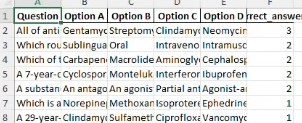
**Paraxcel** is a modular Python desktop utility built to automate the extraction of multiple-choice questions (MCQs), answers, and option formatting from Microsoft Word (`.docx`) documents into structured Excel workbooks (`.xlsx`).
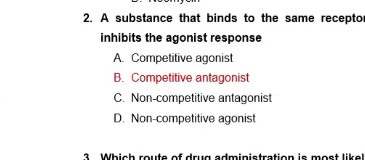
Designed for educators and assessment coordinators, Paraxcel operates entirely offline with zero cloud dependencies. It parses low-level OpenXML document structures to reliably detect marked answers (font color, background highlights) and mathematical notations (superscripts, subscripts).
## Technical Challenges & Architectural Solutions
### 1. Granular XML Run-Level Parsing
- **Challenge:** Detecting highlighted or color-coded answers embedded within arbitrary paragraph runs across inconsistent Word formatting styles.
- **Solution:** Engineered recursive run inspection routines in `para_utility.py` that query OpenXML font color, background tint, and strike-through attributes directly at the character run level.
### 2. Strict Schema Validation & Quality Enforcement
- **Challenge:** Preventing corrupted or partially formatted Word documents from outputting malformed Excel rows.
- **Solution:** Implemented declarative `Pydantic` schemas enforcing strict type bounds (question non-empty, exactly 4 validated options, valid answer index).
### 3. Dependency-Free Desktop Packaging
- **Challenge:** Distributing a Python application to non-technical end-users without requiring a Python runtime environment.
- **Solution:** Configured `PyInstaller` build pipelines with embedded icon resources (`paraxcel.ico`), packaging the application into a standalone Windows binary.
## Verified Accreditation
## Application Screenshots
1. Desktop GUI Interface
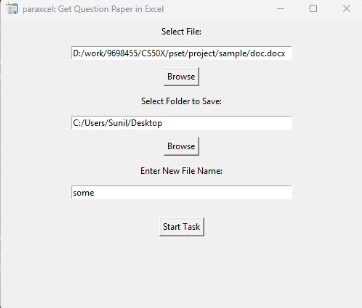
2. Sample DOCX Input
3. Normalized Excel Output