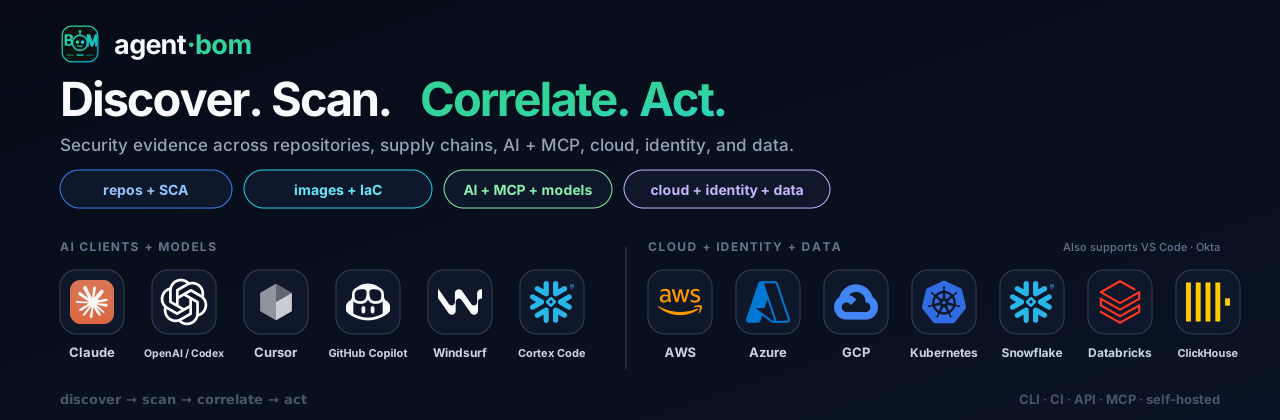
AI supply-chain BOM: every agent, MCP server and AI package, and what each one can reach.
For AppSec teams and developers who run Claude Code, Cursor, Codex or any MCP
client: see which agents, MCP servers, tools and packages are installed, which
are vulnerable, and what each one can reach. Local scans need no account.
## Quick start
From the repository you want to inspect, with [uv installed](https://docs.astral.sh/uv/getting-started/installation/):
```bash
uvx agent-bom scan . -f html -o agent-bom-report.html
```
Open `agent-bom-report.html` for inventory, findings and fix guidance. The scan
stays inside this repository: packages, MCP configuration, secrets and personal
data, skills and IaC; it does not read agent configuration elsewhere on the machine.
Run the same scan again later and agent-bom prints what changed since the last one.
No MCP configuration in the project? Package findings still apply.
No project handy? Run `uvx agent-bom scan --demo --offline` for a bundled sample;
Exit `1` is expected there because the sample trips the security gate. A non-zero
exit can mean a security gate or incomplete assessment; inspect the report and
coverage ([exit codes](site-docs/reference/exit-codes.md), [what a scan does and
does not establish](docs/FIRST_RUN.md#what-this-scan-does-and-does-not-establish),
[first-run guide](docs/FIRST_RUN.md)).
## From laptop to team to org
| Where | Start with | You get |
|---|---|---|
| **On your laptop** | `uvx agent-bom scan .` · `claude mcp add agent-bom -- uvx agent-bom mcp server` | Findings with fixes, a delta on every rescan, and agent-bom as a tool inside your coding agent ([MCP server](docs/MCP_SERVER.md), [plugins](#integrations)) |
| **In your team** | `uses: koda-ai-studio/agent-bom@v0` on pull requests and a weekly `schedule:` | A PR gate with a findings comment and SARIF in code scanning, plus a weekly rescan that catches new CVEs in unchanged code ([GitHub Action](site-docs/integrations/github-action.md)) |
| **Across your org** | `agent-bom up` locally, then Docker Compose or the Helm chart from `oci://ghcr.io/koda-ai-studio/charts/agent-bom` | Retained scans, one graph of agents, MCP servers, packages and credentials, SSO and audit, in your own infrastructure ([self-host](#self-host-in-your-environment)) |
## Why an AI supply-chain BOM
Agents and MCP servers ship without an inventory. A CVE in an AI package, a
poisoned tool description or an over-scoped credential matters by what the
agent that loads it can reach. A package SBOM stops at packages; agent-bom
records the chain and keeps the evidence for every edge.
| 1. Inventory | 2. Correlate | 3. Act |
|---|---|---|
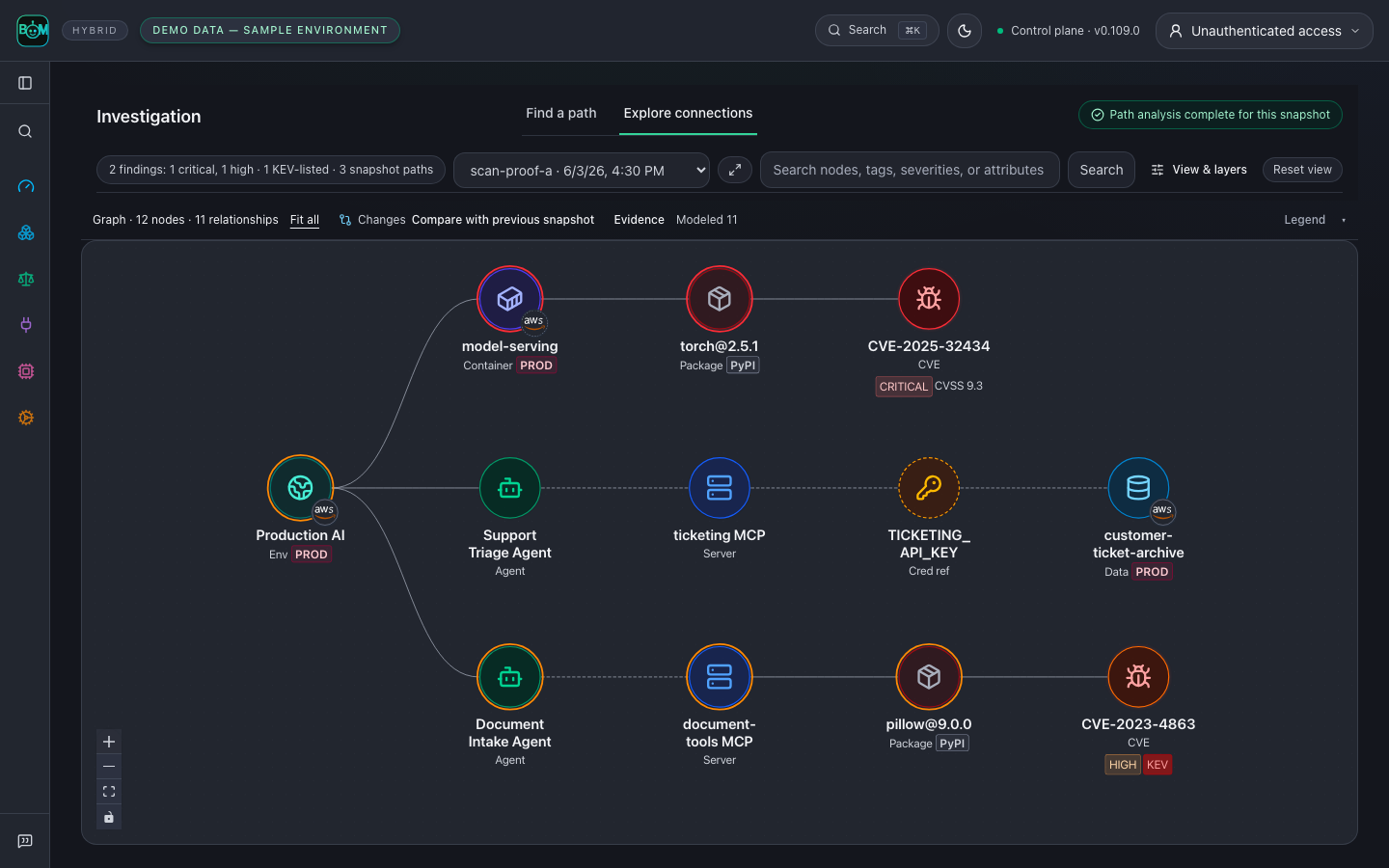
| Agents, MCP servers, tools, packages, models, credential references and cloud resources, read-only | One graph: agent → MCP server → tool → package → credential → data, each edge with its source | Fix, gate CI, block poisoned tool calls, rescan to verify |
*Fictional sample estate. Dashed use, credential and access links are configured
or modeled, not observed at runtime; path analysis covers the collected snapshot only.
The AWS badge describes environment membership; these sample agents have no
recorded execution host or model endpoint.*
[Agent, hosting and model context](docs/graph/AGENT_CONTEXT.md).
Findings map to
[OWASP LLM Top 10, OWASP Agentic Top 10, OWASP MCP Top 10, MITRE ATLAS, EU AI Act and NIST AI RMF](site-docs/features/compliance.md);
control mappings are investigation context, not certification.
## What you get
Start with the workflow you need. An individual developer can scan, inspect
findings and verify fixes without a shared control plane or a compliance
workflow. Teams can add retained scans and shared inventory; organizations can
add identity, audit review and governance when needed. These are adoption paths,
not separate editions or permissions. See the
[deployment chooser](site-docs/deployment/overview.md#choose-your-workflow).
| Offering | What it includes | Cost | Start |
|---|---|---|---|
| CLI, CI and exports | Local and CI scans; SARIF, CycloneDX, SPDX, JSON and HTML exports; `check` pre-install gate; GitHub Action | Free, Apache-2.0; no account | [First run](docs/FIRST_RUN.md) |
| Self-hosted control plane | API and dashboard on Compose or Helm with PostgreSQL, SSO/OIDC, roles, tenant isolation, audit chain, lake evidence import and executive briefs | Free, Apache-2.0; your infrastructure | [Self-host](#self-host-in-your-environment) · [Helm](site-docs/deployment/control-plane-helm.md) |
| MCP server and agent plugins | `agent-bom mcp server` tool profiles; Claude Code and Codex plugins; OpenClaw and Cortex Code skills | Free; runs locally | [MCP server](docs/MCP_SERVER.md) · [Plugins](#integrations) |
| Hosted service and support | No managed cloud offering today. Community support on GitHub; security reports follow published response targets, not a contractual SLA | — | [Product boundaries](site-docs/deployment/product-boundaries.md) · [Support model](docs/ENTERPRISE_SUPPORT_MODEL.md) |
## What it covers
| Area | What you get |
|---|---|
| AI agents and MCP | Agents, MCP servers, tools and credentials from local configs and agent frameworks, linked to what they can reach. |
| Models and AI platforms | Supported OpenAI, Hugging Face, Ollama, MLflow and W&B assets, with available model provenance beside dependencies and agent context. |
| Runtime | An MCP proxy and gateway that alert on poisoned tools and injected results, or block them with `--injection-mode enforce`. |
| SBOM, AI-BOM and Agent-BOM | Software SBOMs in CycloneDX or SPDX. CycloneDX AI components carry collected model metadata. Native agent-bom JSON connects agents, MCP servers, tools, credential references and packages. |
| Dependencies | Lockfiles and manifests across Python, JavaScript, Go, Java, .NET, Rust and more, matched against OSV, GitHub advisories and NVD with KEV and EPSS. |
| Code | Findings imported from any SARIF producer, plus native analysis of AI code (prompt-injection sinks, guardrails, tool exposure) and whether your code reaches the vulnerable function. |
| Containers and IaC | Images scanned in bounded memory and time; Dockerfile, Terraform, Kubernetes, Helm and compose risks with exact lines in SARIF. |
| Cloud and data platforms | Read-only collection from AWS, Azure, GCP, Kubernetes, Databricks and Snowflake, with provider-specific posture checks and graph context. Per-lane rule counts are generated from code in the [capability matrix](docs/VENDOR_COVERAGE.md#capability-matrix). |
| GPU and AI infrastructure | AI workloads on CoreWeave, Nebius, Lambda, RunPod, Vast.ai and Crusoe; GPU containers and Kubernetes GPU nodes. Collection depth varies by provider. |
Generate a BOM from a project, or inspect an agent inventory with sample data:
```bash
agent-bom scan --project . -f cyclonedx -o sbom.cdx.json
agent-bom scan --project . -f spdx -o sbom.spdx.json
agent-bom scan --demo --offline -f json -o agent-bom.json
```
Model metadata appears when the source supplies it. A BOM is an inventory, not
proof of safe execution or complete collection.
All supported sources and evidence destinations, by category
| Area | Integrations |
|---|---|
| AI clients + IDEs | Claude, Codex, Cursor, GitHub Copilot, Windsurf, Cortex Code, Gemini CLI, JetBrains AI, Junie, Amazon Q, Cline, Roo Code, Continue, Zed, Goose, Snowflake CLI, Docker MCP Toolkit, Tabnine, Sourcegraph Cody, Aider, Void, Aide, Trae, Pieces, OpenClaw, mcp-cli |
| AI platforms + model hubs | OpenAI, Hugging Face, Ollama, MLflow, W&B, Langfuse, LangSmith |
| GPU + neo clouds | CoreWeave, Nebius, Lambda, RunPod, Vast.ai, Crusoe, GPU containers + K8s GPU nodes |
| Hyperscalers + Kubernetes | AWS, Azure, GCP, Kubernetes |
| Data + vector stores | Snowflake, Databricks, Supabase, Pinecone, Qdrant, Weaviate, Chroma, Milvus |
| Identity + SaaS + dev | Okta, GitHub Actions, Vercel, Microsoft Entra ID, Jira, ServiceNow, Slack, Jamf |
| Evidence out | ClickHouse, BigQuery, S3, GCS, Azure Blob, Jira tickets, Slack alerts, Vanta, Drata, OCSF syslog |
Product names and logos are trademarks of their owners, used only to identify supported evidence sources. Their use does not imply endorsement or partnership.
## Investigate context and exposure
**Which agent uses the vulnerable component? What could it reach? What evidence supports that path?**
Correlate retained scans by exact, tenant-scoped identities and trace the
recorded blast radius from each agent through its MCP servers to packages,
findings, credentials and data stores. Each relationship keeps its source and
evidence kind. Agent kind, platform, execution host and model links are
separate facts: an environment badge does not say where an agent runs.
**From agent to verified fix:** select Document Intake Agent → inspect
CVE-2023-4863 (high, KEV-listed) and the evidence on each arrow → take the
proposed [remediation](docs/GALLERY.md#engineers-and-grc-fix-and-verify) →
[rescan the changed pin](examples/connected-bom/README.md) and compare snapshots.
The comparison verifies the changed input, not a running deployment.
**Am I affected by a new CVE?** Match it against stored scans, including CVEs
only NVD has published. You get affected assets with their patch target,
possibly affected distro packages to verify, and the blast radius
([walkthrough](docs/RESPOND_TO_A_NEW_CVE.md)):
```bash
agent-bom db update # refresh OSV, NVD, KEV and EPSS
agent-bom db advisory affected CVE-2026-109618 # most recent saved scan
agent-bom db advisory affected CVE-2026-109618 --report --format json # a JSON report written by an earlier scan
```
From an MCP client, the read-only `affected_assets` tool (`graph` and `full`
profiles) takes the same `advisory_id`. In CI, run `uvx agent-bom db update`
before the GitHub Action step (its `auto-update-db` default only refreshes
feeds that missed the daily freshness target). To explain a finding to your team,
[create an impact brief](docs/operations/IMPACT_BRIEF.md) with affected assets,
source receipts, evidence gaps and the next action.
More sample graphs: package evidence, repository and cloud (3)
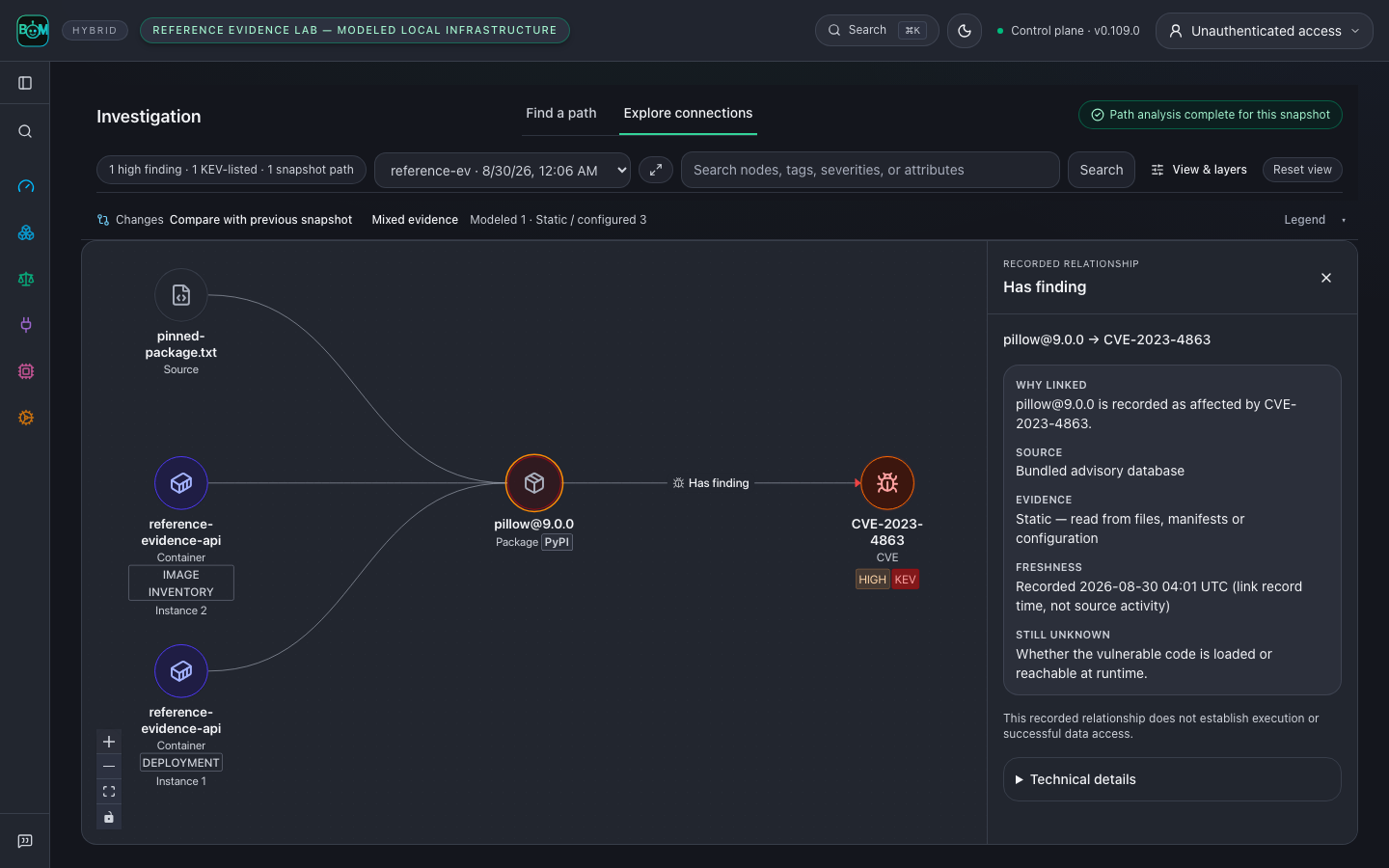
**One package, three parsed inputs.** A repository pin, an image SBOM and a
modeled Kubernetes workload resolve to one `pillow@9.0.0`. The image inventory
and the deployment occurrence stay separate nodes; the advisory receipt is open.
*Real parsers, modeled infrastructure; a graph path does not prove exploitation.*
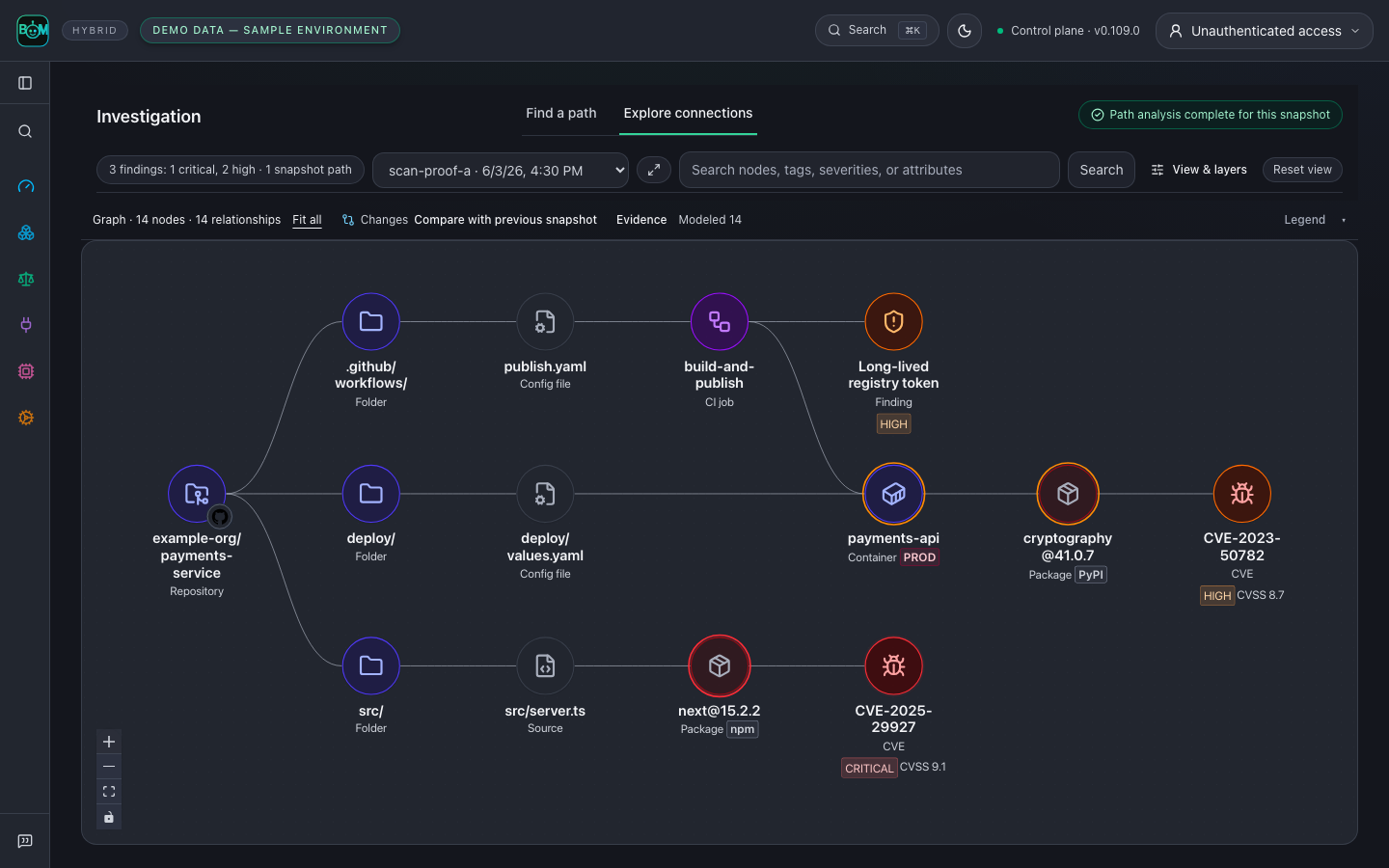
**Repository.** Source imports, deployment configuration and CI traced to a
published container and its vulnerable packages:
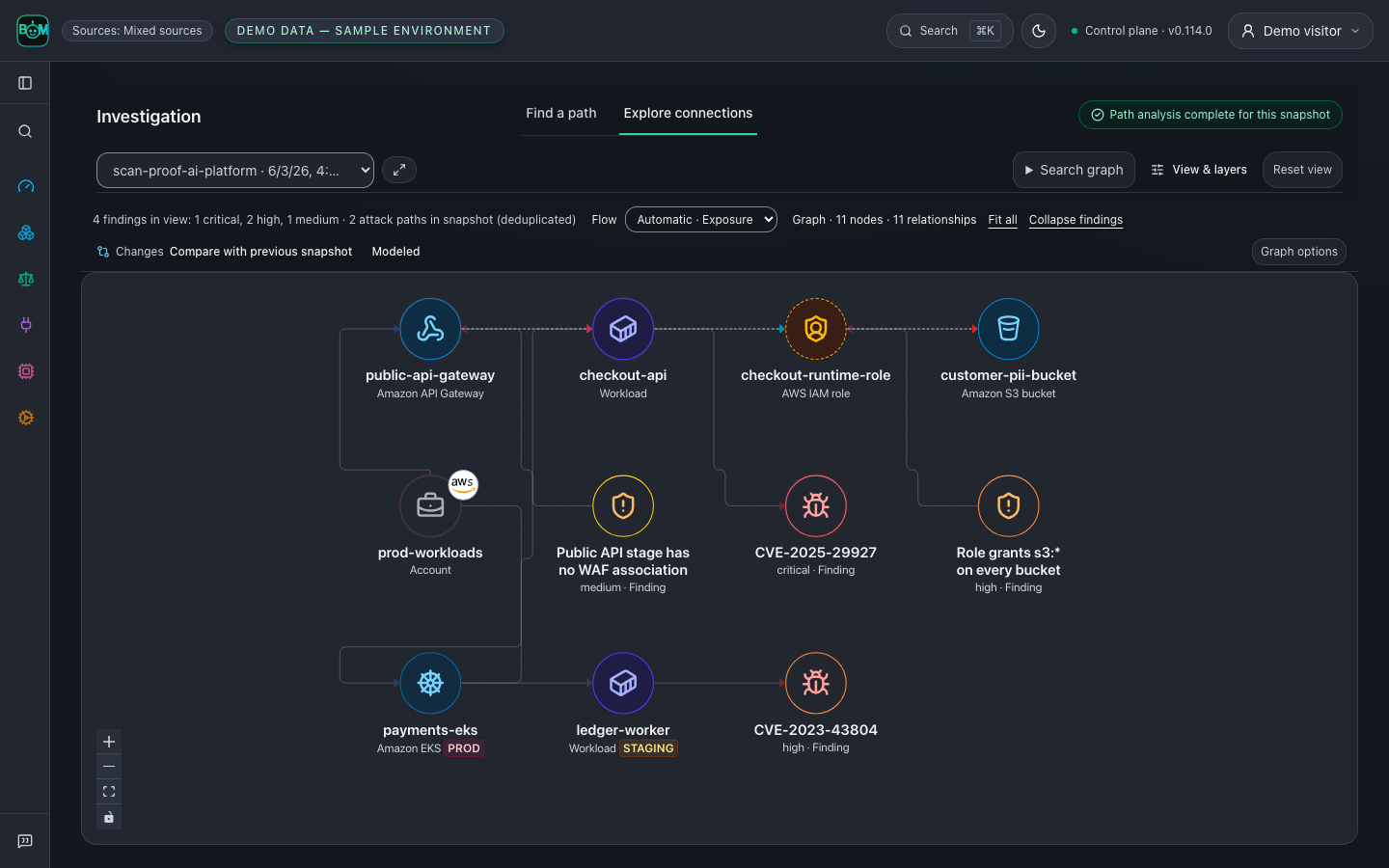
**Cloud.** A public API gateway into a vulnerable workload, its role and a PII bucket:
[Context, correlation and reachability](docs/GALLERY.md#context-correlation-and-reachability) · [Run the reference lab](examples/reference-evidence-lab/README.md) · [Reproduce these screenshots](docs/GALLERY.md#reproduce-the-readme-screenshots)
## Open the sample graph
[Try the demo in your browser](https://koda-ai-studio.github.io/agent-bom/demo/): a read-only copy of the UI on
labelled sample data, with no install and no backend. Scans, settings and
sign-in are turned off there. To open the same graph locally:
```bash
pip install 'agent-bom[ui]==0.114.0'
agent-bom quickstart --run --offline
```
Run the server command it prints, then open its graph URL. Offline quickstart
skips package-CVE lookup, so zero CVEs is not a clean verdict; use the bundled
demo for advisory-backed findings or [populate the advisory database](docs/FIRST_RUN.md).
## Self-host in your environment
**Your infrastructure, identity, database, and audit boundary.** Start a local
pilot from a [published release checkout](https://github.com/koda-ai-studio/agent-bom/releases):
```bash
git clone --depth 1 --branch v0.114.0 https://github.com/koda-ai-studio/agent-bom.git && cd agent-bom
AGENT_BOM_IMAGE_TAG=0.114.0 docker compose up -d
```
Open **http://localhost:3000**, then **Connections** or **New Scan**. The pilot
binds to loopback and retains state in a Docker volume. For cloud accounts, add a
scoped read-only connection, verify access, then start a scan. Before sharing
access, move to the [authenticated deployment](site-docs/deployment/authenticated-hosted-instance.md).
- **Scan** with CLI or CI; export findings, SBOMs and reports.
- **Centralize** inventory, graph evidence, remediation and compliance in your own control plane.
- **Enforce** policy on selected live MCP tool calls through the proxy or gateway.
Deployment options (5): CLI, local dashboard, Compose pilot, authenticated host, Helm
| Deployment | First step | Result and next step |
|---|---|---|
| CLI or CI job | `agent-bom scan --demo --offline -o report.json` | Labelled sample findings in JSON; scan your own inventory or configure a [CI gate](docs/FIRST_RUN.md#pre-commit-hook). |
| Local API and dashboard | `agent-bom quickstart --run --offline` | Sample report and persisted graph; run the printed loopback server command and open its graph URL. |
| Docker Compose pilot | Release checkout and `docker compose up -d` above | Loopback API/UI with retained state; connect a read-only source and run a scan. |
| Authenticated single host | [Platform Compose setup](site-docs/deployment/authenticated-hosted-instance.md) | Login-gated API/UI and PostgreSQL; configure TLS, identity, secrets and backups before sharing access. |
| Kubernetes / EKS | [Helm deployment](site-docs/deployment/control-plane-helm.md) | Control plane in your cluster; provision role-separated secrets and storage, then validate authentication and health. |
Operating modes (5): scan, fleet inventory, MCP server, runtime proxy, runtime gateway
Modes can be combined:
| Mode | What it does | Start |
|---|---|---|
| Scan | Collect inventory and findings on demand or in CI; retain reports and graph evidence. | [First run](docs/FIRST_RUN.md) |
| Fleet inventory | Endpoints or collectors sync inventory to the control plane; review last-seen evidence. | [Fleet sync](site-docs/deployment/proxy-vs-gateway-vs-fleet.md#fleet) |
| MCP server | `agent-bom mcp server` exposes security tools to an MCP client. | [Tool profiles](docs/MCP_SERVER.md) |
| Runtime proxy | Wrap selected local stdio MCP servers to inspect tool calls; verify decisions in the audit trail. | [Proxy setup](site-docs/deployment/proxy-vs-gateway-vs-fleet.md#proxy) |
| Runtime gateway | Relay selected remote MCP traffic through a shared service; validate client auth, policy and upstream connectivity. | [Gateway setup](site-docs/deployment/proxy-vs-gateway-vs-fleet.md#gateway) |
Console terms: Sources, Assets, Findings, Issues
- **Sources** describes recorded evidence: local scans, fleet inventory, cluster
scans, CI/CD, imported evidence, or mixed sources. It does not select a
deployment type or enable runtime enforcement. **Demo data** marks labelled
sample inventory.
- **Assets** are inventoried resources; **Findings** are detections on those
resources; **Issues** group related findings for investigation or remediation.
- **Affected assets** counts distinct resources only when that count is
available. One finding may belong to several security areas, so area counts
must not be summed. Repeated observations across scans are shown separately.
Preview and community deployment paths have separate
[support boundaries](site-docs/deployment/product-boundaries.md).
[Docker pilot guide](docs/DEPLOY_PLATFORM.md) · [Compose with PostgreSQL](deploy/docker-compose.platform.yml) · [Choose a deployment](site-docs/deployment/overview.md) · [Enterprise controls](docs/TRUST.md) · [Connect cloud accounts](docs/CLOUD_CONNECT.md)
## Integrations
Claude Code and Codex plugins: ask your coding agent instead of reading a report
In Claude Code:
```text
/plugin marketplace add koda-ai-studio/agent-bom
/plugin install agent-bom@agent-bom
```
In Codex, run `codex plugin marketplace add koda-ai-studio/agent-bom`, then
install **agent-bom-local** from the Plugins Directory. Both plugins run the
pinned agent-bom release locally and send nothing to an agent-bom service.
| Ask | Skill |
|---|---|
| "Is this project safe to ship?" | `checkup`: one verdict and the three fixes that matter most |
| "Am I affected by CVE-2025-29927?" | `affected`: affected or not found in what was scanned, never "safe" |
| "What have my agents been doing?" | `activity`: MCP usage, unused servers, risky commands from local session history |
| "Are my agent settings too permissive?" | `audit-mcp` and `audit-skills` |
| "Give me an AI-BOM" | `bom`: CycloneDX or SPDX for this machine, a project, an image or a cloud account |
Add `/plugin install agent-bom-guard@agent-bom` to block malicious and
typosquatted package installs before Claude runs them.
[All skills and their permissions](integrations/claude-code/README.md) ·
[Guard details](integrations/agent-bom-guard/README.md)
Work with your existing tools
Use **CLI or GitHub Action**, **REST API**, or **MCP**; export **SARIF, CycloneDX,
SPDX, JSON and HTML**. Cloud connectors and fleet sync collect inventory;
proxy and gateway deployments add runtime evidence.
For other MCP clients, run `agent-bom mcp server`.
Start with eight focused tools in the default profile.
[Choose an MCP profile](docs/MCP_SERVER.md) for graph, cloud, runtime or audit work.
[Try three investigations](docs/MCP_SERVER.md#investigation-workflows): affected agents, exposure receipts and a before/after scan comparison.
[Import existing scanner reports](docs/IMPORTERS.md) without replacing their source evidence.
Check a dependency before installing it with
`uvx agent-bom check requests@2.33.0 --ecosystem pypi`. Add
[pre-commit and CI setup](docs/FIRST_RUN.md#pre-commit-hook) for repeated checks.
[Proxy, gateway and fleet](site-docs/deployment/proxy-vs-gateway-vs-fleet.md) · [Integration capability matrix](docs/CLOUD_CONNECT.md) · [MCP client setup](docs/MCP_SERVER.md) · [Smithery migration](site-docs/integrations/smithery.md)
## Trust and evidence
Discovery uses read-only access by default. Explicit disk side-scans create
temporary cloud resources. Missing evidence stays unavailable or partial;
control mappings are not audit certification.
Runtime evidence and MITRE mapping boundaries
Persisted runtime, proxy and gateway activity retains source receipts and
bounded time windows in the graph. Exact inventory references can bind records;
unresolved identities and collection gaps remain explicit. Recorded activity
does not prove execution or grant access. See the [runtime evidence boundaries](docs/TRACE_CONNECTIONS.md).
MITRE technique associations provide investigation context, not proof of an
attack. [ATLAS mapping receipts](docs/ATLAS_COVERAGE.md) retain the weakness
association and source catalog hashes; modeled graph paths do not establish
observed execution or effective access.
[Measured matcher proof](site-docs/features/scanning.md#reproducible-matching-evidence) · [Product boundaries](docs/PRODUCT_BOUNDARIES.md) · [Permissions](docs/PERMISSIONS.md) · [Threat model](docs/THREAT_MODEL.md) · [Release verification](docs/RELEASE_VERIFICATION.md) · [Graph data model](docs/graph/DATA_MODEL.md)
## Contributing and support
[](https://codespaces.new/koda-ai-studio/agent-bom)
Start with the [first PR guide](CONTRIBUTING.md#your-first-pr-in-30-minutes)
or a [`good first issue`](https://github.com/koda-ai-studio/agent-bom/issues?q=is%3Aopen+label%3A%22good+first+issue%22).
Ask in [GitHub Discussions](https://github.com/koda-ai-studio/agent-bom/discussions) (or [Discord](https://discord.gg/3YmYPqKZh5)), share [feedback](https://github.com/koda-ai-studio/agent-bom/issues/new?template=feedback.yml),
or follow the [maintainer path](GOVERNANCE.md) ([review owners](MAINTAINERS.md)).
[Contributing](CONTRIBUTING.md) · [Capabilities and roadmap](docs/ROADMAP.md) · [Support](SUPPORT.md) · [Report an inaccurate finding](https://github.com/koda-ai-studio/agent-bom/issues/new?template=inaccurate_finding.yml) · [Apache-2.0](LICENSE)
Source version: **v0.114.0** · Latest release: **v0.114.0** · [Changelog](CHANGELOG.md)