# Mural Pay API Documentation - Complete Reference
This comprehensive document contains all documentation from the Mural Pay API developers portal, compiled from https://developers.muralpay.com/.
---
## Table of Contents
### Guides
1. [Business KYC Requirements](#business-kyc-requirements)
2. [Client Custodial Model](#client-custodial-model)
3. [Custody Models](#custody-models)
4. [End-User Custody Model](#end-user-custody-model)
5. [Individual KYC Requirements](#individual-kyc-requirements)
6. [Supporting Details Requirements](#supporting-details-requirements)
7. [Generate API Keys](#generate-api-keys)
8. [Getting Started Overview](#getting-started-overview)
9. [Set IP Allowlist](#set-ip-allowlist)
10. [Create a Payout Request](#create-a-payout-request)
11. [Create an Organization](#create-an-organization)
12. [Execute a Payout Request](#execute-a-payout-request)
13. [Fund an Account](#fund-an-account)
14. [Get Organization KYC Status](#get-organization-kyc-status)
15. [Get the Payout Request Status](#get-the-payout-request-status)
16. [Get Payout Fees](#get-payout-fees)
17. [Main Overview](#main-overview)
18. [Accept Terms of Service](#accept-terms-of-service)
19. [Accounts](#accounts)
20. [Organizations](#organizations)
21. [Payins](#payins)
22. [Payouts](#payouts)
23. [Transactions](#transactions)
24. [Transfer Delivery Times](#transfer-delivery-times)
25. [Developers](#developers)
26. [End-User Custodial Payout Orchestration](#end-user-custodial-payout-orchestration)
27. [End-User Custodial SDK Documentation](#end-user-custodial-sdk-documentation)
28. [End-User Custodial Resources](#end-user-custodial-resources)
29. [Errors](#errors)
30. [Fiat Rail Codes](#fiat-rail-codes)
31. [Sandbox Environment](#sandbox-environment)
32. [AI Developer Resources](#ai-developer-resources)
33. [Developer Fees](#developer-fees)
34. [Mural Webhooks](#mural-webhooks)
### API Reference
35. [Create an Account](#create-an-account-api)
36. [Get an Account](#get-an-account-api)
37. [Get all Accounts](#get-all-accounts-api)
38. [Initiate End-User Custodial Challenge](#initiate-end-user-custodial-challenge-api)
39. [Create an Organization](#create-an-organization-api)
40. [Get an Organization](#get-an-organization-api)
41. [Get Organization KYC Link](#get-organization-kyc-link-api)
42. [Search Organizations](#search-organizations-api)
43. [Get Organization TOS Link](#get-organization-tos-link-api)
44. [Cancel a Payin](#cancel-a-payin-api)
45. [Create a Payin](#create-a-payin-api)
46. [Get a Payin](#get-a-payin-api)
47. [Get Payin Exchange Rate](#get-payin-exchange-rate-api)
48. [Search Payins](#search-payins-api)
49. [Cancel a Payout Request](#cancel-a-payout-request-api)
50. [Create a Payout Request](#create-a-payout-request-api)
51. [Execute End-User Custodial Payout Request](#execute-end-user-custodial-payout-request-api)
52. [Execute a Payout Request](#execute-a-payout-request-api)
53. [Get Bank Details](#get-bank-details-api)
54. [Get Fees for Fiat Amount](#get-fees-for-fiat-amount-api)
55. [Get Fees for Token Amount](#get-fees-for-token-amount-api)
56. [Get a Payout Request](#get-a-payout-request-api)
57. [Get Payout Request Payload](#get-payout-request-payload-api)
58. [Search Payout Requests](#search-payout-requests-api)
59. [Search Transactions](#search-transactions-api)
60. [Get Supported Countries](#get-supported-countries-api)
61. [Create Webhook](#create-webhook-api)
62. [Get Webhook](#get-webhook-api)
63. [List Webhooks](#list-webhooks-api)
64. [Update Webhook](#update-webhook-api)
65. [Update Webhook Status](#update-webhook-status-api)
66. [Delete Webhook](#delete-webhook-api)
67. [Send Webhook Event](#send-webhook-event-api)
---
## Guides
### Business KYC Requirements
After creating a new Organization of type 'business', the documentation outlines required KYC information:
Key Required Information:
* Legal business name
* Business entity type
* Formation date
* Website
* Registered Business Address
* Primary Operating Address
* Requires Proof of Address
* Business Formation Document (e.g. Articles of Incorporation)
* Tax Identification Number
* Ultimate Beneficial Owners (UBOs)
* Individuals owning >20% of entity
* Each UBO subject to Individual KYC
* Source of Funds details
Additional Notes:
- KYC requirements may evolve over time
- Regulatory changes will be communicated to Developers
- Detailed compliance information available in referenced documentation
Reference Links:
- [Proof of Address Requirements](https://docs.muralpay.com/articles/2962171586-business-identity-verification)
- [Business Formation Document Guide](https://docs.muralpay.com/articles/6684235589-business-formation-document-guide)
- [Business Ownership Guide](https://docs.muralpay.com/articles/3930138118-business-ownership-documents-guide)
- [Security Compliance Details](https://docs.muralpay.com/articles/4656194579-security-compliance)
### Client Custodial Model
In the **Client Custodial Model**, you—the Developer—retain custody of funds on behalf of the Organizations you manage through the API. When using the Payouts API, your [Transfer API Key](https://developers.muralpay.com/docs/get-api-key#/transfer-api-key) serves as the authorization mechanism to initiate and move funds from managed Accounts.
> 📘 Note
>
> "Mural does not take custody of any funds managed through the API. As a Developer, you are solely responsible for securing your API keys."
### Custody Models
The documentation describes two payment integration models for the Mural Pay API:
1. Client Custodial
2. End-User Custodial
Key points:
- Developers must choose a model based on their "regulatory requirements and compliance posture"
- Mural Pay recommends consulting legal counsel for model selection
- The document provides a comparison of technical implications between models
Notable quote: "Mural Pay does not provide legal advice regarding the choice of custody model."
The page emphasizes that the developer is responsible for selecting an appropriate integration approach that meets their specific business needs and regulatory environment.
### End-User Custody Model
In the **End-User Custody Model**, the End User retains full custody and control over the funds held in their [Account(s)](https://developers.muralpay.com/docs/account#/). When onboarding an [Organization](https://developers.muralpay.com/docs/customers#/), you will prompt the End User to configure email-based authentication linked to their Mural Account. This authentication is required to explicitly approve all outbound payouts from their Account(s).
This model removes you—the Developer—from the flow of funds. Without explicit approval from the End User, you cannot initiate payouts or move funds from their Account.
### Individual KYC Requirements
The documentation outlines KYC (Know Your Customer) information requirements for individual organizations, which include:
* Full legal name
* Date of Birth
* Contact Information
* Email Address
* Phone Number
* Primary Residential Address
* Proof of Address (linked to external requirements document)
* Government-issued Identification Document
* Nationality
* Tax Identification Number (e.g. SSN)
The document notes that "Mural's KYC information requests may change over time" and that updates will be communicated to developers. A link to additional compliance and security documentation is provided.
Key observation: The requirements are comprehensive and cover personal identification, contact, and tax-related information for individual organizational users.
### Supporting Details Requirements
To comply with regulatory and Anti-Money Laundering (AML) requirements, Mural may require additional supporting details for certain Payouts.
If supporting documentation is required, the following process applies:
1. Attempt to [create a Payout Request](https://developers.muralpay.com/reference/createpayoutrequest#/) as normal.
2. If supporting documentation is needed, you will receive an error response with an error name indicating that the `supportingDetails` field in the API request body is required.
3. Update your Payout Request to include a `supportingDetails` object with the following fields:
1. `supportingDocument` — A base64-encoded data URI containing a document that demonstrates the purpose of the payout or source of funds. Accepted document types include invoices, receipts, contracts, signed agreements, or statements of work. The document must clearly reference the payout transaction and include the recipient's name, payout amount, and description of goods or services.
2. `payoutPurpose` — A string describing the reason for the payout. Refer to the [Payouts](https://developers.muralpay.com/reference/createpayoutrequest#/) endpoint for available options.
When resubmitting the Payout Request, make sure to include the `supportingDetails` in the request body. The request will then be processed successfully.
> 🚧 Please ensure accurate & relevant information is provided
>
> Submitting incomplete or unrelated documents may result in payout delays. Transactions requiring additional documentation may be temporarily placed on hold while under review. A member of the Mural Compliance team will contact you via email if further clarification or documentation are needed.
### Generate API Keys
Key Documentation Points:
> 📘 API Access Requirements
> - Contact support@muralpay.com
> - Complete KYC process
- Must have Business Organization to manage developer API keys
API Key Generation Process:
- Navigate to **Settings > Developers**
- Copy and save keys securely
- Full API key shown only once
- Can revoke/rotate keys from Developers tab
Two Required API Keys:
1. API Key (General)
- Authenticates all API requests
- Use Bearer Authentication in request header
2. Transfer API Key
- Required for transactions and account creation
- Needed for `/payouts/payout/execute` and `/payouts/payout/cancel` endpoints
- Use `transfer-api-key` request header
Important Note: "Most likely the Account automatically provisioned will not be enabled for API use"
Recommendation: Create new Account via API
The documentation includes a screenshot demonstrating the API key generation interface.
### Getting Started Overview
A visually designed HTML section with a gradient background featuring:
- Heading: "Looking to talk to our team about integrating the Mural API?"
- Call-to-Action Button: "Request a Call" (links to contact form)
### Introduction
Documentation for Mural API, which offers:
- Cross-border payment solutions
- Programmable API for integrating payment capabilities
- Supports fiat and stablecoin transactions
An image is included in the documentation.
Contact information: support@muralpay.com
Key Details:
- Purpose: Cross-border payment API integration
- Features: Programmatic payment capabilities
- Contact: Email support available
The documentation provides an overview and invitation to get started with the Mural API, with a visually engaging call-to-action section and introductory information.
### Set IP Allowlist
The documentation explains how to set an IP allowlist to prevent unauthorized API access:
Key points:
- Configure in **Settings > Developers**
- Limit access to specific IP ranges (e.g., application backend infrastructure)
- Default setting allows access from all IP addresses via API key
Supported IP Range Format:
- Uses Classless Inter-Domain Routing (CIDR) notation
- Example: "40.77.183.32/27"
An image is included demonstrating the IP allowlist configuration screen.
The documentation provides a straightforward guide for restricting API access by specifying permitted IP ranges.
### Create a Payout Request
The documentation provides a step-by-step guide for creating a payout request using an API, with the following key sections:
## Get the Source Account ID
- Uses the "get Accounts" endpoint to retrieve the Account ID
- Includes a sample cURL request and JSON response showing account details
- Demonstrates retrieving account information with an API key
## Creating the Payout Request
- Uses the "create Payout Request" endpoint
- Focuses on creating a single fiat payout in Colombian Pesos (COP)
- Provides a detailed cURL request example with:
- Source account ID
- Payout amount (100 USDC)
- Recipient bank and personal details
- Specific fiat rail code for Colombian transactions
### Key Details in Request
- Includes recipient information like:
- Name (Javier Gomez)
- Contact details
- Physical address
- Specifies bank account details
- Uses USDC as the token for transfer
### Response
- Returns a transfer request ID
- Initial status is "AWAITING_EXECUTION"
- Provides breakdown of transaction details including:
- Exchange rates
- Transaction fees
- Converted fiat amount
The documentation serves as a comprehensive guide for developers implementing cross-border payouts through the API.
### Create an Organization
Key Documentation Points:
- An Organization represents end users (individuals or businesses) for payment facilitation
- KYC (Know Your Customer) form must be completed before creating accounts or transfers
- Requires operating using the Client Custody model
## Create Organization Process
### Creation Steps:
1. Send POST request to API endpoint
2. Provide organization details (type, business name, email)
3. Receive organization ID and initial KYC status
#### API Request Example:
- Endpoint: http://api.muralpay.com/api/organizations
- Method: POST
- Required Headers:
- Authorization
- Content-Type
- Sample Payload: Business organization details
#### Response Includes:
- Organization ID
- Creation/Update timestamps
- Initial KYC status
- Currency capabilities
### KYC Link Retrieval
- After organization creation, fetch KYC link
- Recommended to embed KYC link in application's iframe
- KYC must be completed before further actions
#### KYC Link Request:
- GET request to specific organization's KYC endpoint
- Requires API authorization
The documentation provides a step-by-step guide for creating and verifying an organization through the Mural Pay API.
### Execute a Payout Request
The documentation describes how to execute a payout request using an API endpoint. Key points include:
- Requires a payout request ID and `transfer-api-key` header
- Must ensure the source account has sufficient balance
- Provides a curl example request demonstrating API call
- Shows a detailed JSON response with payout request details
Example request highlights:
```shell
curl --request POST \
--url http://app.muralpay.com/api/payouts/payout/e5728f35-f13e-45a2-ba38-144da973938a/execute \
--header 'authorization: Bearer $API-KEY' \
--header 'transfer-api-key: $TRANSFER-KEY'
```
The response includes:
- Payout request ID
- Creation and update timestamps
- Source account ID
- Status (PENDING)
- Detailed payout information including:
- Amount in USDC
- Fiat currency details (COP)
- Transaction fees
- Exchange rate
The documentation notes that "Your Payout Request is now in process and your funds are on their way to your recipient!"
A link is provided for more information on payout request statuses.
### Fund an Account
> 📘 Remember
>
> Upon KYC completion for your Organization, that Organization will be automatically provisioned a Mural virtual account.
## Get Account details
To get the account details for funding, query for all accounts associated with your Organization.
#### Example request
```shell Get all Accounts
curl --request GET \
--url http://api.muralpay.com/api/accounts \
--header 'accept: application/json' \
--header 'authorization: Bearer $API-KEY' \
--header 'on-behalf-of: 807742f0-e76c-44cd-bbe9-30b02e0060f4'
```
#### Example response
```json Get all Accounts Response
[
{
"id": "5d75e362-0812-4ea8-b203-c7c3a09f8473",
"createdAt": "2025-04-05T03:31:00.360Z",
"updatedAt": "2025-04-05T03:31:00.360Z",
"name": "Main Account",
"isApiEnabled": true,
"status": "ACTIVE",
"accountDetails": {
"balances": [
{
"tokenAmount": 0,
"tokenSymbol": "USDC"
}
],
"walletDetails": {
"walletAddress": "0xD3AC55f624fe1430182E1937467BCe1Cf1B8d360",
"blockchain": "POLYGON"
},
"depositAccount": {
"id": "ed70754e-48f7-45bd-8632-54d122e1fc0d",
"accountId": "5d75e362-0812-4ea8-b203-c7c3a09f8473",
"status": "ACTIVATED",
"currency": "USD",
"bankBeneficiaryName": "Sun Tree Capital LLC",
"bankBeneficiaryAddress"
```
### Get Organization KYC Status
The documentation explains how to check the KYC (Know Your Customer) status of an organization after creation by calling a GET endpoint.
## Key Components:
### Example Request
- Uses cURL to retrieve organization details
- Requires API key for authorization
- Endpoint: `https://api.muralpay.com/api/organizations/{organization-id}`
### Response Examples
Two possible response scenarios are shown:
1. KYC Approved
- Includes organization details
- Shows `kycStatus` as "approved"
- Lists currency capabilities
2. KYC Rejected
- Includes organization details
- Shows `kycStatus` as "rejected"
- Provides rejection reason
### Organization KYC Statuses
Possible statuses include:
- `INACTIVE`
- `PENDING`
- `APPROVED`
- `ERROR`
- `REJECTED`
### On-Behalf-Of Header
After KYC approval, users can perform operations for an organization by adding the `on-behalf-of` header to supported API endpoints.
The documentation provides example cURL commands and JSON response structures to demonstrate API usage for checking organization KYC status.
### Get the Payout Request Status
The documentation explains how to retrieve a payout request's status using an API endpoint. It includes:
## Key Sections:
1. Example API Request (curl command)
2. Example API Response (JSON)
3. Payout Request Statuses
4. Individual Payout Statuses
## Payout Request Statuses:
- `AWAITING_EXECUTION`
- `PENDING`
- `EXECUTED`
- `FAILED`
- `CANCELED`
## Fiat Payout Statuses:
- `PAYOUT_CREATED`
- `PAYOUT_PENDING`
- `PAYOUT_ON_HOLD`
- `PAYOUT_COMPLETED`
- `PAYOUT_FAILED`
- `CANCELED`
## Blockchain Payout Statuses:
- `AWAITING_EXECUTION`
- `PENDING`
- `EXECUTED`
- `FAILED`
- `CANCELLED`
Important Note: "EXECUTED" status doesn't guarantee funds have been received for each individual payout.
Contact for support: support@muralpay.com
The documentation provides a comprehensive guide to understanding and tracking payout request and individual payout statuses through the MuralPay API.
### Get Payout Fees
The documentation describes two API endpoints for fetching payout fees in the Payouts API:
1. Token to Fiat Endpoint
- Allows specifying source token amount (USDC)
- Calculates fees for converting tokens to fiat currency
2. Fiat to Token Endpoint
- Allows specifying destination fiat currency amount
- Calculates fees for converting fiat to tokens
Key Notes:
> "The destination fiat currency value provided is an estimate, as exchange rates are not locked until a payout is executed"
Endpoints:
- POST http://app.muralpay.com/api/payouts/fees/token-to-fiat
- POST http://app.muralpay.com/api/payouts/fees/fiat-to-token
Both endpoints require:
- API Key authorization
- JSON payload with token/fiat amount
- Specific currency and rail code (e.g., "cop" for Colombian Peso)
Response Details:
- Exchange rate
- Exchange fee percentage
- Minimum transaction value
- Transaction fee
- Estimated conversion amount
The documentation provides curl command examples and JSON response samples for both token-to-fiat and fiat-to-token scenarios.
### Main Overview
> 📘 Getting Started
>
> Before getting started you will need to create a Mural Organization, complete KYB / KYC, and generate API keys.
The following pages walk you through the integration for enabling a cross-border payment leveraging the Mural API. The process for making a payment via the API follows three core steps, as outlined in the diagram below.
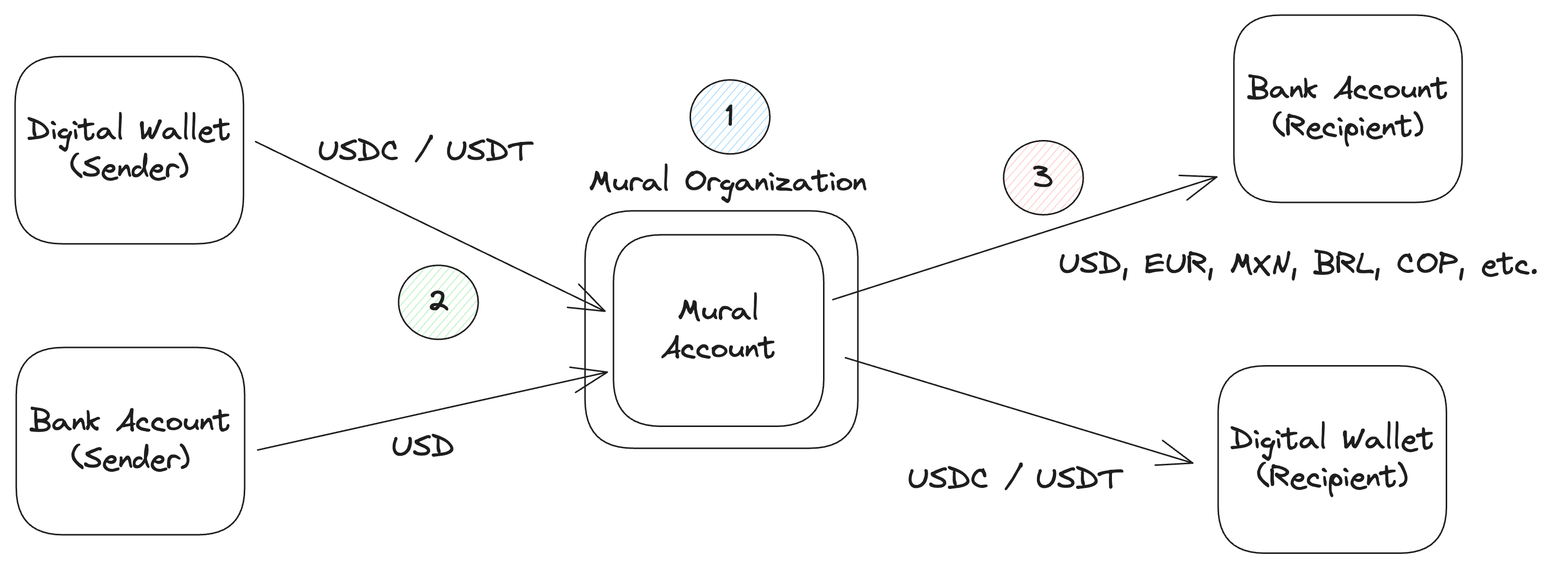
1. **Create an Organization** - Leverage the [Organizations API](../reference/createorganization) to register your end-user with Mural. Upon KYB / KYC approval, an Account will be provisioned for the Organization.
2. **Deposit Funds into an Account** - Use the [Accounts API](../reference/getaccount) to fetch deposit details / instructions, and fund a Customer's balance with USD or USDC. See the [Sandbox Environment documentation](./sandbox-environment) for how to fund accounts in our sandbox.
3. **Create & Execute a Payout Request** - Use the [Payouts API](../reference/createpayoutrequest) to create and execute a payment on behalf of the Organization. Payments can be made via fiat to bank accounts or to digital wallets via stablecoins.
Follow the steps in the following pages to integrate the end-to-end flow.
### Accept Terms of Service
> 📘 Note
>
> In order to perform any operations with the API, Terms of Service must be accepted by your user. All endpoints in the API will throw a special error if Terms of Service have not been accepted.
After creating an Organization, you can check the status of whether or not the Terms of Service have been accepted.
#### Example request
```shell Get organization
curl --request GET \
--url https://api.muralpay.com/api/organizations/807742f0-e76c-44cd-bbe9-30b02e0060f4 \
--header 'accept: application/json' \
--header 'authorization: Bearer $API-KEY'
```
#### Example response
```json Terms of Service No Accepted
{
"type": "business",
"name": "Sun Tree Capital Llc",
"id": "807742f0-e76c-44cd-bbe9-30b02e0060f4",
"createdAt": "2025-04-04T16:32:17.074Z",
"updatedAt": "2025-04-04T16:36:00.592Z",
"kycStatus": {
"type": "pending"
},
"tosStatus": NOT_ACCEPTED,
"currencyCapabilities": [
{
"fiatAndRailCode": "usd",
"currencyCode": "USD",
"depositStatus": {
"type": "enabled"
},
"payOutStatus": {
"type": "enabled"
}
},
...
]
}
```
```json Terms of Service Accepted
{
"type": "business",
"name": "Sun Tree Capital Llc",
"id": "807742f0-e76c-44cd-bbe9-30b02e0060f4",
"createdAt": "2025-04-04T16:32:17.074Z",
"updatedAt": "2025-04-04T16:36:00
```
### Accounts
Accounts are used to store and manage funds. They are used when making deposits or fund payouts.
Each Account has both a wallet address and a set of "pay in methods" which outline the various ways in which you can pay into (fund) your Account. The supported pay in methods are:
1. **Digital wallet**: transfer via the Account's wallet address. Cannot initiate payins via the Payins API for digital wallet transactions.
2. **USD**: ACH or Wire funds to the Account. Cannot initiate payins via the Payins API for USD.
3. **EUR**: SEPA transfer funds to the Account. Cannot initiate payins via the Payins API for EUR.
4. **COP**: Directly fund the Account via a generated PSE or Nequi link using the Payins API.
Upon successful KYC of your Organization, an Account will be created automatically. Additional Accounts can be created via the Accounts API.
> 🚧 Note
>
> "Mural does not have access to or the ability to move funds to/from these Accounts."
An image is also included in the documentation, showing a screenshot related to Accounts.
### Organizations
An Organization represents your end users—the individuals or businesses who own the funds for which you are facilitating payments. Organizations have two types:
* Individual - an individual user / natural person.
* Business - a registered business entity / company.
Creating an Organization for your end user [via the Organizations API ](../reference/createorganization)is the first step to enabling seamless cross-boarder payouts from or to your end users' wallets or bank accounts.
When creating an Organization, you must provide KYC information, which can be submitted either via a hosted KYC link. Mural performs KYC checks, ensuring secure transfers and regulatory compliance. Required information includes details like name, email, and tax identification numbers. For a complete list of onboarding requirements, please visit the [KYC Requirements documentation.](individual-kyc-requirements)
### Payins
Payins (deposits) represent a single inflow of funds into Mural. You can initiate a Payin into your Mural Account in one of two ways: via an external transfer to the provided payin method details or via the Payins API. With a combination of the two methods, you will be able to provide seamless, exhaustive payin functionality into your Accounts.
> 📘 Note
>
> Not all Payin methods are supported via the Payins API and require a transfer to be initiated outside of Mural. Please see Payins API documentation for more details.
A Payin contains two parts: the "sent currency" and the "destination token." If the "sent currency" is a fiat currency, upon receipt, Mural will convert that fiat currency into the "destination token" and blockchain of choice. If the "sent currency" is a token (i.e., USDC or USDT), that token will be directly credited to your Account.
### Payouts
The documentation describes Payouts as "a single outflow of funds in Mural" that can be initiated through a Payout Request. Key details include:
- Requires specifying a source Account, amount, and recipient payment details
- Can be processed via [Payouts API](../reference/createpayoutrequest)
- Two payout types:
1. **FIAT** (currencies like EUR, MXN, USD, BRL, COP) to external Bank Account
2. **BLOCKCHAIN** (USDC / USDT) to digital wallet
The page includes a centered screenshot illustrating the payout process, with an image width of 700px.
Additional reference is made to the [Fiat Rail Code](./fiat-currency-and-rail-codes) documentation for detailed fiat payout construction guidance.
### Transactions
A **Transaction** represents the movement of funds in or out of an Account. Each Transaction is categorized as either a **Deposit** or a **Payout**.
### Transaction Types
**Payin (Deposit)**
A Payin is an inflow of funds into a Mural Account. This occurs when funds are deposited into the Account, adding to its balance. Payin transactions can have the following statuses:
* AWAITING_FUNDS: the deposit has been created, but funds have not been received from the sender.
* COMPLETED: funds have been received and credited to your Account.
**Payout**
A Payout is an outflow of funds from a Mural Account. This occurs when funds are disbursed from the account, reducing its balance. More information for the Payout associated with the Transaction can be retrieved from the [Payouts API](../reference/getpayoutrequest). Payout status information can be found [here](./get-payout-request-status-copy#/payout-request-statuses).
### How to Access Transactions
You can retrieve detailed information about all Transactions associated with a Mural Account by using the the [Transactions API ](https://developers.muralpay.com/v1.8/reference/searchtransactionsforaccount).
### Transfer Delivery Times
The documentation page provides a comprehensive table of transfer delivery times for various countries, currencies, and payment rails. Key details include:
- Delivery times range from instant (T+0) to next-day (T+1)
- Cut-off times vary by country and currency
- Payment rails include local methods, SEPA, Wire, and ACH
The table covers 11 countries:
- Argentina (ARS)
- Bolivia (BOB)
- Brazil (BRL)
- Chile (CLP)
- Colombia (COP)
- Costa Rica (CRC)
- EU (EUR)
- Mexico (MXN)
- Peru (PEN)
- United States (USD)
- South Africa (ZAR)
A note at the bottom warns that "some payouts may be subject to additional" requirements, which could potentially delay delivery times.
The full table includes specific delivery times, cut-off times, and payment rail information for each listed country and currency.
### Developers
### Open API Spec File
You can download our [generated OpenAPI spec here](https://developers.muralpay.com/openapi/open-api-spec.json).
The documentation provides a link to download an OpenAPI specification file for developers to reference the API's structure and endpoints.
### End-User Custodial Payout Orchestration
The document provides a comprehensive guide for implementing end-user custodial payouts using the Mural API and SDK. Key steps include:
1. Prerequisites:
- Install the Mural Browser SDK via npm
- Requires understanding of Mural API integration
2. Organization Creation:
- Create an organization with `endUserCustodialIndividual` or `endUserCustodialBusiness` type
- Specify approvers who can authorize payout requests
3. SDK Implementation:
- Mount an invisible iframe
- Initialize SDK using `createInstance()`
- Trigger authentication challenge
- Start a secure session with verification code
4. Payout Process:
- Retrieve payout request body
- Sign payload using SDK
- Execute payout request with signature
The guide includes detailed code examples for each step, covering curl commands and JavaScript/TypeScript implementations. It emphasizes security through a multi-step authentication and signing process.
Key technical components:
- SDK: `@muralpay/browser-sdk`
- API endpoints for organization, challenge, and payout execution
- Secure session management
- Public key and signature-based authentication
### End-User Custodial SDK Documentation
# API Reference
### Static Methods
#### `createInstance(config: EndUserCustodialSDKConfig): Promise`
Creates and initializes the SDK instance.
```ts
const sdk = await EndUserCustodialSDK.createInstance(config);
```
### Instance Methods
#### `startSession(payload: StartSessionPayload): Promise`
Starts the SDK session using the verification code and `authenticatorId`.
```ts
await sdk.startSession({
code: 'email-code',
authenticatorId: 'auth-id'
});
```
#### `getPublicKey(): string`
Returns the iframe public key to use in the challenge.
```ts
const publicKey = sdk.getPublicKey();
```
#### `signPayoutPayload(payload: any): Promise`
Signs a payout transaction.
```ts
const signature = await sdk.signPayoutPayload(body);
```
#### `isSessionActive(): boolean`
Checks if a session is currently active.
```ts
if (sdk.isSessionActive()) {
// Safe to proceed
}
```
#### `clearSession(): void`
Clears the session state.
```ts
sdk.clearSession();
```
#### `getClientSessionExpiry(): Date | null`
Returns the session's expiration time.
```ts
const expiry = sdk.getClientSessionExpiry();
```
## Full Usage Flow
```ts
// 1. Create SDK instance
const sdk = await EndUserCustodialSDK.createInstance({
iframeContainerId: 'auth-iframe-container-id',
iframeElement: document.getElementById('auth-iframe-container-id')
});
// 2. Get public key
const publicKey = sdk.getPublicKey();
// 3. Backend: trigger challenge with publicKey + user ID
// 4. User inputs email code → start session
await sdk.startSession({
code: codeFromUser,
authenticatorId: authIdFromBackend
});
// 5. Backend: fetch /body-to-sign/:id
const signature = await
```
### End-User Custodial Resources
Content summary:
- Explains requirements for organizations without direct fund custody/transmission capabilities
- Instructs users to use "Mural's end-user custodial organizations and end-user custodial payout flow"
- Directs readers to additional documentation on "custody models"
Key quote: "If you do not have the ability to custody or transmit funds on behalf of your users, you must use Mural's end-user custodial organizations..."
Additional note: Includes a link reference to "[custody models documentation](./custody-models)"
The document provides guidance for organizations seeking to manage user funds through Mural's custodial infrastructure.
### Errors
The Mural API can throw various errors. If it is expected that an error from the Mural API should be handled gracefully, an error will be serialized to the http response as a `MuralServiceException` with the following shape:
```typescript Definition
interface MuralServiceException {
errorInstanceId: string,
name: MURAL_ERROR_NAME, // identifier of the specific error type, see below
message: string
params: map // params defined by the specific error type, see below
}
```
We have a number of specific `MuralServiceException` types, which are outlined below:
### SignedAgreementRequiredException
Definition
```typescript SignedAgreementRequiredException
interface SignedAgreementRequiredException extends MuralServiceException {
name: "SignedAgreementRequiredException",
message: "End user must accept Terms of Service",
params: {
organizationId: string
}
}
```
Expected next steps:
You should generate a new Terms of Service link using the [hosted TOS link endpoint](../reference/getorganizationtoslink) and display that to your user such that they can sign the Terms of Service.
### PayoutQuoteExpiredException
Definition
```typescript SignedAgreementRequiredException
interface PayoutQuoteExpiredException extends MuralServiceException {
name: "PayoutQuoteExpiredException";
message: "This payout request had an expired quote. The exchange rate has been automatically updated for the effected payouts. Please retry the payout to execute the payout request with the updated payouts.";
params: {
expiredQuotes: ExpiredQuote[];
};
}
interface ExpiredQuote {
payoutId: string;
fiatCurrencyCode: string;
previousRate: number; // represents 1 USD equivalent in the destination currency
newRate: number; // represents 1 USD equivalent in the destination currency
previousFiatAmount: number;
newFiatAmount: number;
}
```
Expected next steps
### Fiat Rail Codes
Each destination fiat currency has different requirements for the request to create [Payout Request](./payout-requests-copy). Additionally, the rail in which you send that fiat currency can affect the requirements. To identify this fiat and rail pair and the request body required, we use the concept of a "Fiat Rail Code." You will see this Fiat Rail Code referenced throughout the [Payouts API](../reference/createpayoutrequest). See below for the list of supported Fiat Rail Codes.
Note, we currently only support one rail per currency at the moment, so for now the Fiat Rail Code will be the lowercase equivalent to a given currency's [ISO 4217 currency code.](https://www.iso.org/iso-4217-currency-codes.html#:~:text=The%20first%20two%20letters%20of,and%20the%20D%20for%20dollar.)
| Fiat Rail Code | ISO 4217 Currency Code | Description | Capability |
| :------------- | :--------------------- | :---------------------------------------------------- | :--------------- |
| usd | USD | USD sent to bank accounts in the United States | Deposit / Payout |
| usd-peru | USD | USD sent to bank accounts in Peru | Payout |
| usd-china | USD | USD sent to bank accounts in China | Payout |
| eur | EUR | EUR sent bank accounts in the European Union via SEPA | Deposit / Payout |
| cop | COP | COP sent to bank accounts in Colombia | Deposit / Payout |
| ars | ARS | ARS sent to bank accounts in Argentina | Payout |
| mxn | MXN | MXN sent to bank accounts in Mexico | Payout |
| brl | BRL | BRL sent to bank accounts in Brazil | Payout |
| clp | CLP | CLP
### Sandbox Environment
Mural provides a Sandbox environment for API integration and testing. Users can:
- Book a demo via [https://www.muralpay.com/demo]
- Contact support at [support@muralpay.com]
### Endpoints
Sandbox API Base URL: [https://api-staging.muralpay.com]
### Functionality
Sandbox environment features:
- Limited to one business organization creation
- Automatic organization KYC approval
- Payout Requests automatically marked complete (without actual fund delivery)
### Funding your Account
Two methods to add test funds:
1. "Move Money > Deposit > Bank Accounts > EUR" for fake fund deposits
- Deposits take 1-2 minutes
- Maximum processing limit of ~$5,000
2. Use a Testnet Faucet to deposit USDC via associated wallet address
For additional funds or organization creation, contact [support@muralpay.com].
### AI Developer Resources
The AI Developer Resources page provides miscellaneous resources to assist with development while using Large Language Models (LLMs).
Available Resources:
1. **OpenAPI Specification File**
- Downloadable from: https://developers.muralpay.com/openapi/open-api-spec.json
- Recommended for developers to "copy and paste into their AI Agent's context"
2. **Documentation Markdown**
- Complete documentation corpus available as raw markdown
- Hosted on GitHub: https://raw.githubusercontent.com/muralpay/developer-resources/refs/heads/main/mural-api-documentation-complete.md
3. **LLMs.txt File**
- Downloadable from: https://developers.muralpay.com/llms.txt
4. **MCP Server**
- Noted as "Coming soon..."
**Key Purpose:** The resources are designed to provide comprehensive reference materials for AI developers working with the Mural Pay API, offering multiple formats for integration and context-building in AI agent development.
### Developer Fees
Mural allows developers to collect custom per-payout recipient fees that are automatically withheld from the customer's payout request amount.
#### Fee Structure Example:
- Mural platform exchange fee: 0.4%
- Custom developer fee: 0.5%
- Total variable fee: 0.9%
#### Usage Details:
- Developers set a percentage fee when creating a payout request
- Users pay both the custom fee and Mural's platform fees
- Fees are settled and paid out monthly on an agreed date
#### Important Note:
> "Please contact support before using this feature, this feature needs to be enabled before you can use it."
#### Implementation Example:
In the payout request, developers can specify a `developerFeePercentage` (e.g., 0.5%) which will be collected on top of Mural's platform fee.
#### Practical Scenario:
For a 10,000 USDC payout:
- Total fees: 90 USDC (0.9%)
- Recipient receives: 9,910 USDC
- Developer receives: 50 USDC credited to their Mural Account
**Recommendation:** Contact Mural's support team to enable and arrange fee collection details.
### Mural Webhooks
Webhooks provide real-time notifications for payment operations, enabling instant updates on account balance changes.
#### Webhook Configuration Process:
1. **Create Webhook** (initially DISABLED status)
2. **Enable Webhook** by updating status to ACTIVE
3. **Implement endpoint** to receive webhook events
4. **Implement signature validation** for security
#### Supported Event Categories:
- **`mural_account_balance_activity`**
- `account_credited`: Triggered when funds are received
- `account_debited`: Triggered when funds are sent
#### Key Payload Details:
Webhook payloads include transaction specifics such as:
- Account ID
- Organization ID
- Token details
- Blockchain information
- Transaction hash
#### Security Features:
- **Cryptographic signature verification** for payload authenticity
- **Security headers include:**
- `x-mural-signature`
- `x-mural-webhook-signature-version`
- `x-mural-webhook-timestamp`
#### Delivery Guarantees:
- Events delivered in occurrence order
- Retry mechanism with exponential backoff
- Retry attempts continue for up to 5 minutes
#### Verification Process:
1. Concatenate timestamp and request body
2. Use provided public key to validate signature
3. Implement timestamp checks to prevent replay attacks
The documentation provides comprehensive TypeScript examples for webhook signature verification implementation.
---
## API Reference
### Create an Account API
This is an OpenAPI definition for creating a Mural Account, which allows users to deposit funds and perform payouts. The documentation provides a detailed specification for the account creation API endpoint.
Key Endpoint Details:
- HTTP Method: POST
- Endpoint: `/api/accounts`
- Purpose: "Creates a Mural Account that you can deposit funds into and perform payouts from"
Request Requirements:
- Required Header: Optional `on-behalf-of` (Organization ID)
- Required Request Body:
- `name`: Account name (required)
- `description`: Account description (optional)
Response Includes:
- Account ID (UUID)
- Name and description
- Creation and update timestamps
- API enablement status
- Account status (INITIALIZING or ACTIVE)
- Wallet details
- Blockchain information
- Balance details
- Payin methods
Authentication:
- Requires Bearer JWT token
- Supports multiple security schemes
Supported Blockchains:
- Ethereum
- Polygon
- Base
- Celo
Supported Currencies:
- USD, COP, ARS, EUR, MXN, BRL, CLP, PEN, BOB, CRC, ZAR
Server:
- Base URL: https://api.muralpay.com
The documentation provides a comprehensive, machine-readable specification for programmatically creating and managing accounts through the Mural API.
### Get an Account API
This is an OpenAPI definition for retrieving a Mural Account via API. Key details include:
## API Endpoint
- Path: `/api/accounts/{id}`
- Method: GET
- Description: "Get an Account identified by the provided ID"
## Request Parameters
- `id` (required): Mural Account ID (UUID format)
- Optional header `on-behalf-of`: Organization ID to act on behalf of
## Response (200 OK)
The response includes an Account object with properties such as:
- `id`: Unique account identifier
- `name`: Account name
- `description`: Account description
- `createdAt` and `updatedAt` timestamps
- `isApiEnabled`: Whether the account can be managed via API
- `status`: Account status (INITIALIZING or ACTIVE)
- `accountDetails`: Includes wallet details, balances, and payin methods
## Authentication
- Uses Bearer JWT token authentication
- Server URL: `https://api.muralpay.com`
The documentation provides a comprehensive schema for retrieving detailed account information through the Mural API, supporting various blockchain and payment configurations.
### Get all Accounts API
## Key Details
- **HTTP Method**: GET
- **Endpoint**: `/api/accounts`
- **Description**: Retrieves all Accounts associated with a provided Organization ID
## Request Parameters
- Optional header: `on-behalf-of` (Organization ID)
## Authentication
- Bearer token (JWT) required
## Response (HTTP 200)
The response returns an array of Account objects with the following key properties:
- `id`: Unique UUID identifier
- `name`: Account name
- `description`: Account description
- `createdAt` and `updatedAt`: Timestamps
- `isApiEnabled`: Boolean indicating API management capability
- `status`: Account status (INITIALIZING or ACTIVE)
### Detailed Account Details Include:
- Wallet Details (blockchain, wallet address)
- Account Balances
- Payin Methods
- Supported destination tokens
- Transaction fees
- Payment rail details (USD, EUR, COP)
## Supported Blockchains
- Ethereum
- Polygon
- Base
- Celo
## Server
- Base URL: `https://api.muralpay.com`
The documentation provides a comprehensive OpenAPI specification for retrieving account information programmatically.
### Initiate End-User Custodial Challenge API
The documentation describes an API endpoint for initiating an email challenge in an end-user custodial payout flow. Key details include:
API Endpoint:
- Path: `/api/approvers/end-user-custodial/initiate-challenge`
- HTTP Method: POST
- Description: "Initiates an email challenge to validate the action of an approver"
Request Requirements:
- Header: `on-behalf-of` (Organization ID)
- Request Body:
- `publicKey`: Public key for email authentication
- `approverId`: Identifier for the approver receiving the challenge
Response:
- Successful (200): Returns `authenticatorId`
- Unauthorized (401) response possible
Authentication:
- Bearer token (JWT) required
Server:
- Base URL: `https://api.muralpay.com`
The OpenAPI specification provides a comprehensive technical description of the API endpoint for programmatic global payments, specifically for initiating an approver challenge in a custodial workflow.
### Create an Organization API
The documentation page describes an OpenAPI specification for creating organizations in a system. It defines four types of organizations:
1. Individual Organization
2. Business Organization
3. Individual End-User Custodial Organization
4. Business End-User Custodial Organization
The API endpoint is `/api/organizations` and uses a POST method to create organizations. Each organization type has specific required fields:
Individual Organization requires:
- type (must be "individual")
- firstName
- lastName
- email
Business Organization requires:
- type (must be "business")
- businessName
- email
End-User Custodial Organizations have similar requirements with additional fields like approvers for business types.
The response includes detailed information about the created organization, including:
- Unique ID
- Creation and update timestamps
- Terms of Service status
- KYC (Know Your Customer) verification status
- Currency capabilities for deposits and payouts
The specification provides comprehensive details about possible verification statuses, currency support, and organization metadata, offering a flexible system for onboarding different types of entities.
### Get an Organization API
The documentation page describes an OpenAPI specification for retrieving an organization's details via an API endpoint `/api/organizations/{id}`. The specification defines several organization types:
1. Individual Organization
2. Business Organization
3. Individual End-User Custodial Organization
4. Business End-User Custodial Organization
Each organization type has common attributes like:
- Unique ID
- Creation and update timestamps
- Terms of Service (ToS) status
- KYC (Know Your Customer) verification status
- Currency capabilities
The KYC status can be in various states:
- Inactive
- Pending
- Approved
- Errored
- Rejected
- Needs Update
Currency capabilities include deposit and payout statuses for multiple currencies like USD, EUR, COP, and others, with detailed verification and availability information.
The specification provides a comprehensive schema for retrieving organization details, including extensive metadata about verification, status, and financial capabilities.
### Get Organization KYC Link API
## OpenAPI Definition Details
This OpenAPI specification defines an endpoint for retrieving a KYC (Know Your Customer) link for an organization:
### Endpoint Details:
- **Path**: `/api/organizations/{id}/kyc-link`
- **Method**: GET
- **Description**: "The page at the returned URL guides users through the Mural KYC process."
### Request Parameters:
- `id` (required): Organization ID (UUID format)
### Response:
- **200 Success**: Returns a JSON object with `kycLink` (URL)
- **401 Unauthorized**: Access denied
### Authentication:
- Bearer token (JWT) required
### Server Information:
- Base URL: `https://api.muralpay.com`
- API Version: 1.0
- Purpose: "Mural's API for programmatic global payments"
The endpoint allows organizations to generate a hosted link for completing KYC verification, which can be used by existing users to provide additional required information for Mural services.
### Search Organizations API
The document describes an API endpoint `/api/organizations/search` for retrieving organizations in Mural with the following key characteristics:
Key Endpoint Features:
- HTTP Method: POST
- Purpose: Retrieve organizations with optional filtering
- Pagination support via `limit` and `nextId` query parameters
Filter Capabilities:
- Can filter organizations by name (case-insensitive, partial match)
- An empty filter returns all organizations
Response Structure:
- Includes total count of results
- Supports pagination with `nextId`
- Returns multiple organization types:
1. Individual Organizations
2. Business Organizations
3. Individual End-User Custodial Organizations
4. Business End-User Custodial Organizations
Each organization type includes detailed metadata such as:
- Unique ID
- Creation/Update timestamps
- Terms of Service status
- KYC (Know Your Customer) verification status
- Currency capabilities for deposits and payouts
The documentation provides an extensive, detailed OpenAPI 3.0.0 specification with comprehensive schema definitions for different organization types and their possible states.
### Get Organization TOS Link API
## OpenAPI Definition Details
This OpenAPI specification defines an endpoint for retrieving a terms of service link for an organization:
### Endpoint Details:
- Path: `/api/organizations/{id}/tos-link`
- Method: GET
- Description: "The page at the returned URL allows users to review and accept the terms of service for the organization."
### Request Parameters:
- `id` (required): Organization ID (UUID format)
### Response:
- 200 Success Response:
- Returns a JSON object with `tosLink` (URL)
- 401 Unauthorized Response
### Authentication:
- Bearer token (JWT) required
### Server Information:
- Base URL: `https://api.muralpay.com`
- API Title: "Mural API"
- API Description: "Mural's API for programmatic global payments."
- Version: 1.0
The specification provides a structured way to programmatically retrieve a hosted terms of service link for a specific organization.
### Cancel a Payin API
This is an OpenAPI specification for canceling a Payin through the Mural API. Key details include:
API Endpoint:
- Path: `/api/payins/payin/{id}/cancel`
- Method: POST
- Description: "Cancels the Payin identified by the provided ID."
Parameters:
1. `id` (required, path parameter)
- Type: UUID string
- Identifies the specific Payin to cancel
2. `on-behalf-of` (optional, header parameter)
- Allows acting on behalf of an organization
Authentication:
- Uses Bearer token authentication (JWT)
- Requires authorization for access
Responses:
- 200: Successful cancellation
- 401: Unauthorized access
Server:
- Base URL: `https://api.muralpay.com`
The specification provides a structured approach for programmatically canceling payment transactions through Mural's API.
### Create a Payin API
> 📘 Note
>
> COP payins require specific configuration, please reach out to your Mural representative for more information.
## Documentation Overview
This is an OpenAPI specification for creating a Payin through the Mural API, specifically detailing the endpoint for payin creation.
### Key Endpoint Details
- **Path**: `/api/payins/payin`
- **Method**: POST
- **Description**: Creates a new Payin
- **Server URL**: `https://api.muralpay.com`
### Request Requirements
The request must include:
1. Destination Token (symbol and blockchain)
2. Destination Mural Account ID
3. Payin Details (currently supports COP type)
### Supported Blockchains
- Ethereum
- Polygon
- Base
- Celo
### Payin Status Types
- Created
- Canceled
- Pending
- On Hold
- Completed
- Failed
### Authentication
- Uses Bearer JWT token authentication
### Specific Note
"COP payins require specific configuration, please reach out to your Mural representative for more information."
The full specification provides comprehensive details about request/response structures, authentication, and payin creation process.
### Get a Payin API
The documentation is an OpenAPI specification for a Payin endpoint in the Mural API. Key details include:
API Endpoint: `/api/payins/payin/{id}`
Method: GET
Description: "Gets the Payin identified by the provided ID."
Parameters:
- `id` (required): Payin ID (UUID)
- `on-behalf-of` (optional): Organization ID
Response (200 OK):
- Returns a Payin object with properties like:
- `id`
- `createdAt`
- `updatedAt`
- `destinationAccountId`
- `payinStatus` (multiple possible status types)
- `payinInstructions`
Authentication:
- Bearer token (JWT) required
Server:
- Base URL: `https://api.muralpay.com`
The specification provides a detailed schema for retrieving payment-in (Payin) information, including various status types like created, pending, completed, and failed.
### Get Payin Exchange Rate API
The documentation describes an API endpoint for retrieving exchange rates for payins. Key details include:
API Endpoint: `/api/payins/exchange-rate`
HTTP Method: POST
Description: "Gets the exchange rate for a given fiat amount and payin rail."
Request Body Requirements:
- `destinationToken`: Specifies token symbol and blockchain
- Supported blockchains: ETHEREUM, POLYGON, BASE, CELO
- `amount`: Includes fiat amount and currency code
- Supported currencies: USD, COP, ARS, EUR, MXN, BRL, CLP, PEN, BOB, CRC, ZAR
Response (200 OK) includes:
- `exchangeRate`: Numeric exchange rate
- `sourceCurrency`: Source currency code
- `destinationToken`: Destination token details
Authentication: Bearer JWT token required
Server URL: `https://api.muralpay.com`
The full OpenAPI specification is provided in the JSON schema, detailing the complete request and response structures, supported currencies, and blockchain networks.
### Search Payins API
This is an OpenAPI 3.0.0 specification for a Mural API endpoint to search payins.
Key Details:
- Endpoint: `/api/payins/search`
- HTTP Method: POST
- Description: "Get all Payins associated with the provided Organization ID."
Query Parameters:
- `limit` (optional): Number of results
- `nextId` (optional): UUID for pagination
- `on-behalf-of` (optional): Organization ID header
Response Structure:
- 200 OK Response includes:
- Total number of results
- Optional `nextId` for pagination
- Array of Payin objects with details like:
- ID
- Creation/Update timestamps
- Destination Account ID
- Payin Status (multiple possible states: created, canceled, pending, on-hold, completed, failed)
- Payin Instructions (e.g., COP deposit details)
Authentication:
- Bearer JWT token required
Server:
- Base URL: `https://api.muralpay.com`
The API supports searching and retrieving payment information with comprehensive status tracking and pagination.
### Cancel a Payout Request API
This is an OpenAPI specification for canceling a payout request in the Mural API. Key details include:
## Endpoint Details
- Path: `/api/payouts/payout/{id}/cancel`
- HTTP Method: POST
- Operation ID: `cancelPayoutRequest`
## Required Parameters
1. Path Parameter:
- `id`: Payout request ID (UUID format)
2. Header Parameters:
- `transfer-api-key`: Required API key
- `on-behalf-of`: Optional organization ID
## Response (200 OK)
Returns a detailed payout request object with:
- Payout request metadata (ID, timestamps)
- Source account ID
- Overall payout request status
- Individual payout details for each recipient
## Supported Payout Types
- Fiat payouts (multiple currencies)
- Blockchain payouts (Ethereum, Polygon, Base, Celo)
## Authentication
- Bearer token (JWT) authentication required
## Server
- Base URL: `https://api.muralpay.com`
The API allows canceling a payout request before it is executed, with comprehensive status tracking for both fiat and blockchain payment methods.
### Create a Payout Request API
This is an OpenAPI specification for creating a payout request through the Mural API. Key details include:
## Endpoint Details
- **Path**: `/api/payouts/payout`
- **Method**: POST
- **Authentication**: Bearer token (JWT) required
## Request Structure
The request allows creating payouts with the following main components:
- `sourceAccountId`: UUID of the source account
- `memo`: Optional memo for the payout
- `payouts`: An array of payout details (max 350 payouts)
## Payout Types
Supports two primary payout types:
1. Fiat Payouts
- Supports multiple currencies (USD, COP, EUR, etc.)
- Requires detailed bank and recipient information
2. Blockchain Payouts
- Supports blockchains: Ethereum, Polygon, Base, Celo
- Requires wallet address and blockchain specification
## Recipient Information
Can be for:
- Individuals (requires name, email, date of birth, address)
- Businesses (requires name, email, address)
## Response
A successful request returns:
- Payout request ID
- Creation/update timestamps
- Overall request status
- Individual payout details and statuses
## Key Features
- Multi-currency support
- Flexible payout destinations
- Detailed tracking of payout statuses
The API is designed for programmatic global payments with comprehensive documentation of request and response structures.
### Execute End-User Custodial Payout Request API
This is an OpenAPI specification for executing a payout request using an end-user custodial signature. The API endpoint is:
`/api/payouts/payout/end-user-custodial/execute/{id}`
Key Details:
- HTTP Method: POST
- Authentication: Bearer JWT token required
- Base URL: https://api.muralpay.com
Request Parameters:
- Path Parameter:
- `id` (UUID): Payout request ID (required)
- Header Parameter:
- `on-behalf-of`: Organization ID (required)
Request Body:
- `signature`: Cryptographic signature to authorize payout (required)
- `exchangeRateToleranceMode`: Optional setting for exchange rate handling
- Options: STRICT or FLEXIBLE (default: FLEXIBLE)
Response Details:
- Successful Response (200):
- Returns comprehensive payout request information
- Includes transaction status, source account, payouts details
- Supports both fiat and blockchain payout types
Supported Payout Types:
- Fiat Payouts (multiple currencies supported)
- Blockchain Payouts (Ethereum, Polygon, Base, Celo)
Possible Payout Statuses:
- AWAITING_EXECUTION
- PENDING
- EXECUTED
- FAILED
- CANCELED
The documentation provides a comprehensive technical specification for executing custodial payout requests through the Mural API.
### Execute a Payout Request API
This is an OpenAPI specification for executing a payout request in the Mural API. Key details include:
## Endpoint
- Path: `/api/payouts/payout/{id}/execute`
- HTTP Method: POST
## Required Parameters
- `id`: Payout request ID (UUID)
- `transfer-api-key`: Header for authentication
- Optional `on-behalf-of`: Organization ID header
## Request Body
Includes an optional `exchangeRateToleranceMode` with two modes:
- `FLEXIBLE` (default): Execute payout regardless of exchange rate changes
- `STRICT`: Fail if exchange rates have changed
## Response Details
Successful execution (200 status) returns:
- Payout request metadata
- Source account ID
- Transaction hash
- Overall payout status
- Individual payout details for each recipient
## Recipient Payout Types
Two main payout types:
1. Fiat Payouts
- Multiple currency support
- Detailed status tracking
- Exchange rate and fee information
2. Blockchain Payouts
- Supports Ethereum, Polygon, Base, Celo
- Wallet address and blockchain-specific status
## Authentication
- Bearer JWT token required
Server URL: `https://api.muralpay.com`
### Get Bank Details API
This is an OpenAPI specification for a bank details retrieval endpoint with the following key characteristics:
Endpoint: `/api/payouts/bank-details`
Method: GET
Purpose: "Gets the required bank names for a given fiat and rail code"
Key Features:
- Validates bank names for fiat payouts
- Supports multiple currencies: USD, COP, ARS, EUR, MXN, BRL, CLP, PEN, BOB, CRC, ZAR, USD-Peru, USD-China
- Requires authentication via bearer token
- Returns a list of bank names for specified currency and rail code
Request Parameters:
- `fiatCurrencyAndRail`: Required query parameter (array of currency/rail codes)
Response:
- 200 OK: Returns bank details object
- 401 Unauthorized if authentication fails
Server: https://api.muralpay.com
Authentication: JWT bearer token
The specification provides a comprehensive JSON schema detailing the structure of bank details for various currencies, including an empty bank names list indicating no specific bank name is required for processing.
### Get Fees for Fiat Amount API
This is an OpenAPI specification for a Mural API endpoint `/api/payouts/fees/fiat-to-token` that allows calculating payout fees for converting tokens to fiat currency.
Key Features:
- HTTP Method: POST
- Computes estimated token amount and fees for receiving a specific fiat currency amount
- Supports multiple fiat currencies (USD, COP, ARS, EUR, MXN, BRL, CLP, PEN, BOB, CRC, ZAR)
- Requires authentication via Bearer JWT token
Request Body Parameters:
- `fiatFeeRequests`: Array of payout fee calculation requests
- `fiatAmount`: Desired fiat amount to receive
- `tokenSymbol`: Token to convert (e.g., "USDC")
- `fiatAndRailCode`: Destination currency/rail code
Response includes:
- Exchange rate
- Exchange fee percentage
- Transaction fee
- Estimated token amount required
- Total fees
- Potential error messages
The full OpenAPI specification is provided in JSON format, detailing the complete request and response structures for this API endpoint.
Server URL: https://api.muralpay.com
### Get Fees for Token Amount API
This is an OpenAPI specification for a Mural API endpoint `/api/payouts/fees/token-to-fiat` that allows computing expected fees for token-to-fiat payouts.
Key Details:
- HTTP Method: POST
- Authentication: Bearer JWT token required
- Base URL: https://api.muralpay.com
Request Body Structure:
- Requires `tokenFeeRequests` array
- Each request includes:
- `amount`: Token amount and symbol
- `fiatAndRailCode`: Destination currency (supports USD, COP, ARS, EUR, and others)
Response includes:
- Exchange rate
- Exchange fee percentage
- Transaction fee
- Estimated fiat amount
- Potential success or error responses
Supported Currencies:
- USD, COP, ARS, EUR, MXN, BRL
- Additional regional variants like USD-Peru and USD-China
The API provides a comprehensive mechanism for calculating payout fees across multiple currencies and tokens, with detailed error handling and fee breakdown.
### Get a Payout Request API
This is an OpenAPI specification for retrieving a payout request from the Mural API. Key details include:
## Endpoint Details
- Path: `/api/payouts/payout/{id}`
- Method: GET
- Description: "Gets the Payout Request identified by the provided ID."
## Parameters
1. `id` (required, path parameter):
- UUID format
- Identifies the specific payout request
2. `on-behalf-of` (optional, header parameter):
- Organization ID to act on behalf of
## Response (200 OK)
Returns a detailed payout request object with properties like:
- ID
- Creation/Update timestamps
- Source account ID
- Transaction hash
- Memo
- Overall status (e.g., AWAITING_EXECUTION, PENDING, EXECUTED)
- Individual payout details for recipients
## Supported Payout Types
- Fiat payouts (multiple currencies)
- Blockchain payouts (Ethereum, Polygon, Base, Celo)
## Authentication
- Bearer token (JWT) required
- Unauthorized access returns 401 error
## Server
- Base URL: https://api.muralpay.com
The specification provides comprehensive details about retrieving and understanding payout request information through the Mural API.
### Get Payout Request Payload API
This is an OpenAPI specification for a Mural API endpoint related to payouts. Key details include:
Endpoint: `/api/payouts/payout/end-user-custodial/body-to-sign/{id}`
Method: GET
Description: "Retrieves the Payout Request Body identified by the provided ID"
Parameters:
- `id` (required, UUID path parameter): Payout request ID
- `on-behalf-of` (required, header parameter): Organization ID to act on behalf of
Responses:
- 200 OK: Returns a payout request payload (generic JSON object)
- 401 Unauthorized
Security: Bearer token authentication (JWT)
API Details:
- Title: Mural API
- Description: "Mural's API for programmatic global payments"
- Version: 1.0
- Server: https://api.muralpay.com
The specification provides a comprehensive overview of the payout request body retrieval endpoint, including its structure, parameters, and authentication requirements.
### Search Payout Requests API
This is an OpenAPI specification for a Payout Requests search endpoint with the following key characteristics:
## Endpoint Details
- Path: `/api/payouts/search`
- Method: POST
- Description: "Get all Payout Requests associated with the provided Organization ID and filtered by the provided statuses."
## Authentication
- Uses Bearer JWT authentication
- Server URL: https://api.muralpay.com
## Request Parameters
- Optional query parameters:
- `limit`: Number of results
- `nextId`: UUID for pagination
- Optional header: `on-behalf-of` (Organization ID)
## Request Body
- Requires a filter object
- Can filter by payout statuses:
- AWAITING_EXECUTION
- CANCELED
- PENDING
- EXECUTED
- FAILED
## Response
- Returns a paginated list of payout requests
- Includes detailed information about:
- Payout request metadata
- Source account
- Individual payout details
- Blockchain or fiat payout information
- Transaction statuses
## Supported Payout Types
- Blockchain payouts (Ethereum, Polygon, Base, Celo)
- Fiat payouts (multiple currencies supported)
The specification provides a comprehensive schema for searching and retrieving payout request information programmatically.
### Search Transactions API
The documentation describes an API endpoint for searching transactions associated with a specific account. Key details include:
API Endpoint: `/api/transactions/search/account/{accountId}`
HTTP Method: POST
Parameters:
- `limit` (optional): Number of results
- `nextId` (optional): Pagination identifier
- `accountId` (required): UUID of the account
- `on-behalf-of` (optional): Organization ID
Response (200 OK) includes:
- Total number of transactions
- Next pagination ID
- Transaction results with details like:
- Transaction ID
- Transaction hash
- Execution date
- Memo
- Blockchain (Ethereum, Polygon, Base, Celo)
- Amount and token details
- Counterparty information
- Transaction type (deposit, payout, external payout)
Authentication: Bearer JWT token required
Server URL: `https://api.muralpay.com`
The full JSON schema provides extensive details about the transaction search functionality, including complex nested objects for different transaction types and metadata.
### Get Supported Countries API
This is an OpenAPI specification for a Mural API endpoint that retrieves supported countries and subdivisions for a specific fiat rail code.
Key Details:
- Endpoint: `/api/utilities/countries/{fiatRailCode}`
- HTTP Method: GET
- Authentication: Bearer token (JWT) required
Supported Fiat Rail Codes:
- usd, cop, ars, eur, mxn, brl, clp, pen, bob, crc, zar
- Special codes: usd-peru, usd-china
Response Structure:
- Returns a list of countries with:
- Country name
- ISO 3166-1 alpha-2 country code
- Supported subdivisions (states/provinces)
Example Response:
```json
{
"count": 1,
"countries": [
{
"name": "Colombia",
"alpha2Code": "CO",
"subdivisions": [
{"code": "ANT", "name": "Antioquia"},
{"code": "CUN", "name": "Cundinamarca"},
{"code": "VAC", "name": "Valle del Cauca"}
]
}
]
}
```
Server: https://api.muralpay.com
### Create Webhook API
This is an OpenAPI specification for creating webhooks through the Mural API.
Key Details:
- **Endpoint**: `/api/webhooks`
- **Method**: POST
- **Authentication**: Bearer token (JWT) required
- **Description**: Creates a new webhook endpoint for receiving real-time notifications
Request Parameters:
- Webhook URL endpoint
- Event types to subscribe to
- Authentication configuration
Response:
- Webhook ID
- Status (initially DISABLED)
- Configuration details
### Get Webhook API
Retrieves details for a specific webhook by ID.
Key Details:
- **Endpoint**: `/api/webhooks/{webhookId}`
- **Method**: GET
- **Authentication**: Bearer token (JWT) required
### List Webhooks API
Retrieves all webhooks for the authenticated organization.
Key Details:
- **Endpoint**: `/api/webhooks`
- **Method**: GET
- **Authentication**: Bearer token (JWT) required
### Update Webhook API
Updates webhook configuration such as URL endpoint and event subscriptions.
Key Details:
- **Endpoint**: `/api/webhooks/{webhookId}`
- **Method**: PATCH
- **Authentication**: Bearer token (JWT) required
### Update Webhook Status API
Updates the status of a webhook (ACTIVE/DISABLED).
Key Details:
- **Endpoint**: `/api/webhooks/{webhookId}/status`
- **Method**: PATCH
- **Authentication**: Bearer token (JWT) required
### Delete Webhook API
Deletes a webhook. The webhook will stop receiving events but delivery history is preserved.
Key Details:
- **Endpoint**: `/api/webhooks/{webhookId}`
- **Method**: DELETE
- **Authentication**: Bearer token (JWT) required
- **Description**: Stops webhook from receiving events while preserving delivery history
### Send Webhook Event API
Manually triggers a webhook event for testing purposes.
Key Details:
- **Endpoint**: `/api/webhooks/{webhookId}/send`
- **Method**: POST
- **Authentication**: Bearer token (JWT) required
Server: https://api.muralpay.com
---
## Contact Information
For support and questions, contact: **support@muralpay.com**
API Base URLs:
- Production: `https://api.muralpay.com`
- Sandbox: `https://api-staging.muralpay.com`
---
*This documentation was compiled from https://developers.muralpay.com/ on August 1, 2025. Updated with new content on September 12, 2025.*