# ABAP Architect

[English](#english) | [Türkçe](#türkçe)
Eclipse plug-in that generates ABAP type definitions from JSON/XML data and creates real
DDIC objects (structure, table type, transparent table, data element, domain) in a connected
SAP system via ADT (ABAP Development Tools).
JSON/XML verisinden ABAP tip tanımları üreten ve bağlı SAP sisteminde ADT üzerinden gerçek
DDIC nesneleri (structure, table type, transparent table, data element, domain) oluşturan
Eclipse eklentisi.
- GitHub: https://github.com/murattahtaciii
- LinkedIn: https://www.linkedin.com/in/murattahtacii/
---
## English
### Features
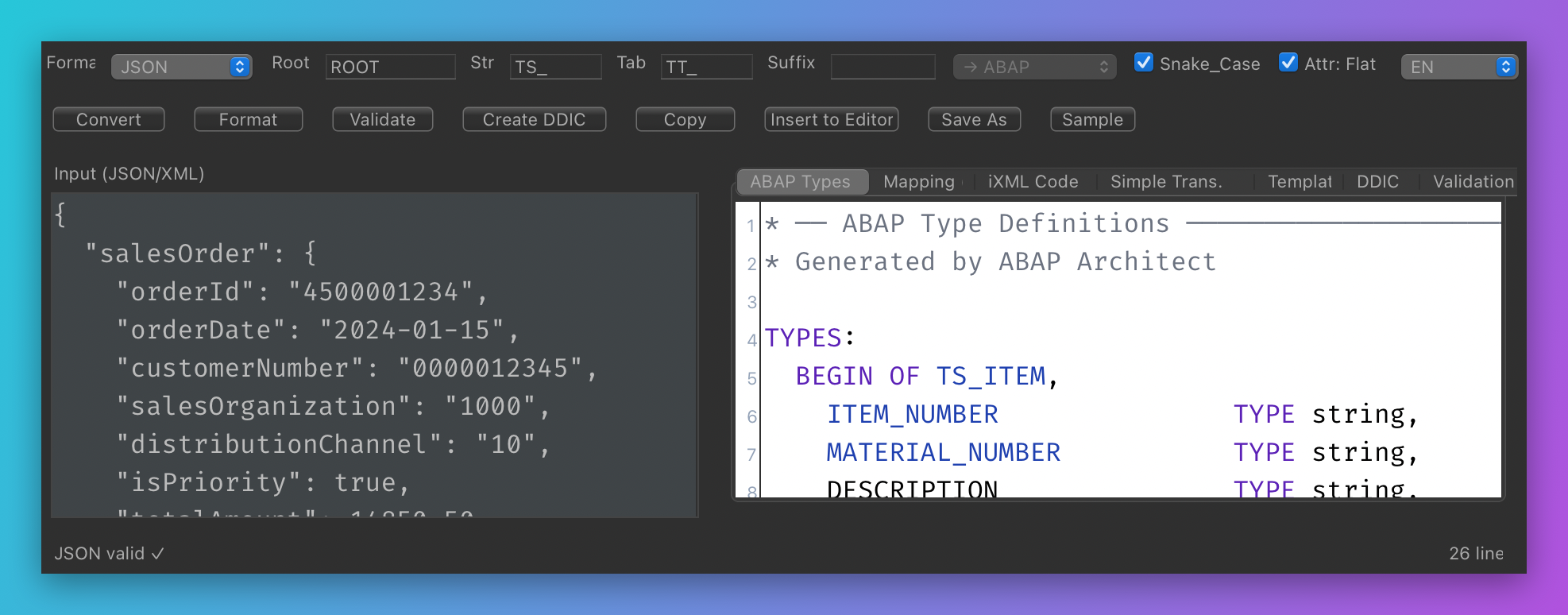
- **ABAP Types**: generates `TS_*` structures and `TT_*` table types for JSON objects/arrays
and XML element/attribute analysis (`TYPES: BEGIN OF ... END OF ...`).
- **Mapping**: generates `/ui2/cl_json=>name_mappings` for JSON/ABAP name differences
(SNAKE_CASE conversion, suffix support).
- **iXML Code**: generates `cl_ixml`-based parsing code for XML (attributes, arrays, nested nodes).
- **Simple Transformation**: generates `tt:transform` source for XML.
- **Templates**: `/ui2/cl_json` serialize/deserialize and HTTP client (SM59) code templates.
- **Validation**: JSON/XML syntax check with error line/column information.
- **Create DDIC**: creates the planned types as **real DDIC objects** in the connected SAP
system and activates them: Structure (TABL/DS), Table Type (TTYP), Transparent Table (TABL/DT),
Data Element (DTEL), Domain (DOMA). Names are suggested and validated according to the
Z/Y (or `/NAMESPACE/`) rule; package/transport is asked on every run.
- **List packages / transports**: lists packages (RIS search) and the user's modifiable
transports from the connected system and fills the fields by selection.
- **Insert into Editor**: inserts the generated code at the cursor position in the active editor.
ADT ABAP editor is supported (via the `IAbapSourcePage` adapter).
- TR/EN interface, dark/light theme aware coloring, line numbers.
### Screenshots
Main view (JSON input -> generated ABAP types):
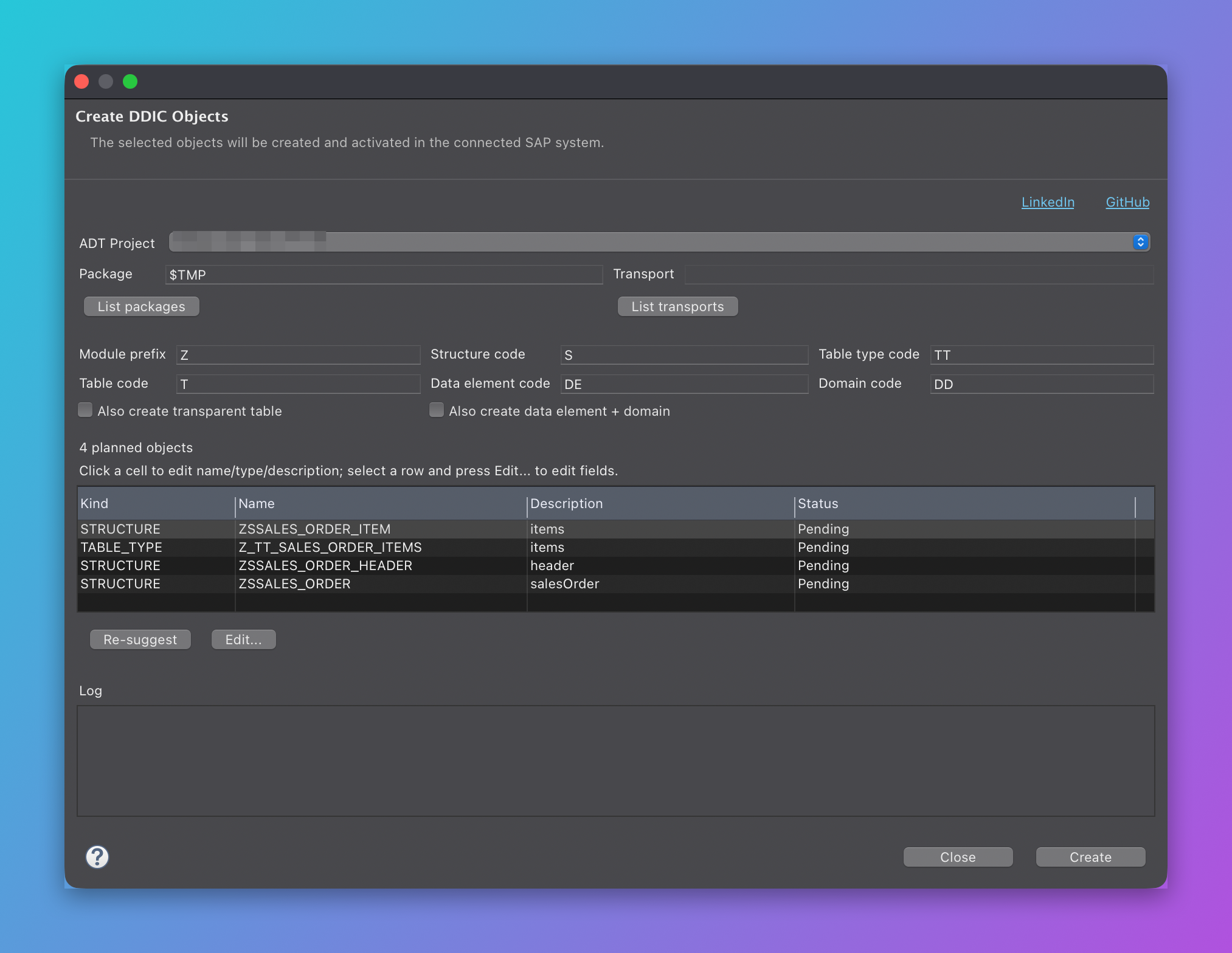
Create DDIC Objects dialog:
### Requirements
- Eclipse IDE 2026-03 (4.39) or similar; Java 21+.
- ADT (ABAP Development Tools) is optional; without it "Insert into Editor" works with editors
implementing `ITextEditor`, but "Create DDIC" is disabled (the plug-in has no compile-time
dependency on ADT; reflection is used).
- SAP backend: **S/4HANA (on-premise) or NetWeaver 7.50+ (SAP_BASIS 750+)** with ADT enabled.
DDIC creation is **not supported on SAP BTP ABAP Environment (ABAP Cloud)** because classic
DDIC object creation via REST is not available there.
### Installation
1. `Help > Install New Software... > Add...`
2. Location: `https://murattahtaciii.github.io/abap-architect/`
3. Install "ABAP Architect" and restart Eclipse.
Local installation from a build:
1. Build (see below) and take `releng/io.github.murattahtaciii.abaparchitect.site/target/repository`.
2. `Help > Install New Software... > Add... > Local...` and select that folder.
### Build
Maven Wrapper (`mvnw`) is included; no local Maven installation required.
```bash
# Online (target platform: download.eclipse.org/releases/2026-03)
./mvnw clean verify
# Different Eclipse release (example)
./mvnw -Declipse.release=2025-12 clean verify
# Offline: creates a local target platform from the installed Eclipse
releng/sync-local-target.sh
./mvnw -Plocal-target clean verify
```
Output: `releng/io.github.murattahtaciii.abaparchitect.site/target/repository/` (p2 update site).
Publish the update site to GitHub Pages (gh-pages branch):
```bash
releng/publish-site.sh
```
### Usage
1. `Window > Show View > Other... > ABAP Architect > ABAP Architect`
2. Paste JSON or XML into the left pane (format is auto-detected; can be overridden).
3. Inspect the output tabs; use **Insert into Editor** to add the generated code to the active editor.
4. Settings: `Root` (root structure name), `Str`/`Tab` (structure/table type prefixes),
`Suffix` (ABAP/JSON target), `Snake_Case`, `Attr: Flat` for XML.
#### Creating DDIC objects
1. Paste JSON/XML data (the DDIC tab shows the plan preview).
2. Press **Create DDIC** on the toolbar.
3. In the dialog:
- **ADT Project**: the connected ABAP project (the active editor's project is preselected)
- **Package**: e.g. `$TMP` (local) or `ZSD_PKG`; a **Transport** is mandatory for non-`$TMP` packages.
**List packages** loads packages from the connected system (RIS search, DEVC);
**List transports** loads the user's modifiable transports (official ADT
`IAdtTransportService.findTransports` first, CTS REST as fallback).
- **Naming**: `__`: default codes are structure `S`, table type `TT`,
table `T`, data element `DE`, domain `DD`.
- **Objects table**: double-click a cell to edit **type** (dropdown), **name** and **description**;
invalid names are shown in red and the **Create** button is disabled while any name is invalid.
- **Edit...**: edits the fields of the selected object (name, ABAP type, length, decimals,
description, key for tables; row type for table types; domain for data elements; data type
for domains). Length/decimals are enabled per type; preset types fill them automatically.
4. Press **Create**; matching objects are created in dependency order (domains -> data elements ->
structures/table types -> root -> table), saved and activated. The log shows `OK` / `ERROR`
with SAP's response for each object.
Rules and notes:
- Names must be `Z...` / `Y...` or `/NAMESPACE/...`; max 30 characters (16 for transparent tables).
For structures/tables the 2nd or 3rd character must not be an underscore (SAP DT101);
suggestions are fixed automatically.
- Arrays (e.g. `items`) become a separate structure + table type. In structures they are added as a
**tabular component** (`items : Z_TT_...;`); transparent tables cannot contain deep components,
so they are skipped there (the log informs about it).
- Nested objects are referenced as a **substructure component** in structures
(`header : ZS_...;`); in transparent tables they are flattened with `include`.
Target objects are created first (topological ordering).
- The transparent table key is the first elementary field; if it is a STRING it is automatically
converted to `CHAR(20)` (STRING fields cannot be keys in DDIC).
- The DDIC DDL source contains **no comments** and uses **ASCII only** (the backend DDL parser
rejects `//` comments and non-ASCII characters).
- When saving into a transportable package, `corrNr` is passed. If an object is already recorded
in another transport (HTTP 409), the plug-in retries with the existing transport record.
- If there is no SAP session, right-click the ADT project and **Log On** before creating.
### License
Eclipse Public License 2.0 (EPL-2.0). See [LICENSE](LICENSE).
---
## Türkçe
### Özellikler
- **ABAP Types**: JSON nesneleri için `TS_*` structure, diziler için `TT_*` table type üretir
(`TYPES: BEGIN OF ... END OF ...`). XML için element/attribute analizine göre aynısını yapar.
- **Mapping**: JSON alan adları ABAP alan adlarından farklıysa `/ui2/cl_json=>name_mappings`
tablosu üretir (SNAKE_CASE dönüşümü, Suffix desteği).
- **iXML Kodu**: XML için `cl_ixml` tabanlı ayrıştırma kodu üretir (attributeler, diziler, iç yapılar).
- **Basit Dönüşüm**: XML için `tt:transform` (Simple Transformation) kaynağı üretir.
- **Şablon**: `/ui2/cl_json` serialize/deserialize + HTTP istemci (SM59) kod şablonları.
- **Doğrulama**: JSON/XML sözdizimi kontrolü, hata satır/sütun bilgisi.
- **DDIC Oluştur**: JSON/XML'den planlanan tipleri bağlı SAP sisteminde **gerçek DDIC nesnesi**
olarak oluşturur ve aktive eder: `Structure` (TABL/DS), `Table Type` (TTYP), `Transparent Table`
(TABL/DT), `Data Element` (DTEL), `Domain` (DOMA). İsimler Z/Y (veya `/NAMESPACE/`) kuralına
göre önerilir ve doğrulanır; paket/transport her seferinde sorulur.
- **Paketleri / Transportları listele**: bağlı sistemden paketleri (RIS arama) ve kullanıcının
değiştirilebilir transportlarını listeler, seçimle alanları doldurur.
- **Editöre Ekle**: Üretilen kodu aktif editörde imlecin bulunduğu konuma ekler. ABAP
Development Tools (ADT) ABAP editörü desteklenir (`IAbapSourcePage` adaptörü üzerinden).
- TR/EN arayüz, koyu/açık tema uyumlu renklendirme, satır numaraları.
### Ekran Görüntüleri
Ana görünüm (JSON girişi -> üretilen ABAP tipleri):

DDIC Nesneleri Oluştur diyaloğu:

### Gereksinimler
- Eclipse IDE 2026-03 (4.39) veya benzeri; Java 21+.
- ADT (ABAP Development Tools) isteğe bağlıdır; yoksa "Editöre Ekle" standart `ITextEditor`
uygulayan editörlerle çalışır, ancak "DDIC Oluştur" devre dışı kalır (eklentinin ADT'ye
derleme bağımlılığı yoktur, yansıma kullanılır).
- SAP sistemi: **S/4HANA (on-premise) veya NetWeaver 7.50+ (SAP_BASIS 750+)** ve ADT aktif olmalı.
**SAP BTP ABAP Environment (ABAP Cloud)** üzerinde DDIC oluşturma **desteklenmez** (klasik DDIC
nesnesi oluşturma REST API'si orada kapalıdır).
### Kurulum
1. `Help > Install New Software... > Add...`
2. Konum: `https://murattahtaciii.github.io/abap-architect/`
3. "ABAP Architect" kurun ve Eclipse'i yeniden başlatın.
Build çıktısından yerel kurulum:
1. Build alın (aşağıya bakın) → `releng/io.github.murattahtaciii.abaparchitect.site/target/repository`
2. `Help > Install New Software... > Add... > Local...` ile o klasörü seçin.
### Derleme
Maven Wrapper (`mvnw`) depoda bulunur; Maven kurulu olmasa da olur.
```bash
# Çevrimiçi (target platform: download.eclipse.org/releases/2026-03)
./mvnw clean verify
# Eclipse sürümü farklıysa (örnek)
./mvnw -Declipse.release=2025-12 clean verify
# Çevrimdışı: kurulu Eclipse kurulumunuzdan yerel target platform üretir
releng/sync-local-target.sh
./mvnw -Plocal-target clean verify
```
Çıktı: `releng/io.github.murattahtaciii.abaparchitect.site/target/repository/` (p2 update site).
Update site'i GitHub Pages'e (gh-pages dalı) yayınlama:
```bash
releng/publish-site.sh
```
### Kullanım
1. `Window > Show View > Other... > ABAP Architect > ABAP Architect`
2. Sol panele JSON veya XML yapıştırın (biçim otomatik algılanır, üstteki listeden elle de seçilebilir).
3. Sağdaki sekmelerden çıktıyı inceleyin; **Editöre Ekle** ile aktif editöre ekleyin.
4. Ayarlar: `Root` (kök yapı adı), `Str`/`Tab` (structure/table type ön ekleri), `Suffix`
(+ hedefi ABAP/JSON), `Snake_Case`, XML için `Attr: Düz`.
#### DDIC nesnesi oluşturma
1. JSON/XML verisini yapıştırın (DDIC sekmesinde plan önizlemesi görünür).
2. Araç çubuğundan **DDIC Oluştur**'a basın.
3. Açılan pencerede:
- **ADT Projesi**: bağlı ABAP projesi (aktif editörün projesi otomatik seçilir)
- **Paket**: örn. `$TMP` (lokal) veya `ZSD_PKG`; `$TMP` dışındaysa **Transport** zorunludur.
**Paketleri listele** bağlı sistemden paketleri (RIS arama, DEVC) listeler; **Transportları
listele** kullanıcının değiştirilebilir transportlarını getirir (önce resmi ADT
`IAdtTransportService.findTransports`, yoksa CTS REST).
- **İsimlendirme**: `__`; varsayılan kodlar: structure `S`, table type `TT`,
tablo `T`, data element `DE`, domain `DD`.
- **Nesneler tablosu**: satıra çift tıklayarak **tip** (dropdown), **isim** ve **açıklama**
düzenlenir; geçersiz isimler kırmızı görünür ve geçersiz isim varken **Oluştur** pasiftir.
- **Düzenle...**: seçili nesnenin alanlarını düzenler (alan adı, ABAP tipi, uzunluk, ondalık,
açıklama, tablolarda anahtar; table type için satır tipi; data element için domain; domain
için veri tipi). Uzunluk/ondalık alanları tipe göre açılır-kilitlenir; hazır tipler değerleri
otomatik doldurur.
4. **Oluştur**'a basın; nesneler bağımlılık sırasına göre (domain → data element → structure/
table type → kök → tablo) oluşturulur, kaydedilir ve aktive edilir. Günlükte her nesne için
`OK` / `HATA` ve SAP'nin döndürdüğü mesaj görünür.
Kurallar ve notlar:
- İsimler `Z...` / `Y...` veya `/NAMESPACE/...` olmalıdır; en fazla 30 karakter (transparent tablo 16).
Structure/tablolarda 2. veya 3. karakter alt tire olamaz (SAP DT101); öneriler otomatik düzeltilir.
- Diziler (ör. `items`) ayrı bir structure + table type olarak oluşturulur. Structure'larda
**tabular bileşen** olarak eklenir (`items : Z_TT_...;`); transparent tablo derin bileşen
içeremez, orada atlanır (günlükte bilgi verilir).
- İç içe nesneler structure'da **alt yapı bileşeni** olarak referanslanır (`header : ZS_...;`);
transparent tabloda `include` ile düzleştirilir. Hedef nesneler bağımlılık sırasına göre önce
oluşturulur (topolojik sıralama).
- Transparent tabloda anahtar, ilk elementary alandır; STRING ise otomatik olarak `CHAR(20)`'ye
çevrilir (DDIC'te STRING alan anahtar olamaz).
- DDIC DDL kaynağı **yorum satırı içermez** ve yalnızca **ASCII** karakterler kullanır (backend
DDL parser'ı `//` yorumlarını ve Türkçe karakterleri reddeder).
- Transport'lu pakete kaydederken `corrNr` gönderilir; nesne başka bir transportta kayıtlıysa
(HTTP 409) eklenti mevcut transport kaydıyla yeniden dener.
- SAP oturumu yoksa oluşturma öncesi ADT projesine sağ tıklayıp **Log On** yapın.
### Lisans
Eclipse Public License 2.0 (EPL-2.0). Bkz. [LICENSE](LICENSE).