Website · Download · Docs · Releases
English | 简体中文
Watch a real team workflow · 64s · No audio
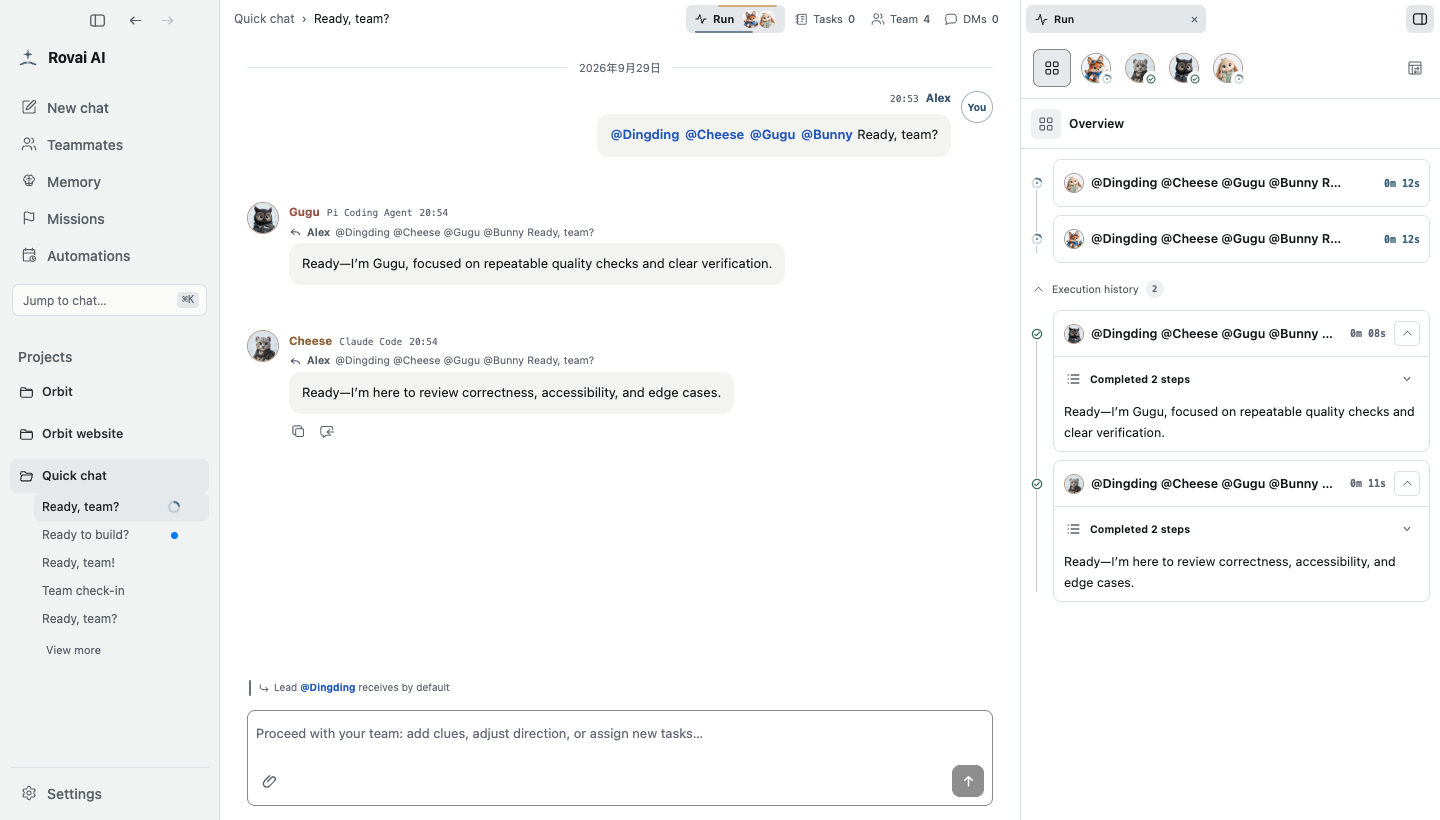
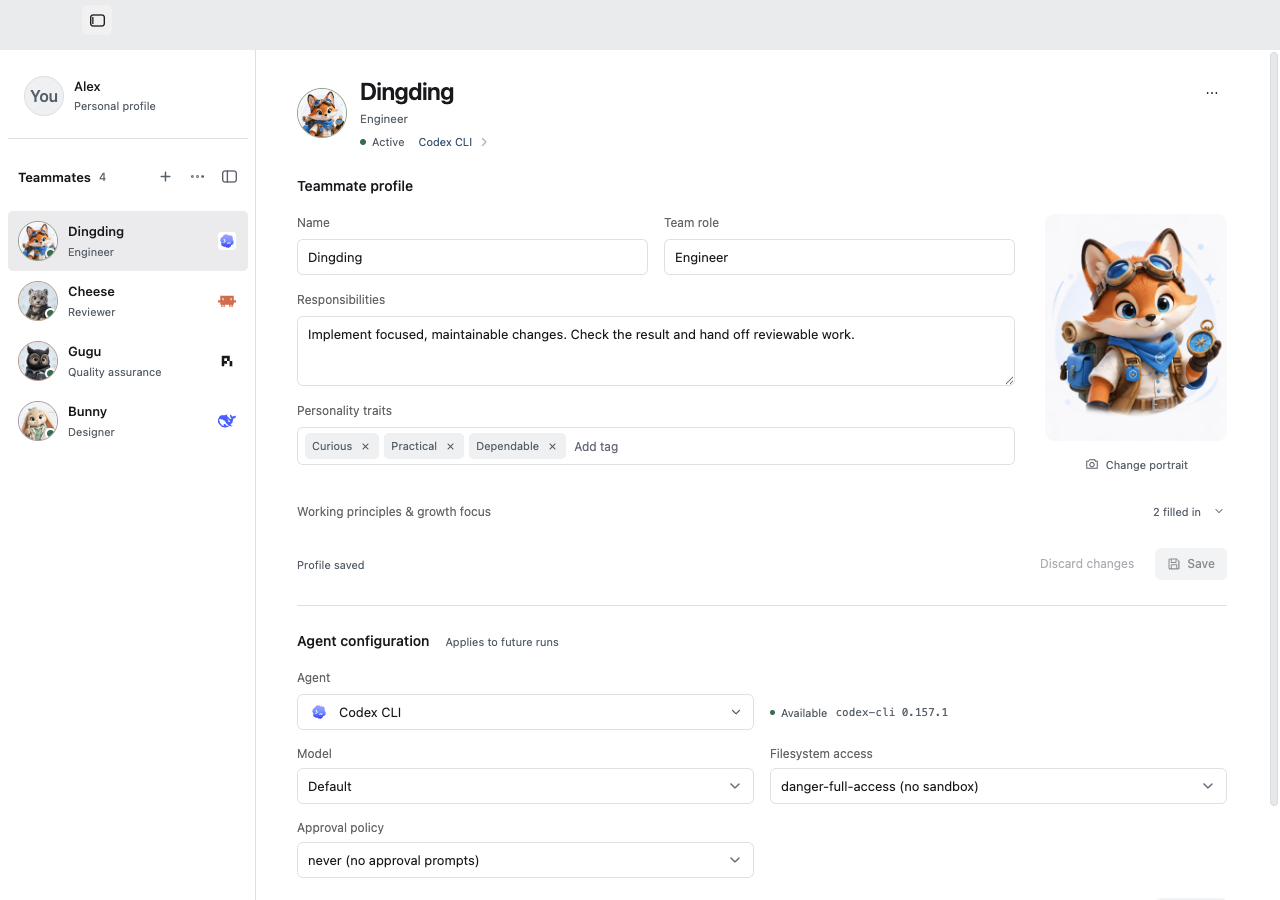
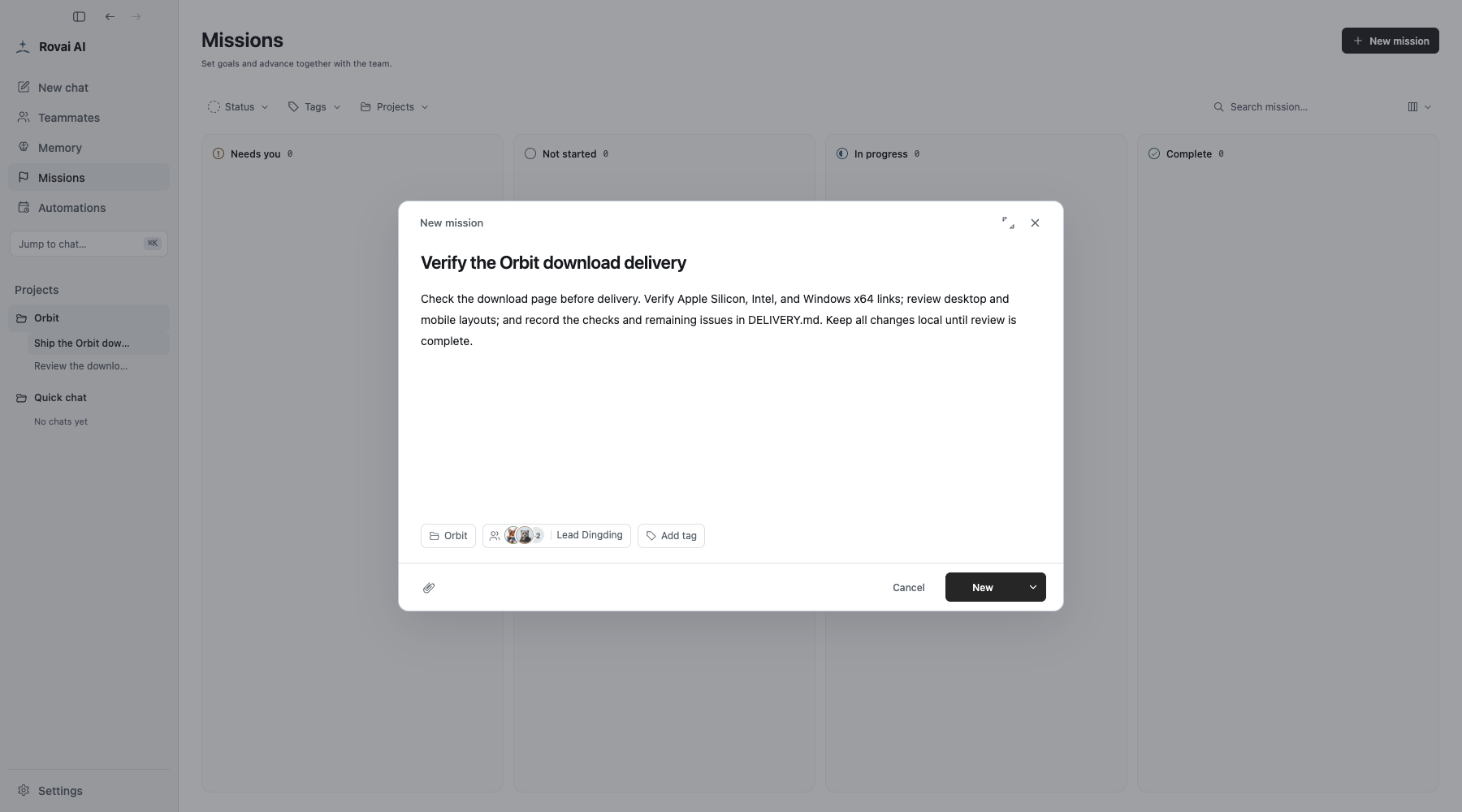
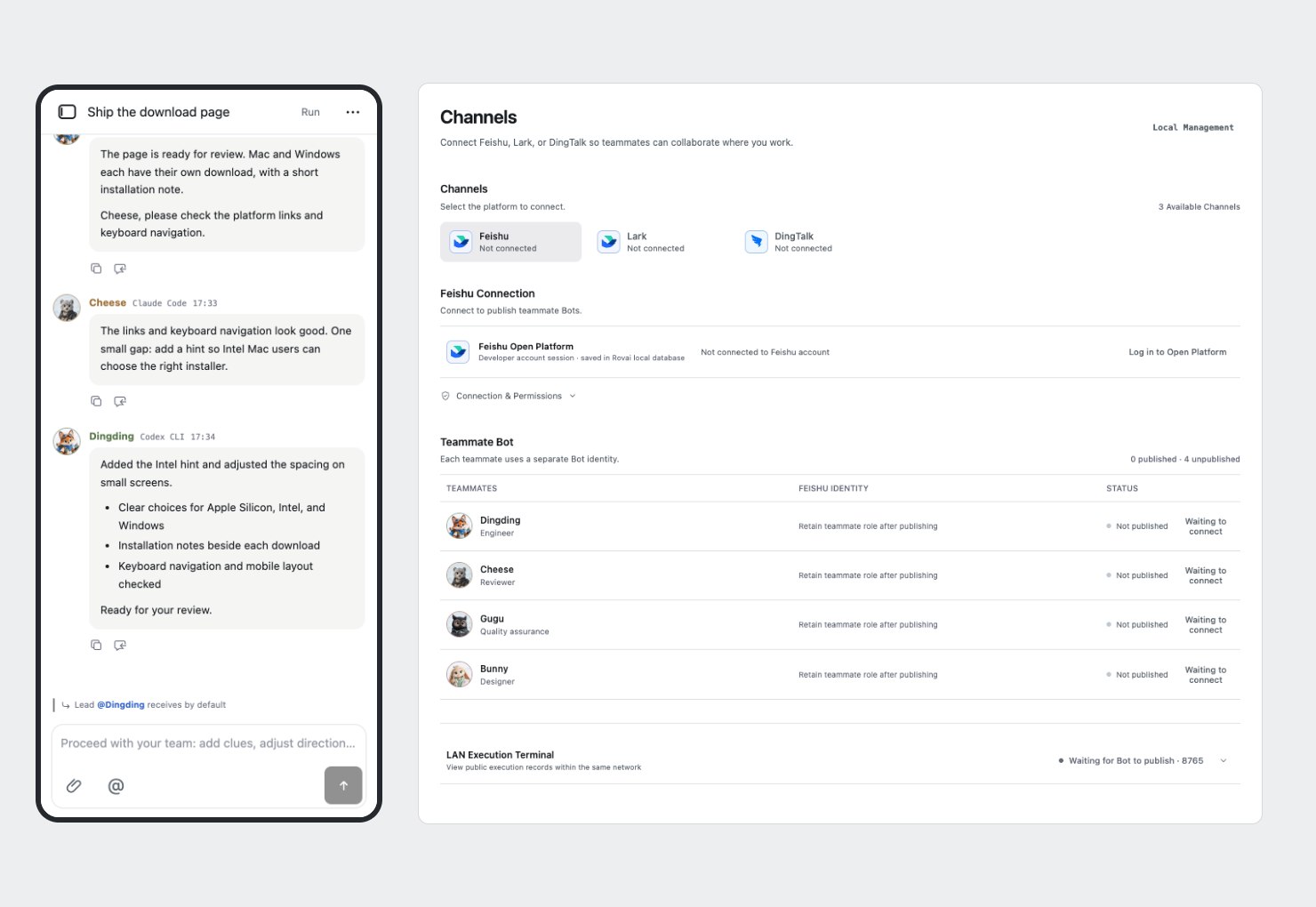
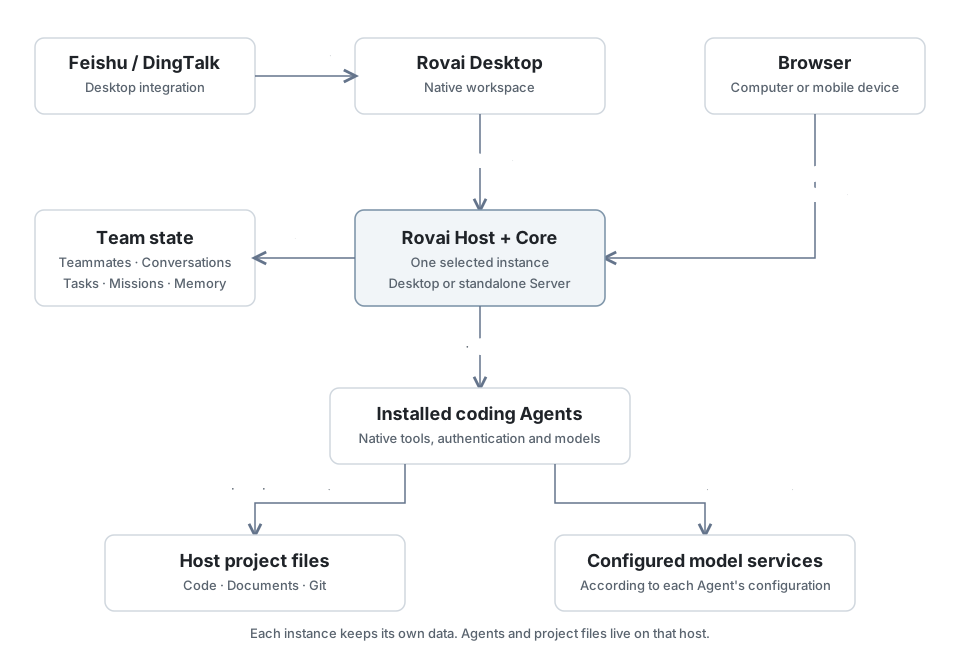
## Work together, from the first request to the next task Start with one teammate, then bring in another when the work needs a second perspective. Keep their roles, conversations, unfinished tasks, and useful agreements available when you return. | Capability | What you can do | | --- | --- | | **[Lasting teammates](https://rovai.dev/docs/members.html)** | Give each teammate a name, role, responsibilities, and working principles. Choose their Agent, model, and permissions separately. | | **[Shared conversations](https://rovai.dev/docs/collaboration.html)** | Address the right teammates, exchange findings, and hand off work. Open a separate one-on-one conversation when you need a focused discussion. | | **[Visible execution](https://rovai.dev/docs/execution.html)** | Follow tool activity, respond to approvals, preview files, and inspect changes alongside the conversation. | | **[Ongoing work](https://rovai.dev/docs/missions.html)** | Track larger goals on the Mission board, schedule recurring work, and save agreements as collaborative memory. | | **[Skills and tools](https://rovai.dev/docs/skills.html)** | Use native Skills, configure Rovai collaboration tools, and connect MCP services supported by your Agent. | | **[Remote access](https://rovai.dev/docs/remote.html)** | Return to your workspace through a browser. Connect Desktop teammates to external messaging channels. | ## Keep your teammates. Choose how they work. A teammate's identity stays with the team across projects. An implementer and a reviewer can have different responsibilities, use different Agents, and keep their own ways of working. Connect installed coding Agents such as **Codex CLI, Claude Code, Pi Coding Agent, DeepSeek Harness, and OpenCode**. Model choices, permissions, Skills, and MCP capabilities depend on the Agent and host platform. [Teammates and configuration](https://rovai.dev/docs/members.html) · [Agents and models](https://rovai.dev/docs/agents.html) · [Platform compatibility](https://rovai.dev/docs/compatibility.html) ## Keep longer work in view Use the Mission board for a goal you will return to: improving a download flow, preparing a release, or working through a project review. Choose a project and team, continue in its conversation, and inspect the accumulated file changes and delivery. Tasks record responsibility; execution records show what ran. Finishing a run, completing a mission, and merging code are separate actions. [Mission board](https://rovai.dev/docs/missions.html) · [Tasks and ownership](https://rovai.dev/docs/tasks.html) · [Scheduled work](https://rovai.dev/docs/automations.html) · [Collaborative memory](https://rovai.dev/docs/memory.html) ## Continue from another device Enable Web access in Rovai Desktop, or run an independent Rovai Server on your own host. Open the workspace in a browser to continue the conversation and follow the work. Agents and project files stay on the host you connect to; separate instances keep separate data. Rovai Desktop also connects to **Feishu and DingTalk**, so you can send requests and receive results in those channels. See the channel guide for setup and availability. [Deployment and remote access](https://rovai.dev/docs/remote.html) · [Channels](https://rovai.dev/docs/channels.html) ## Get started | Where you want to work | Start here | | --- | --- | | **On your desktop** | [Download Rovai Desktop](https://rovai.dev/download/) for macOS Apple Silicon, macOS Intel, or Windows x64. Follow the installation and upgrade notes for your release. | | **On your own server** | [Install Rovai Server](https://rovai.dev/docs/server-install.html). Server packages, host requirements, release limitations, and setup are documented separately. | 1. **Prepare one Agent.** Install and sign in to a supported coding Agent on the host, then check it in **Settings → Agents**. 2. **Choose a teammate.** Set their Agent, model, and permissions. One teammate is enough to get started. 3. **Give it a small task.** Open a project conversation, ask the teammate to explain the project, and inspect the execution before assigning a change. [Complete quick start](https://rovai.dev/docs/quickstart.html) · [Try a two-teammate workflow](https://rovai.dev/docs/collaboration.html) ## How it fits together Rovai keeps the team's collaboration state and coordinates execution. The coding Agents perform the work using their own tools, authentication, and configured model services. Desktop and standalone Server share the Host implementation. Each instance has its own data and environment; connecting through a browser does not migrate or synchronize them. Channel integration is provided by Desktop. [How work moves through Rovai](https://rovai.dev/docs/mechanism.html) · [Engineering architecture](https://github.com/murray17/rovai-ai/blob/main/docs/architecture/README.md) ## Documentation and development | You want to… | Read | | --- | --- | | Learn to use Rovai | [English documentation](https://rovai.dev/docs/) · [中文文档](https://rovai.dev/zh/docs/) | | Configure your tools | [Agents](https://rovai.dev/docs/agents.html) · [Skills](https://rovai.dev/docs/skills.html) · [MCP](https://rovai.dev/docs/mcp.html) | | Connect another device | [Desktop Web](https://rovai.dev/docs/desktop-web.html) · [Server installation](https://rovai.dev/docs/server-install.html) · [Connection options](https://rovai.dev/docs/remote.html) | | Build from source or contribute | [Developer guide](https://github.com/murray17/rovai-ai/blob/main/docs/development/README.md) · [Architecture](https://github.com/murray17/rovai-ai/blob/main/docs/architecture/README.md) · [Compatibility evidence](https://github.com/murray17/rovai-ai/blob/main/docs/runtime-compatibility.md) | The engineering guides are primarily in Chinese. Start with the developer guide for environment setup and isolated development data, then: ```sh git clone https://github.com/murray17/rovai-ai.git cd rovai-ai pnpm install --frozen-lockfile pnpm dev ``` ## Contributing [Issues](https://github.com/murray17/rovai-ai/issues) and [pull requests](https://github.com/murray17/rovai-ai/pulls) are welcome. Include the Rovai version, host platform, and steps to reproduce when reporting a problem. Rovai connects coding agents through native protocols and ACP. See [Agent integration](contributing/agent-integrations.md) for existing adapters, implementation notes, and current gaps. ## License [MIT](https://github.com/murray17/rovai-ai/blob/main/LICENSE) — free to use, modify, distribute, and use commercially. ## Community