
tmodloader-mcp
Drive a running tModLoader instance from an agent —
launch it, ask it questions, photograph it, and read its state back as
structured data.




How it works ·
Quick start ·
Configuration ·
Known limits
Game engines have grown MCP servers — Unity, Unreal, Godot and Defold all have
one, so an assistant can see a real scene instead of guessing from a prompt.
tModLoader has not had one. This is that.
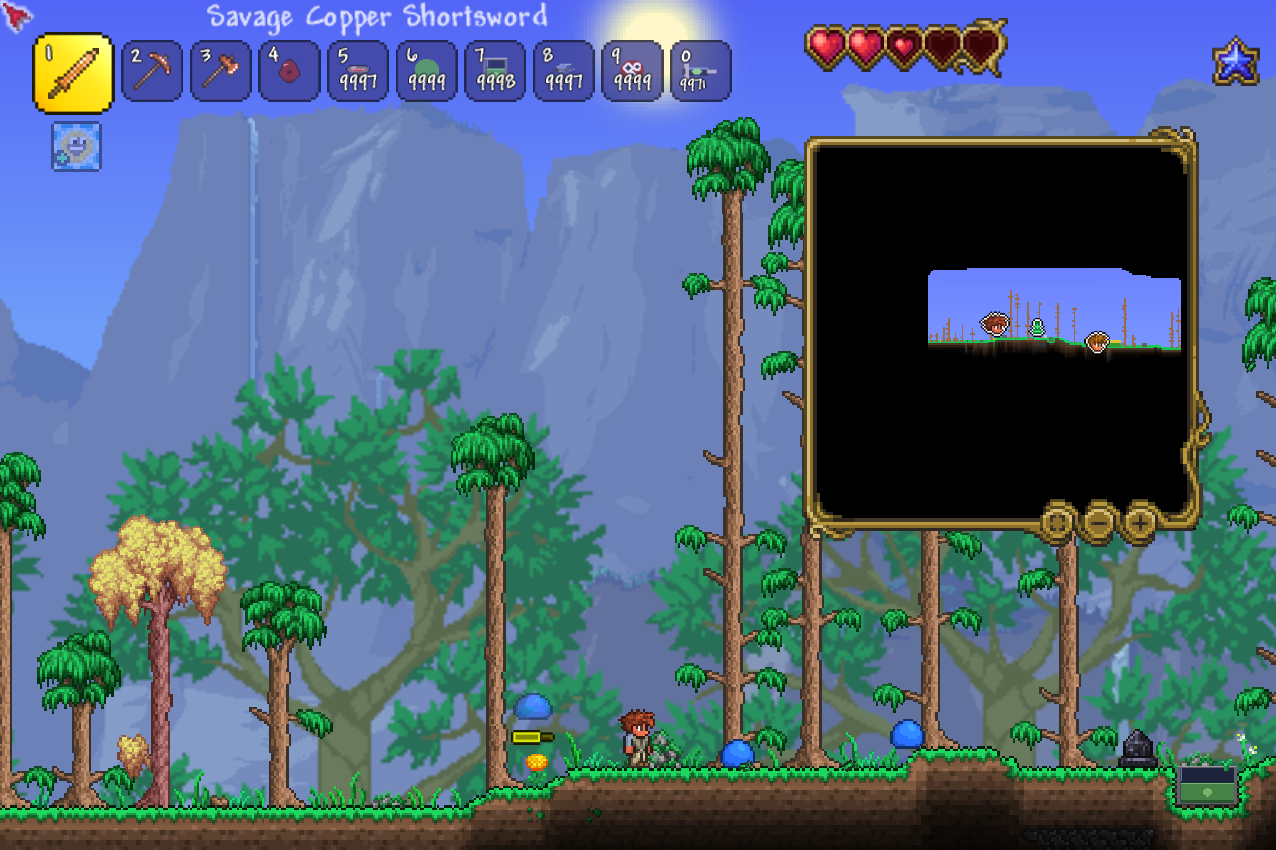
The tool staged its own screenshot —
time:noon, teleport:spawn, spawn:1,25,
shot:full — read from the game's back buffer, so a window in
front of the game cannot be in the picture
(How it works starts there). Trimmed of the
unexplored dark below the terrain; otherwise exactly as returned.
> **Status: alpha** — it has only ever run on one install; see
> [Known limits](#known-limits) before adopting it. Nothing defaults to
> anybody's install, the mod-side half is a folder you vendor
> ([`responder/`](https://github.com/musharna/tmodloader-mcp/tree/master/responder)),
> and CI compiles it with nothing of any mod's on the compile line.
## Quick start
```sh
uv tool install tmodloader-mcp # or: pip install tmodloader-mcp
# the two paths with no default — every plausible default names somebody's install
export TMODLOADER_SAVE_DIR="/mnt/c/Users//Documents/My Games/Terraria/tModLoader"
export TMODLOADER_MOD_SOURCE="$TMODLOADER_SAVE_DIR/ModSources/"
```
Then:
1. **Vendor the responder** — copy
[`responder/`](https://github.com/musharna/tmodloader-mcp/tree/master/responder)
into your mod's source tree and subclass `DevResponder`. It is a folder of
C#, not a PyPI dependency, because it compiles inside **your** mod.
2. **Point your MCP client at the server** — the block in
[Using it from Claude Code](#using-it-from-claude-code).
3. **Ask the game something** — `launch`, then `diag`. Or open with the
`start_a_session` prompt, which lists the worlds and characters that
actually exist here.
This needs **WSL2 driving a Windows tModLoader** — [Requirements](#requirements)
says why before anything else does.
## How it works
The game is asked by **writing a file it polls**, not by sending it input:
```text
┌─────────────────────────────────────────────────────┐
│ an agent — Claude Code, or anything speaking MCP │
└──────────────────────┬──────────────────────────────┘
│ tools · prompts · capture:// resources
┌──────────────────────▼──────────────────────────────┐
│ tmodloader-mcp — this package (Python, WSL2) │
└──────────────────────┬──────────────────────────────┘
│ writes -capture.trigger
│ reads -diag-.txt,
│ -shot-.png, ...
┌──────────────────────▼──────────────────────────────┐
│ the tModLoader save directory │
│ plain files on disk — no socket, no keystrokes │
└──────────────────────▲──────────────────────────────┘
│ polls every few frames, writes
│ each answer next to its trigger
┌──────────────────────┴──────────────────────────────┐
│ DevResponder — C# you vendor into YOUR mod, │
│ inside tModLoader, a real game, on Windows │
└─────────────────────────────────────────────────────┘
```
No synthetic keystrokes, no window focus, and nothing that can be fooled by
another window sitting on top of the game. That last point is the reason for
the design: OS-level screen capture was tried first and returned a picture of
Discord — a window in front of the game — while passing every check available.
Reading the game's own back buffer cannot contain another window by
construction, not by luck.
Captures name a **region** and have no default. The frame holds only the game,
but that still includes a character name, a world name and any chat on screen,
so a request says which corner it wants.
The mod side of that protocol — every filename, what each one contains, and
which failures it has to be able to express — is written down in
[`docs/MOD_CONTRACT.md`](https://github.com/musharna/tmodloader-mcp/blob/master/docs/MOD_CONTRACT.md),
and implemented in
[`responder/`](https://github.com/musharna/tmodloader-mcp/tree/master/responder).
You can read the contract or vendor the folder; the folder is the same document
with a compiler checking it.
Since 0.6.0 replies are **tagged**: a request may carry a short id the
responder echoes back first, so a late answer can never be mistaken for the
next request's. Older vendored copies keep working — the tag is only sent to
a responder that advertises taking it.
## What the mod side answers
These are verbs, driven through the `trigger` tool, not separate MCP tools.
**The reads come with the base class** — every consumer serves them, and
vendoring an upgrade can never hand your mod a power it did not have before:
| Verb | What it answers |
| ------------------ | ------------------------------------------------------- |
| `capture` / `shot` | a photograph of the frame, by named region |
| `diag` | whatever your mod chose to report |
| `tiles` | tile-type counts in a rectangle |
| `entities` | NPC, item or projectile counts, filterable by rectangle |
| `find` | one line per entity: id, position, health |
| `players` | who is connected |
**The writes are opt-ins**, each one line you write in `RegisterCommands`:
| Opt-in | Verbs it adds |
| ------------------ | -------------------------------------------------------------------------- |
| `DevMutations` | `time` `weather` `spawn` `give` `teleport` `settile` `cleartile` `despawn` |
| `DevCommandBridge` | `command` `commandlist` — runs any mod's own registered `ModCommand`s |
| `DevChat` | `chat` `say` |
One line each is deliberately the whole mechanism: not a setting, not a marker
file, not an environment variable, because each of those can be switched on
somewhere other
than the source somebody will read when they ask why an NPC appeared in their
world. [`responder/README.md`](https://github.com/musharna/tmodloader-mcp/blob/master/responder/README.md)
has the detail, including why `DevCommandBridge` is the answer to "what about
an escape hatch" and why there is no `reflect_invoke` here.
## The answers, verbatim
Every line below is real — the same server and client the live checks drive,
quoted rather than paraphrased:
```text
spawn:1,20 OK: spawned 20 of 20 id=1 at tile 2101,252
time:dusk sent to a CLIENT:
REFUSED: "time" changes something the SERVER owns, and a
client that changed it would be corrected by the next world
packet - the change would appear to work and then undo
itself. Send this to the server: time@.
give:8,5 sent to the SERVER:
REFUSED: "give" needs a local player, and a dedicated
server has none - it runs the world without standing in
it. Ask a client, by name.
spawn:0,1 REFUSED: 0 is not a NPC id - it is how Terraria spells
"nothing", so this would have succeeded and done nothing
spawn:banana,5 REFUSED: "banana" is not a positive whole NPC id
time:teatime REFUSED: "teatime" is not one of dawn, noon, dusk, midnight
tiles:0,0,1000,1000
REFUSED: 1000 by 1000 is 1000000 tiles, past the limit of
16384 one query may scan
```
The refusals are the point. Each one says what was wrong, what would have
been right, and — when the verb belongs to the other side of the wire — where
to send it instead, because the reader is an agent and an agent retries
exactly as well as the refusal explains.
## The tool surface
Most of what this does _could_ be a CLI, and where that is true it should stay
one — a stateless local binary does not need a protocol in front of it. What
earns the surface here is that a running game is not stateless:
**A session**
| Tool | What it buys over `bash` |
| ----------------- | --------------------------------------------------------------- |
| `launch` / `stop` | Session state across calls |
| `join` | A second client into a session that is already running |
| `status` | Asking whether a session exists without provoking an error |
| `restart` | stop → build → launch in the one order that works |
| `inventory` | The worlds, characters and mods `launch` needs and cannot check |
**Asking the game**
| Tool | What it buys over `bash` |
| ------------ | --------------------------------------------------------------- |
| `trigger` | The write → poll → timeout → clean-up loop, written once |
| `commands` | What the mod says it serves, read from the mod, not a copy here |
| `diag` | Structured fields AND the records under them, not text to `sed` |
| `wait_until` | Waiting for a state on one budget, instead of sleeping a guess |
| `heartbeat` | WHICH silence — absent, stale, still loading, or not armed |
**Pictures**
| Tool | What it buys over `bash` |
| ---------------- | ----------------------------------------------------------------- |
| `shot` | A path per call, a whole PNG behind it, refusals as refusals |
| `captures` | Which captures exist, as names — a reader that takes no paths |
| `read_capture` | The picture itself, for an agent not on this machine |
| `prune_captures` | Removing captures without a delete loose enough to reach a world |
**Logs**
| Tool | What it buys over `bash` |
| ----------- | --------------------------------------------------------------- |
| `logs` | Any log, filtered — including the run that already rotated away |
| `log_files` | Which logs exist right now, and how many old runs are archived |
| `log_since` | Only what a log gained, and whether it rotated under you |
| `log_watch` | Blocking until a line appears, instead of a guessed sleep |
**Building, the API, and the saves**
| Tool | What it buys over `bash` |
| ---------------- | ----------------------------------------------------------------- |
| `build_mod` | Encodes tModLoader's refusal to build while the game is open |
| `api_search` | What the INSTALLED tModLoader actually exposes, with signatures |
| `save_snapshot` | Copying the world and characters aside before a run mutates them |
| `save_restore` | Putting them back, saving what it overwrote so it can be undone |
| `save_snapshots` | Which copies exist, newest first |
Those one-liners are where the hand-written version actually went wrong: a
`pkill` pattern that matched its own command line, a readiness check that
passed on a killed process's leftover heartbeat, and — for one stretch — a
`shot` row promising a PNG check that did not exist: the file was waited for
and renamed, never opened. It exists now, and reads the end that decides — a
truncated PNG has a perfectly valid signature, so the trailer is what is
checked. The gap was recorded here rather than quietly corrected, because a
README is read by people deciding what they no longer have to check.
Two **prompts** ship with it: `diagnose_silence` walks the four reasons the
mod might not answer, with this install's heartbeat, mod list and logs already
read; `start_a_session` lists the worlds and characters that actually exist
here — the two preconditions `launch` states and cannot check. Both render the
failure into the text when the configuration is unusable, because a diagnostic
that refuses to render has failed at the one moment it was for.
Captures are also addressable as `capture://{name}` resources. Both surfaces
share one reader that takes a **name, never a path**, and serves only
capture-shaped files inside the save directory — a reader that opened whatever
it was handed would be the leak this project exists to prevent.
## What it cannot do
**There is no headless singleplayer.** Terraria has no entry point for it —
`-join -player -skipselect` lands at the main menu, measured rather than
assumed. `launch("singleplayer")` refuses and says so instead of launching
something else and letting you believe otherwise. Singleplayer testing needs a
human to load a world; the other tools then drive it normally.
That matters more than it sounds: a bug that only appeared in singleplayer
shipped once precisely because every harness ran server-plus-client.
**There is no bare dedicated server either.** An empty server runs no update
hooks, so the mod never polls and never answers — measured on one process,
changing only whether a client was attached: silent for 90s alone, answering
within 30s of a client joining. `launch("server")` refuses for the same reason
singleplayer does — what it promises is a game that can answer, and a server
on its own never becomes one. Start one outside this tool if you want a server
to join yourself.
## Requirements
**WSL2 on Windows, driving a Windows tModLoader.** This is the one requirement
worth reading before the others, because it is not a preference — sessions are
listed and killed through Windows' own `tasklist.exe` and `taskkill.exe`, and
`build_mod` hands tModLoader a Windows path because it builds inside a Windows
process. A native Linux or macOS tModLoader cannot be driven by this as it
stands. The configuration check every tool runs first says so by name rather
than failing later on a missing file in System32; if you are on WSL and those
tools live somewhere unusual, set
`TMODLOADER_TASKLIST`, `TMODLOADER_TASKKILL` and `TMODLOADER_POWERSHELL`.
- Python 3.12+
- tModLoader installed (1.4.4.9 is what this is tested against)
- A mod embedding the trigger-file responder — copy
[`responder/`](https://github.com/musharna/tmodloader-mcp/tree/master/responder)
into your mod's source tree and subclass `DevResponder`
- A .NET SDK, for `api_search` only — the index is built by a small C# tool.
Everything else works without one.
## Install
```sh
uv tool install tmodloader-mcp # or: pip install tmodloader-mcp
# or none at all: uvx tmodloader-mcp
```
The package is the Python half only. The responder is not on PyPI and could
not usefully be — it is C# that compiles inside **your** mod — so it is
vendored from
[`responder/`](https://github.com/musharna/tmodloader-mcp/tree/master/responder)
in the repository, however you obtained the package.
## Configuration
Every path is an environment variable. **Two are required**, because every
plausible default for them names somebody's own install:
| Variable | Meaning |
| --------------------------- | ----------------------------------------------- |
| `TMODLOADER_SAVE_DIR` | **Required.** Where the mod writes artifacts |
| `TMODLOADER_MOD_SOURCE` | **Required.** Mod source directory (WSL path) |
| `TMODLOADER_DIR` | tModLoader install; defaults to Steam's layout |
| `TMODLOADER_WORLD_WIN` | Default world, as Windows spells it — see below |
| `TMODLOADER_MOD_SOURCE_WIN` | Usually leave unset — see below |
| `TMODLOADER_MOD_NAME` | Usually leave unset — see below |
```sh
export TMODLOADER_SAVE_DIR="/mnt/c/Users//Documents/My Games/Terraria/tModLoader"
export TMODLOADER_MOD_SOURCE="$TMODLOADER_SAVE_DIR/ModSources/"
```
The required two have no default on purpose: a default pointing at the
author's disk does not fail on yours — it resolves, worst case to something
that exists, and the server drives an install you never chose. Both unset
variables are reported together, so this costs one restart, not two.
`TMODLOADER_WORLD_WIN` is the world `launch` loads when you do not pass one. It
has no default either; with neither set, `launch` refuses and **lists the worlds
actually in your save directory**, with the Windows paths it wants. `inventory`
answers the same question without launching anything.
TMODLOADER_MOD_NAME — when the derived name is wrong,
and what the name keeps apart
`TMODLOADER_MOD_NAME` is the mod's **internal** name, which every artifact
filename is built from: `-diag-.txt`, `-shot-.png`,
lowercased, where `` identifies which player's client wrote it — except
`-capture.trigger` and `-commands.txt`, which stay one name
shared by every client (see
[`docs/MOD_CONTRACT.md`](https://github.com/musharna/tmodloader-mcp/blob/master/docs/MOD_CONTRACT.md#the-filenames)
for why).
tModLoader takes the mod's name from the source folder, so it is derived from
`TMODLOADER_MOD_SOURCE` and only needs setting for a checkout whose folder is
named something other than the mod. Deriving it is also what keeps two mods
driven from one machine out of each other's trigger files — they share a save
directory.
TMODLOADER_MOD_SOURCE_WIN — only for a mod source living
outside /mnt/<drive>
`TMODLOADER_MOD_SOURCE_WIN` is the mod source as Windows sees it, which `-build`
needs because tModLoader compiles inside a Windows process with no `/mnt/c`. It
is **derived** from `TMODLOADER_MOD_SOURCE`, so setting that one is enough for a
source on a drive mount. Set it yourself only if your mod source lives outside
`/mnt/`, where there is no drive letter to translate to and the server
will ask for it by name.
The two describe one directory. If you set both to different places the server
refuses to start and says so, rather than driving one and building the other.
## Using it from Claude Code
A `.mcp.json` ships with the repository, so a session started in this directory
finds the server:
```json
{
"mcpServers": {
"tmodloader": {
"command": "uv",
"args": ["run", "tmodloader-mcp"],
"env": {
"TMODLOADER_SAVE_DIR": "${TMODLOADER_SAVE_DIR}",
"TMODLOADER_MOD_SOURCE": "${TMODLOADER_MOD_SOURCE}"
}
}
}
}
```
The two paths are **read from your environment rather than written down** — a
committed config with real paths would be one person's paths in everybody's
checkout. Export them **where the client is launched**, not only in an
interactive shell: the substitution is the _client's_, against its own
environment, and a value passed through as literal `${TMODLOADER_SAVE_DIR}` is
treated as absent and reported by that name. `claude mcp list` names any that
are missing.
If the server reports a variable missing that you know you
exported — the usual cause is a client older than the export
A process's environment is a copy taken when it starts, and nothing
outside can add to it afterwards. So a long-lived parent — a daemon, an agent
host, a desktop session — hands every client it spawns the environment it had
on the day it started, however long ago that was, and adding the variables to
your profile today does not reach it. The symptom is a shell where
`env | grep TMODLOADER` prints all three sitting next to a server that sees
none of them. Restarting the client is not enough if the thing that spawned the
client is the stale one; restart that.
Nothing can be repaired from inside a running session: the value was gone before
the process started.
A project-scoped `.mcp.json` needs approving once — Claude Code will not run a
server a repository asked it to run without being told to. Start `claude` in
this directory and accept the prompt.
To drive the harness from the directory where you actually develop your mod,
copy the block into that project's `.mcp.json` and point `--directory` at this
checkout:
```json
"args": ["run", "--directory", "/path/to/tmodloader-mcp", "tmodloader-mcp"]
```
Or, with the package from PyPI, no checkout at all:
```json
"command": "uvx",
"args": ["tmodloader-mcp"]
```
The repository's own `.mcp.json` stays on `uv run` deliberately — inside this
checkout you want the code in front of you, not the release behind it.
## Known limits
Everything below is a fact about this repository rather than a plan; the
struck-through history this section replaced lives in
[`CHANGELOG.md`](https://github.com/musharna/tmodloader-mcp/blob/master/CHANGELOG.md),
which is where a changelog belongs.
**The thing most worth knowing about this project is that its hardest bugs
were found by RUNNING it.** Two clients overwriting each other's answers, a
capture lock bounded by a guess, a dedicated server with no address to be told
apart by, and — most recently — a save-snapshot feature whose entire premise
turned out to be false when somebody finally measured it. The unit suite
passed against every one of those. The changelog is the record.
**It has only ever run on one install.** One machine, one tModLoader
(1.4.4.9), one world, one character. Every live check in `tests/` drives a real
game rather than a mock, which is the strongest evidence this project has — and
it is still evidence from a single configuration. That is what the alpha
classifier is for, and the first thing an outside user is likely to find is
something install-specific.
**Two dedicated servers racing for one trigger: observed once, not proven.**
Two servers on one save directory — different ports, different worlds, both
polling the same trigger file — served six alternating addressed requests,
each answered by the server it named, never by the other, always consumed
(`tests/live_race_check.py`). One machine, one run: evidence the claim
protocol holds under a real race, not a proof it always will.
**There is no escape hatch, deliberately.** Other harnesses ship
`reflect_invoke` or `execute_code`. `command` is the answer here: it runs a
mod's OWN registered `ModCommand`s, which the mod already decided existed,
named, and gave a usage line. That keeps every reachable action published,
typed and refusable. Arbitrary evaluation would buy unlimited reach and throw
that away, so a question nobody wrote a verb for still costs an edit, a
rebuild and a relaunch.
**A stopped session saves nothing.** `stop` force-kills, so a run that changes
the world usually leaves no trace on disk — measured, not assumed. Do not rely
on that: a run long enough to autosave, or a graceful exit, does write. Take a
`save_snapshot` before anything that mutates a world you care about.
---
MIT ·
what running it taught, in order ·
the protocol, written down ·
a template mod to start from