
简体中文 ·
English
Problems ·
Scenes ·
Settings ·
Scope ·
Install ·
Docs





---
**PTC Plus gives DSH PTC mode a persistent TypeScript REPL.** Variables, imports, and computed results from one `run_code` remain available to the next. By default, revise names directly: existing closures observe updated bindings, imports can be overridden and re-imported, and failed declarations do not permanently occupy a name.
> [!NOTE]
> Community plugin, with no affiliation with or endorsement from DeepSeek or DSH.
> [!IMPORTANT]
> Built for `danger-full-access`: code can access Node.js and the operating system directly. The plugin adds no sandbox. Use it where that permission scope is acceptable.
## Install
Requires Node.js `^22.19.0 || >=24.0.0` and official DSH with TypeScript PTC mode. Install into your profile, restart DSH, and select PTC mode:
```sh
dsh plugin --profile add dsh-ptc-plus
```
No DSH modifications or custom build are required. See the [installation guide](docs/installation.md) for other installation methods, upgrades, and troubleshooting.
## What default PTC mode gets wrong
Default PTC mode starts each execution in a fresh environment, so the model must resend setup code. PTC Plus keeps the session's computation state available for subsequent calls.
| Scenario | Default PTC mode | With PTC Plus |
| --- | --- | --- |
| Continue a calculation | Each call starts fresh and needs the setup code again | Reuse existing variables, functions, imports, and results directly |
| Fix one mistake | Resend the complete corrected code | Send only the changes with `edit_run_code`, then execute the complete corrected cell |
| Use module syntax | Static `import` and `export` are invalid inside the function body | Write them directly in cells; the plugin adapts them |
| Pass special values | JSON cannot fully represent `undefined`, BigInt, cycles, and similar values | Preserve supported special values and reference relationships for further computation and recovery |
| Find an available tool | Look through the tool interfaces supplied to the model | List and search tools from code, then inspect their parameters as needed |
| Omit a call summary | Missing `run_code.description` fails validation | Supply a display summary automatically so valid code can proceed |
| Recover a top-level tool miscall | Undeclared top-level calls are rejected in PTC mode | Convert a miscall to `run_code` when current tool definitions uniquely identify its target and validate the arguments |
| Access project files | Relative Node paths depend on the host process directory | Resolve file paths, modules, and the default child-process directory from the recorded session project |
| Locate a code error | Return the native error and stack | Map errors to cell source positions; suggest an edit when a single missing closing delimiter has one verified correction |
| Inspect computation state | No reusable session variables remain after execution | Inspect retained variables, definitions, and bounded value previews in the REPL tab |
| Author and reuse helpers | Save the code yourself and load it again in later calls | Author drafts with `/binding`, review them above the composer, and save; enabled bindings work across sessions and supply their interfaces to the model |
| Try a helper manually | No dedicated code workbench for global bindings | Run unsaved source, test it across successive inputs, and inspect results in a workbench with temporary state separate from the Agent session |
| Continue after a restart | No computation state spans calls for recovery | Restore verifiable state from the session record and report what could not be recovered |
Global bindings must be enabled in settings. See [Settings](#settings) and [Scope](#scope) below for optional behavior and recovery limits.
## Three scenes that matter most
### State carries over
The model first executes:
```ts
import { readFile } from 'node:fs/promises'
const manifest = JSON.parse(await readFile('package.json', 'utf8'))
const deps = Object.keys(manifest.dependencies ?? {})
return deps.length
```
The next call continues directly:
```ts
return deps.map(dep => dep + '@' + manifest.dependencies[dep])
```
`deps` and `manifest` remain in the current session. No repeated setup is needed.
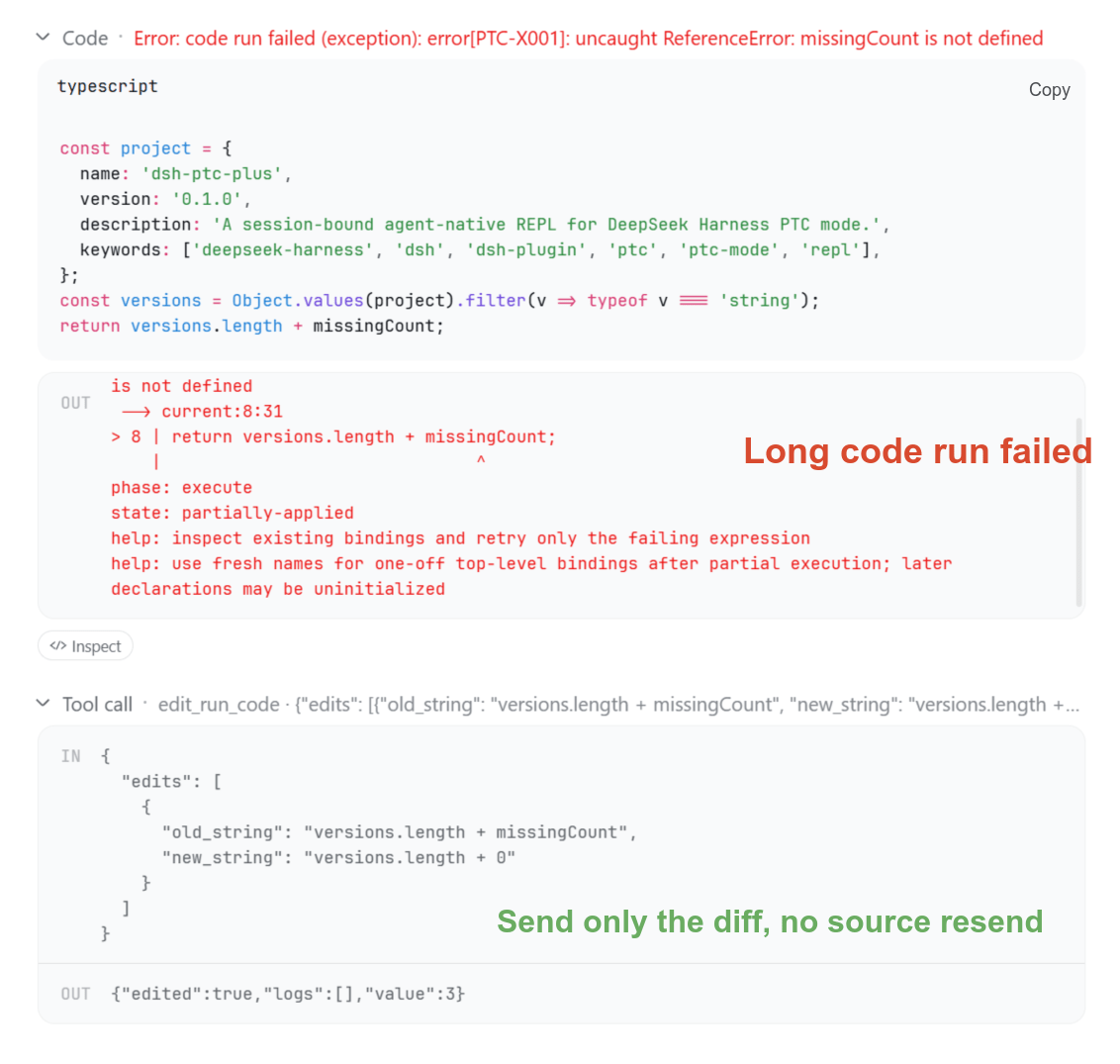
### Fix without resending
The model can submit just the replacement:
```ts
edit_run_code({ edits: [{ old_string: 'deps.length', new_string: 'deps' }] })
```
Editing reruns the entire cell. Code that has written files or called external services still requires a safe retry. Syntax errors identify the location; an unambiguous missing closing delimiter can also receive a correction suggestion.
### Have the Agent author a reusable helper
Enable **Global User Bindings** in settings, then enter:
```text
/binding new Create textTools to trim outer whitespace while preserving interior spaces
/binding edit Add line-by-line trimming
```
The Agent can test and revise the helper incrementally with in-memory REPL examples before submitting a draft. Authoring tests must not modify external files or services. The draft opens above the composer, where you can inspect its source and model prompt, then choose **Save as disabled**, **Save and enable**, or **Discard draft**. Testing and submission do not save a global binding.
The panel can be collapsed or closed; the sparkle button's badge reopens it. A successful save or discard closes the panel automatically. The original request retains its source and outcome in history.
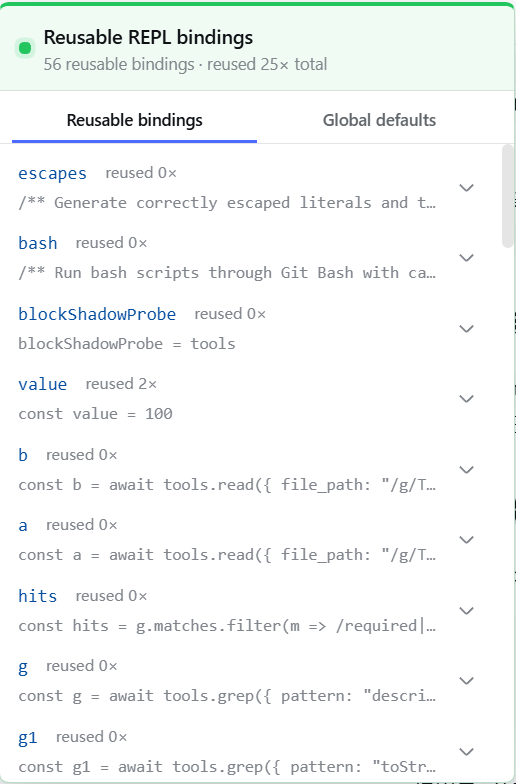
Before the first message, hover over or click the sparkle button to view and toggle global bindings. These choices apply to all sessions. The shortcut appears only while the current session uses the `ptc` or compatible `code` preset. The menu also provides new-binding authoring, existing-binding revision, full management, and a PTC Plus settings shortcut. The settings shortcut opens an in-app dialog containing every plugin setting, while its hover hint still names the host's native settings path. The reusable REPL binding list shows per-binding and total reuse counts, and a redeclaration never resets them.
Enabled binding interfaces are supplied to the model in new sessions and updated at the next permitted request in an existing session. A source-derived interface retains standard global types, referenced local types, representable class heritage, and class instance fields used by its public signatures; abstract classes remain non-constructable, and an imported type that cannot form a self-contained interface produces an explicit error before save. Each binding can include a separate usage prompt or omit its interface. Changing only the prompt preserves the helper's runtime state. Assigning or redeclaring one name in a session overrides only that name; the entry's other names keep working, and the session-local override never writes back to the saved entry. See the [global binding guide](docs/user-bindings.en.md) for details.
## Settings
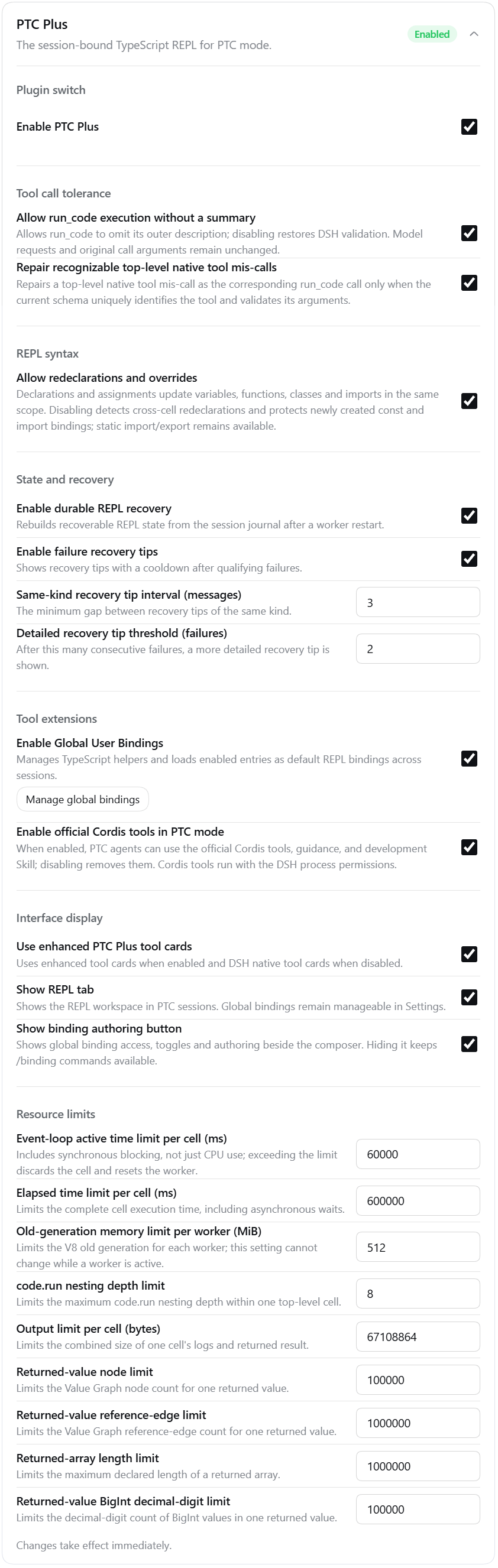
Choose **PTC Plus settings** in the sparkle menu beside the composer to open the complete settings dialog directly. The host's native entry remains available. Depending on the DSH interface, find the plugin on the side-bar **Plugins** page and choose **Configure**, or open **Settings → Plugin configuration → PTC Plus**. The main switch controls the plugin; other settings are grouped by purpose:
- **Tool call tolerance**: accept `run_code` without a summary and repair uniquely identifiable top-level native-tool miscalls.
- **REPL syntax**: `bindingUpdates` defaults to `stateful`, allowing cross-cell updates of variables, functions, classes, and import aliases, and letting a repeated declaration in one logical scope of one cell update the same identity; choose `protected` to keep name protection. `tools` and the injected error classes can be neither redeclared nor written: a declaration collision reports `PTC-N001`, and a failed assignment names the affected binding. Existing configurations that still contain five separate switches appear as pending migration, and the settings page lets you choose either unified policy directly. Module syntax is enabled by default.
- **Module interoperability**: PTC-managed namespaces support live reads and local overrides, including when passed to external functions. External code independently importing a compiled module through native APIs does not receive the same namespace or writable-export guarantee. See the [runtime reference](docs/runtime-reference.md#cell-semantics).
- **State and recovery**: control restart recovery and contextual error tips.
- **Tool extensions**: enable global bindings or official Cordis tools for advanced use.
- **Interface display**: control enhanced tool cards, the REPL tab, and the binding authoring shortcut.
- **Resource limits**: adjust execution time, memory, and output limits.
Global bindings and Cordis tools default to off. Settings generally apply immediately; a worker's memory limit cannot change while it is active. See the [configuration reference](docs/runtime-reference.md#configuration) for fields, defaults, and limits.
`run_code`, `edit_run_code`, binding workbench runs, and user binding execution follow the same stateful semantics. Within each computation environment, cells, PTC-managed modules, `require`, and binding modules share the worker's Node realm, so `Error` subclass checks and `globalThis` writes retain Node behavior. Explicit use of `eval`, `Function`, `node:vm`, or an independent runtime retains its native boundary. Changing the binding update policy does not rewrite the execution environment of existing closures and functions. See the [runtime reference](docs/runtime-reference.md#cell-semantics) for scope, source observation, module interoperability, and recorded-session compatibility rules.
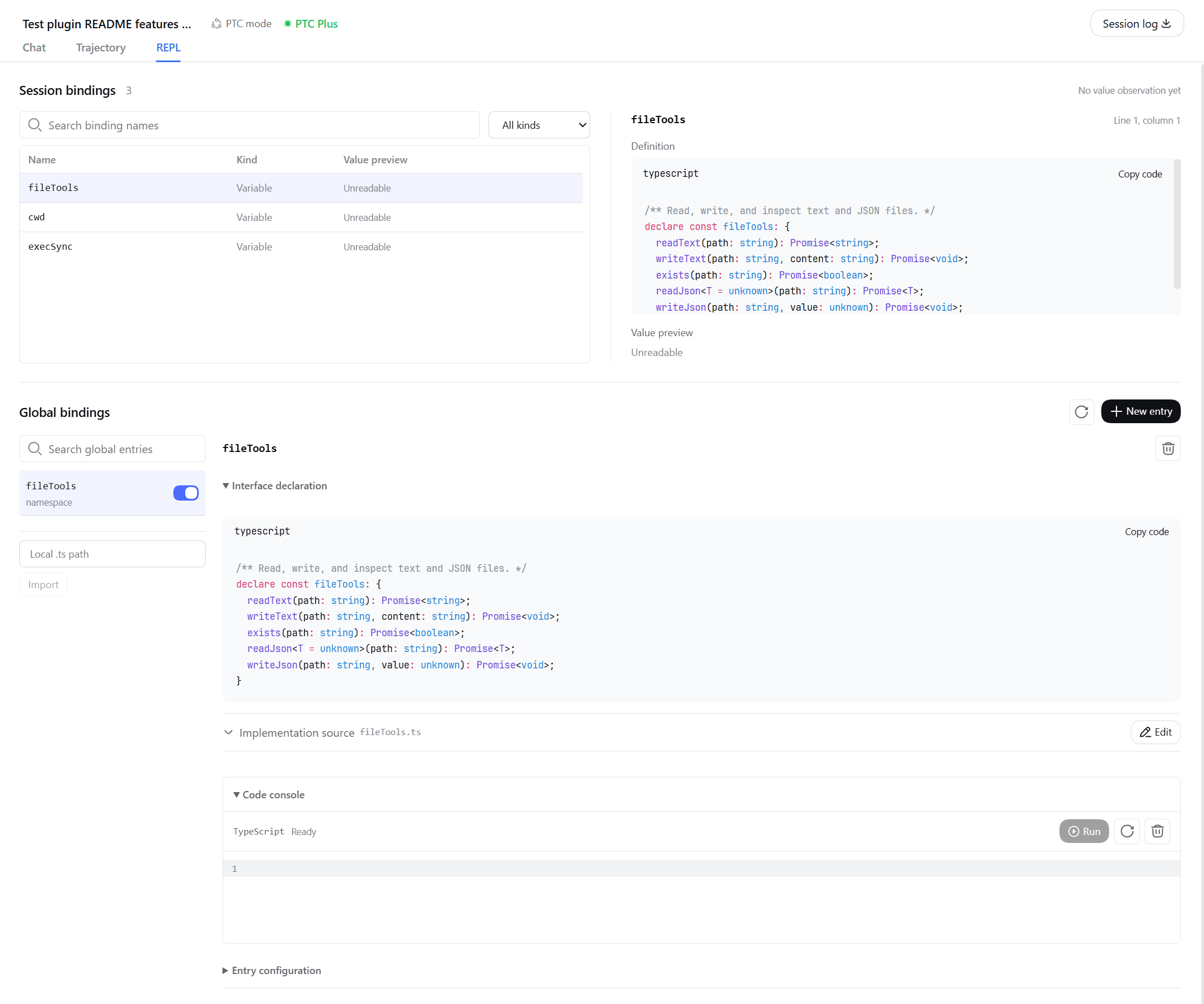
The **REPL** tab lets you search session bindings, inspect definitions, and manage global bindings. The global binding workbench's code console can run unsaved source with independent temporary state. File and network operations performed there still have real effects.
On wide screens, the green **PTC Plus** header indicator offers a quick binding list. On narrow screens, use the **REPL** tab:
## Scope
DSH continues to own tool permissions, approvals, cancellation, and sandbox policy. PTC Plus evaluates session code in a reclaimable helper process, so stuck or unresponsive computation can be terminated without ending DSH; this process boundary is not a security sandbox. Electron Desktop compatibility does not change the environment visible to evaluated code or its child processes. PTC Plus cannot recover every state across restarts: external inputs, unverifiable history, and context compaction can reduce the recovered state. Recovery neither repeats nor reverses historical external operations.
Value previews have size and type limits; objects that cannot be read reliably appear as unavailable. An enabled binding can also fail initialization, with failures reported in execution results. See the [runtime reference](docs/runtime-reference.md) for details.
Model calls and token usage depend on the task and model. A recorded paired observation and its limitations are in the [evaluation guide](docs/evaluation.md#recorded-paired-observation).
## Documentation
[Global binding guide](docs/user-bindings.en.md) · [Installation and upgrades](docs/installation.md) · [Runtime reference](docs/runtime-reference.md) · [Development and architecture](docs/architecture.md) · [Verification and test concurrency](docs/verification.md) · [All documentation](docs/README.md)
[MIT License](LICENSE).