Shanti
(Shanti: means peace of mind)
CLI tool to create and manage git worktrees and jujutsu workspaces in multiple repositories.
Features •
Installation •
Usage •
Configuration •
Roadmap
# Features
- **Manage spaces** — create, delete, and navigate git worktrees and jujutsu workspaces across multiple repositories.
- **Both backends, one list** — shanti detects per repository whether it is driven by git or by jj; a repository colocated with both appears once, and each space says which backend owns it.
- **Create spaces from PR links** — paste a GitHub PR URL and shanti clones the repo and creates a space from the PR branch (requires `gh` CLI or read-only `GITHUB_TOKEN`).
- **Colour schemes** — seven built-in schemes, light and dark, plus one that follows your terminal's own colours.
- **Vi-style navigation**
# Rationale
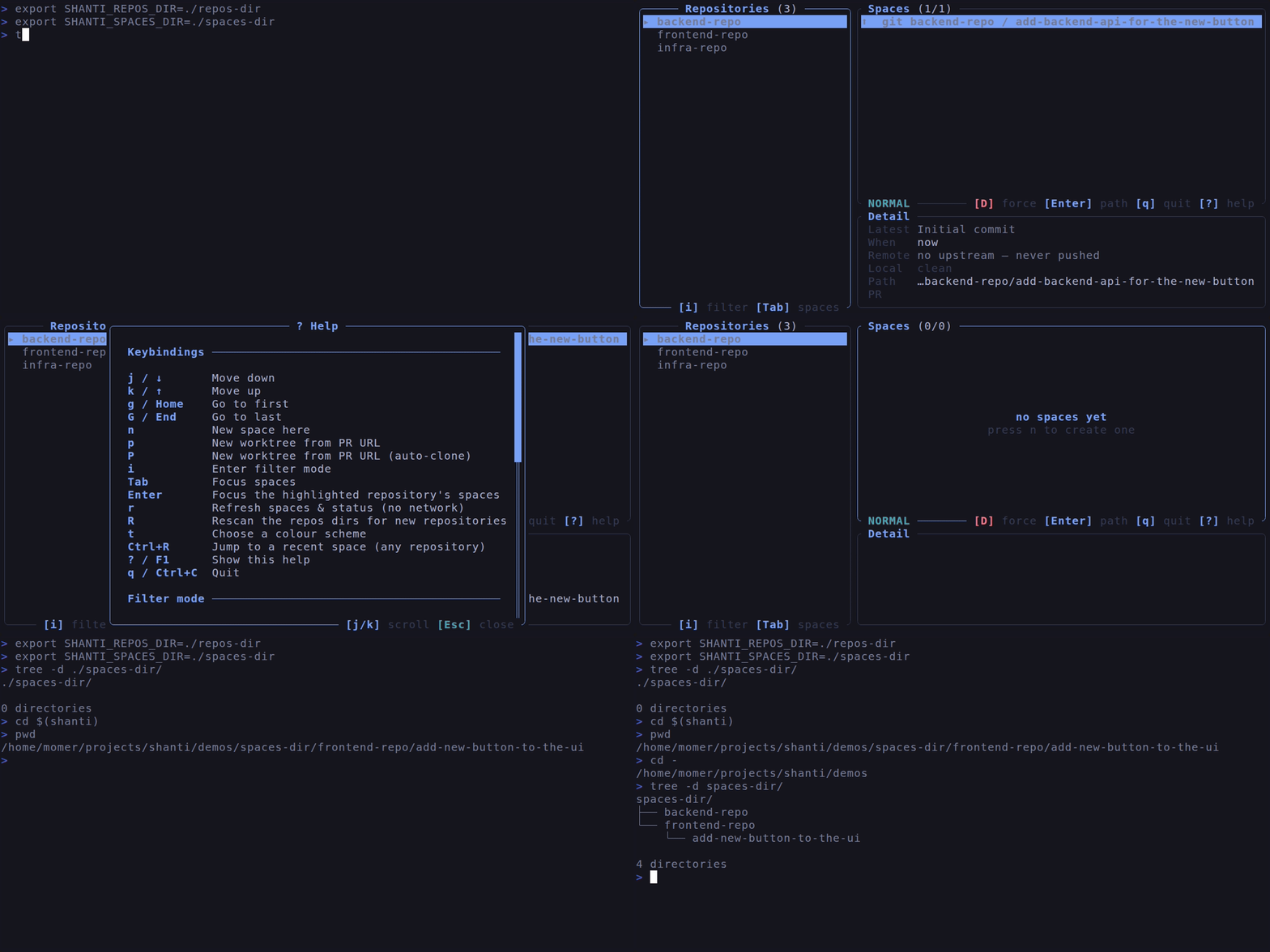
It simplifies working in multiple repositories, and multiple PRs in each repository. Where each PR has a separate space for ease of switching between the PRs.
The idea is to simplify context switching between open PRs by having all the spaces visible and manageable in single place.
`shanti` scans one or more repositories directories (`SHANTI_REPOS_DIR`) for repositories, and stores spaces under a separate directory (`SHANTI_SPACES_DIR`).
```
.
├── work_repos_dir/ # work repositories
│ ├── backend-repo/
│ └── frontend-repo/
├── personal_repos_dir/ # personal repositories
│ └── side-project/
└── spaces_dir/ # spaces managed by shanti
```
Assume, there is a new feature to add a button in the UI, and that button requires a new endpoint in the backend. Spaces can be created as below:
- In the `frontend-repo`, create a new space named `add-new-button-to-the-ui`.
- and, in the `backend-repo`, create a new space named `add-backend-api-for-the-new-button`.
When these spaces are created in `shanti` they will be stored under the `spaces_dir` as below:
```
└── spaces_dir/
├── backend-repo/
│ └── add-backend-api-for-the-new-button/ # checked-out space
│ ├── src/
│ └── ...
└── frontend-repo/
└── add-new-button-to-the-ui/ # checked-out space
├── src/
└── ...
```
To switch between the spaces, run `cd $(shanti)` to go the directory of the selected space.
# Spaces: worktrees and workspaces
A **space** is one checked-out directory of a repository that you can work in independently of the others. It is the one word shanti uses for both backends, because each calls it something different:
| backend | what a space is | created with |
| ------- | --------------- | ------------------ |
| git | a worktree | `git worktree add` |
| jujutsu | a workspace | `jj workspace add` |
A jj workspace differs from a git worktree in ways you will see in shanti:
- **jj auto-commits.** There is no "dirty working tree" in a jj space: your edits are already recorded in the working-copy commit. That is why the local status glyphs differ per backend (see below).
- **A jj space has a name, not a branch.** In a git repository the name you type is a branch name, and shanti creates the branch (from `origin/` if it exists, else the default branch, else `HEAD`). In a jj repository it is the workspace's name: shanti creates it with `jj workspace add --name ` and does not create a bookmark for you. If a bookmark of that name already exists on a remote, the new workspace starts from it (and shanti starts tracking it); otherwise it starts on top of `trunk()`, jj's own name for the repository's mainline.
- **Deleting is safer.** Before forgetting a workspace, shanti lets jj snapshot it, so whatever was on disk becomes a real change in the repository. The directory goes away, the work stays reachable from `jj log`.
## How the backend is chosen
The backend is selected automatically from what's on disk. A repository with both `.git` and `.jj` (colocated) is owned by jj, since running git behind jj's back would leave jj's view of it stale — new spaces there are jj workspaces, though git worktrees that already exist are still listed and still acted on through git.
# Installation
Download the binary from the releases or clone the repo and inside the root directory run:
`cargo install --path . --locked`
Typically, the binary will be installed in `$HOME/.cargo/bin/shanti`.
## Requirements
- **git** — mandatory; shanti drives it through the `git2` library.
- **[jj](https://jj-vcs.github.io/jj/) 0.28.0 or newer** — mandatory only if you use jujutsu repositories, and otherwise not consulted at all: no jj repositories will be found and `jj` is never run. shanti drives it through the `jj` command-line tool rather than a linked library, so it can be upgraded independently of shanti; an older jj is reported up front rather than failing later inside a template parse.
- **`SHANTI_JJ_BIN`** — optional; set it to an executable if `jj` does not live on `PATH` (a nix profile, a custom build).
# Usage
Run `cd $(shanti)` in `bash`/`zsh` or `cd (shanti)` in `fish` shell from any directory with the below CLI options, or define the environment variables or the configuration file and run it without any CLI option:
- `-r`, `--repos-dir`: one or more directories where repositories are stored, colon-separated (or set `SHANTI_REPOS_DIR`, e.g. `/path/a:/path/b`). Can be repeated: `--repos-dir /a --repos-dir /b`. An entry that does not exist is skipped with a warning; only an empty list is an error.
- `-d`, `--spaces-dir`: the directory where the spaces will be stored (or set `SHANTI_SPACES_DIR`). It is created if it is missing.
- `-f`, `--run-fetch`: fetch every repository at startup (or set `SHANTI_RUN_FETCH`).
Meant for scripted use; interactively, `f` fetches just the repository you are
looking at, when you want it.
- `--theme `: the colour scheme to use, e.g. `tokyo-night` or `catppuccin-latte` (or set `SHANTI_THEME`). An unknown name is an error listing the ones that work.
- `--config `: read this configuration file instead of the default one.
- `--show-config`: print the effective configuration, and where each value came from, then exit.
- `--no-hooks`: skip the [post-create hooks](#post-create-hooks) for this run (or set `SHANTI_NO_HOOKS` to any non-empty value).
## Keybindings
`shanti` uses vi-style keybindings. Check them with `?`
| key | action |
| ------------------------- | ----------------------------------------------------------------------------------------------------------- |
| `j` / `↓`, `k` / `↑` | move down / up |
| `g` / `Home`, `G` / `End` | go to first / last |
| `i` or `/` | filter the focused pane (`Esc` leaves it) |
| `Tab` | move focus between the repositories and spaces panes |
| `n` | new space in the highlighted repository (a repository picker when the terminal is too narrow for two panes) |
| `p` | new space from a GitHub PR URL |
| `P` | same, cloning the repository if it is missing |
| `r` | refresh: re-read every known repository's spaces and status (no network) |
| `R` | rescan the repos dirs, picking up repositories added or removed since launch |
| `f` | fetch the remotes of the selected space's repository, and only that one |
| `t` | choose a colour scheme, previewed live (`Enter` saves it, `Esc` restores the previous one) |
| `d` / `D` | delete with confirmation / force delete |
| `Enter` | print the path of the selected space and exit |
| `?` | help |
| `q` / `Ctrl+C` | quit |
# Configuration
Settings come from four layers. Later layers win:
1. built-in defaults,
2. the configuration file,
3. environment variables,
4. command line flags.
`shanti --show-config` prints the winner of each setting and the layer it came from:
```
config file: /home/you/.config/shanti/config.toml (loaded)
spaces_dir = /home/you/spaces (config file)
repos_dirs = /home/you/src (command line)
/home/you/work
run_fetch = false (built-in default)
backend = git (built-in default) [not yet used]
editor = (built-in default) [not yet used]
theme = tokyo-night (built-in default)
hooks = 1 file(s) copied, 2 command(s), 1 repo(s) with their own (config file)
```
## Configuration file
TOML, at `/config.toml`. The config directory is `$XDG_CONFIG_HOME/shanti` when `XDG_CONFIG_HOME` is set, and `~/.config/shanti` otherwise. `SHANTI_CONFIG` overrides that directory outright, and `--config` overrides the file path for a single run. A missing file simply means "use the defaults"; a malformed one is an error naming the file and the offending key.
```toml
repos_dirs = ["~/src", "~/work"]
spaces_dir = "~/spaces"
run_fetch = true
theme = "catppuccin-mocha"
```
`~` is expanded, and paths are resolved the same way no matter which layer they were written in.
`theme` names one of the built-in colour schemes; `SHANTI_THEME` and `--theme` override it, in that order. Press `t` inside shanti to preview and pick one live — that picker is the reference for what ships and what each looks like, and `Enter` there writes this key back for you.
Two further keys, `backend` (`"git"` / `"jujutsu"`) and `editor`, are accepted by the file but nothing acts on them yet: the backend is decided from the repository on disk, and there is no editor integration. `--show-config` marks them `[not yet used]` so the report never implies a value took effect. They are still accepted rather than rejected, so a file that already names them keeps working.
## Post-create hooks
A new space is a fresh checkout, so anything your project needs but does not version — an ignored `.env`, `node_modules`, a `direnv allow` — is missing. Configure it once and shanti runs it after every space it creates:
```toml
[hooks]
copy = [".env", ".envrc"]
run = ["direnv allow"]
[repos.my-app.hooks]
run = ["npm ci"]
```
- **`copy`** — paths relative to the repository root; a path that is not there is skipped, not an error.
- **`run`** — shell command lines, run with the new space as the working directory. Values arrive as environment variables (`SHANTI_SPACE_PATH`, `SHANTI_SPACE_NAME`, `SHANTI_REPO_PATH`, `SHANTI_REPO_NAME`, `SHANTI_BACKEND`) rather than being interpolated.
- Global `[hooks]` run first, then the repository's own `[repos..hooks]` (or `[repos."/abs/path".hooks]` when two checkouts share a name).
Hooks run in the background, so the list stays usable while they work; a failure costs only that hook, never the space, and the status line names what broke. Hooks are read only from **your own** configuration file, never from the repository itself, so cloning a repository is not a code-execution path. `--no-hooks` (or `SHANTI_NO_HOOKS=1`) skips them all for one run.
## Environment variables
| Variable | CLI flag | Description |
| ------------------- | -------------- | -------------------------------------------------------------------------------------- |
| `SHANTI_REPOS_DIR` | `--repos-dir` | Colon-separated directories containing repositories |
| `SHANTI_SPACES_DIR` | `--spaces-dir` | Directory where spaces are created |
| `SHANTI_RUN_FETCH` | `--run-fetch` | Fetch every repository at startup |
| `SHANTI_THEME` | `--theme` | Colour scheme to use, e.g. `catppuccin-latte` |
| `SHANTI_CONFIG` | `--config` | Directory holding `config.toml` (the flag names the file itself) |
| `SHANTI_JJ_BIN` | — | Path to the `jj` binary, when it is not on `PATH` |
| `SHANTI_DATA` | — | Directory for shanti's log file and `spaces.toml` (default `~/.local/state/shanti`) |
| `SHANTI_LOGLEVEL` | — | Log level, e.g. `debug` (`RUST_LOG` takes precedence) |
| `SHANTI_NO_HOOKS` | `--no-hooks` | Skip every post-create hook for this run (any non-empty value) |
| `GITHUB_TOKEN` | — | Read-only token for the GitHub PR flow, needed only when the `gh` CLI is not installed |
# GitHub PR spaces
`p` asks for a GitHub PR URL and creates a space for the PR's branch; `P` does the same and clones the repository first if it is not already in one of the repositories directories. PR details are read through the `gh` CLI when it is available, otherwise over HTTPS with `GITHUB_TOKEN`.
A clone made this way is always a plain **git** clone, even if you use jj everywhere. `jj git clone` would need a new-enough jj on every machine, and a clone is the moment a repository's shape is decided — deciding it for someone who never chose jj is not shanti's call. Adopting jj afterwards costs nothing: run `jj git init --colocate` in the clone and shanti drives it through jj on the next scan.
# Roadmap
- [x] Create new spaces.
- [x] Delete spaces.
- [x] Show the status of spaces (e.g. stale, active ...etc.).
- [x] Create spaces from remote branches.
- [x] Jujutsu workspaces alongside git worktrees.
- [x] Configuration file.
- [x] Selectable, persisted colour schemes.
- [ ] Create PRs from spaces.
- [x] Add metadata to spaces — the detail pane, with the PR each space came from.