[← README](../../README.md) · [Docs index](../README.md)
# The preview pane
The desktop app's preview pane shows the file or folder under the cursor and follows it as you
move: over 60 kinds of file, from code and Markdown to web pages, spreadsheets, databases,
e-books, certificates, slides and LaTeX. Most are drawn by libraries built into the app; a few
need a real program (LaTeX, LibreOffice, PlantUML, pandoc, DuckDB, ffmpeg, ImageMagick, calibre for e-books), which Coxswain runs from
your install or from a network-less container.
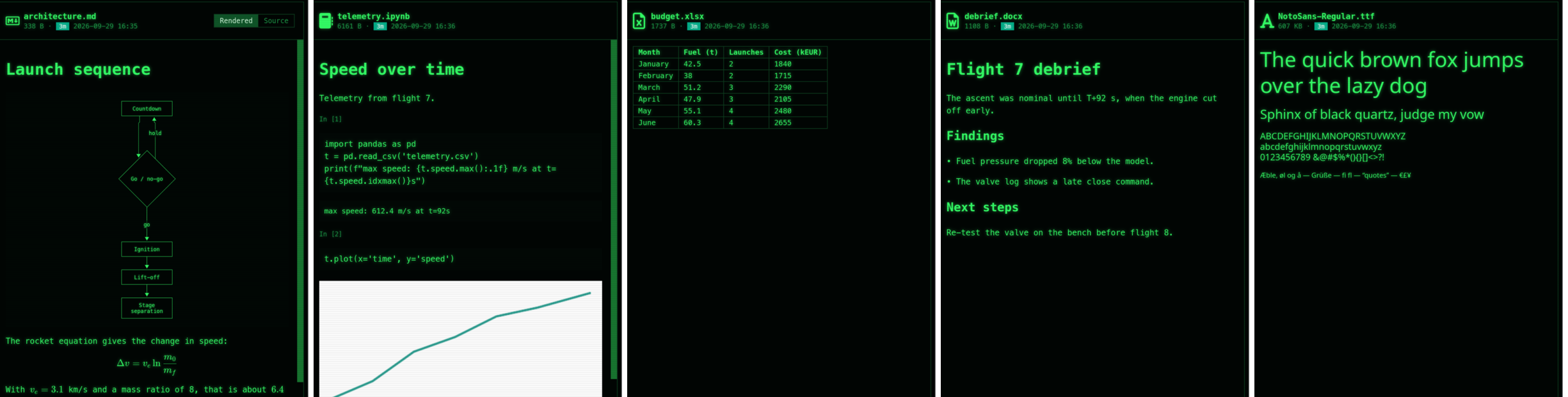
*The same pane, five files: architecture.md (Rendered), telemetry.ipynb, budget.xlsx, debrief.docx and NotoSans-Regular.ttf.*
The preview pane is **desktop-only**. It is drawn by the app's webview: a PDF viewer, SVG
diagrams, pictures, video, sandboxed web pages, fonts at several sizes. A terminal has only
character cells, so the terminal app shows a file in its
[built-in viewer](../commands/view-and-edit.md#the-built-in-viewer) instead: **F3** opens it
full screen, highlighted in the theme's colours (or in the program `viewer` in the config
names), **Enter** in the program your system opens it with. See [View and edit](../commands/view-and-edit.md).
How a preview is made, in the order Coxswain tries ([Previews made by tools](tools.md) has the
details; *Settings → Previews → Use* can put the container first, or leave it out):
```mermaid
flowchart TD
file[The file under the cursor] --> own{A reader built
into the app?}
own -->|yes: code, PDF, pictures,
spreadsheets, …| shown[Shown at once]
own -->|no: LaTeX, LibreOffice,
PlantUML, pandoc, DuckDB,
ffmpeg, ImageMagick,
GDAL, OpenSCAD, KiCad, calibre| tool{The program
installed?}
tool -->|yes| run[It runs; the result
is cached]
tool -->|no| box{podman or docker,
and an image?}
box -->|yes| cont[It runs in a container
with no network;
a first pull waits for a click]
box -->|no| none[A greyed button and the
line that installs it, with Copy]
```
## Contents
- [Opening and closing it](#opening-and-closing-it)
- [What the pane shows](#what-the-pane-shows)
- [Every format, and its page](#every-format-and-its-page)
- [Keys at a glance](#keys-at-a-glance)
## Opening and closing it
1. Put the cursor on a file or folder.
2. Press **Space** or **F3** (NC's F3 opened its viewer). The pane opens at the right of the
window (at the left in a right-to-left language such as Hebrew).
3. Move with the arrow keys: the pane follows the cursor.
4. **Space**, **F3** or **Esc** closes it again, or click the `×` at the right of the pane's
header (its tooltip: *Close the preview (Esc)*). The `×` is there with nothing selected too,
above *Nothing selected*.
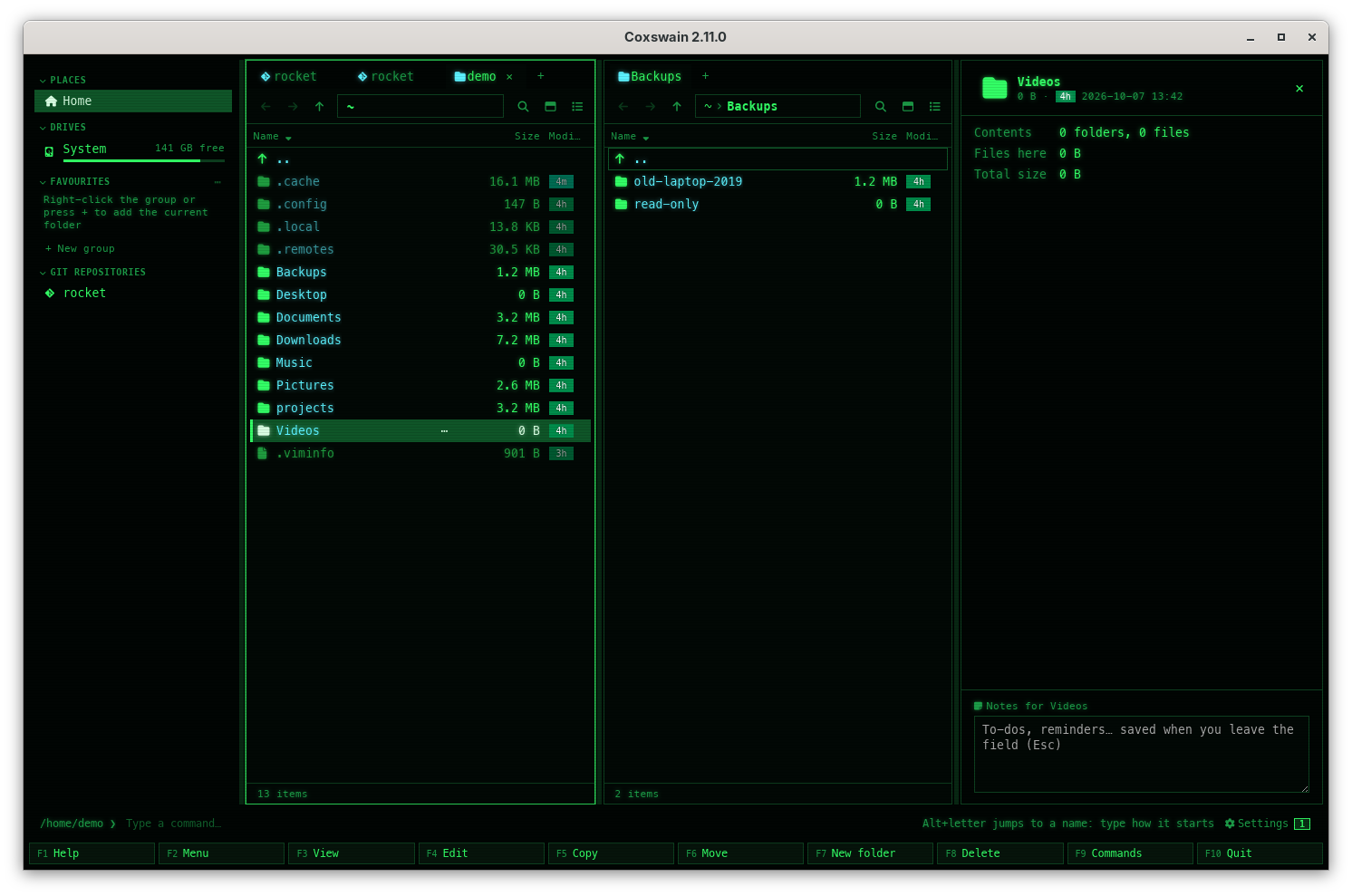
Drag the pane's left edge to make it wider or narrower (240 to 900 pixels, never more than 60 %
of the window). Whether it is open, its width, and every switch you set are kept in the
[session](../panels/session.md). When a [command](../commands/command-line.md) has run, the pane
shows its output (titled *Command output*) until you press its `×` (*Close the command output
and show the preview again*), **F3**, or move on.
## What the pane shows
At the top: the file's icon, name, size (or *Folder*, or the folder's size once
[measured](../panels/folder-sizes.md)), its age chip and date, and at the right the switches for
this kind of file. Under that, the preview; under the preview, for some files, a list of facts
(camera and lens, audio tags, what a program is built for). At the very bottom, the
[folder notes](../organise/notes.md). With nothing under the cursor it says *Nothing under the cursor*.
**A file only in the cloud** (OneDrive, Dropbox, Google Drive, Proton Drive, iCloud) is not
previewed by itself, as reading it would download it: the pane says *Online only: not downloaded.
Press Enter to download and open it, or:* with **Download and preview**, which downloads it and
shows it. No thumbnail and no facts either until then ([Cloud files](../search/cloud-files.md)).
### Switches
Where a file can be shown in more than one way, buttons at the top right choose. The choice
sticks: it applies to the next file of that kind too, and survives a restart.
| Switch | Shown for | Choices |
|---|---|---|
| **File / Diff** | Files git sees as changed | The file, or `git diff HEAD` for it ([Git](../panels/git.md)) |
| **Rendered / Source** | Markdown, HTML, Mermaid, Graphviz, AsciiDoc, calendars, contacts | The rendered view, or the highlighted source |
| **Tree / Source** | JSON, YAML, TOML | A collapsible tree, or the source |
| Sheet names | Workbooks with more than one sheet | One button per sheet |
| **‹** *Page 1 of 4* **›** | TIFF pages, comics | The page before or after ([Old pictures and files](old-formats.md)) |
| Engine buttons | Files made by a tool (LaTeX, Office, PlantUML, …) | The installed programs and the container, e.g. **latexmk · tectonic · podman texlive:latest** |
| Page | What it covers |
|---|---|
| [Text and code](text-and-code.md) | Highlighted code, hex dumps, the git diff, Markdown with Mermaid and math |
| [Logs: follow, filter, columns](logs.md) | Logs, JSON Lines and big text files of any size: coloured by level, followed, filtered by level, text or field, fields as columns, stack traces folded; both apps |
| [Documents](documents.md) | PDF (with *Make PDF searchable* on a scan), Word `.docx`, EPUB, Jupyter notebooks, e-mail, AsciiDoc, reStructuredText, Typst, PostScript, XPS, calendars and contacts |
| [HTML pages, sandboxed](html.md) | `.html` files shown as a browser shows them, with no script and nothing from the web |
| [PowerPoint and Office](office.md) | Slides drawn in the app at once, LibreOffice's exact view after, every other Office format, the old ones (Works, Write, WordPerfect, Lotus 1-2-3) and Windows clip art |
| [Data](data.md) | JSON, YAML and TOML trees, spreadsheets and CSV, SQLite, Parquet, DuckDB, certificates, property lists |
| [Cryptography bills of materials](bom.md) | CycloneDX CBOMs as a rated tree or sunburst, filters, Found in, comparing two scans; the terminal app's own viewer |
| [Build provenance](provenance.md) | SLSA and in-toto provenance as inputs → build → outputs, the signer, outputs checked against the files here, the source commit in your checkout, two builds compared; the terminal app's own viewer |
| [Chess games](chess.md) | PGN files, SCID databases and ChessBase databases (`.cbh`) as a table of games with a filter, each game on a board with its moves and variations; EPD and FEN positions; Polyglot opening books' moves; both apps, the terminal app full screen |
| [Game pieces in the terminal](game-pieces.md) | The terminal app's game pieces: chess and draughts drawn from block characters (octants, sextants, quadrants or half blocks) after the desktop app's pictures, Go stones, shogi tiles and xiangqi discs as shapes with their names as text, as large as the window allows; the desktop app's pictures where the terminal shows them; figurines on a small board |
| [Chess: playing on and the engine](chess-play.md) | Your own moves played from any position, kept as a line beside the game and saved only as a new PGN file; an installed UCI engine's best lines and evaluation (Stockfish or another chosen in Settings, with its own options and a time, depth or node limit), each line stepped through like a variation; both apps |
| [Go games](go.md) | SGF files as a list of games, each on a board stepped through with its captures, variations and comments; both apps, the terminal app full screen |
| [Draughts games](draughts.md) | PDN files as a table of games, each on a numbered board with its captures, kings and variations; international and English draughts; both apps, the terminal app full screen |
| [Xiangqi games](xiangqi.md) | Chinese chess in PGN and DhtmlXQ files (the xiangqi websites' format, inside a zip too) as a table of games, each on a board with the river and palaces and its pieces as characters; ICCS, WXF and Chinese notation; both apps, the terminal app full screen |
| [Shogi games](shogi.md) | KIF and CSA files as a table of games, each on a 9×9 board with the pieces in hand, drops and promotions, variations and comments; both apps, the terminal app full screen |
| [Bridge deals](bridge.md) | PBN files as a table of deals, each as four hands round the table with its auction and play trick by trick; both apps, the terminal app full screen |
| [Neural network models](neural-networks.md) | ONNX, TensorFlow Lite, Core ML and Keras models: inputs, outputs, nodes and parameters in both apps; the graph drawn by Netron, offline, in the desktop app |
| [Media and files](media.md) | Pictures, video, audio, fonts, archives listed, folders, and the facts under a file; with ffmpeg and ImageMagick the video and sound the player cannot play, HEIC, GIMP and RAW photos, video thumbnails |
| [Old pictures and files](old-formats.md) | TIFF with its pages, TGA, DDS, HDR, OpenEXR, JPEG XL, Amiga IFF, PCX, XPM, Photoshop; comics page by page, mailboxes as folders, Outlook `.msg`, dBase tables, tracker music; in both apps |
| [E-books](ebooks.md) | MOBI, Kindle, FictionBook, LIT and Palm books through calibre: cover, title, authors, first pages, Find, Convert e-book; opt-in |
| [Diagrams](diagrams.md) | draw.io, Mermaid, Graphviz, PlantUML, and D2, ditaa, svgbob, Pikchr, nomnoml, WaveDrom, Vega, DBML, erd and bytefield by their programs or Kroki's image |
| [LaTeX projects](latex.md) | Which file is the document, which engine, building by itself, another engine when one fails |
| [Geodata](geodata.md) | GeoPackage, shapefiles, GeoJSON, KML, GPX and GeoTIFF as a map of their own shapes with their facts, a GPX track's length and time, and Convert geodata, by GDAL |
| [OpenSCAD models](openscad.md) | `.scad` models as a picture of their part, and Export 3D model as STL or 3MF, by OpenSCAD |
| [KiCad](kicad.md) | Schematics sheet by sheet and boards layer by layer, a board in 3D as its thumbnail, and Export from KiCad, by kicad-cli |
| [Previews made by tools](tools.md) | The engine buttons, rendering, the preview cache and clearing it, `[preview]` |
| [Containers](containers.md) | podman or docker, what a container may do, what each image gives and costs, pulling, updating and removing images |
| [Safety, speed and limits](safety.md) | What a preview can never do, what loads when, and every size limit |
## Every format, and its page
| Files | Shown as | Page |
|---|---|---|
| Code, config, plain text | Highlighted in the theme's colours | [Text and code](text-and-code.md#formats) |
| `.log`, `.jsonl` `.ndjson`, `syslog`, `app.log.1`, any text over 512 KB | Lines coloured by level, followed, filtered, fields as columns | [Logs](logs.md) |
| Binary files | Hex dump | [Text and code](text-and-code.md#formats) |
| .gguf .safetensors, Ollama's and Hugging Face's blobs; .pt .pth .ckpt | The model's facts, the memory it needs and whether it fits; a pickle named, never opened | [Your local models](../files/local-models.md#the-facts) |
| `.md` `.markdown` | Rendered, with Mermaid and math | [Text and code](text-and-code.md#markdown) |
| `.html` `.htm` `.xhtml` | The page, sandboxed | [HTML](html.md) |
| `.pdf` | Pages, zoom, fitted to the width; a scan offered to be made searchable | [Documents](documents.md#formats), [Make PDF searchable](../files/searchable-pdf.md) |
| `.typ` | PDF built by Typst | [Documents](documents.md#typst) |
| `.ps` `.eps`, `.xps` `.oxps` | PDF made by Ghostscript, GhostXPS | [Documents](documents.md#postscript-and-xps) |
| `.docx`, `.epub`, `.ipynb`, `.eml`, `.adoc`, `.rst`, `.ics`, `.vcf` | Document, book, notebook, mail, cards | [Documents](documents.md#formats) |
| `.pptx` `.pptm` `.ppsx` `.potx` | Slides at once, exact view after | [Office](office.md) |
| `.doc` `.odt` `.rtf` `.ppt` `.odp` `.vsdx`, `.wps` `.wri` `.wpd` `.wk1` `.123`, `.wmf` `.emf` and more | PDF made by LibreOffice | [Office](office.md#formats) |
| `.json` `.yaml` `.toml` | Tree | [Data](data.md#formats) |
| `.csv` `.tsv` `.xlsx` `.xlsm` `.xlsb` `.xls` `.ods` | Table, a button per sheet | [Data](data.md#formats) |
| `.db` `.sqlite`, `.parquet`, `.duckdb` | Tables, rows, schema | [Data](data.md#formats) |
| `.pem` `.crt` `.cer` `.der`, `.plist` | Certificate facts, XML | [Data](data.md#formats) |
| `.onnx` `.tflite` `.mlmodel` `.mlpackage` `.keras`, a Keras `.h5` | The model's facts and its graph, drawn by Netron | [Neural network models](neural-networks.md) |
| `.cdx.json` `.cdx.xml` `.cbom.json`, CycloneDX JSON/XML | Rated tree, sunburst, compare | [Cryptography bills of materials](bom.md) |
| `.intoto.jsonl` `.sigstore.json` `.build.slsa` `provenance.json`, in-toto JSON | Inputs → build → outputs, checks, compare | [Build provenance](provenance.md) |
| `.pgn` `.pgn.gz` `.pgn.zst` `.si4` `.si5` `.cbh` `.cbv` `.epd` `.fen` | A table of games, a game on a board with its moves, positions | [Chess games](chess.md) |
| `.bin` (a Polyglot book) | The board at the start, the book's moves with their weights | [Chess games](chess.md#opening-books) |
| `.sgf` | A list of Go games, a game on a board with its stones and variations | [Go games](go.md) |
| `.pdn` | A table of draughts games, a game on a numbered board with its moves | [Draughts games](draughts.md) |
| `.pgn` with `[Game "Chinese Chess"]` | A table of xiangqi games, a game on a board with the river and palaces | [Xiangqi games](xiangqi.md) |
| A DhtmlXQ game (no ending, `.che`, `.txt` or `.dhtmlxq`, starts with `[DhtmlXQ`) | The xiangqi game on its board | [Xiangqi games](xiangqi.md#dhtmlxq-games) |
| `.kif` `.kifu` `.csa` | A table of shogi games, a game on a board with the pieces in hand | [Shogi games](shogi.md) |
| `.pbn` | A table of bridge deals, a deal as four hands with its auction and tricks | [Bridge deals](bridge.md) |
| Pictures, video, audio, fonts | Image, player, sample text | [Media](media.md#formats) |
| `.avi` `.wmv` `.mpg` `.wma` `.ape` and other video and sound the player cannot play | A frame of the video, the waveform, their facts, by ffmpeg | [Media](media.md#video-and-sound-with-ffmpeg) |
| `.heic` `.xcf` and RAW photos (`.dng` `.cr2` `.nef` …) | The picture, by ImageMagick or ffmpeg | [Media](media.md#photos-only-imagemagick-or-ffmpeg-reads) |
| `.tif` `.tga` `.dds` `.hdr` `.exr` `.qoi` `.jxl` `.iff` `.lbm` `.pcx` `.xpm` `.xbm` `.psd` and Netpbm | The picture, a TIFF page by page | [Old pictures and files](old-formats.md#pictures) |
| `.cbz`, `.mbox`, `.msg`, `.dbf` | Comic pages, messages, a mail, a table | [Old pictures and files](old-formats.md#formats) |
| `.mod` `.xm` `.s3m` `.it` | Tracker music: its samples and facts | [Old pictures and files](old-formats.md#tracker-music) |
| `.mobi` `.azw` `.azw3` `.fb2` `.lit` | Cover, title, authors and first pages, by calibre (opt-in) | [E-books](ebooks.md) |
| `.zip` `.7z` `.tar.*` and other archives | The files inside | [Media](media.md#archives) |
| `.drawio` `.dio` (and `.drawio.svg` `.drawio.png` with the diagram inside), `.mmd`, `.dot` `.gv`, `.puml`, `.d2` `.ditaa` `.bob` `.pikchr` `.nomnoml` `.wavedrom` `.vg` `.vl` `.dbml` `.er` `.bytefield` | Diagrams | [Diagrams](diagrams.md) |
| `.tex` `.ltx` | PDF built by LaTeX | [LaTeX](latex.md) |
| `.scad` | A picture of the part OpenSCAD makes | [OpenSCAD models](openscad.md) |
| `.kicad_sch` `.kicad_pcb` | A PDF of the sheets or the board's layers | [KiCad](kicad.md) |
| `.gpkg` `.shp` `.geojson` `.kml` `.gpx`, GeoTIFF | A map of the file's own shapes, its layers, coordinate system and extent; a GPX track's length and time | [Geodata](geodata.md) |
## Keys at a glance
| Key | Desktop app | Terminal app | Does |
|---|---|---|---|
| **Space** | Preview | (types a space) | Shows or hides the preview pane |
| **F3** | View | View | Desktop: shows or hides the pane. Terminal: opens the file in the built-in viewer |
| **Esc** | Closes the pane | – | When the command line is empty |
| **Enter** | Opens the file | Opens the file | In the program your system uses for it |
| **Alt+N** | Folder notes | – | Opens the pane and puts the cursor in the notes |
| **Ctrl+E** | Extract archive | Extract archive | Unpacks the archive under the cursor into the other panel |
The names are those of the command list (**F9**); **Space** and **F3** can be given other keys
in [`[keys]`](../customise/keys.md) as `toggle_preview` and `view`.
---
[← Previous: Search settings](../search/settings.md) · [Next: Text and code →](text-and-code.md)