[← README](../../README.md) · [Docs index](../README.md) · [The preview pane](README.md)
# Previews made by tools
Some formats need a real program: a TeX distribution, Typst, LibreOffice, Ghostscript, PlantUML,
D2 and the other diagram programs, pandoc, DuckDB, ffmpeg, ImageMagick, GDAL, OpenSCAD, KiCad, and
calibre for [e-books](ebooks.md) when turned on.
Coxswain uses one that is installed, or runs it in a [container](containers.md) (podman or
docker), so nothing has to be installed for a preview you only need now and then. Results are
kept in a cache, so each file is made once.
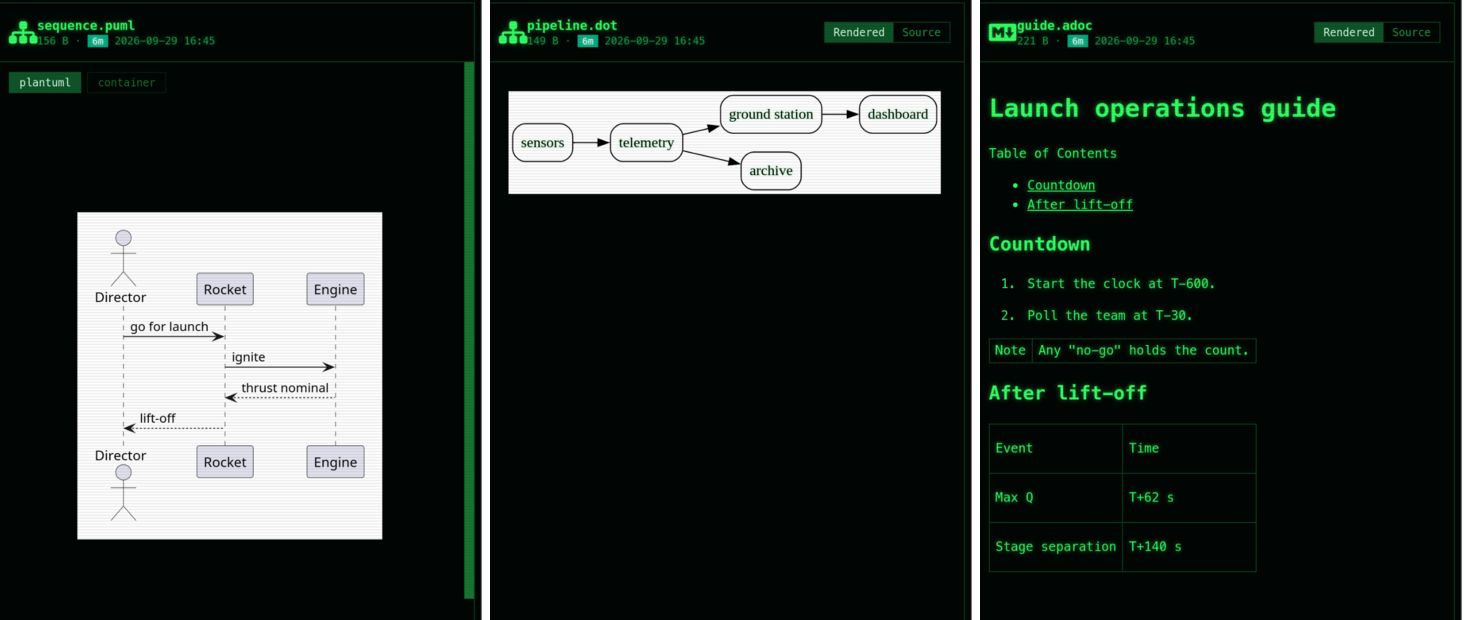
*The engine buttons at the top of a tool preview: here the installed `plantuml` is used; the container is greyed, as there is no podman or docker to run it.*
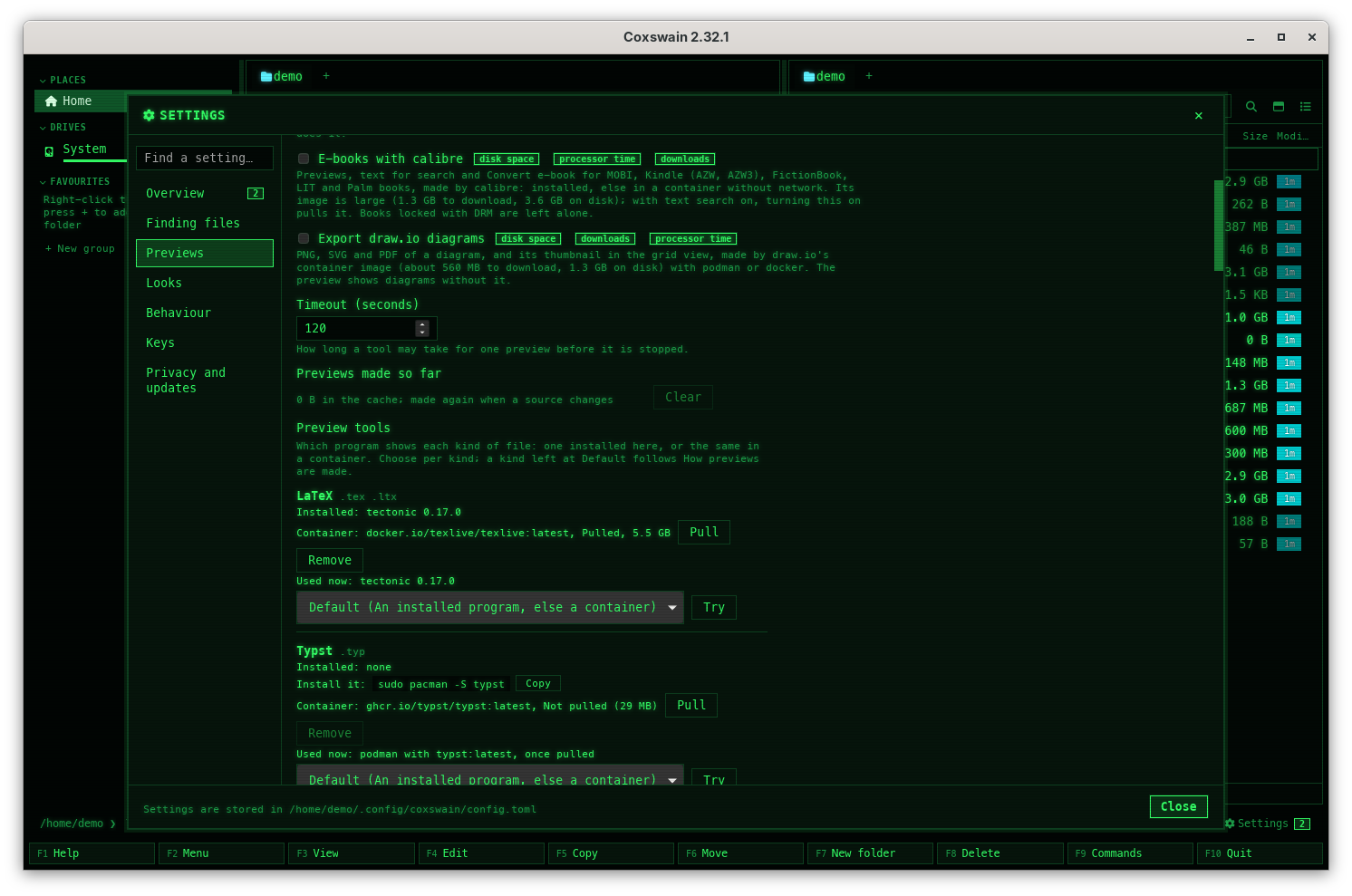
*Settings → Previews → Preview tools: which program makes each kind of preview, and the choice per kind.*
## Contents
- [The tools](#the-tools)
- [Preview tools in Settings](#preview-tools-in-settings)
- [Preview with…](#preview-with)
- [How to use it](#how-to-use-it)
- [How it works](#how-it-works)
- [The preview cache](#the-preview-cache)
- [What you see](#what-you-see)
- [Installing what is missing](#installing-what-is-missing)
- [Settings and config.toml](#settings-and-configtoml)
- [In the terminal app](#in-the-terminal-app)
- [Questions](#questions)
## The tools
Every kind of file a tool shows, the programs Coxswain looks for (best first) and its container
image. The kind's name in backquotes is its key under `[preview.tools]`. This table is made from
the app's own list (`crates/coxswain-core/src/preview_tools.rs`); a test fails when they differ.
| Kind (`[preview.tools]`) | Files | Installed programs it looks for | Container image (default) |
|---|---|---|---|
| [LaTeX](latex.md) (`latex`) | `.tex` `.ltx` | `latexmk`, `tectonic`, `pdflatex` | `latex`: `docker.io/texlive/texlive:latest` (about 2.8 GB to download, 5.9 GB on disk) |
| [Typst](documents.md#typst) (`typst`) | `.typ` | `typst` | `typst`: `ghcr.io/typst/typst:latest` (about 29 MB to download, 65 MB on disk) |
| [Office documents](office.md) (`office`) | `.doc` `.docm` `.dot` `.dotx` `.odt` `.ott` `.rtf` `.wri` `.ppt` `.pptx` `.pps` `.ppsx` `.pot` `.potx` `.odp` `.otp` `.odg` `.vsd` `.vsdx` `.pub` `.wpd` `.wps` `.wk1` `.wks` `.123` `.lwp` `.sxw` `.sxc` `.sxi` `.sxd` `.abw` `.cwk` `.pages` `.key` `.numbers` `.fodt` `.fods` `.fodp` `.fodg` `.cdr` `.pmd` `.wmf` `.emf` | `soffice`, `libreoffice` | `libreoffice`: `docker.io/gotenberg/gotenberg:8-libreoffice` (about 440 MB to download, 1.0 GB on disk) |
| [PostScript and XPS](documents.md#postscript-and-xps) (`postscript`) | `.ps` `.eps` `.xps` `.oxps` | `gs`, `gswin64c`, `gxps` | `ghostscript`: `docker.io/jbarlow83/ocrmypdf-alpine:latest` (about 310 MB to download, 850 MB on disk)
`gxps`: none; set one you trust |
| [Diagrams](diagrams.md) (`diagrams`) | `.puml` `.plantuml` `.pu` `.iuml` `.wsd` `.d2` `.ditaa` `.bob` `.svgbob` `.pikchr` `.nomnoml` `.noml` `.wavedrom` `.vg` `.vega` `.vl` `.vegalite` `.dbml` `.er` `.erd` `.bytefield` | `plantuml`, `d2`, `svgbob`, `pikchr`, `erd` | `plantuml`: `docker.io/plantuml/plantuml:latest` (about 141 MB to download, 353 MB on disk)
`kroki`: `docker.io/yuzutech/kroki:latest` (about 1.2 GB to download, 2.8 GB on disk) |
| [reStructuredText](documents.md) (`markup`) | `.rst` `.rest` | `pandoc` | `pandoc`: `docker.io/pandoc/core:latest` (about 57 MB to download, 246 MB on disk) |
| [DuckDB databases](data.md) (`databases`) | `.duckdb` `.ddb` | `duckdb` | `duckdb`: `ghcr.io/mwo-dk/coxswain-duckdb:latest` (about 25 MB to download, 76 MB on disk) |
| [Video and sound](media.md#video-and-sound-with-ffmpeg) (`video`) | `.avi` `.wmv` `.flv` `.mpg` `.mpeg` `.m2v` `.ts` `.m2ts` `.mts` `.3gp` `.3g2` `.vob` `.asf` `.rm` `.rmvb` `.divx` `.ogm` `.f4v` `.mxf` `.dv` `.nut` `.wma` `.ape` `.ac3` `.dts` `.amr` `.aiff` `.aif` `.au` `.mka` `.wv` `.tta` `.caf` `.w64` `.mp2` `.oga` `.spx` `.ra` | `ffmpeg` | `ffmpeg`: `docker.io/mwader/static-ffmpeg:latest` (about 126 MB to download, 315 MB on disk) |
| [Pictures (HEIC, RAW, GIMP)](media.md#photos-only-imagemagick-or-ffmpeg-reads) (`pictures`) | `.heic` `.heif` `.xcf` `.dpx` `.cin` `.fits` `.fts` `.sgi` `.sun` `.ras` `.xwd` `.pict` `.pct` `.miff` `.wbmp` `.dng` `.cr2` `.cr3` `.crw` `.nef` `.nrw` `.arw` `.srf` `.sr2` `.orf` `.rw2` `.raf` `.pef` `.srw` `.x3f` `.erf` `.kdc` `.dcr` `.mrw` `.3fr` `.iiq` `.rwl` | `magick`, `ffmpeg` | `imagemagick`: `ghcr.io/mwo-dk/coxswain-imagemagick:latest` (about 21 MB to download, 52 MB on disk) |
| [Circuits and boards (KiCad)](kicad.md) (`kicad`) | `.kicad_sch` `.kicad_pcb` | `kicad-cli` | `kicad`: `docker.io/kicad/kicad:9.0.9` (about 476 MB to download, 1.7 GB on disk) |
| [E-books (calibre)](documents.md) (`ebooks`) | `.mobi` `.azw` `.azw3` `.fb2` `.lit` `.pdb` | `ebook-convert` | `calibre`: `docker.io/linuxserver/calibre:9.16.0` (about 1.3 GB to download, 3.6 GB on disk) |
| [Maps (geodata)](geodata.md) (`maps`) | `.gpkg` `.shp` `.geojson` `.kml` `.gpx` | `gdalinfo` | `gdal`: `ghcr.io/osgeo/gdal:alpine-small-3.13.3` (about 40 MB to download, 98 MB on disk) |
| [3D models (OpenSCAD)](openscad.md) (`models`) | `.scad` | `openscad` | `openscad`: `docker.io/openscad/openscad:trixie.2026-10-19` (about 241 MB to download, 635 MB on disk) |
| [Other formats (Tika, for search)](../search/tika.md) (`other`) | `.one` `.xps` `.oxps` `.chm` `.pst` `.ost` `.mht` `.mhtml` `.hwp` `.mdb` `.accdb` | none | `tika`: `docker.io/apache/tika:4.1.0` (about 190 MB to download, 440 MB on disk) |
| [Transcripts (Whisper)](../search/transcripts.md) (`transcripts`) | `.mp3` `.m4a` `.m4b` `.aac` `.wav` `.flac` `.ogg` `.oga` `.opus` `.wma` `.aiff` `.aif` `.mp4` `.m4v` `.mov` `.mkv` `.webm` `.avi` | `whisper-cli` | `whisper`: `ghcr.io/ggml-org/whisper.cpp:main` (about 505 MB to download, 1.1 GB on disk) |
| [Chess engine (Stockfish)](chess-play.md) (`chess_engine`) | `.pgn` `.epd` `.fen` | `stockfish` | `stockfish`: `ghcr.io/mwo-dk/coxswain-stockfish:latest` (about 70 MB to download, 80 MB on disk) |
| [Searchable PDFs (OCR)](../files/searchable-pdf.md) (`ocr`) | `.pdf` | `ocrmypdf` | `ocrmypdf`: `docker.io/jbarlow83/ocrmypdf-alpine:latest` (about 310 MB to download, 850 MB on disk) |
| [Build PDF of AsciiDoc](../files/asciidoc-pdf.md) (`asciidoc`) | `.adoc` `.asciidoc` | `asciidoctor-pdf` | `asciidoctor`: `docker.io/asciidoctor/docker-asciidoctor:latest` (about 665 MB to download, 1.5 GB on disk) |
| [Export draw.io diagram](../files/drawio-export.md) (`drawio`) | `.drawio` `.dio` | none | `drawio`: `docker.io/rlespinasse/drawio-desktop-headless:latest` (about 560 MB to download, 1.3 GB on disk) |
| [Scan for viruses](../files/virus-scan.md) (`viruses`) | any | none | `clamav`: `docker.io/clamav/clamav-debian:1.5_base` (about 80 MB to download, 240 MB on disk) |
What each makes and when it runs by itself:
| Kind | Result | Runs by itself |
|---|---|---|
| LaTeX | PDF | After 0.8 s, when `latex_auto` is on |
| Typst, PostScript and XPS | PDF | At once |
| Office documents | PDF | After 0.6 s |
| Diagrams | SVG | At once |
| reStructuredText | HTML | At once |
| DuckDB databases | Tables, row estimates, column counts | At once |
| Video and sound | PNG of a frame (videos the player cannot play, every video's thumbnail and poster), PNG of the waveform (sound) | At once |
| Pictures | PNG; ImageMagick's image first once pulled | At once |
| Maps | SVG map | At once |
| 3D models | A picture of the part (an SVG outline of a flat model) | At once |
| KiCad | PDF of the sheets or layers; a board in 3D as its thumbnail | At once |
| E-books | Cover, title, authors and first chapter, only with *E-books with calibre* on ([E-books](ebooks.md)) | After 0.4 s |
| Searchable PDFs | A searchable copy, only when [Make PDF searchable](../files/searchable-pdf.md) is asked for | – |
| Transcripts (Whisper) | No preview: the transcript [Transcribe](../search/transcripts.md) makes when asked; *Off* counts as *Default* there | – |
| Other formats (Tika) | No preview: the text [search](../search/tika.md) reads, when `[search] tika` is on; its row has no choice, only its image's **Pull** and **Remove** | – |
"Runs by itself" never includes a container whose image is not pulled yet: a download waits for
your click.
## Preview tools in Settings
*Settings → Previews → Preview tools* (desktop app: **Ctrl+,**; terminal app: **F12**, then
**→** to *Previews*) has a row for every kind in the table above. Each row says:
| Line | Means |
|---|---|
| The kind and its file endings | *LaTeX .tex .ltx* |
| *Installed: latexmk 4.86, pdflatex 3.141592653* | The programs found, with the version each says; *Installed: none* when there is none, then *Install it:* with the line for this system and **Copy** |
| *Container: docker.io/texlive/texlive:latest, Pulled, 5.9 GB* | Its image and whether the runtime has it (*Not pulled (2.8 GB)*), with **Pull** (also updates) and **Remove**; hover it for what the image gives and costs. An image with none set (GhostXPS's by default, or one set to `""`) says *Container: no image; name one under [preview.images] duckdb in config.toml*, with **Open config.toml** |
| *Used now: latexmk 4.86* | What makes these previews now; *podman with texlive:latest, once pulled* when the container is used and its image is still to come; *nothing: install the program, or pull its image* in red when nothing can; *nothing: install duckdb* when the kind has no image (`duckdb = ""`), as there is nothing to pull; *duckdb 2.0.0: no container image is set, so the installed program* when the choice is *Container* but no image is set |
| The choice | *Default (An installed program, else a container)*, *Installed program*, *Container*, *Off*; for a kind with no image *Container (no image)* is greyed out |
| **Try** | Writes a small sample of the kind (a `.tex`, a `.puml` …) into the cache folder, closes Settings and shows it in the panel with the preview open |
The choice is kept under `[preview.tools]` in `config.toml`:
| Choice | `[preview.tools]` | What happens |
|---|---|---|
| *Default (…)* | no entry | The kind follows *How previews are made* (`prefer`) |
| *Installed program* | `"local"` | Only an installed program is the default; the container stays a button in the preview |
| *Container* | `"container"` | The container first, even when a program is installed. A kind with no image (`[preview.images] duckdb = ""`) cannot run in one: the installed program is used, and *Used now* says so |
| *Off* | `"off"` | No tool makes these previews, their thumbnails or their facts in **Properties** (ffprobe, GDAL): the preview says *Previews of these files by a tool are off (Settings → Previews → Preview tools).* with a **Settings → Previews** button. Conversions you ask for (Convert video or audio, Make PDF searchable …) still run, as *Default* |
A choice made here wins over an engine button clicked in the preview for that kind. In the
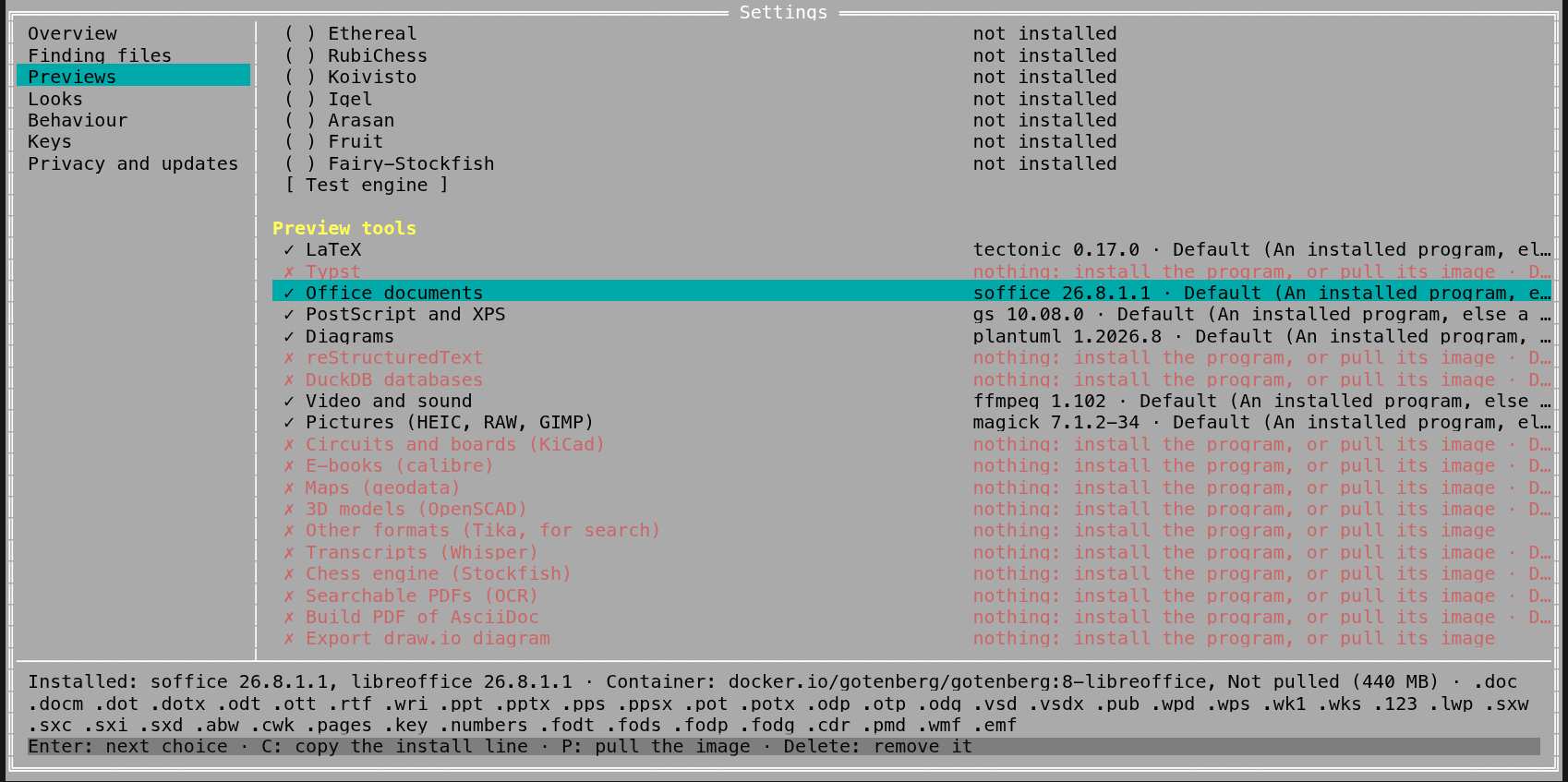
terminal app each row is one line, *✓ LaTeX* with what is used and the choice, *tectonic 0.17.0 ·
Default (…)* (*✗* in red, *nothing: install the program, or pull its image*, when nothing can
make them; *nothing: install duckdb* for a kind with no image, `duckdb = ""`); under the list are what is
installed, the container and the file endings, and the keys **Enter** (the next choice),
**C** (copy the install line), **P** (pull the image) and **Delete** (remove it). On a kind with
no image **Enter** skips *Container*, and the keys are **Enter**, **C** and **O**, which opens
`config.toml` in your editor at `[preview.images]` (adding a commented example when there is
none) to name an image. The
terminal app has no **Try**: it shows no rendered preview.
## Preview with…
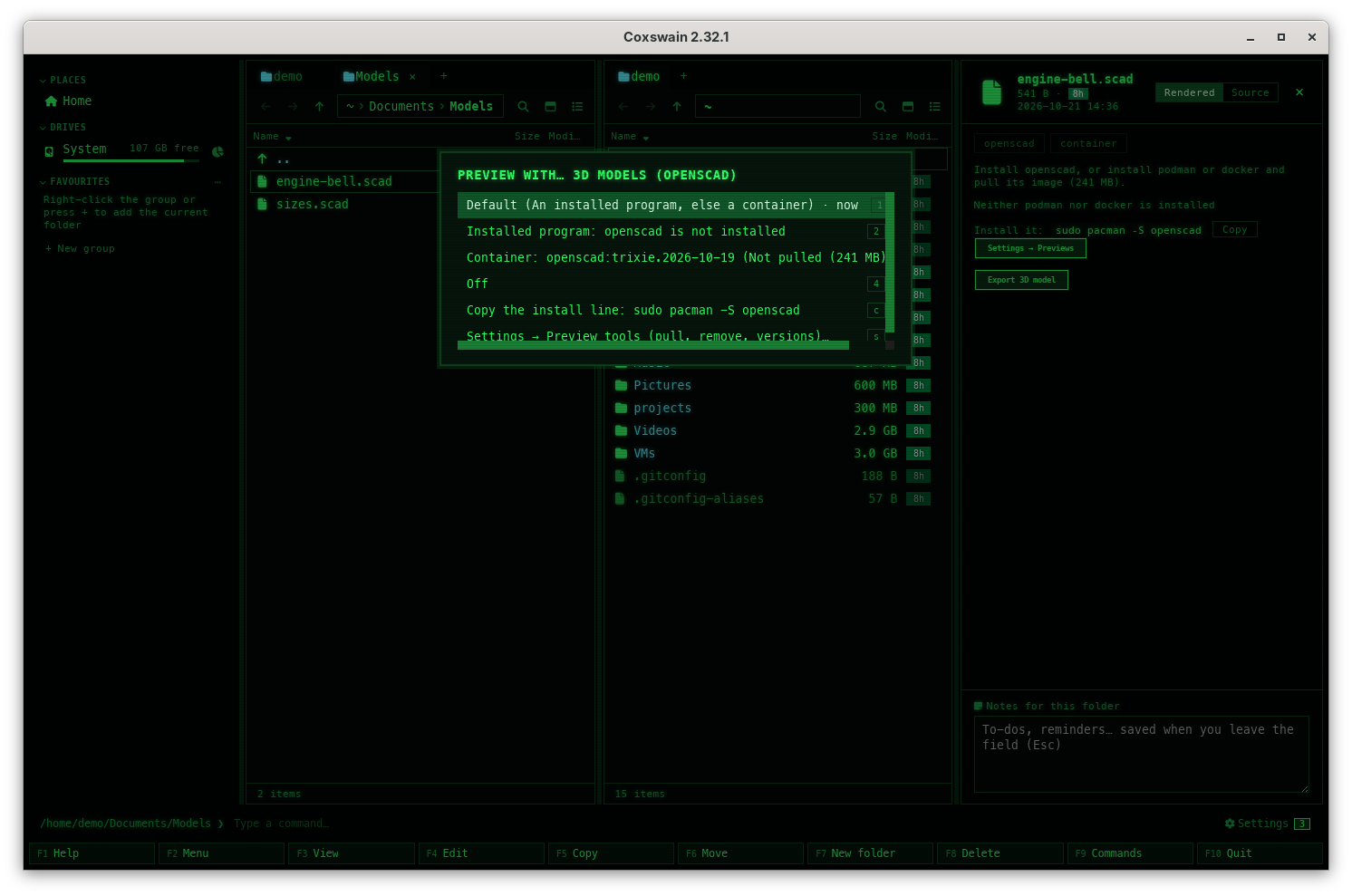
On a file a tool shows, *Preview with…* switches the choice for its whole kind without opening
Settings. It has no key of its own: it is in the action menu (**Shift+F10**), in the command
list (**F9**) and in F1 → Features → *Previews made by tools*.
1. Put the cursor on the file (a `.tex`, a `.puml`, an `.avi` …).
2. Press **Shift+F10** and choose *Preview with…*. A menu titled *Preview with… LaTeX* lists:
- **1** *Default (An installed program, else a container)*,
- **2** *Installed program: latexmk 4.86* (or *Installed program: openscad is not installed*),
- **3** *Container: texlive:latest (Not pulled (2.8 GB))*, left out for a kind with no
image (`[preview.images] duckdb = ""`), so *Off* moves up to **3**,
- **4** *Off*,
- **C** *Copy the install line: sudo pacman -S …*, when no program is installed,
- **S** *Settings → Preview tools (pull, remove, versions)…*.
The choice in force ends in *· now*.
3. Press its number (or **Enter** on it). The choice is written to `[preview.tools]` at once;
in the desktop app the preview is made again with it and the status line says *LaTeX:
saved, the preview is made again*.
The terminal app has the same menu, from **Shift+F10** and **F9**; it makes no tool previews
itself, so the choice there sets them for the desktop app and for what the terminal app does
run (conversions, Make PDF searchable, a video's facts in **Properties**).
## How to use it
1. Put the cursor on the file and open the pane with **Space** or **F3**.
2. It renders by itself (see the table), or shows a button: **Build PDF**, **Render** or
**Read tables**. Press it.
3. To use another engine, click its button at the top; that renders again with it, and the pick
is remembered for the tool (in the session).
4. To choose for a whole kind of file, open *Settings → Previews → Preview tools*
(**Ctrl+,**); *How previews are made* is the default for the kinds left at *Default*.
| Key | Desktop app | Terminal app |
|---|---|---|
| **Space** / **F3** | Shows or hides the pane | – |
| **Ctrl+,** | Settings, *Previews*, with *Preview tools* | **F12**: the same *Previews* area with *Preview tools* (**Enter**, **C**, **P**, **Delete**) |
## How it works
1. **The engines.** The buttons list the installed programs (one per real program:
`libreoffice` is usually a link to `soffice`, so only one shows) and the container, labelled
by runtime and image, e.g. **podman texlive:latest**. When none of the programs is
installed, the first is shown greyed out; hover it for the reason (*tectonic is not
installed*). The container is greyed with *No image for gxps: set [preview.images] gxps
in the config* or *Neither podman nor docker is installed*.
2. **The default.** Without a pick of yours, the first available engine is used, in the order
the kind's choice gives (`[preview.tools]`), else `prefer`: `auto` puts installed programs first and the container last (ImageMagick:
its container first once its image is pulled, as it reads files from anywhere); `local`
never defaults to a container; `container` puts it first.
3. **Waiting a moment.** A tool starts only once the file has stayed under the cursor for a
moment, so moving through a folder does not start one per file.
4. **Running.** The preview says *Rendering with latexmk…*. Programs run in the file's folder;
containers as described in [Containers](containers.md). Every program is started without
the AppImage's own libraries, so an installed LibreOffice or LaTeX works from the AppImage
too.
5. **Errors** show in the preview in red, with **Try again**. A run longer than the timeout is
stopped: *Stopped after 120 s (the timeout in [preview])*. A tool that ends without a file
says *The tool finished without producing a result.*
## The preview cache
Results go to the cache folder (`~/.cache/coxswain/previews` on Linux, `~/Library/Caches/coxswain/previews`
on macOS, `%LOCALAPPDATA%\coxswain\previews` on Windows), in a folder named after a hash of the
file's path, size and modification time, the tool and the engine; for LaTeX also the newest
change in the document's folder. So:
- A file renders once and shows at once afterwards, also after a restart.
- Editing it makes the next render fresh; the old result is no longer used, and goes with the
others not shown for 30 days.
- Each engine has its own result, so switching back and forth costs nothing after the first run.
*Settings → Previews → Previews made so far* shows how much room they take
(*84.2 MB in the cache; made again when a source changes; those not shown for 30 days go by
themselves*). **Clear** empties the cache (it is greyed when the cache is empty); every preview
is then made again when next shown. The cache keeps itself in bounds: at each start of either
app, and every six hours while the desktop app runs, the previews not shown for 30 days go,
and when the cache is then past 4 GB the ones shown longest ago go first (the size is looked at
only then, so it can pass 4 GB for a while between). The first start after the update to this
version removes the previews not shown for 30 days at once; they are made again when next
shown. A build cut short (the app killed, the power gone) or one that failed is never shown
half made: it is made again the next time. See [Where things are
kept](../reference/where-things-are-kept.md).
## What you see
| Line or button | Means |
|---|---|
| **Build PDF** / **Render** / **Read tables** | Waiting for a click; the engine's note is under it |
| *Runs docker.io/pandoc/core:latest without network access* | The container's image is here |
| *Install ffmpeg, or pull its image (126 MB).*, then *Install it:* with the line and **Copy**, **Pull its image (126 MB)** and **Settings → Previews** | No program is installed and the image is not pulled yet: one of the two shows the file ([below](#installing-what-is-missing)) |
| *Rendering with soffice…* | Running |
| *Pulling docker.io/texlive/texlive:latest…* and a progress line | Downloading the image |
| *Install soffice, or install podman or docker and pull its image (440 MB).*, then *Neither podman nor docker is installed*, *Install it:* with the line and **Copy**, and **Settings → Previews** | No program and no container runtime |
| *ditaa has no program of its own here: install podman or docker, and Kroki's image draws it.* and **Settings → Previews** | A diagram kind only Kroki's image draws, and no container can run |
| *Previews of these files by a tool are off (Settings → Previews → Preview tools).* and **Settings → Previews** | The kind's choice is *Off* |
| *Stopped after 120 s (the timeout in [preview])* | Too slow |
| **Try again** | After an error |
## Installing what is missing
When no program is installed and the container would first need a download (or there is no
podman or docker), the pane says what would show the file: *Install ffmpeg, or pull its image
(126 MB).* Under it are both ways: the command that installs the program on this system, with
**Copy**, and **Pull its image (126 MB)**, which pulls the image and makes the preview with it;
then a **Settings → Previews** button that opens *Settings → Previews → Preview tools*
(with *Container runtime → No containers* it opens Settings at that option). Without podman or
docker the sentence is *Install ffmpeg, or install podman or docker and pull its image (126
MB).*, with why the container cannot run under it. Coxswain never runs the install command:
paste it into a shell, then show the file again. Nothing is pulled without the click.
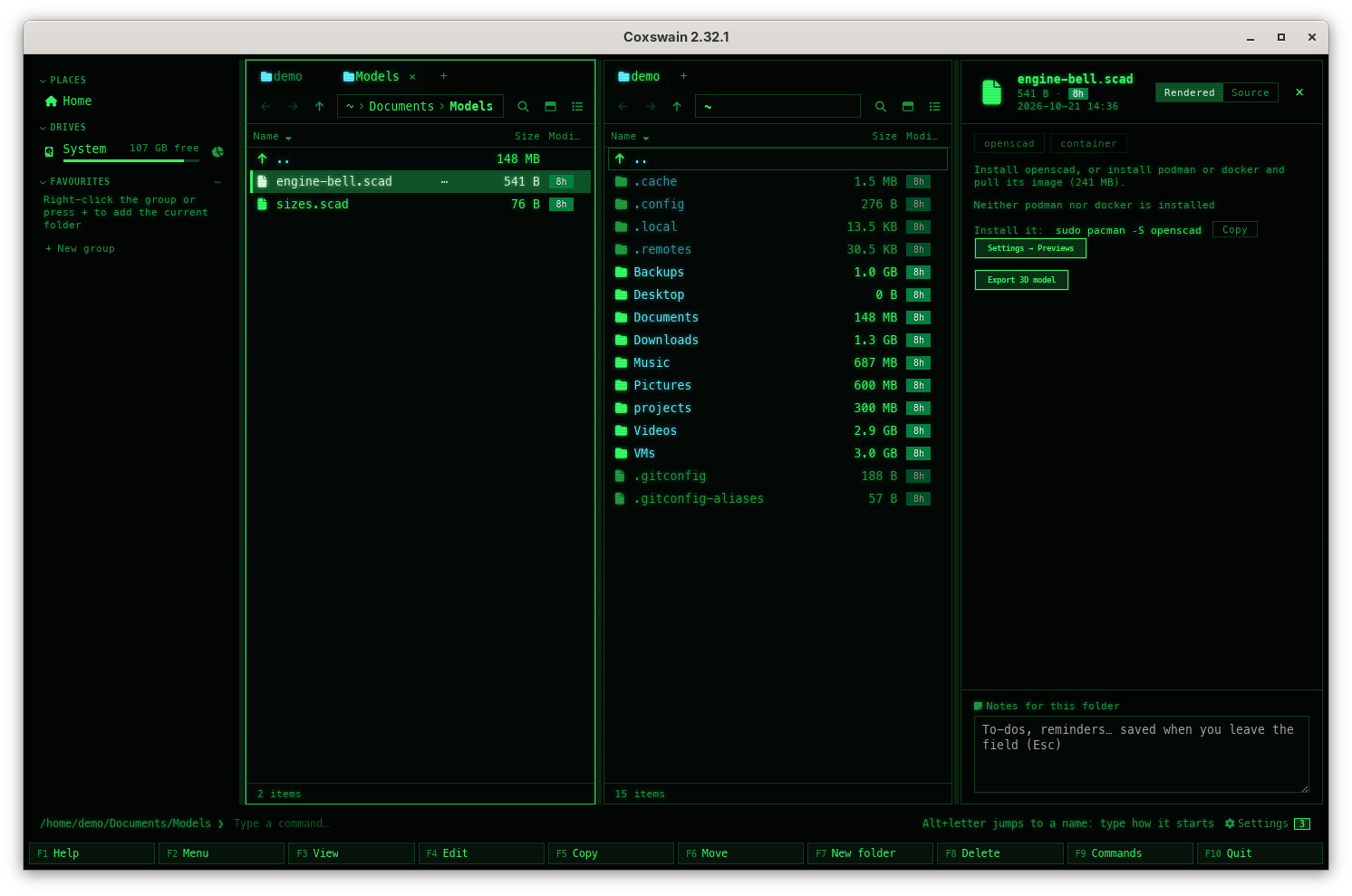
In the terminal app, *Preview with…* (**Shift+F10**) on such a file has the same two ways as
lines with keys: **C** copies the install line, **S** opens *Settings → Previews → Preview
tools*, where **P** pulls the image.
The package manager is the system's own: `pkg` on FreeBSD, `pkgin` on NetBSD, `pkg_add` on
OpenBSD, `pkg` on illumos, on Linux the first of `pacman`, `apt`, `dnf` and `zypper` that is
installed, Homebrew on a Mac and `winget` on Windows.
Every line Coxswain knows, by the name it looks for the program under (made from the same list;
the test checks this one too):
| System | `latex` | `typst` | `soffice` | `gs` | `plantuml` | `pandoc` | `ffmpeg` | `magick` | `kicad-cli` | `calibre` | `gdalinfo` | `openscad` | `stockfish` | `ocrmypdf` | `asciidoctor-pdf` |
|---|---|---|---|---|---|---|---|---|---|---|---|---|---|---|---|
| FreeBSD (`pkg`) | `pkg install texlive-full` | `pkg install typst` | `pkg install libreoffice` | `pkg install ghostscript10` | `pkg install plantuml` | `pkg install hs-pandoc` | `pkg install ffmpeg` | `pkg install ImageMagick7` | `pkg install kicad` | `pkg install calibre` | `pkg install gdal` | `pkg install openscad` | `pkg install stockfish` | none | `pkg install rubygem-asciidoctor-pdf` |
| NetBSD (`pkgin`) | none | `pkgin install typst` | `pkgin install libreoffice` | `pkgin install ghostscript-agpl` | none | `pkgin install pandoc-cli` | `pkgin install ffmpeg7` | `pkgin install ImageMagick` | `pkgin install kicad` | none | `pkgin install gdal` | `pkgin install openscad` | `pkgin install stockfish` | none | none |
| OpenBSD (`pkg_add`) | `pkg_add texlive_texmf-full` | `pkg_add typst` | `pkg_add libreoffice` | `pkg_add ghostscript` | none | `pkg_add pandoc` | `pkg_add ffmpeg` | `pkg_add ImageMagick` | `pkg_add kicad` | none | `pkg_add gdal` | `pkg_add openscad` | `pkg_add stockfish` | `pkg_add ocrmypdf` | none |
| illumos (`pkg`) | `pkg install ooce/application/texlive` | none | none | none | none | none | `pkg install ooce/multimedia/ffmpeg` | none | none | none | none | none | none | none | none |
| Arch (`pacman`) | `sudo pacman -S texlive-basic texlive-latexextra texlive-binextra` | `sudo pacman -S typst` | `sudo pacman -S libreoffice-fresh` | `sudo pacman -S ghostscript` | `sudo pacman -S plantuml` | `sudo pacman -S pandoc-cli` | `sudo pacman -S ffmpeg` | `sudo pacman -S imagemagick` | `sudo pacman -S kicad` | `sudo pacman -S calibre` | `sudo pacman -S gdal` | `sudo pacman -S openscad` | none | `sudo pacman -S ocrmypdf` | none |
| Debian, Ubuntu (`apt`) | `sudo apt install texlive-latex-extra latexmk` | none | `sudo apt install libreoffice` | `sudo apt install ghostscript` | `sudo apt install plantuml` | `sudo apt install pandoc` | `sudo apt install ffmpeg` | `sudo apt install imagemagick` | `sudo apt install kicad` | `sudo apt install calibre` | `sudo apt install gdal-bin` | `sudo apt install openscad` | `sudo apt install stockfish` | `sudo apt install ocrmypdf` | `sudo apt install ruby-asciidoctor-pdf` |
| Fedora (`dnf`) | `sudo dnf install texlive-scheme-medium latexmk` | `sudo dnf install typst` | `sudo dnf install libreoffice` | `sudo dnf install ghostscript` | `sudo dnf install plantuml` | `sudo dnf install pandoc` | `sudo dnf install ffmpeg-free` | `sudo dnf install ImageMagick` | `sudo dnf install kicad` | `sudo dnf install calibre` | `sudo dnf install gdal` | `sudo dnf install openscad` | `sudo dnf install stockfish` | `sudo dnf install ocrmypdf` | `sudo dnf install rubygem-asciidoctor-pdf` |
| openSUSE (`zypper`) | `sudo zypper install texlive-latexmk texlive-collection-latexextra` | `sudo zypper install typst` | `sudo zypper install libreoffice` | `sudo zypper install ghostscript` | `sudo zypper install plantuml` | `sudo zypper install pandoc` | `sudo zypper install ffmpeg` | `sudo zypper install ImageMagick` | `sudo zypper install kicad` | `sudo zypper install calibre` | `sudo zypper install gdal` | `sudo zypper install openscad` | `sudo zypper install stockfish` | none | none |
| macOS (Homebrew) | `brew install --cask mactex-no-gui` | `brew install typst` | `brew install --cask libreoffice` | `brew install ghostscript` | `brew install plantuml` | `brew install pandoc` | `brew install ffmpeg` | `brew install imagemagick` | `brew install --cask kicad` | `brew install --cask calibre` | `brew install gdal` | `brew install --cask openscad` | `brew install stockfish` | `brew install ocrmypdf` | `brew install asciidoctor` |
| Windows (`winget`) | `winget install --id MiKTeX.MiKTeX -e` | `winget install --id Typst.Typst -e` | `winget install --id TheDocumentFoundation.LibreOffice -e` | `winget install --id ArtifexSoftware.GhostScript -e` | none | `winget install --id JohnMacFarlane.Pandoc -e` | `winget install --id Gyan.FFmpeg -e` | `winget install --id ImageMagick.ImageMagick -e` | `winget install --id KiCad.KiCad -e` | `winget install --id calibre.calibre -e` | none | `winget install --id OpenSCAD.OpenSCAD -e` | `winget install --id Stockfish.Stockfish -e` | none | none |
D2, svgbob, Pikchr and erd come from their own projects' releases (`brew install d2`, `cargo
install svgbob_cli`, …): Coxswain has no line for them. Where the table says *none*, and for
DuckDB and GhostXPS everywhere, the pane says instead: *plantuml has no
package here: get it from its website and put it on PATH.* The programs Coxswain reads with (for
search: tesseract, pdftoppm, LibreOffice) have their own table in
[Scans, pictures and older Office files](../search/scans.md#installing-what-is-missing), and
calibre its lines in [E-books](ebooks.md#what-it-needs).
## Settings and config.toml
```toml
[preview]
prefer = "auto" # "auto" (installed program first, else container), "local", "container"
container = "auto" # "auto" (podman, else docker), "podman", "docker", "off"
timeout = 120 # seconds per conversion; pulling is not counted
latex_auto = true # build LaTeX by itself when shown and changed
image_updates = "off" # "weekly", "monthly": the desktop app pulls the pulled images again
image_prune = false # remove an image no preview, Make PDF searchable or Scan for viruses used for 90 days
virus_scan = false # Scan for viruses with ClamAV (Alt+I), only when asked
ebooks = false # e-books through calibre: previews, search, Convert e-book
[preview.tools] # per kind of file, overrides prefer: "local", "container", "off"
office = "local"
video = "off"
[preview.images] # "" means that tool never uses a container; the defaults: the table above
latex = "docker.io/texlive/texlive:latest" # or :latest-medium, about 960 MB to download
```
| Settings → Previews | config.toml | Choices, default |
|---|---|---|
| *How previews are made* | `prefer` | *An installed program, else a container* (`auto`, default), *Installed programs only* (`local`), *Containers, even when a program is installed* (`container`) |
| *Container runtime* | `container` | *podman, else docker* (`auto`, default), podman, docker, *No containers* (`off`) |
| *LaTeX image* | `images.latex` | `docker.io/texlive/texlive:latest` |
| *Build LaTeX by itself* | `latex_auto` | on |
| *E-books with calibre* | `ebooks` | off ([E-books](ebooks.md)) |
| *Timeout (seconds)* | `timeout` | 10 to 3600, `120` |
| *Previews made so far* | – | The cache size, **Clear** |
| *Preview tools* | `tools.*`, `images.*` | A row per kind: what is installed, its image with **Pull** and **Remove**, what is used, the choice, **Try** ([above](#preview-tools-in-settings)) |
| *Keep images up to date* | `image_updates` | *Off* (`off`, default), *Weekly* (`weekly`), *Monthly* (`monthly`) ([Containers](containers.md#keeping-images-up-to-date)) |
| *Remove images not used for 90 days* | `image_prune` | off ([Containers](containers.md#removing-unused-images)) |
| *Scan for viruses with ClamAV* | `virus_scan` | off ([Scan for viruses](../files/virus-scan.md)) |
Setting one image keeps the others' defaults. The images other than LaTeX's are set in
`config.toml` only. A config of before 2.33 with `[preview.prefer_tool]` (per tool) is rewritten
once, on start, to `[preview.tools]` (per kind; `d2` becomes `diagrams`, `waveform` `video`), and
a notice says so. Every key: [Configuration](../reference/configuration.md#preview).
## In the terminal app
The terminal app has no preview pane, so it makes none of these previews; the `[preview]`
section is mostly the desktop app's. The terminal app's Settings (**F12** → *Previews*) change it all the same, for
the desktop app, *Preview tools* too ([above](#preview-tools-in-settings)). Run the
tool yourself on the command line (`latexmk -pdf`, `typst compile`, `soffice --headless
--convert-to pdf`, `gs -dSAFER -sDEVICE=pdfwrite`, `plantuml`, `d2`, `pandoc`, `duckdb`) and
open the result with **Enter**. The tools it does run are OCRmyPDF, for
[Make PDF searchable](../files/searchable-pdf.md) (**Alt+P**), ffmpeg and ImageMagick, for
[Convert video or audio](../files/convert-media.md) and
[Convert or edit pictures](../files/edit-pictures.md), Asciidoctor PDF for [Build PDF of AsciiDoc](../files/asciidoc-pdf.md), draw.io for
[Export draw.io diagram](../files/drawio-export.md), GDAL for
[Convert geodata](geodata.md#convert-geodata), OpenSCAD for
[Export 3D model](openscad.md#export-3d-model), kicad-cli for
[Export from KiCad](kicad.md#export-from-kicad), calibre for [e-books](ebooks.md) (**F3** on a
book, *Convert e-book*), ClamAV, for [Scan for viruses](../files/virus-scan.md)
(**Alt+I**), and ffprobe and GDAL for a video's and
geodata's facts in **Properties**, with the same images and preferences; of `[preview]` it
also reads `ebooks`; and the search helper runs Apache Tika's and whisper.cpp's for it when
[Read other formats with Apache Tika](../search/tika.md) or
[Transcribe speech with Whisper](../search/transcripts.md) is on.
## Questions
#### Why does the preview show a button instead of rendering?
Either the tool waits for a click (LaTeX with `latex_auto` off), or the only engine is a
container whose image is not pulled yet. Coxswain never starts a download of gigabytes by
itself. The note under the button says which.
#### The preview says to install a program. Does Coxswain install it?
No. It shows the line for your system (`sudo apt install plantuml`) with **Copy**, and never runs
it. Paste it into a terminal, or click **Settings → Previews** to let a container make the
preview instead. The lines: [Installing what is missing](#installing-what-is-missing).
#### How do I see which program shows a kind of file?
*Settings → Previews → Preview tools*: the kind's row says what is installed, with versions, its
container image and whether it is pulled, and *Used now:* with what makes the previews. **Try**
shows a sample of that kind at once.
#### How do I turn off the previews of one kind?
Choose *Off* on its row (`[preview.tools] video = "off"`). Its files are shown as if no tool
were there; what you ask for (a conversion) still runs.
#### How do I stop using containers?
*Settings → Previews → Container runtime → No containers* (`container = "off"`),
or *Use → Installed programs only* (`prefer = "local"`), which keeps the container as a button
but never as the default.
#### I installed a program, but the button still says it is not installed.
Coxswain looks for it on the `PATH` the app was started with. A desktop session started before
the install may have the old `PATH`; start Coxswain again. On macOS and Windows, LibreOffice is
also found in its usual install folder.
#### How much room do previews take, and can I free it?
*Settings → Previews → Previews made so far* shows the size; **Clear** frees it.
Nothing is lost: previews are made again when shown. You need not clear it to keep it small:
previews not shown for 30 days go by themselves, and past 4 GB the ones shown longest ago go
(looked at each start and every six hours).
#### Can I use a tool from a container even though it is installed?
Yes: click the container's button (the pick is remembered for that tool), or choose *Container*
on the kind's row in *Settings → Previews → Preview tools* (`[preview.tools] latex =
"container"`), or set `prefer = "container"` for every kind.
#### Why did the timeout not stop the first run?
Pulling an image is not counted: it can be gigabytes. The timeout starts with the run itself.
#### Where is the result? Can I keep the PDF?
In the preview cache ([above](#the-preview-cache)). Copy it from there, or better, build it
yourself; the cache is emptied by **Clear** and its folders are named by hashes.
---
[← Previous: KiCad](kicad.md) · [Next: Containers →](containers.md)