[← README](../../README.md) · [Docs index](../README.md)
# Search
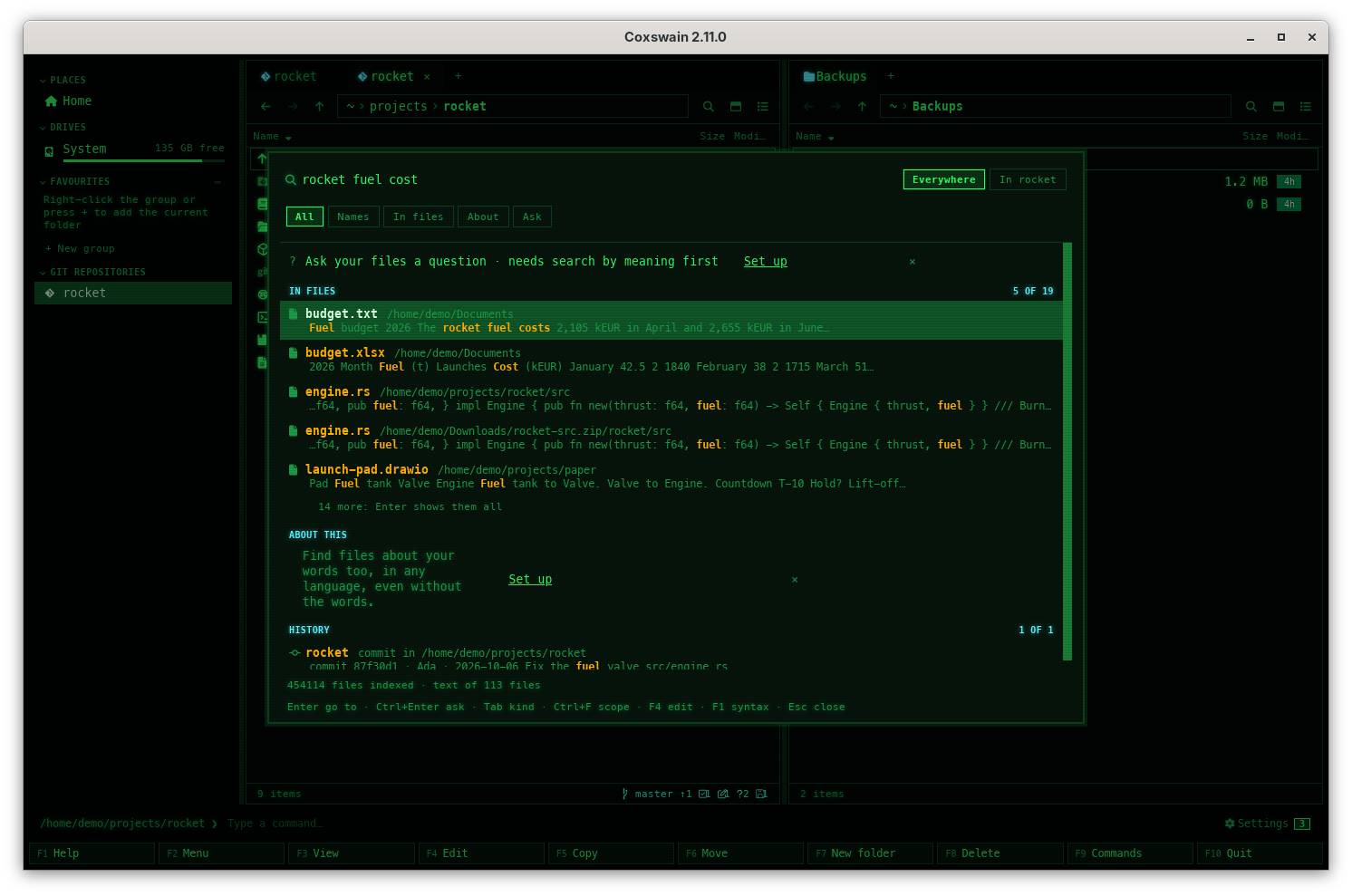
Find gets you what you have the way you remember it, in one field: every file name on the
machine, the words inside your files, what your files are about, and answers to questions about
them. Type, and the hits come in groups; both apps have all of it, and they share one index, kept
by a [search helper](helper.md) in the background. These pages walk through each group, what is
read and when, and every setting.
How it fits together: the helper keeps the name index and reads your files into `search.db` in
the background; Find asks it, and every group comes from one of the three.
```mermaid
flowchart LR
files[Your files and repositories] -->|names, watched| names[(Name index
index.bin)]
files -->|text, read in the background| db[(search.db
passages, commits)]
db -->|embedding model| vec[(Vectors
in search.db)]
subgraph helper[The search helper: one for every window]
names
db
vec
end
names --> g1[Names]
db --> g2[In files, History]
vec --> g3[About this]
g1 & g2 & g3 --> find[Find]
vec -->|closest passages| ask[Ask: your chat model
answers, citing them]
```
| Group of Find | Finds | Needs |
|---|---|---|
| [Names](names.md) | Files and folders by name, on the whole machine or in the scope | Nothing |
| [In files](text.md) | Files whose text has your words, ranked by words and meaning together | *Words inside files* on (the default) and the [helper](helper.md) |
| [About this](meaning.md) | Files about your words that lack them, in any language | [Search by meaning](meaning.md) |
| [History](history.md) | Commits whose message, author or paths match | *Git history* (on by default) |
| [The Ask row](ask.md) | An answer to your question, written from the passages closest to it, with numbered sources | Search by meaning and a chat model: the [built-in one](ask-builtin.md) or one on your server |
Every group finds files [inside archives](archives.md) too. The **scope** (*Everywhere* or the
active panel's folder, **Ctrl+F** inside Find) limits every group and Ask; it shows at the right of the field as a choice of two, the one in force lit.
| Page | What it covers |
|---|---|
| [Smart search in a few minutes](setup.md) | The guided setup in both apps: what each part does, what suits your hardware, every server, the graphics card, starting with your session |
| [Find](find-file.md) | One field: the groups and their order, the kinds (Tab) and prefixes, the scope, the Ask row, every key and state |
| [Names everywhere](names.md) | The name index, how it stays current and fast, names in one folder |
| [Name syntax](name-syntax.md) | Everything's syntax: `!`, `\|`, `*`, `ext:`, `file:`, `folder:`, `case:`, paths |
| [Text in files](text.md) | The *In files* group: how words match, what is read and when |
| [Documents it reads](documents.md) | PDF, Word, spreadsheets, slides, mail, books, notebooks: the formats |
| [Scans, pictures and older Office files](scans.md) | tesseract, pdftoppm and LibreOffice, when they are installed |
| [Other formats with Apache Tika](tika.md) | OneNote, XPS, CHM, Outlook data files and more, read by Apache Tika in a container without network, when you turn it on |
| [Transcripts of speech](transcripts.md) | Recordings and videos you choose, transcribed with Whisper in the background, found by Find and shown in the preview |
| [Diagrams read as sentences](diagrams.md) | draw.io, Mermaid, Graphviz and PlantUML: a sentence per arrow |
| [Git history in search](history.md) | Commit messages, authors and changed paths, found like text; Enter opens the commit |
| [Inside archives](archives.md) | Files in zip, 7z and tar archives, found by name, text and meaning; changes followed |
| [Choosing the folders](folders.md) | Folders read, names only, `.nosearch`, `text_exclude` |
| [Cloud files](cloud-files.md) | OneDrive, Dropbox, Google Drive, Proton Drive, iCloud: files only online are found by name, never downloaded |
| [Removable disks](removable-disks.md) | USB and external disks: kept while unplugged, found again anywhere |
| [Search by meaning](meaning.md) | The built-in multilingual model: turning it on, what it finds, *Measure speed* and `coxswain --meaning bench` |
| [Long files: sample or everything](long-files.md) | What search keeps of long logs, books and data: a sample (the default) or all the text and every passage, for every folder or one, with what it costs said first |
| [Search by meaning on a server](servers.md) | Ollama, Lemonade, LM Studio or any server with the OpenAI API |
| [Ask](ask.md) | Questions answered from your files by your own chat model, with numbered sources |
| [Ask about code](ask-code.md) | Code read as code, cut at its functions and classes, and a map of a project for questions about it as a whole |
| [Ask without a server](ask-builtin.md) | The built-in chat model (Qwen3 1.7B, 4B or 14B): downloaded once, on a Mac's GPU or the processor, nothing sent |
| [Built-in models](models.md) | The models Coxswain downloaded: where they are, whether they are loaded, unloading and deleting them, `coxswain --models` |
| [The search helper](helper.md) | The background process, starting it with your session, and how an app takes the registration over after an upgrade |
| [Battery](battery.md) | Why reading waits while a laptop runs on its battery |
| [Search settings](settings.md) | Every item of *Settings → Finding files*, with its `config.toml` key |
## Keys at a glance
| Key | Desktop app | Terminal app | Does |
|---|---|---|---|
| **Alt+F7**, **Ctrl+F** | yes | yes | Open Find (*All*, *Everywhere*); inside it, switch the scope to the panel's folder and back |
| **Shift+F7**, **Ctrl+Shift+F** | yes | yes (many terminals send Ctrl+Shift+F as Ctrl+F) | Open Find at *In files*; inside it, *In files* ⇄ *All* |
| **Ctrl+F7** | yes | yes | Open Find at *Ask*; inside it, ask what is typed |
| **Ctrl+Enter** / **Alt+Enter** | Ctrl+Enter | Alt+Enter | Ask what is typed, from any row |
| **Tab** / **Shift+Tab** | yes | yes | The next / previous kind: All → Names → In files → About → Ask, round |
| **Up** / **Down** | yes | yes | Move through the rows; headings are skipped |
| **PageUp** / **PageDown** | 15 at a time | 10 at a time | Move a page |
| **Enter** | yes | yes | Go to the file: the active panel opens its folder, cursor on it; on the Ask row, ask |
| **F1** | yes | yes | The name syntax and the prefixes, in Find |
| **F3** | no (the preview pane is behind) | yes | View the file, then come back to the results |
| **F4** | yes | yes | Edit the file, without leaving Find |
| **Esc** | yes | yes | In an answer: back to the list; in the list: close Find |
| **Ctrl+,**, **F12** | yes | **F12** (**Ctrl+,** where the terminal passes it on) | Settings; *Finding files* holds every search setting |
New to it? [Smart search in a few minutes](setup.md) walks through it: **Set up…** in Settings (*Overview* or *Finding files*), or
`coxswain --setup-search`.
The terminal app has the same Settings (**F12**, full screen), and flags such as
`coxswain --meaning on` and `coxswain --index-service on`; see
[Command-line flags](../reference/command-line-flags.md).
---
[← Previous: Opening files](../commands/opening-files.md) · [Next: Smart search in a few minutes →](setup.md)