# Canvas MCP Client


**A customizable infinite canvas dashboard with integrated Model Context Protocol (MCP) server support**
[Features](#features) • [Quick Start](#quick-start) • [Documentation](#documentation) • [Contributing](#contributing) • [License](#license)
---
## 🎯 What is Canvas MCP Client?
Canvas MCP Client is an **open-source, self-hostable dashboard application** built around an infinite, zoomable, and pannable canvas. It provides a unified interface for interacting with multiple MCP (Model Context Protocol) servers through a flexible, widget-based system.
**Why Canvas MCP Client?**
- 🎨 **Infinite Canvas**: Organize your workspace spatially with unlimited zoom and pan capabilities
- 🧩 **Modular Widgets**: Use 12+ pre-built widgets or create your own custom components
- 🛠️ **No-code Widget Builder**: Use the widget builder to create your own widgets without coding
- 🤖 **MCP Integration**: Seamlessly connect to multiple MCP servers using the FastMCP library
- 🔌 **AI-Powered**: Configure multiple AI providers (OpenAI, Anthropic, Ollama, Google) for enhanced functionality
- 🎭 **Template System**: Save and share widget and dashboard configurations
- 🐳 **Easy Deployment**: One-command Docker setup or manual installation
- 🔒 **Privacy-First**: All data stays on your infrastructure, no external dependencies
Perfect for AI power users, developers, content creators, and anyone who wants a customizable workspace for managing AI tools and services.
## 🎥 Quick Demo
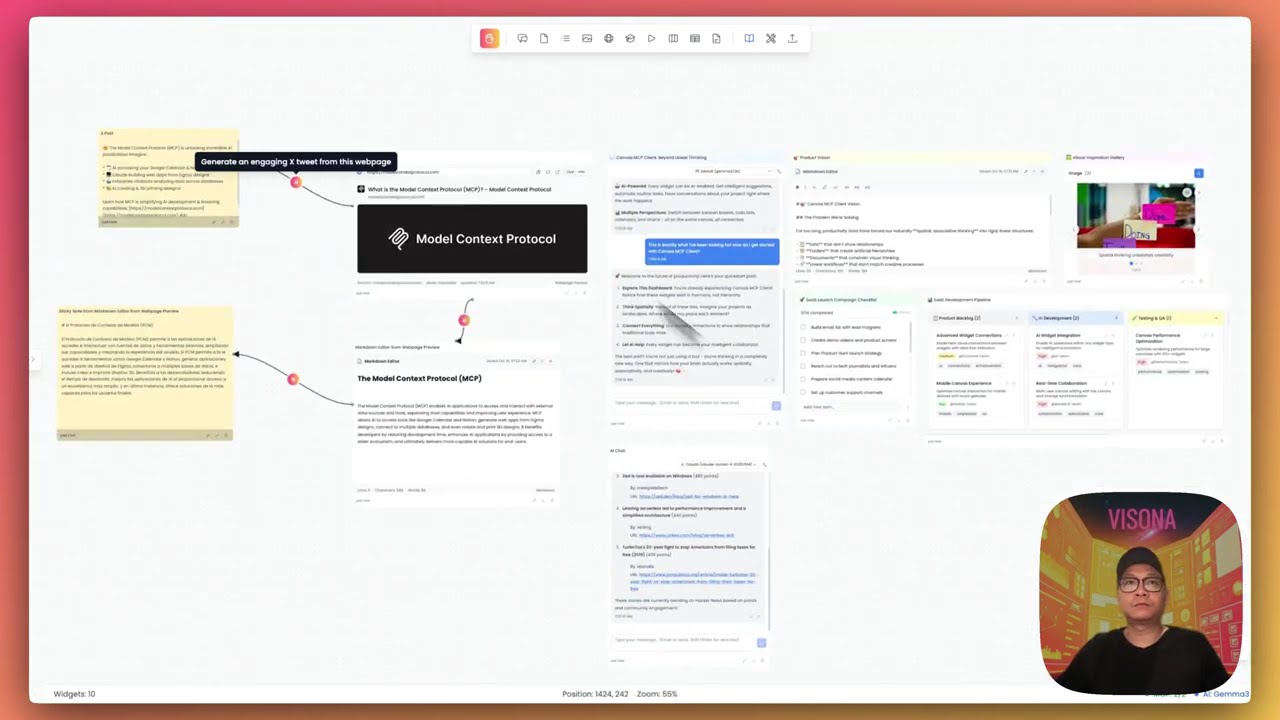
Click to watch the Canvas MCP Client demo video
## ✨ Features
### Core Functionality
- **🎨 Infinite Canvas Interface**
- Smooth zooming and panning
- Grid snap and alignment tools
- Persistent viewport state
- Responsive and optimized rendering
- **🧩 Rich Widget System** (12+ widgets)
- 📝 Sticky Notes - Quick notes and reminders
- ✅ To-Do Lists - Task management with checkboxes
- 💬 AI Chat - Integrated LLM conversations
- 🖼️ Image Display - Visual content display
- 🃏 Flash Cards - Learning and memorization
- 🎬 Video Player - Media playback
- 📊 Kanban Board - Project management
- 📈 Spreadsheet - Data tables and organization
- 📄 Markdown Editor - Formatted documentation
- 🌐 Webpage Preview - Embedded web content
- 🌍 World Clock - Multiple timezone display
- ☁️ Weather Widget - Live weather information
- **🔌 MCP Server Management**
- Configure multiple MCP server connections
- Support for stdio, HTTP, and SSE transport protocols
- Real-time connection status monitoring
- Import/export server configurations
- **🤖 AI LLM Configuration**
- Multiple AI provider support (OpenAI, Anthropic, Ollama, Google)
- Configurable model parameters
- Secure credential storage
- Custom API endpoints
- **📦 Template System**
- Save widgets as reusable templates
- Export/import dashboard configurations
- Share templates with the community
- Template library with preview
- **🎨 Customization**
- Light and dark themes
- Widget color and shape customization
- Flexible layout options
- Drag-and-drop interface
- **💾 Data Persistence**
- Automatic saving
- Local SQLite storage (PostgreSQL ready)
- Session recovery
- Backup and restore capabilities
## 🚀 Quick Start
### Prerequisites
- **Docker & Docker Compose** (Recommended) OR
- **Node.js 18+** and **Python 3.10+** (Manual setup)
### Option 1: Docker (Recommended)
The fastest way to get started:
```bash
# Clone the repository
git clone https://github.com/n00bvn/CanvasMCPClient.git
cd CanvasMCPClient
# Start the application
docker-compose up -d
# Access the application
open http://localhost:3031
```
The application will be available at:
- **Frontend**: http://localhost:3031
- **Backend API**: http://localhost:8081
- **API Docs**: http://localhost:8081/docs
### Option 2: Manual Setup
Click to expand manual setup instructions
#### Backend Setup
```bash
# Navigate to backend directory
cd backend
# Create and activate virtual environment
python -m venv venv
source venv/bin/activate # On Windows: venv\Scripts\activate
# Install dependencies
pip install -r requirements.txt
# Create data directory
mkdir -p data
# Set environment variables
export DATABASE_URL="sqlite:///./data/canvas_mcp.db"
export CORS_ORIGINS="http://localhost:3031,http://127.0.0.1:3031"
export SECRET_KEY="your-secret-key-here"
# Start the backend
uvicorn main:app --reload --host 0.0.0.0 --port 8081
```
#### Frontend Setup
```bash
# Navigate to frontend directory (in a new terminal)
cd frontend
# Install dependencies
npm install
# Set environment variables
export NEXT_PUBLIC_API_URL="http://localhost:8081"
# Start the frontend
npm run dev
```
The application will be available at http://localhost:3031
### First Steps
1. **Configure MCP Servers** (Optional)
- Click the "MCP Servers" button in the sidebar
- Add your MCP server configurations
- Test connections
2. **Set Up AI Providers** (Optional)
- Click "AI Config" in the sidebar
- Add API keys for your preferred providers (OpenAI, Anthropic, etc.)
- Configure default models
3. **Create Your First Dashboard**
- Click "New Dashboard" in the left panel
- Add widgets from the toolbar
- Drag, resize, and customize to your liking
4. **Explore Features**
- Try different widget types
- Save templates for reuse
- Export and share your dashboards
## 📚 Documentation
- **[Contributing Guide](CONTRIBUTING.md)** - How to contribute to the project
- **[Database Guide](DATABASE_GUIDE.md)** - Database schema and migrations
- **[Security Policy](SECURITY.md)** - Security guidelines and reporting
## 🏗️ Architecture
Canvas MCP Client is built with modern, proven technologies:
### Frontend
- **Framework**: Next.js 15 with React 19
- **Language**: TypeScript
- **Styling**: Tailwind CSS
- **State Management**: Redux Toolkit
- **UI Components**: Custom components with Heroicons
- **Canvas Rendering**: HTML5 Canvas with optimized performance
### Backend
- **Framework**: FastAPI (Python 3.10+)
- **Database**: SQLite (development) / PostgreSQL (production ready)
- **ORM**: SQLAlchemy with Alembic migrations
- **MCP Integration**: FastMCP library
- **API Documentation**: Auto-generated OpenAPI/Swagger docs
### Infrastructure
- **Containerization**: Docker & Docker Compose
- **Web Server**: Uvicorn (development) / Gunicorn (production)
- **Reverse Proxy**: Nginx (optional, for production)
## 🤝 Contributing
We welcome contributions from the community! Whether you're fixing bugs, adding features, improving documentation, or creating new widgets, your help is appreciated.
**Ways to contribute:**
- 🐛 Report bugs and issues
- 💡 Suggest new features or widgets
- 📝 Improve documentation
- 🔧 Submit pull requests
- 🎨 Share widget and dashboard templates
- ⭐ Star the repository and spread the word
**Get started:**
1. Read our [Contributing Guide](CONTRIBUTING.md)
2. Check out [open issues](https://github.com/n00bvn/CanvasMCPClient/issues)
3. Join the discussion in [GitHub Discussions](https://github.com/n00bvn/CanvasMCPClient/discussions)
**Before submitting a PR:**
```bash
# Auto-fix formatting issues
./lint-fix.sh
# Check all linting rules
./lint.sh
```
See [Linting Setup](LINTING_SETUP.md) for detailed information.
Please read our [Code of Conduct](CODE_OF_CONDUCT.md) before contributing.
## 🛡️ Security
Security is a top priority. If you discover a security vulnerability, please follow our [Security Policy](SECURITY.md) to report it responsibly.
**Security Features:**
- Encrypted credential storage
- Local-first data architecture
- No telemetry or external data transmission
- Secure MCP server connections
- Regular dependency updates
## 🗺️ Roadmap
- [ ] Remote MCP servers with oAuth support
- [ ] Integrate with OpenAI apps
- [ ] Attach custom prompt to widgets
- [ ] Support image and video generation AI models
- [ ] Add more built-in widgets like Calendar, Music Player, Charts, etc.
- [ ] Add more utitlities like Text, Shapes, etc.
- [ ] Add custom data sources to widgets (webhook, REST API, etc.)
- [ ] Canvas dashboard history and undo/redo
- [ ] Enhance Widget Builder for more advanced widgets
- [ ] Support web scraping and deep research capabilities
- [ ] Mobile responsive design improvements
- [ ] Enhanced AI integration capabilities
- [ ] Performance optimizations for large dashboards
- [ ] Import/export improvements
- [ ] Real-time collaboration features
- [ ] Accessibility enhancements (WCAG 2.1 compliance)
See the [open issues](https://github.com/n00bvn/CanvasMCPClient/issues) for a full list of proposed features and known issues.
## 📊 Project Status
Canvas MCP Client is actively maintained and in **stable development**. We follow semantic versioning and maintain a [CHANGELOG](CHANGELOG.md) for all releases.
**Current Version**: 1.0.0
**Status**: Stable - Ready for self-hosting
**Last Updated**: October 2025
## 🙏 Acknowledgments
- Built with [FastMCP](https://github.com/jlowin/fastmcp) for MCP server integration
- Inspired by infinite canvas tools like Miro, Figma, and Obsidian Canvas
- Icons by [Heroicons](https://heroicons.com/)
- Community contributors and testers
## 📄 License
This project is licensed under the MIT License - see the [LICENSE](LICENSE) file for details.
---
## 💬 Community & Support
- **Issues**: [GitHub Issues](https://github.com/n00bvn/CanvasMCPClient/issues)
- **Discussions**: [GitHub Discussions](https://github.com/n00bvn/CanvasMCPClient/discussions)
- **Documentation**: [Project Wiki](https://github.com/n00bvn/CanvasMCPClient/wiki)
- **Discord community**: [Discord Community](https://discord.gg/rBtSvFMT)
- **Follow us**: [@VisonaHQ](https://x.com/VisonaHQ) | [@thaw_tran](https://x.com/thaw_tran)
## ⭐ Star History
If you find Canvas MCP Client useful, please consider giving it a star! ⭐
---
**Made with ❤️ by [VISONA](https://visona.me) and the open source community**
[⬆ back to top](#canvas-mcp-client)