# mcp-icon-visual
[](https://registry.modelcontextprotocol.io/?q=io.github.n0isy/mcp-icon-visual)
[](https://www.npmjs.com/package/@br-ai-n/mcp-icon-visual)
[](https://opensource.org/licenses/MIT)
MCP server that gives AI agents the ability to **search**, **retrieve**, **compare**, and **render** SVG icons. Built with Rust and the [rmcp](https://github.com/modelcontextprotocol/rust-sdk) SDK.
Combines local filesystem access with a remote rendering API to resolve SVGs from any source — inline strings, URLs, local files, or [Iconify](https://iconify.design/) IDs — and render them onto visual comparison grids.
The key insight: every tool returns **images**. A vision-capable LLM doesn't just get metadata — it *sees* the icons. This turns icon selection from guesswork into a visual conversation.
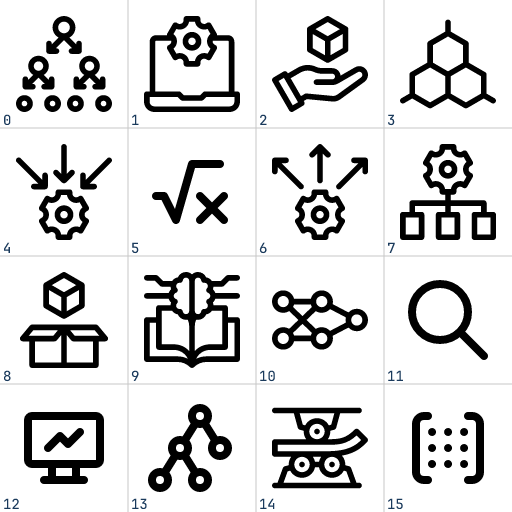
search_icons("machine learning") — 4x4 grid, cells 0–15, returned as PNG
## Agent Pipelines
These tools are designed to be composed by AI agents with vision. Below are three proven patterns.
### 1. Visual Search & Selection
An agent searches for icons and **visually picks** the best match — no blind URL selection.
```
┌─────────────────────────────┐
│ Agent + Vision │
└──────────────┬──────────────┘
│
┌────────────────┼────────────────┐
v v v
search_icons search_icons search_icons
"cloud" "upload" "storage"
│ │ │
v v v
┌──────────┐ ┌──────────┐ ┌──────────┐
│ 4x4 grid │ │ 4x4 grid │ │ 4x4 grid │
│ (sees) │ │ (sees) │ │ (sees) │
└────┬─────┘ └────┬─────┘ └────┬─────┘
│ │ │
└───────────────┼───────────────┘
v
"cells 3, 7, 12 match
the project style"
│
v
render_grid [3 winners]
│
v
┌──────────────────┐
│ final comparison │
│ grid (sees) │──> pick best
└──────────────────┘
```
The agent runs multiple searches, **looks** at each grid, picks candidates by cell number, then renders a final side-by-side comparison to make the choice. Works especially well when the agent has context about the project's visual style.
### 2. Iterative Icon Editing
An agent modifies SVG code and uses `render_grid` as a **visual diff** to track progress across iterations.
```
get_svg "mdi/cloud"
│
v
┌───────────┐
│ raw SVG │
│ markup │
└─────┬─────┘
│
┌────────┴─────────────────────────────────────┐
│ Edit Loop │
│ │
│ Agent modifies SVG code │
│ │ │
│ v │
│ render_grid [original, v1, v2, v3] │
│ │ │
│ v │
│ ┌──────────────────────────────┐ │
│ │ cell 0: original │ │
│ │ cell 1: thicker strokes │ │
│ │ cell 2: rounded corners │ │
│ │ cell 3: filled variant │ │
│ └──────────────┬───────────────┘ │
│ │ │
│ agent sees all versions │
│ decides next edit │
│ │ │
│ └──── loop ──────────────────┘
│
v
save final SVG to disk
```
Each iteration, the agent passes **all versions** (original + edits) as inline SVGs to `render_grid`. It sees them side-by-side in one image and decides whether to keep iterating or stop. The original always stays in cell 0 as a reference.
### 3. Style Matching & Consistency
An agent ensures new icons match the visual style of existing project icons.
```
Project icons on disk Candidate sources
───────────────────── ─────────────────
/app/icons/nav-home.svg search_icons "settings"
/app/icons/nav-search.svg │
/app/icons/nav-profile.svg v
│ picks cells 2, 5, 9
│ │
└──────────┬───────────────────┘
v
render_grid [
/app/icons/nav-home.svg, ← cell 0: existing
/app/icons/nav-search.svg, ← cell 1: existing
/app/icons/nav-profile.svg, ← cell 2: existing
candidate_url_1, ← cell 3: candidate
candidate_url_2, ← cell 4: candidate
candidate_url_3, ← cell 5: candidate
"" ← cell 6: agent's edit
]
│
v
┌────────────────────────────────┐
│ grid image: │
│ existing icons vs candidates │
│ (agent sees style match/clash) │
└────────────────┬───────────────┘
│
agent judges:
"cell 4 matches stroke weight
and corner radius of cells 0-2,
cell 3 is too thin,
cell 5 wrong fill style"
│
v
get_svg cell_4_url
│
v
save to /app/icons/nav-settings.svg
```
By mixing local file paths and remote sources in a single grid, the agent can visually compare existing project icons against candidates in one shot. The grid becomes a style audit tool.
### Combining Pipelines
These patterns compose naturally. A real-world workflow might:
1. **Search** across multiple keywords (pipeline 1)
2. **Compare** top candidates against existing project icons (pipeline 3)
3. **Edit** the closest match to fix style inconsistencies (pipeline 2)
4. **Verify** the final icon one more time against the full icon set (pipeline 3)
All driven by a single agent with vision, using three tools.
## Tools
### `search_icons`
Semantic icon search. Returns a 4x4 PNG grid (512x512, cells 0-15) and a mapping of cell numbers to SVG URLs.
| Parameter | Type | Default | Description |
|-----------|------|---------|-------------|
| `keyword` | string | *required* | Semantic search query (e.g. `"cloud computing"`, `"arrows"`) |
| `background` | string | `"#FFFFFF"` | Grid background color, CSS hex |
| `color` | string \| null | `null` | Recolor all icons to this CSS hex color |
### `get_svg`
Retrieve raw SVG markup from any source. Returns the complete SVG string for inspection or modification.
| Parameter | Type | Description |
|-----------|------|-------------|
| `source` | string | URL, Iconify ID (`mdi/cloud`), absolute file path, or inline `