# dsh-database-manager
[](LICENSE)
[](https://nodejs.org)
[](https://github.com/deepseek-ai/deepseek-harness)
[中文](README.md) | English
A **database management** panel for the [DeepSeek Harness](https://github.com/deepseek-ai/deepseek-harness) Web GUI: one "Database Manager" entry in the sidebar that opens a unified panel for **SQLite / MySQL / Redis**, plus a set of agent tools gated behind a write-protection switch.
No need to leave DSH, and no need to open a separate database client: browse rows, change schemas, run SQL and inspect Redis keys all in the same interface.
## Table of Contents
- [Features](#features)
- [Screenshots](#screenshots)
- [Database Engine Support](#database-engine-support)
- [How It Works](#how-it-works)
- [Installation](#installation)
- [Uninstall](#uninstall)
- [Write Protection](#write-protection)
- [Agent Tools](#agent-tools)
- [Configuration and Data](#configuration-and-data)
- [Development](#development)
- [Scope and Limitations](#scope-and-limitations)
- [License](#license)
## Features
### Data Source List (panel home)
- Top bar: search on the left (name / host / tag) plus grouping (none / by kind / by group / by tag), and "Add database" on the right
- Columns: database kind, name, host, user, authentication, tags, actions
- Actions: **Test** (connectivity + latency + server version), **Connect** (open the engine panel), **Edit**, **Delete**
- Every source carries its own **read-only** flag plus tags / group, and can be added or removed at runtime — no config file edits, no restart
### MySQL / SQLite Panel
A schema / table tree on the left (search filter, view markers, row counts), six tabs on the right:
| Tab | What it does |
| --- | --- |
| **Browse** | Paging and page jump, sort by column, sort by index, column comments under the column name, table comment at the right of the paging row, double-click a cell to edit in place, row edit / copy to insert form / delete, multi-select bulk delete. Also hosts SQL result sets |
| **Structure** | Change / drop / add columns (same controls as the create-table page), primary key editing, unique constraints, index management, distinct-value counts; the action column is pinned to the far right |
| **SQL** | Editor, Ctrl+Enter to run; SELECT results land on the Browse tab |
| **Search** | Query by example (QBE): one row per column, only rows with a value take part, conditions are ANDed |
| **Insert** | Controls chosen per column type; "number of rows to insert" generates several independent forms submitted in one transaction |
| **Operations** | Move table / table options / copy table / table maintenance / delete data or table |
There is also **import / export**: SQL dump (structure / data / DROP optional, whole database or a single table) and CSV (current table), both performed in the browser.
### Redis Panel
A **key tree** on the left, three tabs on the right:
- **Key tree**: each logical database (db0–db15) is a root node; keys are folded into directories by the `:` in their names, and each row shows the number of keys under that directory. The filter box at the top matches key names within already-expanded levels
- **Value**: rendered and **editable** per type — `string` edit value (TTL preserved), `list` edit / remove / append by index, `set` add and remove members, `hash` edit field by field, `zset` edit scores and members; `stream` is read-only with an explanation
- **Server info**: version, memory, connections, key counts per database
- **Command line**: run arbitrary commands against the selected database and see the reply
Write operations on the tree: hovering a directory row reveals **+** (add a key under that directory, prefix filled in) and **🗑** (delete the whole directory); hovering a key row reveals **🗑**. TTL can be set or cleared ("make permanent" issues `PERSIST`, because `EXPIRE key 0` deletes the entire key).
### Usable on Large Databases
Level-by-level loading plus one-shot indexing for large keyspaces keeps million-key databases browsable:
- **Small databases (< 1M keys) scan level by level**: a prefix is only scanned when its directory is opened, and one level scan yields both the subdirectories and the exact key count of each. Measured against a local Docker Redis, opening the root level of a 265k-key database took 0.7–1.4 s, and expanding a 200k-key branch on a single level took 1.0 s
- **Large databases (≥ 1M keys) build the whole tree once and cache it**: 70% of the cost of `SCAN MATCH p:*` is moving key names over the wire (measured over 500k keys: 5.2 s returning names, 1.5 s not returning them), so a Lua script folds names into "directory → count" on the server, reducing network cost to nearly zero (measured on 19.5M keys: about 52 seconds, about 0 KB transferred). Redis is single-threaded and a script blocks other clients while it runs, so scripts are bounded and driven by a host-side cursor in many small steps, with batch size chosen for "tens of milliseconds of blocking per call"
- Large databases **start indexing immediately** with a real progress bar (`scanned X / Y, found N directories`) instead of a confirmation prompt — the operation is read-only and incremental, and the only real alternative is "do not browse this database at all"
- **No missed directories**: the index is a complete traversal, not a sample. A 19.5M-key database was measured to contain directories holding **exactly one key** (`hyperf`, `shopadmin`); sampling would miss them, and the directory list is precisely how users judge "what is in this database"
- Directories and counts **never lie**: a level scan always runs to the end with no key cap, and exceeding the index limit (200k directories) **raises an error instead of silently dropping directories**
- Writes are applied incrementally (adding or deleting keys only touches the affected ancestors and the level itself) without rescanning the whole keyspace
> Sorting uses a case-insensitive code-unit comparison rather than `localeCompare`. Measured over 200k keys: `localeCompare` took 23.3 s, this takes 166 ms — the difference between "it renders" and "it looks hung".
### Design Decisions About Where Results Land
**Whenever a result set is produced, it lands on the Browse tab.** Both the SQL and Search tabs jump to Browse after running a SELECT instead of rendering their own table below: previously each had its own table, and the same rows looked different across tabs.
- **Write statements stay on the SQL tab**: `INSERT`/`UPDATE`/DDL have no result set for a grid, and "N rows affected" is exactly the sentence the user needs; jumping away hides it
- **A result set does not pretend to be a table**: paging, sort-by-index and export/import on the Browse toolbar all act on a **table**, while a result set has no table, no primary key and no total row count, so those controls are absent while a result set is shown, and **result sets are read-only**
- **Search carries its conditions to the Browse tab**, which makes the result set a real table read: pageable, sortable by index, and editable in place when a primary key exists. Browse shows the applied filters at the top with a one-click clear
**Blank / NULL / empty string are three different things** in the insert form, so there are three explicit controls rather than one empty text box to guess from:
| Action | What goes into the SQL | Result |
| --- | --- | --- |
| Leave blank | The column is omitted from `INSERT` | The engine applies its DEFAULT, or NULL when there is none |
| Tick NULL | The column = NULL | An explicit NULL (unlike blank, which uses the DEFAULT) |
| Tick empty string | The column = `''` | Offered only for NOT NULL text columns without a default |
`TINYINT` gets a free-text input rather than a yes/no dropdown: `BOOL`, `BOOLEAN` and `TINYINT(1)` are the **same type** server-side (measured: `information_schema.COLUMNS` returns `tinyint(1)` for all three spellings), so offering two options to the first two would also offer them to the third — and a `TINYINT(1)` holding 2, 3 or -1 could not be entered at all.
**Tables without a primary key get no in-place editing and no bulk delete**: a row is identified by its primary key, and "delete these three rows" is meaningless without one. When a primary key exists, bulk delete runs as a single request in one transaction.
**Features an engine does not support are disabled with a stated reason rather than hidden**: hiding them would leave users who came from the documentation unable to find the control. On SQLite there is no target database to move a table to, no faithful copy-table statement, no table options to change and no REPAIR — all of those blocks are rendered but disabled, with the reason written inside.
Two classes of dangerous operation on large tables state their cost before you commit: operations that rebuild the whole table (SQLite type changes / column drops / primary key changes) say in the confirmation dialog that they will create a new table, move the data, drop the old one and rename, all in one transaction, and that large tables take time; renaming a database explains that MySQL has no `RENAME DATABASE` and that the implementation creates the target database, moves the tables and drops the original.
## Screenshots
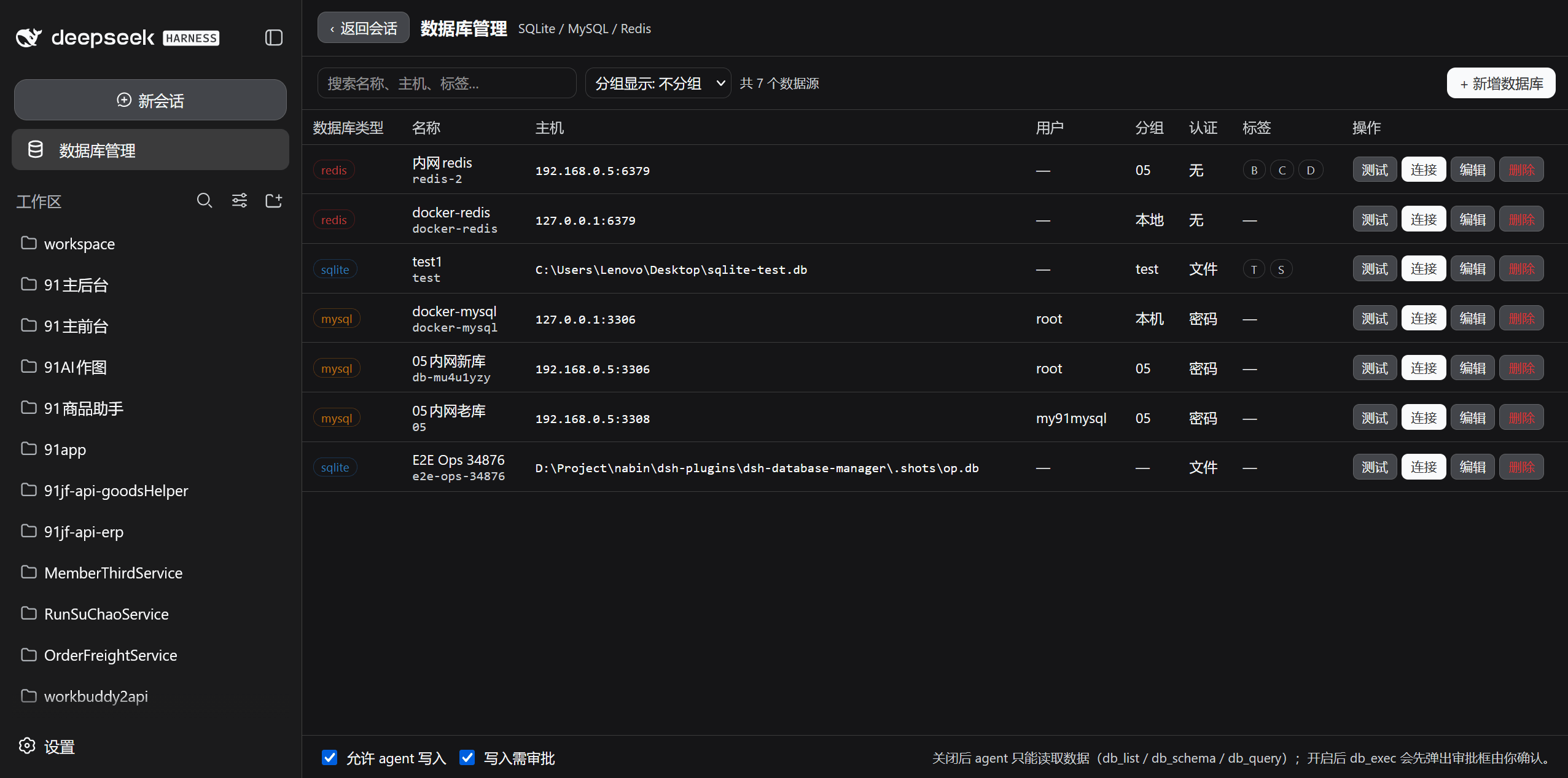
### Data source list
All three source kinds in one place: kind, name, host, user, authentication and tags visible at a glance, with Test / Connect / Edit / Delete per row. The two write-protection switches sit at the bottom of the panel.
### Database list and database operations
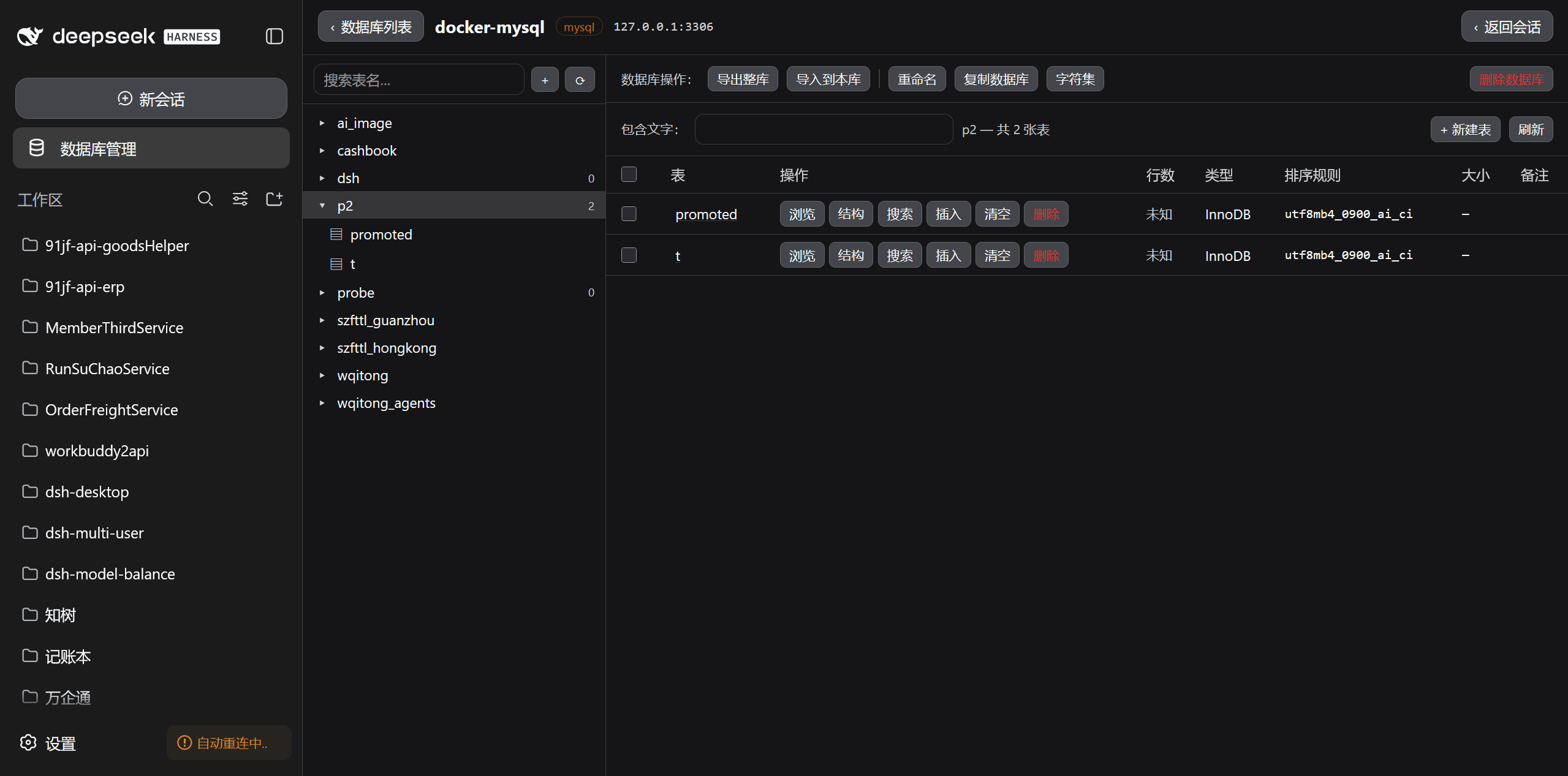
The schema / table tree on the left, the table list and database operations on the right (export database, import into database, rename, copy database, charset, create table).
### Browsing data
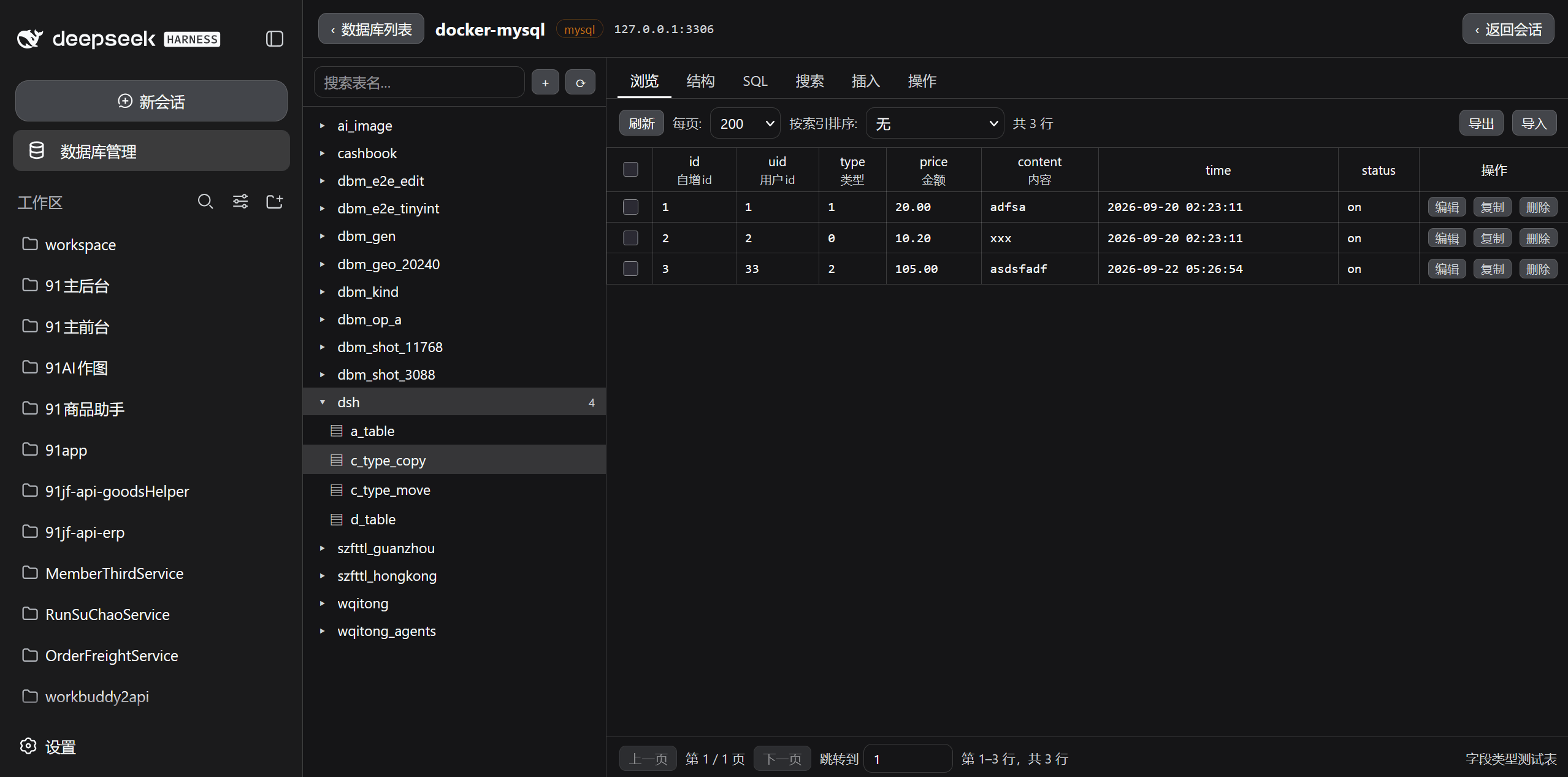
Paging and page jump, sort by index, double-click a cell to edit in place, with edit / copy / delete at the end of each row. Column comments sit under the column name, the table comment at the right of the paging row.
### Table structure
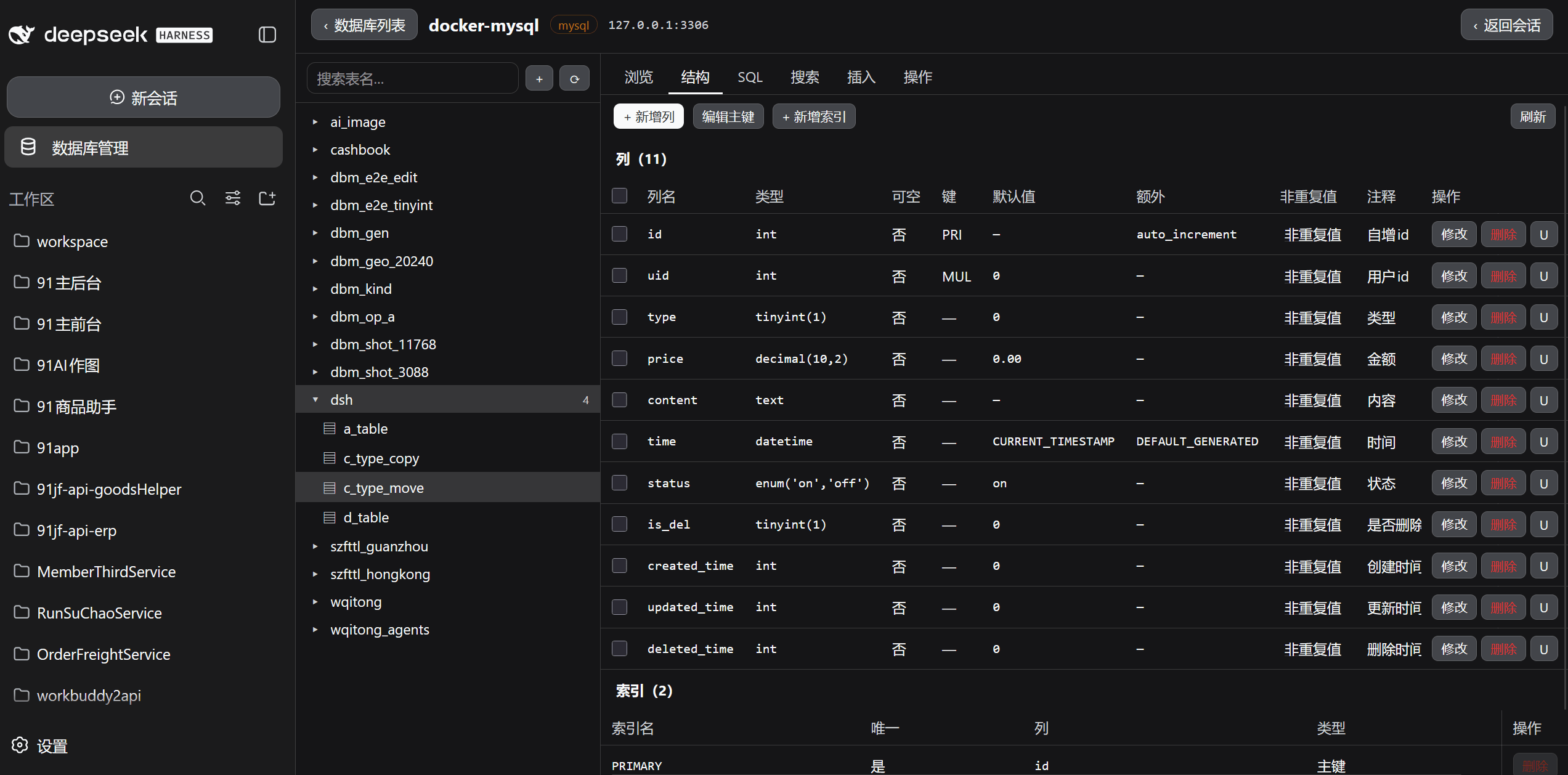
Column attributes at a glance (type, nullable, key, default, extra, distinct-value count, comment) with the action column pinned to the far right; indexes are listed below.
### Inserting data
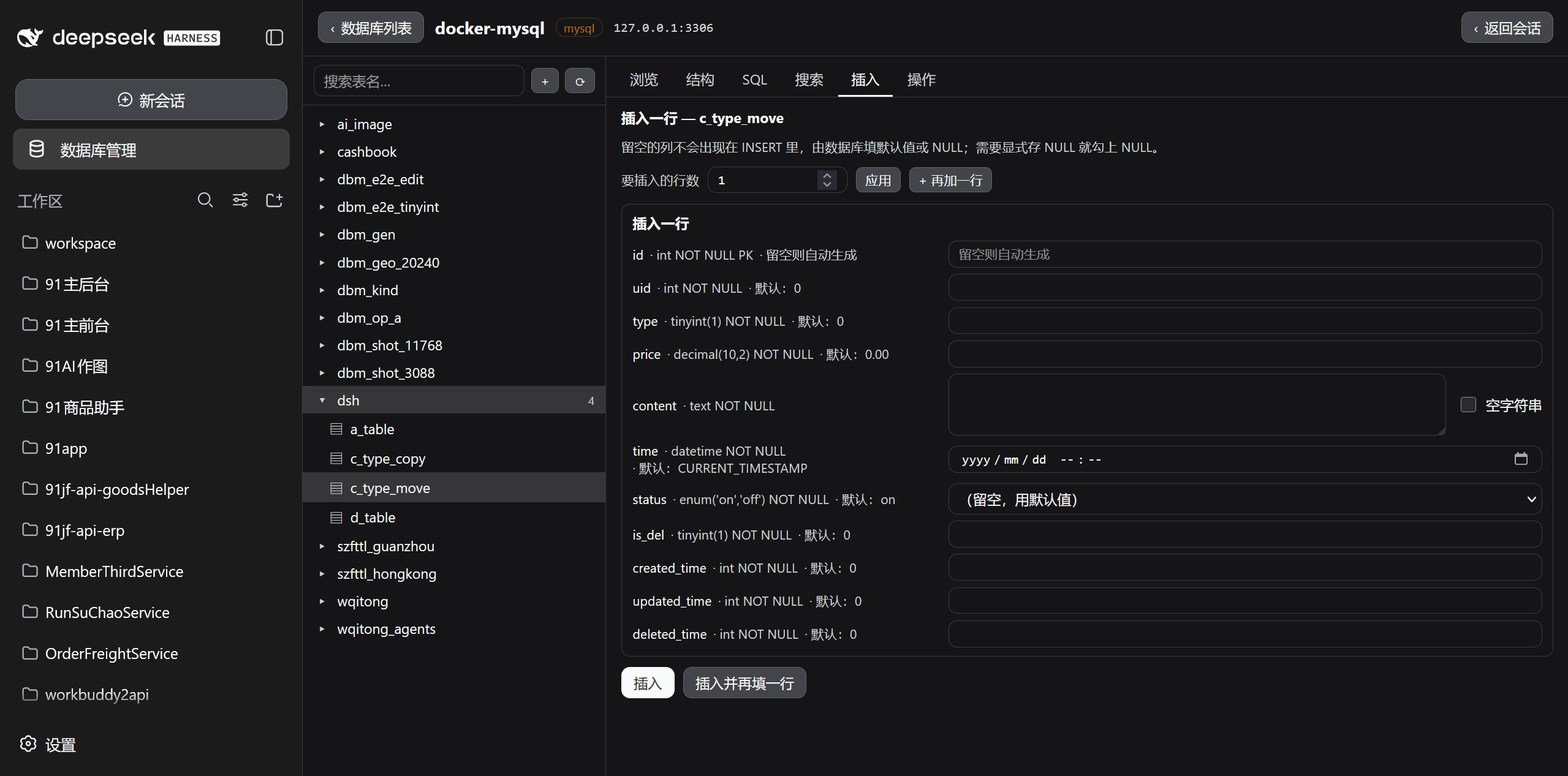
One row per column, controls chosen by column type. Auto-increment columns are marked "auto-generated when left blank", `datetime` gets a date picker, `enum` a member dropdown, long text a multi-line box with an "empty string" checkbox.
### Searching data
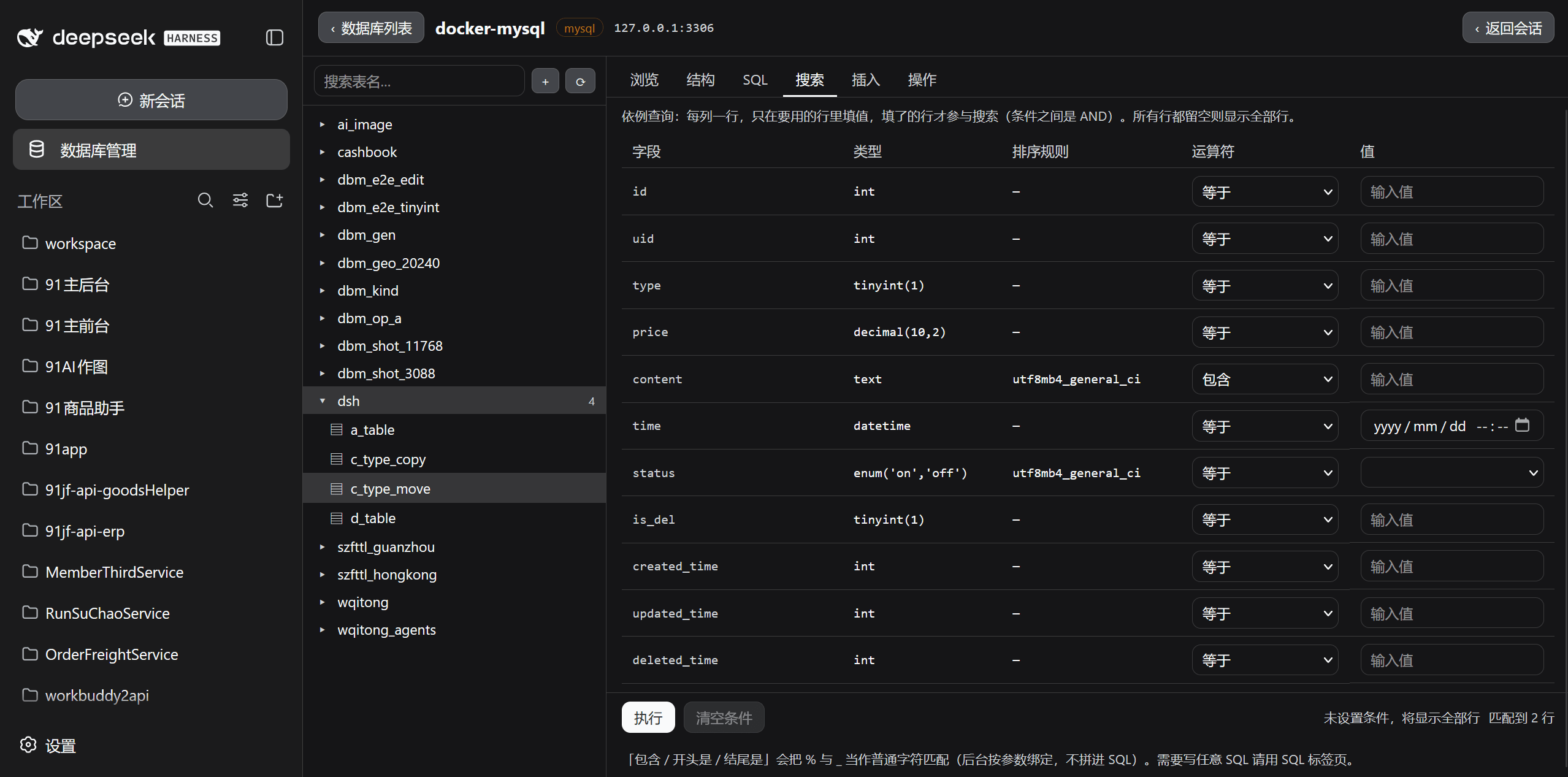
Query by example: the header is field / type / collation / operator / value with **one row per column**, only rows with a value take part, and conditions are ANDed. `Execute` and `Clear conditions` stick to the bottom of the viewport.
### Table operations
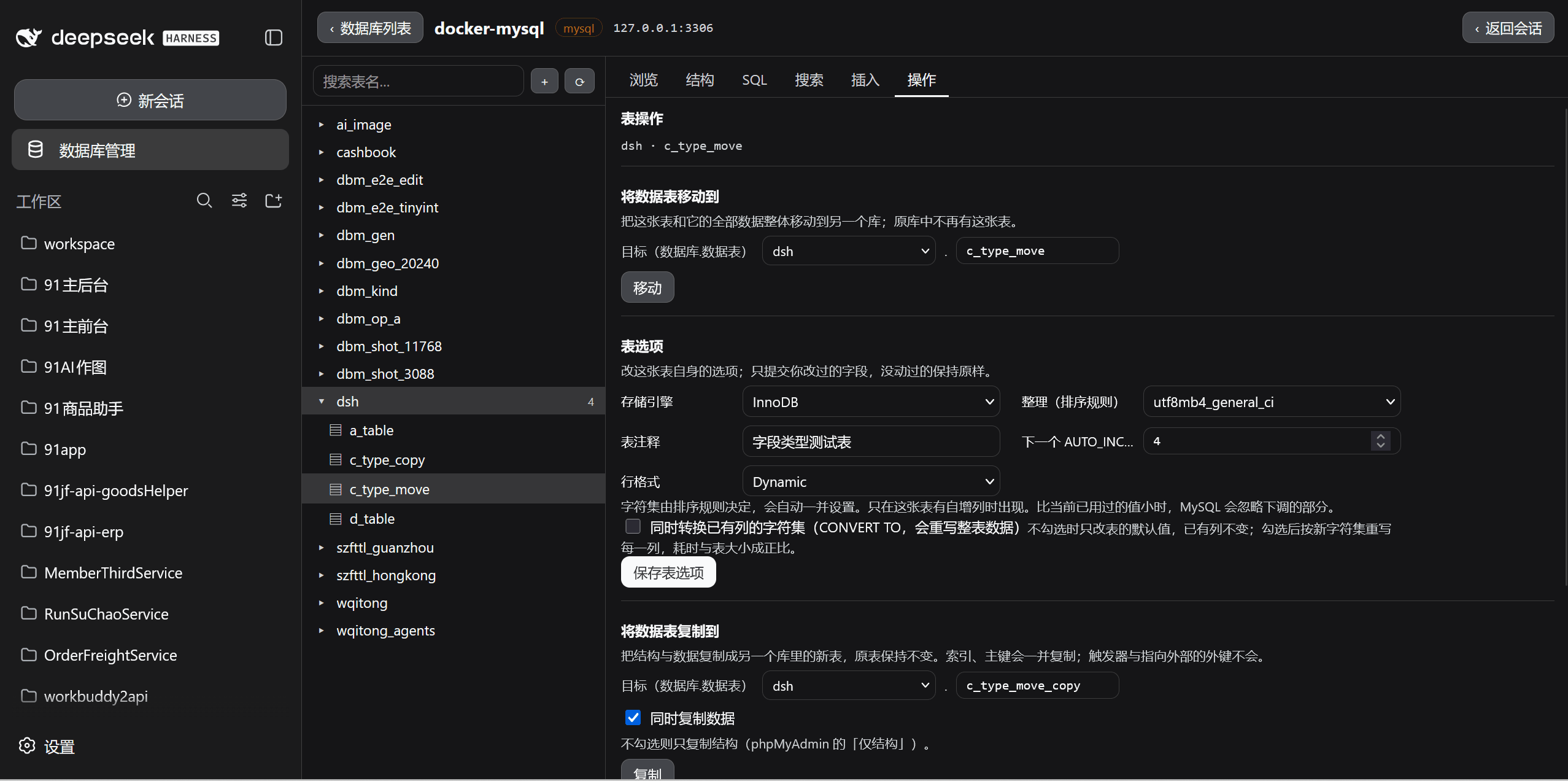
Move table / table options / copy table / table maintenance / delete data or table — five blocks in order.
### Redis panel
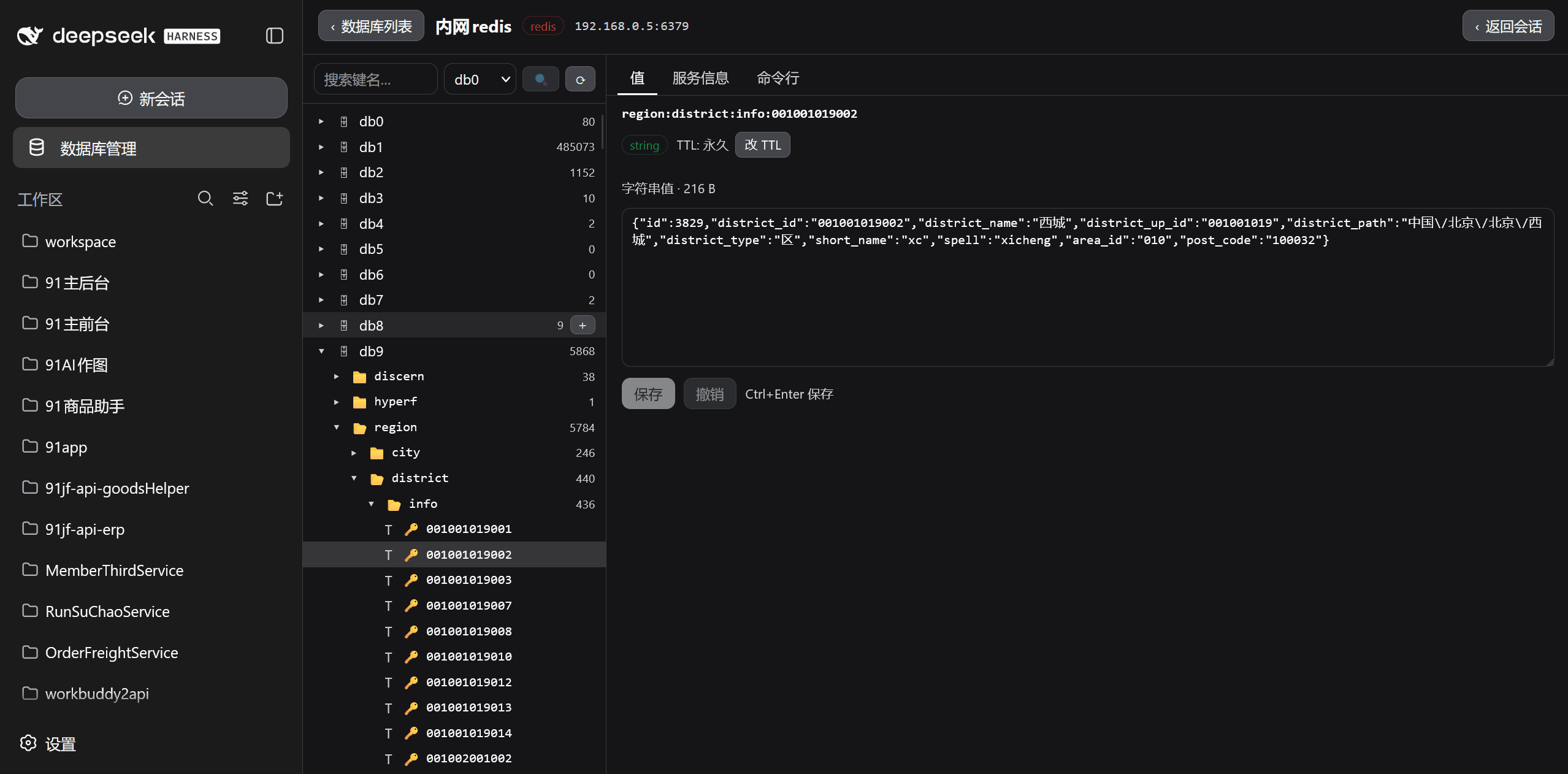
The key tree folded by `:` on the left (showing the key count of each directory), and the Value / Server info / Command line tabs on the right. The value tab shows key type, TTL and content, with Save and Revert (Ctrl+Enter to save).
## Database Engine Support
| Engine | Driver | Notes |
| --- | --- | --- |
| **SQLite** | `node:sqlite` | Built into Node, **zero dependencies** (requires Node ≥ 22.5) |
| **MySQL** | `mysql2` | Plugin dependency, connection pool |
| **Redis** | `ioredis` | Plugin dependency, clients cached per database |
Availability of all three engines is shown at the top of the panel; a missing dependency produces an explicit notice instead of a silent failure. Drivers are loaded lazily and translate their errors, so a deployment with only SQLite still starts normally.
SQLite connects directly to a local `.db` file, which makes it handy for quick inspection and edits; MySQL goes through a connection pool that reclaims idle connections after 30 minutes and discards the old driver when connection fields change.
## How It Works
```
┌──────────────┐ /api/dsh-database/* ┌──────────────┐ mysql2 / ioredis ┌──────────┐
│ Browser │ ───────────────────────→ │ DSH host │ ───────────────────→ │ Database │
│ (panel/tree) │ ←─────────────────────── │ (plugin route)│ ←─────────────────── │ │
└──────────────┘ JSON (redacted) └──────────────┘ queries / commands └──────────┘
↑
authorization gate (agent side)
↑
┌──────────────┐
│ agent tools │
└──────────────┘
```
The plugin has two halves:
- **host half** (`src/index.ts` → `lib/index.js`)
- `store.ts` source storage (atomic writes, redacted projection, persisted write policy)
- `pool.ts` lazily created driver pool, idle connections reclaimed after 30 minutes
- `drivers/` adapters for the three engines behind a shared `SqlDriver` / `RedisDriver` contract
- `routes.ts` the `/api/dsh-database` route family (the **user surface**, where a click is the authorization)
- `tools.ts` agent tools (the **model surface**, gated by `auth.ts`)
- **client half** (`src/client/index.ts` → `lib/client.js`)
- registers the `sidebar.panellist` slot (sidebar entry) and the `main` slot (centred panel)
- both use the same id `database-manager`: the shell's `PanelRow` calls `layout.selectPanel(id)` on click, while clicking any session row calls `selectPanel(null)`, so "click a session to go back" is built-in shell behaviour needing no plugin involvement
SQL identifiers are validated against a conservative grammar and then quoted per engine rules (backticks for MySQL, double quotes for SQLite); values always travel as bound parameters and are never concatenated into statement text.
## Installation
The plugin is installed into a dsh **web profile**, and then that dsh's web service is restarted. Both steps are required.
```bash
# From npm
npx @deepseek-ai/dsh plugin --profile web add dsh-database-manager
# From GitHub
npx @deepseek-ai/dsh plugin --profile web add github:nabin-qq273274877/dsh-database-manager
# Local development (link to your checkout)
npx @deepseek-ai/dsh plugin --profile web add link:/path/to/dsh-database-manager
```
Or hand this prompt to an AI:
```
Please install the dsh-database-manager plugin for me. Repository: https://github.com/nabin-qq273274877/dsh-database-manager
Follow the installation and configuration instructions in the README.
```
After installing, restart `dsh web` and refresh the page. A "Database Manager" entry appears in the sidebar below "New session".
### As a bundle patch layer
The plugin ships `cordis.patch.yml`, equivalent to the `bundles` entry:
```yaml
- insert:
- id: database-manager
name: 'dsh-database-manager'
```
### Installing from source into a profile
While developing this plugin you can use the script in the repository, which does exactly two things — both of which are what the loader actually needs:
```bash
npm run build # produce lib/index.js + lib/client.js first
pwsh -File scripts/install-into-profile.ps1 -DshHome "$env:USERPROFILE\.dsh" # install only
pwsh -File scripts/install-into-profile.ps1 -DshHome "$env:USERPROFILE\.dsh" -Port 3080 # install, restart and verify
```
1. Create a **directory link** at `/node_modules/` pointing at the project directory
2. Append `` to `dsh.profile.bundles` in `/package.json`
The script deliberately avoids a package manager: `pnpm install` re-resolves the entire dependency tree, and `file:` dependencies tend to end up half-installed under that resolution. With a link plus a bundles edit, not a single byte of the rest of the profile's dependency tree is touched.
> **A note on `DSH_HOME`**: a machine can host more than one dsh (the desktop build uses `…\com.dsh.desktop\dsh-desktop\dsh-home`, the command-line build defaults to `~/.dsh`). `-DshHome` must point at the one you mean. During the restart step the script clears `DSH_HOME` so the new process resolves its home by its own default rules rather than inheriting the caller's environment.
## Uninstall
```bash
npx @deepseek-ai/dsh plugin --profile web remove dsh-database-manager
```
## Write Protection
Agent writes pass through two gates, both **fail-closed**:
1. **Monotonic guard** (`ctx.tools.guard`) — evaluated before dispatch. When the agent write switch is off, or the target source is marked read-only, `db_exec` is **rejected outright** with no prompt (the answer is already known, so there is no reason to interrupt the user)
2. **Approval waterfall** (`tools/pre-execute` returning `{kind:'ask'}`) — when the switch is on and the target is writable, every write raises a native DSH approval prompt for the user to confirm. If no approval service exists in the current environment the framework **automatically treats it as a denial**; a user denial or cancellation denies it too, so "nobody answered" never means "allowed"
The two policy switches at the bottom of the panel:
| Switch | Default | Effect |
| --- | --- | --- |
| **Allow agent writes** | off | While off the agent can only read; only when on can `db_exec` possibly run |
| **Writes require approval** | on | While on every write needs your confirmation |
Each source additionally carries its own **read-only** flag: when ticked, the agent cannot modify that source even with global agent writes enabled.
**Writes made in the GUI do not pass through this gate.** Clicking Save or Run in the panel is itself the authorization, exactly as with terminal tools. The same applies to adding or deleting keys on the Redis tree and to editing values or TTL on the right: that is the **user surface** of the panel and is unrelated to the agent write gate.
## Agent Tools
| Tool | Purpose |
| --- | --- |
| `db_list` | List configured sources (id, engine, name, host, user, authentication, tags, read-only) |
| `db_schema` | Inspect database / table / column / index structure (Redis returns the key count per database) |
| `db_query` | Read-only queries (SQL SELECT/WITH/SHOW/DESCRIBE/EXPLAIN/PRAGMA; Redis read commands) |
| `db_exec` | Write operations (guarded by the user switches and approval) |
Redis uses the same tool set on the agent side: `db_query` accepts read commands only and `db_exec` accepts write commands (`SET` / `DEL` / `LPUSH` …), both governed by the switches and approval described above.
## Configuration and Data
- Source configuration: `$DSH_HOME/dsh-database.json` (mode 0600 on POSIX)
- Passwords are stored **in plain text** in that user-private file, under the same trust model as dsh-ssh's host storage — do not read or forward the contents of that file
- Passwords never reach the browser or the model: the API returns the `summarize()` redacted projection (which only exposes `hasPassword`)
## Development
```bash
npm install
npm run typecheck # tsc --noEmit
npm test # vitest: unit + real SQLite path + built-artifact integration + client bundle
npm run build # lib/index.js (host) + lib/client.js (browser)
```
Testing and verification tooling:
| Script | Purpose |
| --- | --- |
| `scripts/probe-surface.mjs` | Load the host artifact offline and list registered tools / routes / prompt sections |
| `scripts/install-into-profile.ps1` | Install into a dsh profile (link + bundles), optionally restart and verify |
| `scripts/check-template-literals.mjs` | Verify files with code embedded in template literals contain no stray backticks |
| `scripts/check-locale-placeholders.mjs` | Verify the placeholders passed to `t('key', {...})` match the template |
The E2E scripts (`scripts/e2e-*.mjs`) assert interface **behaviour** rather than markup, using a real browser against real databases and reading the server back after every write; the `scripts/probe-*.mjs` scripts are targeted probes and minimal reproductions for specific engine behaviour. The maintainer's documentation holds the full inventory and the defects each one pins down.
## Scope and Limitations
This panel is positioned as a **lightweight panel for day-to-day data browsing, schema changes and SQL**, not a MySQL server management suite. It deliberately does **not** do:
- User and privilege management (creating users, grants, password changes, account locking)
- Server status, processes, variables, charsets, engines, plugins, binary log, replication
- Creating and managing views / triggers / stored procedures / functions / events
- Relation view and Designer, tracking and versioning, partition management
- Charts, GIS visualisation, data transformations, print view, PDF schema export
- Export covers only SQL dumps and CSV (no compression, no result-set export, single-table truncation at 200k rows)
- The SQL tab runs one statement at a time, with no syntax highlighting / autocomplete / formatting, and no query history or bookmarks
- The Structure tab's index path supports primary / unique / index only and **cannot create FULLTEXT or SPATIAL indexes** (the create-table page can)
## License
[MIT](LICENSE)