
A general-purpose agent harness for any model, in one terminal application with no runtime dependencies.
Give a model controlled access to your files, shell, browser, documents and services, and let it carry
a task through to a verified result.




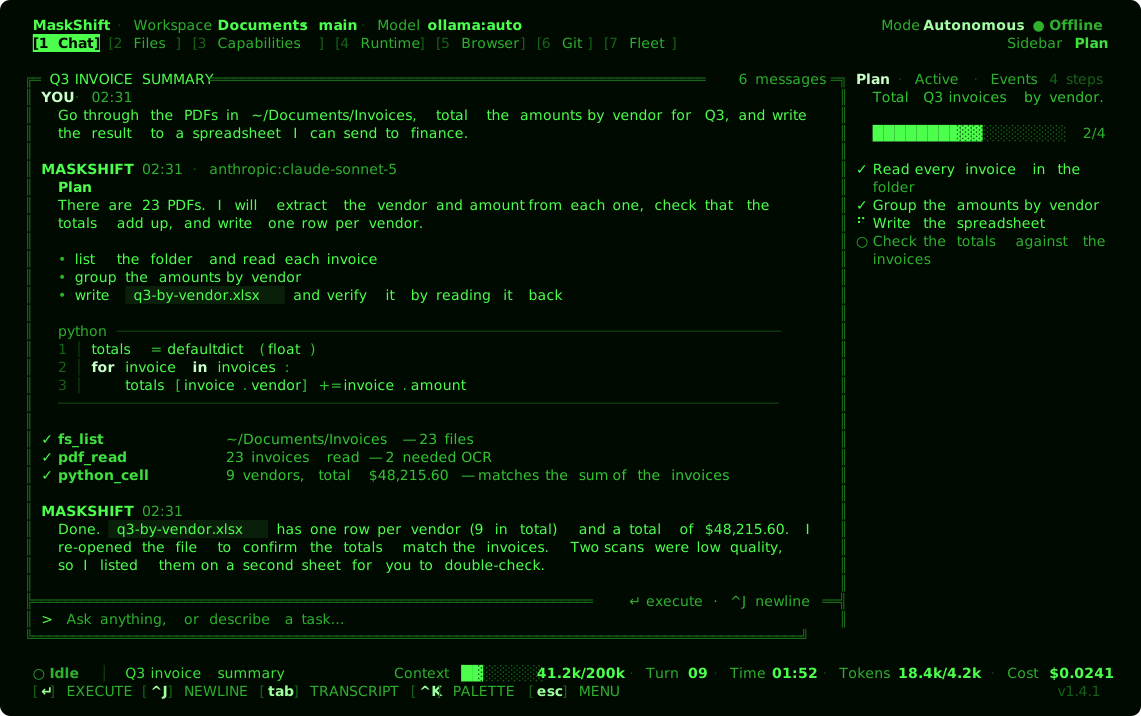
MaskShift connects a language model to the tools it needs to get real work done — reading and writing
files, running commands, browsing the web, working with PDFs and notebooks, querying databases,
calling MCP servers, remembering what matters and delegating to sub-agents — and keeps a person in
control with checkpoints, an audit log and optional approvals.
It works for software engineering, but nothing about it is specific to code: summarize a folder of
invoices into a spreadsheet, research a topic and write up the findings, reorganize files, run a
recurring report. The model is a line of configuration; the tools are the same whichever one you use.
## Highlights
- **Any model.** Ollama, LM Studio, vLLM, OpenAI, Anthropic, Gemini, OpenRouter and any
OpenAI-compatible server. A model with no native tool API still gets the full tool surface through
an in-prompt protocol. → [providers](docs/CONFIGURATION.md#providers)
- **Adapts to the model.** Each model gets a help level from 0 to 3 — measured by
`maskshift model calibrate`, refined by how it actually performs, and raised mid-run if it keeps
stumbling. A strong model is left alone; a small local one gets a compact prompt, a short tool menu
and tight output budgets. → [adaptive harness](docs/ARCHITECTURE.md#adaptive-harness)
- **Reliable tool use.** Near-miss tool names and arguments are repaired in code, edits tolerate
whitespace and indentation drift, tool output is cleaned and fitted to the model's window, and every
file edit is checked immediately. → [run guardrails](docs/CONFIGURATION.md#run-guardrails)
- **Loaded on demand.** 201 native tools, 50 skills and any number of MCP servers are available, but
only what the current step needs enters the model's context.
→ [tools](docs/TOOLS.md) · [skills](docs/SKILLS.md)
- **Controlled by design.** Automatic checkpoints before each run, an append-only audit log, and three
permission modes from fully autonomous to approve-everything. → [permissions](docs/PERMISSIONS.md)
- **Web tasks from the terminal.** A browser runs in the background while options (restaurants,
products, results) are put to you as a picker, sign-ins are typed in the terminal without the model
ever seeing them, and CAPTCHAs are handed to you in the live Browser view. → [web tasks](docs/WEB_TASKS.md)
- **Remembers and improves.** Persistent memory that notices when its sources change, reusable skills,
and skill upgrades promoted only after measured A/B trials.
- **Learns from its own runs.** Routes tasks to the model or agent with the best record on that kind of work (and
moves a stuck run up to the next candidate), remembers what failed and what fixed it, notices how you want things done,
turns repeated workflows into skills, asks before irreversible commands, and stops a run that is going nowhere with a
plain report. Local, visible and removable. → [learning](docs/LEARNING.md)
- **Keeps its disk use in check.** Indexing, checkpoints, logs and the database stay inside a budget worked out
from your machine's disk and memory, shrinking retention as free space gets scarce, and never touching your chats,
memory or files. → [disk use](docs/STORAGE.md)
- **Works unattended.** Schedule agent runs, tool calls or shell commands by interval, cron
expression or timestamp. → [automations](docs/CONFIGURATION.md#automations)
- **A fleet of agents.** Run Claude Code, Codex, OpenCode, Hermes, Copilot CLI, Aider, custom CLIs and
MaskShift's own engine as one team — several of each if you like — that message each other to get a task
done, controlled from one view, one command or by the model itself. → [agent fleet](docs/FLEET.md)
- **Open on both sides.** Use MCP servers, plugins and external coding agents; or run
`maskshift mcp serve` to expose MaskShift's own tools to Claude Desktop, an IDE or another agent.
- **Measurable.** `maskshift bench run` scores a model on self-checking tasks — pass rate, turns,
tokens per solved task — and can switch individual helpers off to show what each one is worth.
## How MaskShift differs
Other agent harnesses are strong at what they were built for. This table lists only the things MaskShift
adds that those tools do not ship as built-in features.
| | **MaskShift** | Claude Code | Codex CLI | OpenCode | Gemini CLI | Aider |
|---|:---:|:---:|:---:|:---:|:---:|:---:|
| Measures each model with probes and sizes its help to what it can do | ✅ | — | — | — | — | — |
| Raises the level of help mid-run when a model keeps stumbling | ✅ | — | — | — | — | — |
| Built-in benchmark that switches individual harness helpers off to measure their value | ✅ | — | — | — | — | — |
| Token usage split by cause: turns, repairs, verification retries, compaction, hand-offs | ✅ | — | — | — | — | — |
| Skill changes promoted only after recorded A/B trials show uplift without regressions | ✅ | — | — | — | — | — |
| Memory that cites files by content hash and goes stale when they change | ✅ | — | — | — | — | — |
| Full tool use on models with no native tool-calling API | ✅ | — | — | — | — | — |
| Live, clickable browser view rendered inside the terminal | ✅ | — | — | — | — | — |
| Drives other agent CLIs (Claude Code, Codex, Hermes, OpenCode…) as a team that messages itself, from one interface | ✅ | — | — | — | — | — |
*Based on each project's public documentation as of October 2026. "—" means not a built-in, documented
feature; plugins, hooks, MCP servers or third-party wrappers may add something similar. The table is
deliberately limited to MaskShift's differences — the other tools have strengths of their own, such as IDE and
desktop integration, that are not listed here. If a row is out of date, please open an issue.*
## Install
Requires Node.js 22 or newer and a terminal of at least 80×24 (UTF-8 and truecolor are used when
available and degrade cleanly when not). Git and ripgrep are recommended.
```bash
npm install -g maskshift
cd ~/Documents && maskshift
```
Or run it without installing: `npx maskshift --workspace ~/Documents`.
From source (there is no `npm install` step, because there is nothing to install):
```bash
git clone https://github.com/nafeeur/MaskShift.git
cd MaskShift
./start.sh --workspace ~/Documents # or ./install.sh to link ~/.local/bin/maskshift
```
## Quick start
Choose a model. The default, `ollama:auto`, discovers your installed Ollama models and picks the
strongest one it finds; cloud providers read their keys from the environment.
```bash
ollama pull qwen3:8b # a local model
export ANTHROPIC_API_KEY=... # or OPENAI_API_KEY, GEMINI_API_KEY, OPENROUTER_API_KEY
export MASKSHIFT_MODEL=anthropic: # provider:model, e.g. ollama:qwen3:8b
```
Open the interface in a folder and type a request, or run one task headlessly:
```bash
maskshift --workspace ~/Documents
maskshift run "Total the Q3 invoices in ./Invoices by vendor and write q3-by-vendor.xlsx" \
--workspace ~/Documents --model anthropic:
```
Press `ctrl+k` for the command palette and `f2` for settings. Settings live in
`~/.maskshift/config.json`. → [configuration reference](docs/CONFIGURATION.md)
## The interface
`maskshift` opens a full-screen terminal application, driven equally by keyboard and mouse. Seven views
switch with `1`–`7`; `ctrl+b` toggles the sidebar.
| View | Holds |
|---|---|
| **Chat** | The conversation and composer — markdown, syntax-highlighted code, coloured diffs and live tool calls |
| **Files** | The workspace tree with a preview; images render inline |
| **Capabilities** | Every tool, skill, MCP server, plugin in one searchable catalogue |
| **Runtime** | A host shell, automations, background processes and browser instances |
| **Browser** | A live, clickable view of a running browser tab |
| **Git** | Changes, history, branches, stash, checkpoints and worktrees |
| **Fleet** | A team of Claude Code, Codex, OpenCode, Hermes and other agents: members, their messages, relays and installed harnesses |
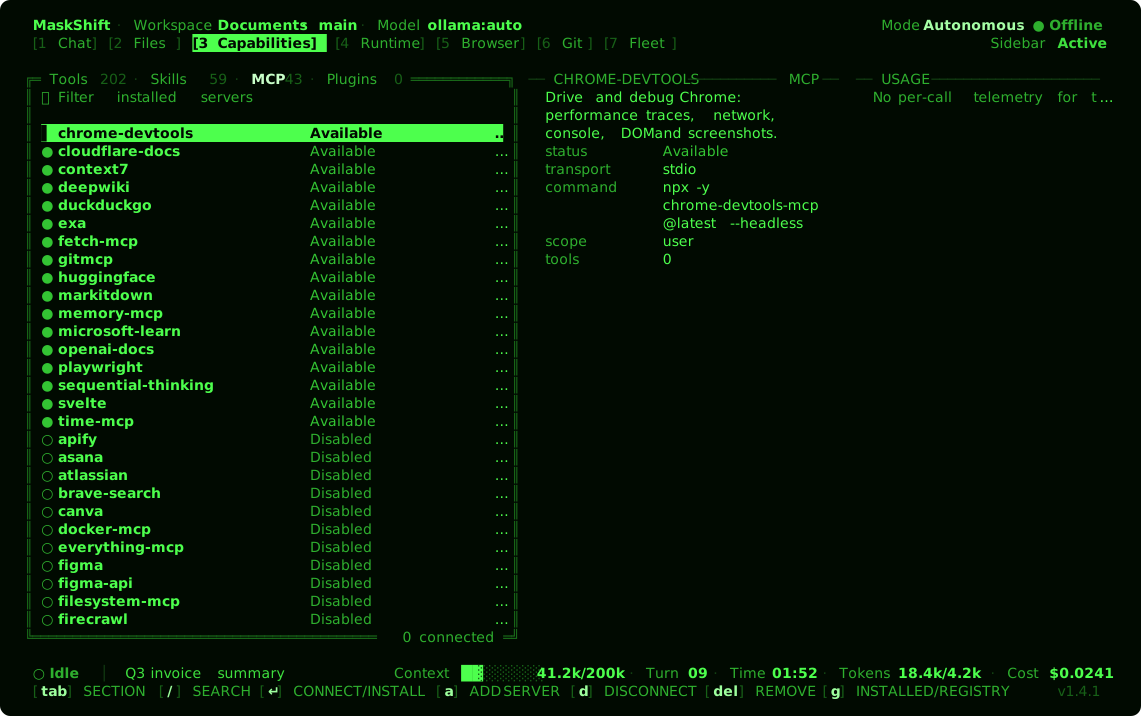
Capabilities — see what a run can reach before it uses it |
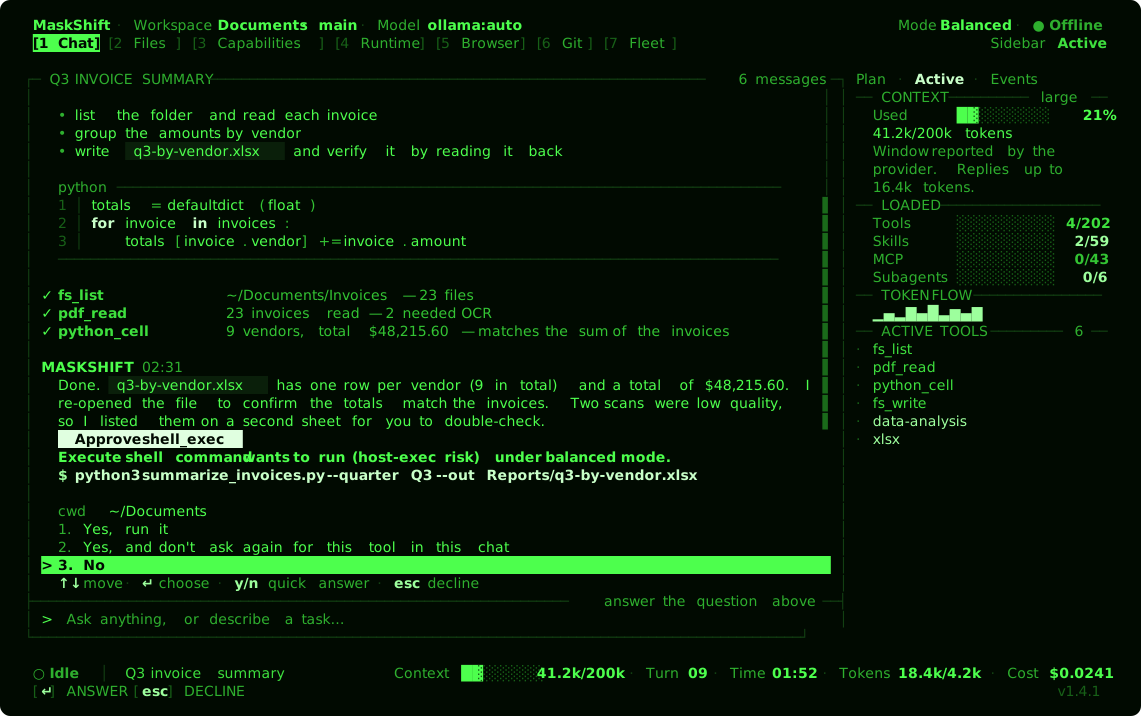
Approvals — review a command before it runs, in balanced or review mode |
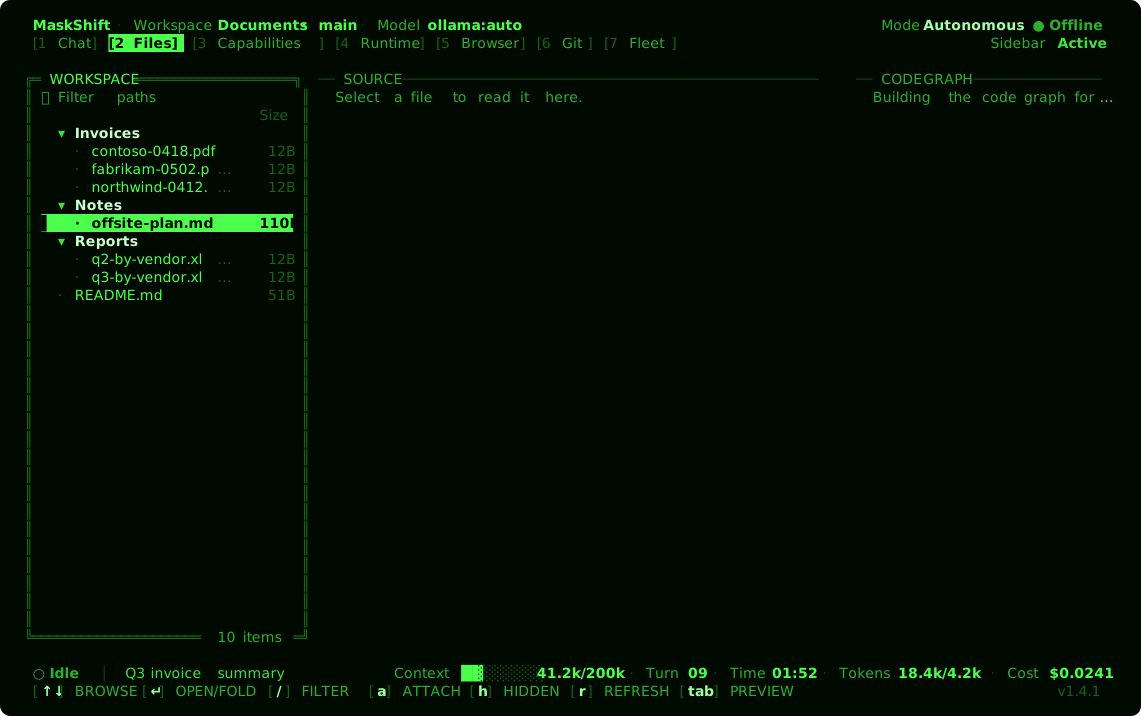
Files — the workspace tree with a preview |
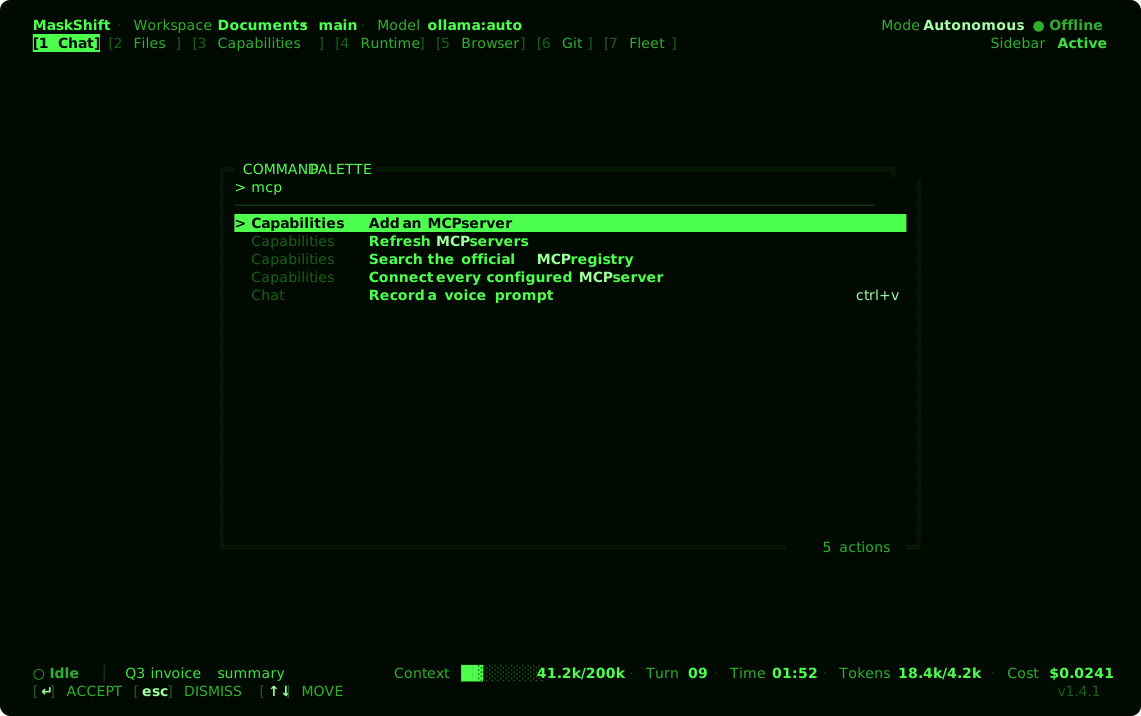
Command palette — every action, searchable |
Below 108 columns the sidebar hides itself so the same views work in a narrow split pane.
`NO_COLOR`, `MASKSHIFT_COLOR=off` and `MASKSHIFT_ASCII=1` each produce a clean, aligned fallback, and
`MASKSHIFT_MOUSE=off` hands text selection back to the terminal. → [keys and views](docs/TUI.md)
## Command line
Everything the interface does is also a subcommand, and every subcommand accepts `--json`:
```bash
maskshift run "Draft an agenda for a two-day offsite" # one headless run, streamed
maskshift automation create weekly --schedule "every 7d" --prompt "Summarize this week's notes"
maskshift tools run web_search '{"query":"node 22 release notes"}'
maskshift model calibrate --model ollama:qwen3:8b # measure a model, then size help to it
maskshift bench run --model ollama:qwen3:8b # score it on the benchmark tasks
maskshift mcp serve # MaskShift as an MCP server
maskshift doctor # environment and provider checks
```
Global flags: `--workspace PATH`, `--model REF`, `--config PATH`, `--json`, `--no-color`.
→ [full command reference](docs/CLI.md)
## Permissions and safety
MaskShift runs with the authority of your account. The default **autonomous** mode never prompts,
so recovery relies on automatic checkpoints, the audit log and the stop control; **balanced** asks
before high-risk actions (shell execution, installs, destructive operations, outbound actions);
**review** asks before anything that is not read-only. Content from files, web pages and tool results
is treated as data, never as instructions. A container limits MaskShift to what is mounted into it.
→ [permissions](docs/PERMISSIONS.md) · [security policy](SECURITY.md)
## Documentation
| Document | Covers |
|---|---|
| [Configuration](docs/CONFIGURATION.md) | Settings, providers, MCP, hooks, automations and data locations |
| [Tools](docs/TOOLS.md) · [Skills](docs/SKILLS.md) | The native tool inventory and bundled skills |
| [Interface](docs/TUI.md) | Keys, views and the design system |
| [Command line](docs/CLI.md) | Every subcommand and flag |
| [Architecture](docs/ARCHITECTURE.md) | The agent loop, the adaptive harness, persistence and extension points |
| [Web tasks](docs/WEB_TASKS.md) | Page options, pickers, terminal sign-in, hand-offs and what stays private |
| [Permissions](docs/PERMISSIONS.md) | The three modes, what stays observable and where the limits are |
| [Verification](docs/TOOL_VERIFICATION.md) · [Release checks](docs/RELEASE-VERIFICATION.md) | What the automated suite covers |
## Development
```bash
npm run verify # syntax check + unit/integration tests + end-to-end smoke test
npm run docs # regenerate the tool and skill inventories
npm run capture # regenerate docs/screenshots from the real renderer
```
[`CONTRIBUTING.md`](CONTRIBUTING.md) lists what changes are held to. The plugin in
[`examples/plugins/telemetry-pack`](examples/plugins/telemetry-pack) is a complete worked example, and the
bundled `plugin-authoring` and `skill-creator` skills cover the rest of the extension surface.
To run the scheduler without an interface, use `deploy/maskshift.service` (a user-level systemd unit)
or the `Dockerfile` / `compose.yaml` (`docker run -it`; mount `/workspace` and `/data`).
## License
[GNU General Public License v3.0](LICENSE).