# dsh-qa · QA Workbench
 [](./LICENSE)
[]()
[]()
[]()
[](https://github.com/deepseek-ai/deepseek-harness/releases/tag/dsh-v0.1.6-alpha.1)
**dsh-qa** is a local QA workbench for DeepSeek Harness. It keeps requirements, test cases, risks, execution, evidence, and delivery decisions in one project space. Project and iteration conversations reuse native DSH sessions with **Test Mode** (preset id: `qa`); business data stays local and the runtime has no production dependencies.
The current implementation version is `v0.4.1`, and it completed 4/4 host-smoke cases against a real `dsh-v0.1.6-alpha.1` host. npm, Git tag, and GitHub Release publication remain separate delivery states and are not implied here.
```
Test Dashboard → DSH Test Chat → Project Kanban → Calendar Schedule
```
[](./LICENSE)
[]()
[]()
[]()
[](https://github.com/deepseek-ai/deepseek-harness/releases/tag/dsh-v0.1.6-alpha.1)
**dsh-qa** is a local QA workbench for DeepSeek Harness. It keeps requirements, test cases, risks, execution, evidence, and delivery decisions in one project space. Project and iteration conversations reuse native DSH sessions with **Test Mode** (preset id: `qa`); business data stays local and the runtime has no production dependencies.
The current implementation version is `v0.4.1`, and it completed 4/4 host-smoke cases against a real `dsh-v0.1.6-alpha.1` host. npm, Git tag, and GitHub Release publication remain separate delivery states and are not implied here.
```
Test Dashboard → DSH Test Chat → Project Kanban → Calendar Schedule
```
 ## Table of Contents
- [Features](#features)
- [Installation (DSH plugin)](#installation-dsh-plugin)
- [Install and update with npm (standalone)](#install-and-update-with-npm-standalone)
- [Quick Start (try without installing)](#quick-start-try-without-installing)
- [QA Control Workbench](#qa-control-workbench-0205-quality-domain)
- [Standalone Mode](#standalone-mode)
- [Architecture](#architecture)
- [AI Toolset](#ai-toolset)
- [Companion QA Skills](#companion-qa-skills)
- [Development & Contributing](#development--contributing)
- [Roadmap Documentation](#roadmap-documentation)
- [License](#license)
- [FAQ](#faq)
## Features
### Test Project Management
- **Project & iteration duality**: The top-level object can be a **test project** or an **iteration** (iterations can hang off a parent project); both bind their own DSH session, and the filter bar separates them
- **Test dashboard & calendar**: Active projects, due-soon/overdue milestones, pending gates, open defects, and recent activity on one screen; calendar supports year/month/day jumps, click-a-date creation, project-scoped milestones or events, and direct deletion
- **Real-time kanban**: Six-column pipeline (Requirements → Test Design → Case Review → In Execution → Defect Regression → Released), drag-and-drop columns, SSE real-time push, multi-window sync
- **Project archive workspace**: Wide project detail for editing name, key, product, owner, summary, and stage; ten sections — Overview / Quality Tasks / Requirements / Test Cases / Defects / Milestones / Reports / Knowledge / Minutes / Gates — plus progress, AI strategy, members, file directory, and stage timeline
- **Local project directory**: Creating a project can auto-generate an 8-level workspace: `01_需求与范围 / 02_测试计划 / 03_测试用例 / 04_测试数据与脚本 / 05_测试执行 / 06_缺陷 / 07_测试报告 / 08_发布与归档`; deleting a project record never deletes the folder
- **Gate governance**: Requirements review / strategy review / case review / report review / release / closure are requested by the AI and approved manually by the test owner (aligned with the 8-stage AI quality-analysis workflow)
### QA Control Workbench (0.2–0.5 quality domain, included in the v0.4.0 baseline)
- **Quality tasks and source snapshots**: Create a quality task for each test objective. The server captures and validates requirements, workspace files, or allowed Git revisions, then records summaries, digests, acceptance criteria, risks, test scope, and analysis decisions instead of trusting client-supplied paths or content.
- **Test plans and controlled execution**: Maintain reviewed test plans and immutable execution-profile versions per quality task. A run preview token is issued only for the current reviewed plan, current profile version, and source digest before a controlled local run starts in a minimal environment.
- **Evidence, analysis, and regression**: Archive terminal runs as integrity-checked evidence bundles; analyze failures, promote confirmed defects with human confirmation, compare runs from the same plan, and manage traceable deterministic regression sets with exclusions.
- **Computed quality gates**: Calculate `PASS / WARN / BLOCK` from execution provenance, verified evidence, critical test results, and risk state. Delivery reports and trends remain available after refresh; controlled exceptions require an owner, reason, and expiry and apply only to eligible warnings.
- **Direct project details**: The active-project list and kanban card body open the full project detail directly. The dashboard shows up to five active projects, while the kanban retains the complete project list.
#### Quality delivery workflow
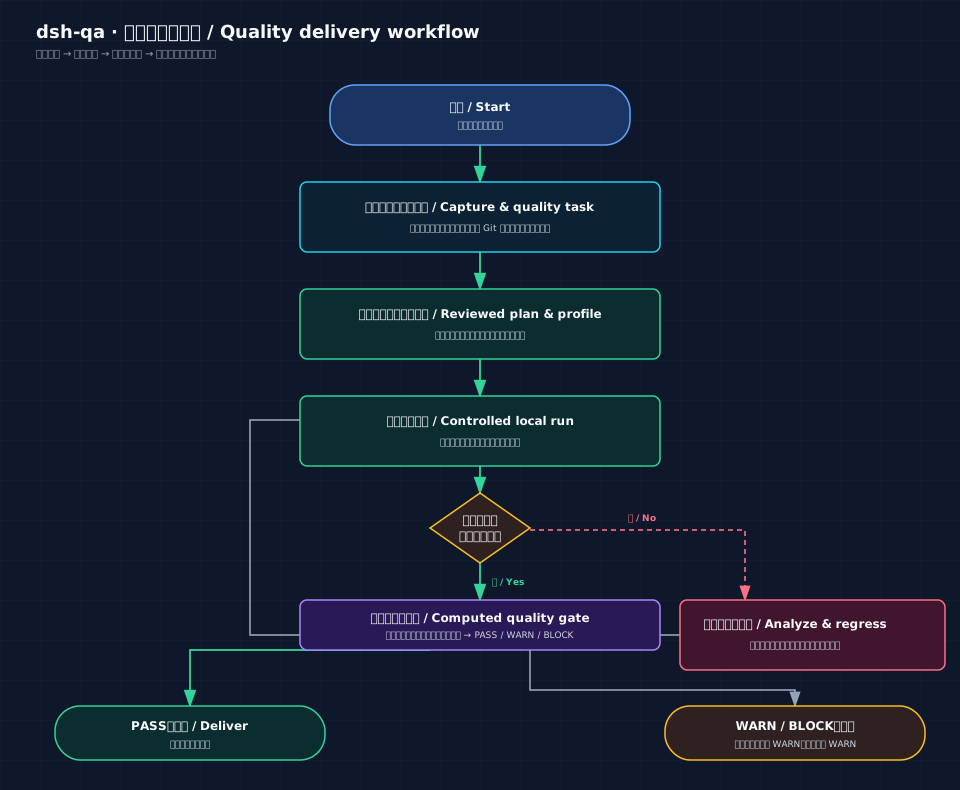
The diagram makes the control boundary explicit: a run that is not terminal or lacks verified evidence enters failure analysis and regression before it runs again. Only a `PASS` gate reaches delivery; `WARN / BLOCK` requires review. An exception applies only to an eligible `WARN` check and can never turn `BLOCK` into a pass.
### AI Collaboration
- **Controllable AI modes**: Per project — full assistance, on-demand collaboration, or fully off; auto-extraction and dashboard reminders can be toggled independently
- **AI material boards**: The AI registers requirements (linkable to test cases with verification purposes), test cases (priority, requirement-trace `trace`, risk tags, three states), defects (business-impact-based severity plus reproduction frequency and impact scope), milestones (auto-computed due dates with overdue/due-soon badges), events, test knowledge, meeting minutes, and test reports (versioned), and can ingest Playwright/Pytest automation results; every registration appears live on kanban cards and the material feed
- **DSH skills & commands**: Each project binds an independent DSH session; the "Skills & Commands" panel supports categories, search, and click-to-insert, with `/` instant suggestions and results echoed back into the workbench
- **QA Skill installer**: The `QA Skill Installer` tab groups skills into Testing Types, Testing Workflows, and Enhanced; Testing Types uses the site-aligned groups Requirements & Strategy, Case Design & Review, Functional & Compatibility, API & Automation, Quality Specialties, and Defects, Reports & Review, with bilingual switching, search, detail links, and one-click DSH installation
- **Single DSH chat & model switching**: Uses only this project's DSH Test Mode session; the model switcher reads DSH's native model catalog — no second model set inside the plugin
### UI & Connectivity
- **Language switching (zh / en)**: the "中 / EN" toggle in the top bar switches the UI language on the fly — Chinese by default, persisted in your local browser; navigation, dashboard, kanban, lists, calendar, radar and drawer/modal titles are all bilingual
- **Adjustable workspace**: Main nav, project rail, and project radar widths are draggable and collapsible; double-click edges to reset; compact / standard / focus-chat presets persist in your local browser
- **Four QA themes**: QA Dashboard, Terminal, Minimal, and Cyber — full skins; the Cyber theme can trigger a "BUILD PASSED" scene at any time
- Overdue milestones in red, due-within-7-days in yellow, pending gates in purple — live counts in the top bar
## Installation (DSH plugin)
Manage the plugin with the **same method used to start DSH**. `dsh web` is an alias for `dsh --profile web`; both command sets below manage the `web` profile.
### Option 1: Start DSH with npx
```bash
# Install the dsh-qa plugin
npx @deepseek-ai/dsh plugin --profile web add dsh-qa
# Update to npm's latest version
npx @deepseek-ai/dsh plugin --profile web update dsh-qa
# Start or restart the Web UI after installation or update
npx @deepseek-ai/dsh web
```
### Option 2: Start from a DeepSeek Harness source checkout
Run these commands from the Harness repository root after `pnpm install` and `pnpm run build`:
```bash
# Install the dsh-qa plugin
pnpm dsh plugin --profile web add dsh-qa
# Update to npm's latest version
pnpm dsh plugin --profile web update dsh-qa
# Start or restart the Web UI after installation or update
pnpm dsh web
```
To pin GitHub or a local development checkout, replace `add dsh-qa` in either option with `add github:naodeng/dsh-qa` or `add link:/path/to/dsh-qa`. Restart the Web UI after installation or update because plugins load when the host starts. A **「质量工作台 / QA Workbench」** entry appears in the GUI sidebar; click to open the workbench in the conversation area or use the toolbar to open it in a tab.
> **Models & API**: The workbench does not maintain a second set of API keys or model configs. Each test project binds a native DSH session whose working directory is the project folder, and automatically uses Test Mode (preset id: `qa`). Model list, model switching, skills, commands, tools, and permission policies all come from DSH; to add providers or models, configure them in DSH settings.
>
> If an old project is bound to a blank standard-mode session, the workbench switches it to Test Mode automatically; if the old session already has conversation history, the workbench keeps that history, creates a new Test Mode session, and rebinds.
## Install and update with npm (standalone)
```bash
# Requires Node.js 18+
npm install -g dsh-qa
qabench # → http://127.0.0.1:8899
# Update to npm's latest version, then restart the workbench
npm update -g dsh-qa
qabench
```
This starts the local QA workbench only. To use sessions, models, skills, and commands inside DeepSeek Harness, install the plugin using the **Installation (DSH plugin)** steps above.
## Quick Start (try without installing)
```bash
# Requires Node.js 18+
git clone https://github.com/naodeng/dsh-qa.git
cd dsh-qa
npm start # → http://127.0.0.1:8899
```
On first launch, one sample project and one sample iteration are created with requirements, test cases, defects, milestones, reports, and a pending approval gate. Explore them from the dashboard, kanban, and calendar. Standalone mode manages local project data; DSH chat, models, skills, and commands require opening the plugin from the DSH sidebar.
## Standalone Mode
```bash
npm start # or double-click start.command
# → http://127.0.0.1:8899 (data directory: /data)
```
The standalone address lets you view and manage test projects, the kanban, and the calendar; DSH chat, models, skills, and commands must be used from the plugin opened in the DSH sidebar.
## Architecture
```
lib/index.js Host half (cordis plugin): starts the workbench in-process + /api/dsh-qa routes + system-prompt announcement
lib/client.js Browser half (v0.4.0): DOM sidebar entry + conversation-area iframe; 0.5 plans the official Panel/Slot migration
cordis.patch.yml Profile bundle patch (inserts the plugin line)
server/ Workbench service (native http + SSE; projects, quality tasks, execution, evidence, and gates)
public/ Four-view frontend (vanilla JS, no build step; relative paths, mountable under any prefix)
```
**Routes**: `/api/dsh-qa/info` (status), `/api/dsh-qa/workbench/` (same-origin mirror proxy, SSE pass-through). The same-origin iframe also connects native sessions through DSH's current `session/*`, `agentPresets/*`, `skills/*`, and `commands/*` APIs — all behind a loopback guard.
**Data directory**: plugin mode `~/.dsh/dsh-qa/` (projects & local materials); standalone mode `/data/`. DSH chat is persisted by DSH itself. Both the workbench and DSH listen on `127.0.0.1`.
## AI Toolset
The workbench ships 23 QA-domain tools that DSH sessions call through function calling to update projects and quality tasks:
| Group | Tools |
| --- | --- |
| Project management | `project_get` `project_update` `member_add` `project_transition` |
| Requirements & cases | `requirement_add` `testcase_add` `testcase_status` `testcase_link` |
| Defects & milestones | `defect_add` `defect_status` `milestone_add` `event_add` |
| Notes & reports | `knowledge_save` `minutes_save` `report_draft` `report_draft_save` |
| Gates & imports | `gate_request` `testrun_import` |
| Quality tasks | `qa_quality_task_get` `qa_quality_analysis_request` `qa_quality_analysis_save` `qa_quality_risk_decide` `qa_quality_test_scope_suggest` |
## Test Mode Preset (plugin mode)
In plugin mode, workbench chat automatically uses DSH's **Test Mode** (preset id: `qa`). Install the preset before first using DSH chat; standalone local-project management does not require it.
```bash
# One-click install of the qa preset into ~/.dsh/.agent-presets/qa
scripts/install-qa-preset.sh
# or preview: scripts/install-qa-preset.sh --dry-run
```
The preset is based on DSH's official `standard` (full coding capabilities) with a QA-testing persona and built-in QA quality principles (executable, judgeable test cases covering positive/exception/boundary; defects separating facts from guesses; no fabricated data). No restart needed — `agentPresets/list` picks up id=`qa` immediately.
## Companion QA Skills
The workbench chat reuses DSH-native skills and commands (type `/` to search). You can install [awesome-qa-skills](https://github.com/naodeng/awesome-qa-skills) as companion testing skills and reference the multi-role workflows of [awesome-qa-prompt](https://github.com/naodeng/awesome-qa-prompt).
Open the workbench from the DSH sidebar and select `QA Skill Installer` to browse and install skills. The page shows `skills/zh` or `skills/en` according to the active UI language. Card names, descriptions, use cases, and detail links are synchronized from the [QA Skills Library](https://inaodeng.com/zh-cn/qaskills/); the local `awesome-qa-skills` checkout remains the installation source.
The installer keeps the website's category order: Testing Types (Requirements & Strategy, Case Design & Review, Functional & Compatibility, API & Automation, Quality Specialties, Defects, Reports & Review), Testing Workflows, and Enhanced. Skills are installed into DeepSeek Harness at `~/.dsh/skills/`; restart `dsh web` after installation before using them in a new DSH session.
```bash
# Install the current repository's testing-type and testing-workflow skills into the DSH skills directory
scripts/install-qa-skills.sh # default: all Chinese skills
scripts/install-qa-skills.sh --lang en # English skills
scripts/install-qa-skills.sh --skill test-case-writing # install a single skill
scripts/install-qa-skills.sh --src /path/to/awesome-qa-skills # custom repo path
scripts/install-qa-skills.sh --dry-run # preview without writing
```
After installing, restart `dsh web` and type `/` in the workbench chat to see the skills (e.g. `/test-case-writing`, `/bug-reporting`, `/requirements-analysis`, `/test-strategy`, `/test-reporting`). The built-in QA system prompt already adopts these libraries' quality principles: test cases organized by requirement-trace `trace` and risk tags covering positive/exception/boundary scenarios; defects separating "observed facts" from "cause guesses" with business-impact-based severity plus reproduction frequency and impact scope; reports distinguishing executed facts, unexecuted scope, and evidence gaps.
> **License note**: This plugin, awesome-qa-skills, and awesome-qa-prompt all use the PolyForm Noncommercial 1.0.0 license (non-commercial use only). This plugin only provides installation guidance and quality-principle references — it does not copy their content.
## Development & Contributing
- Environment: Node.js 18+; run `npm ci` before development or tests
- Run: `npm start` for standalone; `npm run dev` for watch mode
- Test: `npm test` runs unit/API tests (node:test) plus Chromium end-to-end tests (Playwright); `npm run test:unit` / `npm run test:e2e` run each separately
- If the default test port is occupied: `QA_E2E_PORT=8900 npm test`; the default remains `8899`
- Harness host smoke: `DSH_WEB_URL='' DSH_HOST_VERSION=dsh-v0.1.6-alpha.1 npm run test:host-smoke`; Playwright exchanges the launch token for its browser-session cookie before testing, and the command is not part of standard `npm test`
- Publish: after `npm publish`, install with `dsh plugin --profile web add dsh-qa`; models and keys are managed by the user's DSH configuration
- Issues and PRs welcome (Conventional Commits)
## Roadmap Documentation
- [Version semantics and route boundaries](./docs/quality-workbench/2026-09-15-version-map.md): explains the v0.4.0 baseline, the current 0.4.1→1.0 route, and formal release versions
- [Quality Workbench documentation index](./docs/quality-workbench/README.md): requirements, solution design, technical design, and per-version implementation plans
- [0.4.1 Harness compatibility matrix](./docs/quality-workbench/2026-09-15-harness-compatibility.md): local contract, standalone browser, and real-host evidence for `dsh-v0.1.6-alpha.1`
- [Post-1.0 Capability Roadmap](./docs/quality-workbench/post-1.0-capability-roadmap.md): after Quality Intelligence moves earlier, the post-1.0 Obligation, Graph, Adapter, Policy, Multi-Agent, and Autonomous QE direction
## License
[PolyForm Noncommercial License 1.0.0](./LICENSE) — non-commercial use only; see [LICENSE](./LICENSE) for details.
## FAQ
- **No sidebar entry**: restart `dsh web` (plugins load when the host starts)
- **Model unavailable or auth failure**: check the provider, model, and credentials in DSH settings; the workbench does not store keys separately
- **Can't see skills or commands**: make sure you opened the plugin from the DSH sidebar, not the standalone 8899 address; a DSH session is auto-created and bound on first entry into a project
- **Port conflict**: automatically bumps 8899→8909; the plugin line can configure `port`
- **Quality gate shows BLOCK**: a run, evidence item, or risk does not yet meet the delivery rules. Check the delivery-report checks first; fix the issue or create a time-bound exception only for an eligible warning.
- **Relation to DSH Test Mode**: testing business data is stored by this plugin; each project session automatically uses the `qa` preset and can invoke the testing tools and skills installed there
## Table of Contents
- [Features](#features)
- [Installation (DSH plugin)](#installation-dsh-plugin)
- [Install and update with npm (standalone)](#install-and-update-with-npm-standalone)
- [Quick Start (try without installing)](#quick-start-try-without-installing)
- [QA Control Workbench](#qa-control-workbench-0205-quality-domain)
- [Standalone Mode](#standalone-mode)
- [Architecture](#architecture)
- [AI Toolset](#ai-toolset)
- [Companion QA Skills](#companion-qa-skills)
- [Development & Contributing](#development--contributing)
- [Roadmap Documentation](#roadmap-documentation)
- [License](#license)
- [FAQ](#faq)
## Features
### Test Project Management
- **Project & iteration duality**: The top-level object can be a **test project** or an **iteration** (iterations can hang off a parent project); both bind their own DSH session, and the filter bar separates them
- **Test dashboard & calendar**: Active projects, due-soon/overdue milestones, pending gates, open defects, and recent activity on one screen; calendar supports year/month/day jumps, click-a-date creation, project-scoped milestones or events, and direct deletion
- **Real-time kanban**: Six-column pipeline (Requirements → Test Design → Case Review → In Execution → Defect Regression → Released), drag-and-drop columns, SSE real-time push, multi-window sync
- **Project archive workspace**: Wide project detail for editing name, key, product, owner, summary, and stage; ten sections — Overview / Quality Tasks / Requirements / Test Cases / Defects / Milestones / Reports / Knowledge / Minutes / Gates — plus progress, AI strategy, members, file directory, and stage timeline
- **Local project directory**: Creating a project can auto-generate an 8-level workspace: `01_需求与范围 / 02_测试计划 / 03_测试用例 / 04_测试数据与脚本 / 05_测试执行 / 06_缺陷 / 07_测试报告 / 08_发布与归档`; deleting a project record never deletes the folder
- **Gate governance**: Requirements review / strategy review / case review / report review / release / closure are requested by the AI and approved manually by the test owner (aligned with the 8-stage AI quality-analysis workflow)
### QA Control Workbench (0.2–0.5 quality domain, included in the v0.4.0 baseline)
- **Quality tasks and source snapshots**: Create a quality task for each test objective. The server captures and validates requirements, workspace files, or allowed Git revisions, then records summaries, digests, acceptance criteria, risks, test scope, and analysis decisions instead of trusting client-supplied paths or content.
- **Test plans and controlled execution**: Maintain reviewed test plans and immutable execution-profile versions per quality task. A run preview token is issued only for the current reviewed plan, current profile version, and source digest before a controlled local run starts in a minimal environment.
- **Evidence, analysis, and regression**: Archive terminal runs as integrity-checked evidence bundles; analyze failures, promote confirmed defects with human confirmation, compare runs from the same plan, and manage traceable deterministic regression sets with exclusions.
- **Computed quality gates**: Calculate `PASS / WARN / BLOCK` from execution provenance, verified evidence, critical test results, and risk state. Delivery reports and trends remain available after refresh; controlled exceptions require an owner, reason, and expiry and apply only to eligible warnings.
- **Direct project details**: The active-project list and kanban card body open the full project detail directly. The dashboard shows up to five active projects, while the kanban retains the complete project list.
#### Quality delivery workflow

The diagram makes the control boundary explicit: a run that is not terminal or lacks verified evidence enters failure analysis and regression before it runs again. Only a `PASS` gate reaches delivery; `WARN / BLOCK` requires review. An exception applies only to an eligible `WARN` check and can never turn `BLOCK` into a pass.
### AI Collaboration
- **Controllable AI modes**: Per project — full assistance, on-demand collaboration, or fully off; auto-extraction and dashboard reminders can be toggled independently
- **AI material boards**: The AI registers requirements (linkable to test cases with verification purposes), test cases (priority, requirement-trace `trace`, risk tags, three states), defects (business-impact-based severity plus reproduction frequency and impact scope), milestones (auto-computed due dates with overdue/due-soon badges), events, test knowledge, meeting minutes, and test reports (versioned), and can ingest Playwright/Pytest automation results; every registration appears live on kanban cards and the material feed
- **DSH skills & commands**: Each project binds an independent DSH session; the "Skills & Commands" panel supports categories, search, and click-to-insert, with `/` instant suggestions and results echoed back into the workbench
- **QA Skill installer**: The `QA Skill Installer` tab groups skills into Testing Types, Testing Workflows, and Enhanced; Testing Types uses the site-aligned groups Requirements & Strategy, Case Design & Review, Functional & Compatibility, API & Automation, Quality Specialties, and Defects, Reports & Review, with bilingual switching, search, detail links, and one-click DSH installation
- **Single DSH chat & model switching**: Uses only this project's DSH Test Mode session; the model switcher reads DSH's native model catalog — no second model set inside the plugin
### UI & Connectivity
- **Language switching (zh / en)**: the "中 / EN" toggle in the top bar switches the UI language on the fly — Chinese by default, persisted in your local browser; navigation, dashboard, kanban, lists, calendar, radar and drawer/modal titles are all bilingual
- **Adjustable workspace**: Main nav, project rail, and project radar widths are draggable and collapsible; double-click edges to reset; compact / standard / focus-chat presets persist in your local browser
- **Four QA themes**: QA Dashboard, Terminal, Minimal, and Cyber — full skins; the Cyber theme can trigger a "BUILD PASSED" scene at any time
- Overdue milestones in red, due-within-7-days in yellow, pending gates in purple — live counts in the top bar
## Installation (DSH plugin)
Manage the plugin with the **same method used to start DSH**. `dsh web` is an alias for `dsh --profile web`; both command sets below manage the `web` profile.
### Option 1: Start DSH with npx
```bash
# Install the dsh-qa plugin
npx @deepseek-ai/dsh plugin --profile web add dsh-qa
# Update to npm's latest version
npx @deepseek-ai/dsh plugin --profile web update dsh-qa
# Start or restart the Web UI after installation or update
npx @deepseek-ai/dsh web
```
### Option 2: Start from a DeepSeek Harness source checkout
Run these commands from the Harness repository root after `pnpm install` and `pnpm run build`:
```bash
# Install the dsh-qa plugin
pnpm dsh plugin --profile web add dsh-qa
# Update to npm's latest version
pnpm dsh plugin --profile web update dsh-qa
# Start or restart the Web UI after installation or update
pnpm dsh web
```
To pin GitHub or a local development checkout, replace `add dsh-qa` in either option with `add github:naodeng/dsh-qa` or `add link:/path/to/dsh-qa`. Restart the Web UI after installation or update because plugins load when the host starts. A **「质量工作台 / QA Workbench」** entry appears in the GUI sidebar; click to open the workbench in the conversation area or use the toolbar to open it in a tab.
> **Models & API**: The workbench does not maintain a second set of API keys or model configs. Each test project binds a native DSH session whose working directory is the project folder, and automatically uses Test Mode (preset id: `qa`). Model list, model switching, skills, commands, tools, and permission policies all come from DSH; to add providers or models, configure them in DSH settings.
>
> If an old project is bound to a blank standard-mode session, the workbench switches it to Test Mode automatically; if the old session already has conversation history, the workbench keeps that history, creates a new Test Mode session, and rebinds.
## Install and update with npm (standalone)
```bash
# Requires Node.js 18+
npm install -g dsh-qa
qabench # → http://127.0.0.1:8899
# Update to npm's latest version, then restart the workbench
npm update -g dsh-qa
qabench
```
This starts the local QA workbench only. To use sessions, models, skills, and commands inside DeepSeek Harness, install the plugin using the **Installation (DSH plugin)** steps above.
## Quick Start (try without installing)
```bash
# Requires Node.js 18+
git clone https://github.com/naodeng/dsh-qa.git
cd dsh-qa
npm start # → http://127.0.0.1:8899
```
On first launch, one sample project and one sample iteration are created with requirements, test cases, defects, milestones, reports, and a pending approval gate. Explore them from the dashboard, kanban, and calendar. Standalone mode manages local project data; DSH chat, models, skills, and commands require opening the plugin from the DSH sidebar.
## Standalone Mode
```bash
npm start # or double-click start.command
# → http://127.0.0.1:8899 (data directory: /data)
```
The standalone address lets you view and manage test projects, the kanban, and the calendar; DSH chat, models, skills, and commands must be used from the plugin opened in the DSH sidebar.
## Architecture
```
lib/index.js Host half (cordis plugin): starts the workbench in-process + /api/dsh-qa routes + system-prompt announcement
lib/client.js Browser half (v0.4.0): DOM sidebar entry + conversation-area iframe; 0.5 plans the official Panel/Slot migration
cordis.patch.yml Profile bundle patch (inserts the plugin line)
server/ Workbench service (native http + SSE; projects, quality tasks, execution, evidence, and gates)
public/ Four-view frontend (vanilla JS, no build step; relative paths, mountable under any prefix)
```
**Routes**: `/api/dsh-qa/info` (status), `/api/dsh-qa/workbench/` (same-origin mirror proxy, SSE pass-through). The same-origin iframe also connects native sessions through DSH's current `session/*`, `agentPresets/*`, `skills/*`, and `commands/*` APIs — all behind a loopback guard.
**Data directory**: plugin mode `~/.dsh/dsh-qa/` (projects & local materials); standalone mode `/data/`. DSH chat is persisted by DSH itself. Both the workbench and DSH listen on `127.0.0.1`.
## AI Toolset
The workbench ships 23 QA-domain tools that DSH sessions call through function calling to update projects and quality tasks:
| Group | Tools |
| --- | --- |
| Project management | `project_get` `project_update` `member_add` `project_transition` |
| Requirements & cases | `requirement_add` `testcase_add` `testcase_status` `testcase_link` |
| Defects & milestones | `defect_add` `defect_status` `milestone_add` `event_add` |
| Notes & reports | `knowledge_save` `minutes_save` `report_draft` `report_draft_save` |
| Gates & imports | `gate_request` `testrun_import` |
| Quality tasks | `qa_quality_task_get` `qa_quality_analysis_request` `qa_quality_analysis_save` `qa_quality_risk_decide` `qa_quality_test_scope_suggest` |
## Test Mode Preset (plugin mode)
In plugin mode, workbench chat automatically uses DSH's **Test Mode** (preset id: `qa`). Install the preset before first using DSH chat; standalone local-project management does not require it.
```bash
# One-click install of the qa preset into ~/.dsh/.agent-presets/qa
scripts/install-qa-preset.sh
# or preview: scripts/install-qa-preset.sh --dry-run
```
The preset is based on DSH's official `standard` (full coding capabilities) with a QA-testing persona and built-in QA quality principles (executable, judgeable test cases covering positive/exception/boundary; defects separating facts from guesses; no fabricated data). No restart needed — `agentPresets/list` picks up id=`qa` immediately.
## Companion QA Skills
The workbench chat reuses DSH-native skills and commands (type `/` to search). You can install [awesome-qa-skills](https://github.com/naodeng/awesome-qa-skills) as companion testing skills and reference the multi-role workflows of [awesome-qa-prompt](https://github.com/naodeng/awesome-qa-prompt).
Open the workbench from the DSH sidebar and select `QA Skill Installer` to browse and install skills. The page shows `skills/zh` or `skills/en` according to the active UI language. Card names, descriptions, use cases, and detail links are synchronized from the [QA Skills Library](https://inaodeng.com/zh-cn/qaskills/); the local `awesome-qa-skills` checkout remains the installation source.
The installer keeps the website's category order: Testing Types (Requirements & Strategy, Case Design & Review, Functional & Compatibility, API & Automation, Quality Specialties, Defects, Reports & Review), Testing Workflows, and Enhanced. Skills are installed into DeepSeek Harness at `~/.dsh/skills/`; restart `dsh web` after installation before using them in a new DSH session.
```bash
# Install the current repository's testing-type and testing-workflow skills into the DSH skills directory
scripts/install-qa-skills.sh # default: all Chinese skills
scripts/install-qa-skills.sh --lang en # English skills
scripts/install-qa-skills.sh --skill test-case-writing # install a single skill
scripts/install-qa-skills.sh --src /path/to/awesome-qa-skills # custom repo path
scripts/install-qa-skills.sh --dry-run # preview without writing
```
After installing, restart `dsh web` and type `/` in the workbench chat to see the skills (e.g. `/test-case-writing`, `/bug-reporting`, `/requirements-analysis`, `/test-strategy`, `/test-reporting`). The built-in QA system prompt already adopts these libraries' quality principles: test cases organized by requirement-trace `trace` and risk tags covering positive/exception/boundary scenarios; defects separating "observed facts" from "cause guesses" with business-impact-based severity plus reproduction frequency and impact scope; reports distinguishing executed facts, unexecuted scope, and evidence gaps.
> **License note**: This plugin, awesome-qa-skills, and awesome-qa-prompt all use the PolyForm Noncommercial 1.0.0 license (non-commercial use only). This plugin only provides installation guidance and quality-principle references — it does not copy their content.
## Development & Contributing
- Environment: Node.js 18+; run `npm ci` before development or tests
- Run: `npm start` for standalone; `npm run dev` for watch mode
- Test: `npm test` runs unit/API tests (node:test) plus Chromium end-to-end tests (Playwright); `npm run test:unit` / `npm run test:e2e` run each separately
- If the default test port is occupied: `QA_E2E_PORT=8900 npm test`; the default remains `8899`
- Harness host smoke: `DSH_WEB_URL='' DSH_HOST_VERSION=dsh-v0.1.6-alpha.1 npm run test:host-smoke`; Playwright exchanges the launch token for its browser-session cookie before testing, and the command is not part of standard `npm test`
- Publish: after `npm publish`, install with `dsh plugin --profile web add dsh-qa`; models and keys are managed by the user's DSH configuration
- Issues and PRs welcome (Conventional Commits)
## Roadmap Documentation
- [Version semantics and route boundaries](./docs/quality-workbench/2026-09-15-version-map.md): explains the v0.4.0 baseline, the current 0.4.1→1.0 route, and formal release versions
- [Quality Workbench documentation index](./docs/quality-workbench/README.md): requirements, solution design, technical design, and per-version implementation plans
- [0.4.1 Harness compatibility matrix](./docs/quality-workbench/2026-09-15-harness-compatibility.md): local contract, standalone browser, and real-host evidence for `dsh-v0.1.6-alpha.1`
- [Post-1.0 Capability Roadmap](./docs/quality-workbench/post-1.0-capability-roadmap.md): after Quality Intelligence moves earlier, the post-1.0 Obligation, Graph, Adapter, Policy, Multi-Agent, and Autonomous QE direction
## License
[PolyForm Noncommercial License 1.0.0](./LICENSE) — non-commercial use only; see [LICENSE](./LICENSE) for details.
## FAQ
- **No sidebar entry**: restart `dsh web` (plugins load when the host starts)
- **Model unavailable or auth failure**: check the provider, model, and credentials in DSH settings; the workbench does not store keys separately
- **Can't see skills or commands**: make sure you opened the plugin from the DSH sidebar, not the standalone 8899 address; a DSH session is auto-created and bound on first entry into a project
- **Port conflict**: automatically bumps 8899→8909; the plugin line can configure `port`
- **Quality gate shows BLOCK**: a run, evidence item, or risk does not yet meet the delivery rules. Check the delivery-report checks first; fix the issue or create a time-bound exception only for an eligible warning.
- **Relation to DSH Test Mode**: testing business data is stored by this plugin; each project session automatically uses the `qa` preset and can invoke the testing tools and skills installed there