# Waveform Playlist
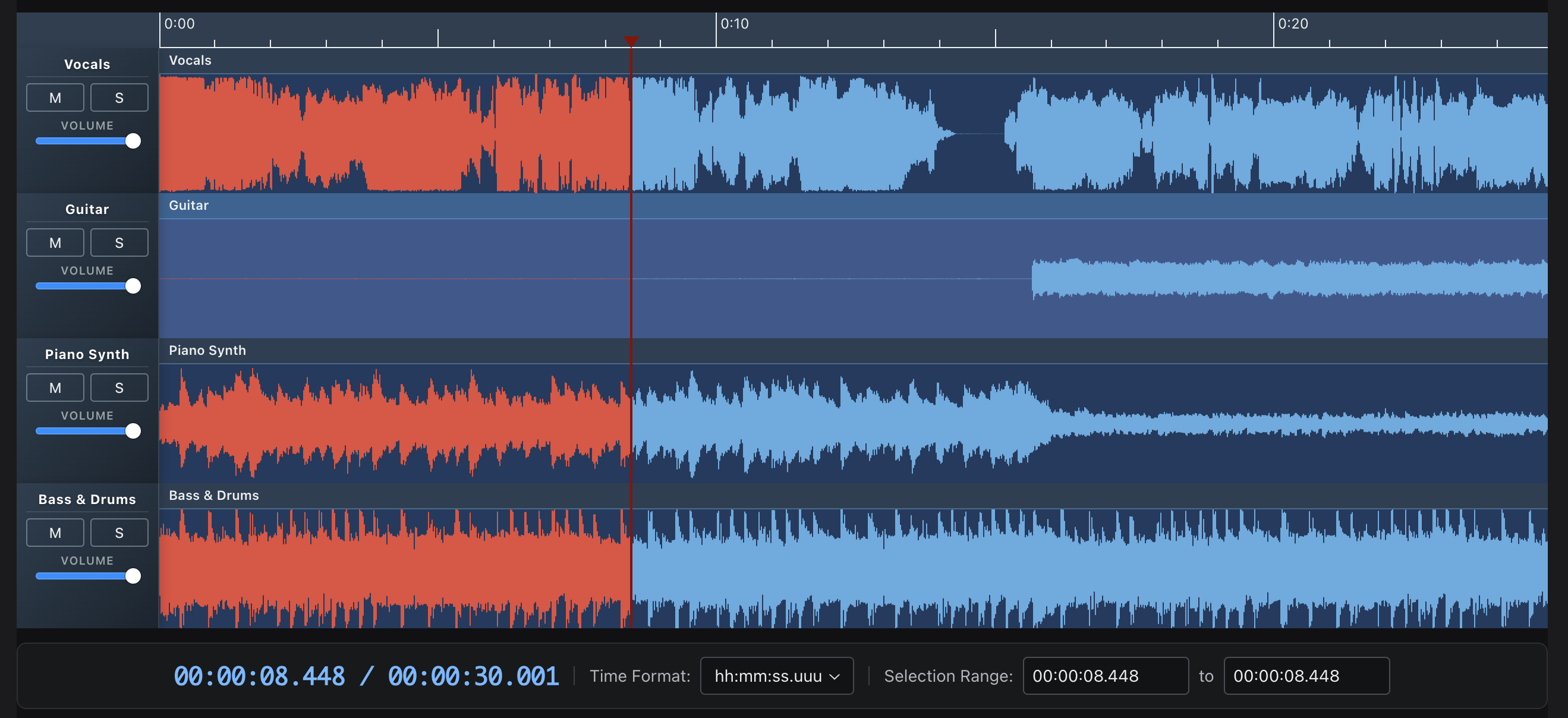
A multi-track audio editor and player built with React, Tone.js, and the Web Audio API. Features canvas-based waveform visualization, drag-and-drop clip editing, and professional audio effects.

## Features
- **Multi-track editing** - Multiple clips per track with drag-to-move and trim
- **Waveform visualization** - Canvas-based rendering with zoom controls
- **20+ audio effects** - Reverb, delay, filters, distortion, and more via Tone.js
- **Recording** - AudioWorklet-based recording with live waveform preview
- **Export** - WAV export with effects, individual tracks or full mix
- **Annotations** - Time-synced text annotations with keyboard navigation
- **Theming** - Full theme customization with dark/light mode support
- **MIDI playback** - MIDI file parsing with piano roll visualization and SoundFont sample playback
- **TypeScript** - Full type definitions included
## Quick Start
```bash
npm install @waveform-playlist/browser tone @dnd-kit/react
```
> **Note**: `tone` and `@dnd-kit/react` are peer dependencies and must be installed separately. `@dnd-kit/dom` and `@dnd-kit/abstract` are also declared peers (they install automatically as dependencies of `@dnd-kit/react`).
> **v14:** the playout engines are optional peers. Install the one(s) you use:
> - WebAudio/Tone path: `npm install @waveform-playlist/browser @waveform-playlist/playout tone`
> - MediaElement path: `npm install @waveform-playlist/browser @waveform-playlist/media-element-playout`
> - Custom adapter: `npm install @waveform-playlist/browser` and pass `createAdapter` (no `tone`).
>
> The `Tone` convenience re-export was removed in v14 — `import * as Tone from 'tone'` directly.
>
> **v14:** effects, WAV export, output metering, and the `useAudioTracks`/`useDynamicTracks` loaders import from `@waveform-playlist/browser/tone`.
>
> **v16:** `@dnd-kit/*` `^0.5.0` is required (`^0.3` is no longer supported). `noDropAnimationPlugins` was removed — `Clip`, `AnnotationBox`, and `SortableTrackControls` configure their own `@dnd-kit` Feedback behavior, so a custom `DragDropProvider` needs no `plugins` prop. `@dnd-kit/dom` is now a declared peer of `ui-components` and `annotations`.
```tsx
import { WaveformPlaylistProvider, Waveform, PlayButton, PauseButton, StopButton } from '@waveform-playlist/browser';
import { createTrack, createClipFromSeconds } from '@waveform-playlist/core';
function App() {
const [tracks, setTracks] = useState([]);
// Load audio and create tracks
useEffect(() => {
async function loadAudio() {
const response = await fetch('/audio/song.mp3');
const arrayBuffer = await response.arrayBuffer();
const audioContext = new AudioContext();
const audioBuffer = await audioContext.decodeAudioData(arrayBuffer);
const track = createTrack({
name: 'My Track',
clips: [createClipFromSeconds({ audioBuffer, startTime: 0 })],
});
setTracks([track]);
}
loadAudio();
}, []);
return (
);
}
```
## Documentation
- [**Live Examples**](https://naomiaro.github.io/waveform-playlist/examples/stem-tracks) - Interactive demos
- [**Getting Started**](https://naomiaro.github.io/waveform-playlist/docs/getting-started/installation) - Installation and basic usage
- [**Guides**](https://naomiaro.github.io/waveform-playlist/docs/guides/loading-audio) - In-depth tutorials
- [**API Reference**](https://naomiaro.github.io/waveform-playlist/docs/api/provider) - Component and hook documentation
## Community
- [**Discord**](https://discord.gg/dsZZBpmD7k) - Chat, get help, and share what you're building on the dawcore server
- [**Issues**](https://github.com/naomiaro/waveform-playlist/issues) - Bug reports and feature requests
- [**Code of Conduct**](CODE_OF_CONDUCT.md) - The standards we hold this community to, on GitHub and Discord
## Examples
| Example | Description |
|---------|-------------|
| [Stem Tracks](https://naomiaro.github.io/waveform-playlist/examples/stem-tracks) | Multi-track playback with mute/solo/volume controls |
| [Effects](https://naomiaro.github.io/waveform-playlist/examples/effects) | 20 Tone.js effects with real-time parameter control |
| [WAM! Kick It Up a Notch](https://naomiaro.github.io/waveform-playlist/examples/wam-effects) | Host WAM 2.0 plugins with community library, native GUIs, and mixed Tone+WAM chains |
| [Recording](https://naomiaro.github.io/waveform-playlist/examples/recording) | Live recording with VU meter and waveform preview |
| [Multi-Clip](https://naomiaro.github.io/waveform-playlist/examples/multi-clip) | Drag-and-drop clip editing with trim handles |
| [Annotations](https://naomiaro.github.io/waveform-playlist/examples/annotations) | Time-synced text with keyboard navigation |
| [Waveform Data](https://naomiaro.github.io/waveform-playlist/examples/waveform-data) | Pre-computed peaks for fast loading |
| [MIDI](https://naomiaro.github.io/waveform-playlist/examples/midi) | MIDI file playback with piano roll and SoundFont samples |
| [Beats & Bars](https://naomiaro.github.io/waveform-playlist/examples/beats-and-bars) | Tempo-synced timescale with beats and bars ruler |
| [Fades](https://naomiaro.github.io/waveform-playlist/examples/fades) | Fade in/out with configurable curves |
| [Stereo](https://naomiaro.github.io/waveform-playlist/examples/stereo) | Stereo waveform rendering and pan controls |
| [Spectrogram](https://naomiaro.github.io/waveform-playlist/examples/mir-spectrogram) | FFT-based spectrogram visualization |
| [Media Element](https://naomiaro.github.io/waveform-playlist/examples/media-element) | HTMLMediaElement playout with playback rate |
| [Styling](https://naomiaro.github.io/waveform-playlist/examples/styling) | Bar width, gaps, rounded bars, gradients, and theme colors |
| [Flexible API](https://naomiaro.github.io/waveform-playlist/examples/flexible-api) | Custom playheads, timestamps, and full UI customization |
## Packages
| Package | Description |
|---------|-------------|
| `@waveform-playlist/browser` | Main React components, hooks, and context |
| `@waveform-playlist/core` | Types, utilities, and clip/track creation |
| `@waveform-playlist/engine` | Framework-agnostic timeline engine with pure operations |
| `@waveform-playlist/ui-components` | Styled UI components (buttons, sliders, etc.) |
| `@waveform-playlist/playout` | Tone.js audio engine |
| `@waveform-playlist/webaudio-peaks` | Peak extraction from AudioBuffer or sample arrays |
**Optional packages:**
| Package | Description |
|---------|-------------|
| `@waveform-playlist/midi` | React `useMidiTracks` hook + piano roll visualization with SoundFont/PolySynth playback. Re-exports the parser from `@dawcore/midi`. |
| `@waveform-playlist/annotations` | Time-synced text annotations with drag editing |
| `@waveform-playlist/recording` | AudioWorklet recording with live waveform preview (requires [setup](https://naomiaro.github.io/waveform-playlist/docs/guides/recording#audioworklet-setup)) |
| `@waveform-playlist/worklets` | Shared AudioWorklet processors for metering and recording (auto-installed with recording) |
| `@waveform-playlist/spectrogram` | React `SpectrogramProvider` + UI (menu items, settings modal). Computation/worker/orchestrator are imported from `@dawcore/spectrogram`. |
| `@waveform-playlist/media-element-playout` | HTMLMediaElement-based playout with pitch-preserving playback rate |
## Key Hooks
```tsx
// Load audio files into tracks
const { tracks, loading, error } = useAudioTracks([
{ src: '/audio/vocals.mp3', name: 'Vocals' },
{ src: '/audio/drums.mp3', name: 'Drums' },
]);
// Playback controls
const { play, pause, stop, seekTo } = usePlaylistControls();
// Playback animation (60fps updates)
const { currentTime, isPlaying } = usePlaybackAnimation();
// Zoom controls
const { zoomIn, zoomOut, samplesPerPixel } = useZoomControls();
// Master effects chain
const { masterEffects, toggleBypass, updateParameter } = useDynamicEffects();
// WAV export
const { exportWav, isExporting, progress } = useExportWav();
// Recording
const { startRecording, stopRecording, isRecording } = useIntegratedRecording(
tracks, setTracks, selectedTrackId
);
```
## Web Components (Experimental)
`@dawcore/components` provides framework-agnostic Web Components for multi-track audio editing — no React required. Built with Lit, adapter-pluggable: choose between `@dawcore/transport` (native Web Audio) or `@waveform-playlist/playout` (Tone.js).
```bash
npm install @dawcore/components @waveform-playlist/core @waveform-playlist/engine
```
Audio backend (choose one):
```bash
npm install @dawcore/transport # Native Web Audio (multi-tempo, multi-meter, metronome)
# or
npm install @waveform-playlist/playout tone # Tone.js (effects, MIDI synths)
```
```html
```
**Features:**
- Declarative `` and `` elements with auto-loading
- Imperative API for programmatic mutation — `editor.addTrack/removeTrack/updateTrack/addClip/removeClip/updateClip` and `editor.ready()` for engine bootstrap before any track loads
- Adapter-pluggable — choose Native Web Audio or Tone.js backend
- Clip move, trim, and split with collision detection
- Undo/redo with transaction-based grouping
- Keyboard shortcuts (Space=play/pause, S=split, Cmd/Ctrl+Z=undo)
- File drop for adding tracks
- Frozen-panes layout — height-constrained editors scroll vertically with a pinned ruler and row-locked track controls; controls adapt to short rows
- Recording with overdub, punch-in replace (takes land at the playhead and replace overlapped content), automatic armed-track mute (the recorded-over material is silenced during the take), named takes with live clip headers, and latency compensation
- Metronome with mixed meters and tempo changes
- Tempo automation — linear ramps and Möbius-Ease curves with exact integration
- Pre-computed peaks for fast initial render
- Player-style end-of-timeline auto-stop by default; `indefinite-playback` rolls DAW-style until an explicit stop, `fill-viewport` fills the empty viewport so the ruler renders before any track (recording sessions suppress the auto-stop automatically)
**Packages:**
| Package | Description |
|---------|-------------|
| `@dawcore/components` | Lit Web Components for multi-track editing |
| `@dawcore/transport` | Native Web Audio transport — scheduling, looping, tempo automation, time signatures, metronome |
| `@dawcore/spectrogram` | Framework-agnostic spectrogram orchestrator, FFT worker pool, and color maps — used by `render-mode="spectrogram"` |
| `@dawcore/midi` | Framework-agnostic MIDI parser (`parseMidiFile`, `parseMidiUrl`) — used by `editor.loadMidi()` and re-exported by `@waveform-playlist/midi` |
| `@dawcore/wam` | Web Audio Modules (WAM 2.0) plugin hosting and generic parameter GUIs — used by `editor.addWamPlugin()` and the effects chain (optional peer, loaded on demand) |
| `@dawcore/faust` | In-browser Faust DSP → WAM 2.0 compilation — used by `editor.addFaustEffect()` (optional peer, loaded on demand) |
Run the examples locally:
```bash
pnpm example:dawcore-native # Native Web Audio — localhost:5173
pnpm example:dawcore-tone # Tone.js backend — localhost:5174
pnpm example:dawcore-wam # WAM 2.0 plugins + Faust — localhost:5175
pnpm example:media-element # MediaElement-only React starter (no Tone) — localhost:5176
pnpm example:react-starter # Full multitrack React starter (Tone engine) — localhost:5177
```
The **[react-starter](examples/react-starter/)** is the smallest correct setup for the full
multitrack editor — `WaveformPlaylistProvider` on the default Tone.js engine with mixer
controls, plus a README section explaining the "AudioContext was prevented from starting"
browser warning and how the provider's gesture-safe startup avoids it (see its
[README](examples/react-starter/README.md)).
The **[media-element-player](examples/media-element-player/)** starter is a minimal React
single-track player using only `@waveform-playlist/browser` + `@waveform-playlist/media-element-playout`
(no `@waveform-playlist/playout`, no `tone`) — see its [README](examples/media-element-player/README.md).
**dawcore-native** example pages:
- [`basic.html`](examples/dawcore-native/basic.html) — Basic playback with timescale and file drop
- [`multiclip.html`](examples/dawcore-native/multiclip.html) — Multi-clip editing with move, trim, and split, plus drag-to-reorder tracks with a live slot-snap drop preview
- [`programmatic.html`](examples/dawcore-native/programmatic.html) — Imperative `editor.addTrack` / `addClip` / `updateClip` / `removeClip` plus declarative DOM mutation, side-by-side
- [`beats-grid.html`](examples/dawcore-native/beats-grid.html) — Beats & bars grid mode with snap-to-grid, plus bar-aligned tick-based annotation regions (`start-tick`/`end-tick`)
- [`beat-map-grid.html`](examples/dawcore-native/beat-map-grid.html) — Variable tempo from beat maps with metronome
- [`record.html`](examples/dawcore-native/record.html) — Recording with overdub
- [`metronome.html`](examples/dawcore-native/metronome.html) — Metronome with mixed meters, tempo presets, and looping sequences
- [`automation.html`](examples/dawcore-native/automation.html) — Tempo automation with step, linear, and curve presets
- [`analyser.html`](examples/dawcore-native/analyser.html) — Spectrum analyser connected to master output
- [`spectrogram.html`](examples/dawcore-native/spectrogram.html) — Per-track FFT spectrograms via `render-mode="spectrogram"` with color-map and frequency-scale controls
- [`effects.html`](examples/dawcore-native/effects.html) — Per-track and master insert effects (`native-*` registry) with live parameter sliders, bypass, and `daw-effect-*` event log
- [`player.html`](examples/dawcore-native/player.html) — Lightweight `` single-track HTMLMediaElement player: waveform with `peaks-src` + timescale ruler, and a scrubber-only fallback (no `peaks-src`), with `daw-ready`/`daw-timeupdate`/`daw-play`/`daw-stop` event log
- [`annotations.html`](examples/dawcore-native/annotations.html) — `` lyric/section markers with dual-view sync between the timeline lane and ``, drag-to-resize boundaries, and keyboard navigation/playback
- [`sonnet.html`](examples/dawcore-native/sonnet.html) — Sonnet 1 parity demo: `box-label="id"` bars with the full text in ``
**dawcore-tone** example pages:
- [`basic.html`](examples/dawcore-tone/basic.html) — Basic playback with Tone.js adapter
- [`multiclip.html`](examples/dawcore-tone/multiclip.html) — Multi-clip editing with Tone.js, plus drag-to-reorder tracks with a live slot-snap drop preview
- [`programmatic.html`](examples/dawcore-tone/programmatic.html) — Imperative `editor.addTrack` / `addClip` / `updateClip` / `removeClip` plus declarative DOM mutation, with the Tone.js adapter
- [`beats-grid.html`](examples/dawcore-tone/beats-grid.html) — Beats & bars grid with Tone.js
- [`record.html`](examples/dawcore-tone/record.html) — Mic recording with overdub
- [`analyser.html`](examples/dawcore-tone/analyser.html) — Spectrum analyser connected to master output
- [`spectrogram.html`](examples/dawcore-tone/spectrogram.html) — Per-track FFT spectrograms with the Tone.js adapter
- [`midi.html`](examples/dawcore-tone/midi.html) — Programmatic MIDI clips with piano-roll render mode and Tone.js PolySynth
- [`midi-load.html`](examples/dawcore-tone/midi-load.html) — Load `.mid` files (URL or file picker) via `editor.loadMidi()` and play them through Tone.js PolySynth
- [`soundfont.html`](examples/dawcore-tone/soundfont.html) — MIDI through SoundFont samples: `SoundFontCache.fromUrl()` + `createToneAdapter({ soundFontCache })`, with PolySynth fallback when the `.sf2` fails to load
- [`annotations.html`](examples/dawcore-tone/annotations.html) — `` lyric/section markers with dual-view sync between the timeline lane and ``, drag-to-resize boundaries, and keyboard navigation/playback with the Tone.js adapter
**dawcore-wam** example pages:
- [`index.html`](examples/dawcore-wam/index.html) — WAM 2.0 plugin hosting end to end: insert plugins on **any track or the master bus** (one rack per track + master), with the target chosen from a dropdown that tracks every track — including stems **dragged-and-dropped** onto the editor (`file-drop`). Load community plugins by URL or from the [webaudiomodules.com](https://www.webaudiomodules.com/) library, open plugin GUIs, reorder/bypass chains, save and restore chains (including state) via localStorage, export the mix to WAV through `exportAudio()`, and compile Faust DSP to a live effect in the browser (`@dawcore/faust`) — plus pre-compiled Faust effects served from this repo
**Spec & roadmap:** [`docs/specs/web-components-migration.md`](docs/specs/web-components-migration.md) — full element catalogue, attribute/property/event tables, programmatic API contracts, theming tokens, and migration phases.
## Browser Support
Requires Web Audio API support: Chrome, Firefox, Safari, Edge (modern versions).
See [Can I Use: Web Audio API](https://caniuse.com/audio-api)
## Development
```bash
# Install dependencies
pnpm install
# Start dev server
pnpm website
# Run tests
pnpm test
# Build all packages
pnpm build
```
Visit http://localhost:3000/waveform-playlist to see the examples.
## Books
Currently writing: [Mastering Tone.js](https://leanpub.com/masteringtonejs)

## Credits
Originally created for the [Airtime](https://www.sourcefabric.org/software/airtime/) project at [Sourcefabric](https://www.sourcefabric.org/).
## License
[MIT License](http://doge.mit-license.org)