███    ██ ██    ██ ███    ███ ██████
████   ██ ██    ██ ████  ████ ██   ██
██ ██  ██ ██    ██ ██ ████ ██ ██████
██  ██ ██ ██    ██ ██  ██  ██ ██   ██
██   ████  ██████  ██      ██ ██   ██

A text calculator for natural language expressions with a vim-style TUI.
Try it online →
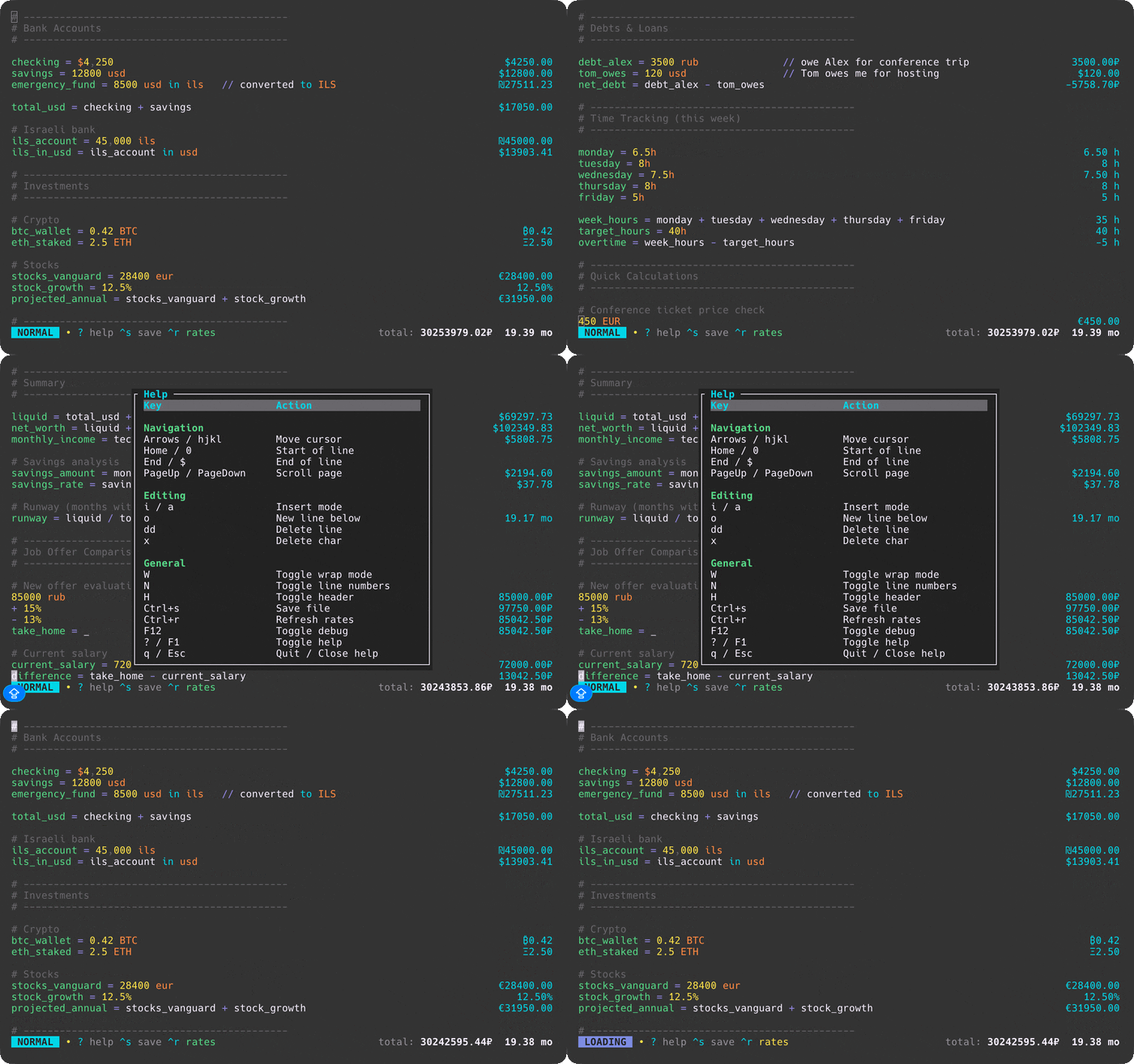
## Features
- **Natural language expressions**: `20% of 150`, `$100 in euros`, `2 hours + 30 min`
- **Variables**: `tax = 15%` then `100 + tax`
- **Unit conversions**: Length, weight, time, temperature, data sizes
- **Compound units**: `5 m * 10 m = 50 m²`, `100 km / 2 h = 50 km/h`
- **Currency conversions**: USD, EUR, GBP, JPY, CHF, CNY, CAD, AUD, INR, KRW, RUB, ILS, PLN, UAH + crypto (BTC, ETH, SOL, and more)
- **Number base conversions**: `22 to hex`, `22 to bin`
- **Live exchange rates**: Fetched automatically on startup
- **Dual keybinding modes**: Vim (modal) or Standard (direct input) - toggle with `Shift+Tab`
- **Mouse support**: Scroll with mouse wheel or trackpad
- **File persistence**: Auto-saves to config directory, supports custom files
- **Syntax highlighting**: Numbers, operators, variables, units, and currencies
- **Comments**: Lines starting with `#` or `//` are treated as comments
- **Continuation**: Start a line with an operator (`+ 10`, `* 2`) to continue from the previous result
- **Wrap mode**: Toggle text wrapping with bottom-aligned results
- **Grouped totals**: Currencies and units summed separately in footer (respects exchange rates)
## Installation
### macOS (Homebrew)
```bash
brew tap nasedkinpv/tap
brew install numr
```
Installs both binaries: `numr` (opens the calculator file in the TUI) and `numr-cli` (CLI/REPL/server).
### Arch Linux (AUR)
```bash
# Using yay
yay -S numr
# Using paru
paru -S numr
```
Installs both binaries: `numr` (opens the calculator file in the TUI) and `numr-cli` (CLI/REPL/server).
### From source
```bash
# Install the TUI binary
cargo install --path crates/numr-tui
# Install the CLI binary
cargo install --path crates/numr-cli
# Or build both from source
cargo build --release
# Binaries will be available at target/release/numr and target/release/numr-cli
```
Release archives also contain both binaries: `numr` (opens the calculator file in the TUI) and `numr-cli` (CLI/REPL/server).
## Usage
### TUI Mode
```bash
# Open default file (~/.config/numr/default.numr)
numr
# Open specific file
numr example.numr
```
### CLI Mode
```bash
# Single expression
numr-cli "20% of 150"
# Evaluate file (aligned "input = result" output)
numr-cli -f example.numr
# Interactive REPL
numr-cli -i
# Pipe mode
echo "100 + 200" | numr-cli
# Aligned output for any mode
numr-cli --verbose "20% of 150"
```
By default, `numr-cli` prints just the result. File mode (`-f`) uses aligned `input = result` output. Use `--verbose` to get aligned output in other modes.
On Linux, use `rlwrap numr-cli -i` for readline-style history and editing in the REPL.
### JSON-RPC Server Mode
Run numr as a backend for other tools (editors, launchers, scripts):
```bash
numr-cli --server
```
Send JSON-RPC 2.0 requests via stdin, receive responses via stdout:
```bash
echo '{"jsonrpc":"2.0","method":"eval","params":{"expr":"20% of 150"},"id":1}' | numr-cli --server
# {"jsonrpc":"2.0","result":{"type":"number","value":30.0,"display":"30"},"id":1}
```
**Available methods:**
| Method | Params | Description |
|--------|--------|-------------|
| `eval` | `{"expr": "..."}` | Evaluate expression |
| `eval_lines` | `{"lines": [...]}` | Evaluate multiple lines |
| `clear` | none | Clear state |
| `get_totals` | none | Get grouped totals |
| `get_variables` | none | List variables |
| `reload_rates` | none | Refresh exchange rates |
## Keybindings (TUI)
The TUI supports two keybinding modes: **Vim** (default) and **Standard**. Press `Shift+Tab` to toggle between them.
### Vim Mode
#### Normal Mode
| Key | Action |
|-----|--------|
| `i` / `a` | Enter Insert mode at/after cursor |
| `I` / `A` | Enter Insert mode at line start/end |
| `o` / `O` | New line below/above and enter Insert mode |
| `s` | Substitute character (delete and insert) |
| `C` | Change to end of line |
| `h` / `j` / `k` / `l` | Move left/down/up/right |
| `w` / `b` / `e` | Word forward/backward/end |
| `0` / `$` | Line start/end |
| `gg` / `G` | First/last line |
| `Space` | Move right |
| `PageUp/Down` | Scroll page |
| `x` / `X` | Delete char forward/backward |
| `dd` | Delete line |
| `D` | Delete to end of line |
| `J` | Join lines |
| `W` / `N` / `H` | Toggle wrap/line numbers/header |
| `?` / `F1` | Toggle help |
| `Ctrl+s` | Save |
| `Ctrl+r` | Refresh rates |
| `F12` | Toggle debug |
| `Shift+Tab` | Switch to Standard mode |
| `q` | Quit |
#### Insert Mode
| Key | Action |
|-----|--------|
| `Esc` | Return to Normal mode |
| Type | Insert text |
| `Backspace` / `Delete` | Delete char backward/forward |
| `Enter` | New line |
| `Arrows` / `PageUp/Down` | Navigate |
| `Home` / `End` | Line start/end |
| `Ctrl+s` | Save |
### Standard Mode
Direct input like traditional editors - no modal switching required.
| Key | Action |
|-----|--------|
| Type | Insert text directly |
| `Arrow keys` | Move cursor |
| `Home` / `End` | Line start/end |
| `PageUp/Down` | Scroll page |
| `Ctrl+a` / `Ctrl+e` | Line start/end |
| `Ctrl+g` | Go to first line |
| `Backspace` / `Delete` | Delete char |
| `Ctrl+k` | Delete line |
| `Enter` | New line |
| `Ctrl+w/l/h` | Toggle wrap/line numbers/header |
| `?` / `F1` | Toggle help |
| `Ctrl+s` | Save |
| `Ctrl+r` | Refresh rates |
| `Shift+Tab` | Switch to Vim mode |
| `Ctrl+q` | Quit |
## Supported Operations
### Arithmetic
```
10 + 20 → 30
100 - 25 → 75
6 * 7 → 42
100 / 4 → 25
2 ^ 8 → 256
```
### Number Base Conversions
```
22 to hex → 0x16
22 to bin → 0b10110
-42 to hex → -0x2a
```
### Percentages
```
20% of 150 → 30
100 + 15% → 115
$50 - 10% → $45
```
### Variables
```
price = $100
tax = 8%
price + tax → $108
```
### Comments
```
# This is a comment
// This is also a comment
Groceries $45.00
# Comments are dimmed and ignored in calculations
```
### Continuation
```
$100 → $100
+ $50 → $150 (continues from previous)
* 2 → $300
- 10% → $270
total = _ → $270 (_ or ANS references previous result)
```
### Functions
```
sum(10, 20, 30) → 60
avg(10, 20, 30) → 20
min(5, 3, 8) → 3
max(5, 3, 8) → 8
sqrt(16) → 4
abs(-5) → 5
round(3.7) → 4
floor(3.7) → 3
ceil(3.2) → 4
```
### Compound Units
```
# Area from multiplication
5 m * 10 m → 50 m²
# Speed from division
100 km / 2 h → 50 km/h
# Distance from speed × time
50 kph * 2 h → 100 km
# Unit conversions
50 kph in mps → 13.89 m/s
# Mixed operations
25 km / 100 km → 0.25 (dimensionless)
```
**Compound unit aliases**: `kph` (km/h), `mph` (mi/h), `mps` (m/s), `m2` (m²), `km2` (km²), `ft2` (ft²)
## Supported Units
### Length
`km`, `m`, `cm`, `mm`, `mi`/`miles`, `ft`/`feet`, `in`/`inches`
### Area
`m²`/`m2`, `km²`/`km2`, `ft²`/`ft2`, `acre`, `hectare`/`ha`
### Speed
`m/s`/`mps`, `km/h`/`kph`, `mph`, `knot`
### Weight
`kg`, `g`, `mg`, `lb`/`lbs`, `oz`, `ton`
### Volume
`L`, `mL`, `gal`, `m³`/`m3`
### Time
`months`/`mo`, `weeks`/`wk`, `days`/`d`, `hours`/`hr`/`h`, `minutes`/`min`, `seconds`/`sec`/`s`
### Energy
`J`, `kJ`, `cal`, `kcal`, `kWh`
### Power
`W`, `kW`
### Temperature
`K`/`Kelvin`, `C`/`Celsius`, `F`/`Fahrenheit`
### Data
`TB`, `GB`, `MB`, `KB`, `bytes`
### Currencies
**Fiat:** `$`/`USD`, `€`/`EUR`, `£`/`GBP`, `¥`/`JPY`, `CHF`, `CNY`/`RMB`, `CAD`, `AUD`, `₹`/`INR`, `₩`/`KRW`, `₽`/`RUB`, `₪`/`ILS`, `zł`/`PLN`, `₴`/`UAH`
**Crypto:** `₿`/`BTC`, `Ξ`/`ETH`, `◎`/`SOL`, `₮`/`USDT`, `USDC`, `BNB`, `XRP`, `₳`/`ADA`, `Ð`/`DOGE`, `DOT`, `Ł`/`LTC`, `LINK`, `AVAX`, `MATIC`, `TON`
## Architecture
```mermaid
graph TB
subgraph Frontends
TUI[numr-tui
Ratatui Terminal UI]
CLI[numr-cli
Command Line]
end
subgraph Editor[numr-editor]
Highlight[Syntax Highlighting]
end
subgraph Core[numr-core]
Parser[Parser
Pest PEG Grammar]
AST[AST Builder]
Eval[Evaluator]
Types[Types
Value, Currency, Unit]
Cache[Rate Cache]
Fetch[Fetch Module]
end
subgraph External APIs
Fiat[open.er-api.com
Fiat Rates]
Crypto[CoinGecko API
Crypto Prices]
end
TUI --> Highlight
TUI --> Parser
CLI --> Parser
Highlight --> Types
Parser --> AST
AST --> Eval
Eval --> Types
Eval --> Cache
TUI -.->|fetch on startup| Fetch
CLI -.->|fetch if cache expired| Fetch
Fetch -.-> Fiat
Fetch -.-> Crypto
Fetch -.-> Cache
```
```
numr/
├── crates/
│ ├── numr-core/ # Core evaluation engine (WASM-compatible)
│ │ ├── parser/ # Pest PEG grammar and AST builder
│ │ ├── eval/ # Expression evaluation with unit/currency handling
│ │ ├── types/ # Value, Currency, Unit registries
│ │ ├── cache/ # Exchange rate caching with BFS path finding
│ │ └── fetch/ # HTTP fetching (optional "fetch" feature)
│ ├── numr-editor/ # Syntax highlighting (WASM-compatible)
│ ├── numr-tui/ # Terminal UI (Ratatui) with vim modes
│ └── numr-cli/ # Command-line interface and REPL
```
The core library (`numr-core`) is UI-agnostic and can be embedded in CLI, TUI, GUI, or WASM contexts. The `fetch` feature flag enables HTTP fetching (adds reqwest dependency, not WASM-compatible).
User preferences are stored in `~/.config/numr/config.toml` (created on first run). Toggle settings persist automatically.
Example configuration:
```toml
[preferences]
keybinding_mode = "standard"
wrap_mode = true
show_line_numbers = true
[files]
default_path = "~/Documents/default.numr"
[api]
fiat_rates_url = "https://open.er-api.com/v6/latest/USD"
crypto_rates_url = "https://api.coingecko.com/api/v3/simple/price"
[api.keys]
coingecko_api_key = "your-key-here"
```
If `crypto_rates_url` points to CoinGecko, `numr` automatically uses the correct demo/pro API key header based on the host.
Exchange rates are cached to `~/.config/numr/rates.json` with 1-hour expiry. Both TUI and CLI share this cache:
- **TUI**: Fetches fresh rates on startup
- **CLI**: Fetches only if cache is expired
Rate sources:
- **Fiat currencies**: [open.er-api.com](https://open.er-api.com) (152 currencies, free)
- **Cryptocurrency**: [CoinGecko](https://www.coingecko.com/en/api) (15 tokens, free)
## Integrations
- [elephant-numr](https://github.com/nasedkinpv/elephant-numr) — Provider for [Walker/Elephant](https://github.com/abenz1267/walker) launcher
## License
MIT