

A text calculator for natural language expressions with a vim-style TUI.
Try it online →
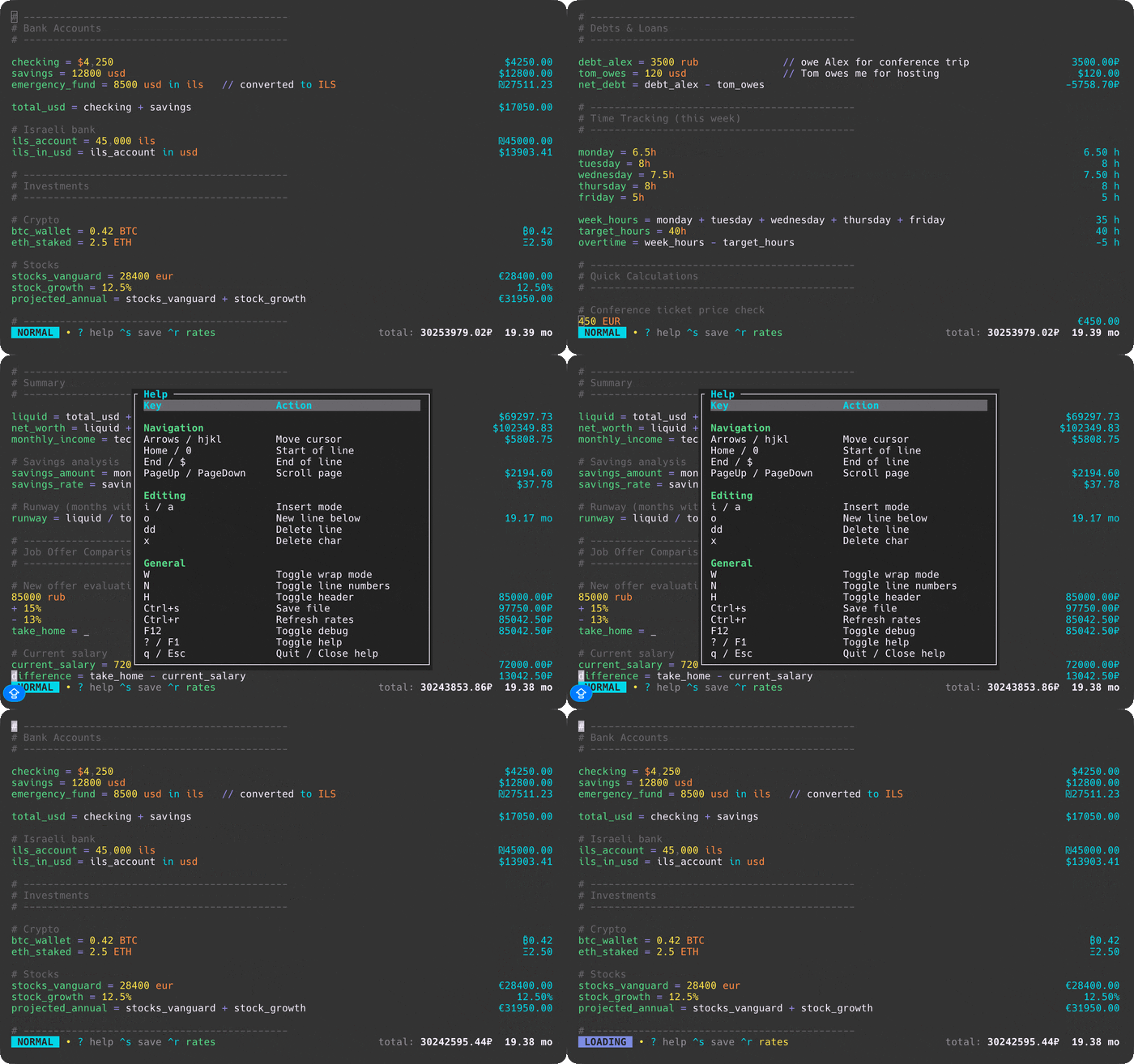
## Features
- **Natural language expressions**: `20% of 150`, `$100 in euros`, `2 hours + 30 min`
- **Variables**: `tax = 15%` then `100 + tax`
- **Unit conversions**: Length, weight, time, temperature, data sizes
- **Compound units**: `5 m * 10 m = 50 m²`, `100 km / 2 h = 50 km/h`
- **Currency conversions**: USD, EUR, GBP, JPY, CHF, CNY, CAD, AUD, INR, KRW, RUB, ILS, PLN, UAH + crypto (BTC, ETH, SOL, and more)
- **Number base conversions**: `22 to hex`, `22 to bin`
- **Math functions and constants**: `median(1, 3, 2)`, `clamp(120, 0, 100)`, `sin(90°)`, `factorial(5)`
- **Angle conversions**: `90° to rad`, `3.14159 rad to deg`, `rad(180)`, `deg(pi)`
- **Live exchange rates**: Loaded and refreshed explicitly by each frontend, with a shared 1-hour cache
- **Dual keybinding modes**: Vim (modal) or Standard (direct input) - toggle with `Shift+Tab`
- **Mouse support**: Scroll with mouse wheel or trackpad
- **File persistence**: Save with `Ctrl+S`, supports custom files
- **Syntax highlighting**: Numbers, operators, variables, units, and currencies
- **Comments**: Lines starting with `#` or `//` are treated as comments
- **Continuation**: Start a line with an operator (`+ 10`, `* 2`) to continue from the previous result
- **Wrap mode**: Toggle text wrapping; results follow the final expression row and ignore trailing comments
- **Grouped totals**: Currencies and units summed separately in footer (respects exchange rates)
## Installation
### macOS (Homebrew)
```bash
brew tap nasedkinpv/tap
brew install numr
```
Installs both binaries: `numr` (opens the calculator file in the TUI) and `numr-cli` (CLI/REPL/server).
### Arch Linux (AUR)
```bash
# Using yay
yay -S numr
# Using paru
paru -S numr
```
Installs both binaries: `numr` (opens the calculator file in the TUI) and `numr-cli` (CLI/REPL/server).
### From source
```bash
# Install the TUI binary
cargo install --path crates/numr-tui
# Install the CLI binary
cargo install --path crates/numr-cli
# Or build both from source
cargo build --release
# Binaries will be available at target/release/numr and target/release/numr-cli
```
Release archives also contain both binaries: `numr` (opens the calculator file in the TUI) and `numr-cli` (CLI/REPL/server).
## Usage
### TUI Mode
```bash
# Open default file (stored in OS config directory)
numr
# Open specific file
numr example.numr
```
### CLI Mode
```bash
# Single expression
numr-cli "20% of 150"
# Evaluate file (aligned "input = result" output)
numr-cli -f example.numr
# Interactive REPL
numr-cli -i
# Pipe mode
echo "100 + 200" | numr-cli
# Show running total
numr-cli -t -f example.numr
# Aligned output for any mode
numr-cli --verbose "20% of 150"
```
By default, `numr-cli` prints just the result. File mode (`-f`) uses aligned `input = result` output. Use `--verbose` to get aligned output in other modes. Use `-t` to show a running total at the end.
On Linux, use `rlwrap numr-cli -i` for readline-style history and editing in the REPL.
### JSON-RPC Server Mode
Run numr as a backend for other tools (editors, launchers, scripts):
```bash
numr-cli --server
```
Send JSON-RPC 2.0 requests via stdin, receive responses via stdout:
```bash
echo '{"jsonrpc":"2.0","method":"eval","params":{"expr":"20% of 150"},"id":1}' | numr-cli --server
# {"jsonrpc":"2.0","result":{"type":"number","value":"30","display":"30"},"id":1}
```
The transport is newline-delimited JSON. It supports calls, notifications, `null` IDs, and JSON-RPC batches; each input frame is limited to 1 MiB. Notifications update server state but produce no response.
**Available methods:**
| Method | Params | Description |
|--------|--------|-------------|
| `eval` | `{"expr": "..."}` | Evaluate expression |
| `eval_lines` | `{"lines": [...]}` | Evaluate multiple lines |
| `clear` | none | Clear state |
| `get_totals` | none | Get grouped totals |
| `get_variables` | none | List variables |
| `reload_rates` | none | Refresh exchange rates |
See [docs/json-rpc.md](docs/json-rpc.md) for the complete protocol, result schema, limits, and error codes.
## Keybindings (TUI)
The TUI supports two keybinding modes: **Vim** (default) and **Standard**. Press `Shift+Tab` to toggle between them.
### Vim Mode
#### Normal Mode
| Key | Action |
|-----|--------|
| `i` / `a` | Enter Insert mode at/after cursor |
| `I` / `A` | Enter Insert mode at line start/end |
| `o` / `O` | New line below/above and enter Insert mode |
| `s` | Substitute character (delete and insert) |
| `C` | Change to end of line |
| `h` / `j` / `k` / `l` | Move left/down/up/right |
| `w` / `b` / `e` | Word forward/backward/end |
| `0` / `$` | Line start/end |
| `gg` / `G` | First/last line |
| `Space` | Move right |
| `PageUp/Down` | Scroll page |
| `x` / `X` | Delete char forward/backward |
| `dd` | Delete line |
| `D` | Delete to end of line |
| `J` | Join lines |
| `W` / `N` / `H` | Toggle wrap/line numbers/header |
| `?` / `F1` | Toggle help |
| `Ctrl+s` | Save |
| `Ctrl+r` | Refresh rates |
| `F12` | Toggle debug |
| `Shift+Tab` | Switch to Standard mode |
| `q` | Quit |
#### Insert Mode
| Key | Action |
|-----|--------|
| `Esc` | Return to Normal mode |
| Type | Insert text |
| `Backspace` / `Delete` | Delete char backward/forward |
| `Option+Backspace` / `Ctrl+w` | Delete previous word |
| `Cmd+Backspace` / `Ctrl+u` | Delete to line start |
| `Enter` | New line |
| `Arrows` / `PageUp/Down` | Navigate |
| `Home` / `End` | Line start/end |
| `Ctrl+s` | Save |
### Standard Mode
Direct input like traditional editors - no modal switching required.
| Key | Action |
|-----|--------|
| Type | Insert text directly |
| `Arrow keys` | Move cursor |
| `Home` / `End` | Line start/end |
| `PageUp/Down` | Scroll page |
| `Ctrl+a` / `Ctrl+e` | Line start/end |
| `Ctrl+g` | Go to first line |
| `Backspace` / `Delete` | Delete char |
| `Option+Backspace` / `Ctrl+w` | Delete previous word |
| `Cmd+Backspace` / `Ctrl+u` | Delete to line start |
| `Ctrl+k` | Delete to line end |
| `Enter` | New line |
| `Option+z` | Toggle wrap |
| `Ctrl+l` / `Ctrl+h` | Toggle line numbers/header |
| `?` / `F1` | Toggle help |
| `Ctrl+s` | Save |
| `Ctrl+r` | Refresh rates |
| `Shift+Tab` | Switch to Vim mode |
| `Ctrl+q` | Quit |
## Supported Operations
| Category | Examples |
|----------|----------|
| Arithmetic | `10 + 20`, `6 * 7`, `2 ^ 8` |
| Percentages | `20% of 150`, `$50 - 10%`, `100 + 15%` |
| Variables | `tax = 8%` then `price + tax` |
| Continuation | `$100` → `+ $50` → `* 2` (chains from previous) |
| Functions | `sum()`, `avg()`, `min()`, `max()`, `median()`, `clamp()`, `sqrt()`, `abs()`, `round()`, `floor()`, `ceil()`, `sin()`, `cos()`, `tan()`, `rad()`, `deg()`, `ln()`, `log()`, `log_y()`, `factorial()`, `mod()` |
| Base conversion | `22 to hex` → `0x16`, `22 to bin` → `0b10110` |
| Unit conversion | `5 km in miles`, `22 C in F`, `1 TB in GB` |
| Compound units | `5 m * 10 m` → `50 m²`, `100 km / 2 h` → `50 km/h` |
| Currency | `$100 in eur`, `1 BTC in USD` |
| Comments | `# comment` or `// comment` |
| Reference previous | `_` or `ANS` for last result |
**Compound unit aliases**: `kph` (km/h), `mph` (mi/h), `mps` (m/s), `m2` (m²), `km2` (km²), `ft2` (ft²)
See [example.numr](example.numr) for a complete, executable tour of arithmetic, variables, continuations, functions, currencies, angles, and compound units. Constants are `pi`, `e`, and `phi`.
## Supported Units
| Category | Units |
|----------|-------|
| Length | `km`, `m`, `cm`, `mm`, `mi`/`miles`, `ft`/`feet`, `in`/`inches` |
| Area | `m²`/`m2`, `km²`/`km2`, `ft²`/`ft2`, `acre`, `hectare`/`ha` |
| Speed | `m/s`/`mps`, `km/h`/`kph`, `mph`, `knot` |
| Weight | `kg`, `g`, `mg`, `lb`/`lbs`, `oz`, `ton` |
| Volume | `L`, `mL`, `gal`, `m³`/`m3` |
| Time | `months`/`mo`, `weeks`/`wk`, `days`/`d`, `hours`/`hr`/`h`, `minutes`/`min`, `seconds`/`sec`/`s` |
| Energy | `J`, `kJ`, `cal`, `kcal`, `kWh` |
| Power | `W`, `kW` |
| Temperature | `K`/`Kelvin`, `C`/`Celsius`, `F`/`Fahrenheit` |
| Data | `TB`, `GB`, `MB`, `KB`, `bytes` |
| Fiat | `$`/`USD`, `€`/`EUR`, `£`/`GBP`, `¥`/`JPY`, `CHF`, `CNY`, `CAD`, `AUD`, `₹`/`INR`, `₩`/`KRW`, `₽`/`RUB`, `₪`/`ILS`, `zł`/`PLN`, `₴`/`UAH` |
| Crypto | `₿`/`BTC`, `Ξ`/`ETH`, `◎`/`SOL`, `₮`/`USDT`, `USDC`, `BNB`, `XRP`, `₳`/`ADA`, `Ð`/`DOGE`, `DOT`, `Ł`/`LTC`, `LINK`, `AVAX`, `MATIC`, `TON` |
## Architecture
Calculation semantics live in the pure, WASM-compatible `numr-core`; `numr-editor` provides shared highlighting and UTF-8 primitives; CLI, TUI, web, and desktop remain thin I/O and presentation adapters. See [docs/architecture.md](docs/architecture.md) for the complete component map, contracts, dependency direction, and rate data flow. The web frontend is maintained in the separate [numr-web repository](https://github.com/nasedkinpv/numr-web).
Config and cache are stored in the OS config directory (`~/.config/numr/` on Linux, `~/Library/Application Support/numr/` on macOS). Settings persist automatically when toggled in the TUI.
Example `config.toml`:
```toml
[preferences]
keybinding_mode = "vim" # "vim" or "standard"
wrap_mode = false
show_line_numbers = false
show_header = false
[files]
default_path = "~/Documents/calculations.numr"
[api]
fiat_rates_url = "https://open.er-api.com/v6/latest/USD"
crypto_rates_url = "https://api.coingecko.com/api/v3/simple/price"
[api.keys]
coingecko_api_key = "your-key-here"
```
CoinGecko API key header (demo vs pro) is selected automatically based on the URL host.
Exchange rates are cached to `rates.json` in the same config directory with 1-hour expiry. Cache I/O is explicit and writes use atomic replacement. The native adapters share this cache:
- **TUI**: Starts a background refresh without blocking the event loop
- **CLI**: Loads the cache, then fetches only if no usable cached rates exist
- **JSON-RPC server**: Loads the cache at startup; network access occurs only through `reload_rates`
Rate sources:
- **Fiat currencies**: [open.er-api.com](https://open.er-api.com) (152 currencies, free)
- **Cryptocurrency**: [CoinGecko](https://www.coingecko.com/en/api) (15 tokens, free)
## Integrations
- [elephant-numr](https://github.com/nasedkinpv/elephant-numr) — Provider for [Walker/Elephant](https://github.com/abenz1267/walker) launcher
## License
MIT