# ffc — Foxmayn Frappe CLI
A command line, an MCP server and a desktop app for Frappe and ERPNext sites.
> **Not an official Frappe project.** ffc and Foxmayn Frappe Desktop are made independently by Foxmayn and are not affiliated with or endorsed by Frappe Technologies.
- **ffc** works with documents, reports, workflows, files and permissions over the REST API, with output made for scripts (JSON, NDJSON, CSV, `--jq`).
- **`ffc mcp`** lets AI assistants (Claude Desktop, Claude Code, Cursor, VS Code, Codex) use your sites, with per-site limits, confirmations and an audit log.
- **Foxmayn Frappe Desktop** (Windows and macOS) adds sites, chats with them through its Assistant and connects AI apps, without the terminal.
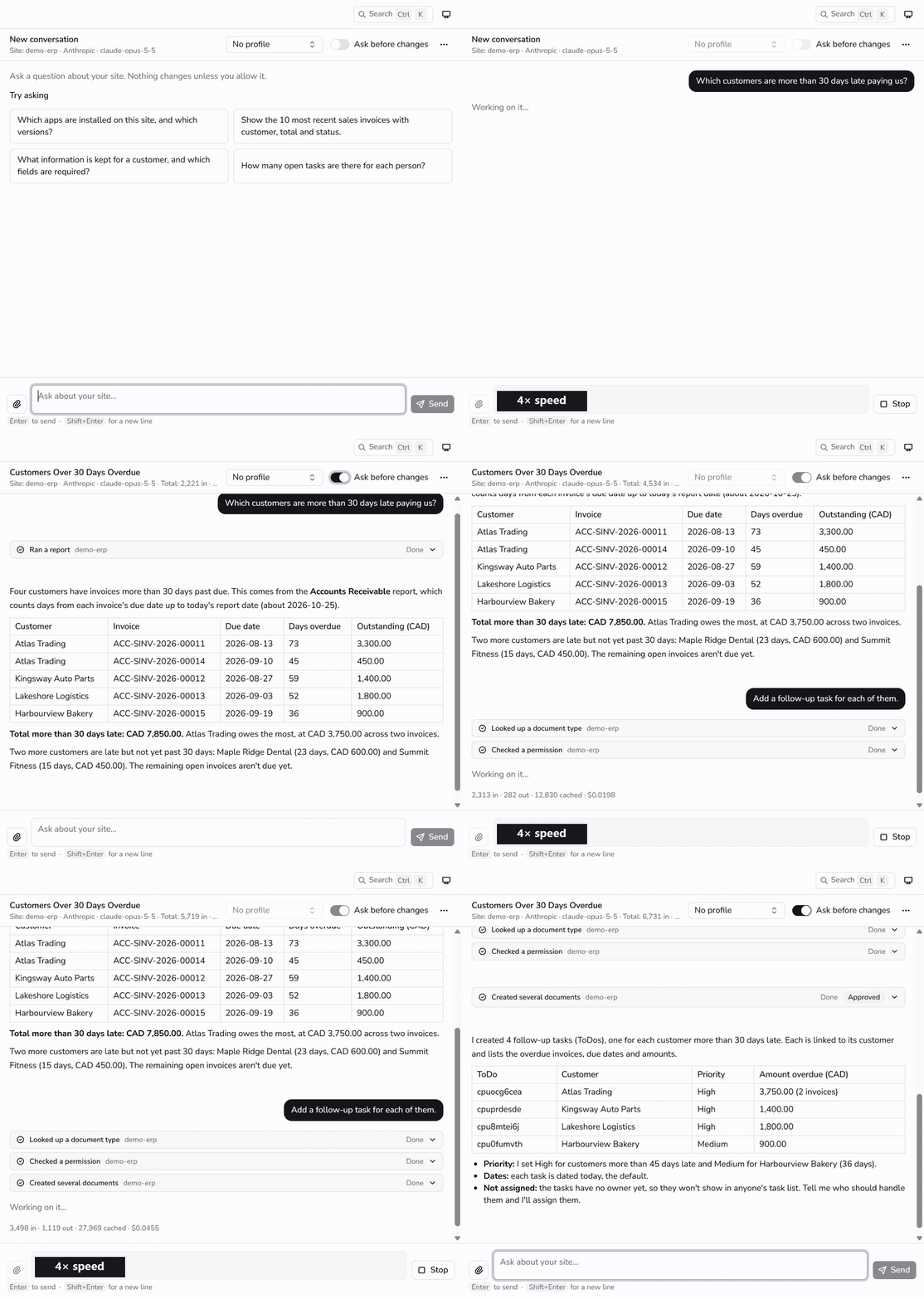 A real run of the Desktop Assistant (Claude Opus 5.5) on a demo ERPNext site, waits shown at 4× speed. With "Ask before changes" on, nothing is written until you approve the card.
## Safety
An AI assistant connected to an ERP should not be able to surprise you. ffc and the desktop app act with your own Frappe user's permissions and only ever narrow them:
- **Read-only** by default in the desktop app, and one flag (`--read-only`) or one config key for any AI client.
- **Per-site policy:** allow or deny tools, DocTypes and server methods. Users, permissions, scripts and settings stay read-only unless you list them.
- **Approvals:** ffc asks before deletes, cancels, workflow actions and shares, through any AI client that can ask (`confirm: always` refuses them in clients that cannot). In the desktop app's "Ask before changes" mode every change waits on a card that shows the fields before and after, and an update is refused if the document changed on the site since you saw it.
- **Audit log:** every tool call, allowed or refused, is one JSON line on your machine.
- **Dry runs:** CLI commands that write accept `--dry-run` and print what they would send.
Details and limits: [MCP safety](docs/mcp/safety.md) · [Desktop approvals](docs/desktop/using.md#read-only-or-ask-before-changes).
## Install
**Linux and macOS**
```bash
curl -fsSL https://raw.githubusercontent.com/nasroykh/foxmayn_frappe_cli/main/install.sh | sh
```
**Windows** (PowerShell or cmd.exe)
```powershell
powershell -ExecutionPolicy Bypass -Command "irm https://raw.githubusercontent.com/nasroykh/foxmayn_frappe_cli/main/install.ps1 | iex"
```
Or with a package manager: `brew install nasroykh/tap/ffc` (macOS, Linux), or `scoop bucket add foxmayn https://github.com/nasroykh/scoop-bucket` then `scoop install ffc` (Windows).
Both scripts download the latest release for your platform and check its SHA-256 checksum. Manual downloads, building from source, signature checks, updating (`ffc update`) and uninstalling: [Installation](docs/getting-started/installation.md).
**Desktop app (beta):** builds are not code-signed yet ([help fund signing](#support)), so a browser download shows a Windows SmartScreen or macOS Gatekeeper warning. The install scripts download the release themselves and check its SHA-256 checksum (and its release signature on macOS) before installing:
```bash
# macOS
curl -fsSL https://raw.githubusercontent.com/nasroykh/foxmayn_frappe_cli/main/install-desktop.sh | sh
```
```powershell
# Windows (PowerShell or cmd.exe)
powershell -ExecutionPolicy Bypass -Command "irm https://raw.githubusercontent.com/nasroykh/foxmayn_frappe_cli/main/install-desktop.ps1 | iex"
```
Or download the `desktop-v…` release from the [Releases page](https://github.com/nasroykh/foxmayn_frappe_cli/releases); see [Install the desktop app](docs/desktop/install.md) for the first-launch steps.
## Quickstart
```bash
ffc init # add your first site (browser sign-in, API key or password)
ffc whoami # who you are on the site, roles, Frappe version
ffc list-docs -d Customer -f name,customer_name -l 5
ffc get-doc -d "Sales Invoice" -n ACC-SINV-2026-00001 --json
ffc list-docs -d ToDo --filters '{"status":"Open"}' --output csv > todos.csv
```
Connect an AI assistant to your sites:
```bash
ffc mcp install --client claude-desktop # or claude-code, cursor, vscode, codex; --read-only allows reads only
```
More in the [Quickstart](docs/getting-started/quickstart.md).
## Documentation
| Topic | Where |
| --- | --- |
| Install, first site, sign-in methods, config file and env vars | [Installation](docs/getting-started/installation.md) · [Authentication](docs/getting-started/authentication.md) · [Configuration](docs/getting-started/configuration.md) |
| Every command, global flags, output formats, exit codes, dry runs | [CLI reference](docs/cli/README.md) |
| MCP server: setup per client, running it, tools, safety and policy | [MCP](docs/mcp/README.md) |
| Desktop app: install, sites, the Assistant, connecting apps, updates | [Desktop](docs/desktop/README.md) |
| Release signing, where credentials live | [Security](docs/security.md) |
| Problems and questions | [Troubleshooting](docs/troubleshooting.md) · [FAQ](docs/faq.md) |
| Building, testing, releasing, the desktop dev loop | [Development](docs/development/README.md) |
The full index is [docs/README.md](docs/README.md).
## For AI agents
[`skills/`](skills/) holds agent skills for using ffc (start with `ffc-core`; then `ffc-setup`, `ffc-mcp`, `ffc-bulk-lifecycle`, `ffc-reports-api`, `ffc-files-collab`) and for working on this repository (`ffc-dev` and the `ffc-dev-*` skills). `make skills-init` links them into `.claude/`, `.cursor/` and `.agent/`.
## Support
ffc is free and stays free. If it saves you time, you can support its development on [Ko-fi](https://ko-fi.com/foxmayn). The first goal is code signing, so the desktop app installs on Windows and macOS without security warnings; then test servers and development tools. Already use Wise? You can also send through [Wise](https://wise.com/pay/me/nasreddiney2).
## Contributing
Issues and pull requests are welcome. Start with [Development](docs/development/README.md): `make build`, `make test`, `make lint`. Every new command or MCP tool ships with tests against the fake Frappe site in `internal/frappetest`.
## Credits
ffc builds on these open-source projects, with thanks to their authors:
- **CLI and MCP server:** [Cobra](https://github.com/spf13/cobra) and [pflag](https://github.com/spf13/pflag), [Charm](https://charm.sh) ([Lip Gloss](https://github.com/charmbracelet/lipgloss), [Huh](https://github.com/charmbracelet/huh), [Bubbles](https://github.com/charmbracelet/bubbles), [colorprofile](https://github.com/charmbracelet/colorprofile)), [Resty](https://github.com/go-resty/resty), [gojq](https://github.com/itchyny/gojq), [mcp-go](https://github.com/mark3labs/mcp-go), [hujson](https://github.com/tailscale/hujson), [go-yaml](https://github.com/yaml/go-yaml), [go-isatty](https://github.com/mattn/go-isatty) and the Go [x/sys](https://pkg.go.dev/golang.org/x/sys) packages.
- **Desktop app:** [Wails](https://wails.io), [React](https://react.dev), [Base UI](https://base-ui.com), [shadcn/ui](https://ui.shadcn.com), [Tailwind CSS](https://tailwindcss.com), [Tabler Icons](https://tabler.io/icons), [Nunito Sans](https://fonts.google.com/specimen/Nunito+Sans) (via Fontsource), [cmdk](https://github.com/pacocoursey/cmdk), [Embla Carousel](https://www.embla-carousel.com), [Vite](https://vite.dev) and the other packages in [`desktop/frontend/package.json`](desktop/frontend/package.json).
- **Release tooling:** [GoReleaser](https://goreleaser.com) and [NSIS](https://nsis.sourceforge.io).
- **[Frappe Framework](https://frappe.io/framework) and [ERPNext](https://erpnext.com)**, the open-source platforms this project talks to. Frappe and ERPNext are trademarks of their respective owners, used here only to describe compatibility.
## License
[MIT](LICENSE) © 2026 Nas (Foxmayn)