# Announcement
Vimac is now [Homerow](https://homerow.app). Homerow is a refined, sleeker, more performant successor of Vimac, incorporating lessons learned from it's predecessor.
# Vimac - Productive macOS keyboard-driven navigation
Vimac is a macOS productivity application that provides keyboard-driven navigation and control of the macOS Graphical User Interface (GUI).
Vimac is heavily inspired by [Vimium](https://github.com/philc/vimium/).
## Getting Started
You can download Vimac [here](https://vimacapp.com). Unzip the file and move `Vimac.app` to `Applications/`.
You can refer to the manual [here](https://vimacapp.com/manual).
## How does Vimac work?
The current Vimac workflow works like this:
1. Activate a mode (`Hold Space to activate Hint-mode` is the default)
2. Perform actions within the activated mode
3. Exit the mode, either manually or automatically when the mode's task is complete
### Hint-mode
Activating Hint-mode allows one to perform a click, double-click, or right-click on an actionable UI element
Upon activation, "hints" will be generated for each actionable element on the frontmost window:
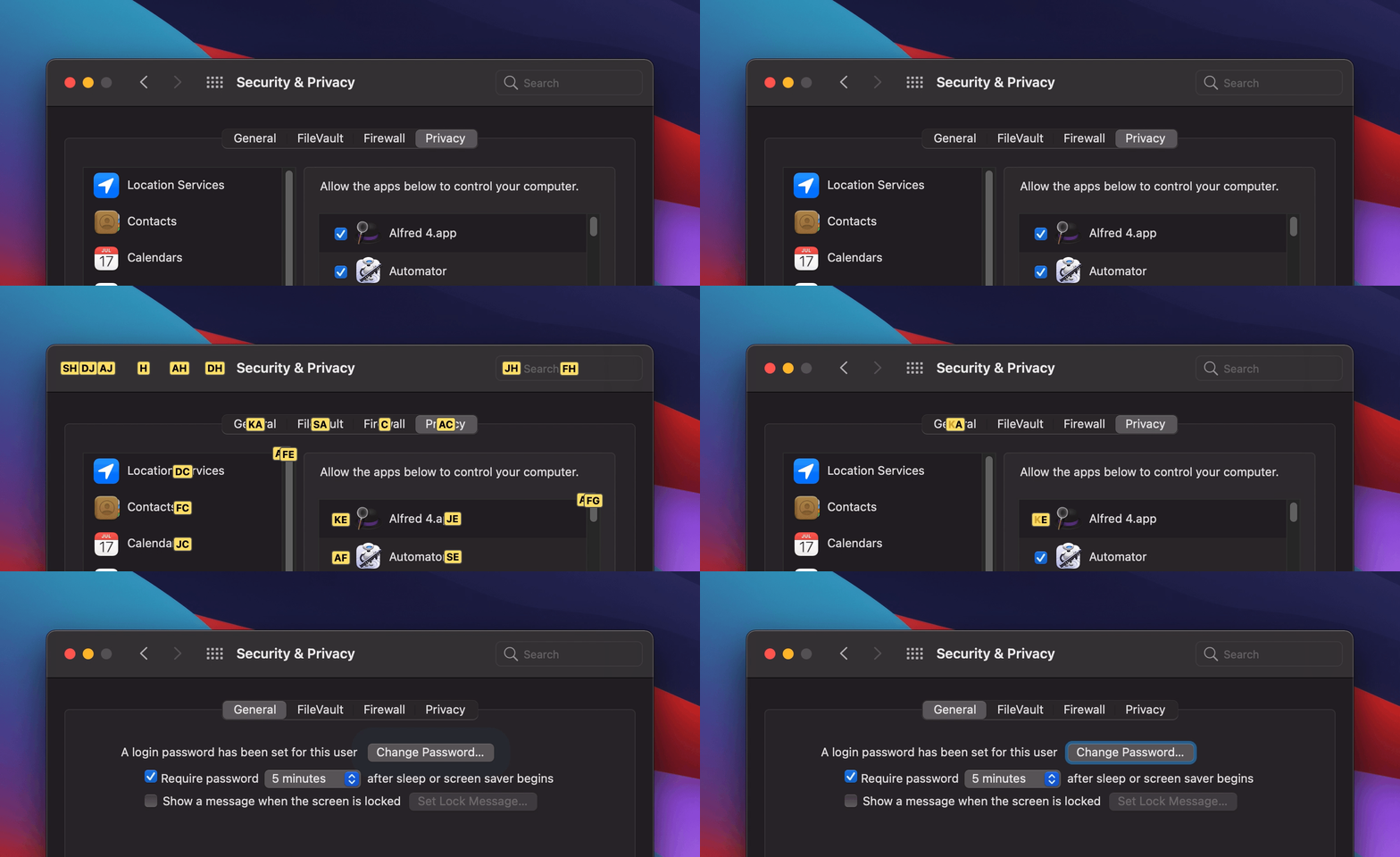 Simply type the assigned "hint-text" (eg. "ka") to perform a click at the location!
### Scroll-mode
Activating Scroll-mode allows one to scroll through the scrollable areas of the frontmost window.
Upon activation, a red border surrounds the active scroll area:
Simply type the assigned "hint-text" (eg. "ka") to perform a click at the location!
### Scroll-mode
Activating Scroll-mode allows one to scroll through the scrollable areas of the frontmost window.
Upon activation, a red border surrounds the active scroll area:
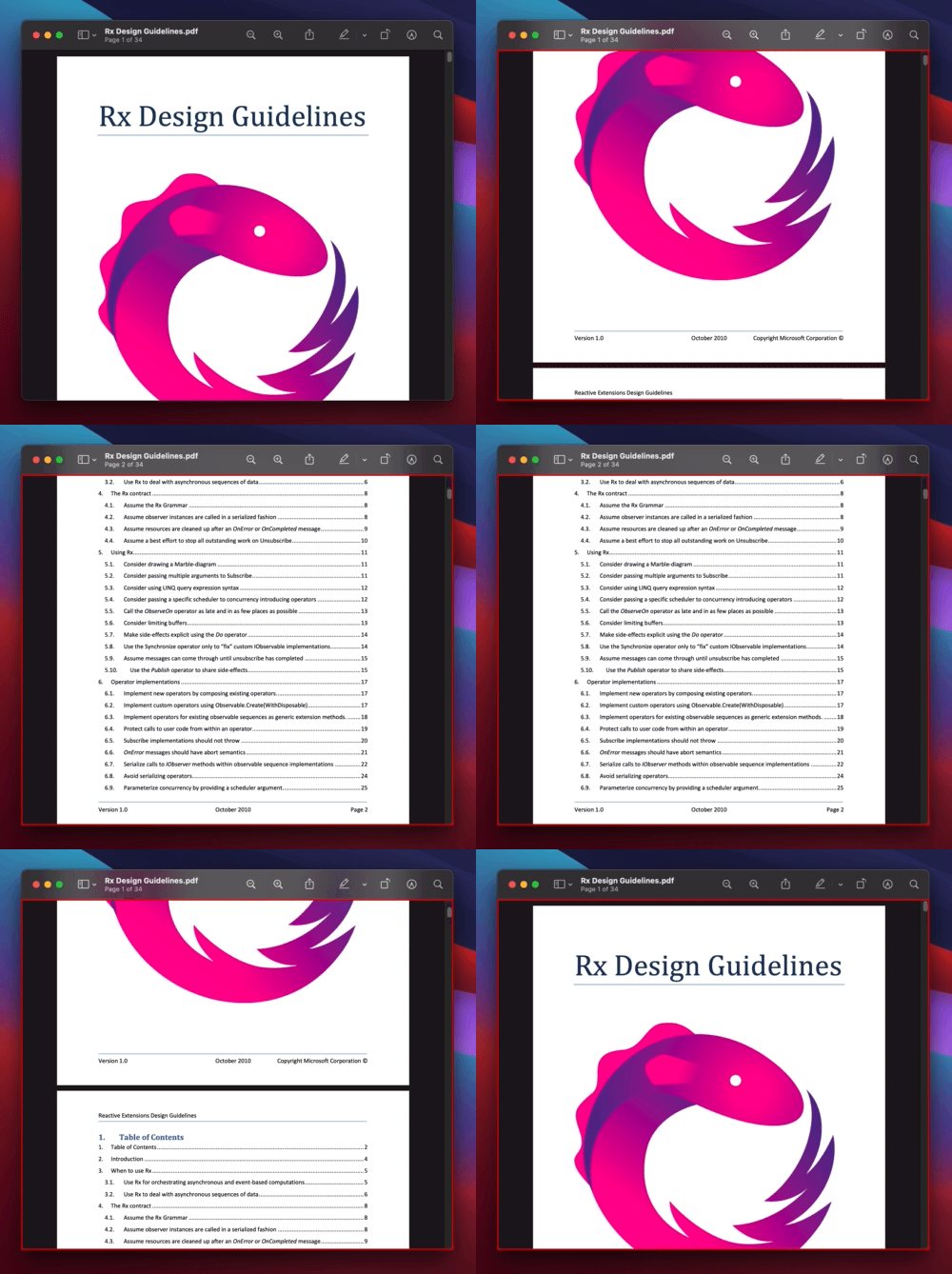 HJKL keys can be used to scroll within the scroll area.
## Building
```
pod install
carthage build
open Vimac.xcworkspace
```
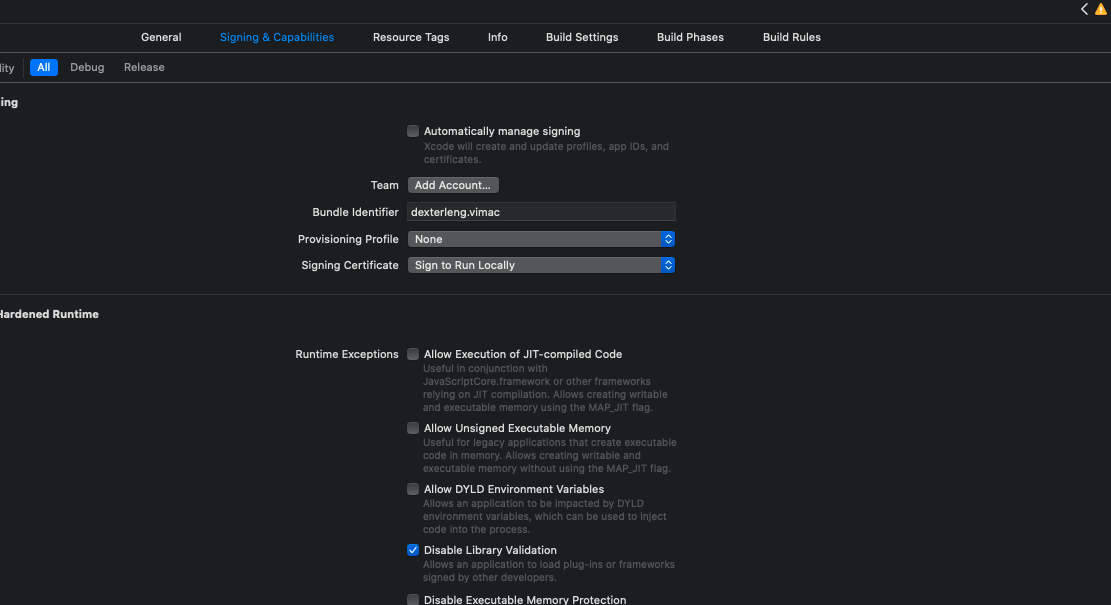
Modify the Signing and Capabilities to the following (note the `Disable Library Validation` option):
Add Vimac and Xcode (for running AppleScript) to the list of Accessibility apps under **System Preferences > Security & Privacy > Accessibility**:
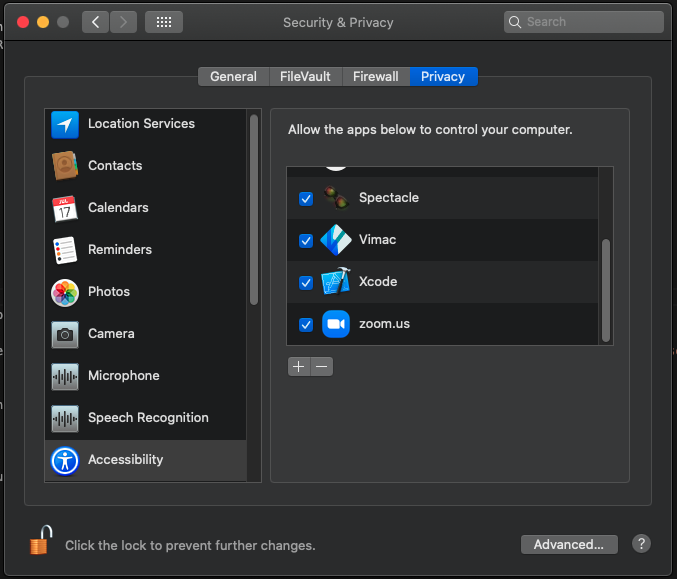
Keep System Preferences open under this section during development with the settings unlocked. This is because the `grant-accessibility-permission-dev.scpt` AppleScript is scheduled to run after each build to re-grant Accessibility permissions.
The AppleScript simply checks and unchecks Vimac to re-grant permissions which are lost after a cleanbuild.
Build Vimac now! You may have to build it several times as the AppleScript may not run well the first time.
At this point running `git status` would bring up:
```
modified: ViMac-Swift/ViMac_Swift.entitlements
modified: Vimac.xcodeproj/project.pbxproj
modified: grant-accessibility-permission-dev.scpt
```
Avoid committing them.
## Contributing
Feel free to contribute to Vimac. Make sure to open an issue / ask to work on something first!
HJKL keys can be used to scroll within the scroll area.
## Building
```
pod install
carthage build
open Vimac.xcworkspace
```
Modify the Signing and Capabilities to the following (note the `Disable Library Validation` option):

Add Vimac and Xcode (for running AppleScript) to the list of Accessibility apps under **System Preferences > Security & Privacy > Accessibility**:

Keep System Preferences open under this section during development with the settings unlocked. This is because the `grant-accessibility-permission-dev.scpt` AppleScript is scheduled to run after each build to re-grant Accessibility permissions.
The AppleScript simply checks and unchecks Vimac to re-grant permissions which are lost after a cleanbuild.
Build Vimac now! You may have to build it several times as the AppleScript may not run well the first time.
At this point running `git status` would bring up:
```
modified: ViMac-Swift/ViMac_Swift.entitlements
modified: Vimac.xcodeproj/project.pbxproj
modified: grant-accessibility-permission-dev.scpt
```
Avoid committing them.
## Contributing
Feel free to contribute to Vimac. Make sure to open an issue / ask to work on something first!