



# SolidLikeARock
**AI agents can generate code faster than humans can review it.**
One forbidden import slips into a PR today — `UIKit` in the network layer, a
ViewModel reaching straight into a data toolkit. Nobody catches it in review.
One architectural violation today becomes a hundred tomorrow, and your Clean
Architecture ends up a diagram on a wiki that the code stopped following
months ago. And AI-generated code ships insecure patterns just as fast as
architectural ones — a token in UserDefaults, an MD5 hash, TLS validation
quietly disabled.
SolidLikeARock is **two guardrails in one Swift CLI**: it enforces your
architecture's import rules *and* checks for insecure patterns on every build
and every PR, so both kinds of drift are caught the moment they appear —
whether the code was written by a human or generated by an AI agent:
```
Sources/Presentation/HomeView.swift:5: error: SolidLikeARock: layer 'Presentation' must not import 'Data'
Sources/Auth/Session.swift:42: error: SolidLikeARock: [tokenInUserDefaults] credential stored in UserDefaults under 'authToken' — UserDefaults is cleartext on disk; use the Keychain
```
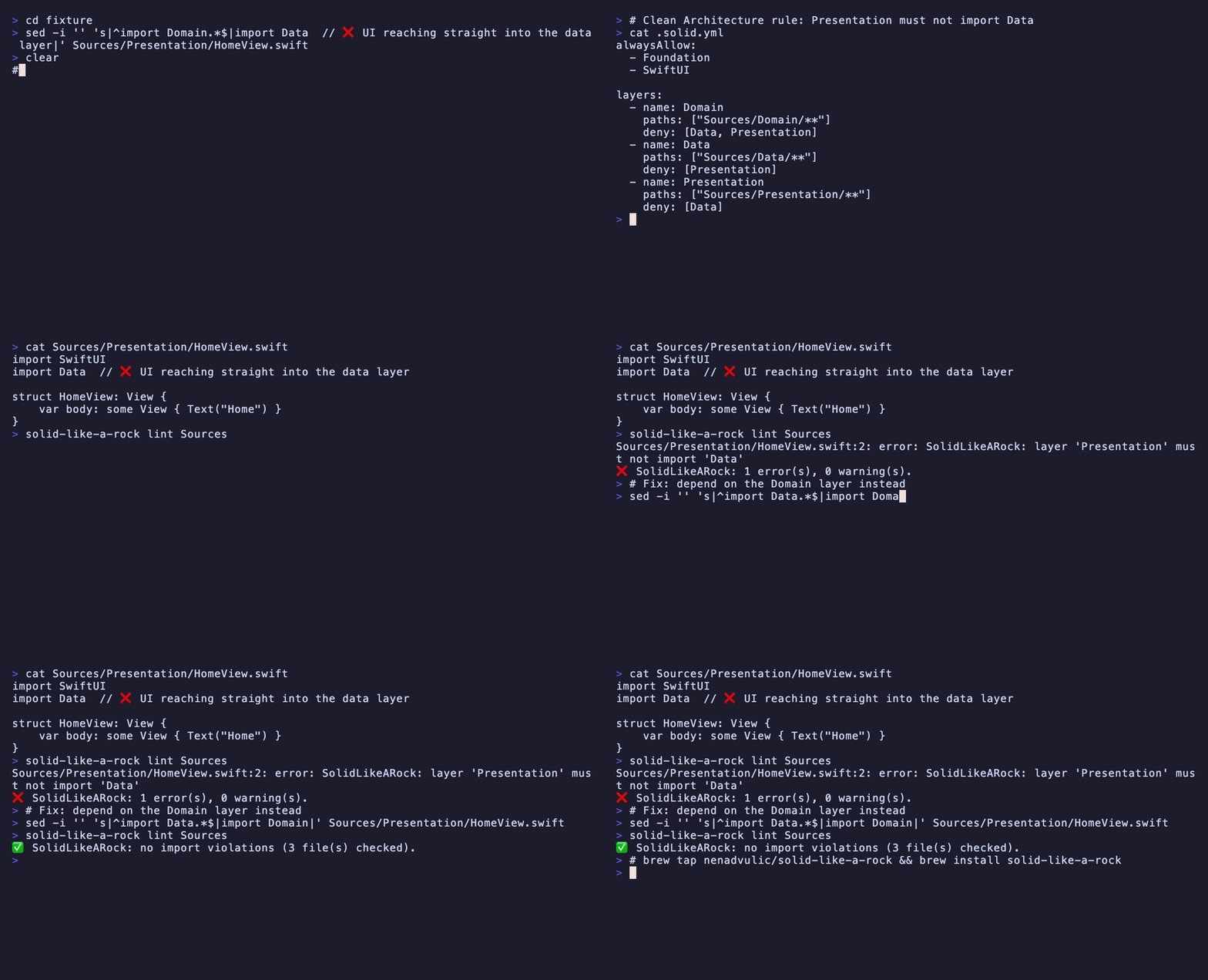
Under the hood it is a tiny, dependency-light Swift CLI that parses each
`.swift` file with [SwiftSyntax](https://github.com/swiftlang/swift-syntax)
(a real syntax tree — no fragile regex / `grep`), finds every `import`
statement, figures out which architectural layer the file belongs to, and
fails if a layer imports something it shouldn't. Swift architecture validation
as a build step: a practical way to enforce the **Dependency Inversion
Principle** (the *D* in SOLID) and Clean Architecture boundaries in CI —
dependencies must point inward.
```
Domain <- Data <- Presentation
(dependencies point inward)
```
It completes the tools you already run, rather than replacing them:
| Tool | Purpose |
|------|---------|
| [SwiftLint](https://github.com/realm/SwiftLint) | Style rules |
| [Periphery](https://github.com/peripheryapp/periphery) | Dead code |
| **SolidLikeARock** | Architecture + security rules |
## Why now?
AI coding assistants can generate code faster than humans can review it.
The challenge is no longer writing code.
The challenge is ensuring that generated code conforms to your architecture — and doesn't quietly ship an insecure pattern along the way.
SolidLikeARock acts as a guardrail for both: it enforces your import rules and its security checks on every build and every PR, so no AI-generated shortcut silently collapses your layers or stores a credential in cleartext.
## Install
**Homebrew (recommended):**
```bash
brew tap nenadvulic/solid-like-a-rock
brew install solid-like-a-rock
```
**From source:**
```bash
git clone https://github.com/nenadvulic/solid-like-a-rock.git
cd solid-like-a-rock
swift build -c release
cp .build/release/solid-like-a-rock /usr/local/bin/
```
Or run without installing:
```bash
swift run solid-like-a-rock --config .solid.yml Sources
```
## Quick start
**Architecture lint** (layered import rules):
```bash
solid-like-a-rock init # analyse the project, generate .solid.yml
solid-like-a-rock lint Sources
```
**Security check only — no architecture required:**
```bash
solid-like-a-rock init --security
solid-like-a-rock lint Sources
```
## Generate a config (`init`)
Writing `.solid.yml` by hand on an existing project is tedious. `init` generates
a starter config by analysing the project's **real inter-module import graph** —
deterministic, no LLM. It emits one layer per local module; you regroup/rename
them into business layers afterwards.
```bash
# Freeze the current architecture (best for legacy adoption):
solid-like-a-rock init --freeze ./MyApp
# Heuristic layering proposal, to review:
solid-like-a-rock init ./MyApp
# Multi-package project with a non-standard modules directory:
solid-like-a-rock init --packages-dir Modules .
# TCA (The Composable Architecture) project — groups into Models/Dependencies/Features/App:
solid-like-a-rock init --tca ./MyTCAApp
# Security checks only — no architecture rules:
solid-like-a-rock init --security
```
`--security` writes a [security-only preset](docs/configuration.md#security-checks-security) when the
project has no config yet, and appends the `security:` section to the config
`init` would otherwise generate — it composes with `--tca` and `--freeze`.
- **`--freeze`** — for each module, deny every *other* local module it doesn't
import today. Result: **zero violations now**, and the linter bites the moment
a **new** cross-module dependency appears. The fastest way onto a living codebase.

- **default (heuristic)** — ranks modules by depth in the import graph and denies
only *outward* dependencies (toward more-outer layers). More permissive; review it.
It auto-detects the layout (`Packages//Sources` or `Sources/`), scans only
sources (never `Tests/`), ignores system/third-party imports, and writes a sorted,
deterministic, commented file. It won't overwrite an existing file without `--force`.
Need a hand-written or AI-generated config (e.g. plain Xcode/CocoaPods projects)?
See **[Configuration](docs/configuration.md)**.
## Run
```bash
solid-like-a-rock Sources
```
Output uses the `file:line: error: message` format, so violations show up
inline in Xcode and in CI logs:
```
Sources/Domain/User.swift:3: error: SolidLikeARock: layer 'Domain' is not allowed to import 'UIKit'
Sources/Presentation/HomeView.swift:5: error: SolidLikeARock: layer 'Presentation' must not import 'Data'
❌ SolidLikeARock: 2 violation(s) found.
```
Exit code is non-zero when violations are found — drop it straight into a CI step
or an Xcode "Run Script" build phase.
## Documentation
The deep-dive docs live under [`docs/`](docs/):
- **[Configuration](docs/configuration.md)** — write & tune `.solid.yml`: layers, the layered `dependencyOrder` mode, the visibility rule, the security checks, and an AI prompt to bootstrap a config.
- **[Adopting on a living codebase](docs/adoption.md)** — baseline (fail only on *new* violations), inline `// solid:ignore` suppressions, and warning-level severity.
- **[Integrations](docs/integrations.md)** — Xcode, GitHub Action / CI, SwiftPM command & build-tool plugins, Danger, Claude Code, and the architecture graph.
- **[Using with TCA](docs/tca.md)** — enforce feature-peer isolation in The Composable Architecture.
- **[Security rules reference](docs/security-rules.md)** — all 14 rules, what each one fires on and why.
## Example project
A runnable 4-layer Clean Architecture sample lives at
`Tests/SolidCoreTests/Fixtures/CleanArchSample` and doubles as the integration
test for this tool. It contains five well-behaved files and three files that
intentionally cross a boundary:
```
CleanArchSample/
├─ .solid.yml
└─ Sources/
├─ Domain/ User.swift, UserRepository.swift # pure, imports only Foundation
├─ Application/ FetchUserUseCase.swift # ✅ imports Domain
│ BadUseCase.swift # ❌ imports Infrastructure
├─ Infrastructure/ CoreDataUserStore.swift # ✅ imports Domain (inward)
│ BadGateway.swift # ❌ imports Presentation
└─ Presentation/ UserView.swift # ✅ SwiftUI + Application
LeakyView.swift # ❌ imports Infrastructure
```
Run it:
```bash
cd Tests/SolidCoreTests/Fixtures/CleanArchSample
solid-like-a-rock --config .solid.yml Sources
```
Expected output — exactly three violations, exit code 1:
```
Sources/Application/BadUseCase.swift:2: error: SolidLikeARock: layer 'Application' is not allowed to import 'Infrastructure'
Sources/Infrastructure/BadGateway.swift:2: error: SolidLikeARock: layer 'Infrastructure' must not import 'Presentation'
Sources/Presentation/LeakyView.swift:2: error: SolidLikeARock: layer 'Presentation' must not import 'Infrastructure'
❌ SolidLikeARock: 3 violation(s) found.
```
`BadUseCase` trips the whitelist (`Application` may import only `Domain`), while
`BadGateway` and `LeakyView` trip deny-lists — the latter being the key
Dependency Inversion boundary: the UI must never reach into `Infrastructure`.
## Why SwiftSyntax instead of regex?
A regex matches `import` inside strings, comments, and `#if` blocks. SwiftSyntax
parses the actual grammar, so `let s = "import Secrets"` is correctly ignored and
conditional imports are handled the same way the compiler sees them.
## Real-world example
First run on a production car-sharing iOS app (~30 SPM modules, Clean
Architecture layers, several years of history): **25 violations**, none of
which had been caught in code review —
- `UIKit` imported inside the network provider (Data layer)
- SwiftUI views living inside data toolkits
- Presentation ViewModels importing data providers and toolkits directly,
bypassing the domain
All 25 went into a committed baseline the same day; CI now fails only on *new*
violations, and the team burns the baseline down at its own pace. That is the
adoption path on any living codebase: measure, freeze, then ratchet. See
**[Adopting on a living codebase](docs/adoption.md)**.
## Built for AI-assisted development
Coding agents are great at writing Swift — and equally great at quietly
ignoring your architecture. A `.solid.yml` in the repo turns those implicit
rules into something a machine can respect: the agent's output gets linted
like any other code, locally, in CI, and on the PR.
Works with whatever assistant your team uses — Claude Code, Cursor, Codex,
Windsurf — since the guardrail lives in the build, not in the editor. Pair it
with the [AI config prompt](docs/configuration.md#generate-a-config-with-ai) to bootstrap the rules,
then let the linter keep every contributor honest, human or not.
## Performance
Measured on a real project — [isowords](https://github.com/pointfreeco/isowords),
Point-Free's heavily modularised SPM app (88 local modules):
| | |
|---|---|
| Swift files scanned | 388 |
| `init --freeze` (full import-graph analysis) | 0.18 s |
| `lint` (median of 3 runs) | 0.86 s |
| Machine | Apple M1 — Homebrew binary v0.4.2 |
Reproduce it yourself — one command, pinned to a fixed isowords commit:
```bash
scripts/benchmark.sh
```
The same run doubles as an integration example: `init --freeze` generates a
ready-to-use `.solid.yml` for the whole project (one layer per module, zero
violations on day one), so the linter bites only when a *new* cross-module
dependency appears.
## Roadmap
- [x] Architecture rules
- [x] Import validation
- [x] Architecture graph visualization
- [x] Security checks (Keychain misuse, cleartext HTTP, weak crypto, auth flaws, PII in logs)
## License
MIT