# Win-CodexBar
[English](./README.md) | [简体中文](./README.zh-CN.md) | [繁體中文(臺灣)](./README.zh-TW.md) | [日本語](./README.ja-JP.md) | [한국어](./README.ko-KR.md) | [Español mexicano](./README.es-MX.md)
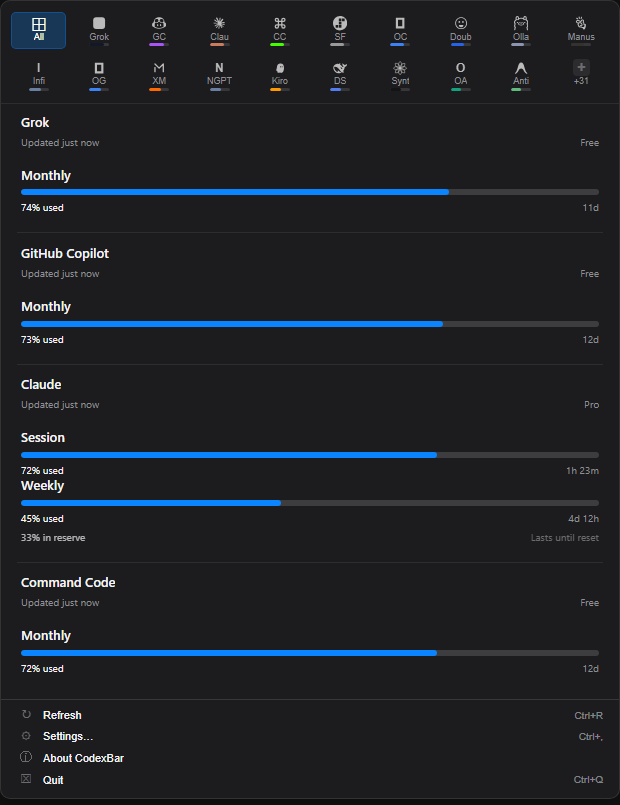
Win-CodexBar is a Windows system-tray app for keeping AI coding-tool usage visible without opening a dozen dashboards. It ports the spirit of [CodexBar](https://github.com/steipete/CodexBar) to a Tauri + React desktop shell backed by shared Rust provider logic.
|
|
## Highlights
- **56 providers** including Codex, Claude, Copilot, OpenRouter, Cursor, Gemini, DeepSeek, MiniMax, Kiro, Antigravity, Groq, Qoder, Sakana AI, CrossModel, and more.
- **Tray-first workflow** with a compact provider grid, usage cards, refresh action, settings shortcut, and quit control.
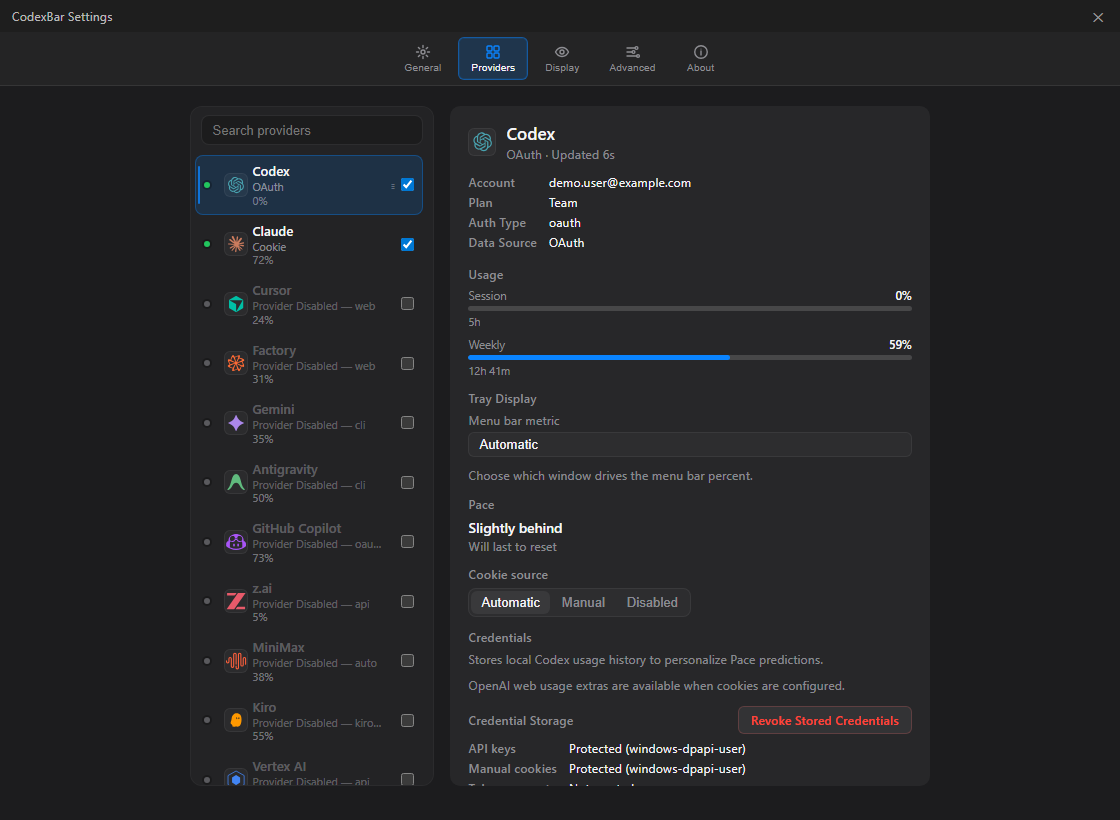
- **Provider settings** for source selection, credentials, cookie import, token accounts, API keys, regions, and tray-display preferences.
- **Windows credential protection** for app-managed API keys, manual cookies, and token accounts, using user-scoped DPAPI where available.
- **Browser cookie import** for Chrome, Edge, Brave, and Firefox, kept opt-in per provider.
- **Installed local CLI** for scripting usage, cost, config, diagnostics, and loopback integrations.
- **Installer + portable builds** with WebView2 runtime bootstrap, VC++ runtime bootstrap, and SHA-256 checksum files.
## Install
Install with Windows Package Manager:
```powershell
winget install Finesssee.Win-CodexBar
```
Or download the latest installer/portable build from [GitHub Releases](https://github.com/Finesssee/Win-CodexBar/releases).
- Installer: `CodexBar--Setup.exe`
- Portable: `CodexBar--portable.exe`
- Checksums: each release includes `.sha256` files
Winget distribution is approved through [microsoft/winget-pkgs](https://github.com/microsoft/winget-pkgs/tree/master/manifests/f/Finesssee/Win-CodexBar). New versions can take a little time to appear because every Winget update is pinned to a specific release URL and installer hash.
## First Run
1. Launch **CodexBar** from the Start Menu or portable executable.
2. Click the tray icon to open the usage panel.
3. Open **Settings -> Providers**.
4. Enable the providers you use.
5. Add the matching credential type: OAuth/device login, API key, browser cookies, local CLI login, or token account.
For Claude, browser cookies/sessionKey are preferred because they match Claude's settings-page usage. OAuth and CLI stay available as fallbacks. For CLI-based providers such as Codex and Gemini, sign in with the provider CLI first.
## Latest Release
**v0.33.2** fixes tray-panel dismissal so the popover closes on focus loss or Escape, without immediately reopening from the same tray click.
See the full history in [CHANGELOG.md](CHANGELOG.md).
## Supported Providers
Provider matrix
| Provider | Auth | Tracks |
|---|---|---|
| Codex | OAuth / CLI | Session, Weekly, Credits |
| Claude | Cookies / OAuth fallback / CLI fallback | Session (5h), Weekly |
| Cursor | Cookies | Plan, Usage, Billing |
| Factory | Cookies | Usage |
| Gemini | gcloud OAuth | Quota |
| Copilot | GitHub Device Flow / gh CLI / legacy token | Plan usage, Chat |
| Antigravity | Local LSP | Usage, Per-model quotas |
| z.ai | API Token | Quota |
| MiniMax | API / Cookies | Usage, Billing Summary |
| Kiro | Cookies / CLI | Monthly Credits, Overage |
| Vertex AI | gcloud OAuth | Cost |
| Augment | Cookies | Credits |
| OpenCode | Local Config | Usage |
| Kimi | Cookies | 5h Rate, Weekly |
| Kimi K2 | API Key | Credits |
| Amp | Cookies | Usage |
| Warp | Local Config | Usage |
| Ollama | Cookies / API Key | Usage, Cloud Models, Pace windows |
| Azure OpenAI | API Key | Deployment |
| T3 Chat | Cookies / cURL | Base, Overage |
| OpenRouter | API Key | Credits |
| JetBrains AI | Local Config | Usage |
| Alibaba | Cookies | Usage |
| Alibaba Token Plan | Cookies | Token Plan Credits, Reset date |
| NanoGPT | API Key | Credits |
| Infini | API Key | Session, Weekly, Quota |
| Perplexity | Cookies | Credits, Plan |
| Abacus AI | Cookies | Credits |
| Mistral | Cookies | Billing, Usage |
| OpenCode Go | Cookies | Usage, Zen Balance |
| Kilo | API Key / CLI | Usage |
| Codebuff | API Key / Local Config | Credits, Weekly |
| DeepSeek | API Key | Balance, Usage summaries, Cost |
| Windsurf | Local Cache | Daily, Weekly |
| Manus | Cookies | Credits, Refresh Credits |
| Xiaomi MiMo | Cookies | Balance, Token Plan |
| Doubao | API Key | Request Limits |
| Command Code | Cookies | Monthly Credits, Purchased Credits |
| Crof | API Key | Credits, Request Quota |
| StepFun | Oasis Token | 5h, Weekly, Token refresh |
| Venice | API Key | USD / DIEM Balance |
| OpenAI | Admin API / API Key | Usage, Requests, Project-scoped cost, Credit Balance |
| Grok | Cookies / auth.json | Billing |
| ElevenLabs | API Key | Subscription Credits, Voice Slots |
| Deepgram | API Key | Project Usage |
| Groq | API Key | Enterprise Metrics |
| LLM Proxy | API Key | Quota Stats |
## Supported Languages
The UI and contributor reporting currently support:
- English
- 简体中文
- 繁體中文(臺灣)
- 日本語
- 한국어
- Español mexicano
## Build From Source
```powershell
# Prerequisites: Node.js + pnpm. Rust and MinGW are installed by the script when needed.
git clone https://github.com/Finesssee/Win-CodexBar.git
cd Win-CodexBar
.\scripts\dev.ps1
```
Useful dev flags:
```powershell
.\scripts\dev.ps1 -Release # optimized build
.\scripts\dev.ps1 -SkipBuild # relaunch the last build
```
CLI examples:
```bash
codexbar-cli --help
codexbar-cli diagnose --pretty
codexbar-cli usage -p claude
codexbar-cli usage -p all
codexbar-cli cost -p codex
```
Installer builds include `codexbar.exe` as the tray app and `codexbar-cli.exe` as the console CLI. Start Menu shortcuts launch the desktop app; terminal commands use `codexbar-cli.exe`. `codexbar-desktop.exe` is still installed as a compatibility alias for older shortcuts and autostart entries.
## Release Builds
For local Windows release builds, use the cached release builder:
```powershell
.\scripts\windows-release-build.ps1 -Ref v0.33.2 -SmokeInstall
```
The script builds the real Tauri release binary plus the console CLI, verifies signed installer dependencies, packages with Inno Setup, writes installer/portable assets, writes SHA-256 sidecars, and can run a silent install/uninstall smoke test.
More release automation notes live in [docs/release/ci-cd.md](docs/release/ci-cd.md).
## Privacy
- **On-device by default**: provider data is read from known local paths or provider APIs you configure.
- **Opt-in cookies**: browser-cookie extraction only runs for providers you enable.
- **Protected secrets**: API keys, manual cookies, and token accounts use the secure-file layer; Windows uses user-scoped DPAPI where available.
- **Safe diagnostics**: diagnostics expose provider/source/status metadata only, never raw cookies, API keys, bearer tokens, or OAuth values.
- **Verified updates**: installer downloads require a GitHub SHA-256 digest and are re-verified immediately before apply.
## Docs
| Topic | Link |
|---|---|
| Building from source | [docs/BUILDING.md](docs/BUILDING.md) |
| WSL setup and auth tips | [docs/WSL.md](docs/WSL.md) |
| Browser cookie details | [docs/COOKIES.md](docs/COOKIES.md) |
## Credits
- Original macOS app: [steipete/CodexBar](https://github.com/steipete/CodexBar) by Peter Steinberger
- Inspired by [ccusage](https://github.com/ryoppippi/ccusage) for cost tracking
## License
MIT, same as the original CodexBar.