# net-benchmark
fast, extensible network benchmarking — dns, http, and ssl from a single cli.
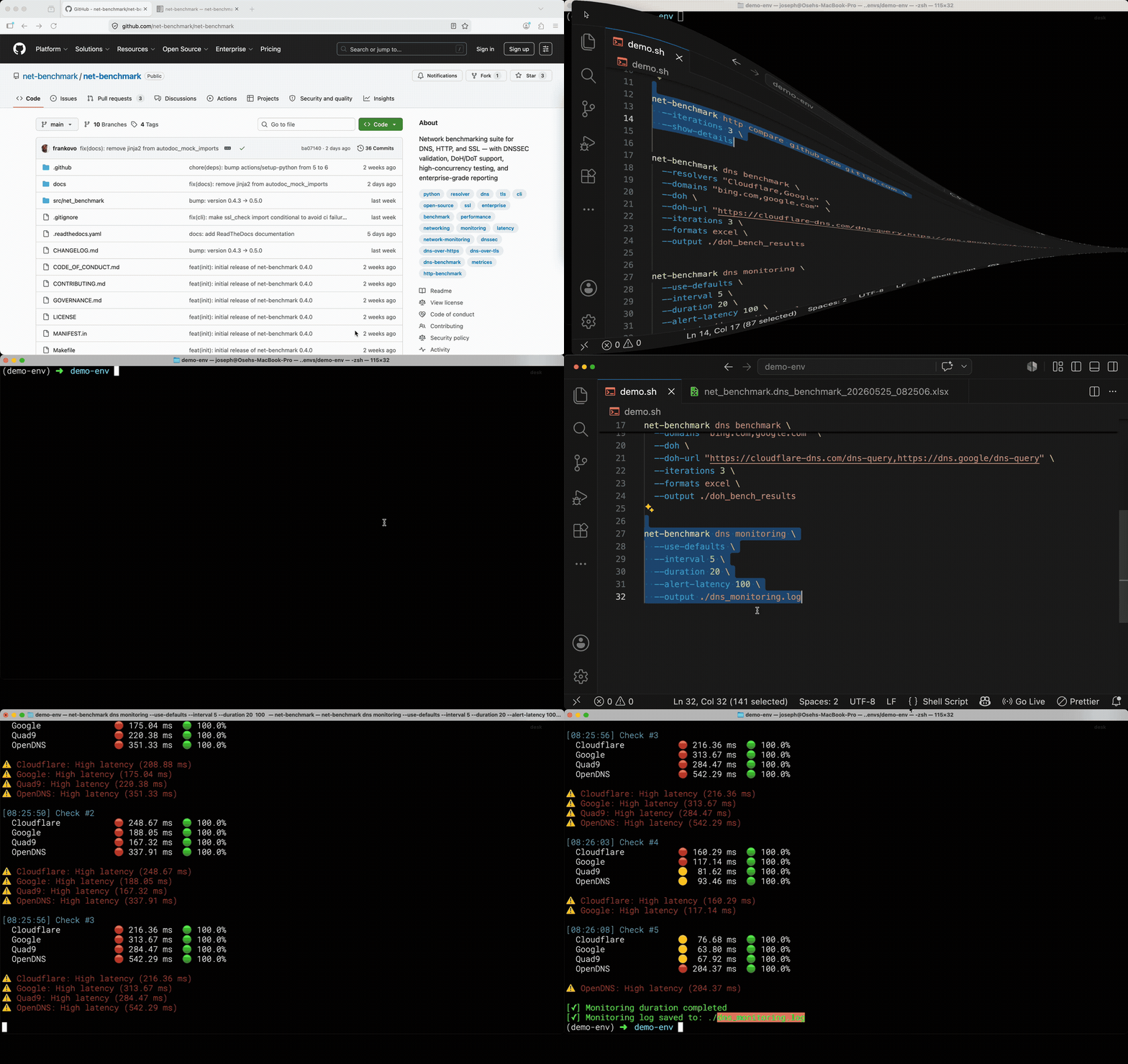
**Demo**
[](https://github.com/net-benchmark/net-benchmark)
*Watch the full 2:09 demo of DNS & HTTP benchmarks*
**If you find this useful, consider giving it a ⭐ — it helps others discover the project.**
[](https://pypi.org/project/net-benchmark)
[](https://pypi.org/project/net-benchmark)
[](LICENSE)
[](https://github.com/net-benchmark/net-benchmark/actions/workflows/test.yml)
[](https://github.com/net-benchmark/net-benchmark/actions/workflows/docker.yml)
[](https://pepy.tech/project/net-benchmark)
[](https://hub.docker.com/r/joeovo/net-benchmark)
[](https://hub.docker.com/r/joeovo/net-benchmark)
[](https://net-benchmark.readthedocs.io/en/latest/)
[](https://github.com/net-benchmark/net-benchmark/discussions)
[](https://pypi.org/project/net-benchmark)
[](https://github.com/net-benchmark/net-benchmark/stargazers)
```bash
pip install net-benchmark
pip install net-benchmark[pdf] # with pdf export
```
> **Successor to [dns-benchmark-tool](https://github.com/net-benchmark/dns-benchmark-tool)** — fully backward compatible.
> `dns-benchmark` command still works as an alias.
## Why net-benchmark?
Most network tooling answers one question and stops. `dig` tells you a resolver
responded. `curl` tells you a request succeeded. `ab` gives you a number without
telling you whether that number is about the server or about the machine you ran
it on.
net-benchmark exists to produce **evidence you can act on and hand to someone
else**:
| | |
|---|---|
| **One CLI, three layers** | DNS, HTTP and TLS from a single tool with one output model — no stitching three utilities together to explain one slow page load. |
| **Measurements you can defend** | Per-phase timing (DNS, TCP, TLS, TTFB), percentiles from real histograms, and metrics that are *omitted* rather than reported as a misleading zero when they cannot be computed. |
| **Reports, not scrollback** | CSV, Excel with charts, PDF and JSON — the artifact goes in the ticket, the migration doc, or the CI job. |
| **CI-ready** | `--threshold 'p95_latency<400'` exits non-zero. Metric names are validated before the run starts, so a typo costs a second rather than a full load test. |
| **Encrypted DNS as a first-class citizen** | DoH and DoT with DNSSEC validation, not an afterthought. |
| **Honest about its own limits** | If the tool is the bottleneck, it says so — and `--workers` lets you remove it. |
**Typical questions it answers:**
```bash
# "Which resolver is actually fastest from this network?"
net-benchmark dns top --limit 5
# "Is our new CDN faster than the old origin?"
net-benchmark http compare https://old.example.com https://new.example.com
# "Can checkout hold 400 requests/second before we open the sale?"
net-benchmark http load-test -t https://checkout.example.com/api/cart \
--mode sustained --rps 400 --duration 300 --workers 4 \
--threshold 'p95_latency<400'
```
## Table of Contents
- [Why net-benchmark?](#why-net-benchmark)
- [Installation](#installation)
- [Tools](#tools)
- [DNS benchmark](#dns-benchmark)
- [HTTP benchmark](#http-benchmark)
- [Load Testing](#-load-testing)
- [SSL check](#ssl-check)
- [Export formats](#export-formats)
- [Release workflow](#release-workflow)
- [Links & Support](#links--support)
- [Contributing](#contributing)
- [License](#license)
---
## Installation
```bash
pip install net-benchmark # core
pip install net-benchmark[pdf] # with pdf export
pip install net-benchmark[lint] # with ssl check --lint (pkilint)
pip install net-benchmark[crypto] # with ssl check --deep-introspection, --simulate-clients, --jarm
```
### Docker
No local Python needed:
```bash
docker pull joeovo/net-benchmark:latest # csv, excel, json
docker pull joeovo/net-benchmark:latest-pdf # adds PDF report export
docker run --rm joeovo/net-benchmark:latest http benchmark --use-defaults --formats csv,excel
```
Also available on GHCR: `ghcr.io/net-benchmark/net-benchmark`. Full guide, including CI/CD and Kubernetes examples: [Running in Docker](https://net-benchmark.readthedocs.io/en/latest/guides/docker.html).
### Homebrew
```bash
brew tap net-benchmark/net-benchmark
brew install net-benchmark
```
### Requirements
- Python 3.11+
- pip package manager
### Install from Source
```bash
git clone https://github.com/net-benchmark/net-benchmark.git
cd net-benchmark
pip install -e .
```
### Verify Installation
```bash
net-benchmark --version
net-benchmark dns --help
net-benchmark http --help
net-benchmark ssl check --help
# See all available options for a specific command
net-benchmark dns benchmark --help
net-benchmark http benchmark --help
net-benchmark ssl check --help
```
### First Run
```bash
# Test with defaults (recommended for first time)
net-benchmark dns benchmark --use-defaults --formats csv,excel
# HTTP test with defaults
net-benchmark http benchmark --use-defaults --formats csv,excel
```
---
## Tools
### DNS benchmark
DNS benchmark — test dns resolver performance, dnssec, doh/dot
#### 🎯 Why This Tool?
DNS resolution is often the hidden bottleneck in network performance. A slow resolver can add hundreds of milliseconds to every request.
##### The Problem
- ⏱️ **Hidden Bottleneck**: DNS can add 300ms+ to every request
- 🤷 **Unknown Performance**: Most developers never test their DNS
- 🌍 **Location Matters**: "Fastest" resolver depends on where YOU are
- 🔒 **Security Varies**: DNSSEC, DoH, DoT support differs wildly
##### The Solution
net-benchmark helps you:
- 🔍 **Find the fastest** DNS resolver for YOUR location
- 📊 **Get real data** - P95, P99, jitter, consistency scores
- 🛡️ **Validate security** - DNSSEC verification built-in
- 🚀 **Test at scale** - 100+ concurrent queries in seconds
##### Perfect For
- ✅ **Developers** optimizing API performance
- ✅ **DevOps/SRE** validating resolver SLAs
- ✅ **Self-hosters** comparing Pi-hole/Unbound vs public DNS
- ✅ **Network admins** running compliance checks
---
#### Quick start
```bash
# Test default resolvers against popular domains
net-benchmark dns benchmark --use-defaults --formats csv,excel
```
Results are automatically saved to `./benchmark_results/` with summary CSV, detailed raw data, and optional PDF/Excel reports.
> For installation details, see [Installation](#installation).
> For PDF export, see [PDF dependencies](#pdf-dependencies) under [Export formats](#export-formats).
---
#### ⚡ Commands at a Glance
| Command | What it does | Quick example |
|---|---|---|
| `benchmark` | Full DNS benchmark with exports | `net-benchmark dns benchmark --use-defaults` |
| `top` | Rank all resolvers by speed | `net-benchmark dns top --limit 5` |
| `compare` | Side-by-side resolver comparison | `net-benchmark dns compare Cloudflare Google Quad9` |
| `monitoring` | Continuous monitoring with alerts | `net-benchmark dns monitoring --use-defaults` |
```bash
# Find your fastest resolver right now
net-benchmark dns top --limit 5
# Compare the big three
net-benchmark dns compare Cloudflare Google Quad9 --show-details
# Monitor with DoT and alerts for 1 hour
net-benchmark dns monitoring --use-defaults --dot \
--interval 30 --duration 3600 \
--alert-latency 150 --output monitor.log
```
---
#### ✨ Key Features
##### 🚀 Performance
- **Async queries** - Test 100+ resolvers simultaneously
- **Multi-iteration** - Run benchmarks multiple times for accuracy
- **Statistical analysis** - Mean, median, P95, P99, jitter, consistency
- **Cache control** - Test with/without DNS caching
##### 🔒 Security & Privacy
- **DNSSEC validation** - Verify cryptographic trust chains
- **DNS-over-HTTPS (DoH)** - Encrypted DNS benchmarking
- **DNS-over-TLS (DoT)** - Secure transport testing
- **DNS-over-QUIC (DoQ)** - Experimental QUIC support
##### 📊 Analysis & Export
- **Multiple formats** - CSV, Excel, PDF, JSON (see [Export formats](#export-formats) for details)
- **Visual reports** - Charts and graphs
- **Domain statistics** - Per-domain performance analysis
- **Error breakdown** - Identify problematic resolvers
##### 🏢 Enterprise Features
- **TSIG authentication** - Secure enterprise queries
- **Zone transfers** - AXFR/IXFR validation
- **Dynamic updates** - Test DNS write operations
- **Compliance reports** - Audit-ready documentation
##### 🌐 Cross-Platform
- **Linux, macOS, Windows** - Works everywhere
- **CI/CD friendly** - JSON output, exit codes
- **IDNA support** - Internationalized domain names
- **Auto-detection** - Windows WMI DNS discovery
---
#### 🔒 Security & Encrypted DNS
Three protocols are fully supported — each adds privacy at a latency cost.
| Protocol | Flag | Typical overhead | When to use |
|---|---|---|---|
| Plain UDP | *(default)* | baseline | Latency benchmarking |
| DNS-over-HTTPS | `--doh` | +50–200ms | Privacy, firewall bypass |
| DNS-over-TLS | `--dot` | +200–500ms cold, ~50ms warm | Encrypted transport |
| DNSSEC | `--dnssec-validate` | +30–100ms | Validating resolver integrity |
> ⚠️ **Tradeoffs**
> - DoH and DoT add TLS handshake overhead on first query per resolver. Use `--warmup-fast` to absorb this before measuring.
> - `--dnssec-validate` requests RRSIG records and enforces the AD flag. Only ~33% of common domains are DNSSEC-signed — expect `DNSSEC_FAILED` results on unsigned domains. Latency numbers with and without this flag are **not directly comparable**.
> - Results on mobile/hotspot will show 2–5× higher variance than wired ethernet. Use `--iterations 5` and compare median latency, not average.
```bash
# DoH benchmark
net-benchmark dns benchmark \
--resolvers "Cloudflare,Google" \
--domains "cloudflare.com,google.com" \
--doh --warmup-fast
# custom resolvers — must supply urls 1:1, order matters, or it fails early
net-benchmark dns benchmark \
--resolvers "Cloudflare,Google" \
--domains "bing.com,google.com" \
--doh \
--doh-url "https://cloudflare-dns.com/dns-query,https://dns.google/dns-query" \
--iterations 1 \
--formats csv \
--output ./doh_results_explicit_urls
# DoT with DNSSEC on signed domains
net-benchmark dns benchmark \
--resolvers "Cloudflare,Quad9" \
--domains "cloudflare.com,quad9.net" \
--dot \
--dnssec-validate
# DOH rank top resolvers
# Note: `top` without --category tests every resolver in the database, and
# --doh fails fast if ANY of them has no DoH URL. Narrow with --category,
# or supply --doh-url, if you hit that.
net-benchmark dns top --doh --limit 5
# DOT rank top resolvers
net-benchmark dns top --dot --metric reliability --limit 5
# Compare DoH resolvers
net-benchmark dns compare Cloudflare Google --doh --iterations 3
# Monitor with DoT
net-benchmark dns monitoring --use-defaults --dot \
--interval 60 --alert-latency 300
# DoH + DNSSEC enforced + export
net-benchmark dns benchmark --use-defaults --doh --dnssec-validate --formats csv,excel
# DoT + DNSSEC enforced + multiple iterations
net-benchmark dns benchmark \
--resolvers "Cloudflare,Quad9,Google" \
--domains "cloudflare.com,quad9.net,google.com" \
--dot \
--dnssec-validate \
--iterations 5 \
--formats excel
# DoH + custom urls + monitoring
net-benchmark dns monitoring \
--resolvers "Cloudflare,Google" \
--doh \
--doh-url "https://cloudflare-dns.com/dns-query,https://dns.google/dns-query" \
--interval 30 --duration 7200
```
**Early failure examples** — these fail immediately before any query runs:
```bash
# --doh and --dot are mutually exclusive
net-benchmark dns benchmark --use-defaults --doh --dot
# ERROR: --doh and --dot are mutually exclusive.
# --doh-url count must match --resolvers count
net-benchmark dns benchmark --resolvers "Cloudflare,Google" --domains "bing.com,google.com" --doh \
--doh-url "https://cloudflare-dns.com/dns-query"
# ERROR: --doh-url has 1 URL(s) but --resolvers has 2 resolver(s). Counts must match.
# Custom IP with --doh requires --doh-url
net-benchmark dns benchmark --resolvers "192.168.1.1" --domains "google.com" --doh
# ERROR: --doh requires a DoH URL for: 192.168.1.1. Use --doh-url to supply them explicitly.
```
---
#### 🔧 Advanced Capabilities
> ⚠️ These flags are **documented for visibility** but not yet implemented.
> They represent upcoming advanced features.
- `--zone-transfer` → AXFR/IXFR zone transfer testing *(coming soon)*
- `--tsig` → TSIG-authenticated queries *(coming soon)*
- `--idna` → Internationalized domain name support *(coming soon)*
🚀 Performance & Concurrency Features
- **Async I/O with dnspython** - Test 100+ resolvers simultaneously
- **Trio framework support** - High-concurrency async operations
- **Configurable concurrency** - Control max concurrent queries
- **Retry logic** - Exponential backoff for failed queries
- **Cache simulation** - Test with/without DNS caching
- **Multi-iteration benchmarks** - Run tests multiple times for accuracy
- **Warmup phase** - Pre-warm DNS caches before testing
- **Statistical analysis** - Mean, median, P95, P99, jitter, consistency scores
**Example:**
```bash
net-benchmark dns benchmark \
--max-concurrent 200 \
--iterations 5 \
--timeout 3.0 \
--warmup
```
🔒 Security & Privacy Features
- **DNSSEC validation** - Verify cryptographic trust chains
- **DNS-over-HTTPS (DoH)** - Encrypted DNS benchmarking via HTTPS
- **DNS-over-TLS (DoT)** - Secure transport layer testing
- **DNS-over-QUIC (DoQ)** - Experimental QUIC protocol support
- **TSIG authentication** - Transaction signatures for enterprise DNS
- **EDNS0 support** - Extended DNS features and larger payloads
**Example:**
```bash
# Test DoH resolvers
net-benchmark dns benchmark \
--doh \
--resolvers doh-providers.json \
--dnssec-validate
```
🏢 Enterprise & Migration Features
- **Zone transfers (AXFR/IXFR)** - Full and incremental zone transfer validation
- **Dynamic DNS updates** - Test DNS write operations and updates
- **EDNS0 support** - Extended DNS options, client subnet, larger payloads
- **Windows WMI integration** - Auto-detect active system DNS settings
- **Compliance reporting** - Generate audit-ready PDF/Excel reports
- **SLA validation** - Track uptime and performance thresholds
**Example:**
```bash
# Validate DNS migration
net-benchmark dns benchmark \
--resolvers old-provider.json,new-provider.json \
--domains business-domains.txt \
--output migration-report/ \
--formats pdf,excel
# Zone-transfer (AXFR/IXFR) validation is not implemented yet — see
# "Advanced Capabilities" above.
```
📊 Analysis & Reporting Features
- **Per-domain statistics** - Analyze performance by domain
- **Per-record-type stats** - Compare A, AAAA, MX, TXT, etc.
- **Error breakdown** - Categorize and count error types
- **Comparison matrices** - Side-by-side resolver comparisons
- **Trend analysis** - Performance over time (with multiple runs)
- **Best-by-criteria** - Find best resolver by latency/reliability/consistency
**Example:**
```bash
# Detailed analysis
net-benchmark dns benchmark \
--use-defaults \
--domain-stats \
--record-type-stats \
--error-breakdown \
--formats csv,excel,pdf
```
🌐 Internationalization & Compatibility
- **IDNA support** - Internationalized domain names (IDN)
- **Multiple record types** - A, AAAA, MX, TXT, CNAME, NS, SOA, PTR, SRV, CAA
- **Cross-platform** - Linux, macOS, Windows (native support)
- **CI/CD integration** - JSON output, proper exit codes, quiet mode
- **Custom resolvers** - Load from JSON, test your own DNS servers
- **Custom domains** - Test against your specific domain list
**Example:**
```bash
# Test internationalized domains
net-benchmark dns benchmark \
--domains international-domains.txt \
--record-types A,AAAA,MX \
--resolvers custom-resolvers.json
```
> 💡 **Most users only need basic features.** These advanced capabilities are available when you need them.
---
#### 💼 Use Cases
##### 🔧 For Developers: Optimize API Performance
```bash
# Find fastest DNS for your API endpoints
net-benchmark dns benchmark \
--domains api.myapp.com,cdn.myapp.com \
--record-types A,AAAA \
--resolvers production.json \
--iterations 10
```
**Result:** Reduce API latency by 100-300ms
---
##### 🛡️ For DevOps/SRE: Validate Before Migration
```bash
# Test new DNS provider before switching
# (--use-defaults would OVERRIDE --resolvers, so pass --domains instead)
net-benchmark dns benchmark \
--resolvers current-dns.json,new-dns.json \
--domains business-domains.txt \
--dnssec-validate \
--output migration-report/ \
--formats csv,excel
```
**Result:** Verify performance and security before migration
---
##### 🏠 For Self-Hosters: Prove Pi-hole Performance
```bash
# Compare Pi-hole against public resolvers
# (resolvers are POSITIONAL arguments, not a --resolvers option)
net-benchmark dns compare pihole.local 1.1.1.1 8.8.8.8 9.9.9.9 \
--domains common-sites.txt \
--iterations 10
```
**Result:** Data-driven proof your self-hosted DNS is faster (or not!)
---
##### 📊 For Network Admins: Automated Health Checks
```bash
# Add to crontab for monthly reports
0 0 1 * * net-benchmark dns benchmark \
--use-defaults \
--output /var/reports/dns/ \
--formats excel,csv \
--domain-stats \
--error-breakdown
```
**Result:** Automated compliance and SLA reporting
---
##### 🔐 For Privacy Advocates: Test Encrypted DNS
```bash
# Benchmark privacy-focused DoH/DoT resolvers
net-benchmark dns benchmark \
--doh \
--resolvers privacy-resolvers.json \
--domains sensitive-sites.txt \
--dnssec-validate
```
**Result:** Find fastest encrypted DNS without sacrificing privacy
---
#### 📖 Usage Examples
##### Basic Usage
```bash
# Basic test with progress bars
net-benchmark dns benchmark --use-defaults --formats csv,excel
# Basic test without progress bars
net-benchmark dns benchmark --use-defaults --formats csv,excel --quiet
# Test with custom resolvers and domains
net-benchmark dns benchmark --resolvers data/resolvers.json --domains data/domains.txt
# Quick test with only CSV output
net-benchmark dns benchmark --use-defaults --formats csv
```
##### Advanced Usage
```bash
# Export a machine-readable bundle
net-benchmark dns benchmark --use-defaults --json --output ./results
# Test specific record types
net-benchmark dns benchmark --use-defaults --formats csv,excel --record-types A,AAAA,MX
# Custom output location and formats
net-benchmark dns benchmark \
--use-defaults \
--output ./my-results \
--formats csv,excel
# Include detailed statistics
net-benchmark dns benchmark \
--use-defaults \
--formats csv,excel \
--record-type-stats \
--error-breakdown
# High concurrency with retries
net-benchmark dns benchmark \
--use-defaults \
--formats csv,excel \
--max-concurrent 200 \
--timeout 3.0 \
--retries 3
# Website migration planning
net-benchmark dns benchmark \
--resolvers data/global_resolvers.json \
--domains data/migration_domains.txt \
--formats excel,pdf \
--output ./migration_analysis
# DNS provider selection
net-benchmark dns benchmark \
--resolvers data/provider_candidates.json \
--domains data/business_domains.txt \
--formats csv,excel \
--output ./provider_selection
# Network troubleshooting
net-benchmark dns benchmark \
--resolvers "192.168.1.1,1.1.1.1,8.8.8.8" \
--domains "problematic-domain.com,working-domain.com" \
--timeout 10 \
--retries 3 \
--formats csv \
--output ./troubleshooting
# Security assessment
net-benchmark dns benchmark \
--resolvers data/security_resolvers.json \
--domains data/security_test_domains.txt \
--formats pdf \
--output ./security_assessment
# Performance monitoring
net-benchmark dns benchmark \
--use-defaults \
--formats csv \
--quiet \
--output /var/log/net_benchmark/$(date +%Y%m%d_%H%M%S)
```
#### Inline input support for resolvers and domains
This feature introduces full support for comma‑separated inline values for the
`--resolvers` and `--domains` flags.
##### New capabilities
1. **inline resolvers**: `--resolvers "1.1.1.1,8.8.8.8,9.9.9.9"`
2. **inline domains**: `--domains "google.com,github.com"`
3. **single values**: `--resolvers "1.1.1.1"` or `--domains "google.com"`
4. **named resolvers**: `--resolvers "cloudflare,google,quad9"`
5. **mixed input**: `--resolvers "1.1.1.1,cloudflare,8.8.8.8"`
##### Backward compatibility
- all existing file‑based configurations continue to work
- no breaking changes to the cli
- file detection takes priority over inline parsing
##### Usage Examples
###### Before (Only files worked)
```bash
net-benchmark dns benchmark \
--resolvers data/resolvers.json \
--domains data/domains.txt
```
###### After (Both work)
```bash
# Inline (New)
net-benchmark dns benchmark \
--resolvers "1.1.1.1,8.8.8.8,9.9.9.9" \
--domains "google.com,github.com" \
--timeout 10 \
--retries 3 \
--formats csv \
--output ./troubleshooting
# Files (STILL WORKS)
net-benchmark dns benchmark \
--resolvers data/resolvers.json \
--domains data/domains.txt \
--formats csv
```
###### Named resolvers
```bash
net-benchmark dns benchmark \
--resolvers "Cloudflare,Google,Quad9" \
--domains "google.com,github.com" \
--timeout 10 \
--retries 3 \
--formats csv \
--output ./troubleshooting_named
```
###### Mixed input
```bash
net-benchmark dns benchmark \
--resolvers "1.1.1.1,Cloudflare,8.8.8.8" \
--domains "google.com,github.com" \
--timeout 10 \
--retries 3 \
--formats csv \
--output ./troubleshooting_mixed
```
###### Single
```bash
net-benchmark dns benchmark \
--resolvers "1.1.1.1" \
--domains "google.com" \
--timeout 10 \
--retries 3 \
--formats csv \
--output ./troubleshooting
```
#### 🔧 Utilities
##### Resolver management
```bash
# Show default resolvers and domains
net-benchmark dns list-defaults
# Browse all available resolvers
net-benchmark dns list-resolvers
# Browse with detailed information
net-benchmark dns list-resolvers --details
# Filter by category
net-benchmark dns list-resolvers --category security
net-benchmark dns list-resolvers --category privacy
net-benchmark dns list-resolvers --category family
# Export resolvers to different formats
net-benchmark dns list-resolvers --format csv
net-benchmark dns list-resolvers --format json
```
##### Domain management
```bash
# List all test domains
net-benchmark dns list-domains
# Show domains by category
net-benchmark dns list-domains --category tech
net-benchmark dns list-domains --category ecommerce
net-benchmark dns list-domains --category social
# Limit results
net-benchmark dns list-domains --count 10
net-benchmark dns list-domains --category news --count 5
# Export domain list
net-benchmark dns list-domains --format csv
net-benchmark dns list-domains --format json
```
##### Category overview
```bash
# View all available categories
net-benchmark dns list-categories
```
##### Configuration management
```bash
# Generate sample configuration
net-benchmark dns generate-config --output sample_config.yaml
# Category-specific configurations
net-benchmark dns generate-config --category security --output security_test.yaml
net-benchmark dns generate-config --category family --output family_protection.yaml
net-benchmark dns generate-config --category performance --output performance_test.yaml
# Custom configuration for specific use case
net-benchmark dns generate-config --category privacy --output privacy_audit.yaml
```
---
#### Complete usage guide
##### Quick performance test
```bash
# Basic test with progress bars
net-benchmark dns benchmark --use-defaults
# Quick test with only CSV output
net-benchmark dns benchmark --use-defaults --formats csv --quiet
# Test specific record types
net-benchmark dns benchmark --use-defaults --record-types A,AAAA,MX
```
Add-on analytics flags:
```bash
# Include domain and record-type analytics and error breakdown
net-benchmark dns benchmark --use-defaults \
--domain-stats --record-type-stats --error-breakdown
```
JSON export:
```bash
# Export a machine-readable bundle
net-benchmark dns benchmark --use-defaults --json --output ./results
```
##### Network administrator
```bash
# Compare internal vs external DNS
net-benchmark dns benchmark \
--resolvers "192.168.1.1,1.1.1.1,8.8.8.8,9.9.9.9" \
--domains "internal.company.com,google.com,github.com,api.service.com" \
--formats excel,pdf \
--timeout 3 \
--max-concurrent 50 \
--output ./network_audit
# Test DNS failover scenarios
net-benchmark dns benchmark \
--resolvers data/primary_resolvers.json \
--domains data/business_critical_domains.txt \
--record-types A,AAAA \
--retries 3 \
--formats csv,excel \
--output ./failover_test
```
##### ISP & network operator
```bash
# Comprehensive ISP resolver comparison
net-benchmark dns benchmark \
--resolvers data/isp_resolvers.json \
--domains data/popular_domains.txt \
--timeout 5 \
--max-concurrent 100 \
--formats csv,excel,pdf \
--output ./isp_performance_analysis
# Regional performance testing
net-benchmark dns benchmark \
--resolvers data/regional_resolvers.json \
--domains data/regional_domains.txt \
--formats excel \
--quiet \
--output ./regional_analysis
```
##### Developer & DevOps
```bash
# Test application dependencies
net-benchmark dns benchmark \
--resolvers "1.1.1.1,8.8.8.8" \
--domains "api.github.com,registry.npmjs.org,pypi.org,docker.io,aws.amazon.com" \
--formats csv \
--quiet \
--output ./app_dependencies
# CI/CD integration test
net-benchmark dns benchmark \
--resolvers data/ci_resolvers.json \
--domains data/ci_domains.txt \
--timeout 2 \
--formats csv \
--quiet
```
##### Security auditor
```bash
# Security-focused resolver testing
net-benchmark dns benchmark \
--resolvers data/security_resolvers.json \
--domains data/malware_test_domains.txt \
--formats csv,pdf \
--output ./security_audit
# Privacy-focused testing
net-benchmark dns benchmark \
--resolvers data/privacy_resolvers.json \
--domains data/tracking_domains.txt \
--formats excel \
--output ./privacy_analysis
```
##### Enterprise IT
```bash
# Corporate network assessment
net-benchmark dns benchmark \
--resolvers data/enterprise_resolvers.json \
--domains data/corporate_domains.txt \
--record-types A,AAAA,MX,TXT,SRV \
--timeout 10 \
--max-concurrent 25 \
--retries 2 \
--formats csv,excel,pdf \
--output ./enterprise_dns_audit
# Multi-location testing
net-benchmark dns benchmark \
--resolvers data/global_resolvers.json \
--domains data/international_domains.txt \
--formats excel \
--output ./global_performance
```
#### 🔍 New CLI Options
| Option | Description | Example |
|--------------------|-----------------------------------------------------------------------------|-------------------------------------------------------------------------|
| `--iterations, -i` | Run the full benchmark loop **N times** | `net-benchmark dns benchmark --use-defaults -i 3` |
| `--use-cache` | Allow cached results to be reused across iterations | `net-benchmark dns benchmark --use-defaults -i 3 --use-cache` |
| `--warmup` | Run a **full warmup** (all resolvers × domains × record types) | `net-benchmark dns benchmark --use-defaults --warmup` |
| `--warmup-fast` | Run a **lightweight warmup** (one probe per resolver) | `net-benchmark dns benchmark --use-defaults --warmup-fast` |
| `--include-charts` | Embed charts and graphs in PDF/Excel reports for visual performance analysis | `net-benchmark dns benchmark --use-defaults --formats pdf,excel --include-charts` |
---
#### ⚡ CLI Commands
##### 🚀 Top
Quickly rank resolvers by speed and reliability.
```bash
# Rank resolvers quickly
net-benchmark dns top
# Use custom domain list
net-benchmark dns top -d domains.txt
# Export results to JSON
net-benchmark dns top -o results.json
```
---
##### 📊 Compare
Benchmark resolvers side‑by‑side with detailed statistics.
```bash
# Compare Cloudflare, Google, and Quad9
net-benchmark dns compare Cloudflare Google Quad9
# Compare by IP addresses
net-benchmark dns compare 1.1.1.1 8.8.8.8 9.9.9.9
# Show detailed per-domain breakdown
net-benchmark dns compare Cloudflare Google --show-details
# Export results to CSV
net-benchmark dns compare Cloudflare Google -o results.csv
```
---
##### 🔄 Monitoring
Continuously monitor resolver performance with alerts.
```bash
# Monitor default resolvers continuously (every 60s)
net-benchmark dns monitoring --use-defaults
# Monitor with custom resolvers and domains
net-benchmark dns monitoring -r resolvers.json -d domains.txt
# Run monitoring for 1 hour with alerts
net-benchmark dns monitoring --use-defaults --interval 30 --duration 3600 \
--alert-latency 150 --alert-failure-rate 5 --output monitor.log
```
---
##### 🌟 Command Showcase
| Command | Purpose | Typical Use Case | Key Options | Output |
|--------------|---------|------------------|-------------|--------|
| **top** | Quick ranking of resolvers by speed and reliability | Fast check to see which resolver is best right now | `--domains`, `--record-types`, `--output` | Sorted list of resolvers with latency & success rate |
| **compare** | Side‑by‑side comparison of specific resolvers | Detailed benchmarking across chosen resolvers/domains | `--domains`, `--record-types`, `--iterations`, `--output`, `--show-details` | Table of resolvers with latency, success rate, per‑domain breakdown |
| **monitoring** | Continuous monitoring with alerts | Real‑time tracking of resolver performance over time | `--interval`, `--duration`, `--alert-latency`, `--alert-failure-rate`, `--output`, `--use-defaults` | Live status indicators, alerts, optional log file |
---
#### 📊 Analysis Enhancements
- **Iteration count**: displayed when more than one iteration is run.
- **Cache hits**: shows how many queries were served from cache (when `--use-cache` is enabled).
- **Failure tracking**: resolvers with repeated errors are counted and can be inspected with `get_failed_resolvers()`.
- **Cache statistics**: available via `get_cache_stats()`, showing number of cached entries and whether cache is enabled.
- **Warmup results**: warmup queries are marked with `iteration=0` in raw data, making them easy to filter out in analysis.
Example summary output:
```markdown
=== BENCHMARK SUMMARY ===
Total queries: 150
Successful: 140 (93.33%)
Average latency: 212.45 ms
Median latency: 198.12 ms
Fastest resolver: Cloudflare
Slowest resolver: Quad9
Iterations: 3
Cache hits: 40 (26.7%)
```
#### ⚡ Best Practices
| Mode | Recommended Flags | Purpose |
|-----------------|------------------------------------------------------------------------------------|-------------------------------------------------------------------------|
| **Quick Run** | `--iterations 1 --timeout 1 --retries 0 --warmup-fast` | Fast feedback, minimal retries, lightweight warmup. Good for quick checks. |
| **Thorough Run**| `--iterations 3 --use-cache --warmup --timeout 5 --retries 2` | Multiple passes, cache enabled, full warmup. Best for detailed benchmarking. |
| **Debug Mode** | `--iterations 1 --timeout 10 --retries 0 --quiet` | Long timeout, no retries, minimal output. Useful for diagnosing resolver issues. |
| **Balanced Run**| `--iterations 2 --use-cache --warmup-fast --timeout 2 --retries 1` | A middle ground: moderate speed, some retries, cache enabled, quick warmup. |
#### ⚙️ Configuration Files
##### Resolvers JSON format
```json
{
"resolvers": [
{
"name": "Cloudflare",
"ip": "1.1.1.1",
"ipv6": "2606:4700:4700::1111"
},
{
"name": "Google DNS",
"ip": "8.8.8.8",
"ipv6": "2001:4860:4860::8888"
}
]
}
```
##### Domains text file format
```txt
# Popular websites
google.com
github.com
stackoverflow.com
# Corporate domains
microsoft.com
apple.com
amazon.com
# CDN and cloud
cloudflare.com
aws.amazon.com
```
---
#### Performance optimization
```bash
# Large-scale testing (1000+ queries)
net-benchmark dns benchmark \
--resolvers data/many_resolvers.json \
--domains data/many_domains.txt \
--max-concurrent 50 \
--timeout 3 \
--quiet \
--formats csv
# Unstable networks
net-benchmark dns benchmark \
--resolvers data/backup_resolvers.json \
--domains data/critical_domains.txt \
--timeout 10 \
--retries 3 \
--max-concurrent 10
# Quick diagnostics
net-benchmark dns benchmark \
--resolvers "1.1.1.1,8.8.8.8" \
--domains "google.com,cloudflare.com" \
--formats csv \
--quiet \
--timeout 2
```
---
#### Troubleshooting
```bash
# Command not found
pip install -e .
net-benchmark dns --help
# PDF generation fails (Ubuntu/Debian) – see [PDF dependencies](#pdf-dependencies)
sudo apt-get install libcairo2 libpango-1.0-0 libpangocairo-1.0-0 \
libgdk-pixbuf2.0-0 libffi-dev shared-mime-info
# Or skip PDF
net-benchmark dns benchmark --use-defaults --formats csv,excel
# Network timeouts
net-benchmark dns benchmark --use-defaults --timeout 10 --retries 3
net-benchmark dns benchmark --use-defaults --max-concurrent 25
```
##### Debug mode
```bash
# Verbose run
net-benchmark dns benchmark --use-defaults --formats csv
# Minimal configuration
net-benchmark dns benchmark --resolvers "1.1.1.1" --domains "google.com" --formats csv
```
---
#### Automation & CI
##### Cron jobs
```bash
# Daily monitoring
0 2 * * * /usr/local/bin/net-benchmark dns benchmark --use-defaults --formats csv --quiet --output /var/log/net_benchmark/daily_$(date +\%Y\%m\%d)
# Time-based variability (every 6 hours)
0 */6 * * * /usr/local/bin/net-benchmark dns benchmark --use-defaults --formats csv --quiet --output /var/log/net_benchmark/$(date +\%Y\%m\%d_\%H)
```
##### GitHub Actions example
```yaml
- name: DNS Performance Test
run: |
pip install net-benchmark
net-benchmark dns benchmark \
--resolvers "1.1.1.1,8.8.8.8" \
--domains "api.service.com,database.service.com" \
--formats csv \
--quiet
```
---
#### Screenshots
Place images in `src/net_benchmark/dns_benchmark/docs/screenshots/`:
- `src/net_benchmark/dns_benchmark/docs/screenshots/cli_run.png`
- `src/net_benchmark/dns_benchmark/docs/screenshots/excel_report.png`
- `src/net_benchmark/dns_benchmark/docs/screenshots/pdf_summary.png`
- `src/net_benchmark/dns_benchmark/docs/screenshots/pdf_charts.png`
- `src/net_benchmark/dns_benchmark/docs/screenshots/excel_charts.png`
- `src/net_benchmark/dns_benchmark/docs/screenshots/real_time_monitoring.png`
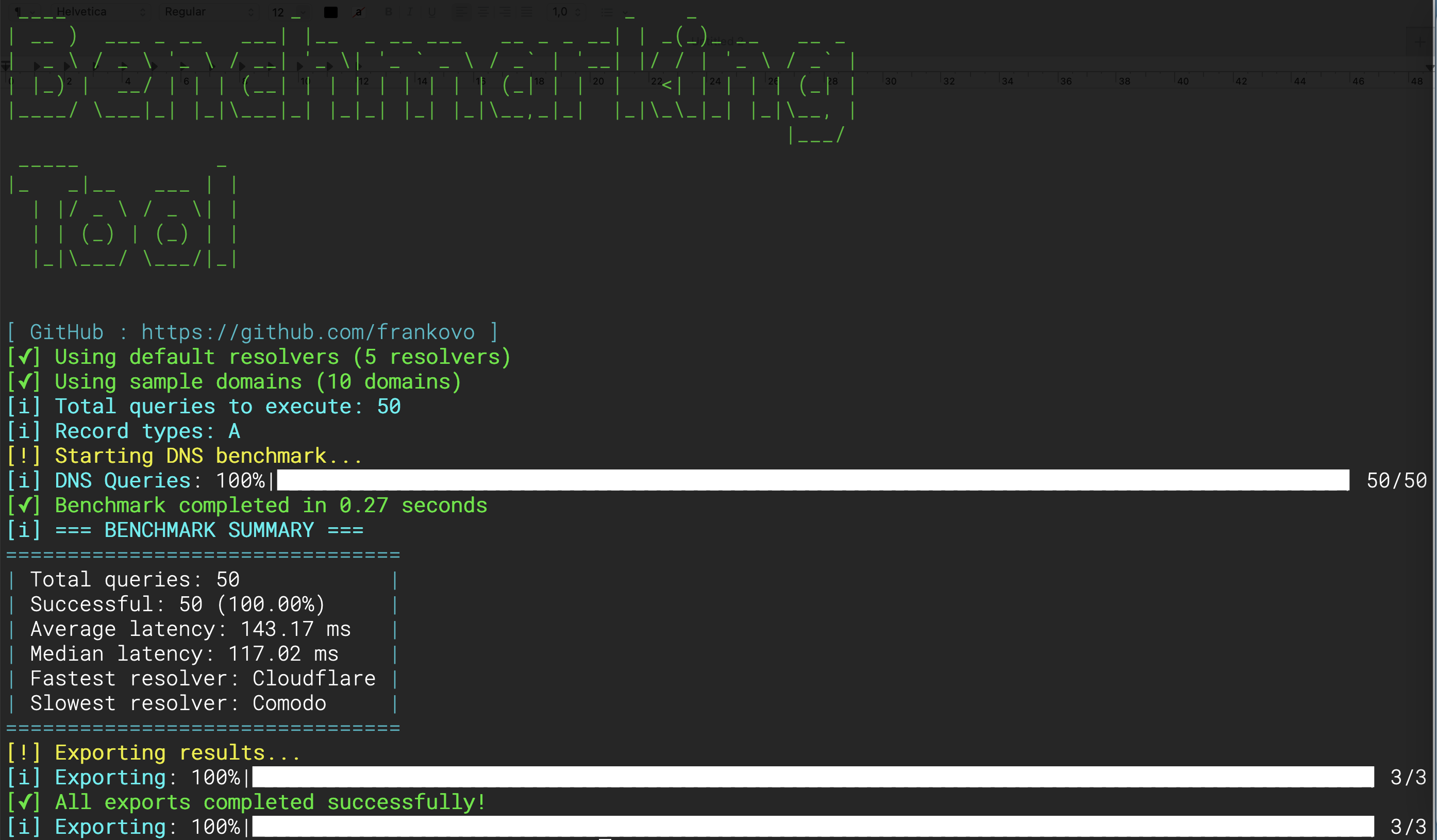
##### 1. CLI Benchmark Run
[](https://github.com/net-benchmark/net-benchmark)
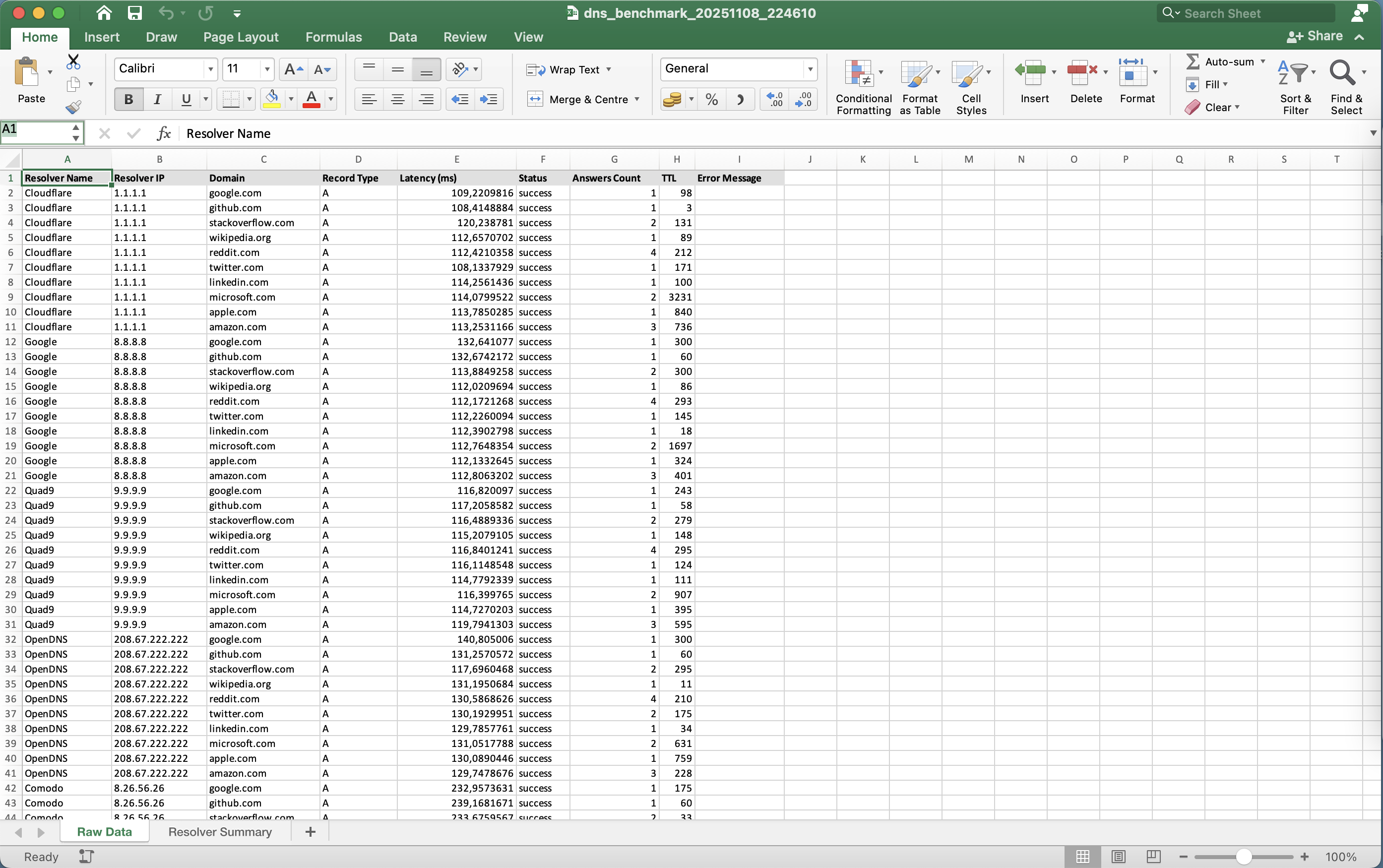
##### 2. Excel Report Output
[](https://github.com/net-benchmark/net-benchmark)
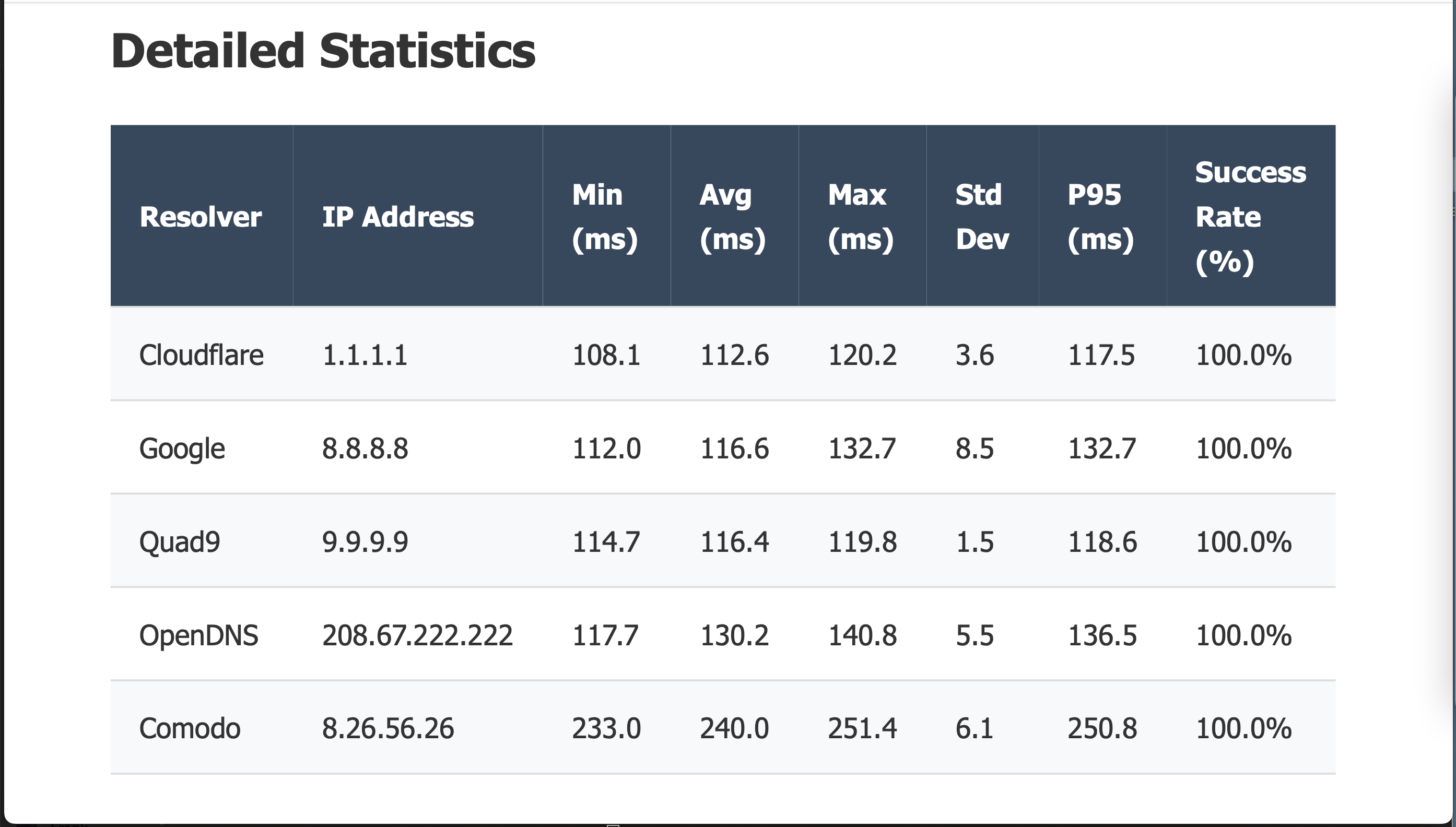
##### 3. PDF Executive Summary
[](https://github.com/net-benchmark/net-benchmark)
##### 4. PDF Charts
[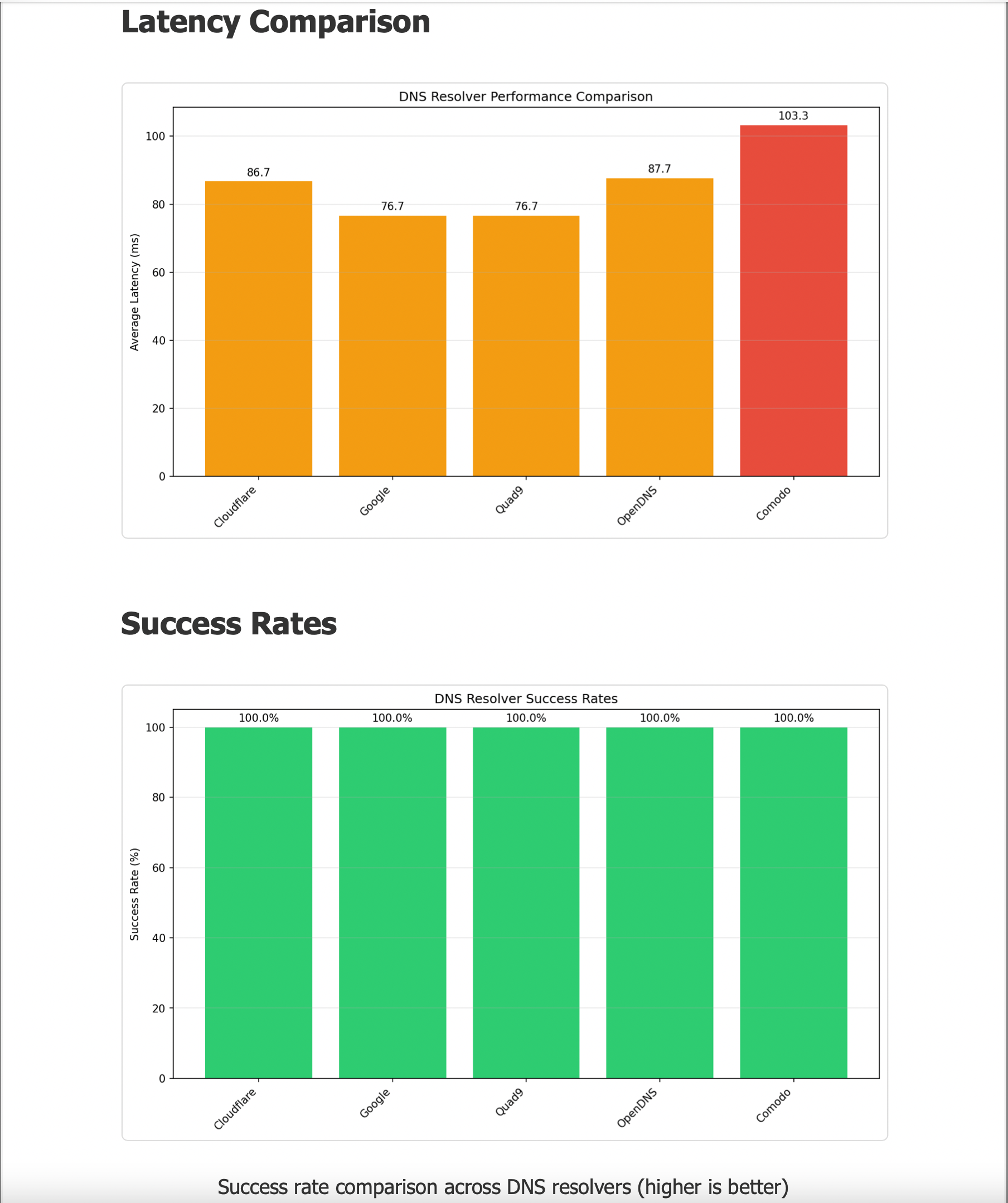](https://github.com/net-benchmark/net-benchmark)
##### 5. Excel Charts
[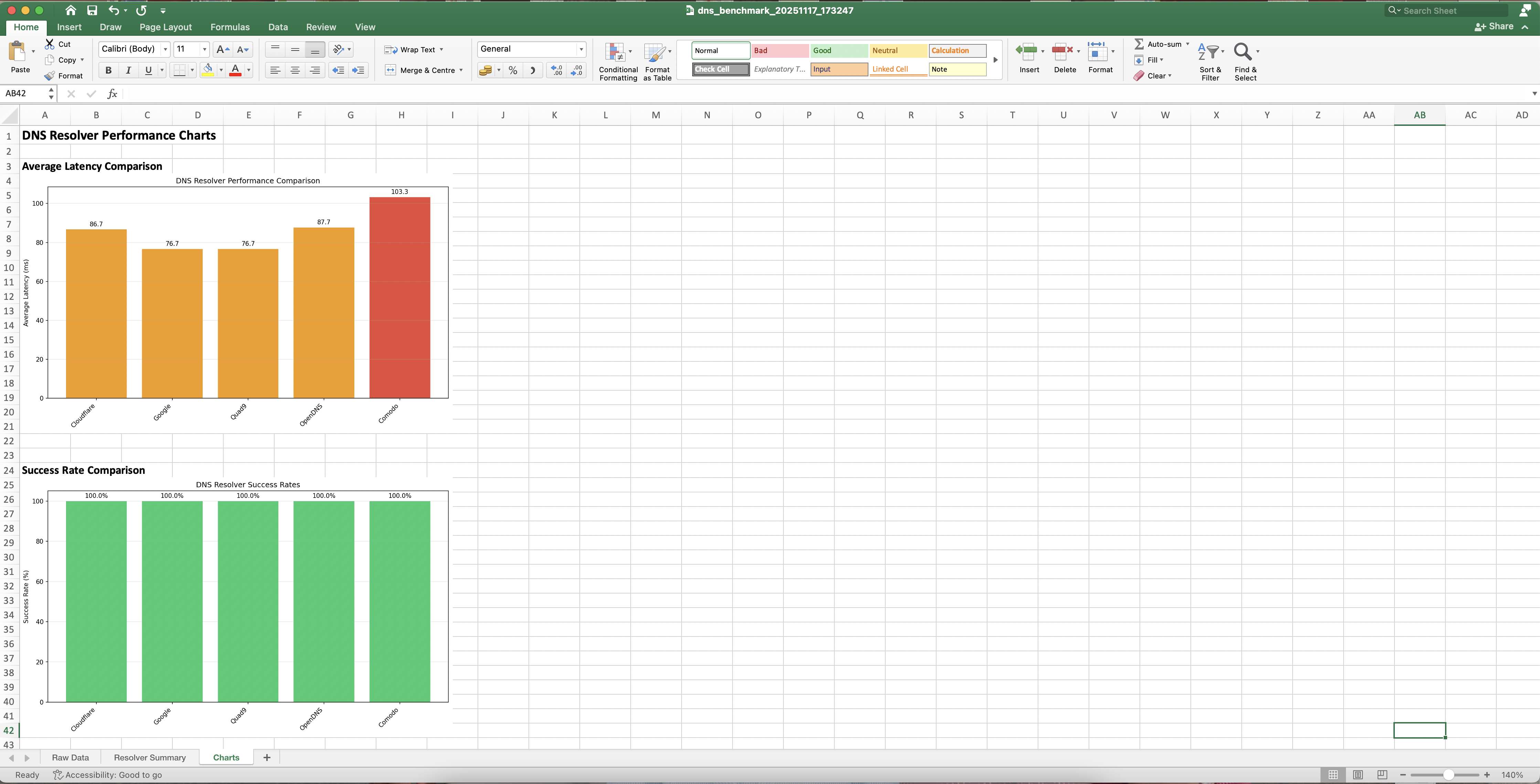](https://github.com/net-benchmark/net-benchmark)
##### 6. Real Time Monitoring
[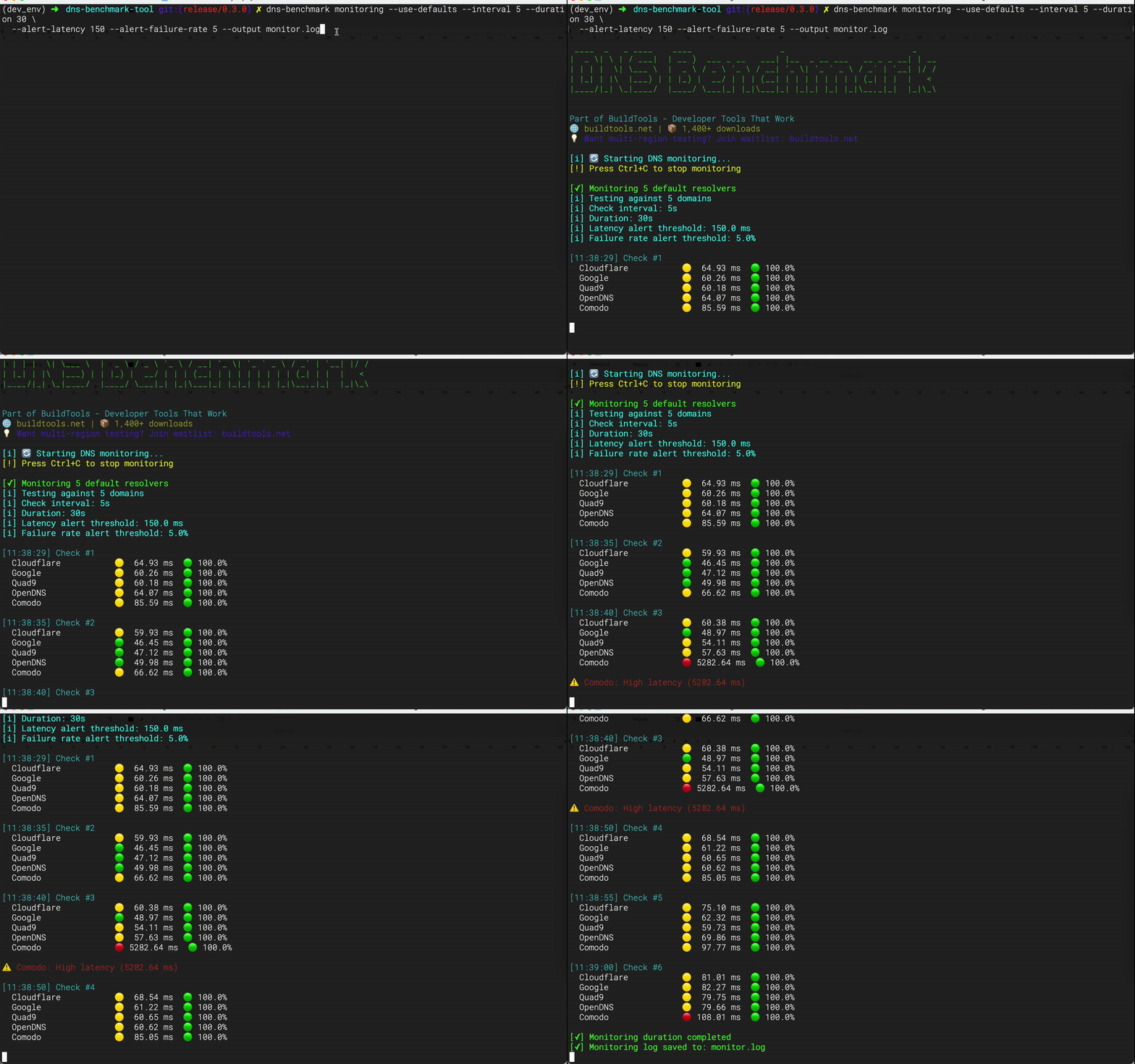](https://github.com/net-benchmark/net-benchmark)
#### Getting help
```bash
net-benchmark dns --help
net-benchmark dns benchmark --help
net-benchmark dns top --help
net-benchmark dns compare --help
net-benchmark dns monitoring --help
net-benchmark dns list-defaults --help
net-benchmark dns list-resolvers --help
net-benchmark dns list-domains --help
net-benchmark dns list-categories --help
net-benchmark dns generate-config --help
```
Common scenarios:
```bash
# I'm new — where to start?
net-benchmark dns list-defaults
net-benchmark dns benchmark --use-defaults
# Test specific resolvers
net-benchmark dns list-resolvers --category security
net-benchmark dns benchmark --resolvers data/security_resolvers.json --domains data/domains.txt
# Generate a management report
net-benchmark dns benchmark --use-defaults --formats excel,pdf \
--domain-stats --record-type-stats --error-breakdown --json \
--output ./management_report
```
---
#### ❓ FAQ
Why is my ISP's DNS not fastest?
Local ISP DNS often has caching advantages but may lack:
- Global anycast network (slower for distant domains)
- DNSSEC validation
- Privacy features (DoH/DoT)
- Reliability guarantees
Test both and decide based on YOUR priorities!
How often should I benchmark DNS?
- **One-time**: When choosing DNS provider
- **Monthly**: For network health checks
- **Before migration**: When switching providers
- **After issues**: To troubleshoot performance
Can I test my own DNS server?
Yes! Just add it to a custom resolvers JSON file:
```json
{
"resolvers": [
{"name": "My DNS", "ip": "192.168.1.1"}
]
}
```
Is this tool safe to use in production?
Yes! The tool only performs DNS lookups (read operations). It does NOT:
- Modify DNS records
- Perform attacks
- Send data to external servers
All tests are standard DNS queries that any resolver handles daily.
Why do results vary between runs?
DNS performance varies due to:
- Network conditions
- DNS caching (resolver and intermediate)
- Server load
- Geographic routing changes
Run multiple iterations (`--iterations 5`) for more consistent results.
---
### HTTP benchmark
HTTP benchmark — latency, TTFB, security headers, CDN fingerprinting, TLS certs
#### 🎯 Why This Tool?
Every HTTP request hides a dozen performance and security signals — DNS, TCP, TLS, redirects, compression, caching, CDN routing, and server software.
Most tools measure only total latency. net‑benchmark gives you the full picture.
##### The Problem
- ⏱️ **Hidden bottlenecks** — is the delay DNS, TCP, TLS, or the server itself?
- 🔗 **Silent redirects** — each hop adds latency you can't see without per‑hop timing
- 🔒 **Missing security headers** — CSP, HSTS, X‑Frame‑Options often absent
- 🕵️ **Unknown CDN** — what CDN is actually serving your traffic?
- 📜 **Expired certificates** — hard to catch before they break production
##### The Solution
net‑benchmark helps you:
- 🔍 **Break down every request** — DNS → TCP → TLS → TTFB → TTLB, all in milliseconds
- 📊 **Get real stats** — P95, P99, jitter, consistency scores
- 🛡️ **Audit security** — HSTS, CSP, X‑Frame‑Options, CDN fingerprinting, server header leaks
- 📜 **Capture TLS certs** — expiry days, CN, issuer, SANs, wildcard detection
- 🚀 **Test at scale** — 50+ concurrent requests in seconds
##### Perfect For
- ✅ **Developers** optimising API performance
- ✅ **DevOps/SRE** validating CDN and origin server SLAs
- ✅ **Security engineers** auditing HTTP security headers and TLS hygiene
- ✅ **API providers** benchmarking endpoints with auth, headers, and body payloads
---
#### Quick start
```bash
# Test 5 built‑in targets with a single iteration
net-benchmark http benchmark --use-defaults
```
Results are automatically saved to `./benchmark_results/` with summary CSV, detailed raw data, and optional PDF/Excel reports.
```bash
# First‑run recommendations
net-benchmark http benchmark --use-defaults --formats csv,excel
net-benchmark http benchmark --use-defaults --iterations 5 # meaningful jitter/consistency
```
---
#### ⚡ Commands at a Glance
| Command | What it does | Quick example |
|---|---|---|
| `benchmark` | Full HTTP benchmark with exports | `net-benchmark http benchmark --use-defaults` |
| `top` | Rank targets by speed | `net-benchmark http top --use-defaults --limit 5` |
| `compare` | Side‑by‑side target comparison | `net-benchmark http compare api.example.com api2.example.com` |
| `monitoring` | Continuous monitoring with alerts | `net-benchmark http monitoring --use-defaults` |
| `load-test` | Sustained load test with configurable traffic shaping | `net-benchmark http load-test -t https://api.example.com --mode throughput --duration 30` |
| `merge-load-test` | Merge worker summaries from a distributed run | `net-benchmark http merge-load-test ./nodes/*.json -o ./merged` |
```bash
# Find your fastest endpoint right now
net-benchmark http top --use-defaults --limit 5
# Compare two APIs side‑by‑side
net-benchmark http compare api.example.com api2.example.com --iterations 3 --show-details
# Monitor with alerts for 1 hour
net-benchmark http monitoring --use-defaults \
--interval 30 --duration 3600 \
--alert-latency 500 --alert-failure-rate 5
# Load-test an endpoint to find its throughput ceiling
net-benchmark http load-test -t https://api.example.com/health --mode throughput --duration 30 --max-concurrency 300
```
---
#### ✨ Key Features
##### 🚀 Performance
- **Async engine** — httpx with HTTP/2, connection pooling, semaphore concurrency
- **Timing breakdown** — DNS resolve, TCP connect, TLS handshake, TTFB, TTLB, total latency
- **Multi‑iteration** — run benchmarks multiple times for statistical accuracy
- **Statistical analysis** — mean, median, P95, P99, jitter, consistency score
- **Retry with backoff** — exponential backoff on failures (mirrors DNS engine)
- **Configurable concurrency** — control max concurrent requests
- **Warmup phase** — optional HEAD or full warmup before measurement
##### 🔒 Security & TLS
- **Security headers audit** — HSTS, CSP, X‑Frame‑Options, X‑Content‑Type‑Options, Referrer‑Policy, Permissions‑Policy
- **CDN fingerprinting** — detects Cloudflare, CloudFront, Fastly, Akamai, Google, Azure CDN
- **Server header leak detection** — flags software/version disclosure
- **Inline TLS cert capture** — expiry days, CN, issuer, SANs, wildcard detection
- **Downgrade detection** — HTTPS→HTTP redirect chains and HTTP/2→HTTP/1.1 fallback
- **IPv4 vs IPv6** — dual‑stack detection per request
- **Alt‑Svc detection** — server advertising HTTP/3
##### 🔐 Auth & Enterprise
- **Basic auth, Bearer token, custom API key** — `--auth basic:user:pass`, `--auth bearer:token`, `--headers x-api-key:key`
- **mTLS client certificates** — `--cert` + `--cert-key`
- **Proxy support** — `--proxy http://proxy:8080`
- **SNI override** — `--sni example.com`
- **Interface binding** — `--local-address 192.168.1.100`
- **Request ID injection** — `--inject-request-id` adds X‑Request‑ID header
- **Custom User‑Agent** — `--user-agent "MyBot/1.0"`
- **Cookies** — repeatable `--cookie "name=value"` flag
##### 🧪 Assertions & Validation
- **Assert status code** — `--assert status=200`
- **Assert body contains** — `--assert body_contains=success`
- **Assert header exists** — `--assert header_exists=X-Cache`
- **Assert header value** — `--assert header_value=X-Cache=HIT`
- **Assert max latency** — `--assert max_latency=500`
- **Assert content‑type** — `--assert content_type=application/json`
- **Assert response size** — `--assert response_size_min=100`, `--assert response_size_max=10000`
##### 📊 Analysis & Export
- **Multiple formats** — CSV, Excel, PDF, JSON (see [Export formats](#export-formats))
- **Visual reports** — charts and graphs in Excel/PDF
- **Per‑target statistics** — latency, TTFB, HTTP/2 rate, redirect rate, compressed size
- **Cache header analysis** — Cache‑Control, ETag, Last‑Modified, Age presence
- **Status code distribution** — 2xx/3xx/4xx/5xx breakdown
- **Error breakdown** — identify problematic targets
---
#### 🔧 HTTP/2, Redirects, and Downgrade Detection
| Feature | What it captures |
|---|---|
| HTTP/2 negotiation | ALPN result (`h2` or `http/1.1`) per request |
| HTTP/2 downgrade detection | Flags when HTTP/2 was expected but HTTP/1.1 was negotiated |
| Redirect chain | Full hop list with per‑hop URL, status code, and duration |
| Downgrade detection | Flags any HTTPS→HTTP redirect in the chain |
| Compressed size | Content‑Length header captured for bandwidth analysis |
```bash
# Force HTTP/1.1 to compare performance
net-benchmark http benchmark --use-defaults --no-http2
# Watch redirect chains
net-benchmark http benchmark --targets https://github.com --iterations 1
# Detect HTTP/2 downgrades (useful behind corporate proxies)
net-benchmark http benchmark --use-defaults --iterations 3
```
---
#### 🔒 Security & Auth Examples
```bash
# Basic auth
net-benchmark http benchmark \
--targets https://httpbin.org/basic-auth/user/pass \
--auth "basic:user:pass"
# Bearer token (standard OAuth2)
net-benchmark http benchmark \
--targets https://api.example.com/data \
--auth "bearer:sk-abc123"
# Custom API key header (x‑api‑key)
net-benchmark http benchmark \
--targets https://api.example.com/echo \
--method POST \
--headers "x-api-key:sk-abc123"
# mTLS client certificate
net-benchmark http benchmark \
--targets https://mtls.example.com \
--cert client.pem --cert-key client-key.pem
# Proxy with credentials
# (--auth authenticates to the ORIGIN, not the proxy — put proxy
# credentials in the proxy URL itself)
net-benchmark http benchmark \
--targets https://example.com \
--proxy http://proxyuser:proxypass@proxy:8080
```
---
#### 💼 Use Cases
##### 🔧 For Developers: Optimise API Performance
```bash
# Find fastest endpoint and break down timing
net-benchmark http benchmark \
--targets https://api.myapp.com/v1/users,https://api.myapp.com/v2/users \
--method GET \
--headers "Authorization:Bearer token" \
--iterations 5
```
**Result:** Pinpoint whether DNS, TCP, TLS, or server logic is the bottleneck.
---
##### 🛡️ For DevOps/SRE: Validate CDN Migration
```bash
# Compare old origin vs new CDN
net-benchmark http compare \
https://origin.example.com \
https://cdn.example.com \
--iterations 5 --show-details
```
**Result:** Data‑driven proof your CDN is (or isn't) faster.
---
##### 🔐 For Security Engineers: Audit Public Endpoints
```bash
# Full security audit with assertions
net-benchmark http benchmark \
--targets https://www.example.com,https://api.example.com \
--assert status=200 \
--assert header_exists=strict-transport-security \
--assert header_value=X-Content-Type-Options=nosniff \
--formats excel,pdf \
--output ./security_audit
```
**Result:** Instant report card of security header coverage and TLS certificate health.
---
##### 🏢 For Enterprise: Automated Health Checks
```bash
# Add to crontab for hourly reports
0 * * * * net-benchmark http benchmark \
--targets targets.txt \
--assert status=200 --assert max_latency=1000 \
--formats csv --quiet \
--output /var/reports/http/$(date +\%Y\%m\%d_\%H)
```
**Result:** Automated SLA compliance and performance trending.
---
#### 📖 Usage Examples
##### Basic Usage
```bash
# Test built‑in defaults
net-benchmark http benchmark --use-defaults
# Custom targets from file
net-benchmark http benchmark --targets ./targets.txt
# Inline targets (comma‑separated)
net-benchmark http benchmark --targets "https://example.com,https://httpbin.org/get"
# Quick test with only CSV output
net-benchmark http benchmark --use-defaults --formats csv --quiet
# Multiple iterations for statistical accuracy
net-benchmark http benchmark --use-defaults --iterations 5
# Custom HTTP method with body
net-benchmark http benchmark \
--targets https://api.example.com/echo \
--method POST \
--body '{"action":"test"}'
# Body from file
echo '{"name":"test","value":42}' > payload.json
net-benchmark http benchmark \
--targets https://api.example.com/echo \
--method POST \
--body-file payload.json
```
##### Advanced Usage
```bash
# Export all formats with charts
net-benchmark http benchmark \
--use-defaults \
--formats csv,excel,pdf \
--include-charts \
--json \
--output ./full_report
# Separate timeout control
net-benchmark http benchmark \
--targets https://slow-api.example.com \
--connect-timeout 5 --read-timeout 30 --write-timeout 10
# Query parameters without hacking the URL
net-benchmark http benchmark \
--targets https://api.example.com/search \
--params "page=1,limit=50,q=test"
# High concurrency with warmup
net-benchmark http benchmark \
--use-defaults \
--max-concurrent 100 \
--warmup-fast \
--iterations 3
# Full assertion suite
net-benchmark http benchmark \
--targets https://api.example.com/health \
--assert status=200 \
--assert body_contains=ok \
--assert max_latency=500 \
--assert content_type=application/json \
--assert response_size_min=10
```
##### CI/CD Integration
```yaml
- name: HTTP Endpoint Health Check
run: |
pip install net-benchmark
net-benchmark http benchmark \
--targets "https://api.prod.example.com/health,https://web.prod.example.com" \
--assert status=200 \
--assert max_latency=1000 \
--formats csv \
--quiet
```
---
#### ⚡ CLI Commands
##### 🚀 Top
Quickly rank targets by speed or reliability.
```bash
# Rank default targets by latency
net-benchmark http top --use-defaults --limit 5
# Rank by TTFB
net-benchmark http top --use-defaults --limit 5 --metric ttfb
# Rank by success rate
net-benchmark http top --targets targets.txt --limit 10 --metric success
```
---
##### 📊 Compare
Benchmark specific targets side‑by‑side with detailed statistics.
```bash
# Compare two targets
net-benchmark http compare https://example.com https://httpbin.org/get
# Auto‑scheme (https:// added if missing)
net-benchmark http compare api.example.com api2.example.com
# With auth and iterations
net-benchmark http compare api.example.com api2.example.com \
--auth "bearer:token" --iterations 5
# Show per‑iteration breakdown
net-benchmark http compare api.example.com api2.example.com \
--iterations 3 --show-details
# Export comparison
net-benchmark http compare api.example.com api2.example.com \
--output comparison.csv
```
---
##### 🔄 Monitoring
Continuously monitor targets with configurable alerts.
```bash
# Monitor defaults every 60 seconds
net-benchmark http monitoring --use-defaults
# Monitor with custom targets and alerts
net-benchmark http monitoring \
--targets targets.txt \
--interval 30 \
--duration 3600 \
--alert-latency 500 \
--alert-failure-rate 5 \
--output ./monitoring_logs
# Page only on unreachable origins, not on a legitimate 403
net-benchmark http monitoring \
--targets https://internal-api.example.com \
--expected-status 200,403 \
--alert-transport-error-rate 5 \
--interval 60
```
> `http monitoring` has no `--proxy`. Proxy support lives on `http benchmark`
> and `http compare`.
---
#### ⚡ Load Testing
`net-benchmark http load-test` runs sustained traffic against one or more
HTTP targets using three load-shaping strategies. Unlike `benchmark`
(fixed iteration count), load-test runs for a duration and reports
achieved throughput, latency percentiles, and connection-level behavior.
Since **0.5.2** the load can also be generated from several parallel workers —
separate processes on one machine, or separate machines entirely — with a
synchronised start and a statistically correct merge.
> Full reference: **[HTTP Load Testing](https://net-benchmark.readthedocs.io/en/latest/guides/http-load-test.html)**
##### Modes
| Mode | What it does | Use case |
|--------------|----------------------------------------------------|------------------------------------|
| `throughput` | Saturates the target up to `--max-concurrency` | Find the ceiling |
| `sustained` | Holds a fixed `--rps` for `--duration` | SLA / capacity validation |
| `ramp-up` | Steps concurrency up, then holds at peak | Find the breaking point gradually |
##### Examples
**Throughput — how fast can this endpoint go?**
```bash
net-benchmark http load-test \
-t https://api.staging.example.com/health \
--mode throughput \
--duration 30 \
--max-concurrency 300 \
--formats csv,excel \
--include-charts
```
**Sustained — validate a fixed capacity target**
```bash
net-benchmark http load-test \
-t https://checkout.example.com/api/cart \
--mode sustained \
--rps 150 \
--duration 300 \
--formats csv,excel,json
```
`--rps` is required in sustained mode — the CLI fails fast with a clear
message if it's missing.
**Ramp-up — find where things start to break**
```bash
net-benchmark http load-test \
-t https://api.example.com/search \
--mode ramp-up \
--start-concurrency 5 \
--ramp-concurrency 500 \
--ramp-duration 120 \
--hold-duration 60 \
--max-total-rps 1000 \
--formats csv,excel,pdf
```
`--max-total-rps` is a *safety ceiling*, not a target rate — use
`sustained` if you want a fixed rate. It exists because against very
fast targets (localhost, mesh sidecars) nothing else bounds request
rate. It defaults to `ramp-concurrency * 50`, which is usually generous
enough to never trigger against real network-bound services.
**Comparing multiple targets (e.g. canary vs. stable)**
```bash
net-benchmark http load-test \
-t https://api-v1.example.com,https://api-v2.example.com \
--mode sustained --rps 100 --duration 120 \
--formats excel --include-charts
```
Each target runs concurrently in its own connection pool. The Excel
export produces a comparison sheet plus per-target raw-request and
timeline sheets.
**Protocol/transport diagnostics under load**
```bash
net-benchmark http load-test \
-t https://cdn.example.com/asset.js \
--mode throughput --duration 60 --max-concurrency 200 \
--enable-tls-resumption --enable-push-detection \
--formats json
```
Connection reuse is always tracked and needs no flag —
`--enable-connection-reuse` is deprecated and has no effect. The other two
detections are opt-in, because they add per-request bookkeeping: turn them
on only when you're actually investigating TLS resumption or HTTP/2 push
behavior.
##### Reading the results
| Metric | Meaning |
|---|---|
| **Achieved RPS** | Requests that *completed*, over the run window. Asked for 400 and got 180 means the target could not keep up. |
| **Avg blocked** | Waiting for a free connection slot. **Your** side. |
| **Avg waiting** | Waiting for the server to respond. **Their** side. |
`blocked` rising while `waiting` stays flat is the most useful signal in the
output: you are measuring your own generator rather than the target. That is
what `--workers` exists to fix.
##### Distributed load generation (0.5.2)
A single Python process — one GIL, one event loop, one connection pool — is
often the bottleneck long before the target is. `--workers` generates the load
from N **separate processes**, started against a shared wall-clock barrier and
merged at the end.
```bash
# Baseline: one process.
net-benchmark http load-test -t https://api.example.com/health \
--mode throughput --duration 20 --max-concurrency 50
# Four processes. --max-concurrency is PER WORKER: 200 in flight overall.
net-benchmark http load-test -t https://api.example.com/health \
--mode throughput --duration 20 --max-concurrency 50 --workers 4
```
Expect a ~5s pause before requests begin — the start barrier, sized so every
spawned interpreter has finished importing before the run starts.
- RPS scales with worker count, `blocked` flat → the single process was the
ceiling, and you removed it.
- RPS flat, `waiting` climbs → the target is saturated. A result, not a failure.
- RPS flat, `blocked` climbs → a machine limit (NIC, CPU, ports). Processes
escape the GIL, not the network card.
**Rate splitting.** `--rps` is the run **total** and is divided across workers:
```bash
# 4 workers pace 100 RPS each; the merged summary reports 400.
net-benchmark http load-test -t https://api.example.com/cart \
--mode sustained --rps 400 --duration 30 --workers 4 --max-backlog 20
```
**Target topologies.** With several targets, `--target-distribution` decides
what `--workers` multiplies — and changes what `--rps` means:
| Value | Behaviour | `--rps` is | Use when |
|---|---|---|---|
| `replicate` (default) | Every worker runs every target | run **total**, split | Saturating one origin |
| `shard` | Targets dealt round-robin, one worker each | **per target**, not divided | Measuring more targets in parallel |
##### Across several machines (0.5.2)
Multi-process generation removes the GIL and the single event loop. It does not
remove the NIC, or the fact that all traffic comes from one place. For traffic
genuinely arriving from several regions, run a node per region against a shared
barrier and merge.
```bash
# 1. Pick the barrier — prints the epoch to paste onto every node.
net-benchmark http load-test -t https://example.com \
--duration 60 --start-delay 120 --quiet
# [i] Start barrier: 1754320000.000 (epoch seconds, UTC)
# 2. Every node: IDENTICAL --start-at, its own labels and rate share.
net-benchmark http load-test -t https://example.com \
--mode sustained --rps 250 --duration 60 \
--start-at 1754320000.000 --warmup 10 \
--worker-id hel1 --region eu-north \
--emit-summary hel1.json --formats csv
# 3. Collect and merge.
net-benchmark http merge-load-test ./nodes/*.json \
-o ./merged --threshold 'p95_latency<500'
```
Percentiles are recomputed from the merged latency histogram. Averaging several
nodes' P95 values does not give the P95 of their union — it is a different
number, not an approximation.
The per-node run still writes its own local exports; `--formats` on `load-test`
takes at least one format and cannot be emptied. The file that matters for the
merge is the one named by `--emit-summary` — keep the node's `--formats` narrow
(`csv`) rather than trying to switch exports off.
`--warmup` opens connections *before* the barrier: without it a synchronised
start is a synchronised cold start and the opening seconds measure TLS
handshakes. Where clock offset has been measured, the merge refuses beyond 50 ms
of skew — nodes agreeing on an epoch only proves they were *told* the same
value.
##### Pass/fail thresholds (CI)
Parsed *before* the run starts, including the metric name, so a typo costs a
second rather than a full load test. Any failure exits non-zero.
```bash
net-benchmark http load-test \
-t https://staging.example.com/api/health \
--mode sustained --rps 200 --duration 60 \
--workers 4 --max-backlog 50 --warmup 10 \
--expected-status 200,404 \
--threshold 'p95_latency<400' \
--threshold 'success_rate>99.5' \
--threshold 'dropped_rate<1'
```
Percentiles survive a merge. Dispersion and phase-timing metrics
(`std_latency`, `jitter`, `consistency_score`, `p95_ttfb_ms`,
`p95_duration_ms`, `p95_blocked_ms`, `p95_waiting_ms`) do not, and are
**rejected on a merged run** rather than passing against a structural zero.
They stay exact at `--workers 1` and per worker in `*_workers.csv`.
##### Output formats
| Format | Contents |
|---------|----------------------------------------------------------------|
| `csv` | Raw results, summary, per-worker summary, per-interval timeline, error breakdown, latency histogram |
| `excel` | Comparison sheet + per-target raw/timeline sheets, optional charts |
| `pdf` | Report with charts (requires `pip install net-benchmark[pdf]`) |
| `json` | Full structured bundle, all targets |
> **Note:** PDF export fails soft — if `weasyprint` isn't installed, the
> run still completes and other formats are still written; check the CLI
> output for `PDF export failed`.
##### Limits and gotchas
- **Concurrency flags are per worker.** `--workers 4 --max-concurrency 50` is
200 in flight; so are `--max-backlog` and `--max-total-rps`. `--rps` is the
exception under `replicate`.
- **Raw per-request rows do not survive `--workers > 1`.** `*_raw.csv` and the
per-target Excel sheets are empty regardless of `--no-retain-results`. Every
statistic, interval and histogram survives.
- **`--live` is single-worker only.** The callback cannot be sent into a spawned
process; above one worker the CLI warns rather than silently printing nothing.
- **Workers that will be merged must agree on `--interval-bucket`.** Mismatched
widths are refused.
- **A dead worker means load that was never offered.** Failures are reported per
target rather than folded into the merged summary.
---
#### ⚡ Best Practices
| Mode | Recommended Flags | Purpose |
|---|---|---|
| **Quick Run** | `--iterations 1 --warmup-fast` | Fast feedback, lightweight warmup |
| **Thorough Run** | `--iterations 5 --warmup --timeout 10 --retries 2` | Multiple passes, full warmup, best for detailed benchmarking |
| **Debug Mode** | `--iterations 1 --timeout 30 --retries 0` | Long timeout, no retries, useful for diagnosing endpoint issues |
| **API Testing** | `--method POST --body '{}' --headers "Auth:token" --assert status=200` | Send payloads and validate responses |
---
#### 📊 What the Summary Shows
```text
============================================
| Total requests: 5 |
| Successful: 4 (80.00%) |
| Avg latency: 1047.25 ms |
| Avg TTFB: 772.20 ms |
| HTTP/2 rate: 100.0% |
| HSTS coverage: 60.0% |
| Assertion pass: 100.0% |
| Fastest target: https://www.apple.com |
| Slowest target: https://www.github.com |
============================================
```
---
#### 🔧 Troubleshooting
```bash
# Command not found
pip install -e .
net-benchmark http --help
# PDF generation fails (Ubuntu/Debian) – see PDF dependencies
sudo apt-get install libcairo2 libpango-1.0-0 libpangocairo-1.0-0 \
libgdk-pixbuf2.0-0 libffi-dev shared-mime-info
# Or skip PDF
net-benchmark http benchmark --use-defaults --formats csv,excel
# Network timeouts
net-benchmark http benchmark --use-defaults --timeout 30 --retries 3
net-benchmark http benchmark --use-defaults --max-concurrent 10
# SSL errors on internal servers
net-benchmark http benchmark --targets https://internal.local --no-verify-ssl
```
---
#### Getting help
```bash
net-benchmark http --help
net-benchmark http benchmark --help
net-benchmark http top --help
net-benchmark http compare --help
net-benchmark http monitoring --help
net-benchmark http load-test --help
net-benchmark http merge-load-test --help
```
Common scenarios:
```bash
# I'm new — where to start?
net-benchmark http benchmark --use-defaults
# Test a specific API with auth
net-benchmark http benchmark \
--targets https://api.example.com/echo \
--method POST \
--headers "x-api-key:sk-abc123" \
--body '{"test":true}'
# Generate a security audit report
net-benchmark http benchmark \
--targets https://www.example.com \
--assert status=200 \
--assert header_exists=strict-transport-security \
--formats excel,pdf \
--output ./security_audit
```
---
#### ❓ FAQ
**Why is my API slower than expected?**
The timing breakdown (DNS → TCP → TLS → TTFB → TTLB) tells you exactly where the time goes. If DNS is slow, check your resolver. If TLS is slow, check certificate chain size or OCSP stapling. If TTFB is slow, the server logic or database is the bottleneck.
**How often should I benchmark HTTP endpoints?**
- **One‑time**: When choosing a CDN or API provider
- **Daily**: For critical production endpoints
- **Before deployment**: To catch performance regressions
- **After incidents**: To validate fixes
**Can I test endpoints behind authentication?**
Yes — `--auth basic:user:pass`, `--auth bearer:token`, or `--headers x-api-key:key` all work. mTLS is also supported via `--cert` and `--cert-key`.
**Is this tool safe to use in production?**
Yes! It only performs standard HTTP requests (read operations). It does not modify data, perform attacks, or send data to external servers.
**Why do results vary between runs?**
HTTP performance varies due to network conditions, server load, CDN routing changes, and TLS session resumption. Run multiple iterations (`--iterations 5`) for more consistent results. Use `--warmup-fast` to absorb cold‑start effects.
**What’s the difference between `benchmark` and `load-test`?**
`benchmark` runs a fixed number of iterations per target to get detailed per‑request timing and security headers. `load-test` runs for a set duration with configurable concurrency or RPS to measure throughput, saturation, and tail latency under sustained load. Use `benchmark` for one‑off performance audits; use `load-test` for capacity planning and stress testing.
---
### SSL check
SSL check — TLS handshake, certificate, and policy audit
#### 🎯 Why This Tool?
A certificate expiring unnoticed, a deprecated TLS version left enabled, a
mail server's STARTTLS quietly stopped working — these are the failures that
show up as an outage, not a warning, because nothing was watching for them
between renewals.
##### The Problem
- 📜 **Certificates expire silently** — nobody notices until a client refuses the connection
- 🔓 **Deprecated protocols linger** — TLS 1.0/1.1 and weak ciphers stay enabled long after they should be gone
- 🔑 **Weak keys and signatures slip through** — RSA-1024, SHA-1 signatures, certificates nobody re-audited since issuance
- 📬 **STARTTLS breaks quietly** — a mail or directory server that stops offering STARTTLS fails differently than one that stops responding
- 🌐 **Multi-port TLS surfaces get missed** — 443 gets checked, 465/587/993/995/636 often don't
##### The Solution
net-benchmark helps you:
- 🔍 **Audit the full handshake** — negotiated TLS version, cipher suite (with IANA code), ALPN, session resumption, and (opt-in) TLS 1.3 0-RTT timing
- 📅 **Track certificate lifetime** — days remaining, CA/Browser Forum validity-period compliance, a forward-looking check for renewals that will exceed a soon-to-tighten cap
- 🔑 **Flag weak crypto** — under-strength keys, broken signature hashes, deprecated TLS versions
- 🔗 **Validate the chain of trust** — AIA fetch, path validation against Mozilla/system roots (opt-in: also Apple/Google/Microsoft), OCSP/CRL revocation, cross-sign detection
- 🕵️ **Reach past what OpenSSL exposes** — named groups (incl. post-quantum), DH parameters, TLS 1.3 cipher enumeration, signature algorithm probing, and configuration-surface vulnerability flags, via the optional `[crypto]` extra
- 🏅 **Grade against published rubrics** — SSL Labs' own Server Rating Guide and the Server Side TLS (TLSRef, formerly Mozilla) guidelines, both scored against their actual current published documents, not an approximation
- 🔬 **Certificate Transparency, linting, and fingerprinting** — SCT/log trust status, CA/Browser Forum Baseline Requirements linting (`[lint]` extra), JARM server fingerprinting, real-browser client simulation
- 📬 **Check STARTTLS explicitly** — SMTP, IMAP, POP3, FTP, LDAP, with an override for non-standard ports
- 🚦 **Gate CI on policy** — `--threshold` fails the build on an expiring certificate, a hostname mismatch, an unexpected cipher/group, or a deprecated version, per target
##### Perfect For
- ✅ **DevOps/SRE** catching certificate expiry before it becomes an incident
- ✅ **Security engineers** auditing TLS configuration across a fleet
- ✅ **Platform teams** gating deploys on certificate and protocol policy in CI
---
#### Quick start
```bash
# Check a single endpoint
net-benchmark ssl check --targets api.example.com
# Check several, with a certificate expiry gate for CI
net-benchmark ssl check \
--targets "api.example.com,www.example.com" \
--threshold 'cert_expiry_days>30' \
--formats csv,excel
```
Results are saved to `./benchmark_results/` — a non-zero exit code means a
`--threshold` failed, which is what makes this usable as a CI step.
---
#### Common options
| Flag | What it does |
|---|---|
| `--targets` / `-t` | Comma-separated hosts (`host`, `host:port`, or a URL) or a file, one per line |
| `--ports` | Ports applied to targets with no explicit port (default: `443`) |
| `--all-ports` | Scan the common TLS/STARTTLS port set (443, 8443, 465, 993, 995, 587, 636) |
| `--starttls` | Force the STARTTLS protocol (`smtp`, `imap`, `pop3`, `ldap`, `ftp`) instead of guessing from the port — needed for a mail server on a non-standard port |
| `--resolve` | Pin a target to an IP without DNS: `host:port:ip` (repeatable) |
| `--handshake-samples` / `--min-samples` | Handshakes per target for timing percentiles; percentiles are withheld below `--min-samples` rather than reported unreliably |
| `--check-resumption` | Test TLS session resumption with a dedicated pair of handshakes |
| `--min-days-remaining` | Flag a certificate expiring within N days |
| `--min-tls-version` | Flag a negotiated version below this floor, e.g. `TLSv1.2` |
| `--expected-issuer` / `--expected-fingerprint` / `--expected-cipher` / `--expected-group` | Flag a certificate/handshake that doesn't match a pinned issuer, fingerprint, cipher, or negotiable group |
| `--as-of` | Evaluate every certificate as of a future date, e.g. to check what breaks at a renewal deadline |
| `--threshold` | Pass/fail criterion, e.g. `cert_expiry_days>30` (repeatable, evaluated per target, exit code 1 on any failure) |
Full flag reference: `net-benchmark ssl check --help`.
#### Deeper checks (opt-in — each adds network calls or a dependency)
| Flag | What it does |
|---|---|
| `--verify-chain` | Fetch missing intermediates via AIA, validate against Mozilla + system trust |
| `--check-multi-store` | Also validate against Apple's, Google's, and Microsoft's own root programs |
| `--check-revocation` | Query OCSP and CRL for each certificate's own revocation status |
| `--enumerate-protocol` | Enumerate supported TLS versions and TLS 1.2-and-below cipher suites, A–F rated |
| `--check-ct-logs` | Resolve embedded SCTs against the CT log registry; report log trust status |
| `--lint` | CA/Browser Forum Baseline Requirements linting via pkilint (`pip install net-benchmark[lint]`) |
| `--deep-introspection` | Named groups (incl. post-quantum), DH parameters, extensions, signature algorithms, TLS 1.3 ciphers, vulnerability flags — via CryptoLyzer (`pip install net-benchmark[crypto]`) |
| `--grade` | Score against the published SSL Labs Server Rating Guide |
| `--check-mozilla-profiles` | Check compliance against the Server Side TLS (TLSRef) guidelines |
| `--simulate-clients` | Which real browsers/libraries can complete a handshake with this target |
| `--jarm` | Compute a JARM server fingerprint |
| `--audit-san` | Check whether each SAN entry on the certificate is actually live |
| `--generate-pin-set` | Generate an SPKI pin set (leaf + backup pins) for certificate pinning |
| `--measure-0rtt` | Time a full handshake vs. resumed vs. resumed-with-0-RTT (requires the system `openssl` CLI) |
```bash
# Multi-port scan with a strict policy
net-benchmark ssl check --targets mail.example.com --all-ports \
--min-tls-version TLSv1.2 --require-forward-secrecy
# Mail server STARTTLS on a non-standard port
net-benchmark ssl check --targets mail.example.com:2525 --starttls smtp
# What breaks at the next quarterly renewal?
net-benchmark ssl check --targets api.example.com --as-of 2026-09-01
# CI gate: fail the build on any expiring or deprecated-TLS target
net-benchmark ssl check --targets ./targets.txt \
--threshold 'cert_expiry_days>30' \
--threshold 'deprecated_tls_rate==0' \
--quiet
```
#### A note on certificate chains
Full chain-of-trust reporting — which CA issued it, whether the chain the
server sent is complete, revocation status — is available via `--verify-chain`
and `--check-revocation` on every supported Python version. What's still
version-gated: observing the **raw bytes the peer itself sent** for its
intermediate chain needs `SSLObject.get_unverified_chain()`, which is
**Python 3.13+** — on 3.11/3.12, `--verify-chain` still validates correctly,
it just can't use the peer's own chain as a shortcut and always fetches
intermediates via AIA instead.
---
## Export formats
| format | flag | notes |
|--------|------|-------|
| CSV | `--formats csv` | raw results + summary + optional domain/record type/error stats |
| Excel | `--formats excel` | formatted workbook with charts and DNSSEC sheet |
| PDF | `--formats pdf` | requires `pip install net-benchmark[pdf]` (see below) |
| JSON | `--json` | full structured payload (separate flag) |
### CSV outputs
- Raw data: individual query results with timestamps and metadata
- Summary statistics: aggregated metrics per resolver
- Domain statistics: per-domain metrics (when `--domain-stats`)
- Record type statistics: per-record-type metrics (when `--record-type-stats`)
- Error breakdown: counts by error type (when `--error-breakdown`)
### Excel report
- Raw data sheet: all query results with formatting
- Resolver summary: comprehensive statistics with conditional formatting
- Domain stats: per-domain performance (optional)
- Record type stats: per-record-type performance (optional)
- Error breakdown: aggregated error counts (optional)
- Performance analysis: charts and comparative analysis
### PDF report
- Executive summary: key findings and recommendations
- Performance charts: latency comparison; optional success rate chart
- Resolver rankings: ordered by average latency
- Detailed analysis: technical deep‑dive with percentiles
### 📄 Optional PDF Export
By default, the tool supports **CSV** and **Excel** exports.
PDF export requires the extra dependency **weasyprint**, which is not installed automatically to avoid runtime issues on some platforms.
### HTTP‑specific exports
| CSV file | Contents |
|----------|----------|
| `*_raw.csv` | Individual request results with timing breakdown |
| `*_summary.csv` | Per‑target aggregated statistics |
| `*_security.csv` | Security headers presence matrix |
| `*_ttfb.csv` | Time‑to‑first‑byte analysis |
| `*_protocols.csv` | HTTP/1.1 vs HTTP/2 distribution |
### Excel report (HTTP)
- **Raw Data** sheet: all requests with timing, security headers, cert details
- **Target Summary** sheet: comprehensive per‑target statistics
- **TTFB Analysis** sheet: TTFB percentiles per target
- **Security Headers** sheet: colour‑coded presence matrix
- **Charts** sheet: latency comparison, TTFB comparison, success rates (optional)
#### Install with PDF support
```bash
pip install net-benchmark[pdf]
```
#### Usage
Once installed, you can request PDF output via the CLI:
```bash
net-benchmark dns benchmark --use-defaults --formats pdf --output ./results
```
If `weasyprint` is not installed and you request PDF output, the CLI will show:
```bash
[-] Error during benchmark: PDF export requires 'weasyprint'. Install with: pip install net-benchmark[pdf]
```
### ⚠️ WeasyPrint Setup (for PDF export) {#pdf-dependencies}
The tool uses **WeasyPrint** to generate PDF reports.
You need extra system libraries in addition to the Python package.
#### 🛠 Linux (Debian/Ubuntu)
```bash
sudo apt install python3-pip libpango-1.0-0 libpangoft2-1.0-0 \
libharfbuzz-subset0 libjpeg-dev libopenjp2-7-dev libffi-dev
```
#### 🛠 macOS (Homebrew)
```bash
brew install pango cairo libffi gdk-pixbuf jpeg openjpeg harfbuzz
```
#### 🛠 Windows
Install GTK+ libraries using one of these methods:
- **MSYS2**: [Download MSYS2](https://www.msys2.org/), then run:
```bash
pacman -S mingw-w64-x86_64-gtk3 mingw-w64-x86_64-libffi
```
- **GTK+ 64‑bit Installer**: [Download GTK+ Runtime](https://github.com/tschoonj/GTK-for-Windows-Runtime-Environment-Installer/releases) and run the installer.
Restart your terminal after installation.
#### ✅ Verify Installation
After installing the system libraries, install the Python extra:
```bash
pip install net-benchmark[pdf]
```
Then run:
```bash
net-benchmark dns benchmark --use-defaults --formats pdf --output ./results
```
### JSON export
- Machine‑readable bundle including:
- Overall statistics
- Resolver statistics
- Raw query results
- Domain statistics
- Record type statistics
- Error breakdown
### Generate Sample Config
```bash
net-benchmark dns generate-config \
--category privacy \
--output my-config.yaml
```
---
## Release workflow
- **Prerequisites**
- **GPG key configured:** run `make gpg-check` to verify.
- **Branch protection:** main requires signed commits and passing CI.
- **CI publish:** triggered on signed tags matching vX.Y.Z.
- **Prepare release (signed)**
- **Patch/minor/major bump:**
```bash
make release-patch # or: make release-minor / make release-major
```
- Updates versions.
- Creates or reuses `release/X.Y.Z`.
- Makes a signed commit and pushes the branch.
- **Open PR:** from `release/X.Y.Z` into `main`, then merge once CI passes.
- **Tag and publish**
- **Create signed tag and push:**
```bash
make release-tag VERSION=X.Y.Z
```
- Tags main with `vX.Y.Z` (signed).
- CI publishes to PyPI.
- **Manual alternative**
- **Create branch and commit signed:**
```bash
git checkout -b release/manually-update-version-based-on-release-pattern
git add .
git commit -S -m "Release release/$NEXT_VERSION"
git push origin release/$NEXT_VERSION
```
- **Open PR and merge into main.**
- **Then tag:**
```bash
make release-tag VERSION=$NEXT_VERSION
```
- **Notes**
- **Signed commits:** `git commit -S ...`
- **Signed tags:** `git tag -s vX.Y.Z -m "Release vX.Y.Z"`
- **Version sources:** `pyproject.toml` and `src/net_benchmark/__init__.py`
---
## Links & Support
### Official
- **Documentation**: [net-benchmark](https://net-benchmark.readthedocs.io/en/latest/)
- **GitHub**: [net-benchmark/net-benchmark](https://github.com/net-benchmark/net-benchmark)
- **PyPI**: [net-benchmark](https://pypi.org/project/net-benchmark)
### Community
- **Discussions**: [GitHub Discussions](https://github.com/net-benchmark/net-benchmark/discussions)
- **Issues**: [Bug Reports](https://github.com/net-benchmark/net-benchmark/issues)
---
## Contributing
contributions are welcome. see [CONTRIBUTING.md](CONTRIBUTING.md).
this project uses a [BDFL governance model](GOVERNANCE.md) — @frankovo
has final say on technical direction and releases.
---
## License
MIT © [frankovo](https://github.com/frankovo)
> **Looking for dns-benchmark-tool?**
> this project is its successor. the original is archived at
> [net-benchmark/dns-benchmark-tool](https://github.com/net-benchmark/dns-benchmark-tool).
---
powered by [buildtools.net](https://buildtools.net) —
web dashboard, multi-region testing, and enterprise features.