
Confucius4-R2T2: A Low Latency and High Accuracy Real-Time Speech Recognition Model
Real Real-Time Transcription
Real Real-Time Transcription






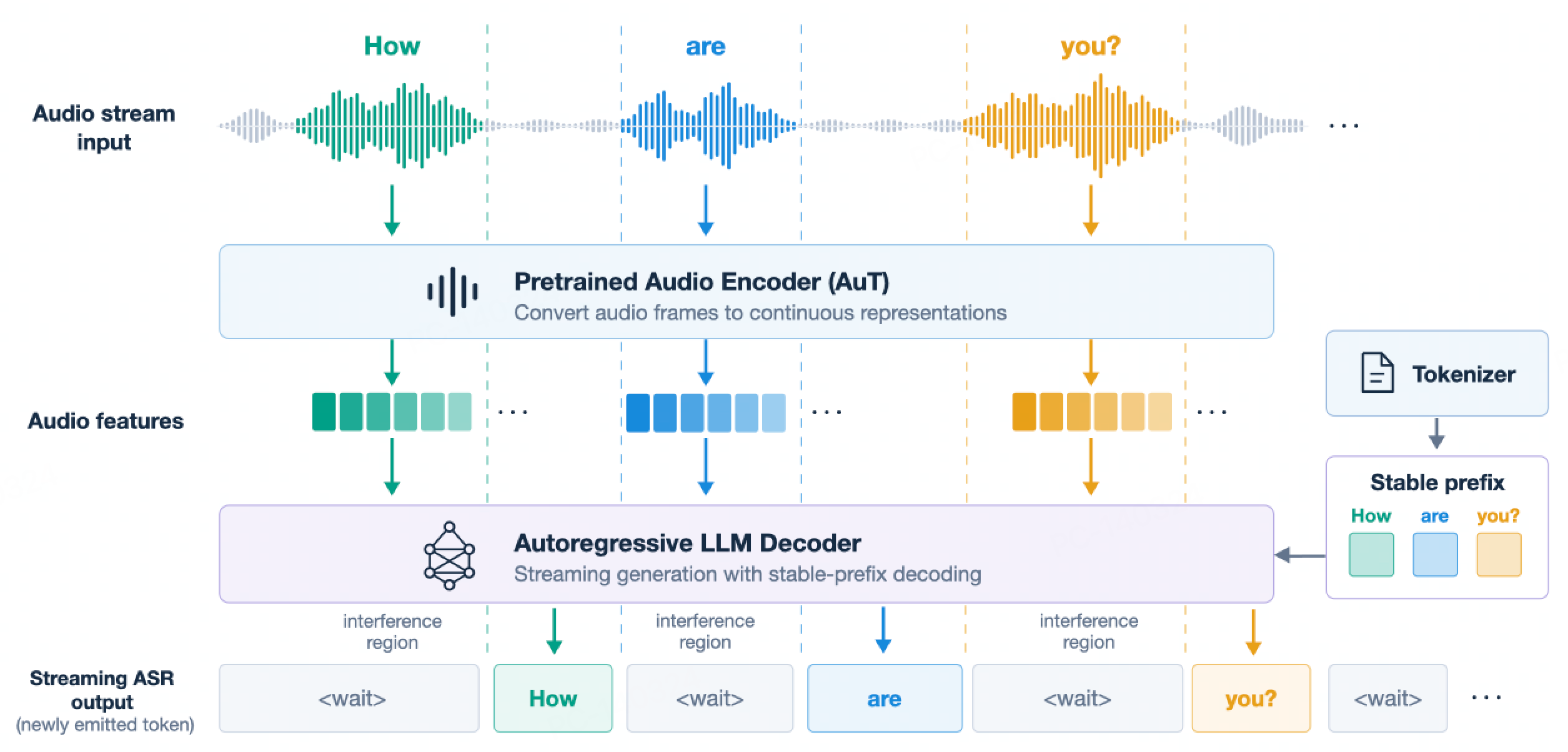
Figure 1. Overall framework of R2T2.
Figure 2. GPT-Live-Transcribe and R2T2 processing the same audio, shown together in real time — a side-by-side comparison.
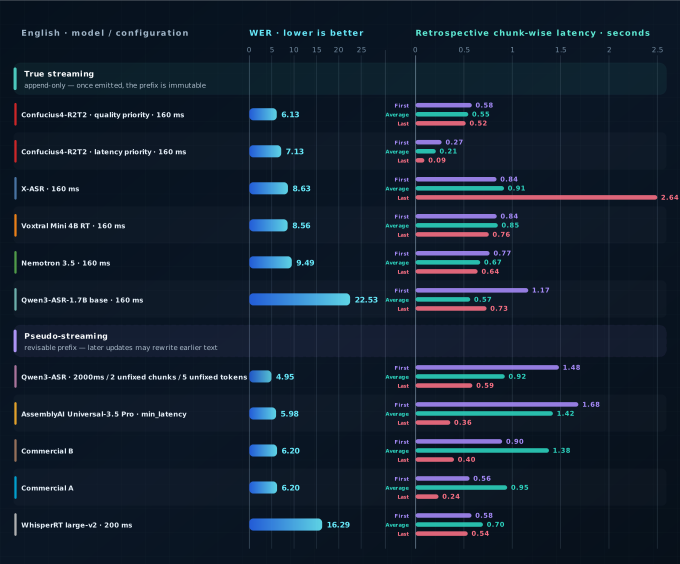
Figure 3. English WER and retrospective chunk-wise latency across model and configuration settings.
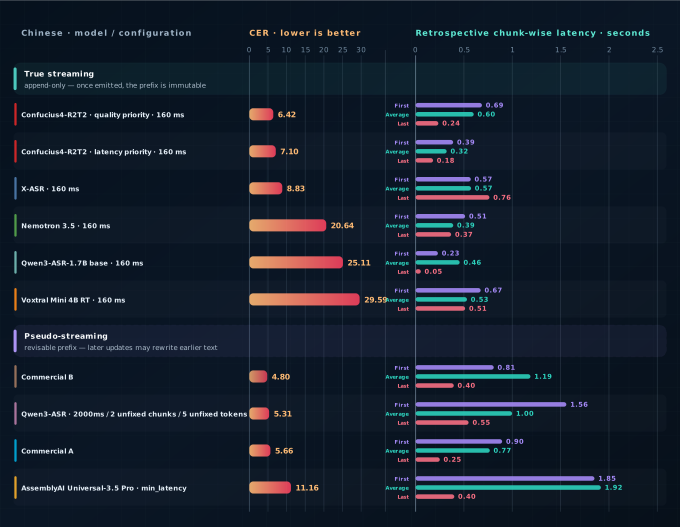
Figure 4. Chinese CER and retrospective chunk-wise latency across model and configuration settings.
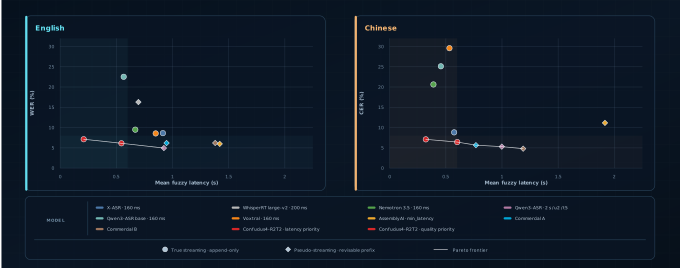
Figure 5. Accuracy-latency Pareto frontier. Lower-left is better; the frontier uses retrospective chunk-wise mean fuzzy latency.
| Dataset | Qwen | R2T2 (ours) 160ms |
Open-source | Proprietary | ||||||
|---|---|---|---|---|---|---|---|---|---|---|
| Qwen3-ASR※ 2s/u2/t5 |
Qwen3-ASR base 160ms |
X-ASR 160ms |
WhisperRT※ 200ms |
Nemotron 160ms |
Voxtral 160ms |
AssemblyAI※ min_latency |
Commercial A※ | Commercial B※ | ||
| AMI | 9.25 | 24.79 | 11.37 |
14.41 | 24.19 | 18.11 | 15.94 | 12.00 | 13.27 | 8.44 |
| Giga-clean | 8.61 | 24.37 | 9.60 |
10.26 | 13.81 | 12.67 | 11.13 | 9.21 | 8.84 | 9.46 |
| LS-clean | 1.67 | 22.30 | 2.13 |
3.86 | 4.70 | 3.71 | 2.49 | 1.89 | 1.73 | 1.25 |
| LS-other | 3.54 | 25.74 | 4.88 |
9.64 | 9.86 | 8.27 | 7.15 | 3.37 | 3.57 | 2.48 |
| SPGI | 2.90 | 22.25 | 3.00 |
5.14 | 8.66 | 3.93 | 3.06 | 2.14 | 3.06 | 1.74 |
| VoxPopuli | 3.02 | 20.71 | 3.07 |
5.68 | 8.28 | 5.69 | 6.30 | 4.75 | 3.17 | 3.14 |
| Earnings22 | 6.68 | 29.72 | 9.36 |
15.95 | 35.08 | 17.22 | 11.66 | 7.47 | 10.32 | 8.96 |
| TED-LIUM | 2.33 | 19.18 | 3.34 |
3.75 | 6.67 | 5.11 | 4.60 | 3.23 | 3.08 | 3.30 |
| EN-RealSI | 6.54 | 13.75 | 8.40 |
8.97 | 35.36 | 10.69 | 14.75 | 9.73 | 8.73 | 17.05 |
| Dataset | Qwen | R2T2 (ours) 160ms |
Open-source | Proprietary | ||||||
|---|---|---|---|---|---|---|---|---|---|---|
| Qwen3-ASR※ 2s/u2/t5 |
Qwen3-ASR base 160ms |
X-ASR 160ms |
WhisperRT※ 200ms |
Nemotron 160ms |
Voxtral 160ms |
AssemblyAI※ min_latency |
Commercial A※ | Commercial B※ | ||
| Wenet-net | 4.94 | 19.79 | 5.87 |
8.81 | U | 24.70 | 23.53 | 12.91 | 5.13 | 4.79 |
| Wenet-meeting | 5.97 | 20.38 | 7.27 |
11.33 | U | 20.18 | 60.54 | 11.84 | 7.07 | 3.75 |
| SPEECHIO-06 | 6.10 | 24.50 | 7.30 |
7.86 | U | 22.52 | 32.16 | 15.08 | 5.67 | 5.34 |
| SPEECHIO-07 | 6.19 | 21.16 | 8.20 |
11.22 | U | 24.28 | 22.97 | 10.84 | 6.45 | 6.46 |
| CN-RealSI | 3.34 | 39.72 | 3.48 |
4.92 | U | 11.52 | 8.74 | 5.15 | 3.99 | 3.64 |
 |
|  | Standard checkpoint for the vLLM backend |
| llama.cpp | `Confucius4-R2T2-GGUF` | | | GGUF repository with several quantization variants |
## Installation
We recommend using a **fresh, isolated environment**. For local development and
source installation, use the **Conda** or **uv** environment below. **Docker** is
recommended for quickly running the project with a preconfigured CUDA and runtime
environment — see [Docker](#docker-recommended).
### Clone the repository
```bash
git clone https://github.com/netease-youdao/Confucius4-R2T2.git
cd Confucius4-R2T2
```
### Option 1: Conda
```bash
conda create -n confucius4-r2t2 python=3.12 -y
conda activate confucius4-r2t2
# Install the package with the vLLM backend
pip install -e .
```
### Option 2: uv
```bash
uv venv --python 3.12
source .venv/bin/activate
# Install the package with the vLLM backend
uv pip install -e .
```
Python 3.10+ is supported. Python 3.12 is the version we test against.
vLLM has strict CUDA / PyTorch compatibility requirements. If the install
fails to resolve, check the version matrix on the [vLLM website](https://docs.vllm.ai/)
and pin a combination that matches your CUDA runtime.
## Docker (recommended)
R2T2 runs out of the box on the official **Qwen3-ASR** Docker image, which already ships every runtime library we need.
Pre-built image: [qwenllm/qwen3-asr](https://hub.docker.com/r/qwenllm/qwen3-asr).
Before you begin, install the [NVIDIA Container Toolkit](https://docs.nvidia.com/datacenter/cloud-native/container-toolkit/latest/install-guide.html) to enable GPU access from Docker. If Docker Hub access is slow or unreliable in your region, you may need to configure a registry mirror.
### 1. Start a container
```bash
LOCAL_WORKDIR=/path/to/your/workspace # host path that will be mounted into the container
HOST_PORT=8000
CONTAINER_PORT=80
docker run --gpus all --name confucius4-r2t2 \
-v /var/run/docker.sock:/var/run/docker.sock \
-p $HOST_PORT:$CONTAINER_PORT \
--mount type=bind,source=$LOCAL_WORKDIR,target=/data/shared/confucius4-r2t2 \
--shm-size=4gb \
-it qwenllm/qwen3-asr:latest
```
Your local workspace (`$LOCAL_WORKDIR`) — including a checkout of this repository and the R2T2 checkpoint — will be mounted inside the container at `/data/shared/confucius4-r2t2`. Host port `8000` is mapped to container port `80`; services running inside the container must bind to `0.0.0.0` (not `127.0.0.1`) for port forwarding to work.
### 2. Run the example inside the container
Once inside the container's shell:
```bash
cd /data/shared/confucius4-r2t2/Confucius4-R2T2
MODEL_PATH=/data/shared/confucius4-r2t2/Confucius4-R2T2 \
./run_example.sh /path/to/audio.wav
```
### 3. Manage the container
```bash
# re-enter after exiting
docker start confucius4-r2t2
docker exec -it confucius4-r2t2 bash
# remove completely
docker rm -f confucius4-r2t2
```
## Quick Start
Grab any audio file (mono or stereo, any sample rate — it is resampled to 16 kHz internally) and run:
```bash
./run_example.sh /path/to/audio.wav \
--model_path /path/to/Confucius4-R2T2 \
--infer_mode stream_vllm \
--language Chinese \
--chunk_size_ms 160
```
Logs are written to `run_example.log` by default. Run `./run_example.sh --help` to see the full flag list.
### Configuration
`run_example.sh` reads the following environment variables (all optional):
| Variable | Default | Description |
| --------------------- | ------------------ | ------------------------------------------------------ |
| `MODEL_PATH` | (required) | Path or HF repo id of the R2T2 checkpoint |
| `AUDIO` | first CLI argument | Path to the input audio file |
| `INFER_MODE` | `stream_vllm` | `stream_vllm` or `onetime_vllm` |
| `LANGUAGE` | `Chinese` | Language hint (e.g. `Chinese`, `English`, …) |
| `CHUNK_SIZE_MS` | `160` | Streaming chunk size (80 ms–2 s supported) |
| `UNFIXED_TOKEN_NUM` | `1` | Number of unfixed trailing tokens (rollback window) |
| `CONTEXT` | `""` | Context / hotword hint prepended to the prompt |
| `CUDA_VISIBLE_DEVICES`| `0` | GPU id(s) to expose |
| `LOG_FILE` | `run_example.log` | Where to write logs |
You can also call `example.py` directly and pass any of these as flags (`--audio`, `--model_path`, `--infer_mode`, `--language`, `--chunk_size_ms`, `--lookahead_ms`, `--unfixed_token_num`, `--context`).
## Python API
Audio inputs can be passed as a local path, a URL, base64 data, or a `(np.ndarray, sr)` tuple. Batched inference is supported. Remember to wrap vLLM code under `if __name__ == '__main__':` to avoid the `spawn` error described in [vLLM Troubleshooting](https://docs.vllm.ai/en/latest/usage/troubleshooting/#python-multiprocessing).
### vLLM backend
#### Offline transcription
```python
import librosa
from r2t2 import R2T2ASRModel
if __name__ == "__main__":
asr = R2T2ASRModel.LLM(
model="/path/to/Confucius4-R2T2",
gpu_memory_utilization=0.5,
max_model_len=16384,
max_inference_batch_size=32,
max_new_tokens=4096,
)
wav, sr = librosa.load("path/to/audio.wav", sr=16000, mono=True)
results = asr.transcribe(
audio=[(wav, 16000)],
language=["Chinese"], # or [None]
return_time_stamps=False,
)
print(results[0].language, results[0].text)
```
#### Streaming transcription
```python
import librosa
from r2t2 import R2T2ASRModel
if __name__ == "__main__":
asr = R2T2ASRModel.LLM(
model="/path/to/Confucius4-R2T2",
gpu_memory_utilization=0.4,
max_model_len=16384,
max_new_tokens=4, # keep small for low-latency streaming
)
wav, sr = librosa.load("path/to/audio.wav", sr=16000, mono=True)
state = asr.init_streaming_state(
context="", # optional hotword / topic hint
language="Chinese", # or None
unfixed_chunk_num=0,
unfixed_token_num=1,
chunk_size_sec=0.16,
)
step = int(0.16 * 16000)
for pos in range(0, len(wav), step):
seg = wav[pos : pos + step]
_, text = asr.streaming_transcribe(seg, state, max_new_tokens=4)
print("text:", text)
asr.finish_streaming_transcribe(state)
print("final:", state.text)
```
For a complete streaming example with adaptive `max_new_tokens` and initial-chunk lookahead handling, see [`example.py`](./example.py).
### llama.cpp backend
The [`r2t2_llama/`](./r2t2_llama) package adds decoding support for deployments where a llama.cpp runtime is preferred. Three routes are available:
| Mode | Audio encoder | Decoder |
| --- | --- | --- |
| `stream_llama_hybrid` | vLLM-native encoder (PyTorch) | llama.cpp |
| `stream_llama` | llama.cpp | llama.cpp |
| `onetime_llama` | llama.cpp | llama.cpp |
```bash
GGUF_DIR=/path/to/gguf python -m r2t2_llama.example_llama \
--audio resources/test.wav \
--model_path /path/to/Confucius4-R2T2 \
--infer_mode stream_llama_hybrid
```
Prebuilt CUDA artifacts for CPython 3.12 ship in the package, so no llama.cpp checkout is needed to run it. See [`r2t2_llama/README.md`](./r2t2_llama/README.md) for the pinned llama.cpp version, the Python API, and rebuild instructions.
## WebSocket Server
For real-time, multi-client streaming ASR, this repo ships a ready-to-run WebSocket server (`ws_server.py`), a launcher script (`run_start_server.sh`), and a reference Python client (`ws_client.py`).
### Start and stop the server
```bash
# Start with a VAD model
./run_start_server.sh start \
--model_path /path/to/Confucius4-R2T2 \
--vad_model_path /path/to/Stream-VAD \
--port 8272 \
--gpu 0
# Stop
./run_start_server.sh kill
# Restart in one step
./run_start_server.sh restart \
--model_path /path/to/Confucius4-R2T2 \
--vad_model_path /path/to/Stream-VAD \
--port 8272 \
--gpu 0
```
| Flag | Env var | Default | Description |
| --------------------- | -------------------- | -------------------------------------------------------------- | ---------------------------------------------------- |
| `-m`, `--model_path` | `ASR_MODEL_PATH` | (required) | Path or HF repo id of the R2T2 checkpoint |
| `-v`,`--vad_model_path` | `VAD_MODEL_PATH` | `checkpoints/vad/Stream-VAD` | Path to the FireRedVAD Stream-VAD model |
| `-p`, `--port` | `PORT` | `8272` | Port the WebSocket server binds to |
| `-g`, `--gpu` | `CUDA_VISIBLE_DEVICES` | `0` | GPU id(s) exposed to the server process |
| `-h`, `--host` | `HOST_TAG` | `localhost` | Host tag used only in the log file name |
The launcher resolves its own directory, so it can be invoked from anywhere. Logs are written to `nohup_service_ws_
| Standard checkpoint for the vLLM backend |
| llama.cpp | `Confucius4-R2T2-GGUF` | | | GGUF repository with several quantization variants |
## Installation
We recommend using a **fresh, isolated environment**. For local development and
source installation, use the **Conda** or **uv** environment below. **Docker** is
recommended for quickly running the project with a preconfigured CUDA and runtime
environment — see [Docker](#docker-recommended).
### Clone the repository
```bash
git clone https://github.com/netease-youdao/Confucius4-R2T2.git
cd Confucius4-R2T2
```
### Option 1: Conda
```bash
conda create -n confucius4-r2t2 python=3.12 -y
conda activate confucius4-r2t2
# Install the package with the vLLM backend
pip install -e .
```
### Option 2: uv
```bash
uv venv --python 3.12
source .venv/bin/activate
# Install the package with the vLLM backend
uv pip install -e .
```
Python 3.10+ is supported. Python 3.12 is the version we test against.
vLLM has strict CUDA / PyTorch compatibility requirements. If the install
fails to resolve, check the version matrix on the [vLLM website](https://docs.vllm.ai/)
and pin a combination that matches your CUDA runtime.
## Docker (recommended)
R2T2 runs out of the box on the official **Qwen3-ASR** Docker image, which already ships every runtime library we need.
Pre-built image: [qwenllm/qwen3-asr](https://hub.docker.com/r/qwenllm/qwen3-asr).
Before you begin, install the [NVIDIA Container Toolkit](https://docs.nvidia.com/datacenter/cloud-native/container-toolkit/latest/install-guide.html) to enable GPU access from Docker. If Docker Hub access is slow or unreliable in your region, you may need to configure a registry mirror.
### 1. Start a container
```bash
LOCAL_WORKDIR=/path/to/your/workspace # host path that will be mounted into the container
HOST_PORT=8000
CONTAINER_PORT=80
docker run --gpus all --name confucius4-r2t2 \
-v /var/run/docker.sock:/var/run/docker.sock \
-p $HOST_PORT:$CONTAINER_PORT \
--mount type=bind,source=$LOCAL_WORKDIR,target=/data/shared/confucius4-r2t2 \
--shm-size=4gb \
-it qwenllm/qwen3-asr:latest
```
Your local workspace (`$LOCAL_WORKDIR`) — including a checkout of this repository and the R2T2 checkpoint — will be mounted inside the container at `/data/shared/confucius4-r2t2`. Host port `8000` is mapped to container port `80`; services running inside the container must bind to `0.0.0.0` (not `127.0.0.1`) for port forwarding to work.
### 2. Run the example inside the container
Once inside the container's shell:
```bash
cd /data/shared/confucius4-r2t2/Confucius4-R2T2
MODEL_PATH=/data/shared/confucius4-r2t2/Confucius4-R2T2 \
./run_example.sh /path/to/audio.wav
```
### 3. Manage the container
```bash
# re-enter after exiting
docker start confucius4-r2t2
docker exec -it confucius4-r2t2 bash
# remove completely
docker rm -f confucius4-r2t2
```
## Quick Start
Grab any audio file (mono or stereo, any sample rate — it is resampled to 16 kHz internally) and run:
```bash
./run_example.sh /path/to/audio.wav \
--model_path /path/to/Confucius4-R2T2 \
--infer_mode stream_vllm \
--language Chinese \
--chunk_size_ms 160
```
Logs are written to `run_example.log` by default. Run `./run_example.sh --help` to see the full flag list.
### Configuration
`run_example.sh` reads the following environment variables (all optional):
| Variable | Default | Description |
| --------------------- | ------------------ | ------------------------------------------------------ |
| `MODEL_PATH` | (required) | Path or HF repo id of the R2T2 checkpoint |
| `AUDIO` | first CLI argument | Path to the input audio file |
| `INFER_MODE` | `stream_vllm` | `stream_vllm` or `onetime_vllm` |
| `LANGUAGE` | `Chinese` | Language hint (e.g. `Chinese`, `English`, …) |
| `CHUNK_SIZE_MS` | `160` | Streaming chunk size (80 ms–2 s supported) |
| `UNFIXED_TOKEN_NUM` | `1` | Number of unfixed trailing tokens (rollback window) |
| `CONTEXT` | `""` | Context / hotword hint prepended to the prompt |
| `CUDA_VISIBLE_DEVICES`| `0` | GPU id(s) to expose |
| `LOG_FILE` | `run_example.log` | Where to write logs |
You can also call `example.py` directly and pass any of these as flags (`--audio`, `--model_path`, `--infer_mode`, `--language`, `--chunk_size_ms`, `--lookahead_ms`, `--unfixed_token_num`, `--context`).
## Python API
Audio inputs can be passed as a local path, a URL, base64 data, or a `(np.ndarray, sr)` tuple. Batched inference is supported. Remember to wrap vLLM code under `if __name__ == '__main__':` to avoid the `spawn` error described in [vLLM Troubleshooting](https://docs.vllm.ai/en/latest/usage/troubleshooting/#python-multiprocessing).
### vLLM backend
#### Offline transcription
```python
import librosa
from r2t2 import R2T2ASRModel
if __name__ == "__main__":
asr = R2T2ASRModel.LLM(
model="/path/to/Confucius4-R2T2",
gpu_memory_utilization=0.5,
max_model_len=16384,
max_inference_batch_size=32,
max_new_tokens=4096,
)
wav, sr = librosa.load("path/to/audio.wav", sr=16000, mono=True)
results = asr.transcribe(
audio=[(wav, 16000)],
language=["Chinese"], # or [None]
return_time_stamps=False,
)
print(results[0].language, results[0].text)
```
#### Streaming transcription
```python
import librosa
from r2t2 import R2T2ASRModel
if __name__ == "__main__":
asr = R2T2ASRModel.LLM(
model="/path/to/Confucius4-R2T2",
gpu_memory_utilization=0.4,
max_model_len=16384,
max_new_tokens=4, # keep small for low-latency streaming
)
wav, sr = librosa.load("path/to/audio.wav", sr=16000, mono=True)
state = asr.init_streaming_state(
context="", # optional hotword / topic hint
language="Chinese", # or None
unfixed_chunk_num=0,
unfixed_token_num=1,
chunk_size_sec=0.16,
)
step = int(0.16 * 16000)
for pos in range(0, len(wav), step):
seg = wav[pos : pos + step]
_, text = asr.streaming_transcribe(seg, state, max_new_tokens=4)
print("text:", text)
asr.finish_streaming_transcribe(state)
print("final:", state.text)
```
For a complete streaming example with adaptive `max_new_tokens` and initial-chunk lookahead handling, see [`example.py`](./example.py).
### llama.cpp backend
The [`r2t2_llama/`](./r2t2_llama) package adds decoding support for deployments where a llama.cpp runtime is preferred. Three routes are available:
| Mode | Audio encoder | Decoder |
| --- | --- | --- |
| `stream_llama_hybrid` | vLLM-native encoder (PyTorch) | llama.cpp |
| `stream_llama` | llama.cpp | llama.cpp |
| `onetime_llama` | llama.cpp | llama.cpp |
```bash
GGUF_DIR=/path/to/gguf python -m r2t2_llama.example_llama \
--audio resources/test.wav \
--model_path /path/to/Confucius4-R2T2 \
--infer_mode stream_llama_hybrid
```
Prebuilt CUDA artifacts for CPython 3.12 ship in the package, so no llama.cpp checkout is needed to run it. See [`r2t2_llama/README.md`](./r2t2_llama/README.md) for the pinned llama.cpp version, the Python API, and rebuild instructions.
## WebSocket Server
For real-time, multi-client streaming ASR, this repo ships a ready-to-run WebSocket server (`ws_server.py`), a launcher script (`run_start_server.sh`), and a reference Python client (`ws_client.py`).
### Start and stop the server
```bash
# Start with a VAD model
./run_start_server.sh start \
--model_path /path/to/Confucius4-R2T2 \
--vad_model_path /path/to/Stream-VAD \
--port 8272 \
--gpu 0
# Stop
./run_start_server.sh kill
# Restart in one step
./run_start_server.sh restart \
--model_path /path/to/Confucius4-R2T2 \
--vad_model_path /path/to/Stream-VAD \
--port 8272 \
--gpu 0
```
| Flag | Env var | Default | Description |
| --------------------- | -------------------- | -------------------------------------------------------------- | ---------------------------------------------------- |
| `-m`, `--model_path` | `ASR_MODEL_PATH` | (required) | Path or HF repo id of the R2T2 checkpoint |
| `-v`,`--vad_model_path` | `VAD_MODEL_PATH` | `checkpoints/vad/Stream-VAD` | Path to the FireRedVAD Stream-VAD model |
| `-p`, `--port` | `PORT` | `8272` | Port the WebSocket server binds to |
| `-g`, `--gpu` | `CUDA_VISIBLE_DEVICES` | `0` | GPU id(s) exposed to the server process |
| `-h`, `--host` | `HOST_TAG` | `localhost` | Host tag used only in the log file name |
The launcher resolves its own directory, so it can be invoked from anywhere. Logs are written to `nohup_service_ws_