LobsterAI logo # LobsterAI **The open-source desktop AI agent that does real work on your computer.** Describe a task in plain language. LobsterAI reads your files, runs tools, drives a browser,
edits Office documents, and hands back finished work — at your desk or from your phone.

Latest release GitHub stars MIT license Platforms: macOS and Windows Follow LobsterAI on X Join the WeChat community

**English** · [简体中文](README_zh.md)

Download  ·  Quick start  ·  Features  ·  Build from source  ·  Community
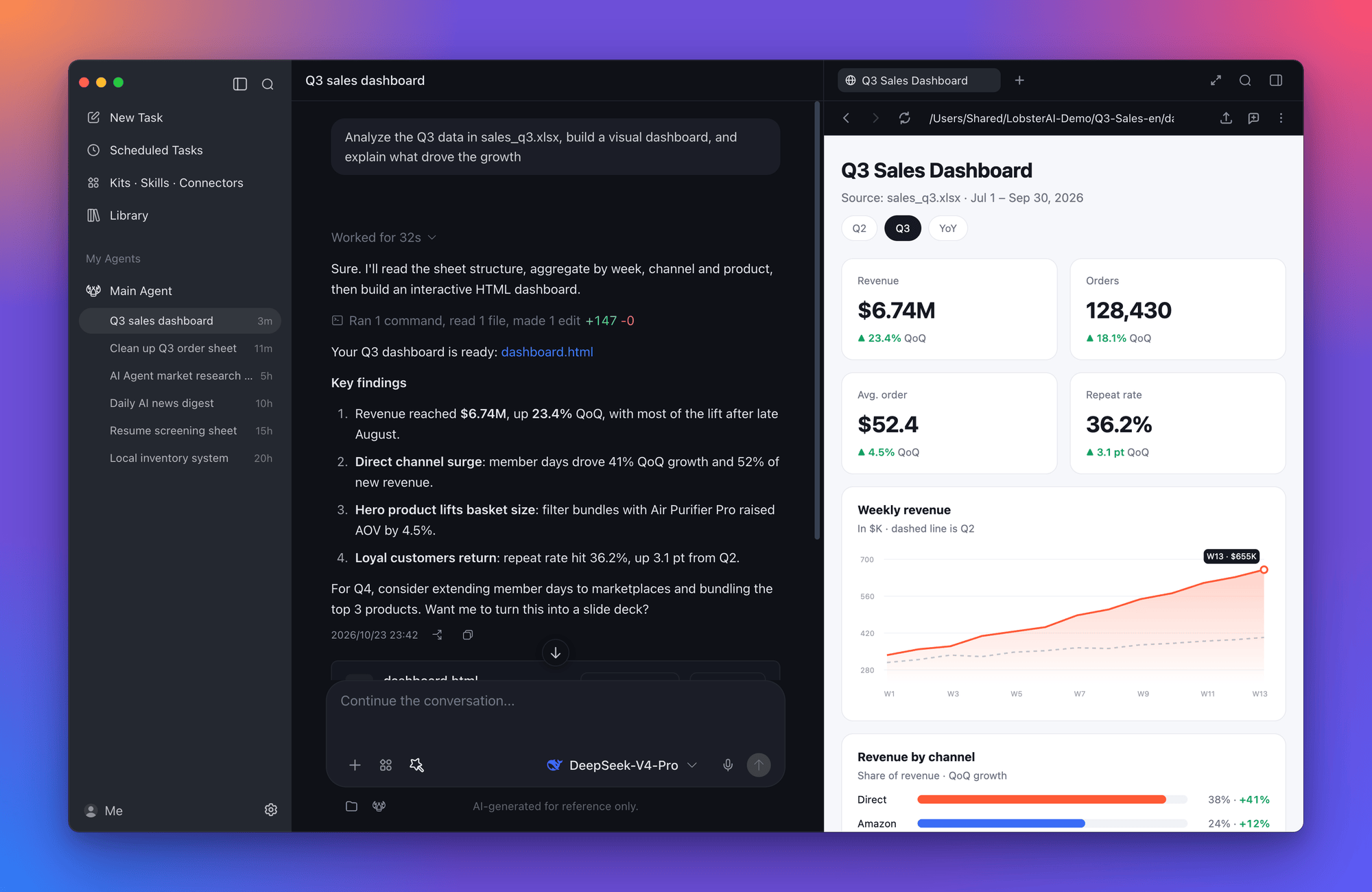
LobsterAI analyzing a spreadsheet and previewing the dashboard it built
## Why LobsterAI Most AI assistants stop at an answer. LobsterAI is built to finish the job. - **It works where your work lives.** Point it at a folder and it reads spreadsheets, writes documents, runs scripts, and browses the web, asking before anything sensitive. - **You see the result, not just a reply.** Web pages, charts, images, videos, PDFs, and Word, Excel, and PowerPoint files open in a side panel, ready to edit or share. - **It keeps working when you step away.** Schedule recurring jobs, or message your desktop agent from WeChat, Feishu, DingTalk, Telegram, and more. - **It's yours.** MIT-licensed, with sessions stored locally. Sign in to use the built-in models, or bring your own API keys. Built by [NetEase Youdao](https://www.youdao.com/), LobsterAI is the first open-source desktop-grade agent from a major Chinese tech company. ## Features
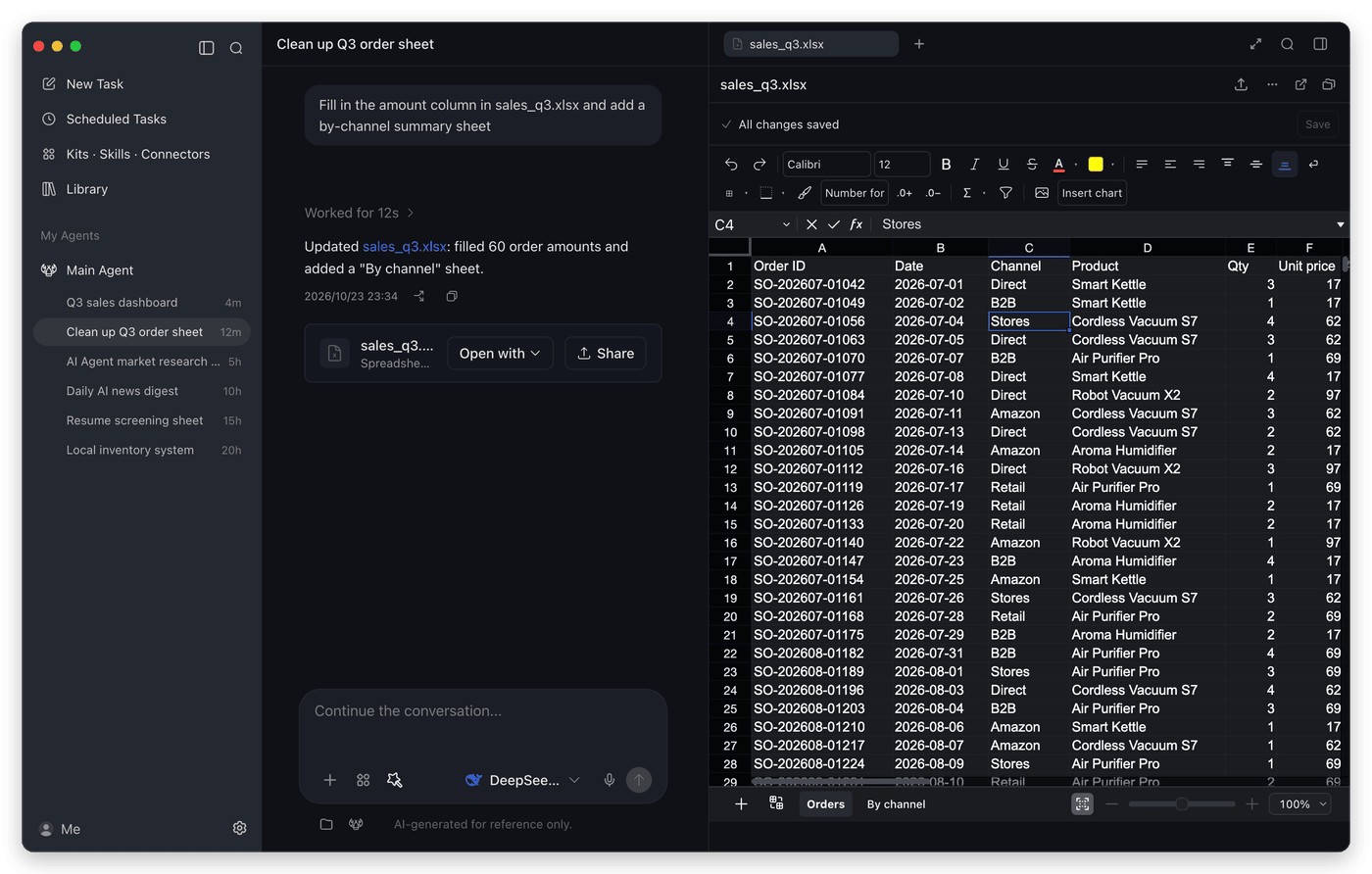
Editing an Excel workbook inside LobsterAI

Native Office editing
Open Word, Excel, and PowerPoint files right in the app. Edit by hand, or let the agent make changes live alongside you.

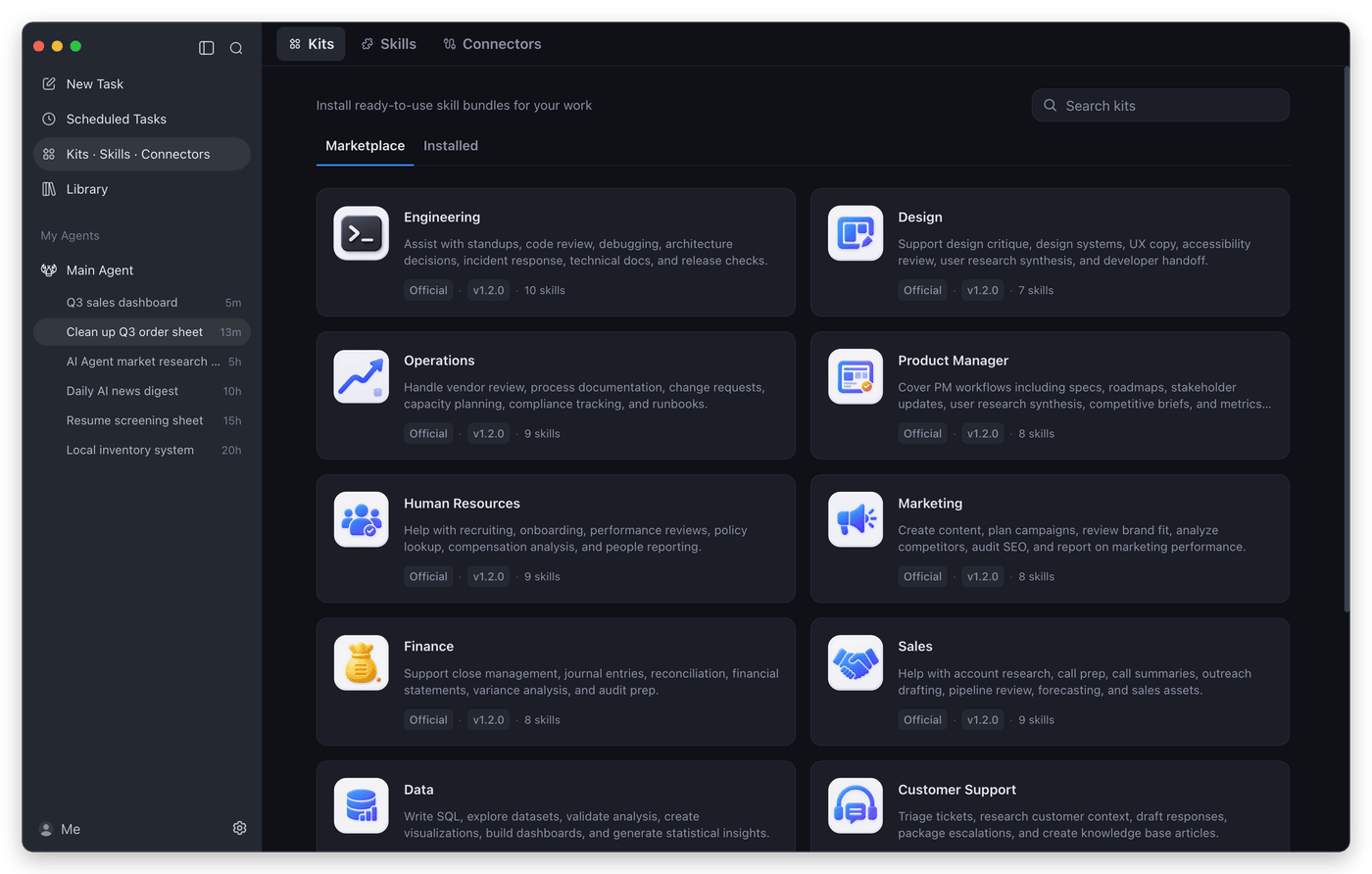
The kits marketplace

Kits, skills, and connectors
Install role-based kits for engineering, design, finance, sales, and more, pick individual skills, or connect MCP servers.

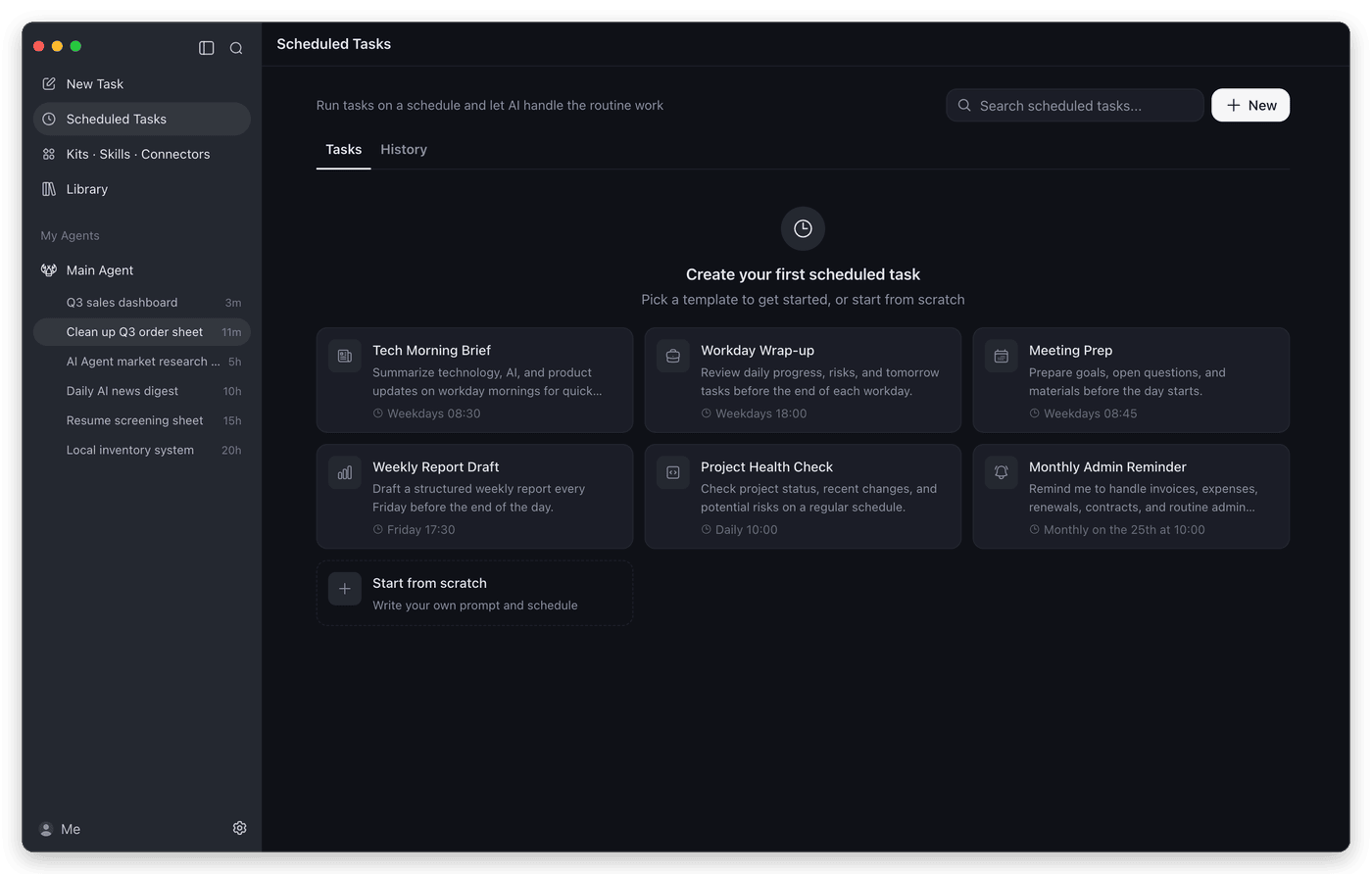
Scheduled task templates

Scheduled tasks
Turn any prompt into a recurring job: morning briefs, end-of-day wrap-ups, weekly reports, and health checks.

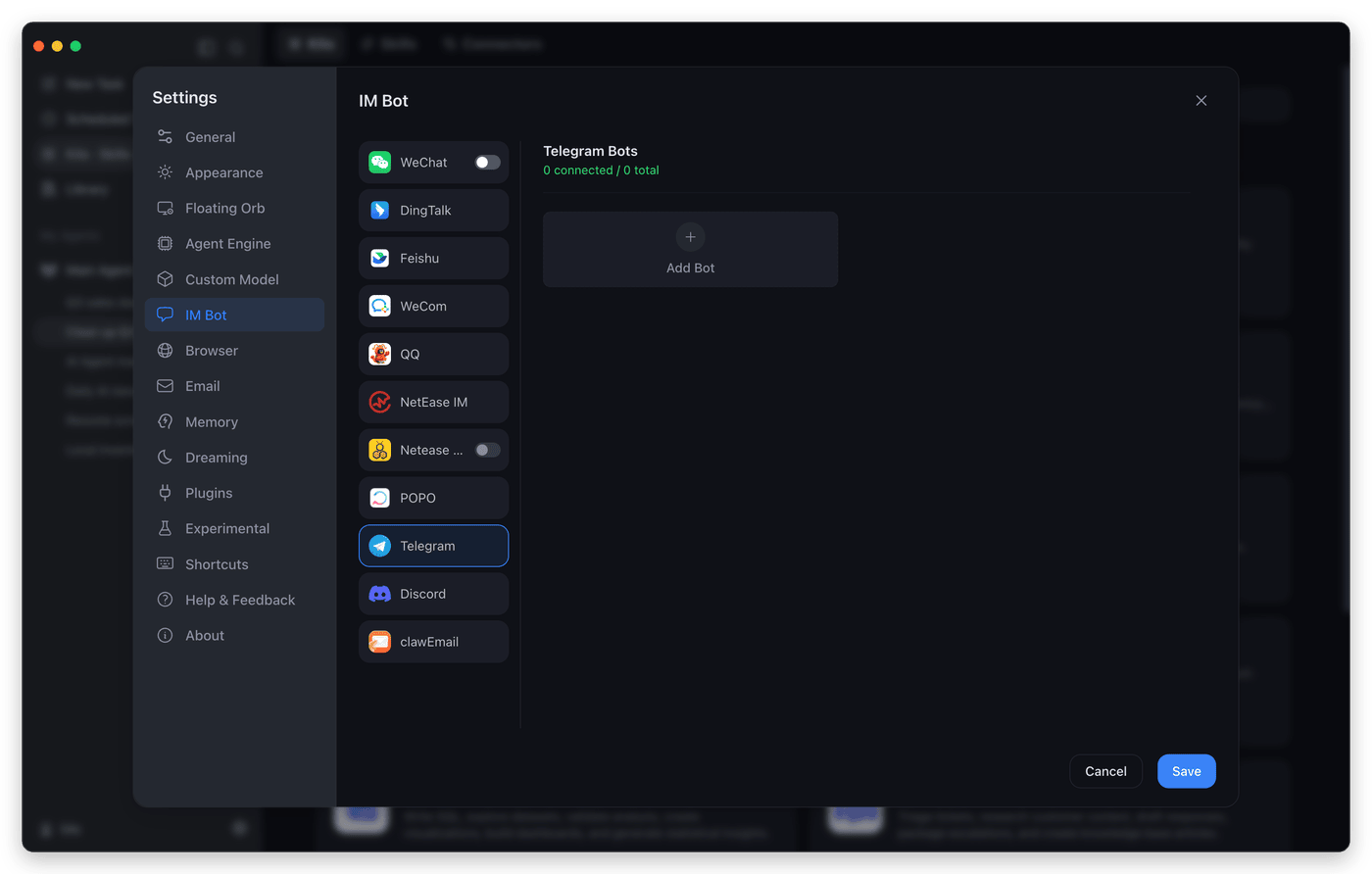
IM bot settings

Message it from anywhere
Connect a chat app once, then send tasks to your desktop agent from your phone.

### Everything in the box | Capability | What you get | | --- | --- | | **Cowork sessions** | Long-running tasks on local projects with streaming progress, a tool timeline, session forks, and approval prompts before file, shell, or network actions. | | **Artifacts and sharing** | Live previews for HTML, SVG, Mermaid, images, video, Markdown, code, PDF, and Office files. Edit images in place and share results as a link. | | **Built-in browser** | An in-app browser the agent can drive, with tabs, saved logins, and passkey support, for research and web workflows. | | **Computer use** | Let the agent operate desktop apps on Windows x64 and macOS 13 or later. | | **Multiple agents** | Create agents with their own identity, model, skills, and working folder, add ready-made experts from the Expert Plaza, and bind agents to chat channels. | | **Skills** | Built-in skills for documents, spreadsheets, slides, PDFs, web search, browser automation, image and video generation, stock research, writing, email, and more. See [`SKILLs/`](SKILLs). | | **MCP connectors** | Add local or remote MCP servers from the marketplace, sign in with OAuth, and choose which tools each server exposes. | | **IM channels** | WeChat, WeCom, DingTalk, Feishu/Lark, QQ, NetEase IM, NetEase Bee, POPO, Telegram, Discord, and email. Multi-instance platforms can route each bot to a different agent. | | **Desktop companion** | A floating orb for quick tasks, screenshots, and actions on selected text, such as translating or reading aloud. | | **Memory and Dreaming** | Durable memory files, plus optional scheduled "Dreaming" runs that consolidate what the agent learned, so preferences carry across sessions. | | **Models** | Built-in models (DeepSeek, GLM, Kimi, Qwen, MiniMax, and more) after sign-in, or your own keys for OpenAI, Anthropic, Gemini, xAI, OpenRouter, Ollama, LM Studio, and any OpenAI-compatible endpoint. | | **Library** | Every file your agents create, collected in one place across sessions, both local and shared. | ## Things to try | Scenario | Example prompt | | --- | --- | | Build a local tool | "I still track inventory and sales in Excel. Build a local inventory system that records purchases and sales, calculates stock and profit, and opens in my browser." | | Analyze local data | "Use `product-growth.xlsx` to build a visual dashboard and summarize the main growth drivers." | | Make a deck | "Research the AI agent market and turn the findings into a presentation." | | Check a web dashboard | "Open the ads dashboard every morning, check spend and conversion anomalies, and summarize likely causes." | | Screen documents | "Turn the resumes in this folder into a screening sheet and shortlist the strongest candidates against the JD." | | Run scheduled work | "Every weekday at 9 AM, collect yesterday's AI news and send me a concise digest." | ## Quick start 1. **Install LobsterAI.** Download it from the [official website](https://lobsterai.youdao.com/#/download-list), or get the latest release directly: [macOS (Apple Silicon)](https://github.com/netease-youdao/LobsterAI/releases/latest/download/LobsterAI--mac-arm64.dmg) · [macOS (Intel)](https://github.com/netease-youdao/LobsterAI/releases/latest/download/LobsterAI--mac-x64.dmg) · [Windows x64](https://github.com/netease-youdao/LobsterAI/releases/latest/download/LobsterAI--win-x64.exe) 2. **Choose a model.** Sign in to use the built-in models, or add your own API key under **Settings → Custom Model**. 3. **Give it a task.** Pick a working folder, describe what you want, and approve actions as it works. Generated files open in the side panel. 4. **Go further.** Install kits from **Kits · Skills · Connectors**, set up recurring work in **Scheduled Tasks**, or connect a chat app under **Settings → IM Bot**. ## How it works ```mermaid flowchart LR subgraph App["LobsterAI desktop app (Electron)"] UI["Renderer
React · Redux · Tailwind
sessions · artifacts · Office editors"] Main["Main process
Cowork sessions · permissions · SQLite
skills · MCP · IM · scheduler"] UI <-->|"preload IPC"| Main end Main <-->|"config sync · events"| Gateway["OpenClaw gateway
bundled agent runtime"] Gateway --> Models["LLM providers"] Gateway --> Tools["Local tools
files · shell · browser
computer use · MCP servers"] Chat["Chat apps
WeChat · Feishu · DingTalk · Telegram …"] <--> Gateway ``` - **Cowork** is LobsterAI's product layer. It owns sessions, messages, permissions, artifacts, agents, and IM bindings, and stores them locally in SQLite. - **[OpenClaw](https://github.com/openclaw/openclaw)** is the agent runtime underneath. LobsterAI ships a pinned build, renders its config from app state, and translates its events into the Cowork stream. - The renderer is sandboxed with context isolation and talks to the main process only through the preload IPC bridge. ## Build from source Requirements: Node.js `>=24.15.0 <25`, npm `>=11.17.0 <12`, git, and pnpm. ```bash git clone https://github.com/netease-youdao/LobsterAI.git cd LobsterAI npm install # First run: fetches the pinned OpenClaw version into ../openclaw, builds the runtime, and starts the app npm run electron:dev:openclaw # Later runs, once the runtime exists npm run electron:dev ``` [CONTRIBUTING.md](CONTRIBUTING.md) covers tests, linting, runtime options, packaging installers, and the project layout. ## Security and privacy - Sessions, messages, and settings are stored locally in `lobsterai.sqlite` under the app's user data directory. Agent memory and runtime state live alongside it under `openclaw/`. - File operations, shell commands, and network access are permission-gated, and the agent asks before it acts. - Renderer windows run with context isolation, sandboxing, and no Node.js integration. ## Community Join the WeChat group for help, feedback, and release news. You can also follow [@LobsterAIYoudao](https://x.com/LobsterAIYoudao) on X. WeChat community QR code Report bugs and request features through [GitHub Issues](https://github.com/netease-youdao/LobsterAI/issues/new/choose). ## Contributing Contributions are welcome. Read [CONTRIBUTING.md](CONTRIBUTING.md) to set up your environment, and look for [good first issues](https://github.com/netease-youdao/LobsterAI/issues?q=is%3Aissue%20state%3Aopen%20label%3A%22good%20first%20issue%22) to get started. ## Star history Star history chart ## License [MIT](LICENSE) © NetEase Youdao