LobsterAI





English · 中文
All-scenario office assistant Agent.
The first open-source desktop-grade Agent among major Chinese tech companies, built by NetEase Youdao.
Features
·
Developing
·
Community
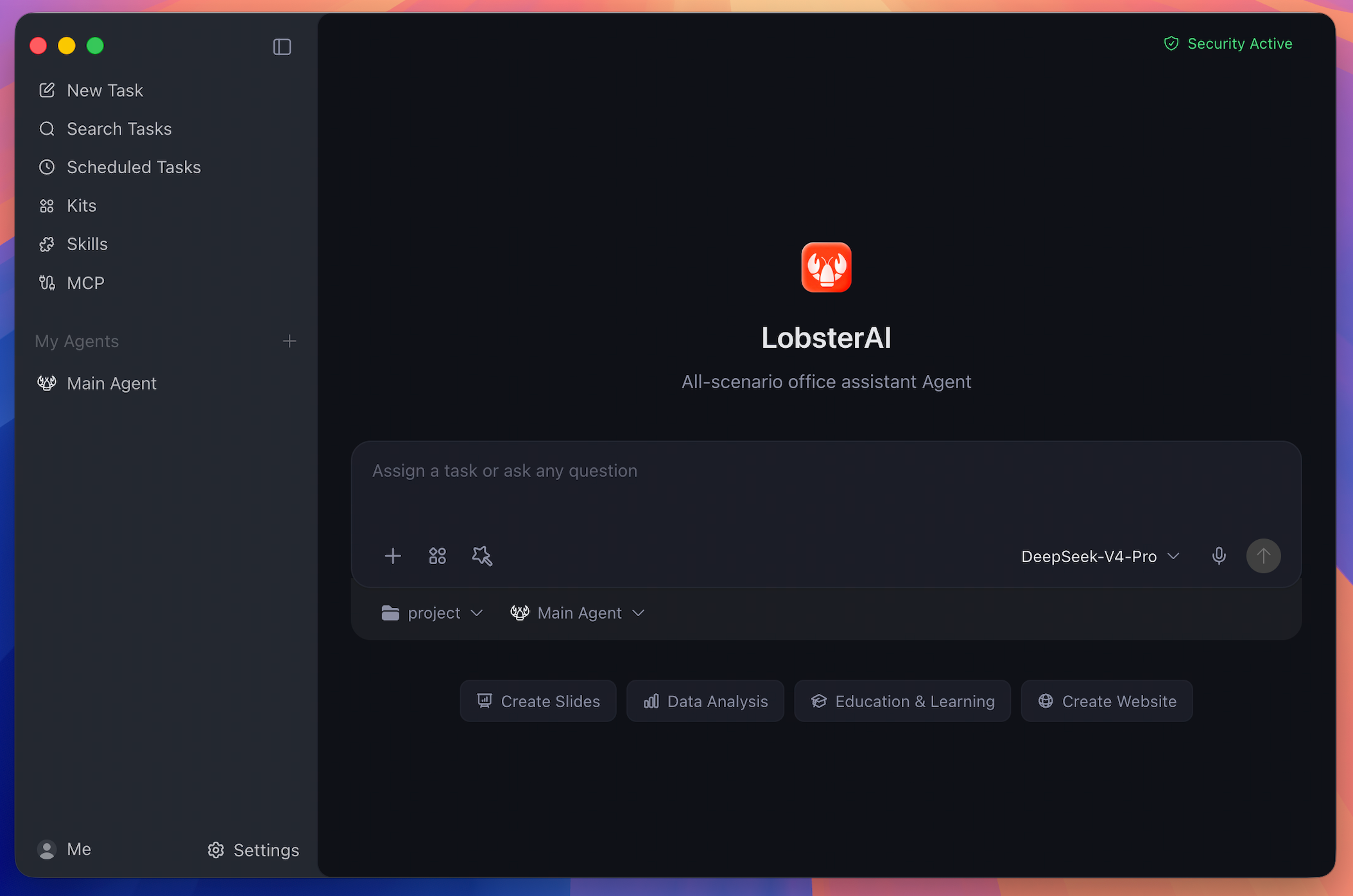
LobsterAI is a desktop Agent that can operate in your real working environment: local files, terminal commands, browser workflows, documents, spreadsheets, slides, IM channels, scheduled jobs, and project workspaces.
Cowork is the LobsterAI product/session layer. OpenClaw is the runtime and gateway underneath it. That split lets LobsterAI keep local persistence, permissions, UI state, artifacts, agents, memory, and IM bindings in the desktop app while using OpenClaw for agent execution.
## Features
### Desktop Cowork Sessions
Run long-form Agent tasks against local projects and files. LobsterAI streams progress, keeps session history, renders tool output, and asks for approval before sensitive actions such as file operations, terminal commands, or network access.
### Multi-Agent Workflows
Create custom Agents with their own identity, model choice, skills, working directory, enabled state, and IM bindings. Keep the Main Agent for general work and use specialized Agents for repeatable roles.
### Expert Kits
Install scenario-oriented Expert Kits that package capability selections and references for common workflows. Kits are selected independently from direct skills, so a workflow can combine curated kits with individual tools.
### Skills
LobsterAI ships with 28 built-in skills configured in `SKILLs/skills.config.json`, including web search, Word documents, spreadsheets, PowerPoint, PDF processing, Remotion video generation, browser automation, image/video generation, stock research, content writing, email, weather, and skill creation.
### MCP Servers
Connect external tools and data sources through Model Context Protocol servers. LobsterAI stores user-configured servers locally and syncs enabled servers into OpenClaw.
### Scheduled Tasks
Create recurring work either by conversation or through the scheduled task UI. Use it for daily news digests, inbox summaries, website monitoring, weekly reports, and other repeatable work.
### IM Remote Control
Reach your desktop Agent from WeChat, WeCom, DingTalk, Feishu/Lark, QQ, Telegram, Discord, NetEase IM, NetEase Bee, POPO, and email. Multi-instance platforms can bind different accounts or channels to different Agents.
### Rich Artifacts
Preview and manage generated HTML, SVG, images, video, Mermaid diagrams, code, Markdown, text, documents, and local service artifacts inside the desktop app.
### Local Memory And Data
Sessions and app data live locally in SQLite. OpenClaw workspace memory uses files such as `MEMORY.md`, `USER.md`, `SOUL.md`, and daily notes, so durable preferences and project context can carry across sessions.
## Real-World Prompts
| Scenario | Example prompt |
| --- | --- |
| Build a local system | "I still track inventory and sales in Excel. Build a local inventory system that records purchases and sales, calculates stock and profit, and opens in my browser." |
| Analyze local data | "Use `product-growth.xlsx` to build a visual dashboard and summarize the main growth drivers." |
| Generate a deck | "Research the AI Agent market and turn the findings into a presentation." |
| Automate browser checks | "Open the ads dashboard every morning, check spend and conversion anomalies, and summarize likely causes." |
| Screen documents | "Turn the resumes in this folder into a screening sheet and shortlist the strongest candidates against the JD." |
| Run scheduled work | "Every weekday at 9 AM, collect yesterday's AI news and send me a concise digest." |
## How It Works
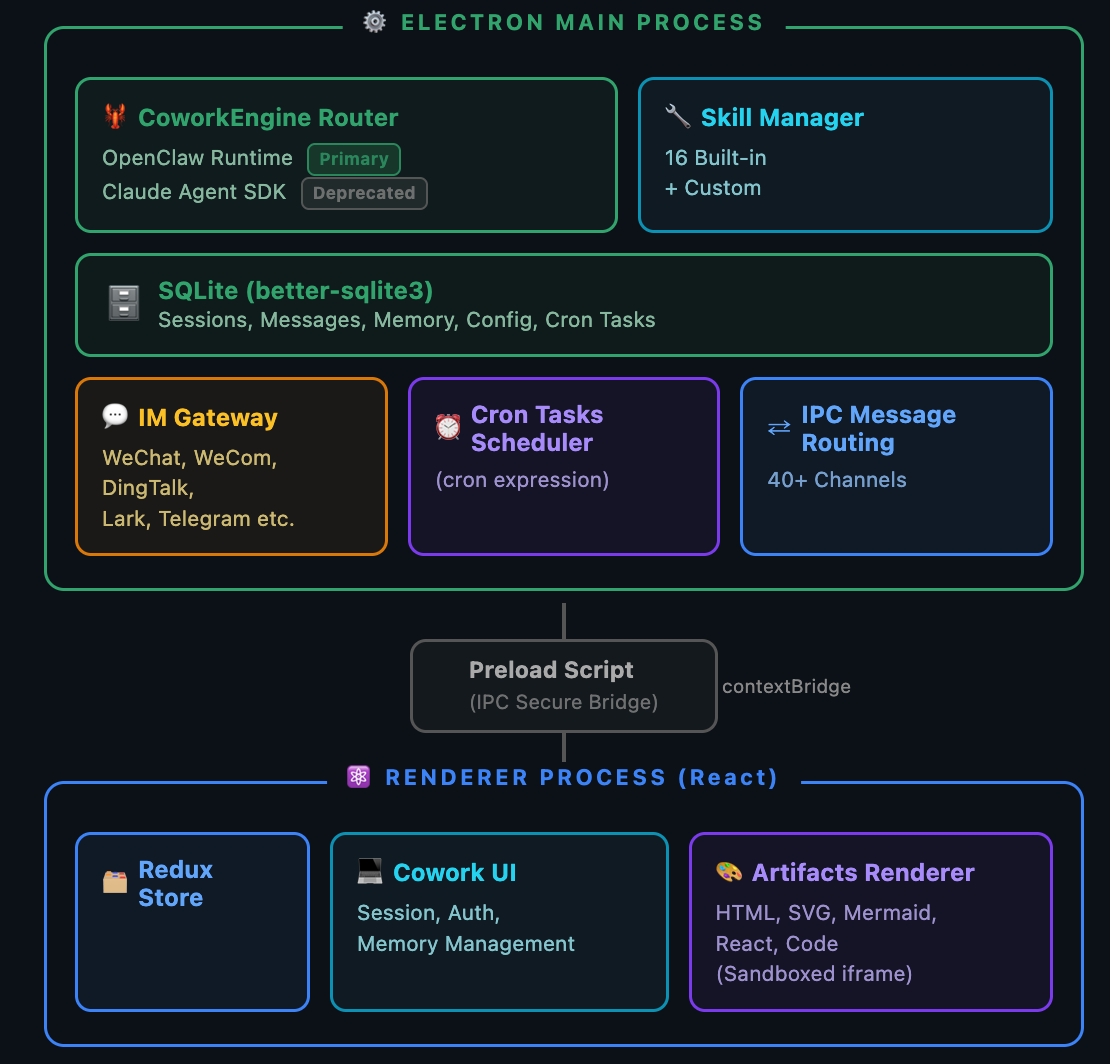
- **Renderer**: React, Redux Toolkit, Tailwind, artifact renderers, settings, agent/session UI, skills, MCP, scheduled tasks, and IM configuration.
- **Main process**: Electron lifecycle, IPC, SQLite persistence, auth, logging, OpenClaw startup, runtime repair, skill sync, IM gateways, and artifact services.
- **OpenClaw integration**: `openclawEngineManager`, `openclawConfigSync`, `openclawRuntimeAdapter`, and `coworkEngineRouter` translate LobsterAI state into OpenClaw runtime behavior.
## Install
### Desktop
Download the latest macOS and Windows installers from [Official Website](https://lobsterai.youdao.com/) or [GitHub Releases](https://github.com/netease-youdao/LobsterAI/releases).
### Run From Source
Requirements:
- Node.js `>=24.15.0 <25`
- npm `>=11.17.0 <12` (older versions: `npm install -g npm@11.17.0`)
- git and pnpm, needed on the first run to build the pinned OpenClaw runtime from the sibling `../openclaw` checkout
`better-sqlite3@13.0.3` includes prebuilt N-API binaries for Windows, macOS,
and Linux on x64/arm64. The `allowScripts` entry in `package.json` skips npm's
unnecessary implicit rebuild for this version, so installing it does not require
Visual Studio C++ Build Tools on Windows. Other dependencies' install scripts
still run. Recheck this entry when upgrading `better-sqlite3`.
```bash
git clone https://github.com/netease-youdao/LobsterAI.git
cd LobsterAI
npm install
```
First development run:
```bash
npm run electron:dev:openclaw
```
Daily development after the pinned OpenClaw runtime exists:
```bash
npm run electron:dev
```
The renderer dev server runs at `http://localhost:5175`.
## Developing
```bash
# Production renderer bundle
npm run build
# Electron main/preload TypeScript build
npm run compile:electron
# Official Vitest entry used by CI
npm test
# Full ESLint across src; may expose existing legacy debt
npm run lint
# CI-style lint for touched TypeScript files
npx eslint --ext ts,tsx --report-unused-disable-directives --max-warnings 0
```
### OpenClaw Runtime
The pinned OpenClaw version and third-party plugin list live in `package.json` under `openclaw`.
```bash
# Build the current-platform runtime manually
npm run openclaw:runtime:host
# Use a custom OpenClaw source checkout
OPENCLAW_SRC=/path/to/openclaw npm run electron:dev:openclaw
# Force runtime rebuild
OPENCLAW_FORCE_BUILD=1 npm run electron:dev:openclaw
# Keep a local OpenClaw checkout on its current branch/tag
OPENCLAW_SKIP_ENSURE=1 npm run electron:dev:openclaw
```
### DeepSeek Harness Runtime
The pinned dsh version and one archive descriptor per platform live in `package.json` under `dsh`. Development reads `vendor/dsh-runtime/current`; shipped apps download the archive on first use and verify it against the digest they carry.
```bash
# Build and activate the current-platform runtime
npm run dsh:runtime:host
# Boot it once and assert the web UI answers
npm run dsh:runtime:verify
# Full gate: build, pack, install over HTTP, boot, assert provider/model over RPC
npm run dsh:e2e
```
Publish a runtime archive (per platform)
Each target must be built on a matching machine: native dependencies install for the host, so a cross-architecture build produces an archive that packs cleanly and only fails on users' machines. The build refuses to run on a mismatched host.
| Target | Build on |
| --- | --- |
| `mac-arm64` | Apple Silicon mac |
| `mac-x64` | Intel mac |
| `win-x64` | Windows 10 1803+ (ships `tar.exe`) |
Run these on that machine, substituting the target:
```bash
# 1. Build (applies the pinned patches, prunes to ~160 MB)
npm run dsh:runtime:mac-arm64
# 2. Pack; prints the sha256 and size
npm run dsh:runtime:pack mac-arm64
# 3. Upload vendor/dsh-dist/dsh-runtime--mac-arm64.tar.gz to the CDN,
# then record where it landed. Digest and size come from the local manifest,
# so they cannot drift from the bytes that were packed.
npm run dsh:runtime:url mac-arm64 "https://cdn.example.com/"
# 4. Confirm the URL serves exactly those bytes
npm run dsh:runtime:verify-urls mac-arm64
```
Step 3 writes `dsh.runtimes[target]` into `package.json`; commit that hunk so every platform's descriptor ships in one build. Each target holds one absolute URL and nothing is appended to it, so a CDN that mints an unrelated URL per file needs no shared directory.
Update to a newer dsh version
1. Bump `dsh.version` in `package.json`.
2. Copy the patch directory to the new version: `cp -R scripts/dsh-patches/ scripts/dsh-patches/`. Patches are found by version, and a missing directory applies **no** patches without failing — the Windows console-hiding and directory-picker fixes would vanish silently. After copying, the build's sentinels re-verify each patch still lands, and fail if upstream moved the code.
3. Empty `dsh.runtimes`. A descriptor left pointing at the previous archive still passes its digest check, so the old runtime would install under the new version's name.
4. Rebuild, upload, and record all three targets as above.
5. Re-run `npm run dsh:runtime:verify-urls` and `npm run dsh:e2e`.
Known gap: existing users keep the runtime they already installed. `ensureRuntimeInstalled` returns early whenever any runtime is present and never compares it with the pinned version, so only fresh installs pick up a new dsh. Selection among installed versions is also a lexical sort, which puts `rc.6` ahead of `rc.10`.
## Packaging
Build desktop installers
The CI workflow builds each installer on its own OS (macOS, Windows, Linux). Do the same locally: native modules are compiled for the host, and the `dist:*` scripts build the OpenClaw runtime for the requested target only.
Build machine prerequisites:
- Node.js `>=24.15.0 <25`. `.npmrc` sets `engine-strict`, so npm refuses other versions.
- npm `>=11.17.0 <12`, required for the dependency install-script policy.
- git and pnpm, used to build the pinned OpenClaw runtime from the sibling `../openclaw` checkout (override with `OPENCLAW_SRC`).
- Windows: Git for Windows. The runtime build runs in its Git Bash. Without it, run `npm run setup:mingit` once to prepare a portable Git under `resources/mingit`.
Clean build:
```bash
# 1. Install dependencies exactly as pinned in package-lock.json.
# npm ci removes node_modules itself, so do not delete it by hand and do not
# run npm install first: that installs everything twice and may rewrite the
# lock file. postinstall applies patches/. better-sqlite3 uses its bundled
# N-API binaries in both Node.js and Electron.
npm ci
# 2. Remove stale build output. dist-electron is compiled by tsc, which keeps
# files whose sources were deleted.
npx rimraf dist dist-electron
# 3. Build the installer. Output goes to release/.
npm run dist:mac # macOS, host architecture
npm run dist:mac:x64
npm run dist:mac:arm64
npm run dist:mac:universal
npm run dist:win # Windows x64
npm run dist:linux
```
`vendor/` does not need to be deleted between builds. The OpenClaw runtime under `vendor/openclaw-runtime/` is cached by pinned version and patch hash and is rebuilt automatically when either changes. Set `OPENCLAW_FORCE_BUILD=1` to rebuild it after changing the build scripts themselves, and `OPENCLAW_FORCE_PLUGIN_INSTALL=1` to re-download the bundled plugins. Optional plugins (POPO, NIM) are skipped with a warning when their registry is unreachable, so check the build log before shipping.
The `dist:*` scripts also run these steps for you:
- `openclaw:runtime:`: build, patch, bundle, and prune the OpenClaw runtime, shipped under `Resources/cfmind`.
- Windows only, `verify:installer-patches`: re-applies `patches/app-builder-lib+*.patch` to `node_modules` and runs the installer contract tests. It fails when `node_modules` still carries an older version of the patch, for example after `git pull` without reinstalling; run `npm ci` and retry. Never ship an installer from a tree where it fails.
- Windows only, `setup:python-runtime`: prepares a portable Python under `resources/python-win`, so end users do not need to install Python. cfmind, `SKILLs`, and python-win are shipped as a single `win-resources.tar` and extracted after install.
Windows channel and web-installer builds wrap the same `dist:win` chain:
```bash
# Full installer for a distribution channel
npm run dist:win:channel -- --keyfrom [--silent]
# Web installer: a small stub that downloads the package from your CDN
npm run dist:win:web -- --keyfrom [--silent] [--pkg-base-url | --pkg-url ]
```
Offline or private-source packaging can use:
- `LOBSTERAI_PORTABLE_PYTHON_ARCHIVE`
- `LOBSTERAI_PORTABLE_PYTHON_URL`
- `LOBSTERAI_WINDOWS_EMBED_PYTHON_VERSION`
- `LOBSTERAI_WINDOWS_EMBED_PYTHON_URL`
- `LOBSTERAI_WINDOWS_GET_PIP_URL`
- `LOBSTERAI_PORTABLE_GIT_ARCHIVE`
- `LOBSTERAI_PORTABLE_GIT_URL`
## Project Map
| Path | Purpose |
| --- | --- |
| `src/main/main.ts` | Electron lifecycle, IPC registration, auth, logging, runtime startup, and service wiring |
| `src/main/libs/openclawEngineManager.ts` | OpenClaw gateway process, runtime state, ports, logs, restart, and repair |
| `src/main/libs/openclawConfigSync.ts` | Renders LobsterAI providers, models, agents, IM bindings, skills, MCP, and workspace instructions into OpenClaw config |
| `src/main/libs/agentEngine/openclawRuntimeAdapter.ts` | Translates OpenClaw gateway events into Cowork stream events |
| `src/main/coworkStore.ts` | Cowork sessions, messages, config, agents, memory metadata, and SQLite CRUD |
| `src/renderer/components/cowork/` | Main Cowork UI, prompt input, session detail, permissions, thinking/tool display, media, and voice input |
| `src/renderer/components/agent/` | Agent creation and settings UI |
| `src/renderer/components/skills/` | Skill management UI |
| `src/renderer/components/mcp/` | MCP server management UI |
| `src/renderer/components/scheduledTasks/` | Scheduled task list, form, detail, run history, and templates |
| `src/renderer/services/i18n.ts` | Renderer i18n dictionary and `t()` helper |
| `SKILLs/` | Bundled LobsterAI skills |
## Security And Data
- Renderer windows use context isolation, disabled Node integration, and sandboxing.
- Renderer-to-main access goes through preload IPC APIs.
- Sensitive tool actions are permission-gated and logged.
- App data is stored locally in `lobsterai.sqlite` under Electron `userData`.
- OpenClaw state, workspace memory, generated config, and gateway logs live under `userData/openclaw`.
## Community & Support
Join the WeChat group for help, feedback, and release updates:
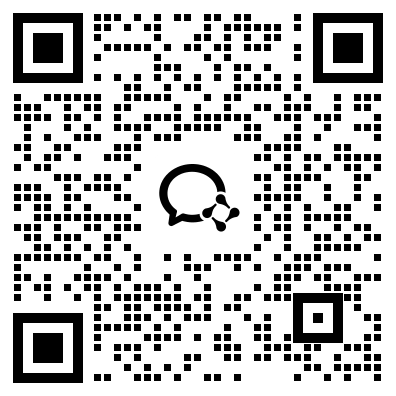
Please use the repository issue templates for bugs and feature requests. For pull requests, include a short summary, linked issue when relevant, screenshots for UI changes, and notes for Electron-specific behavior such as IPC, storage, runtime, or windowing changes.
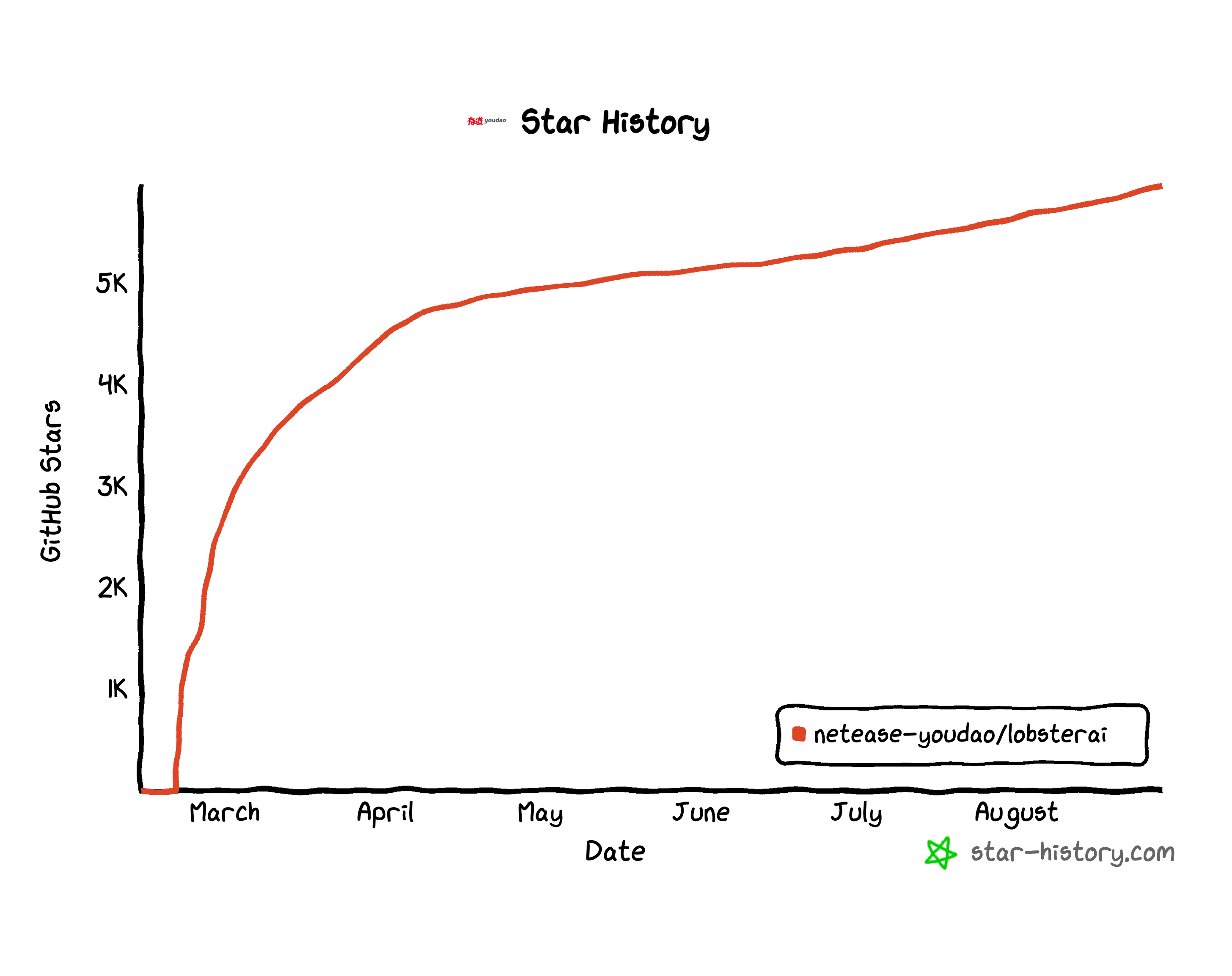
## Star History
[](https://www.star-history.com/?repos=netease-youdao%2Flobsterai&type=date&legend=bottom-right)
## License
[MIT License](LICENSE)
Built and maintained by [NetEase Youdao](https://www.youdao.com/).