# Maket
**Create visual documents with your AI assistant.** Maket gives Claude, Codex, Gemini, and other MCP clients an HTML/CSS canvas with live preview. Compose a one-off design, bind a template to typed rows for mail merge, or attach validated document-owned state so native HTML controls and agent updates keep a living document current. Export finished output to PDF or hand it off to Gmail as a draft.
[](https://www.npmjs.com/package/@ng-galien/maket)
[](https://www.npmjs.com/package/@ng-galien/maket)
[](LICENSE)
[](https://nodejs.org/)
[](https://modelcontextprotocol.io/)
[](https://glama.ai/mcp/servers/ng-galien/maket)
[](https://github.com/ng-galien/maket/actions/workflows/ci.yml)
[](https://github.com/ng-galien/maket/actions/workflows/ci.yml)
[](#contributing)
**[Visit the Maket website →](https://ng-galien.github.io/maket/)**
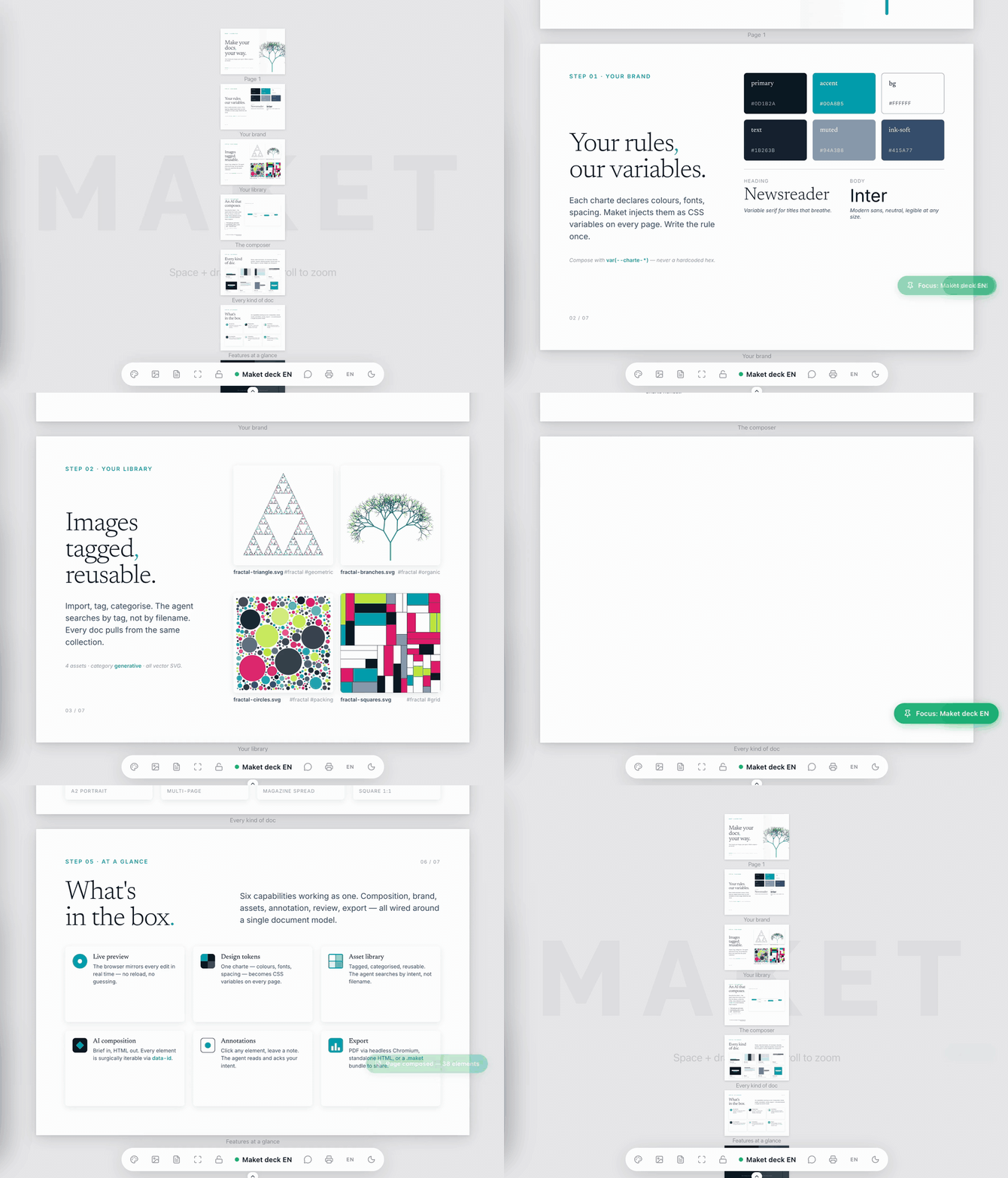
60 seconds · charte → library → data → AI composition → every kind of doc → export.
---
## Install Maket App
Maket App is the default way to run Maket. It includes the interface, server,
runtime, and agent setup — Node.js is not required.
| Platform | Installer |
|---|---|
| **macOS Apple Silicon** | `Maket-macOS-arm64.dmg` |
| **macOS Intel** | `Maket-macOS-x64.dmg` |
| **Windows x64** | `Maket-Windows-x64-Setup.exe` |
| **Linux x64** | `Maket-Linux-x64.deb` or `Maket-Linux-x64.rpm` |
[Download the newest snapshot](https://github.com/ng-galien/maket/actions/workflows/desktop-snapshot.yml)
to test Maket App now. Snapshot installers are unsigned, built from `main`, and
retained for 14 days. The same unsigned installers for macOS and Windows, plus
Linux packages, appear on the
[latest release](https://github.com/ng-galien/maket/releases/latest).
Open the installer, launch **Maket**, then follow the first-run agent setup.
Need a headless server, CI installation, or browser-only deployment? Jump to
[Maket Server via npm](#option-b--maket-server-via-npm-advanced).
## Why Maket
Your AI assistant is good at writing. But design is about space, hierarchy, and rhythm — and that happens in layout, not prose. Maket adds a real canvas, reusable visual resources, and two distinct data models: collections produce repeated variants from ordered rows, while document state keeps one document synchronized with its own validated, revisioned data.
## Features
- **Live preview** — Changes appear in your browser the instant the AI writes them. Use **Annotate** in the detail document toolbar (or connected Reader) to select an element and save feedback for the agent; turn it off to resume navigation.
- **HTML/CSS canvas** — Pages are real HTML sized in mm. No lock-in to a proprietary format.
- **Brand chartes** — Define design tokens (colors, fonts, spacing, shadows) once; Maket enforces them during composition.
- **Image library** — Drop images in, tag them, the AI picks the right one for the brief.
- **Data-driven collections** — Define typed fields with JSON Schema, paste or edit ordered rows, bind a page to placeholders such as `{{ product_name }}`, preview one row or the full series, and render one output page per row.
- **Living documents** — Attach a JSON Schema and state snapshot to one document, render `{{ state.* }}` values, edit supported fields through bound checkbox, text, select, and button controls, and retain immutable revisions for history and restore.
- **PDF export** — Print-ready output via headless Chromium.
- **Gmail drafts** — Compose an email document and hand it off to Gmail as a draft; you review and send yourself.
- **Paper & screen formats** — A2–A8, DESKTOP/TABLET/MOBILE aspect ratios, and AUTO pages with a defined width and content-driven height.
- **Agent skills included** — Three skills (`maket`, `maket-charte`, `maket-review`) that teach the AI assistant how to design, brand, and review documents.
## What it looks like
```
You — fais-moi un flyer A5 pour un concert jazz dimanche soir, ambiance feutrée
AI — maket_doc new doc="Jazz flyer" format=A5 orientation=portrait
maket_charte view name="Smoky Club"
maket_html set doc="Jazz flyer" page=1 context_token=...
→ Live preview opens. Warm amber on deep navy, serif display for
the headline, fine sans for the venue details.
You — (clicks the date on the preview) "rends-la plus grosse"
AI — maket_workspace list_messages → sees your note
maket_html patch doc="Jazz flyer" ops=[...]
→ Date scales up, hierarchy re-balanced.
You — parfait, exporte
AI — maket_pdf doc="Jazz flyer"
→ ~/.maket/exports/jazz-flyer.pdf
```
## Data-driven documents
Collections turn a page into a reusable template for product labels, event badges, personalized flyers, certificates, catalog pages, or any other repeated document. Each collection owns a **JSON Schema** and a set of ordered rows. Bind it to a page, place typed values in the HTML with `{{ field_name }}`, and Maket renders one variant per row.
The Collections workspace and `maket_collection` tool both support schema changes, row insertion/update/delete, paste-oriented tabular editing, and validation feedback. Maket validates the schema, every row, and every placeholder before rendering. In the preview you can keep the raw template visible, inspect one selected row, or display the complete generated series; print and PDF output expand the bound page across all rows.
```text
You — crée une série d'étiquettes produit avec le nom et le prix
AI — maket_doc new doc="Product labels" format=A6 orientation=portrait
maket_collection action=create name=products
schema='{"type":"object","properties":{"product_name":{"type":"string"},"price":{"type":"string"}},"required":["product_name","price"]}'
maket_collection action=add_row name=products
data='{"product_name":"Earl Grey","price":"12 €"}'
maket_collection action=add_row name=products
data='{"product_name":"Sencha","price":"14 €"}'
maket_collection action=bind doc="Product labels" page=1 name=products
maket_html set doc="Product labels" page=1
html='
{{ product_name }}
{{ price }}
'
→ The preview can show the template, either product, or both generated labels.
You — exporte toute la série
AI — maket_pdf doc="Product labels"
→ One PDF page per collection row.
```
## Living documents
Document state is for a single evolving artifact: a checklist, status board, form, or report whose current values belong to that document. `maket_state` initializes a JSON Schema and data snapshot, validates every update, requires the current revision for mutations, and records each accepted change as a complete immutable revision. Updates re-render the existing pages; they do not create mail-merge variants.
A page can use HTML, JSON Forms, or HTML embedding its current JSON Forms template at ``. A hand-authored HTML template uses the supported Mustache subset for display and explicit `data-maket-bind` attributes for editing. A JSON Forms template is set with `maket_page action=set_form`; its optional UI schema controls layout while the document-state JSON Schema supplies fields and choices. Maket renders both formats with native controls through the same state owner. The same current values render passively in snapshots, print, and PDF output.
For sequential questions, keep the subject and answer-history Mustache list in HTML, place exactly one `` inside a static block container outside Mustache sections, and call `maket_page action=set_form` for each question. Changing the form preserves the HTML and document state. The embedded form adapts to its container.
JSON Forms styling is renderer-owned: attach a charte to apply its text, background, surface, border, accent, muted, and font tokens. The UI schema controls structure and presentation options, not arbitrary CSS.
```html
 Agent journal — Field notes from the agents working on Maket.
## License
[MIT](LICENSE) — © Alexandre Boyer