





The ultimate command center for your AI coding assistants on macOS.
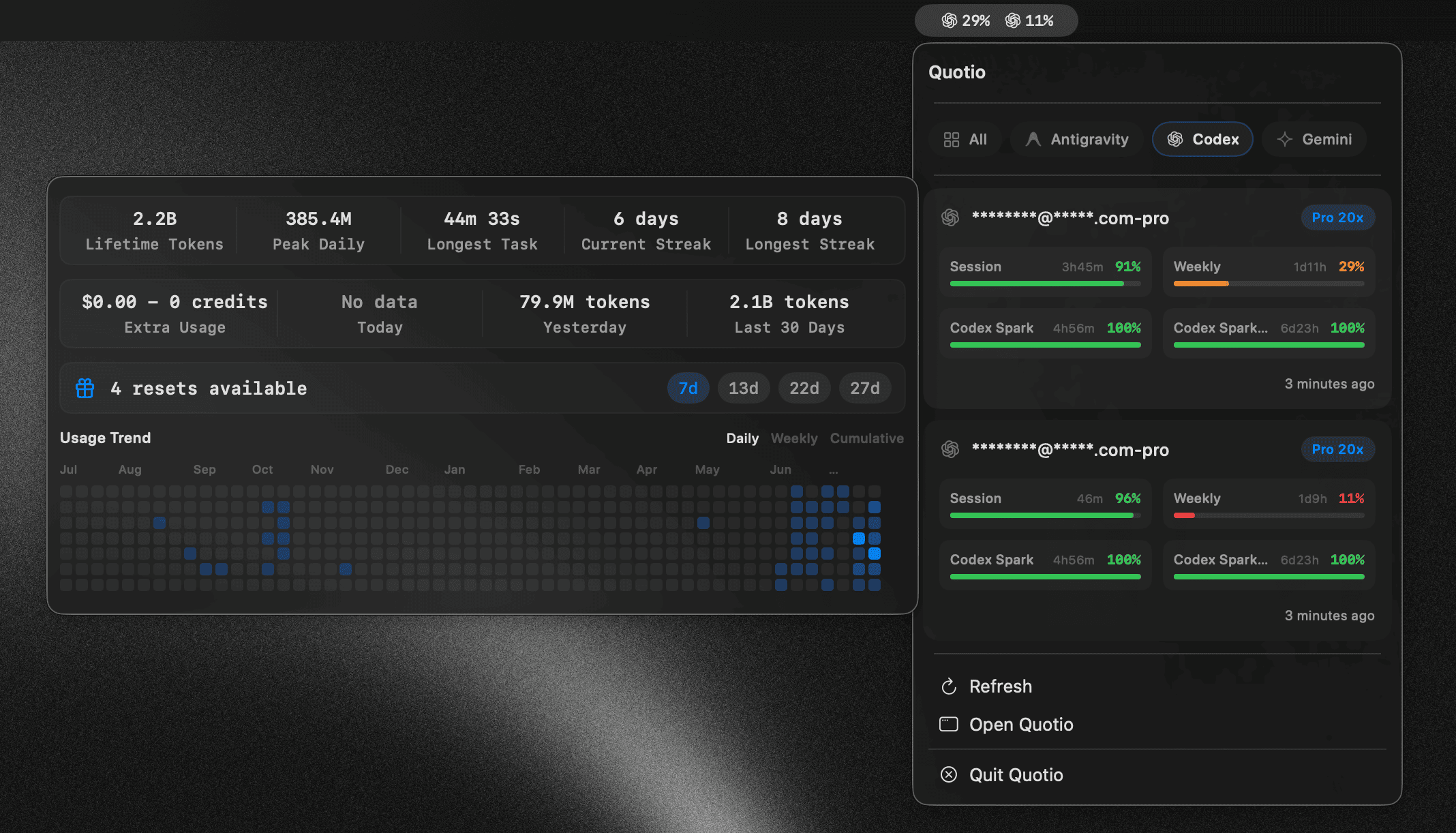
Quotio is a native macOS application for managing **CLIProxyAPI** - a local proxy server that powers your AI coding agents. It helps you manage multiple AI accounts, track quotas, and configure CLI tools in one place. ## ✨ Features - **🔌 Multi-Provider Support**: Connect accounts from Claude, OpenAI Codex, Qwen, Vertex AI, iFlow, Antigravity, Kiro, Trae, and GitHub Copilot via OAuth or API keys. - **📊 Standalone Quota Mode**: View quota and accounts without running the proxy server - perfect for quick checks. - **🚀 One-Click Agent Configuration**: Auto-detect and configure AI coding tools like Claude Code, OpenCode, and more. - **📈 Real-time Dashboard**: Monitor request traffic, token usage, and success rates live. - **📉 Smart Quota Management**: Visual quota tracking per account with automatic failover strategies (Round Robin / Fill First). - **🔑 API Key Management**: Generate and manage API keys for your local proxy. - **🖥️ Menu Bar Integration**: Quick access to server status, quota overview, and custom provider icons from your menu bar. - **🔔 Notifications**: Alerts for low quotas, account cooling periods, or service issues. - **🔄 Auto-Update**: Built-in Sparkle updater for seamless updates. - **🌍 Multilingual**: English, Vietnamese, and Simplified Chinese support. ## 🤖 Supported Ecosystem ### AI Providers | Provider | Auth Method | |----------|-------------| | Anthropic Claude | OAuth | | OpenAI Codex | OAuth | | Qwen Code | OAuth | | Vertex AI | Service Account JSON | | iFlow | OAuth | | Antigravity | OAuth | | Kiro | OAuth | | GitHub Copilot | OAuth | ### IDE Quota Tracking (Monitor Only) | IDE | Description | |-----|-------------| | Cursor | Auto-detected when installed and logged in | | Trae | Auto-detected when installed and logged in | > **Note**: These IDEs are only used for quota usage monitoring. They cannot be used as providers for the proxy. ### Compatible CLI Agents Quotio can automatically configure these tools to use your centralized proxy: - Claude Code - Codex CLI - Amp CLI - OpenCode - Factory Droid ## 🚀 Installation ### Requirements - macOS 14.0 (Sonoma) or later - Internet connection for OAuth authentication ### Homebrew (Recommended) ```bash brew tap nguyenphutrong/tap brew install --cask quotio ``` ### Download Download the latest `.dmg` from the [Releases](https://github.com/nguyenphutrong/quotio/releases) page. > ⚠️ **Note**: The app is not signed with an Apple Developer certificate yet. If macOS blocks the app, run: > ```bash > xattr -cr /Applications/Quotio.app > ``` ### Building from Source 1. **Clone the repository:** ```bash git clone https://github.com/nguyenphutrong/quotio.git cd Quotio ``` 2. **Open in Xcode:** ```bash open Quotio.xcodeproj ``` 3. **Build and Run:** - Select the "Quotio" scheme - Press `Cmd + R` to build and run > The app will automatically download the `CLIProxyAPI` binary on first launch. ## 📖 Usage ### 1. Start the Server Launch Quotio and click **Start** on the dashboard to initialize the local proxy server. ### 2. Connect Accounts Go to **Providers** tab → Click on a provider → Authenticate via OAuth or import credentials. ### 3. Configure Agents Go to **Agents** tab → Select an installed agent → Click **Configure** → Choose Automatic or Manual mode. ### 4. Monitor Usage - **Dashboard**: Overall health and traffic - **Quota**: Per-account usage breakdown - **Logs**: Raw request/response logs for debugging ## ⚙️ Settings - **Port**: Change the proxy listening port - **Routing Strategy**: Round Robin or Fill First - **Auto-start**: Launch proxy automatically when Quotio opens - **Notifications**: Toggle alerts for various events ## 📸 Screenshots ### Dashboard


 ## ⭐ Star History