# audiobookshelf-mcp
[](https://github.com/ni-c/audiobookshelf-mcp/actions/workflows/ci.yml)
[](https://scorecard.dev/viewer/?uri=github.com/ni-c/audiobookshelf-mcp)
 [](https://glama.ai/mcp/servers/ni-c/audiobookshelf-mcp)
[](https://glama.ai/mcp/servers/ni-c/audiobookshelf-mcp)
[](https://www.npmjs.com/package/audiobookshelf-mcp)
[](https://github.com/ni-c/audiobookshelf-mcp/pkgs/container/audiobookshelf-mcp)
[](https://mcp-hub.ni-c.de)
[](https://audiobookshelf-mcp.ni-c.de)
[](https://github.com/sponsors/ni-c)
A [Model Context Protocol](https://modelcontextprotocol.io) (MCP) server for
[Audiobookshelf](https://www.audiobookshelf.org/), the self-hosted audiobook and
podcast server.
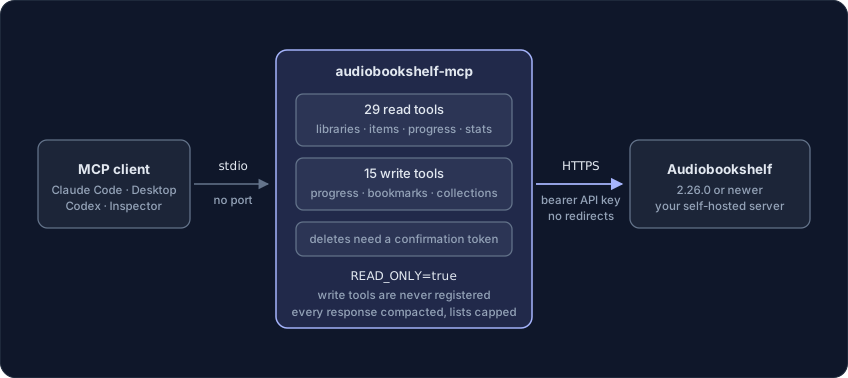
Lets MCP clients like Claude Code, Claude Desktop or Codex browse your libraries,
answer questions about what you own and what you have listened to, and — unless you
switch it off — keep your listening progress, bookmarks, collections and playlists up
to date: 44 tools, 29 read and 15 write.
Forty-four tools is the ceiling, not the floor: `AUDIOBOOKSHELF_ALLOW_TOOLS=essential`
registers a curated eight instead, and a model picks the right tool far more
reliably from eight than from forty-four — see
[choosing which tools load](#choosing-which-tools-load).
 ## What makes it different
**Every response is a projection, not the raw object.** An expanded library item
carries every audio file, track and chapter with full ffprobe metadata. The media
tools answer with a compact shape instead, and `detail="full"` is there for when
the raw object really is what you want.
**Twenty-nine of the forty-four tools only read.** `AUDIOBOOKSHELF_READ_ONLY=true`
registers those and nothing else, so a write tool is absent from `tools/list`
rather than refused when it is called.
**The six tools that take something out ask a person first**, through MCP
elicitation — a dialog the model cannot answer on its behalf, falling back to a
single-use token bound to the exact targets where the client cannot show one.
## Requirements
- Node.js 22 or newer
- Audiobookshelf **2.26.0 or newer** — earlier versions have no API keys
- An Audiobookshelf API key
## Getting an API key
API keys are managed by an admin under **Settings → Users → API Keys**. A key acts
on behalf of exactly one Audiobookshelf user and inherits that user's permissions,
so a key issued for a normal account cannot see libraries that account cannot see,
and cannot delete anything unless that account may delete. The key is shown only
once, at creation.
## Configuration
| Variable | Required | Description |
| ----------------------------- | -------- | --------------------------------------------------------------------------------------- |
| `AUDIOBOOKSHELF_URL` | yes | Base URL of the instance, e.g. `https://abs.example.com`. Must not contain credentials. |
| `AUDIOBOOKSHELF_API_KEY` | yes | API key, sent as `Authorization: Bearer …` |
| `AUDIOBOOKSHELF_READ_ONLY` | no | `true` registers only the 29 read tools |
| `AUDIOBOOKSHELF_INSECURE_TLS` | no | `true` accepts self-signed certificates — scoped to this connection, not process-wide |
| `AUDIOBOOKSHELF_ALLOW_TOOLS` | no | Comma-separated tool names, `list_*` prefixes, or `essential` for a curated preset |
| `AUDIOBOOKSHELF_DENY_TOOLS` | no | Same syntax; removed from whatever `AUDIOBOOKSHELF_ALLOW_TOOLS` left |
| `ELICITATION` | no | `false` replaces the approval dialog with the two-call token. **Not prefixed** |
The server starts without configuration: it completes the MCP handshake and lists
its tools, and every call then fails with the setup instructions. That is
deliberate, so registries and sandbox inspectors can introspect it.
### Choosing which tools load
`AUDIOBOOKSHELF_ALLOW_TOOLS` and `AUDIOBOOKSHELF_DENY_TOOLS` take comma-separated tool names;
a trailing `*` matches a whole family. `essential` is a curated preset of
eight: `list_libraries`, `search_library`, `list_library_items`, `get_library_item`, `get_item_chapters`, `list_items_in_progress`, `get_media_progress`, `set_media_progress`.
```sh
AUDIOBOOKSHELF_ALLOW_TOOLS=essential
AUDIOBOOKSHELF_ALLOW_TOOLS=search_library,get_library_item,set_media_progress
AUDIOBOOKSHELF_DENY_TOOLS=delete_*
```
An entry that matches no tool aborts startup and names it, so a typo cannot
silently hide a tool — an absent tool is not something anyone traces back to an
environment variable. A filtered tool is never registered, so it is absent from
`tools/list` and unknown to `tools/call` alike, exactly like a write tool under
`AUDIOBOOKSHELF_READ_ONLY`.
If you run several of these servers at once, [mcp-hub](https://mcp-hub.ni-c.de)
is the other answer — its `/hub` endpoint replaces every server's tools with six
meta-tools.
## Installation
### Claude Code
```sh
claude mcp add audiobookshelf \
-e AUDIOBOOKSHELF_URL=https://abs.example.com \
-e AUDIOBOOKSHELF_API_KEY=… \
-- npx -y audiobookshelf-mcp
```
### Claude Desktop
`claude_desktop_config.json`:
```json
{
"mcpServers": {
"audiobookshelf": {
"command": "npx",
"args": ["-y", "audiobookshelf-mcp"],
"env": {
"AUDIOBOOKSHELF_URL": "https://abs.example.com",
"AUDIOBOOKSHELF_API_KEY": "…"
}
}
}
}
```
### Codex
`~/.codex/config.toml`:
```toml
[mcp_servers.audiobookshelf]
command = "npx"
args = ["-y", "audiobookshelf-mcp"]
env = { AUDIOBOOKSHELF_URL = "https://abs.example.com", AUDIOBOOKSHELF_API_KEY = "…" }
```
### Docker
Multi-arch, with SBOM and build provenance:
```sh
docker run -i --rm \
-e AUDIOBOOKSHELF_URL=https://abs.example.com \
-e AUDIOBOOKSHELF_API_KEY=… \
ghcr.io/ni-c/audiobookshelf-mcp
```
`-i` is required — the protocol runs over stdin and stdout. There is no port to
publish. More client recipes, including how to keep the key off the `docker run`
command line, are in the
[client guide](https://audiobookshelf-mcp.ni-c.de/guide/clients).
### Through mcp-hub
A client that cannot spawn a local process — ChatGPT connectors, Claude on the web,
Cursor, LibreChat — reaches audiobookshelf-mcp through [mcp-hub](https://mcp-hub.ni-c.de): one
container serves many stdio MCP servers over Streamable HTTP, with an OAuth 2.1 login
behind a single password and long-lived tokens for the clients that cannot do OAuth. Its
`/hub` endpoint puts every server behind six meta-tools, so one connector reaches all of
them without N×tool schemas in the model's context, and it speaks both protocol revisions
— a question this server asks travels through it to the person at the far end.
Its `/config/mcp.json` uses Claude Code's format, so the entry is the one you already
have:
```json
{
"mcpServers": {
"audiobookshelf": {
"command": "npx",
"args": ["-y", "audiobookshelf-mcp"],
"env": { "AUDIOBOOKSHELF_ALLOW_TOOLS": "essential" },
"denyTools": ["delete_*"]
}
}
}
```
`allowTools` and `denyTools` there are the hub's **own** per-server filter, which is not
the same thing as `*_ALLOW_TOOLS` in `env` — the difference, and the mistake it invites,
are in the [client guide](https://audiobookshelf-mcp.ni-c.de/guide/clients#through-mcp-hub).
## Tools
Every tool declares an `outputSchema` and answers with `structuredContent`
alongside the text block, so a client can use the result without parsing prose.
Seven tools that answered with a sentence — _"Collection col_1 deleted."_ — now
answer with the fields as well.
The tools that report library metadata carry `untrusted: true` and
`source: "audiobookshelf"` as fields: book descriptions pulled from metadata
providers, podcast feed summaries and episode titles are all written by someone
else, and so are the bookmark titles and selected tags of an account and the
titles of a library's longest and largest items. The rest are without it — an
id this server was given, a position it was asked to store, the version string
of the instance, and the library names and folder paths the operator typed.
The documents are described as open objects with the top-level keys this server
builds. `detail: "full"` hands the API record back whole, so the same tool
answers with far more keys than it names — and the SDK validates each result
against its schema before it goes out, which is exactly why a strict shape would
be wrong here.
`get_personalized_shelves` answers `{items: [...]}` rather than the bare array
the API sends: a schema whose root is an array is served to a 2025-era client
rewritten as `{result: …}`, so it would otherwise answer in two shapes.
### Reading
| Tool | What it does |
| ------------------------------------- | --------------------------------------------------------------------------------------------------- |
| `list_libraries` | The accessible libraries with id, name and media type — the entry point |
| `get_library` | One library with its folders and settings |
| `get_library_stats` | Item, author and genre counts, total duration and size |
| `get_library_filter_data` | The filterable values of a library: authors, genres, tags, series, narrators, languages, publishers |
| `list_library_items` | Items of a library, paginated, sortable, filterable |
| `search_library` | Full-text search across books, podcasts, series, authors, narrators and tags |
| `get_personalized_shelves` | The home screen shelves: Continue Listening, Recently Added, … |
| `list_series` / `get_series` | Series with book count and total duration |
| `list_authors` / `get_author` | Authors, optionally with their items |
| `list_tags` / `list_genres` | All tags / genres used on the server |
| `get_library_item` | One book or podcast with metadata, tags and your progress |
| `get_item_chapters` | The chapter list of a book, separate because it can be long |
| `get_podcast_episode` | One episode with publication date, duration and description |
| `list_recent_episodes` | Newest episodes of a podcast library |
| `get_me` | The user the API key acts for, with permissions and libraries |
| `list_items_in_progress` | Started but unfinished items across all libraries |
| `get_media_progress` | Position, percentage and finished state for one item |
| `get_listening_stats` | Total time, time per day and per weekday, most listened items |
| `get_year_stats` | The "year in review" figures for one calendar year |
| `list_listening_sessions` | Playback sessions with device, position and time listened |
| `list_bookmarks` | Bookmarks, all of them or those of one item |
| `list_collections` / `get_collection` | Collections — shared, ordered groups of books |
| `list_playlists` / `get_playlist` | Playlists — private per user, books or episodes |
| `get_server_status` | Version and initialization state of the server |
### Writing
| Tool | What it does |
| ------------------------------------------------------------------ | ----------------------------------------------------------------------- |
| `set_media_progress` | Set position, mark finished or unfinished, hide from Continue Listening |
| `delete_media_progress` 👤 | Delete a progress record — the listening history of that item |
| `create_bookmark` / `update_bookmark` / `delete_bookmark` 👤 | Named positions in a book |
| `create_collection` / `update_collection` / `delete_collection` 👤 | Collections |
| `add_books_to_collection` / `remove_books_from_collection` 👤 | Collection membership |
| `create_playlist` / `update_playlist` / `delete_playlist` 👤 | Playlists |
| `add_items_to_playlist` / `remove_items_from_playlist` 👤 | Playlist membership |
👤 asks a person through MCP elicitation · falls back to a two-call
`confirm_token` where the client cannot show a dialog.
### Response size
Audiobookshelf returns very large objects — an expanded library item carries every
audio file, track and chapter with full ffprobe metadata. Every tool that returns
media therefore answers with a compact projection by default and accepts
`detail: "full"` for the raw object.
Three bounds, because one is not enough:
- **A response ceiling of 5 MB.** `content-length` is checked before a byte is
read and a chunked body is counted while reading, so an oversized answer is
refused rather than parsed.
- **A result ceiling of 100 000 bytes**, applied in `jsonResult` — so it covers
`detail: "full"` too. Whole entries are dropped, never characters: a truncated
document is not a smaller answer, it is an unparseable one. The result then
carries a `truncated` block naming what to call instead.
- **A cap on embedded members.** A compact collection or playlist embeds the
first 25 of its books or entries and reports the real count; `get_collection`
and `get_playlist` return the whole membership for one of them.
`list_library_items` pages properly, with `limit` and `page`. Seven listing tools
have neither — `list_libraries`, `list_authors`, `list_tags`, `list_genres`,
`list_collections`, `list_playlists` and `list_bookmarks` — because the
Audiobookshelf routes behind them return everything in one answer and take no
paging parameters. `library_id` narrows the two collection routes; the rest are
bounded by the ceilings above.
### Filtering
`list_library_items` takes `filter_group` plus `filter_value` and builds the
base64-encoded `filter` parameter the API expects. The valid values come from
`get_library_filter_data`. A valued group without a value is rejected, because
Audiobookshelf would silently answer with the _unfiltered_ library instead.
```
filter_group="authors", filter_value=""
filter_group="progress", filter_value="finished" | "in-progress" | "not-started" | "not-finished"
filter_group="issues" (standalone, no value)
```
## Not exposed, on purpose
**No playback.** Pausing, seeking and playing are a session state machine that
belongs in a real client. `set_media_progress` covers "mark this finished" and
"jump me to chapter 12"; your phone does the playing.
**No administration, even with an admin key.** There is no tool for user
management, server settings, backups, cache purging, filesystem browsing, library
or item deletion, metadata rewriting or file uploads. Those endpoints exist in
Audiobookshelf; they are simply not wired up here, because the blast radius of a
confused or manipulated model is bounded by the tool list.
## Safety
- **Read-only mode.** `AUDIOBOOKSHELF_READ_ONLY=true` does not register the write
tools at all, rather than refusing them at call time.
- **A person is asked, not just told.** The eight tools that can take something
out — the three deletes, `delete_bookmark`, `remove_books_from_collection`,
`remove_items_from_playlist`, and `update_collection` / `update_playlist` when
they are asked to reorder, which replaces an order nobody can reconstruct —
raise a real dialog through MCP elicitation,
which the model cannot answer on its behalf. A plain `confirm: true` flag could
be set by the model on the first try, or be talked into it by text coming out
of the library.
Where the client cannot show a dialog they fall back to a single-use token
bound to the exact targets and expiring after five minutes. That fallback
proves the call was made twice with the same arguments and nothing more, and
the text says so rather than implying somebody approved. `ELICITATION=false`
takes it deliberately; it never removes the guard. See
[Asking a person](https://audiobookshelf-mcp.ni-c.de/guide/approval).
- **Confirmation prompts never quote API content.** Collection and playlist names
are user-supplied text and are read by a model, so the prompts name ids and
counts only.
- **A 200 that is not JSON is an error.** Returning the body as a string made an
SSO portal or a captive proxy in front of the instance look like an empty
library rather than like a failure.
- **Untrusted content is marked.** Book descriptions come from metadata providers
and podcast summaries come from RSS feeds — third parties write them. Every
result carrying such content is labelled as data, not instructions.
- **The API key is deleted from the environment** once the configuration has been
read, so it is not visible to child processes or in `/proc//environ`.
- **No redirects are followed** (`redirect: 'error'`), so the `Authorization`
header cannot be replayed against another host, and every request has a 15
second timeout.
- **Ids are validated** before they enter a URL path.
- **Upstream error bodies are sanitized**: HTML error pages are dropped, anything
else is truncated to 2000 characters.
- **Progress updates send whitelisted fields only.** The Audiobookshelf endpoint
applies its payload to the progress record wholesale.
- **What this server cannot do**, by design: no user management, no server
settings, no backups, no cache purging, no filesystem browsing, no library or
item deletion, no metadata rewriting, no file uploads.
One caveat that comes from Audiobookshelf itself: removing the _last_ entry from a
playlist deletes the playlist. `remove_items_from_playlist` says so in its result
when it happens.
## Documentation
The full guide, tool reference and security notes live at
**[audiobookshelf-mcp.ni-c.de](https://audiobookshelf-mcp.ni-c.de)** (source in [`docs/`](docs/)).
## Development
```sh
npm install
npm run lint # oxlint + prettier --check
npm run build # tsc
npm test # vitest
npm run test:coverage # with thresholds
npm run docs:tools # regenerate docs/reference/tools.md from the registered tools
```
The table above is hand-curated; the complete
[tool reference](https://audiobookshelf-mcp.ni-c.de/reference/tools) with every
parameter is generated from the code, and CI fails if the committed copy is stale.
See [CONTRIBUTING.md](CONTRIBUTING.md) for a throwaway Audiobookshelf you can
safely write to — the write tools change progress and bookmarks on the API key's
own user, so don't develop against a library you care about.
The tool definitions were derived from the Audiobookshelf server source
(`server/routers/ApiRouter.js` and the controllers) rather than from
[api.audiobookshelf.org](https://api.audiobookshelf.org/), which is out of date in
several places — the filter data endpoint is `/filterdata` not `/filter`, progress
updates are `PATCH /api/me/progress/:id` not `POST /api/me/progress`, and bookmarks
live under `/api/me/item/:id/bookmark`.
## Releasing
Tag-driven, no manual publish step:
1. Move the `[Unreleased]` entries into a new `## [x.y.z] - YYYY-MM-DD` section in
`CHANGELOG.md` and bump `package.json`.
2. `npm run lint && npm run build && npm run test:coverage`.
3. Commit, then a **signed annotated** tag: `git tag -s vx.y.z -m "vx.y.z"`.
4. `git push origin main vx.y.z`.
`release.yml` then runs the tests, publishes to npm with provenance via Trusted
Publishing (no token secret involved), creates the GitHub release from the
CHANGELOG section, and publishes to the
[MCP registry](https://registry.modelcontextprotocol.io) as
`io.github.ni-c/audiobookshelf-mcp`. `ci.yml` pushes the multi-arch image to GHCR
on the same tag.
If the registry step fails, fix it on `main` and dispatch the
`Publish to MCP Registry` workflow — do **not** re-run the tag job, which would
check out the old tree.
## Contributing
Issues, discussions and pull requests are welcome — see
[CONTRIBUTING.md](CONTRIBUTING.md). For vulnerabilities please use
[private reporting](https://github.com/ni-c/audiobookshelf-mcp/security/advisories/new)
rather than a public issue; the policy is in [SECURITY.md](SECURITY.md).
## License
[MIT](LICENSE) © Willi Thiel
## What makes it different
**Every response is a projection, not the raw object.** An expanded library item
carries every audio file, track and chapter with full ffprobe metadata. The media
tools answer with a compact shape instead, and `detail="full"` is there for when
the raw object really is what you want.
**Twenty-nine of the forty-four tools only read.** `AUDIOBOOKSHELF_READ_ONLY=true`
registers those and nothing else, so a write tool is absent from `tools/list`
rather than refused when it is called.
**The six tools that take something out ask a person first**, through MCP
elicitation — a dialog the model cannot answer on its behalf, falling back to a
single-use token bound to the exact targets where the client cannot show one.
## Requirements
- Node.js 22 or newer
- Audiobookshelf **2.26.0 or newer** — earlier versions have no API keys
- An Audiobookshelf API key
## Getting an API key
API keys are managed by an admin under **Settings → Users → API Keys**. A key acts
on behalf of exactly one Audiobookshelf user and inherits that user's permissions,
so a key issued for a normal account cannot see libraries that account cannot see,
and cannot delete anything unless that account may delete. The key is shown only
once, at creation.
## Configuration
| Variable | Required | Description |
| ----------------------------- | -------- | --------------------------------------------------------------------------------------- |
| `AUDIOBOOKSHELF_URL` | yes | Base URL of the instance, e.g. `https://abs.example.com`. Must not contain credentials. |
| `AUDIOBOOKSHELF_API_KEY` | yes | API key, sent as `Authorization: Bearer …` |
| `AUDIOBOOKSHELF_READ_ONLY` | no | `true` registers only the 29 read tools |
| `AUDIOBOOKSHELF_INSECURE_TLS` | no | `true` accepts self-signed certificates — scoped to this connection, not process-wide |
| `AUDIOBOOKSHELF_ALLOW_TOOLS` | no | Comma-separated tool names, `list_*` prefixes, or `essential` for a curated preset |
| `AUDIOBOOKSHELF_DENY_TOOLS` | no | Same syntax; removed from whatever `AUDIOBOOKSHELF_ALLOW_TOOLS` left |
| `ELICITATION` | no | `false` replaces the approval dialog with the two-call token. **Not prefixed** |
The server starts without configuration: it completes the MCP handshake and lists
its tools, and every call then fails with the setup instructions. That is
deliberate, so registries and sandbox inspectors can introspect it.
### Choosing which tools load
`AUDIOBOOKSHELF_ALLOW_TOOLS` and `AUDIOBOOKSHELF_DENY_TOOLS` take comma-separated tool names;
a trailing `*` matches a whole family. `essential` is a curated preset of
eight: `list_libraries`, `search_library`, `list_library_items`, `get_library_item`, `get_item_chapters`, `list_items_in_progress`, `get_media_progress`, `set_media_progress`.
```sh
AUDIOBOOKSHELF_ALLOW_TOOLS=essential
AUDIOBOOKSHELF_ALLOW_TOOLS=search_library,get_library_item,set_media_progress
AUDIOBOOKSHELF_DENY_TOOLS=delete_*
```
An entry that matches no tool aborts startup and names it, so a typo cannot
silently hide a tool — an absent tool is not something anyone traces back to an
environment variable. A filtered tool is never registered, so it is absent from
`tools/list` and unknown to `tools/call` alike, exactly like a write tool under
`AUDIOBOOKSHELF_READ_ONLY`.
If you run several of these servers at once, [mcp-hub](https://mcp-hub.ni-c.de)
is the other answer — its `/hub` endpoint replaces every server's tools with six
meta-tools.
## Installation
### Claude Code
```sh
claude mcp add audiobookshelf \
-e AUDIOBOOKSHELF_URL=https://abs.example.com \
-e AUDIOBOOKSHELF_API_KEY=… \
-- npx -y audiobookshelf-mcp
```
### Claude Desktop
`claude_desktop_config.json`:
```json
{
"mcpServers": {
"audiobookshelf": {
"command": "npx",
"args": ["-y", "audiobookshelf-mcp"],
"env": {
"AUDIOBOOKSHELF_URL": "https://abs.example.com",
"AUDIOBOOKSHELF_API_KEY": "…"
}
}
}
}
```
### Codex
`~/.codex/config.toml`:
```toml
[mcp_servers.audiobookshelf]
command = "npx"
args = ["-y", "audiobookshelf-mcp"]
env = { AUDIOBOOKSHELF_URL = "https://abs.example.com", AUDIOBOOKSHELF_API_KEY = "…" }
```
### Docker
Multi-arch, with SBOM and build provenance:
```sh
docker run -i --rm \
-e AUDIOBOOKSHELF_URL=https://abs.example.com \
-e AUDIOBOOKSHELF_API_KEY=… \
ghcr.io/ni-c/audiobookshelf-mcp
```
`-i` is required — the protocol runs over stdin and stdout. There is no port to
publish. More client recipes, including how to keep the key off the `docker run`
command line, are in the
[client guide](https://audiobookshelf-mcp.ni-c.de/guide/clients).
### Through mcp-hub
A client that cannot spawn a local process — ChatGPT connectors, Claude on the web,
Cursor, LibreChat — reaches audiobookshelf-mcp through [mcp-hub](https://mcp-hub.ni-c.de): one
container serves many stdio MCP servers over Streamable HTTP, with an OAuth 2.1 login
behind a single password and long-lived tokens for the clients that cannot do OAuth. Its
`/hub` endpoint puts every server behind six meta-tools, so one connector reaches all of
them without N×tool schemas in the model's context, and it speaks both protocol revisions
— a question this server asks travels through it to the person at the far end.
Its `/config/mcp.json` uses Claude Code's format, so the entry is the one you already
have:
```json
{
"mcpServers": {
"audiobookshelf": {
"command": "npx",
"args": ["-y", "audiobookshelf-mcp"],
"env": { "AUDIOBOOKSHELF_ALLOW_TOOLS": "essential" },
"denyTools": ["delete_*"]
}
}
}
```
`allowTools` and `denyTools` there are the hub's **own** per-server filter, which is not
the same thing as `*_ALLOW_TOOLS` in `env` — the difference, and the mistake it invites,
are in the [client guide](https://audiobookshelf-mcp.ni-c.de/guide/clients#through-mcp-hub).
## Tools
Every tool declares an `outputSchema` and answers with `structuredContent`
alongside the text block, so a client can use the result without parsing prose.
Seven tools that answered with a sentence — _"Collection col_1 deleted."_ — now
answer with the fields as well.
The tools that report library metadata carry `untrusted: true` and
`source: "audiobookshelf"` as fields: book descriptions pulled from metadata
providers, podcast feed summaries and episode titles are all written by someone
else, and so are the bookmark titles and selected tags of an account and the
titles of a library's longest and largest items. The rest are without it — an
id this server was given, a position it was asked to store, the version string
of the instance, and the library names and folder paths the operator typed.
The documents are described as open objects with the top-level keys this server
builds. `detail: "full"` hands the API record back whole, so the same tool
answers with far more keys than it names — and the SDK validates each result
against its schema before it goes out, which is exactly why a strict shape would
be wrong here.
`get_personalized_shelves` answers `{items: [...]}` rather than the bare array
the API sends: a schema whose root is an array is served to a 2025-era client
rewritten as `{result: …}`, so it would otherwise answer in two shapes.
### Reading
| Tool | What it does |
| ------------------------------------- | --------------------------------------------------------------------------------------------------- |
| `list_libraries` | The accessible libraries with id, name and media type — the entry point |
| `get_library` | One library with its folders and settings |
| `get_library_stats` | Item, author and genre counts, total duration and size |
| `get_library_filter_data` | The filterable values of a library: authors, genres, tags, series, narrators, languages, publishers |
| `list_library_items` | Items of a library, paginated, sortable, filterable |
| `search_library` | Full-text search across books, podcasts, series, authors, narrators and tags |
| `get_personalized_shelves` | The home screen shelves: Continue Listening, Recently Added, … |
| `list_series` / `get_series` | Series with book count and total duration |
| `list_authors` / `get_author` | Authors, optionally with their items |
| `list_tags` / `list_genres` | All tags / genres used on the server |
| `get_library_item` | One book or podcast with metadata, tags and your progress |
| `get_item_chapters` | The chapter list of a book, separate because it can be long |
| `get_podcast_episode` | One episode with publication date, duration and description |
| `list_recent_episodes` | Newest episodes of a podcast library |
| `get_me` | The user the API key acts for, with permissions and libraries |
| `list_items_in_progress` | Started but unfinished items across all libraries |
| `get_media_progress` | Position, percentage and finished state for one item |
| `get_listening_stats` | Total time, time per day and per weekday, most listened items |
| `get_year_stats` | The "year in review" figures for one calendar year |
| `list_listening_sessions` | Playback sessions with device, position and time listened |
| `list_bookmarks` | Bookmarks, all of them or those of one item |
| `list_collections` / `get_collection` | Collections — shared, ordered groups of books |
| `list_playlists` / `get_playlist` | Playlists — private per user, books or episodes |
| `get_server_status` | Version and initialization state of the server |
### Writing
| Tool | What it does |
| ------------------------------------------------------------------ | ----------------------------------------------------------------------- |
| `set_media_progress` | Set position, mark finished or unfinished, hide from Continue Listening |
| `delete_media_progress` 👤 | Delete a progress record — the listening history of that item |
| `create_bookmark` / `update_bookmark` / `delete_bookmark` 👤 | Named positions in a book |
| `create_collection` / `update_collection` / `delete_collection` 👤 | Collections |
| `add_books_to_collection` / `remove_books_from_collection` 👤 | Collection membership |
| `create_playlist` / `update_playlist` / `delete_playlist` 👤 | Playlists |
| `add_items_to_playlist` / `remove_items_from_playlist` 👤 | Playlist membership |
👤 asks a person through MCP elicitation · falls back to a two-call
`confirm_token` where the client cannot show a dialog.
### Response size
Audiobookshelf returns very large objects — an expanded library item carries every
audio file, track and chapter with full ffprobe metadata. Every tool that returns
media therefore answers with a compact projection by default and accepts
`detail: "full"` for the raw object.
Three bounds, because one is not enough:
- **A response ceiling of 5 MB.** `content-length` is checked before a byte is
read and a chunked body is counted while reading, so an oversized answer is
refused rather than parsed.
- **A result ceiling of 100 000 bytes**, applied in `jsonResult` — so it covers
`detail: "full"` too. Whole entries are dropped, never characters: a truncated
document is not a smaller answer, it is an unparseable one. The result then
carries a `truncated` block naming what to call instead.
- **A cap on embedded members.** A compact collection or playlist embeds the
first 25 of its books or entries and reports the real count; `get_collection`
and `get_playlist` return the whole membership for one of them.
`list_library_items` pages properly, with `limit` and `page`. Seven listing tools
have neither — `list_libraries`, `list_authors`, `list_tags`, `list_genres`,
`list_collections`, `list_playlists` and `list_bookmarks` — because the
Audiobookshelf routes behind them return everything in one answer and take no
paging parameters. `library_id` narrows the two collection routes; the rest are
bounded by the ceilings above.
### Filtering
`list_library_items` takes `filter_group` plus `filter_value` and builds the
base64-encoded `filter` parameter the API expects. The valid values come from
`get_library_filter_data`. A valued group without a value is rejected, because
Audiobookshelf would silently answer with the _unfiltered_ library instead.
```
filter_group="authors", filter_value=""
filter_group="progress", filter_value="finished" | "in-progress" | "not-started" | "not-finished"
filter_group="issues" (standalone, no value)
```
## Not exposed, on purpose
**No playback.** Pausing, seeking and playing are a session state machine that
belongs in a real client. `set_media_progress` covers "mark this finished" and
"jump me to chapter 12"; your phone does the playing.
**No administration, even with an admin key.** There is no tool for user
management, server settings, backups, cache purging, filesystem browsing, library
or item deletion, metadata rewriting or file uploads. Those endpoints exist in
Audiobookshelf; they are simply not wired up here, because the blast radius of a
confused or manipulated model is bounded by the tool list.
## Safety
- **Read-only mode.** `AUDIOBOOKSHELF_READ_ONLY=true` does not register the write
tools at all, rather than refusing them at call time.
- **A person is asked, not just told.** The eight tools that can take something
out — the three deletes, `delete_bookmark`, `remove_books_from_collection`,
`remove_items_from_playlist`, and `update_collection` / `update_playlist` when
they are asked to reorder, which replaces an order nobody can reconstruct —
raise a real dialog through MCP elicitation,
which the model cannot answer on its behalf. A plain `confirm: true` flag could
be set by the model on the first try, or be talked into it by text coming out
of the library.
Where the client cannot show a dialog they fall back to a single-use token
bound to the exact targets and expiring after five minutes. That fallback
proves the call was made twice with the same arguments and nothing more, and
the text says so rather than implying somebody approved. `ELICITATION=false`
takes it deliberately; it never removes the guard. See
[Asking a person](https://audiobookshelf-mcp.ni-c.de/guide/approval).
- **Confirmation prompts never quote API content.** Collection and playlist names
are user-supplied text and are read by a model, so the prompts name ids and
counts only.
- **A 200 that is not JSON is an error.** Returning the body as a string made an
SSO portal or a captive proxy in front of the instance look like an empty
library rather than like a failure.
- **Untrusted content is marked.** Book descriptions come from metadata providers
and podcast summaries come from RSS feeds — third parties write them. Every
result carrying such content is labelled as data, not instructions.
- **The API key is deleted from the environment** once the configuration has been
read, so it is not visible to child processes or in `/proc//environ`.
- **No redirects are followed** (`redirect: 'error'`), so the `Authorization`
header cannot be replayed against another host, and every request has a 15
second timeout.
- **Ids are validated** before they enter a URL path.
- **Upstream error bodies are sanitized**: HTML error pages are dropped, anything
else is truncated to 2000 characters.
- **Progress updates send whitelisted fields only.** The Audiobookshelf endpoint
applies its payload to the progress record wholesale.
- **What this server cannot do**, by design: no user management, no server
settings, no backups, no cache purging, no filesystem browsing, no library or
item deletion, no metadata rewriting, no file uploads.
One caveat that comes from Audiobookshelf itself: removing the _last_ entry from a
playlist deletes the playlist. `remove_items_from_playlist` says so in its result
when it happens.
## Documentation
The full guide, tool reference and security notes live at
**[audiobookshelf-mcp.ni-c.de](https://audiobookshelf-mcp.ni-c.de)** (source in [`docs/`](docs/)).
## Development
```sh
npm install
npm run lint # oxlint + prettier --check
npm run build # tsc
npm test # vitest
npm run test:coverage # with thresholds
npm run docs:tools # regenerate docs/reference/tools.md from the registered tools
```
The table above is hand-curated; the complete
[tool reference](https://audiobookshelf-mcp.ni-c.de/reference/tools) with every
parameter is generated from the code, and CI fails if the committed copy is stale.
See [CONTRIBUTING.md](CONTRIBUTING.md) for a throwaway Audiobookshelf you can
safely write to — the write tools change progress and bookmarks on the API key's
own user, so don't develop against a library you care about.
The tool definitions were derived from the Audiobookshelf server source
(`server/routers/ApiRouter.js` and the controllers) rather than from
[api.audiobookshelf.org](https://api.audiobookshelf.org/), which is out of date in
several places — the filter data endpoint is `/filterdata` not `/filter`, progress
updates are `PATCH /api/me/progress/:id` not `POST /api/me/progress`, and bookmarks
live under `/api/me/item/:id/bookmark`.
## Releasing
Tag-driven, no manual publish step:
1. Move the `[Unreleased]` entries into a new `## [x.y.z] - YYYY-MM-DD` section in
`CHANGELOG.md` and bump `package.json`.
2. `npm run lint && npm run build && npm run test:coverage`.
3. Commit, then a **signed annotated** tag: `git tag -s vx.y.z -m "vx.y.z"`.
4. `git push origin main vx.y.z`.
`release.yml` then runs the tests, publishes to npm with provenance via Trusted
Publishing (no token secret involved), creates the GitHub release from the
CHANGELOG section, and publishes to the
[MCP registry](https://registry.modelcontextprotocol.io) as
`io.github.ni-c/audiobookshelf-mcp`. `ci.yml` pushes the multi-arch image to GHCR
on the same tag.
If the registry step fails, fix it on `main` and dispatch the
`Publish to MCP Registry` workflow — do **not** re-run the tag job, which would
check out the old tree.
## Contributing
Issues, discussions and pull requests are welcome — see
[CONTRIBUTING.md](CONTRIBUTING.md). For vulnerabilities please use
[private reporting](https://github.com/ni-c/audiobookshelf-mcp/security/advisories/new)
rather than a public issue; the policy is in [SECURITY.md](SECURITY.md).
## License
[MIT](LICENSE) © Willi Thiel